set GENESIS G70 2021 Manual Online
[x] Cancel search | Manufacturer: GENESIS, Model Year: 2021, Model line: G70, Model: GENESIS G70 2021Pages: 516, PDF Size: 12.84 MB
Page 332 of 516

5-83
Driving your vehicle
5
Go to the 'User Settings →Driver
assistance →Forward Collision
Warning →Early/Normal/Late'.
The options for the initial Forward
Collision Warning includes the fol-
lowing:
- Early :
When this condition is selected, the
initial Forward Collision Warning is
activated earlier than normal. This
setting maximizes the amount of dis-
tance between the vehicle ahead
before the initial warning occurs.Even though, 'Early' is selected if the
front vehicle suddenly stops the ini-
tial warning activation time may not
seem fast.
- Normal :
When this condition is selected, the
initial Forward Collision Warning is
activated normally. This setting
allows for a nominal amount of dis-
tance between the vehicle, pedestri-
an or cyclist ahead before the initial
warning occurs.
- Late :
When this condition is selected, the
initial Forward Collision Warning is
activated later than normal. This set-
ting reduces the amount of distance
between the vehicle, pedestrian or
cyclist ahead before the initial warn-
ing occurs.
Select 'Late' when traffic is light and
when driving speed is slow.
Prerequisite for activation
The FCA system is on and ready
when FCA is selected on the LCD
display and when the following pre-
requisites are satisfied:
- The ESC (Electronic Stability
Control) is on.
- Driving speed exceeds approxi-
mately 6mph (10km/h). (The FCA
is only activated within a certain
speed range.)
- The system detects a vehicle,
pedestrian or cyclist in front, which
may collide with your vehicle. (The
FCA may not be activated or may
sound a warning alarm in accor-
dance with the driving situation or
vehicle condition.)
OIK057087N
Page 333 of 516

5-84
Driving your vehicle
FCA Warning Message and
System Control
The FCA produces warning mes-
sages and warning alarms in accor-
dance with the collision risk levels,
such as abrupt stopping of the vehi-
cle in front, insufficient braking dis-
tance, or pedestrian, cyclist detec-
tion. Also, it controls the brakes in
accordance with the collision risk lev-
els.
The driver can select the initial warn-
ing activation time in the User
Settings in the LCD display. The
options for the initial Forward Collision
Warning include EARLY, NORMAL, or
LATE initial warning time.
Collision Warning
(First warning)
This warning message appears on
the LCD display with a warning
chime. Additionally, some vehicle
system intervention occurs by the
engine management system to help
decelerate the vehicle.
- Your vehicle speed may decelerate
moderately.
- The FCA system limitedly controls
the brakes to preemptively mitigate
impact in a collision.
•Completely stop the vehicle
on a safe location before
operating the switch on the
steering wheel to activate
/deactivate the FCA system.
•The FCA automatically acti-
vates upon pressing the
Engine Start/Stop button to
the ON position. The driver
can deactivate the FCA by
canceling the system setting
on the LCD display.
•The FCA automatically deacti-
vates upon canceling the ESC
(Electronic Stability Control).
When the ESC is canceled,
the FCA cannot be activated
on the LCD display. The FCA
warning light will illuminate
which is normal.
WARNING
OIK057059L
Page 336 of 516
5-87
Driving your vehicle
5
• NEVER install any accessories
or stickers on the front wind-
shield, nor tint the front wind-
shield.
• NEVER locate any reflective
objects (i.e. white paper, mirror)
over the dashboard. Any light
reflection may cause a malfunc-
tion of the system.
• Pay extreme caution to keep the
camera out of water.
• NEVER disassemble the camera
assembly, nor apply any impact
on the camera assembly.
• Playing the vehicle audio sys-
tem at high volume may offset
the system warning sounds.
Information
Have the system checked by an
authorized retailer of Genesis
Branded products when:
• The windshield glass is replaced.
• The sensor cover or sensor gets
damaged or replaced.
Warning message and warning
light
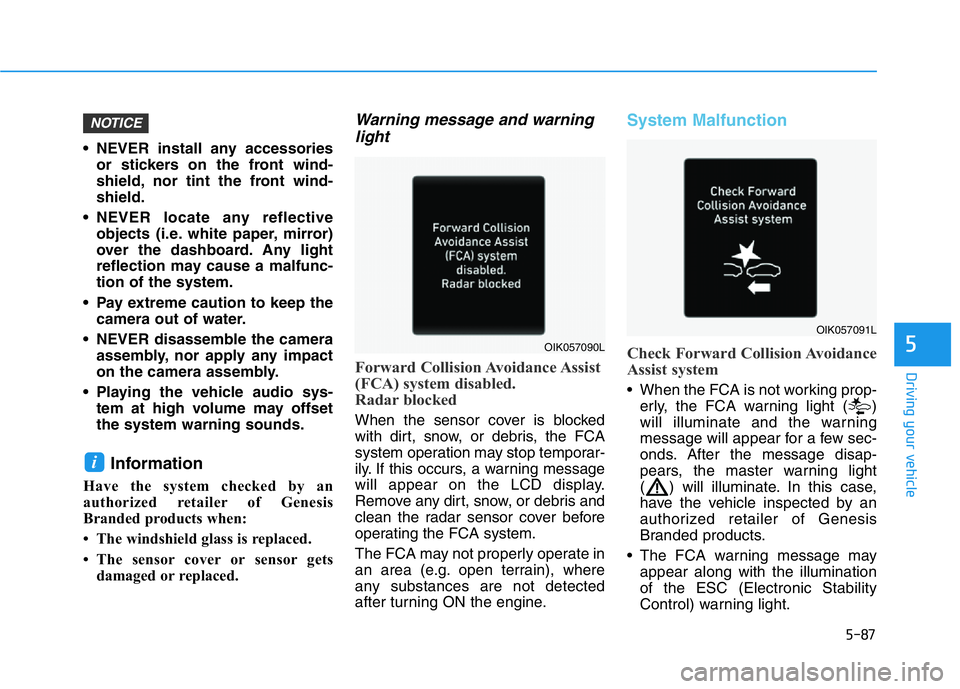
Forward Collision Avoidance Assist
(FCA) system disabled.
Radar blocked
When the sensor cover is blocked
with dirt, snow, or debris, the FCA
system operation may stop temporar-
ily. If this occurs, a warning message
will appear on the LCD display.
Remove any dirt, snow, or debris and
clean the radar sensor cover before
operating the FCA system.
The FCA may not properly operate in
an area (e.g. open terrain), where
any substances are not detected
after turning ON the engine.
System Malfunction
Check Forward Collision Avoidance
Assist system
• When the FCA is not working prop-
erly, the FCA warning light ( )
will illuminate and the warning
message will appear for a few sec-
onds. After the message disap-
pears, the master warning light
( ) will illuminate. In this case,
have the vehicle inspected by an
authorized retailer of Genesis
Branded products.
• The FCA warning message may
appear along with the illumination
of the ESC (Electronic Stability
Control) warning light.
i
NOTICE
OIK057090L
OIK057091L
Page 343 of 516
5-94
Driving your vehicle
Information
This device complies with Part 15 of
the FCC rules.
Operation is subject to the following
three conditions:
1. This device may not cause harmful
interference, and
2. This device must accept any inter-
ference received, including interfer-
ence that may cause undesired
operation.
3. Changes or modifications not
expressly approved by the party
responsible for compliance could
void the user's authority to operate
the device.
Information
Radio frequency radiation exposure
information:
This equipment complies with FCC
radiation exposure limits set forth for
an uncontrolled environment.
This equipment should be installed
and operated with minimum distance
of 8 in. (20 cm) between the radiator
(antenna) and your body.
This transmitter must not be co-locat-
ed or operating in conjunction with
any other antenna or transmitter.
ii
•Do not use the Forward
Collision-Avoidance Assist
(FCA) system when towing a
vehicle. Application of the
FCA system while towing may
adversely affect the safety of
your vehicle or the towing
vehicle.
•Use extreme caution when the
vehicle in front of you has
cargo that extends rearward
from the cab, or when the
vehicle in front of you has
higher ground clearance.
•Forward Collision-Avoidance
Assist system may operate
when an object, which has
similar shape or characteris-
tic to a vehicle, pedestrian or
cyclist, is detected.
•The FCA system is designed
to detect and monitor the vehi-
cle, pedestrian or cyclist
ahead in the roadway through
radar signals and camera
recognition. It is not designed
to detect, motorcycles, or
smaller wheeled objects such
as luggage bags, shopping
carts, or strollers.
•Never try to test the operation of
the FCA system. Doing so may
cause severe injury or death.
•If the front bumper, front
glass, radar or camera have
been replaced or repaired,
have the vehicle inspected by
an authorized retailer of
Genesis Branded products.
WARNING
Page 352 of 516
5-103
Driving your vehicle
5
LKA System Function Change
The driver can change LKA to Lane
Departure Warning (LDW) system or
change the LKA system mode
between Standard LKA and Active
LKA from the LCD display. Go to the
'User Settings →Driver Assistance →
Lane safety →Active LKA/Standard
LKA/Lane Departure Warning.
The system is automatically set to
Standard LKA if a function is not
selected.
Active LKA
The Active LKA mode provides more
frequent steering wheel control in
comparison with the Standard LKA
mode. Active LKA can help reduce
the driver's fatigue to assist the
steering for maintaining the vehicle
in the middle of the lane.
Standard LKA
The Standard LKA mode guides the
driver to help keep the vehicle within
the lanes. It rarely controls the steer-
ing wheel, when the vehicle drives
well inside the lanes. However, it
starts to control the steering wheel,
when the vehicle is about to deviate
out of the lane.
Lane Departure Warning
LDW system alerts the driver with a
visual and steering wheel vibration
warning when the system detects the
vehicle departing the lane. The steer-
ing wheel will not be controlled.
When the vehicle's front wheel con-
tacts the inside edge of lane line,
LKA alerts the driver with the lane
departure warning.
Information
This device complies with Part 15 of
the FCC rules.
Operation is subject to the following
two conditions:
1. This device may not cause harmful
interference, and
2. This device must accept any inter-
ference received, including interfer-
ence that may cause undesired
operation.
i
Page 353 of 516
5-104
Driving your vehicle
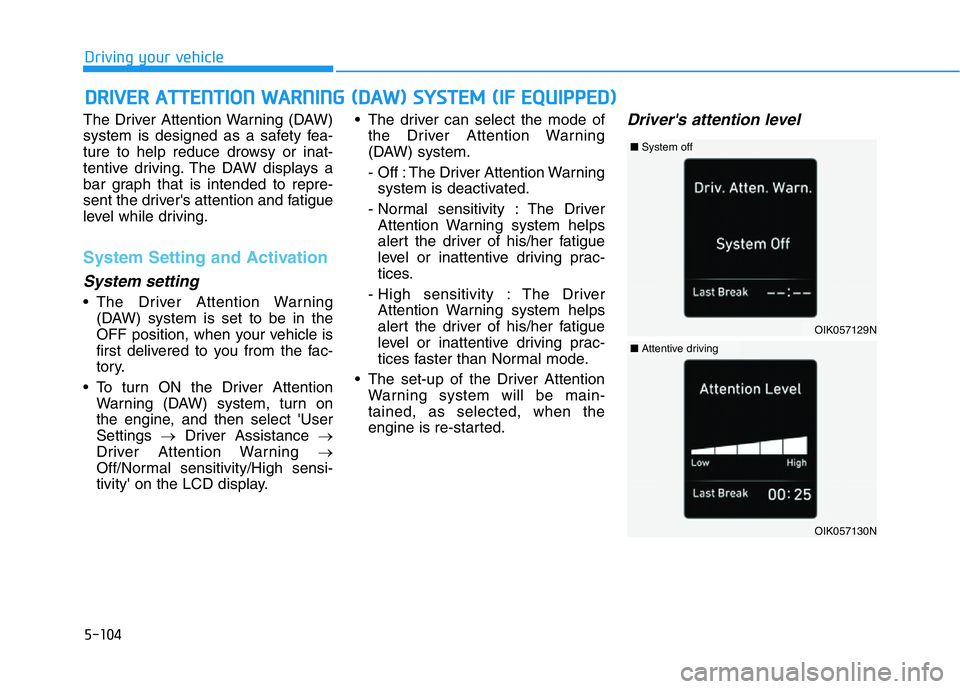
The Driver Attention Warning (DAW)
system is designed as a safety fea-
ture to help reduce drowsy or inat-
tentive driving. The DAW displays a
bar graph that is intended to repre-
sent the driver's attention and fatigue
level while driving.
System Setting and Activation
System setting
• The Driver Attention Warning
(DAW) system is set to be in the
OFF position, when your vehicle is
first delivered to you from the fac-
tory.
• To turn ON the Driver Attention
Warning (DAW) system, turn on
the engine, and then select 'User
Settings →Driver Assistance →
Driver Attention Warning →
Off/Normal sensitivity/High sensi-
tivity' on the LCD display.• The driver can select the mode of
the Driver Attention Warning
(DAW) system.
- Off : The Driver Attention Warning
system is deactivated.
- Normal sensitivity : The Driver
Attention Warning system helps
alert the driver of his/her fatigue
level or inattentive driving prac-
tices.
- High sensitivity : The Driver
Attention Warning system helps
alert the driver of his/her fatigue
level or inattentive driving prac-
tices faster than Normal mode.
• The set-up of the Driver Attention
Warning system will be main-
tained, as selected, when the
engine is re-started.
Driver's attention level
DRIVER ATTENTION WARNING (DAW) SYSTEM (IF EQUIPPED)
OIK057129N
■System off
OIK057130N
■Attentive driving
Page 354 of 516
5-105
Driving your vehicle
5
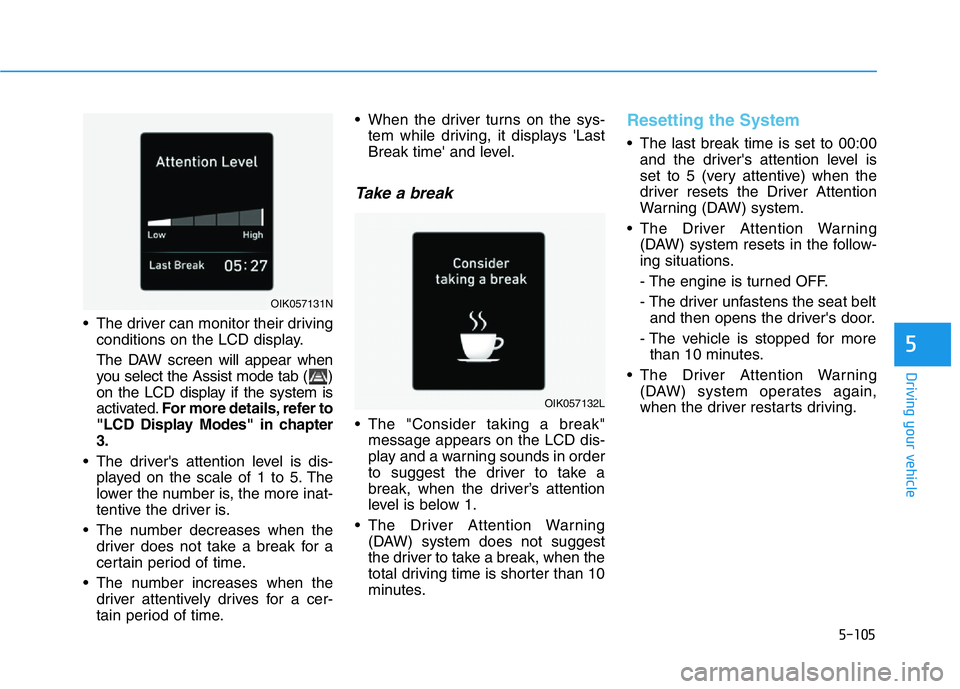
• The driver can monitor their driving
conditions on the LCD display.
The DAW screen will appear when
you select the Assist mode tab ( )
on the LCD display if the system is
activated.For more details, refer to
"LCD Display Modes" in chapter
3.
• The driver's attention level is dis-
played on the scale of 1 to 5. The
lower the number is, the more inat-
tentive the driver is.
• The number decreases when the
driver does not take a break for a
certain period of time.
• The number increases when the
driver attentively drives for a cer-
tain period of time.• When the driver turns on the sys-
tem while driving, it displays 'Last
Break time' and level.
Take a break
• The "Consider taking a break"
message appears on the LCD dis-
play and a warning sounds in order
to suggest the driver to take a
break, when the driver’s attention
level is below 1.
• The Driver Attention Warning
(DAW) system does not suggest
the driver to take a break, when the
total driving time is shorter than 10
minutes.
Resetting the System
• The last break time is set to 00:00
and the driver's attention level is
set to 5 (very attentive) when the
driver resets the Driver Attention
Warning (DAW) system.
• The Driver Attention Warning
(DAW) system resets in the follow-
ing situations.
- The engine is turned OFF.
- The driver unfastens the seat belt
and then opens the driver's door.
- The vehicle is stopped for more
than 10 minutes.
• The Driver Attention Warning
(DAW) system operates again,
when the driver restarts driving.
OIK057132L
OIK057131N
Page 356 of 516
5-107
Driving your vehicle
5
The Driver Attention Warning sys-
tem utilizes the camera sensor on
the front windshield for its opera-
tion. To keep the camera sensor in
the best condition, you should
observe the followings:
• Do not disassemble the camera
temporarily to tint the window or
to attach any types of coatings
and accessories. If you disas-
semble a camera and assemble
it again, take your vehicle to an
authorized retailer of Genesis
Branded products and have the
system checked for calibration.
• NEVER install any accessories
or stickers on the front wind-
shield, nor tint the front wind-
shield.
• NEVER locate any reflective
objects (i.e. white paper, mirror)
over the dashboard. Any light
reflection may cause a malfunc-
tion of the Driver Attention Alert
(DAW) system.
• Pay extreme caution to keep the
camera sensor out of water.• NEVER arbitrarily disassemble
the camera assembly, nor apply
any impact on the camera
assembly.
NOTICE
The Driver Attention Warning
(DAW) system may not properly
operate with limited alerting in
the following situations:
•The lane detection perform-
ance is limited. (For more
details, refer to "Lane Keeping
Assist (LKA) system" in this
chapter.)
•The vehicle is violently driven
or is abruptly turned for obsta-
cle avoidance (e.g. construc-
tion area, other vehicles, fallen
objects, bumpy road).
•Forward drivability of the vehi-
cle is severely undermined
(possibly due to wide variation
in tire pressures, uneven tire
wear-out, toe-in/toe-out align-
ment).
•The vehicle drives on a curvy
road.
•The vehicle drives on a bumpy
road.
•The vehicle drives through a
windy area.
•The vehicle is controlled by the
following driving assist sys-
tems:
- Lane Keeping Assist (LKA)
system
- Forward Collision-Avoidance
Assist (FCA) system
- Smart Cruise Control (SCC)
systemCAUTION
Playing the vehicle audio sys-
tem at high volume may offset
the Driver Attention Warning
(DAW) system warning sounds.
CAUTION
Page 357 of 516
5-108
Driving your vehicle
Cruise Control Operation
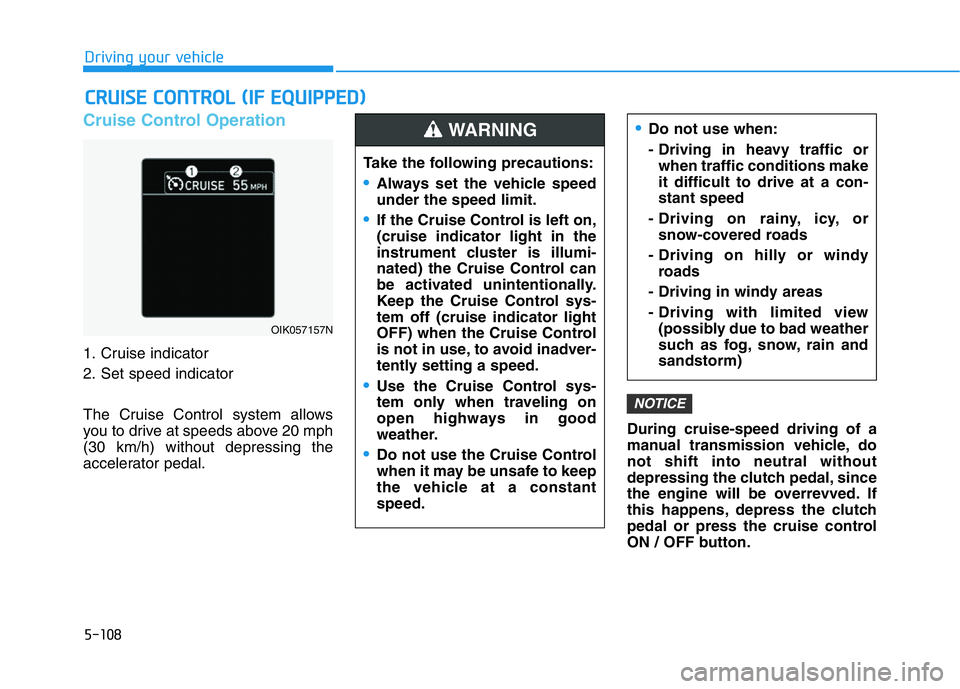
1. Cruise indicator
2. Set speed indicator
The Cruise Control system allows
you to drive at speeds above 20 mph
(30 km/h) without depressing the
accelerator pedal.During cruise-speed driving of a
manual transmission vehicle, do
not shift into neutral without
depressing the clutch pedal, since
the engine will be overrevved. If
this happens, depress the clutch
pedal or press the cruise control
ON / OFF button.
NOTICE
CRUISE CONTROL (IF EQUIPPED)
Page 358 of 516

5-109
Driving your vehicle
5
Information
• During normal cruise control opera-
tion, when the SET switch is activat-
ed or reactivated after applying the
brakes, the cruise control will ener-
gize after approximately 3 seconds.
This delay is normal.
• Before activating the cruise control
function, the system will check to
verify that the brake switch is oper-
ating normally. Depress the brake
pedal at least once after turning ON
the ignition or starting the engine.
To set Cruise Control speed
1. Press the CRUISE button on the
steering wheel to turn the system
on. The cruise indicator will illumi-
nate.
2. Accelerate to the desired speed,
which must be more than 20 mph
(30 km/h).
Information - Manual
transmission
For manual transmission vehicles, you
should depress the brake pedal at
least once to set the cruise control
after starting the engine.3. Push the toggle switch down
(SET-), and release it. The set
speed on the LCD display will illu-
minate.
4. Release the accelerator pedal.
Information
On a steep slope, the vehicle may
slightly slow down or speed up, while
driving uphill or downhill.
i
i
i
OIK057023
OIK057022L