set GENESIS G70 2021 Manual PDF
[x] Cancel search | Manufacturer: GENESIS, Model Year: 2021, Model line: G70, Model: GENESIS G70 2021Pages: 516, PDF Size: 12.84 MB
Page 287 of 516

5-38
Driving your vehicle
Auto Hold
The Auto Hold maintains the vehicle
in a standstill even though the brake
pedal is not depressed after the driv-
er brings the vehicle to a complete
stop by depressing the brake pedal.
To apply :
1. With the driver's door and engine
hood closed, fasten the driver's
seat belt or depress the brake
pedal and then press the [AUTO
HOLD] switch. The white AUTO
HOLD indicator will come on and
the system will be in the standby
position.2. When you stop the vehicle com-
pletely by depressing the brake
pedal, the Auto Hold maintains the
brake pressure to hold the vehicle
stationary. The indicator changes
from white to green.
3. The vehicle will remain stationary
even if you release the brake
pedal.
4. If the EPB is applied, Auto Hold
will be released.
To release :
• If you depress the accelerator
pedal with the shift lever in D
(Drive) or Manual shift mode, the
Auto Hold will be released auto-
matically and the vehicle will start
to move. The AUTO HOLD indica-
tor changes from green to white.
• If the vehicle is restarted using the
cruise control toggle switch (RES+
or SET-) while Auto Hold and cruise
control is operating, the Auto Hold
will be released regardless of
accelerator pedal operation. The
AUTO HOLD indicator changes
from green to white. (if equipped
with cruise control system)
When the AUTO HOLD is auto-
matically released by depress-
ing the accelerator pedal, always
take a look around your vehicle.
Slowly depress the accelerator
pedal for a smooth start.
WARNING
OIK057014
W W
h h
i i
t t
e e
G G
r r
e e
e e
n n
OIK057013
W W
h h
i i
t t
e e
Page 306 of 516
5-57
Driving your vehicle
5
When certain conditions are met, the
engine is automatically decoupled
from the transmission while the shift
lever is remained in D (Drive). In this
ECO Coasting mode, the engine
stays at idling speed to reduce fuel
consumption and increase coasting
distance. The engine is automatically
coupled back again when ECO
Coasting deactivation conditions are
met. Please refer to ECO Coasting
activation and deactivation condi-
tions.ECO Coasting Activation
Condition
The ECO Coasting is activated after
depressing and releasing the accel-
erator pedal when:
• The Drive Mode is set to the ECO
mode
• The driver's accelerating style is
SMART ECO in SMART mode
• ECO is selected for
Engine/Transmission in CUSTOM
mode from the infotainment sys-
tem screen
• The shift lever is in D (Drive)
• The Cruise Control/Smart Cruise
Control button is OFF
• The accelerator or brake pedal is
not depressed
• The vehicle's speed is within 35 –
100 mph (55 – 160 km/h) range
• The road gradient is within -5~+5%
range
• In SMART mode, if the distance
between the vehicle ahead and the
relative speed is within a certain
range (if equipped with Smart
Cruise Control)
Information
• If the front radar for smart cruise
control system cannot operate nor-
mally, the inter-vehicle distance and
relative speed condition are auto-
matically ignored (if equipped with
Smart Cruise Control).
• The ECO Coasting is activated after
the warming up of the engine and
transmission, and self-diagnosis of
engine sensors are completed.
• Activation of the ECO Coasting
may temporarily be delayed accord-
ing to the driving situation even if
the above conditions are met.
i
ECO COASTING (IF EQUIPPED)
Page 307 of 516

5-58
Driving your vehicle
ECO Coasting Deactivation
Condition
The ECO Coasting is deactivated
while the function is in activation
when:
• The Drive Mode is set to the COM-
FORT or SPORT mode
• The driver's accelerating style is
SMART COMFORT or SMART
SPORT in SMART mode
• The Cruise Control/Smart Cruise
Control button is ON (the cruise
indicator is ON)
• The vehicle's speed exceeds 35 –
100 mph (55 – 160 km/h) range
• The road gradient is under -5% or
over +5%
• If the distance between the vehicle
ahead is too close or the relative
speed changes momentarily in
SMART mode
• If lane change is predicated in
SMART mode (e.g. the turn signal
is turned ON or a LKA warning
appears due to steering wheel
control, etc.)
Information
It is recommended to deactivate the
ECO Coasting function if you are
driving under frequently stop-and-go
condition. Change the Drive Mode to
COMFORT or SPORT mode or deac-
tivate the ECO Coasting mode from
the infotainment system screen.
Setting ECO Coasting
Function
Select 'Settings →Vehicle settings
→ Coasting' on the infotainment sys-
tem screen. Turn the function ON
and the ECO Coasting function will
activate.
i
OIK057150L
Page 311 of 516

5-62
Driving your vehicle
Auto start
To restart the engine in the auto
stop mode
• Release the brake pedal.
- When Auto Hold (if equipped with
EPB (Electronic Parking Brake))
is activated, if you release the
brake pedal, the engine will be in
the auto stop state. However, if
you depress the accelerator
pedal, the engine will start again.
The auto stop indicator ( ) goes
OFF on the instrument cluster, when
the engine is restarted.
The engine is automatically restart-
ed in the following situations.
• The brake vacuum pressure is low
• The engine has stopped for about
5 minutes
• The air conditioning is ON with the
fan speed set to the highest posi-
tion
• The front defroster is ON
• The battery is weak
• The cooling and heating perform-
ance of the climate control system
is unsatisfactory
• The vehicle is shifted to P (Park)
when Auto Hold is activated
• The door is opened or the seatbelt
is unfastened when Auto Hold is
activated
• The EPB switch is pressed when
Auto Hold is activated
The auto stop indicator ( ) blinks
in green for 5 seconds on the instru-
ment cluster.
The auto start is temporarily deac-
tivated in the following situations.
• When the shift lever is shifted from
N (Neutral) to R (Reverse), D
(Drive) or Manual shift mode with-
out the brake pedal depressed. A
message "Press brake pedal for
Auto Start" will appear on the LCD
display. To activate auto start,
depress the brake pedal.
OIK057086N
Page 315 of 516
5-66
Driving your vehicle
ECO mode
When the drive mode is
set to ECO mode, the
engine and transmission
control logic are changed
to maximize fuel efficien-
cy.
• When ECO mode is selected by
pressing the DRIVE MODE selec-
tion button, the ECO indicator will
illuminate.
• If the vehicle is set to ECO mode,
when the engine is turned off and
restarted the drive mode setting
will remain in ECO mode.
Information
Fuel efficiency depends on the driver's
driving habit and road condition.
When ECO mode is activated:
• The acceleration response may be
slightly reduced if the accelerator
pedal is depressed moderately.
• The air conditioner performance
may be limited.
• The shift pattern of the automatic
transmission may change.
• The engine noise may be louder at
some automatic transmission
shifts as down-shift requires press-
ing down more on the accelerator.
The above situations are normal
conditions when ECO mode is acti-
vated to help improve fuel efficiency.
Limitation of ECO mode operation:
If the following conditions occur while
ECO mode is operating, the system
operation is limited even though
there is no change in the ECO indi-
cator.
• When the coolant temperature is
low:
The system will be limited until
engine performance becomes nor-
mal.
• When driving up a hill:
The system will be limited to gain
power when driving uphill because
engine torque is restricted.
• When driving the vehicle with the
automatic transmission gear shift
lever in manual mode.
The system will be limited accord-
ing to the shift location.
i
Page 319 of 516

5-70
Driving your vehicle
• The driving mode automatically
changes to SMART SPORT, when
you abruptly accelerate the vehicle
or repetitively operate the steering
wheel (Your driving is categorized
to be aggressive.). In this mode,
your vehicle drives in a lower gear
for abrupt accelerating/decelerat-
ing and increases the engine brake
performance.
• You may still sense the engine
braking performance, even when
you release the accelerator pedal
in SMART SPORT mode. It is
because your vehicle remains in
lower gear over a certain period of
time for next acceleration. Thus, it
is a normal driving situation, not
indicating any malfunction.
• The driving mode automatically
changes to SMART SPORT mode
only in harsh driving situations. In
most of the normal driving situa-
tions, the driving mode sets to be
either in SMART ECO mode or in
SMART COMFORT mode.
Limitation of SMART mode
The SMART mode may be limited in
following situations. (The OFF indica-
tor illuminates in those situations.)
• The driver manually moves the
shift lever :
It deactivates SMART mode. The
vehicle drives, as the driver manu-
ally moves the shift lever.
• The cruise control is activated :
The cruise control system may
deactivate the SMART mode when
the vehicle is controlled by the set
speed of the smart cruise control
system. (SMART mode is not
deactivated just by activating the
cruise control system.)
• The transmission oil temperature is
either extremely low or extremely
high :
The SMART mode can be active in
most of the normal driving situa-
tions. However, an extremely high/
low transmission oil temperature
may temporarily deactivate the
SMART mode, because the trans-
mission condition is out of normal
operation condition.
ECO mode
When the drive mode is
set to ECO mode, the
engine and transmission
control logic are changed
to maximize fuel efficien-
cy.
• When ECO mode is selected by
rotating the DRIVE MODE selec-
tion knob, the ECO indicator will
illuminate.
• If the vehicle is set to ECO mode,
when the engine is turned off and
restarted the drive mode setting
will remain in ECO mode.
Information
Fuel efficiency depends on the driver's
driving habit and road condition.
i
Page 325 of 516

5-76
Driving your vehicle
• The second stage alarm may be
deactivated.
- To deactivate the warning chime:
Go to the 'User Settings →Driver
Assistance and deselect Blind-
Spot Collision Warning sound' on
the LCD display.
- To activate the warning chime:
Go to the 'User Settings →Driver
Assistance and select Blind-Spot
Collision Warning sound' on the
LCD display.
Information
The warning chime function helps
alert the driver. Deactivate this func-
tion only when it is necessary.
Refer to "User Settings mode" in
chapter 3 for more details.
Rear Cross-Traffic Collision
Warning
The Rear Cross-Traffic Collision
Warning function monitors approach-
ing cross traffic from the left and right
side of the vehicle when your vehicle
is in reverse.
Operating conditions
To operate:
Go to the 'User Settings →Driver
Assistance and select Rear Cross-
Traffic Collision Warning' on the LCD
display.(For more information,
refer to "LCD Display" in chapter
3.).
The system will turn on and standby
to activate. The system will activate
when vehicle speed is below 6 mph
(10 km/h) and with the shift lever in R
(Reverse).
Information
• If the vehicle is turned off and on
again, the RCCW system will return
to the state right before the vehicle
was turned off. Turn the RCCW sys-
tem off when not in use.
• The Rear Cross-Traffic Collision
Warning (RCCW) detecting range
is approximately 1 - 65 ft (0.5 – 20
m). An approaching vehicle will be
detected if their vehicle speed is
within 2.5 - 22.5 mph (4 - 36 km/h).
Note that the detecting range may
vary under certain conditions. As
always, use caution and pay close
attention to your surroundings
when backing up your vehicle.
i
i
Page 328 of 516
5-79
Driving your vehicle
5
- A trailer or carrier is installed. To
use the BCW system, remove the
trailer or carrier from your vehicle.
If any of these conditions occur, the
light on the BCW switch and the sys-
tem will turn off automatically.
When the BCW cancelled warning
message is displayed in the cluster,
check to make sure that the rear
bumper is free from any dirt or snow
in the areas where the sensor is
located. Remove any dirt, snow, or
foreign material that could interfere
with the radar sensors.
After any dirt or debris is removed,
the BCW system should operate nor-
mally after about 10 minutes of driv-
ing the vehicle.
If the system still does not operate
normally have your vehicle inspected
by an authorized retailer of Genesis
Branded products.Information
Turn off the system by pressing the
BCW switch and deselecting Rear
Cross Traffic Warning from the User
Settings mode on the cluster, when
using a trailer or carrier behind your
vehicle.
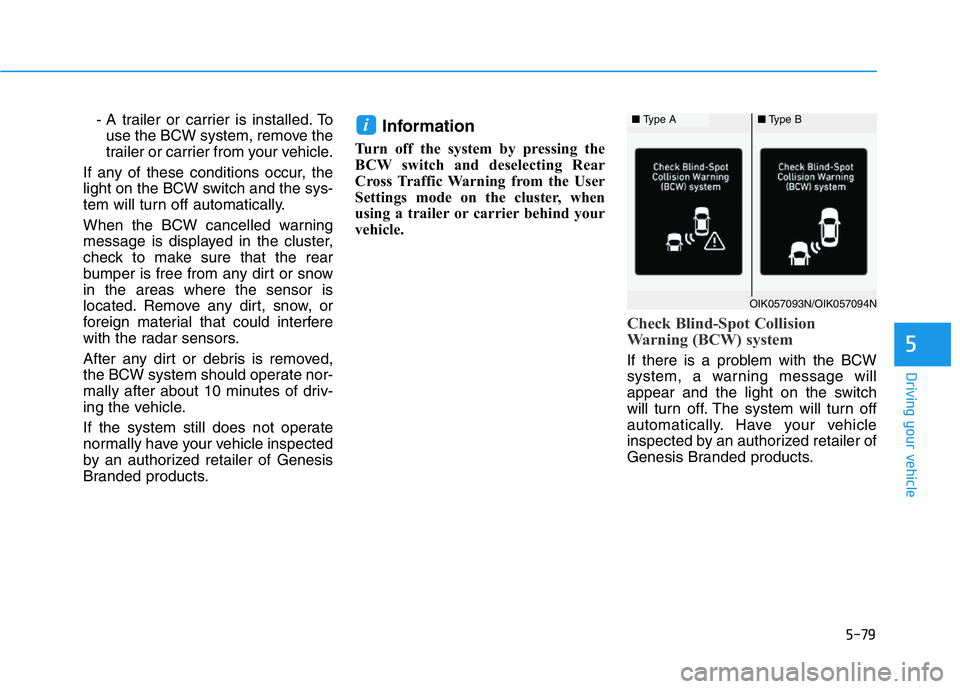
Check Blind-Spot Collision
Warning (BCW) system
If there is a problem with the BCW
system, a warning message will
appear and the light on the switch
will turn off. The system will turn off
automatically. Have your vehicle
inspected by an authorized retailer of
Genesis Branded products.
i■ Type A■Type B
OIK057093N/OIK057094N
Page 330 of 516

5-81
Driving your vehicle
5
• When the detected vehicle also
moves back, as your vehicle drives
back.
• If there are small objects in the
detecting area such as a shopping
cart, a baby stroller or pedestrian.
• If there is a low height vehicle such
as a sports car.
• When other vehicles are close to
your vehicle.
• When the vehicle in the next lane
moves two lanes away from you
OR when the vehicle two lanes
away moves to the next lane to
you.
• When driving through a narrow
road with many trees or bushes.
• When driving through a large area
with few vehicles or structures
around, such as a desert, rural
area, etc.
• When driving on wet surfaces.Information
This device complies with Part 15 of
the FCC rules.
Operation is subject to the following
three conditions:
1. This device may not cause harmful
interference, and
2. This device must accept any inter-
ference received, including interfer-
ence that may cause undesired
operation.
3. Changes or modifications not
expressly approved by the party
responsible for compliance could
void the user's authority to operate
the device.
Information
Radio frequency radiation exposure
information:
This equipment complies with FCC
radiation exposure limits set forth for
an uncontrolled environment.
This equipment should be installed
and operated with minimum distance
of 8 in. (20 cm) between the radiator
(antenna) and your body.
This transmitter must not be co-locat-
ed or operating in conjunction with
any other antenna or transmitter.
ii
Page 331 of 516

5-82
Driving your vehicle
The Forward Collision-Avoidance
Assist (FCA) system is designed to
help detect and monitor the vehicle
ahead or detect a pedestrian or
cyclist (if equipped) in the roadway
through radar signals and camera
recognition to warn the driver that a
collision is imminent, and if neces-
sary, apply emergency braking.
System Setting and Activation
System setting
• The driver can activate the FCA by
pressing Engine Start/Stop button to
the ON position and by selecting :
'User Settings →Driver Assistance
→Forward Collision-Avoidance
Assist (FCA)'
The FCA deactivates, when the driv-
er deselects the system setting.
The warning light illumi-
nates on the cluster,
when you cancel the FCA
system. The driver can
monitor the FCA ON/OFF status on
the LCD display. Also, the warning
light illuminates when the ESC
(Electronic Stability Control) is
turned off.
If the warning light remains ON when
the FCA is activated, have the sys-
tem checked by an authorized retail-
er of Genesis Branded products.
• The driver can select the initial warn-
ing activation time on the LCD dis-
play.
FORWARD COLLISION-AVOIDANCE ASSIST (FCA) SYSTEM (IF EQUIPPED)
Take the following precautions
when using the Forward Collision-
Avoidance Assist (FCA) system:
•This system is only a supple-
mental system and it is not
intended to, nor does it replace
the need for extreme care and
attention of the driver. The
sensing range and objects
detectable by the sensors are
limited. Pay attention to the
road conditions at all times.
•NEVER drive too fast in accor-
dance with the road condi-
tions or while cornering.
•Always drive cautiously to
prevent unexpected and sud-
den situations from occur-
ring. The Forward Collision-
Avoidance system may not
always stop the vehicle com-
pletely and is only intended to
help mitigate a collision that
is imminent.
WARNING