set GENESIS G70 2021 Repair Manual
[x] Cancel search | Manufacturer: GENESIS, Model Year: 2021, Model line: G70, Model: GENESIS G70 2021Pages: 516, PDF Size: 12.84 MB
Page 244 of 516
![GENESIS G70 2021 Repair Manual 3-159
Convenient features of your vehicle
3
Clock
Vehicles with Audio system
Select the [SETUP]button on the
audio system ➟Select [Date/Time].
• Set time: Set the time displayed on
the audio scree](/img/46/35609/w960_35609-243.png "GENESIS G70 2021 Repair Manual 3-159
Convenient features of your vehicle
3
Clock
Vehicles with Audio system
Select the [SETUP]button on the
audio system ➟Select [Date/Time].
• Set time: Set the time displayed on
the audio scree")
3-159
Convenient features of your vehicle
3
Clock
Vehicles with Audio system
Select the [SETUP]button on the
audio system ➟Select [Date/Time].
• Set time: Set the time displayed on
the audio screen.
• Time format: Choose between 12-
hour and 24-hour time formats.
Vehicles with Navigation system
Select the Settings menu on the
Navigation system➟Select
[Date/Time].
• GPS time: Displays time according
to the received GNSS time.
• 24-hour: Switches to 12 hour or 24
hour.
Coat Hook (if equipped)
These hangers are not designed to
hold large or heavy items.Do not hang other objects such
as hangers or hard objects
except clothes. Also, do not put
heavy, sharp or breakable
objects in the clothe pockets. In
an accident or when the curtain
air bag is inflated, it may cause
vehicle damage or personal
injury.
WARNING
OIK047085OIK047068
■Type A
OIK047069
■Type B
Do not attempt to adjust the
clock while driving. Doing so
may result in distracted driving
which may lead to an accident
involving personal injury or
death.
WARNING
Page 248 of 516
4-3
Infotainment system
4
• Do not clean the inside of the
rear window glass with a cleaner
or scraper to remove foreign
deposits as this may cause dam-
age to the antenna elements.
• To prevent damage to the rear
glass antenna, never use sharp
instruments or window cleaner
containing abrasives to clean
the window. Clean the inside
surface of the rear glass window
with a piece of soft cloth.
• Avoid adding metallic coatings
such as Ni, Cd, and so on. These
can degrade the receiving AM
and FM broadcast signals.
• When putting a sticker on the
inside surface of the rear win-
dow, be careful not to damage
the rear glass antenna.
• Do not put sharp instruments
nearby the rear glass antenna.
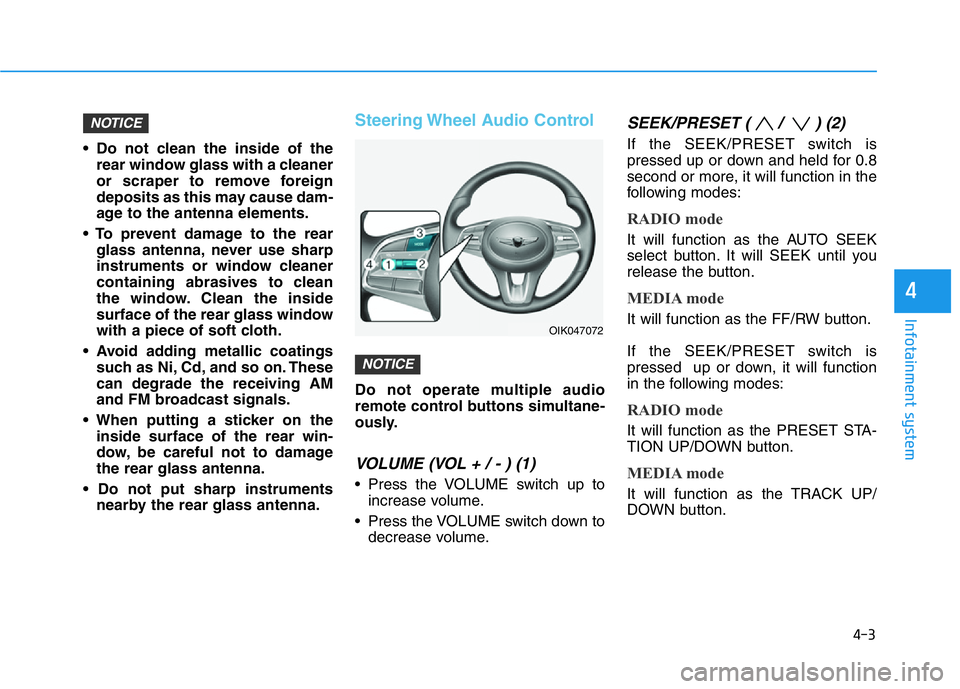
Steering Wheel Audio Control
Do not operate multiple audio
remote control buttons simultane-
ously.
VOLUME (VOL + / - ) (1)
• Press the VOLUME switch up to
increase volume.
• Press the VOLUME switch down to
decrease volume.
SEEK/PRESET ( / ) (2)
If the SEEK/PRESET switch is
pressed up or down and held for 0.8
second or more, it will function in the
following modes:
RADIO mode
It will function as the AUTO SEEK
select button. It will SEEK until you
release the button.
MEDIA mode
It will function as the FF/RW button.
If the SEEK/PRESET switch is
pressed up or down, it will function
in the following modes:
RADIO mode
It will function as the PRESET STA-
TION UP/DOWN button.
MEDIA mode
It will function as the TRACK UP/
DOWN button.
NOTICE
NOTICE
OIK047072
Page 250 of 516
Driving your vehicle
5
Before Driving ........................................................5-4
Before Entering the Vehicle ...........................................5-4
Before Starting ..................................................................5-4
Engine Start/Stop Button .....................................5-6
Engine Start/Stop button positions ..............................5-7
Starting the Engine ...........................................................5-9
Turning Off the Engine..................................................5-11
Manual Transmission ...........................................5-12
Manual Transmission Operation ..................................5-12
Good Driving Practices ..................................................5-15
Automatic Transmission ......................................5-16
Automatic Transmission Operation .............................5-16
Paddle Shifter (Manual Shift Mode) ..........................5-21
LCD Display Messages ...................................................5-22
Good Driving Practices ..................................................5-26
Braking System ....................................................5-28
Power Brakes ...................................................................5-28
High Performance Brake...............................................5-29
Disc Brakes Wear Indicator ..........................................5-29
Parking Brake...................................................................5-30
Electronic Parking Brake (EPB)...................................5-33
Auto Hold ..........................................................................5-38
Anti-lock Brake System (ABS) ....................................5-41
Electronic Stability Control (ESC)................................5-43
Vehicle Stability Management (VSM).........................5-47Hill-Start Assist Control (HAC) ....................................5-48
Good Braking Practices .................................................5-48
All Wheel Drive (AWD) ........................................5-49
Using All Wheel Drive (AWD) .......................................5-49
Emergency precautions .................................................5-51
Limited slip differential .......................................5-53
Electronic Control Suspension (ECS) ................5-54
Launch Control .....................................................5-55
Prerequisite for Activation ...........................................5-55
Launch Control Activation.............................................5-55
Limited Use of Launch Control ....................................5-56
ECO Coasting ........................................................5-57
ECO Coasting Activation Condition .............................5-57
ECO Coasting Deactivation Condition.........................5-58
Setting ECO Coasting Function....................................5-58
ECO Coasting Activation Indicator ..............................5-59
ISG (Idle Stop and Go) System ..........................5-60
To Activate the ISG System ..........................................5-60
To Deactivate the ISG System......................................5-63
ISG System Malfunction ................................................5-63
The Battery Sensor Deactivation ................................5-64
Drive Mode Integrated Control System ............5-65
Drive Mode (with Manual Transmission)...................5-65
Drive Mode (with Automatic Transmission)..............5-68
Smart shift on trip computer .......................................5-72
Page 251 of 516
5
Blind-Spot Collision Warning (BCW) System...5-73
Blind-Spot Collision Warning .......................................5-74
Rear Cross-Traffic Collision Warning ........................5-76
Detecting sensor .............................................................5-78
Limitations of the System .............................................5-80
Forward Collision-Avoidance Assist (FCA)
System ...................................................................5-82
System Setting and Activation.....................................5-82
FCA Warning Message and System Control ............5-84
FCA Sensor .......................................................................5-86
System Malfunction .......................................................5-87
Limitations of the System .............................................5-89
Lane Keeping Assist (LKA) System ...................5-95
LKA System Operation...................................................5-96
Warning Light and Message.........................................5-99
Limitations of the System...........................................5-101
LKA System Function Change ...................................5-103
Driver Attention Warning (DAW) System .......5-104
System Setting and Activation ..................................5-104
Resetting the System ...................................................5-105
System Standby.............................................................5-106
System Malfunction .....................................................5-106
Cruise Control .....................................................5-108
Cruise Control Operation ............................................5-108
Smart Cruise Control with Stop &
Go System ...........................................................5-113
Smart Cruise Control Switch ......................................5-114
Smart Cruise Control Speed .......................................5-114
Smart Cruise Control Vehicle-to-Vehicle
Distance ...........................................................................5-119
Sensor to Detect Distance to the
Vehicle Ahead ................................................................5-122
To Adjust the Sensitivity of
Smart Cruise Control ....................................................5-123
To Convert to Cruise Control Mode .........................5-124
Limitations of the System...........................................5-124
Declaration of conformity ................................5-129
Special Driving Conditions ................................5-130
Hazardous Driving Conditions....................................5-130
Rocking the Vehicle ......................................................5-130
Smooth Cornering .........................................................5-131
Driving at Night .............................................................5-131
Driving in the Rain ........................................................5-131
Driving in Flooded Areas.............................................5-132
Highway Driving ............................................................5-132
Winter Driving ....................................................5-133
Snow or Icy Conditions................................................5-133
Winter Precautions .......................................................5-136
Vehicle Load Limit..............................................5-138
Tire Loading Information Label .................................5-139
Trailer Towing .....................................................5-144
Page 252 of 516

5-3
Driving your vehicle
5
Carbon monoxide (CO) gas is toxic. Breathing CO can cause unconsciousness and death.
Engine exhaust contains carbon monoxide which cannot be seen or smelled.
Do not inhale engine exhaust.
If at any time you smell engine exhaust inside the vehicle, open the windows immediately. Exposure to CO can cause
unconsciousness and death by asphyxiation.
Be sure the exhaust system does not leak.
The exhaust system should be checked whenever the vehicle is raised to change the oil or for any other purpose. If
you hear a change in the sound of the exhaust or if you drive over something that strikes the underneath side of the
vehicle, have the exhaust system checked as soon as possible by an authorized retailer of Genesis Branded products.
Do not run the engine in an enclosed area.
Letting the engine idle in your garage, even with the garage door open, is a hazardous practice. Run the engine only
long enough to start the engine and to move the vehicle out of the garage.
Avoid idling the engine for prolonged periods with people inside the vehicle.
If it is necessary to idle the engine for a prolonged period with people inside the vehicle, be sure to do so only in an
open area with the air intake set at "Fresh" and fan control set to high so fresh air is drawn into the interior.
Keep the air intakes clear.
To assure proper operation of the ventilation system, keep the ventilation air intakes located in front of the windshield
clear of snow, ice, leaves, or other obstructions.
If you must drive with the trunk open:
Close all windows.
Open instrument panel air vents.
Set the air intake control at "Fresh", the air flow control at "Floor" or "Face", and the fan control set to high.
WARNING
Page 261 of 516

5-12
Manual Transmission
Operation
The manual transmission has 6 for-
ward gears. The transmission is fully
synchronized in all forward gears so
shifting to either a higher or a lower
gear is easily accomplished.To shift to R (Reverse), make sure
the vehicle has completely stopped,
and then move the shift lever to neu-
tral before moving into R (Reverse).When you've come to a complete
stop and it's hard to shift into 1st gear
or R (Reverse):
1. Put the shift lever in neutral and
release the clutch pedal.
2. Depress the clutch pedal, and
then shift into 1 (first) or R
(Reverse) gear.
Information
During cold weather, shifting may be
difficult until the transmission lubri-
cant has warmed up.
i
MANUAL TRANSMISSION
Driving your vehicle
OIK058135N
Before leaving the driver's seat,
always make sure the shift lever
is in 1
stgear when the vehicle is
parked on a uphill and in R
(Reverse) on a downhill, set the
parking brake, and press the
Engine Start/Stop button to the
OFF position. Unexpected vehi-
cle movement may occur if
these precautions are not fol-
lowed.
WARNING
Page 278 of 516
5-29
Driving your vehicle
5
High Performance Brake
(if equipped)
For vehicles equipped with the High
Performance Brake (large-diameter
brembo brakes for enhanced braking
performance), noise such as a
squeal, squeak or groan is generat-
ed while braking. This is normal and
the friction may create circle patterns
on the disc surface. This is also a
normal situation which does not
affect braking performance.
• Occasional brake noise is nor-
mal. If a continuous grinding or
continuous squeal sound is
present, the brake lining may be
worn-out. Have the vehicle
checked by an authorized retail-
er of Genesis Branded products.
• If the vehicle has continuous
vibration or shudder in the
steering wheel while braking,
have the vehicle be checked by
an authorized retailer of Genesis
Branded products.
Disc Brakes Wear Indicator
When your brake pads are worn and
new pads are required, you will hear
a high pitched warning sound from
your front or rear brakes. You may
hear this sound come and go or it
may occur whenever you depress
the brake pedal.
Note that some driving conditions or
climates may cause a brake squeal
when you first apply (or lightly apply)
the brakes. This is normal and does
not indicate a problem with your
brakes.
To avoid costly brake repairs, do
not continue to drive with worn
brake pads.
Information
Always replace brake pads as com-
plete front or rear axle sets.
i
NOTICE
NOTICE
Frequent speeding and braking
may deform components and
worn the disc brake causing
vibration when braking. Prevent
brake damage by avoiding
excessive braking.
Brake wear, noise, vibration
from excessive braking or
deformation of the brakes
caused by repeatedly braking in
high speed, racing on tracks,
etc. can be excluded from war-
ranty coverage.
WARNING
Page 279 of 516

5-30
Driving your vehicle
Parking Brake
Hand type (if equipped)
Always set the parking brake before
leaving the vehicle. To apply the
parking brake:
Firmly depress the brake pedal.
Pull up the parking brake lever as far
as possible.To release:
Firmly depress the brake pedal.
While pressing the release button
(1), slightly pull up on the parking
brake lever then lower the parking
brake lever (2).
If the parking brake does not release
or does not release all the way, have
your vehicle checked by an author-
ized retailer of Genesis Branded
products.
OIK058138N
OIK058139N
To reduce the risk of SERIOUS
INJURY or DEATH, do not oper-
ate the parking brake while the
vehicle is moving except in an
emergency situation. It could
damage the brake system and
lead to an accident.
WARNING
Page 280 of 516

5-31
Driving your vehicle
Foot type (if equipped)
Always set the parking brake before
leaving the vehicle. To apply the
parking brake:
Firmly depress the brake pedal.
Depress the parking brake pedal
down as far as possible.To release:
Firmly depress the brake pedal.
Depress the parking brake pedal
down and it will release automatical-
ly.
If the parking brake does not release
or does not release all the way, have
your vehicle checked by an author-
ized retailer of Genesis Branded
products.5
OIK057140
To reduce the risk of SERIOUS
INJURY or DEATH, do not oper-
ate the parking brake while the
vehicle is moving except in an
emergency situation. It could
damage the brake system and
lead to an accident.
WARNING
OIK057140
Page 284 of 516
5-35
Driving your vehicle
5
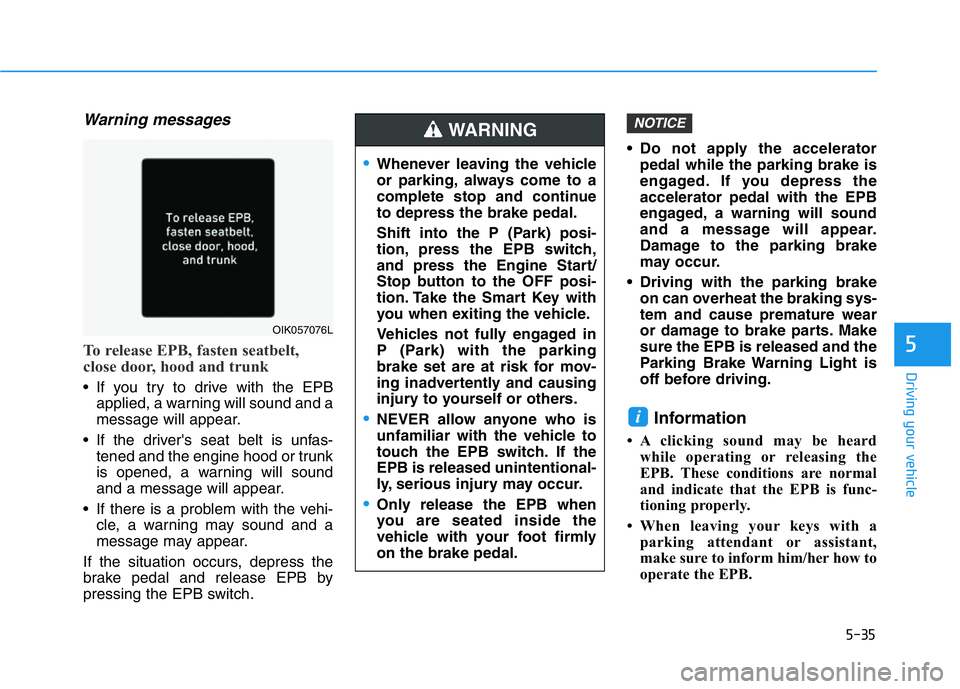
Warning messages
To release EPB, fasten seatbelt,
close door, hood and trunk
• If you try to drive with the EPB
applied, a warning will sound and a
message will appear.
• If the driver's seat belt is unfas-
tened and the engine hood or trunk
is opened, a warning will sound
and a message will appear.
• If there is a problem with the vehi-
cle, a warning may sound and a
message may appear.
If the situation occurs, depress the
brake pedal and release EPB by
pressing the EPB switch.• Do not apply the accelerator
pedal while the parking brake is
engaged. If you depress the
accelerator pedal with the EPB
engaged, a warning will sound
and a message will appear.
Damage to the parking brake
may occur.
• Driving with the parking brake
on can overheat the braking sys-
tem and cause premature wear
or damage to brake parts. Make
sure the EPB is released and the
Parking Brake Warning Light is
off before driving.
Information
• A clicking sound may be heard
while operating or releasing the
EPB. These conditions are normal
and indicate that the EPB is func-
tioning properly.
• When leaving your keys with a
parking attendant or assistant,
make sure to inform him/her how to
operate the EPB.
i
NOTICE
•Whenever leaving the vehicle
or parking, always come to a
complete stop and continue
to depress the brake pedal.
Shift into the P (Park) posi-
tion, press the EPB switch,
and press the Engine Start/
Stop button to the OFF posi-
tion. Take the Smart Key with
you when exiting the vehicle.
Vehicles not fully engaged in
P (Park) with the parking
brake set are at risk for mov-
ing inadvertently and causing
injury to yourself or others.
•NEVER allow anyone who is
unfamiliar with the vehicle to
touch the EPB switch. If the
EPB is released unintentional-
ly, serious injury may occur.
•Only release the EPB when
you are seated inside the
vehicle with your foot firmly
on the brake pedal.
WARNING
OIK057076L