brake GENESIS G80 2021 Owner's Guide
[x] Cancel search | Manufacturer: GENESIS, Model Year: 2021, Model line: G80, Model: GENESIS G80 2021Pages: 604, PDF Size: 11.47 MB
Page 170 of 604
Convenient Features
5-32
NOTICE
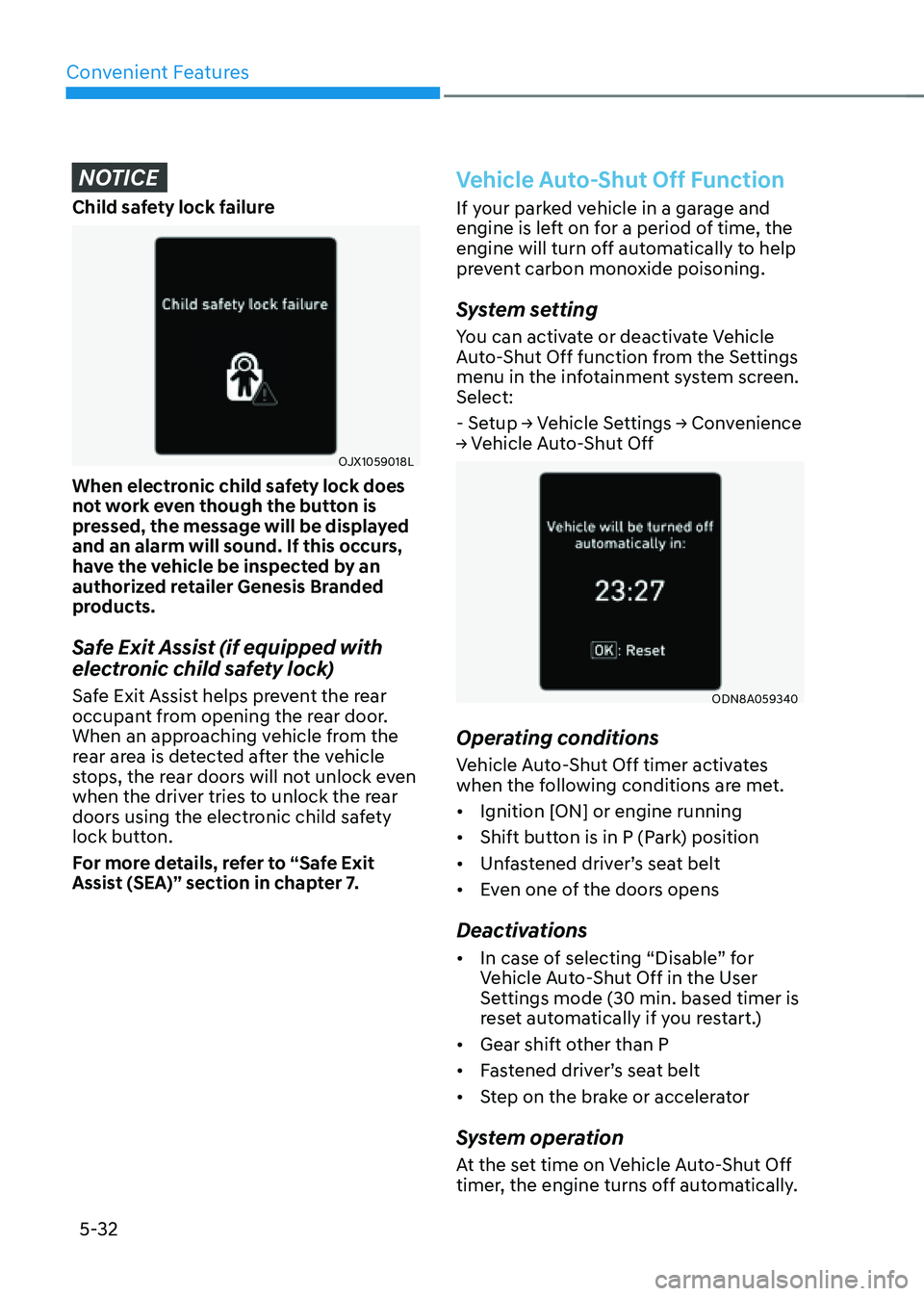
Child safety lock failure
OJX1059018L
When electronic child safety lock does
not work even though the button is
pressed, the message will be displayed
and an alarm will sound. If this occurs,
have the vehicle be inspected by an
authorized retailer Genesis Branded
products.
Safe Exit Assist (if equipped with
electronic child safety lock)
Safe Exit Assist helps prevent the rear
occupant from opening the rear door.
When an approaching vehicle from the
rear area is detected after the vehicle
stops, the rear doors will not unlock even
when the driver tries to unlock the rear
doors using the electronic child safety
lock button.
For more details, refer to “Safe Exit
Assist (SEA)” section in chapter 7.
Vehicle Auto-Shut Off Function
If your parked vehicle in a garage and
engine is left on for a period of time, the
engine will turn off automatically to help
prevent carbon monoxide poisoning.
System setting
You can activate or deactivate Vehicle
Auto-Shut Off function from the Settings
menu in the infotainment system screen.
Select:
- Setup → Vehicle Settings → Convenience
→ Vehicle Auto-Shut Off
ODN8A059340
Operating conditions
Vehicle Auto-Shut Off timer activates
when the following conditions are met.
• Ignition [ON] or engine running
• Shift button is in P (Park) position
• Unfastened driver’s seat belt
• Even one of the doors opens
Deactivations
• In case of selecting “Disable” for
Vehicle Auto-Shut Off in the User
Settings mode (30 min. based timer is
reset automatically if you restart.)
• Gear shift other than P
• Fastened driver’s seat belt
• Step on the brake or accelerator
System operation
At the set time on Vehicle Auto-Shut Off
timer, the engine turns off automatically.
Page 200 of 604
Convenient Features
5-62
Hood
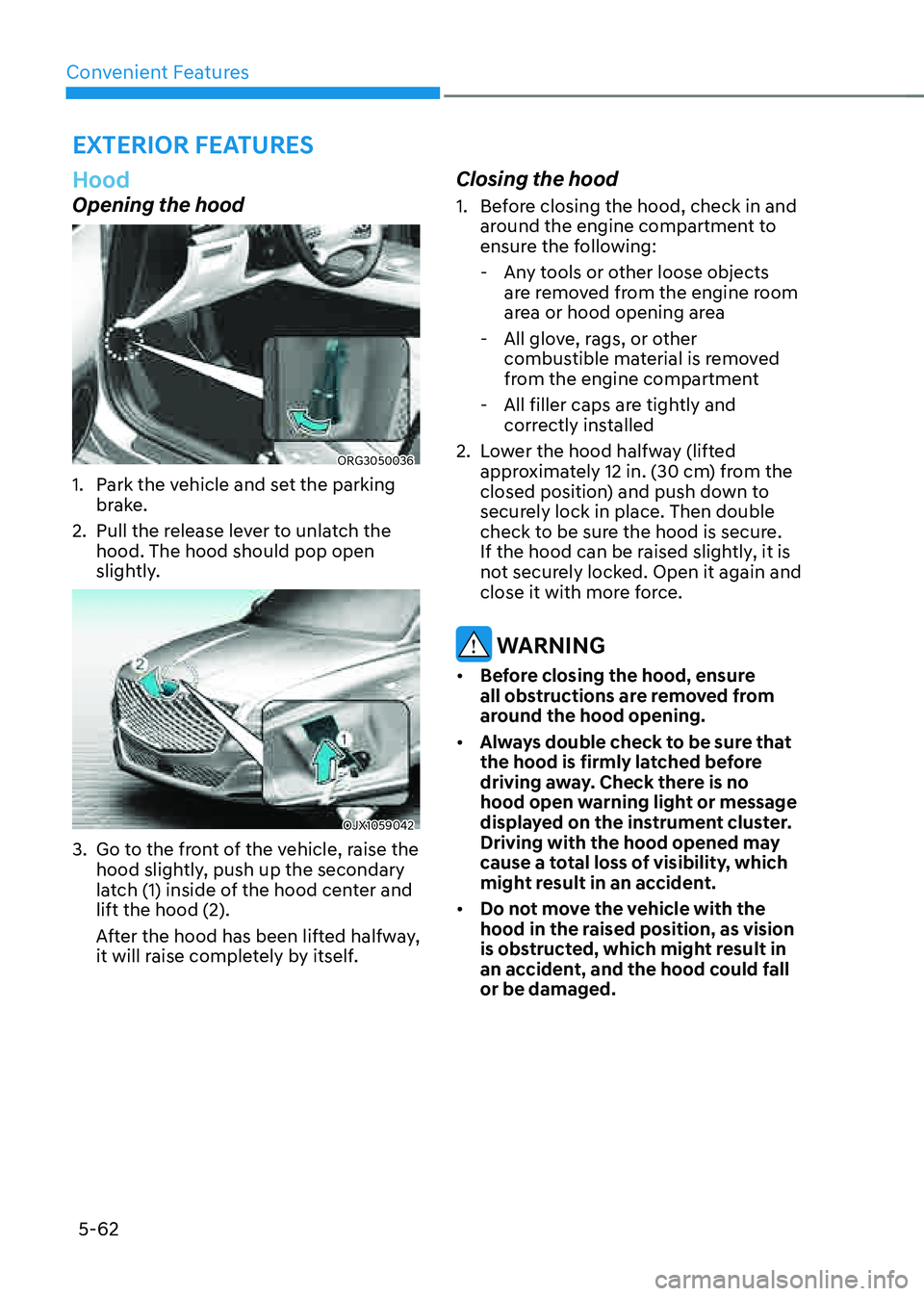
Opening the hood
ORG3050036
1. Park the vehicle and set the parking
brake.
2. Pull the release lever to unlatch the
hood. The hood should pop open
slightly.
OJX1059042
3. Go to the front of the vehicle, raise the
hood slightly, push up the secondary
latch (1) inside of the hood center and
lift the hood (2).
After the hood has been lifted halfway,
it will raise completely by itself.
Closing the hood
1. Before closing the hood, check in and
around the engine compartment to
ensure the following:
-Any tools or other loose objects
are removed from the engine room
area or hood opening area
-All glove, rags, or other
combustible material is removed
from the engine compartment
-All filler caps are tightly and
correctly installed
2. Lower the hood halfway (lifted
approximately 12 in. (30 cm) from the
closed position) and push down to
securely lock in place. Then double
check to be sure the hood is secure.
If the hood can be raised slightly, it is
not securely locked. Open it again and
close it with more force.
WARNING
• Before closing the hood, ensure
all obstructions are removed from
around the hood opening.
• Always double check to be sure that
the hood is firmly latched before
driving away. Check there is no
hood open warning light or message
displayed on the instrument cluster.
Driving with the hood opened may
cause a total loss of visibility, which
might result in an accident.
• Do not move the vehicle with the
hood in the raised position, as vision
is obstructed, which might result in
an accident, and the hood could fall
or be damaged.
EXTERIOR FEATURES
Page 201 of 604
05
5-63
Non-Powered Trunk (if equipped)
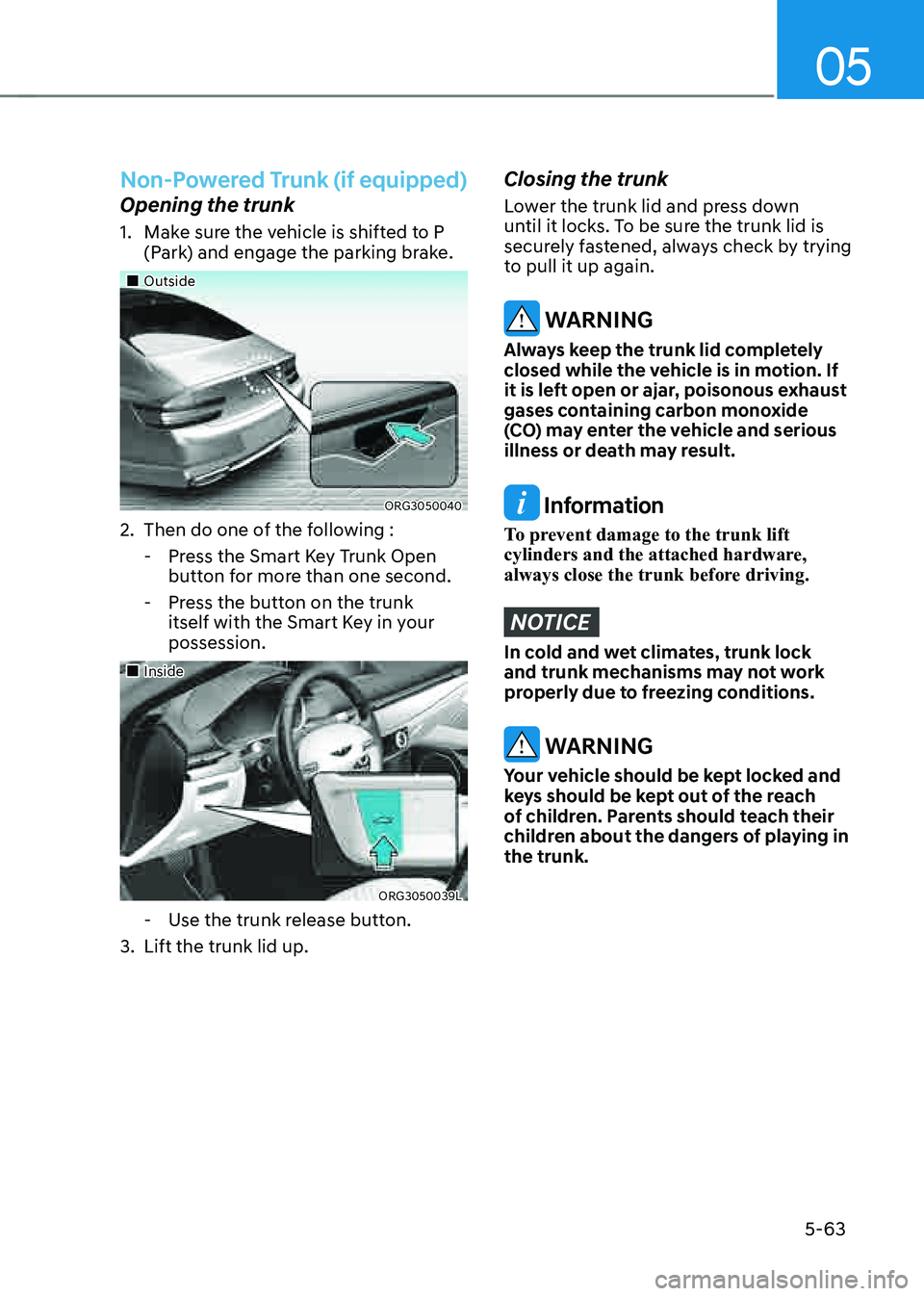
Opening the trunk
1. Make sure the vehicle is shifted to P
(Park) and engage the parking brake.
„„Outside
ORG3050040
2. Then do one of the following :
-Press the Smart Key Trunk Open
button for more than one second.
-Press the button on the trunk
itself with the Smart Key in your
possession.
„„Inside
ORG3050039L
-Use the trunk release button.
3. Lift the trunk lid up.
Closing the trunk
Lower the trunk lid and press down
until it locks. To be sure the trunk lid is
securely fastened, always check by trying
to pull it up again.
WARNING
Always keep the trunk lid completely
closed while the vehicle is in motion. If
it is left open or ajar, poisonous exhaust
gases containing carbon monoxide
(CO) may enter the vehicle and serious
illness or death may result.
Information
To prevent damage to the trunk lift
cylinders and the attached hardware,
always close the trunk before driving.
NOTICE
In cold and wet climates, trunk lock
and trunk mechanisms may not work
properly due to freezing conditions.
WARNING
Your vehicle should be kept locked and
keys should be kept out of the reach
of children. Parents should teach their
children about the dangers of playing in
the trunk.
Page 212 of 604

Convenient Features
5 -74
WARNING
Gasoline is highly flammable and
explosive. Failure to follow these
guidelines may result in SERIOUS
INJURY or DEATH:
• Read and follow all warnings posted
at the gas station.
• Before refueling, note the location of
the Emergency Gasoline Shut-Off, if
available, at the gas station.
• Before touching the fuel nozzle, you
should eliminate the potential build-
up of static electricity by touching
a metal part of the vehicle, a safe
distance away from the fuel filler
neck, nozzle, or other gas source,
with your bare hand.
• Do not use mobile phones while
refueling. Electric current and/or
electronic interference from cellular
phones can potentially ignite fuel
vapors and cause a fire.
• Do not go back into the vehicle
once you have begun refueling.
You can generate a buildup of
static electricity by touching,
rubbing or sliding against any item
or fabric capable of producing
static electricity. Static electricity
discharge can ignite fuel vapors
causing a fire. If you must re-enter
the vehicle, you should once again
eliminate potentially dangerous
static electricity discharge by
touching a metal part of the vehicle,
away from the fuel filler neck, nozzle
or other Gasoline source, with your
bare hand.
• When using an approved portable
fuel container, be sure to place the
container on the ground prior to
refueling. Static electricity discharge
from the container can ignite fuel
vapors causing a fire.
Once refueling has begun, contact
between your bare hand and the
vehicle should be maintained until
the filling is complete.
• Use only approved portable plastic
fuel containers designed to carry and
store Gasoline.
• When refueling, always shift the
gear to the P (Park) position, set
the parking brake, and press the
Engine Start/Stop button to the
OFF position. Sparks produced by
electrical components related to the
engine can ignite fuel vapors causing
a fire.
• Do not use matches or a lighter and
do not smoke or leave a lit cigarette
in your vehicle while at a gas station,
especially during refueling.
• Do not over-fill or top-off your
vehicle tank, which can cause
Gasoline spillage.
• If a fire breaks out during refueling,
leave the vicinity of the vehicle, and
immediately contact the manager
of the gas station and then contact
the local fire department. Follow any
safety instructions they provide.
• If pressurized fuel sprays out, it can
cover your clothes or skin and thus
subject you to the risk of fire and
burns. Always remove the fuel cap
carefully and slowly. If the cap is
venting fuel or if you hear a hissing
sound, wait until the condition stops
before completely removing the cap.
• Always check that the fuel cap is
installed securely to prevent fuel
spillage in the event of an accident.
Page 216 of 604

Convenient Features
5-78
Exterior Lights
Lighting control
To operate the lights, turn the knob at
the end of the control lever to one of the
following positions:
OJX1059057
1. OFF position
2. AUTO headlamp position
3. Parking lamp position
4. Headlamp positionDaytime Running Light (DRL)
The Daytime Running Lights (DRL) can
make it easier for others to see the front
of your vehicle during the day, especially
after dawn and before sunset.
The DRL system will turn the dedicated
lamp OFF when :
• The headlamps are ON.
• The parking brake is applied.
• The vehicle is turned off.
OJX1059059
AUTO headlamp position
The parking lamp and headlamp will
be turned ON or OFF automatically
depending on the amount of daylight as
measured by the ambient light sensor (1)
at the upper end of the windshield glass.
Even with the AUTO headlamp feature
in operation, it is recommended to
manually turn ON the headlamps when
driving at night or in a fog, driving in the
rain, or when you enter dark areas, such
as tunnels and parking facilities.
LIGHTING
Page 266 of 604

6
Before Driving ........................................................................\
...........................6-4Before Entering the Vehicle ........................................................................\
................6-4
Before Starting ........................................................................\
....................................6-4
Engine Start/Stop Button ........................................................................\
.........6-5Engine Stop/Start Button Positions ........................................................................\
...6-6
Starting the Engine ........................................................................\
..............................6 -7
Smart Key Slot - Emergency Starting ........................................................................\
6-8
Turning Off the Engine ........................................................................\
........................6-8
Remote Start ........................................................................\
........................................6-9
Automatic Transmission ........................................................................\
..........6-10Automatic Transmission Operation ........................................................................\
...6-10
LCD Display Messages (Cluster) ........................................................................\
........6-16
Paddle Shifter (Manual Shift Mode) ........................................................................\
..6-19
Good Driving Practices ........................................................................\
......................6-19
Braking System ........................................................................\
........................6-21Power-Assist brakes ........................................................................\
...........................6-21
Disc Brakes Wear Indicator ........................................................................\
................ 6-21
Electronic Parking Brake (EPB)
........................................................................\
..........6-22
Auto Hold ........................................................................\
............................................6-26
Anti-Lock Brake System (ABS) ........................................................................\
..........6-30
Electronic Stability Control (ESC) ........................................................................\
.....6-31
Vehicle Stability Management (VSM) .......................................................................6-34
Hill-Start Assist Control (HAC) ........................................................................\
...........6-35
Good Braking Practices ........................................................................\
....................6-36
All Wheel Drive (AWD) ........................................................................\
............6-37All Wheel Drive (AWD) Operation ........................................................................\
......6-37
Emergency Precautions ........................................................................\
.....................6-39
Electronic Control Suspension ........................................................................\
6-41System Malfunction ........................................................................\
...........................6-41
Electronically Controlled Suspension with Road Preview .......................................6-41
System Malfunction ........................................................................\
..........................6-42
Limitations of the System ........................................................................\
.................6-42
6. Driving Your Vehicle
Driving Your Vehicle
Page 270 of 604

06
6-5
ORG3060001
Whenever the front door is opened, the
Engine Start/Stop button will illuminate
and will go off 30 seconds after the door
is closed.
WARNING
To turn the vehicle off in an emergency:
Press and hold the Engine Start/Stop
button for more than two seconds OR
Rapidly press and release the Engine
Start/ Stop button three times (within
three seconds).
If the vehicle is still moving, you can
restart the vehicle without depressing
the brake pedal by pressing the Engine
Start/Stop button with the gear in the N
(Neutral) position.
WARNING
• NEVER press the Engine Start/Stop
button while the vehicle is in motion
except in an emergency. This will
result in the vehicle turning off and
loss of power assist for the steering
and brake systems. This may lead
to loss of directional control and
braking function, which could cause
an accident.
• Before leaving the driver’s seat,
always make sure the gear is in the
P (Park) position, set the parking
brake, press the Engine Start/Stop
button to the OFF position, and take
the Smart Key with you. Unexpected
vehicle movement may occur if these
precautions are not followed.
• NEVER reach through the steering
wheel for the Engine Start/Stop
button or any other control while the
vehicle is in motion. The presence
of your hand or arm in this area
may cause a loss of vehicle control
resulting in an accident.
ENGINE START/STOP BUTTON
Page 271 of 604

Driving Your Vehicle
6-6
Engine Stop/Start Button Positions
Button PositionAction Notes
OFF To turn off the engine, press the
Engine Start/Stop button with the
vehicle shifted to P (Park).
Note if the Engine Start/Stop
button is pressed with the vehicle
shifted to D (Drive) or R (Reverse),
the gear will automatically shift to
P (Park).
If the Engine Start/Stop button is
pressed with the gear shifted to
N (Neutral), the Engine Start/Stop
button will change to the ACC
position.
ACC Press the Engine Start/Stop button
when the button is in the OFF
position without depressing the
brake pedal.
Some of the electrical accessories
are usable. If you leave the Engine Start/Stop
button in the ACC position for
more than one hour, the battery
power will turn off automatically
to prevent the battery from
discharging.
ON Press the Engine Start/Stop button
while it is in the ACC position
without depressing the brake
pedal.
The warning lights can be checked
before the engine is started. Do not leave the Engine Start/Stop
button in the ON position when the
engine is not running to prevent
the battery from discharging.
START To start the engine, depress the
brake pedal and press the Engine
Start/ Stop button with the gear
shifted to the P (Park) or the N
(Neutral) position.
For your safety, start the engine
with the gear shifted to the P
(Park) position. If you press the Engine Start/Stop
button without depressing the
brake pedal, the engine does not
start and the Engine Start/Stop
button changes as follows:
OFF → ACC → ON → OFF or ACC
Ã
To prevent vehicle battery discharge, the Engine Start/Stop button changes to the
OFF position when the Engine Start/Stop button is in the ACC or ON position with
the gear in P (Park) for a certain period of time. When the function operates, the tail
lamps will turn off. To use the tail lamps again, turn the headlamp switch located on
the steering column to the OFF and ON position again.
Page 272 of 604

06
6 -7
Starting the Engine
WARNING
• Always wear appropriate shoes when
operating your vehicle. Unsuitable
shoes, such as high heels, ski boots,
sandals, flip flops, etc., may interfere
with your ability to use the brake and
accelerator pedals.
• Do not start the vehicle with the
accelerator pedal depressed.
The vehicle can move which can lead
to an accident.
• Wait until the engine rpm is normal.
The vehicle may suddenly move if
the brake pedal is released when the
rpm is high.
Information
• The vehicle will start by pressing the
Engine Start/Stop button, only when
the smart key is in the vehicle.
• Even if the smart key is in the vehicle,
and when it is far away from the driver,
the engine may not start.
• When the Engine Start/Stop button
is in the ACC or ON position, if any
door is open, the system checks for the
smart key. When the smart key is not
in the vehicle, the “
” indicator
will blink and the warning 'Key not in
vehicle' will come on. When all doors
are closed, the chime will also sound for
about 5 seconds. Keep the smart key in
the vehicle.
1. Always carry the smart key with you.
2. Make sure the parking brake is
applied.
3. Make sure the gear is shifted to P
(Park) by pressing the P button.
4. Depress the brake pedal.
5. Press the Engine Start/Stop button.
Information
• Do not wait for the engine to warm up
while the vehicle remains stationary.
Start driving at moderate engine
speeds. Steep accelerating and
decelerating should be avoided.
• Always start the vehicle with your foot
on the brake pedal. Do not depress the
accelerator while starting the vehicle.
Do not race the engine while warming
it up.
Page 273 of 604
Driving Your Vehicle
6-8
NOTICE
To prevent damage to the vehicle:
• If the engine stalls while you are in
motion, do not attempt to shift the
gear to the P (Park) position.
If traffic and road conditions permit,
you may put the gear in N (Neutral)
while the vehicle is still moving and
press the Engine Start/Stop button in
an attempt to restart the engine.
• Do not push or tow your vehicle to
start the vehicle.
NOTICE
To prevent damage to the vehicle:
Do not press the Engine Start/Stop
button for more than 10 seconds except
when the stop lamp fuse is blown.
When the stop lamp fuse is blown,
you cannot normally start the engine.
Replace the fuse with a new one. If you
are not able to replace the fuse, you
can start the engine by pressing and
holding the Engine Start/Stop button
for 10 seconds with the Engine Start/
Stop button in the ACC position.
For your safety always depress the
brake pedal before starting the vehicle.
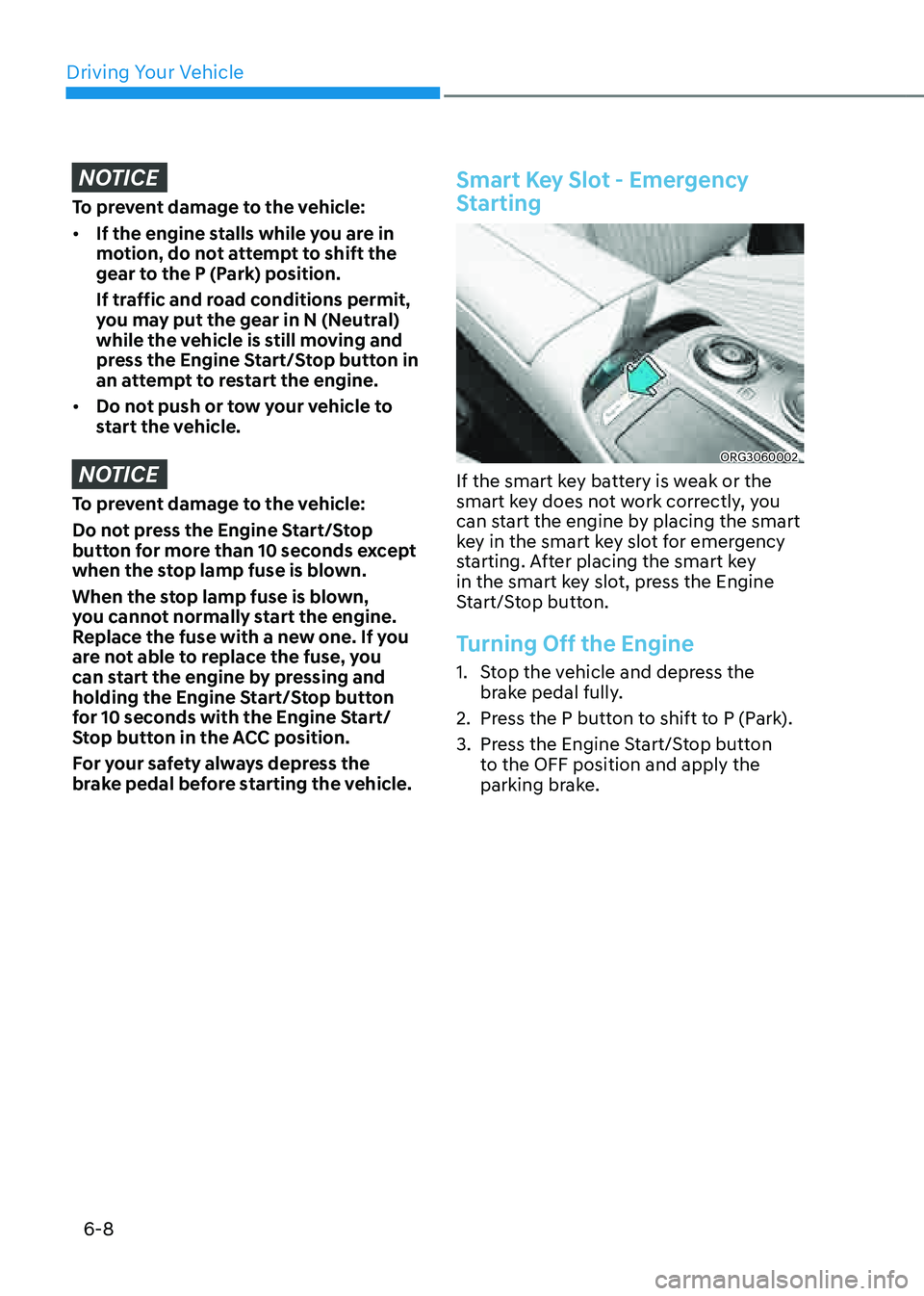
Smart Key Slot - Emergency
Starting
ORG3060002
If the smart key battery is weak or the
smart key does not work correctly, you
can start the engine by placing the smart
key in the smart key slot for emergency
starting. After placing the smart key
in the smart key slot, press the Engine
Start/Stop button.
Turning Off the Engine
1. Stop the vehicle and depress the
brake pedal fully.
2. Press the P button to shift to P (Park).
3. Press the Engine Start/Stop button
to the OFF position and apply the
parking brake.