FUEL GENESIS G90 2017 Owner's Guide
[x] Cancel search | Manufacturer: GENESIS, Model Year: 2017, Model line: G90, Model: GENESIS G90 2017Pages: 524, PDF Size: 19.3 MB
Page 197 of 524
3-95
03
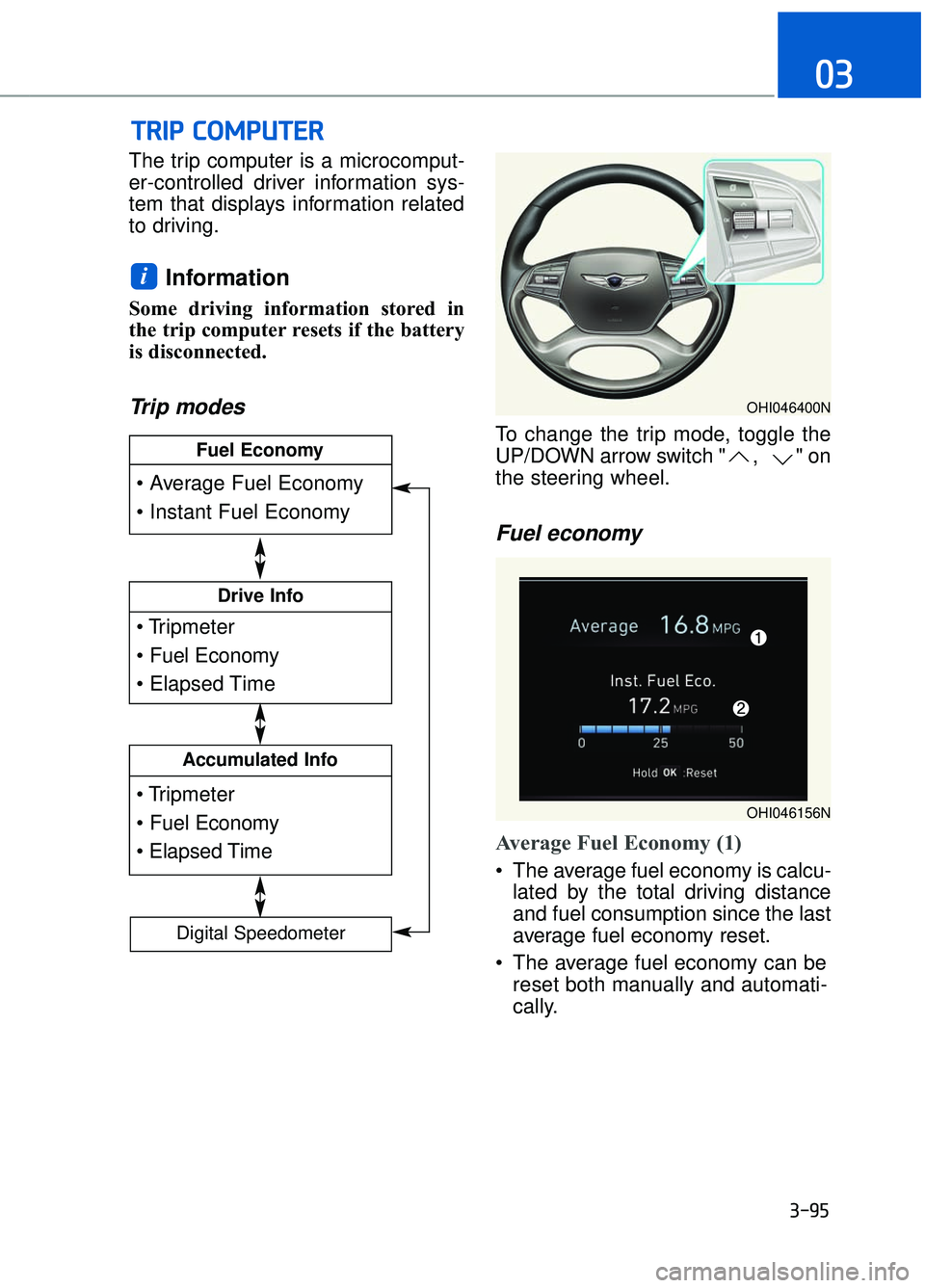
The trip computer is a microcomput-
er-controlled driver information sys-
tem that displays information related
to driving.
Information
Some driving information stored in
the trip computer resets if the battery
is disconnected.
Trip modes
To change the trip mode, toggle the
UP/DOWN arrow switch " , " on
the steering wheel.
Fuel economy
Average Fuel Economy (1)
The average fuel economy is calcu-lated by the total driving distance
and fuel consumption since the last
average fuel economy reset.
The average fuel economy can be reset both manually and automati-
cally.
i
T
TR
R I
IP
P
C
C O
O M
M P
PU
U T
TE
ER
R
Drive Info
Accumulated Info
Fuel Economy
Digital Speedometer
OHI046400N
OHI046156N
Page 198 of 524

3-96
Convenient features of your vehicle
Manual reset
To clear the average fuel economy
manually, press the OK button on the
steering wheel for more than 1 sec-
ond when the average fuel economy
is displayed.
For more information on the OK
button, refer to the "LCD Display
Control" in this chapter.
Automatic reset
To reset the average fuel economy
automatically whenever refueling,
select the "After refueling" menu in
User Settings mode of the LCD dis-
play (Refer to "LCD Display" ).
Under "After refueling" menu, the
average fuel economy will be cleared
to zero (----) when the vehicle speed
exceeds 1 mph (1 km/h) after refuel-
ing more than 2 gallons (6 liters).
Information
The vehicle must be driven for a min-
imum of 0.19 mile (0.3 km) since the
last ignition key cycle before the aver-
age fuel economy will be recalculated.
Instant Fuel Economy (2)
This mode displays the instanta-
neous fuel economy while driving
when the vehicle speed is greater
than 5 mph (8 km/h).
Driving Info display
This display shows the trip distance
(1), the average fuel economy (2),
and the total driving time (3).
The information is calculated for each
ignition cycle. The driving information
data gets initialized, when it has
passed 4 hours after turning OFF the
engine. In other words, the last driv-
ing information is available 4 hours
after you have turned on the engine.
To manually reset the information,
press and hold the OK button when
viewing the Driving info. The trip dis-
tance, the average fuel economy, and
total driving time will reset simultane-
ously.
The driving information will continue to
be counted while the engine is still run-
ning (for example, when the vehicle is
in traffic or stopped at a stop light.)
Information
The vehicle must be driven for a mini-
mum of 0.19 miles (300 meters) since the
last ignition key cycle before the average
fuel economy will be recalculated.
i
i
OHI046171N
Page 199 of 524

3-97
03
Accumulated Info display
This display shows the accumulated
trip distance (1), the average fuel
economy (2), and the total driving
time (3).
The information is calculated starting
from the last reset.
To manually reset the information,
press and hold the OK button when
viewing the Accumulated driving info.
The trip distance, the average fuel
economy, and total driving time will
reset simultaneously.
The accumulated driving information
will continue to be counted while the
engine is still running (for example,
when the vehicle is in traffic or
stopped at a stop light.)
Information
The vehicle must be driven for a min-
imum of 0.19 miles (300 meters) since
the last ignition key cycle before the
average fuel economy will be recalcu-
lated.
Digital speedometer
This message shows the speed of
the vehicle.
i
OHI046173NOHI046172N
Page 275 of 524

5-14
Driving your vehicle
D (Drive)
This is the normal driving position.
The transmission will automatically
shift through an eight-gear
sequence, providing the best fuel
economy and power.
For extra power when passing anoth-
er vehicle or driving uphill depress
the accelerator pedal further until
you feel the transmission downshift
to a lower gear.To shift into D (Drive), depress the
brake pedal and press the
[UNLOCK] button on the shift lever.
Move the shift lever backward.
To shift into D (Drive) from N
(Neutral), you must depress the
brake pedal.
Always come to a complete stop
before shifting into D (Drive).
NOTICE
OHI056015L
■
R (Reverse) → D (Drive)
Unlock Button
OHI056016L
■P (Park), N (Neutral) →D (Drive)
Unlock Button
Do not shift into gear unless
your foot is firmly on the
brake pedal. Use the N
(Neutral) position to idle a
vehicle for an extended period
of time. The wheels and the
transmission are not
engaged. While parking the
vehicle with the engine run-
ning, depress the brake pedal
or apply the parking brake.
Do not drive with the shift lever in N (Neutral). Doing so
may result in an accident
because of a loss of engine
braking and the transmission
could be damaged.
WARNING
Page 305 of 524

D
DR
RI
IV
V E
E
M
M O
OD
DE
E
I
IN
N T
TE
EG
G R
RA
A T
TE
ED
D
C
C O
O N
NT
TR
R O
O L
L
S
S Y
Y S
ST
T E
EM
M
5-44
Driving your vehicle
The drive mode may be selected
according to the driver's preference
or road condition. The mode changes whenever the
DRIVE MODE button is pressed.
SMART mode :
SMART mode automatically
adjusts the driving mode (ECO ↔
NORMAL ↔SPORT) in accor-
dance with the driver's driving
habits.
SPORT mode : SPORT mode provides sporty but
firm riding.
ECO mode : ECO mode helps improve fuel effi-
ciency for eco-friendly driving.
INDIVIDUAL mode : The driver can separately adjust
modes of each driving system.
The driving mode will be continuous-
ly maintained, as selected when the
engine is restarted. However, except
if it is in SPORT mode. SPORT mode
will change to SMART mode, when
the engine is restarted.
OHI056060L
■ Type A
OHI056061L
■Type B
OHI056124
Page 306 of 524
5-45
05
SMART mode
SMART mode selects the
proper driving mode
among ECO, NORMAL,
and SPORT by judging
the driver’s driving habits
(i.e. mild or dynamic)
from the brake pedal
depression or the steer-
ing wheel operation.
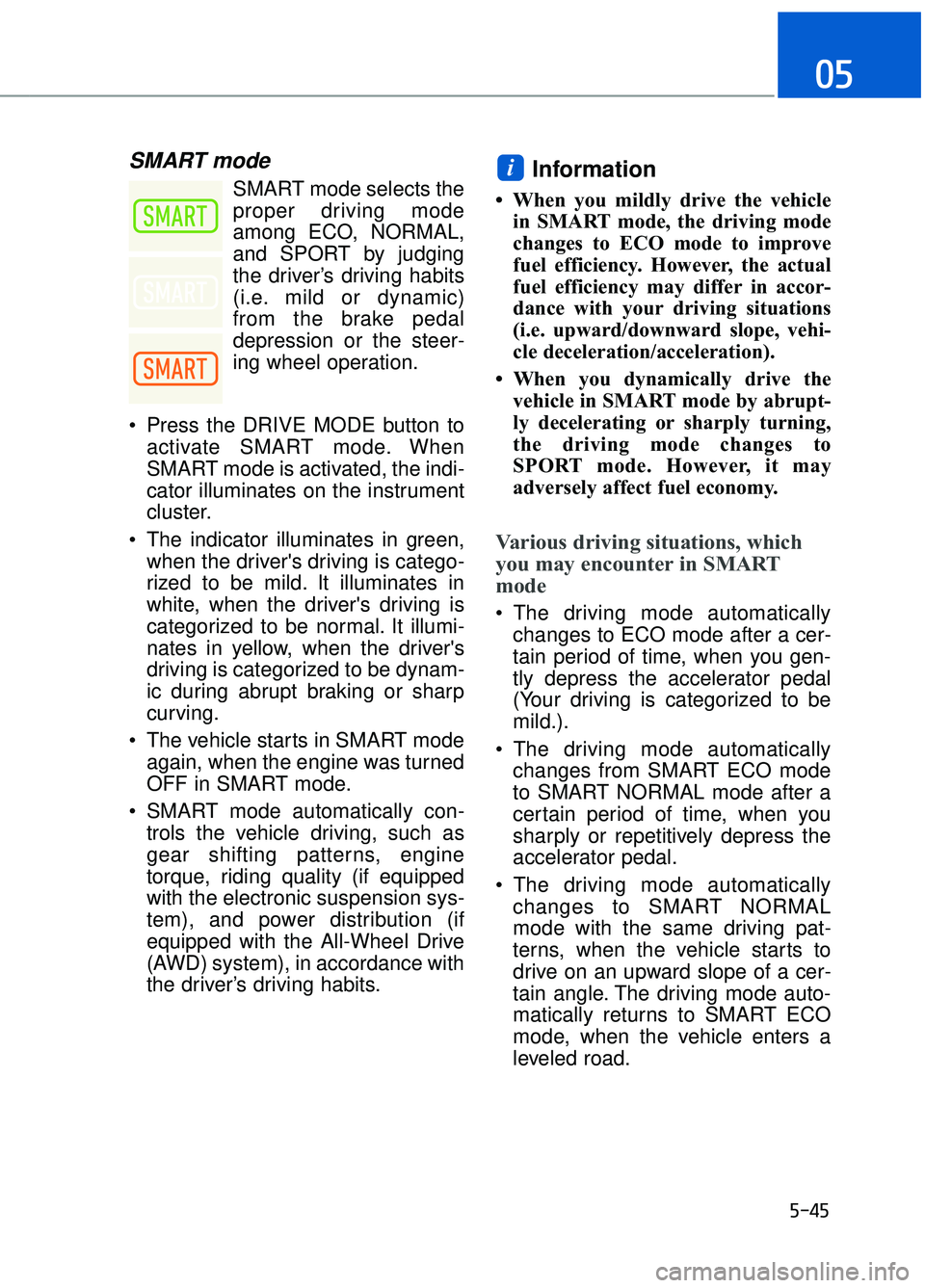
Press the DRIVE MODE button to activate SMART mode. When
SMART mode is activated, the indi-
cator illuminates on the instrument
cluster.
The indicator illuminates in green, when the driver's driving is catego-
rized to be mild. It illuminates in
white, when the driver's driving is
categorized to be normal. It illumi-
nates in yellow, when the driver's
driving is categorized to be dynam-
ic during abrupt braking or sharp
curving.
The vehicle starts in SMART mode again, when the engine was turned
OFF in SMART mode.
SMART mode automatically con- trols the vehicle driving, such as
gear shifting patterns, engine
torque, riding quality (if equipped
with the electronic suspension sys-
tem), and power distribution (if
equipped with the All-Wheel Drive
(AWD) system), in accordance with
the driver’s driving habits.Information
• When you mildly drive the vehiclein SMART mode, the driving mode
changes to ECO mode to improve
fuel efficiency. However, the actual
fuel efficiency may differ in accor-
dance with your driving situations
(i.e. upward/downward slope, vehi-
cle deceleration/acceleration).
• When you dynamically drive the vehicle in SMART mode by abrupt-
ly decelerating or sharply turning,
the driving mode changes to
SPORT mode. However, it may
adversely affect fuel economy.
Various driving situations, which
you may encounter in SMART
mode
The driving mode automaticallychanges to ECO mode after a cer-
tain period of time, when you gen-
tly depress the accelerator pedal
(Your driving is categorized to be
mild.).
The driving mode automatically changes from SMART ECO mode
to SMART NORMAL mode after a
certain period of time, when you
sharply or repetitively depress the
accelerator pedal.
The driving mode automatically changes to SMART NORMAL
mode with the same driving pat-
terns, when the vehicle starts to
drive on an upward slope of a cer-
tain angle. The driving mode auto-
matically returns to SMART ECO
mode, when the vehicle enters a
leveled road.
i
Page 308 of 524

5-47
05
SPORT mode
SPORT mode manages
the driving dynamics by
automatically adjusting
the steering effort, and
the engine and transmission control
logic for enhanced driver perform-
ance.
When SPORT mode is selected by pressing the DRIVE MODE button,
the SPORT indicator (yellow color)
will illuminate.
Whenever the engine is restarted, the Drive Mode will revert back to
SMART mode. If SPORT mode is
desired, re-select SPORT mode
from the DRIVE MODE button.
When SPORT mode is activated: - The engine rpm will tend toremain raised over a certain
length of time even after releas-
ing the accelerator
- Upshifts are delayed when accel- erating
Information
In SPORT mode, the fuel efficiency
may decrease.
Virtual engine sounds are gener-
ated from the exterior amplifiers.
Pay extreme caution while replac-
ing amplifier components. The
use of any after-market compo-
nents or speakers may damage
the exterior amplifiers causing the
virtual engine sounds not to prop-
erly operate.
ECO mode
When the Drive Mode is
set to ECO mode, the
engine and transmission
control logic are changed
to maximize fuel efficiency.
When ECO mode is selected by pressing the DRIVE MODE button,
the ECO indicator (green color) will
illuminate.
If the vehicle is set to ECO mode, when the engine is turned OFF
and restarted the Drive Mode set-
ting will remain in ECO mode.
Information
Fuel efficiency depends on the driver's
driving habit and road condition.
i
NOTICE
i
Page 309 of 524
5-48
Driving your vehicle
When ECO mode is activated:
The acceleration response may beslightly reduced if the accelerator
pedal is depressed moderately.
The air conditioner performance may be limited.
The shift pattern of the automatic transmission may change.
The engine noise may be louder at some automatic transmission
shifts as down-shift requires press-
ing down more on the accelerator.
The above situations are normal
conditions when ECO mode is acti-
vated to improve fuel efficiency.
Limitation of ECO mode operation:
If the following conditions occur while
ECO mode is operating, the system
operation is limited even though
there is no change in the ECO indi-
cator.
When the coolant temperature is low:
The system will be limited until
engine performance becomes nor-
mal.
When driving up a hill: The system will be limited to gain
power when driving uphill because
engine torque is restricted.
When driving the vehicle with the automatic transmission gear shift
lever in manual mode.
The system will be limited accord-
ing to the shift location.
INDIVIDUAL mode
In INDIVIDUAL mode, thedriver can select separate
modes and combine them
on the DIS Navigation
System screen.
- Engine/Transmission:
ECO/SMART
- Steering wheel:COMFORT/SPORT
- Suspension:COMFORT +/
COMFORT/SPORT
- All-Wheel Drive (AWD) system:
ECO/COMFORT/SPORT
For more information, refer to the
separately supplied DIS Navigation
System manual.
When INDIVIDUAL mode is select- ed by pressing the DRIVE MODE
button, the INDIVIDUAL mode indi-
cator (blue color) will illuminate.
Page 365 of 524
5-104
Driving your vehicle
Driving in Flooded Areas
Avoid driving through flooded areas
unless you are sure the water is no
higher than the bottom of the wheel
hub. Drive through any water slowly.
Allow adequate stopping distance
because brake performance may be
reduced.
After driving through water, dry the
brakes by gently applying them sev-
eral times while the vehicle is moving
slowly.
Highway Driving
Tires
Adjust the tire inflation, as specified.
Under-inflation may overheat or
damage the tires.
Do not install worn-out or damaged
tires, which may reduce traction or
fail the braking operation.
Information
Never over-inflate your tires above the
maximum inflation pressure, as speci-
fied on your tires.
Fuel, engine coolant and engineoil
Driving at higher speeds on the high-
way consumes more fuel and is less
efficient than driving at a slower,
more moderate speed. Maintain a
moderate speed in order to conserve
fuel when driving on the highway.
Be sure to check both the engine
coolant level and the engine oil
before driving.
Drive belt
A loose or damaged drive belt may
overheat the engine.
i
Utility vehicles have a signifi-
cantly higher rollover rate than
other types of vehicles. To pre-
vent rollovers or loss of control:
Take corners at slower speeds
than you would with a passen-
ger vehicle.
Avoid sharp turns and abrupt maneuvers.
Do not modify your vehicle in any way that you would raise
the center of gravity.
Keep tires properly inflated.
Do not carry heavy cargo on the roof.
WARNING
In a rollover crash, an unbelted
person is significantly more
likely to die than a person wear-
ing a seat belt. Make sure all
passengers are wearing their
seat belts.
WARNING
Page 370 of 524
5-109
05
V
VE
EH
H I
IC
C L
LE
E
L
L O
O A
AD
D
L
L I
IM
M I
IT
T
Two labels on your driver's door sill
show how much weight your vehicle
was designed to carry: the Tire and
Loading Information Label and the
Certification Label.
Before loading your vehicle, familiar-
ize yourself with the following terms
for determining your vehicle's weight
ratings, from the vehicle's specifica-
tions and the Certification Label:
Base Curb Weight
This is the weight of the vehicle
including a full tank of fuel and all
standard equipment. It does not
include passengers, cargo, or option-
al equipment.
Vehicle Curb Weight
This is the weight of your new vehicle
when you picked it up from your deal-
er plus any aftermarket equipment.
Cargo Weight
This figure includes all weight added
to the Base Curb Weight, including
cargo and optional equipment.
GAW (Gross Axle Weight)
This is the total weight placed on
each axle (front and rear) - including
vehicle curb weight and all payload. GAWR (Gross Axle Weight Rating)
This is the maximum allowable
weight that can be carried by a single
axle (front or rear). These numbers
are shown on the Certification Label.
The total load on each axle must
never exceed its GAWR.
GVW (Gross Vehicle Weight)
This is the Base Curb Weight plus
actual Cargo Weight plus passen-
gers.
GVWR (Gross Vehicle Weight
Rating)
This is the maximum allowable
weight of the fully loaded vehicle
(including all options, equipment,
passengers and cargo). The GVWR
is shown on the Certification Label
located on the driver’s door sill.