lock GMC TERRAIN 2010 Manual PDF
[x] Cancel search | Manufacturer: GMC, Model Year: 2010, Model line: TERRAIN, Model: GMC TERRAIN 2010Pages: 410, PDF Size: 2.55 MB
Page 281 of 410
Vehicle Care 9-7
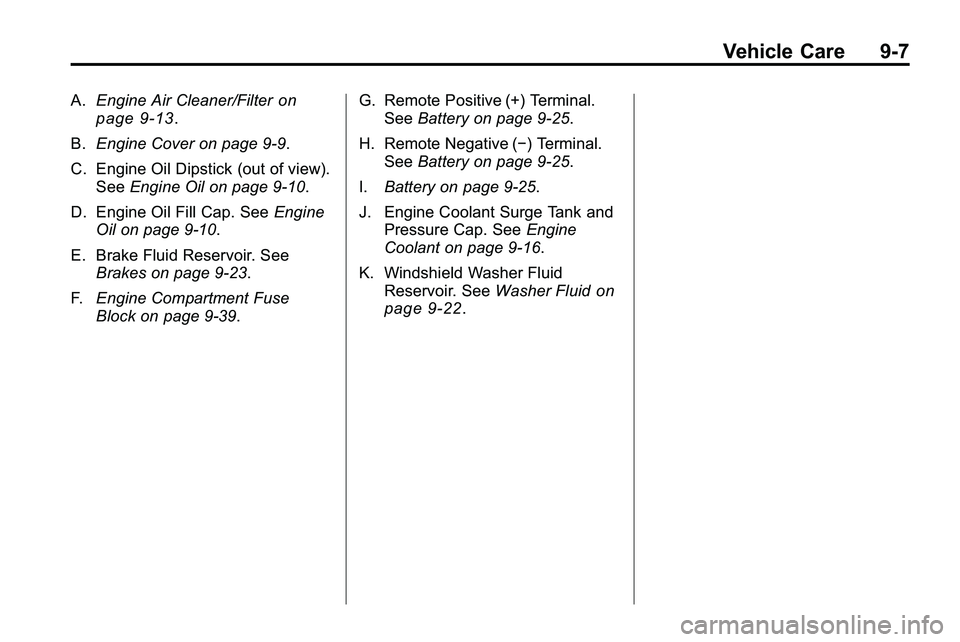
A.Engine Air Cleaner/Filteron
page 9‑13.
B. Engine Cover on page 9‑9.
C. Engine Oil Dipstick (out of view). See Engine Oil on page 9‑10.
D. Engine Oil Fill Cap. See Engine
Oil on page 9‑10.
E. Brake Fluid Reservoir. See Brakes on page 9‑23.
F. Engine Compartment Fuse
Block on page 9‑39. G. Remote Positive (+) Terminal.
See Battery on page 9‑25.
H. Remote Negative (−) Terminal. See Battery on page 9‑25.
I. Battery on page 9‑25.
J. Engine Coolant Surge Tank and Pressure Cap. See Engine
Coolant on page 9‑16.
K. Windshield Washer Fluid Reservoir. See Washer Fluid
on
page 9‑22.
Page 283 of 410
Vehicle Care 9-9
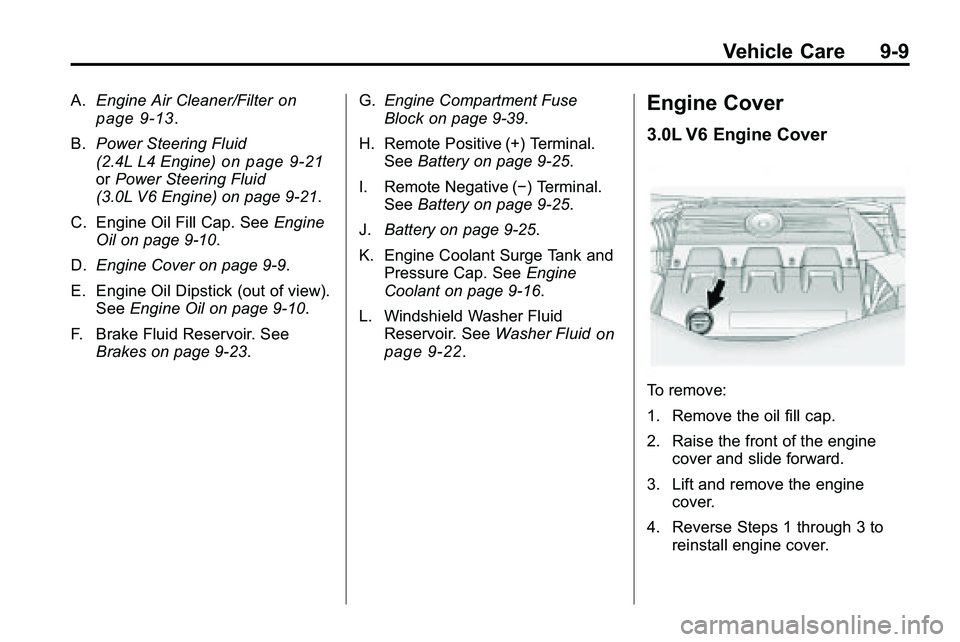
A.Engine Air Cleaner/Filteron
page 9‑13.
B. Power Steering Fluid
(2.4L L4 Engine)
on page 9‑21orPower Steering Fluid
(3.0L V6 Engine) on page 9‑21.
C. Engine Oil Fill Cap. See Engine
Oil on page 9‑10.
D. Engine Cover on page 9‑9.
E. Engine Oil Dipstick (out of view). See Engine Oil on page 9‑10.
F. Brake Fluid Reservoir. See Brakes on page 9‑23. G.
Engine Compartment Fuse
Block on page 9‑39.
H. Remote Positive (+) Terminal. See Battery on page 9‑25.
I. Remote Negative (−) Terminal. See Battery on page 9‑25.
J. Battery on page 9‑25.
K. Engine Coolant Surge Tank and Pressure Cap. See Engine
Coolant on page 9‑16.
L. Windshield Washer Fluid Reservoir. See Washer Fluid
on
page 9‑22.
Engine Cover
3.0L V6 Engine Cover
To remove:
1. Remove the oil fill cap.
2. Raise the front of the engine
cover and slide forward.
3. Lift and remove the engine cover.
4. Reverse Steps 1 through 3 to reinstall engine cover.
Page 286 of 410

9-12 Vehicle Care
Engine Oil Life System
When to Change Engine Oil
This vehicle has a computer system
that indicates when to change the
engine oil and filter. This is based
on engine revolutions and engine
temperature, and not on mileage.
Based on driving conditions, the
mileage at which an oil change is
indicated can vary considerably. For
the oil life system to work properly,
the system must be reset every time
the oil is changed.
When the system has calculated
that oil life has been diminished, it
indicates that an oil change is
necessary. A“Change Engine Oil
Soon” message comes on.
See Engine Oil Messages
on
page 4‑31. Change the oil as soon as possible within the next 1 000 km
(600 miles). It is possible that,
if driving under the best conditions,
the oil life system might not indicate
that an oil change is necessary for
over a year. However, the engine oil
and filter must be changed at least
once a year and at this time the
system must be reset. Your dealer/
retailer has trained service people
who will perform this work using
genuine parts and reset the system.
It is also important to check the oil
regularly and keep it at the proper
level.
If the system is ever reset
accidentally, the oil must be
changed at 5 000 km (3,000 miles)
since the last oil change.
Remember to reset the oil life
system whenever the oil is changed.
How to Reset the Engine Oil
Life System
Reset the system whenever the
engine oil is changed so that the
system can calculate the next
engine oil change. To reset the
system:
1. Turn the ignition to ON/RUN with
the engine off.
2. Fully press and release the accelerator pedal three times
within five seconds.
If the vehicle has Driver Information
Center (DIC) buttons:
1. Turn the ignition to ON/RUN, with the engine off.
2. Press the DIC menu button until “Remaining Oil Life” displays.
3. Press and hold the set/clear button until “100%”is displayed.
4. Turn the key to LOCK/OFF.
The system is reset when the
“Change Engine Oil Soon” message
goes off.
Page 293 of 410
Vehicle Care 9-19
Notice:In cold weather, water
can freeze and crack the engine,
radiator, heater core and other
parts. Use the recommended
coolant and the proper coolant
mixture.
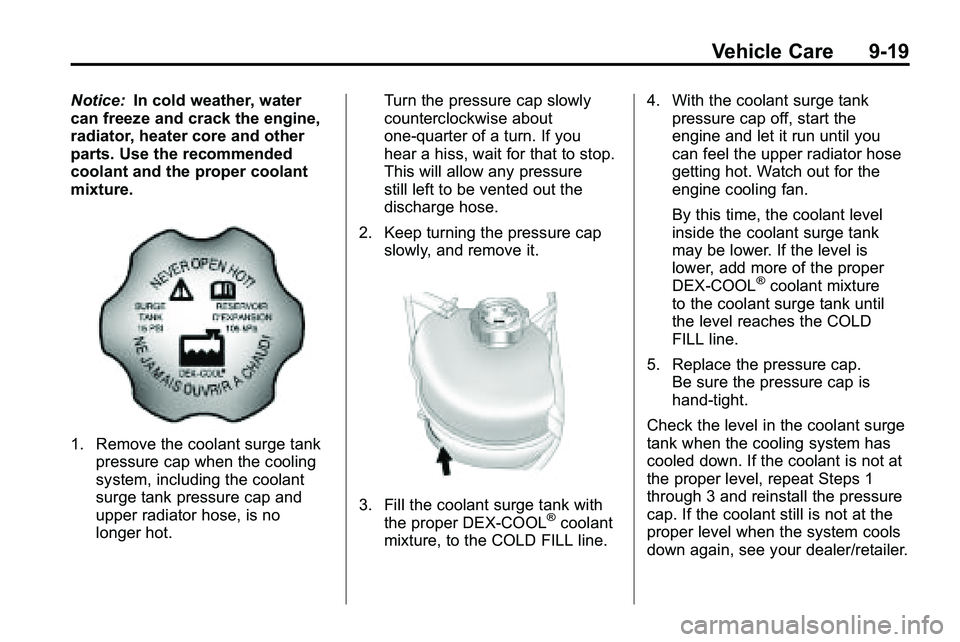
1. Remove the coolant surge tank pressure cap when the cooling
system, including the coolant
surge tank pressure cap and
upper radiator hose, is no
longer hot. Turn the pressure cap slowly
counterclockwise about
one-quarter of a turn. If you
hear a hiss, wait for that to stop.
This will allow any pressure
still left to be vented out the
discharge hose.
2. Keep turning the pressure cap slowly, and remove it.
3. Fill the coolant surge tank with
the proper DEX-COOL®coolant
mixture, to the COLD FILL line. 4. With the coolant surge tank
pressure cap off, start the
engine and let it run until you
can feel the upper radiator hose
getting hot. Watch out for the
engine cooling fan.
By this time, the coolant level
inside the coolant surge tank
may be lower. If the level is
lower, add more of the proper
DEX-COOL
®coolant mixture
to the coolant surge tank until
the level reaches the COLD
FILL line.
5. Replace the pressure cap. Be sure the pressure cap is
hand-tight.
Check the level in the coolant surge
tank when the cooling system has
cooled down. If the coolant is not at
the proper level, repeat Steps 1
through 3 and reinstall the pressure
cap. If the coolant still is not at the
proper level when the system cools
down again, see your dealer/retailer.
Page 301 of 410

Vehicle Care 9-27
3. Try to start the engine in eachgear. The vehicle should start
only in P (Park) or N (Neutral).
If the vehicle starts in any other
position, contact your dealer/
retailer for service.
Automatic Transmission
Shift Lock Control
System Check
{WARNING
When you are doing this
inspection, the vehicle could
move suddenly. If the vehicle
moves, you or others could be
injured.
1. Before starting this check, be sure there is enough room
around the vehicle. It should be
parked on a level surface. 2. Firmly apply the parking brake.
See Parking Brake
on
page 8‑40.
Be ready to apply the regular
brake immediately if the vehicle
begins to move.
3. With the engine off, turn the ignition to ON/RUN, but do not
start the engine. Without
applying the regular brake, try to
move the shift lever out of
P (Park) with normal effort. If the
shift lever moves out of P (Park),
contact your dealer/retailer for
service.
Ignition Transmission
Lock Check
While parked, and with the parking
brake set, try to turn the ignition to
LOCK/OFF in each shift lever
position.
.The ignition should turn to
LOCK/OFF only when the shift
lever is in P (Park).
.The ignition key should come
out only in LOCK/OFF.
Contact your dealer/retailer if
service is required.
Page 306 of 410
9-32 Vehicle Care
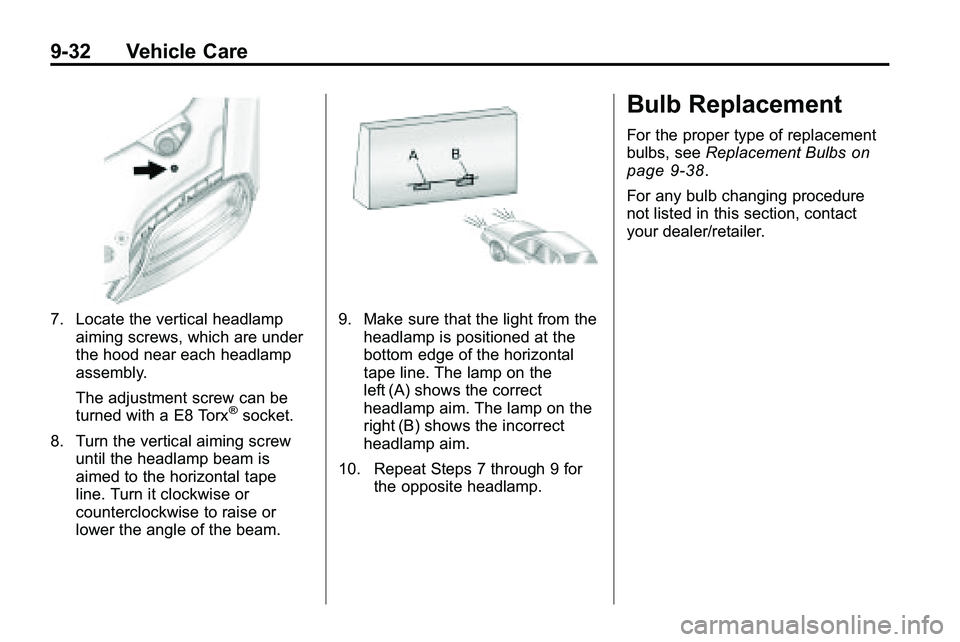
7. Locate the vertical headlampaiming screws, which are under
the hood near each headlamp
assembly.
The adjustment screw can be
turned with a E8 Torx
®socket.
8. Turn the vertical aiming screw until the headlamp beam is
aimed to the horizontal tape
line. Turn it clockwise or
counterclockwise to raise or
lower the angle of the beam.
9. Make sure that the light from theheadlamp is positioned at the
bottom edge of the horizontal
tape line. The lamp on the
left (A) shows the correct
headlamp aim. The lamp on the
right (B) shows the incorrect
headlamp aim.
10. Repeat Steps 7 through 9 for the opposite headlamp.
Bulb Replacement
For the proper type of replacement
bulbs, see Replacement Bulbson
page 9‑38.
For any bulb changing procedure
not listed in this section, contact
your dealer/retailer.
Page 307 of 410

Vehicle Care 9-33
Headlamps, Front Turn
Signal, Sidemarker, and
Parking Lamps
A. Low-Beam Headlamp
B. High-Beam headlamp
C. Side Marker Lamp
D. Park/Turn Signal LampTo replace:
1. Turn the tire to reach the access
port cap located in the front of
wheel well cover.A. Screw
B. Access Port Cap
2. Remove screw (A) and turn the access port cap (B)
counterclockwise to remove.
3. If replacing a low/high headlamp bulb, remove the dust cover cap
from the back of the headlamp
housing by turning the cap
counterclockwise. 4. Turn the low/high beam or
park/turn signal bulb socket
counterclockwise to remove from
the lamp assembly.
5. Turn the sidemarker bulb socket clockwise to remove from the
lamp assembly.
6. Remove the bulb from the socket or disconnect bulb
assembly from harness
connector.
7. Install new bulb.
8. Reinstall the low/high beam or park/turn signal bulb socket to
the lamp assembly, turning
clockwise.
9. Reinstall the sidemarker bulb socket to the lamp assembly,
turning clockwise.
10. Replace the dust cover cap on headlamps.
11. Reinstall the wheel well cover access port cap and secure by
installing screw.
Page 308 of 410
9-34 Vehicle Care
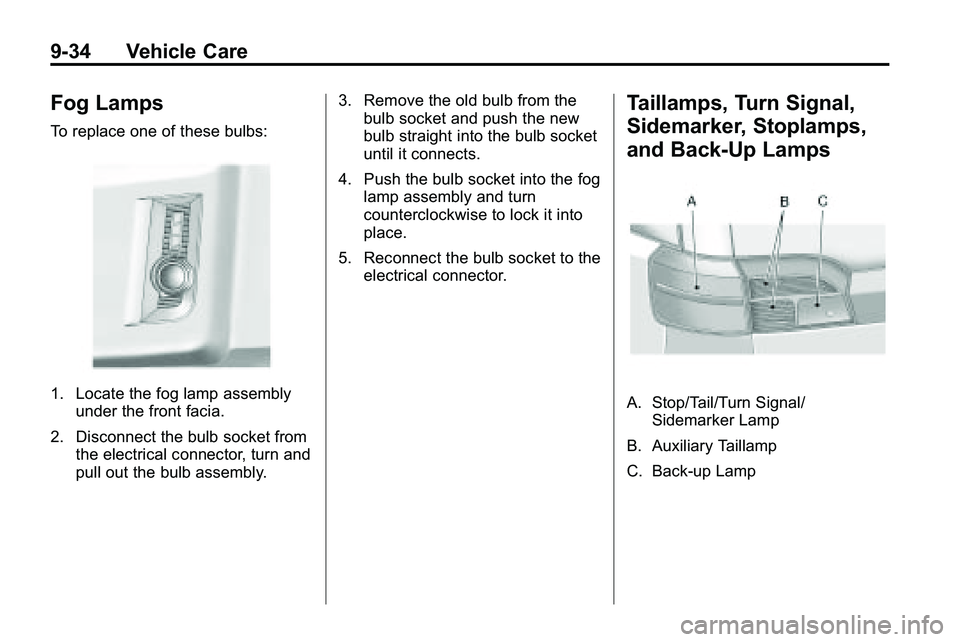
Fog Lamps
To replace one of these bulbs:
1. Locate the fog lamp assemblyunder the front facia.
2. Disconnect the bulb socket from the electrical connector, turn and
pull out the bulb assembly. 3. Remove the old bulb from the
bulb socket and push the new
bulb straight into the bulb socket
until it connects.
4. Push the bulb socket into the fog lamp assembly and turn
counterclockwise to lock it into
place.
5. Reconnect the bulb socket to the electrical connector.
Taillamps, Turn Signal,
Sidemarker, Stoplamps,
and Back-Up Lamps
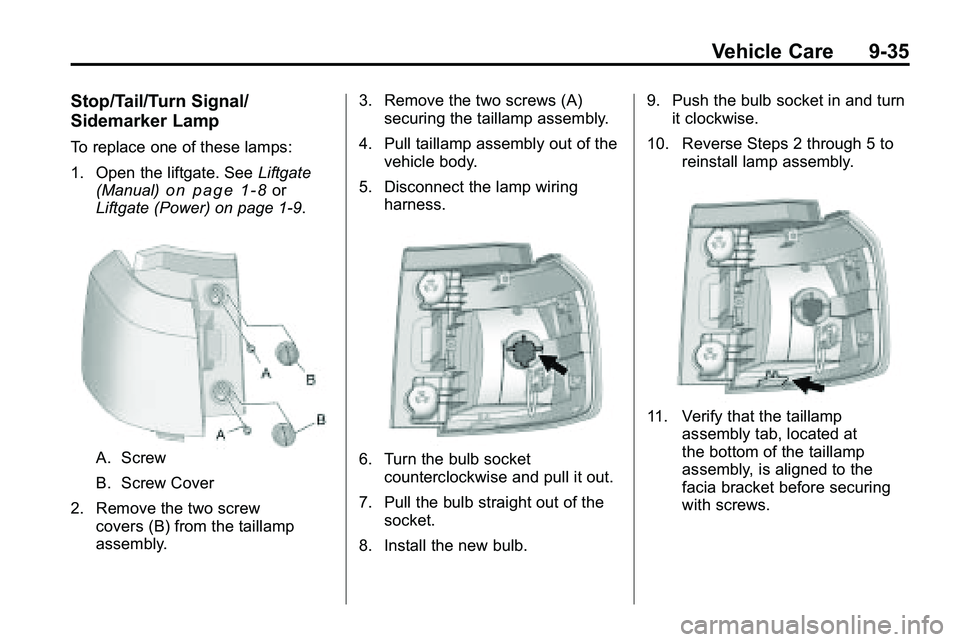
A. Stop/Tail/Turn Signal/Sidemarker Lamp
B. Auxiliary Taillamp
C. Back-up Lamp
Page 309 of 410
Vehicle Care 9-35
Stop/Tail/Turn Signal/
Sidemarker Lamp
To replace one of these lamps:
1. Open the liftgate. SeeLiftgate
(Manual)
on page 1‑8or
Liftgate (Power) on page 1‑9.
A. Screw
B. Screw Cover
2. Remove the two screw covers (B) from the taillamp
assembly. 3. Remove the two screws (A)
securing the taillamp assembly.
4. Pull taillamp assembly out of the vehicle body.
5. Disconnect the lamp wiring harness.6. Turn the bulb socketcounterclockwise and pull it out.
7. Pull the bulb straight out of the socket.
8. Install the new bulb. 9. Push the bulb socket in and turn
it clockwise.
10. Reverse Steps 2 through 5 to reinstall lamp assembly.
11. Verify that the taillampassembly tab, located at
the bottom of the taillamp
assembly, is aligned to the
facia bracket before securing
with screws.
Page 310 of 410
9-36 Vehicle Care
Auxiliary Taillamp
To replace one of these lamps:
1. Open the liftgate. SeeLiftgate
(Manual)
on page 1‑8or
Liftgate (Power) on page 1‑9.
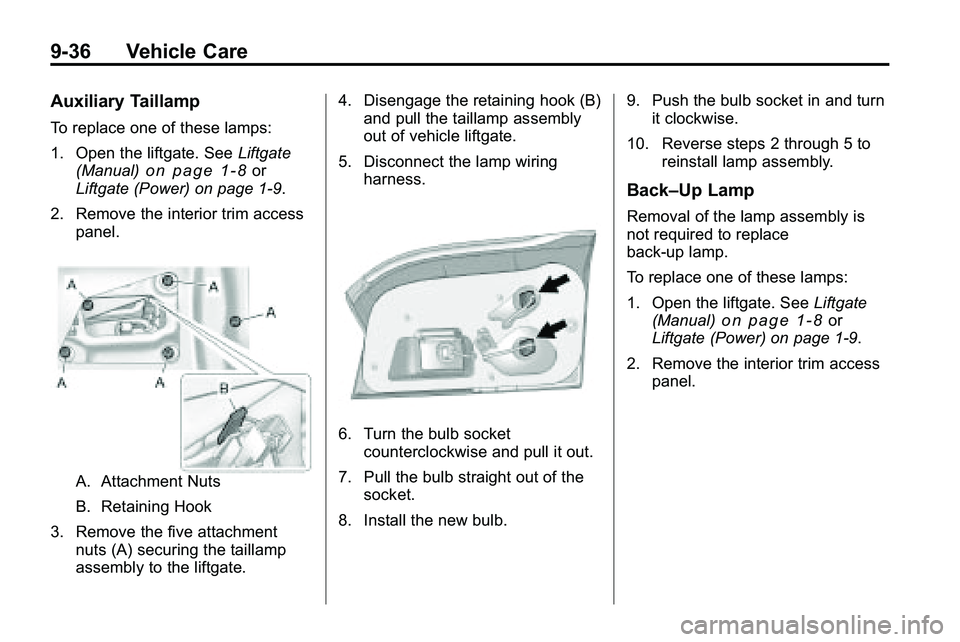
2. Remove the interior trim access panel.
A. Attachment Nuts
B. Retaining Hook
3. Remove the five attachment nuts (A) securing the taillamp
assembly to the liftgate. 4. Disengage the retaining hook (B)
and pull the taillamp assembly
out of vehicle liftgate.
5. Disconnect the lamp wiring harness.
6. Turn the bulb socketcounterclockwise and pull it out.
7. Pull the bulb straight out of the socket.
8. Install the new bulb. 9. Push the bulb socket in and turn
it clockwise.
10. Reverse steps 2 through 5 to reinstall lamp assembly.
Back–Up Lamp
Removal of the lamp assembly is
not required to replace
back-up lamp.
To replace one of these lamps:
1. Open the liftgate. See Liftgate
(Manual)
on page 1‑8or
Liftgate (Power) on page 1‑9.
2. Remove the interior trim access panel.