wheel GMC YUKON DENALI 2010 Owner's Manual
[x] Cancel search | Manufacturer: GMC, Model Year: 2010, Model line: YUKON DENALI, Model: GMC YUKON DENALI 2010Pages: 560, PDF Size: 4.32 MB
Page 151 of 560
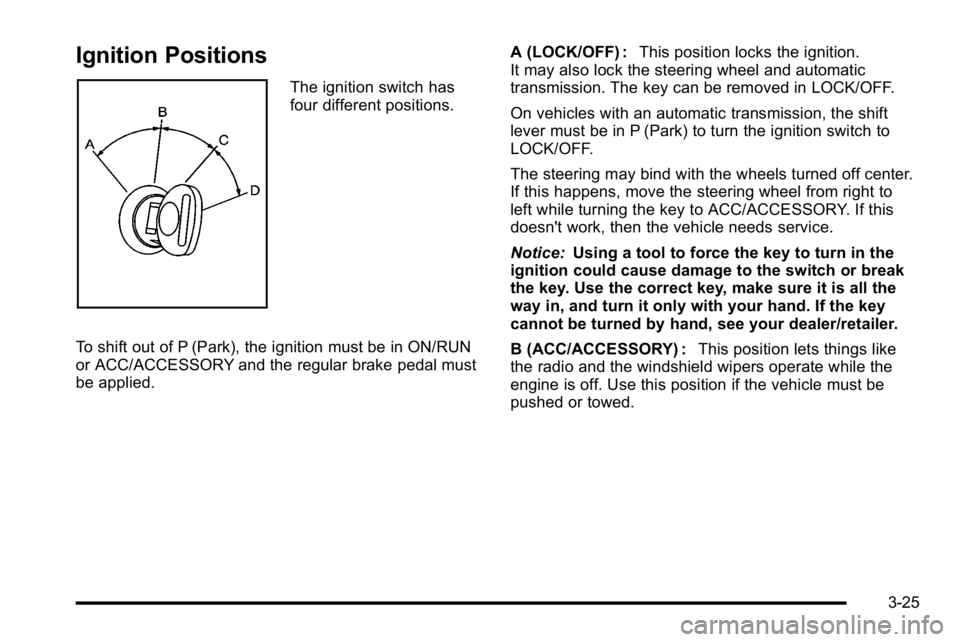
Ignition Positions
The ignition switch has
four different positions.
To shift out of P (Park), the ignition must be in ON/RUN
or ACC/ACCESSORY and the regular brake pedal must
be applied. A (LOCK/OFF) :
This position locks the ignition.
It may also lock the steering wheel and automatic
transmission. The key can be removed in LOCK/OFF.
On vehicles with an automatic transmission, the shift
lever must be in P (Park) to turn the ignition switch to
LOCK/OFF.
The steering may bind with the wheels turned off center.
If this happens, move the steering wheel from right to
left while turning the key to ACC/ACCESSORY. If this
doesn't work, then the vehicle needs service.
Notice: Using a tool to force the key to turn in the
ignition could cause damage to the switch or break
the key. Use the correct key, make sure it is all the
way in, and turn it only with your hand. If the key
cannot be turned by hand, see your dealer/retailer.
B (ACC/ACCESSORY) : This position lets things like
the radio and the windshield wipers operate while the
engine is off. Use this position if the vehicle must be
pushed or towed.
3-25
Page 156 of 560
Automatic Transmission Operation
The vehicle has a Hydra-Matic®6L80 automatic
transmission, and has an electronic shift position
indicator within the instrument panel cluster.
The electronic shift position indicator displays when
the shift lever is moved out of P (Park).
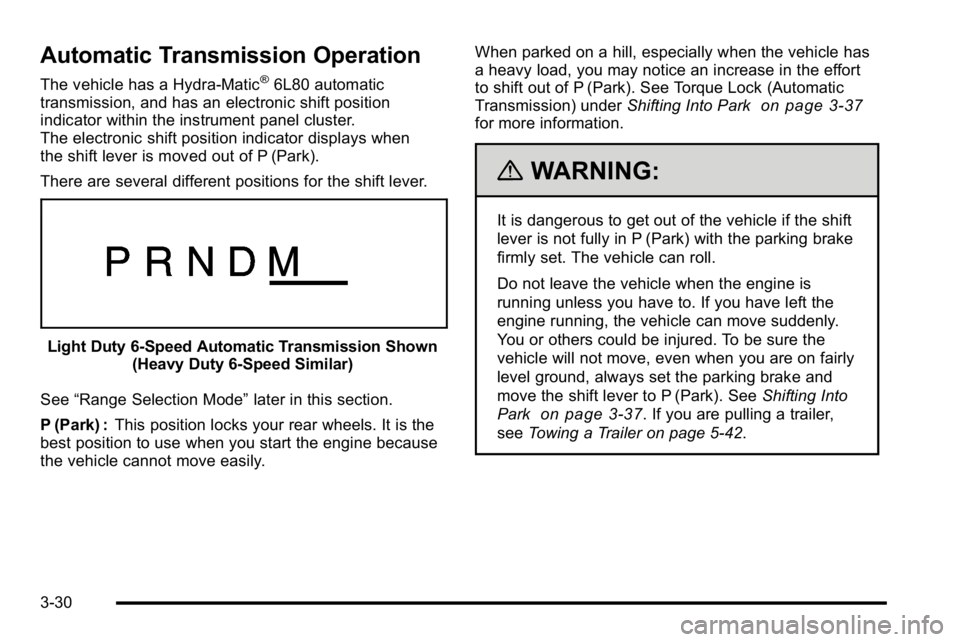
There are several different positions for the shift lever.
Light Duty 6‐Speed Automatic Transmission Shown (Heavy Duty 6‐Speed Similar)
See “Range Selection Mode” later in this section.
P (Park) : This position locks your rear wheels. It is the
best position to use when you start the engine because
the vehicle cannot move easily. When parked on a hill, especially when the vehicle has
a heavy load, you may notice an increase in the effort
to shift out of P (Park). See Torque Lock (Automatic
Transmission) under
Shifting Into Park
on page 3‑37for more information.
{WARNING:
It is dangerous to get out of the vehicle if the shift
lever is not fully in P (Park) with the parking brake
firmly set. The vehicle can roll.
Do not leave the vehicle when the engine is
running unless you have to. If you have left the
engine running, the vehicle can move suddenly.
You or others could be injured. To be sure the
vehicle will not move, even when you are on fairly
level ground, always set the parking brake and
move the shift lever to P (Park). See Shifting Into
Park
on page 3‑37. If you are pulling a trailer,
see Towing a Trailer on page 5‑42.
3-30
Page 157 of 560
R (Reverse) :Use this gear to back up.
Notice: Shifting to R (Reverse) while the vehicle is
moving forward could damage the transmission.
The repairs would not be covered by the vehicle
warranty. Shift to R (Reverse) only after the vehicle
is stopped.
To rock the vehicle back and forth to get out of snow,
ice, or sand without damaging the transmission, see If
Your Vehicle is Stuck in Sand, Mud, Ice, or Snow
on
page 5‑29.
N (Neutral) : In this position, the engine does not
connect with the wheels. To restart the engine when the
vehicle is already moving, use N (Neutral) only. Also,
use N (Neutral) when the vehicle is being towed.
{WARNING:
Shifting into a drive gear while the engine is
running at high speed is dangerous. Unless your
foot is firmly on the brake pedal, the vehicle could
move very rapidly. You could lose control and hit
people or objects. Do not shift into a drive gear
while the engine is running at high speed. Notice:
Shifting out of P (Park) or N (Neutral) with
the engine running at high speed may damage the
transmission. The repairs would not be covered by
the vehicle warranty. Be sure the engine is not
running at high speed when shifting the vehicle.
D (Drive) : This position is for normal driving. It provides
the best fuel economy for the vehicle. If you need more
power for passing, and you are:
.Going less than about 35 mph (55 km/h), push the
accelerator pedal about halfway down.
.Going about 35 mph (55 km/h) or more, push the
accelerator all the way down.
D (Drive) can be used when towing a trailer, carrying a
heavy load, driving on steep hills, or for off-road driving.
You may want to shift the transmission to a lower gear
selection if the transmission shifts too often.
Downshifting the transmission in slippery road
conditions could result in skidding, see “Skidding”
under Loss of Control on page 5‑11.
3-31
Page 190 of 560
Don't exceed the maximum vehicle capacity when
loading the vehicle. For more information on vehicle
capacity and loading, seeLoading the Vehicle
on
page 5‑31.
Be sure the cargo is properly loaded.
.If small heavy objects are placed on the roof, place
the load in the area over the rear wheels (behind
the rear side door on Yukon XL Denali models).
If needed, cut a piece of 3/8 inch plywood to fit
inside the crossrails and siderails to spread the
load. If plywood is used, tie it to the siderail
supports.
.Tie the load to the crossrails or the siderail
supports. Use the crossrails only to keep the load
from sliding. To move the crossrails, pull out on
the latch release handle at each end. Slide the
crossrail to the desired position balancing the force
side to side. Push the release handle back into the
latched position and slide the crossrail back and
forth slightly to be sure the latch snaps securely
into place.
.If needed to carry long items, move the crossrails
as far apart as possible. Tie the load to the
crossrails and the siderails or siderail supports.
Also tie the load to the bumpers, but do not tie the
load so tightly that the crossrails or siderails are
damaged.
.To reduce wind noise, put the front crossrail
approximately 18 to 24 inches (46 to 58 cm) to the
front supports.
.After moving a crossrail, be sure it is securely
locked into the siderail.
A Center High-Mounted Stoplamp (CHMSL) is located
above the rear window. Make sure items are loaded on
the roof of the vehicle, do not block or damage the
CHMSL.
To prevent damage or loss of cargo while driving,
periodically stop and check to make sure the luggage
and cargo is still securely fastened.
Rear Storage Area
For vehicles with a rear storage area, it is located in the
rear cargo area of the vehicle on the driver's side trim
panel.
Turn the knobs and swing the storage door to access
the storage compartment. The door can be removed.
Convenience Net
Use the convenience net, located in the rear, to store
small loads as far forward as possible. The net should
not be used to store heavy loads.
3-64
Page 191 of 560
Cargo Cover
{WARNING:
An improperly stored cargo cover could be thrown
about the vehicle during a collision or sudden
maneuver. Someone could be injured. If the cover
is removed, always store it in the proper storage
location. When it is replaced, always be sure that
it is securely reattached.
To use the cargo cover, if equipped: 1. Pull the cover handle toward the rear of the vehicle.
2. Latch the cover posts into the retaining sockets on the cargo area trim panels.
To return the cover to the retracted position: 1. Pull up on the cover handle to release the cover posts from the retaining sockets.
2. Let the cover move forward to the full retracted position. To remove the cover from a regular wheelbase model:
1. Let the cover go all the way into the holder.
2. Then, grasping the driver's side cover end cap, push the cover end cap toward the passenger side
of the vehicle.
3. Swing the cover rearward and take it out of the vehicle.
To put the cover in the vehicle: 1. Make sure the cover slot in the holder faces rearward with the round surface facing down.
2. Then, hold the cover at an angle and place the cover end cap into the slot in the passenger side
trim panel.
3. Move the other end of the cover forward and hold it next to the driver's side trim panel slot.
4. Press the end caps in, to allow the cover to fit into the trim slot.
5. Pull lightly on the cover holder to make sure it is secure.
On extended wheelbase models there are two
cover positions. The slots furthest forward allow
the cover to be used if the third seat is removed or
folded down. The cover can be installed and
removed from either side.
3-65
Page 195 of 560
Section 4 Instrument Panel
Instrument Panel Overview. . . . . . . . . . . . . . . . . . . . . . . .4-3
Hazard Warning Flashers . . . . . . . . . . . . . . . . . . . . . . . 4-3
Horn . . . . . . . . . . . . . . . . . . . . . . . . . . . . . . . . . . . . . . . . . . . . 4-3
Tilt Wheel . . . . . . . . . . . . . . . . . . . . . . . . . . . . . . . . . . . . . . . 4-3
Heated Steering Wheel . . . . . . . . . . . . . . . . . . . . . . . . . 4-4
Turn Signal/Multifunction Lever . . . . . . . . . . . . . . . . . . 4-4
Turn and Lane-Change Signals . . . . . . . . . . . . . . . . . 4-5
Headlamp High/Low-Beam Changer . . . . . . . . . . . . 4-5
Flash-to-Pass . . . . . . . . . . . . . . . . . . . . . . . . . . . . . . . . . . . 4-6
Windshield Wipers . . . . . . . . . . . . . . . . . . . . . . . . . . . . . . 4-6
Windshield Washer . . . . . . . . . . . . . . . . . . . . . . . . . . . . . 4-7
Rear Window Wiper/Washer . . . . . . . . . . . . . . . . . . . . 4-7
Cruise Control . . . . . . . . . . . . . . . . . . . . . . . . . . . . . . . . . . 4-8
Exterior Lamps . . . . . . . . . . . . . . . . . . . . . . . . . . . . . . . . . 4-11
Headlamps on Reminder . . . . . . . . . . . . . . . . . . . . . . 4-12
Daytime Running Lamps (DRL) . . . . . . . . . . . . . . . . 4-12
Automatic Headlamp System . . . . . . . . . . . . . . . . . . 4-13
Fog Lamps . . . . . . . . . . . . . . . . . . . . . . . . . . . . . . . . . . . . 4-14
Instrument Panel Brightness . . . . . . . . . . . . . . . . . . . 4-14
Dome Lamps . . . . . . . . . . . . . . . . . . . . . . . . . . . . . . . . . . 4-14
Dome Lamp Override . . . . . . . . . . . . . . . . . . . . . . . . . . 4-14
Entry Lighting . . . . . . . . . . . . . . . . . . . . . . . . . . . . . . . . . . 4-15
Exit Lighting . . . . . . . . . . . . . . . . . . . . . . . . . . . . . . . . . . . 4-15
Front Reading Lamps . . . . . . . . . . . . . . . . . . . . . . . . . . 4-15
Electric Power Management . . . . . . . . . . . . . . . . . . . 4-15 Battery Run-Down Protection . . . . . . . . . . . . . . . . . . 4-16
Accessory Power Outlet(s) . . . . . . . . . . . . . . . . . . . . . 4-16
Ashtray(s) and Cigarette Lighter . . . . . . . . . . . . . . . 4-17
Climate Controls . . . . . . . . . . . . . . . . . . . . . . . . . . . . . . . . . . 4-18
Dual Automatic Climate Control System . . . . . . . 4-18
Outlet Adjustment . . . . . . . . . . . . . . . . . . . . . . . . . . . . . . 4-23
Rear Air Conditioning and Heating System
and Electronic Climate Controls . . . . . . . . . . . . . 4-24
Warning Lights, Gages, and Indicators . . . . . . . . . .4-25
Instrument Panel Cluster . . . . . . . . . . . . . . . . . . . . . . . 4-26
Speedometer and Odometer . . . . . . . . . . . . . . . . . . . 4-27
Trip Odometer . . . . . . . . . . . . . . . . . . . . . . . . . . . . . . . . . 4-27
Tachometer . . . . . . . . . . . . . . . . . . . . . . . . . . . . . . . . . . . . 4-27
Safety Belt Reminders . . . . . . . . . . . . . . . . . . . . . . . . . 4-27
Airbag Readiness Light . . . . . . . . . . . . . . . . . . . . . . . . 4-28
Passenger Airbag Status Indicator . . . . . . . . . . . . . 4-29
Charging System Light . . . . . . . . . . . . . . . . . . . . . . . . 4-30
Voltmeter Gage . . . . . . . . . . . . . . . . . . . . . . . . . . . . . . . . 4-31
Brake System Warning Light . . . . . . . . . . . . . . . . . . . 4-32
Antilock Brake System (ABS) Warning Light . . . 4-33
StabiliTrak
®Indicator Light . . . . . . . . . . . . . . . . . . . . . 4-33
Engine Coolant Temperature Gage . . . . . . . . . . . . 4-34
Tire Pressure Light . . . . . . . . . . . . . . . . . . . . . . . . . . . . 4-34
Malfunction Indicator Lamp . . . . . . . . . . . . . . . . . . . . 4-35
Oil Pressure Gage . . . . . . . . . . . . . . . . . . . . . . . . . . . . . 4-38
4-1
Page 196 of 560
Section 4 Instrument Panel
Oil Pressure Light . . . . . . . . . . . . . . . . . . . . . . . . . . . . . 4-39
Security Light . . . . . . . . . . . . . . . . . . . . . . . . . . . . . . . . . . 4-39
Fog Lamp Light . . . . . . . . . . . . . . . . . . . . . . . . . . . . . . . . 4-40
Cruise Control Light . . . . . . . . . . . . . . . . . . . . . . . . . . . 4-40
Highbeam On Light . . . . . . . . . . . . . . . . . . . . . . . . . . . . 4-40
Tow/Haul Mode Light . . . . . . . . . . . . . . . . . . . . . . . . . . 4-40
Fuel Gage . . . . . . . . . . . . . . . . . . . . . . . . . . . . . . . . . . . . . 4-41
Low Fuel Warning Light . . . . . . . . . . . . . . . . . . . . . . . . 4-42
Driver Information Center (DIC) . . . . . . . . . . . . . . . . . .4-42
DIC Operation and Displays (Using DIC Buttons) . . . . . . . . . . . . . . . . . . . . . . . . . 4-43
DIC Operation and Displays (Using Trip Odometer Reset Stem) . . . . . . . . . . 4-50
DIC Compass . . . . . . . . . . . . . . . . . . . . . . . . . . . . . . . . . . 4-53
DIC Warnings and Messages . . . . . . . . . . . . . . . . . . 4-56
DIC Vehicle Customization (With DIC Buttons) . . . . . . . . . . . . . . . . . . . . . . . . . . 4-66 Audio System(s)
. . . . . . . . . . . . . . . . . . . . . . . . . . . . . . . . . . 4-75
Setting the Clock . . . . . . . . . . . . . . . . . . . . . . . . . . . . . . 4-76
Radio(s) . . . . . . . . . . . . . . . . . . . . . . . . . . . . . . . . . . . . . . . 4-77
Using an MP3 (Radios with CD) . . . . . . . . . . . . . . . 4-94
Using an MP3 (Radios with CD and DVD) . . . . 4-101
XM Radio Messages . . . . . . . . . . . . . . . . . . . . . . . . . 4-108
Navigation/Radio System . . . . . . . . . . . . . . . . . . . . . 4-110
Bluetooth
®. . . . . . . . . . . . . . . . . . . . . . . . . . . . . . . . . . . . 4-110
Rear Seat Entertainment (RSE) System . . . . . . 4-120
Rear Seat Audio (RSA) . . . . . . . . . . . . . . . . . . . . . . . 4-130
Theft-Deterrent Feature . . . . . . . . . . . . . . . . . . . . . . 4-132
Audio Steering Wheel Controls . . . . . . . . . . . . . . . 4-132
Radio Reception . . . . . . . . . . . . . . . . . . . . . . . . . . . . . . 4-135
Rear Side Window Antenna . . . . . . . . . . . . . . . . . . 4-136
XM™ Satellite Radio Antenna System . . . . . . . . 4-136
4-2
Page 197 of 560
Instrument Panel Overview
Hazard Warning Flashers
|(Hazard Warning Flasher):Press this button
located on top of the steering column, to make the front
and rear turn signal lamps flash on and off. This warns
others that you are having trouble. Press again to turn
the flashers off.
When the hazard warning flashers are on, the vehicle's
turn signals will not work.
Horn
To sound the horn, press the center pad on the steering
wheel.
Tilt Wheel
The power tilt wheel control is located on the left side of
the steering column.
Push the control up or down to tilt the steering wheel
up or down.
To set the memory position, see DIC Vehicle
Customization (With DIC Buttons) on page 4‑66.
4-3
Page 198 of 560
Heated Steering Wheel
For vehicles with a heated steering wheel, the button for
this feature is located on the steering wheel.
(:Press to turn the heated steering wheel on or off.
A light on the button displays when the feature is
turned on.
The steering wheel takes about three minutes to start
heating.
Turn Signal/Multifunction Lever
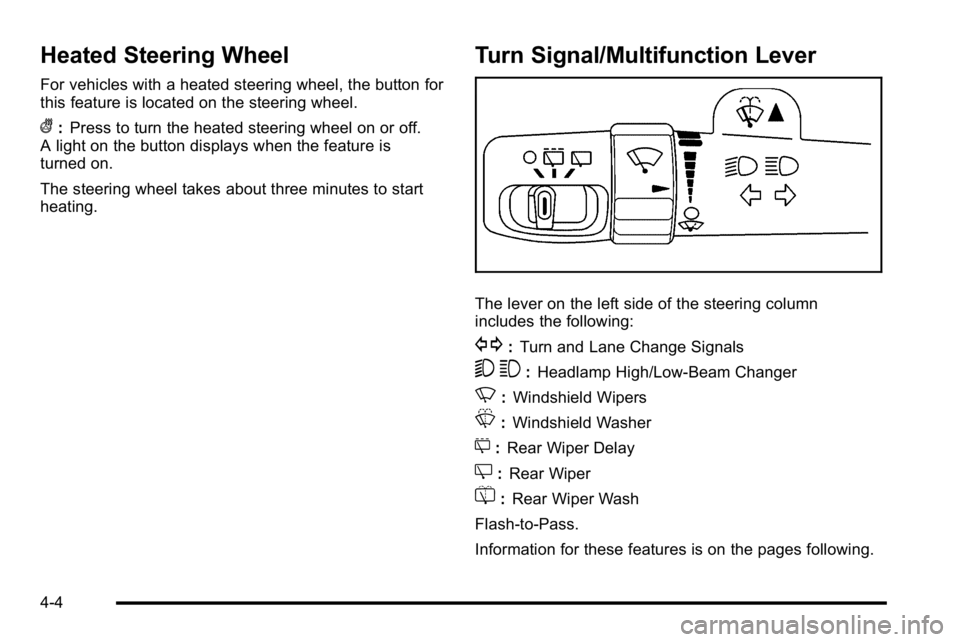
The lever on the left side of the steering column
includes the following:
G: Turn and Lane Change Signals
5 3:Headlamp High/Low-Beam Changer
N:Windshield Wipers
L:Windshield Washer
5:Rear Wiper Delay
Z:Rear Wiper
=:Rear Wiper Wash
Flash-to-Pass.
Information for these features is on the pages following.
4-4
Page 202 of 560
The rear window wiper/washer will not operate if the
liftgate or liftglass is open or ajar. If the liftgate or
liftglass is opened while the rear wiper is on, the wiper
will return to the parked position and stop.
Cruise Control
{WARNING:
Cruise control can be dangerous where you
cannot drive safely at a steady speed. So, do not
use the cruise control on winding roads or in
heavy traffic.
Cruise control can be dangerous on slippery
roads. On such roads, fast changes in tire traction
can cause excessive wheel slip, and you could
lose control. Do not use cruise control on slippery
roads.With cruise control, a speed of about 40 km/h (25 mph)
or more can be maintained without keeping your foot on
the accelerator. Cruise control does not work at speeds
below about 40 km/h (25 mph).
When the brakes are applied, the cruise control
turns off.
For vehicles with an Allison
®or Hydra‐Matic 6‐speed
automatic transmission, see “Grade Braking and Cruise
Grade Braking (Allison Transmission) under Tow/Haul
Mode
on page 3‑34for an explanation of how cruise
control interacts with the Range Selection Mode,
tow/haul and grade braking systems.
For vehicles with the StabiliTrak
®system, if it begins to
limit wheel spin while the cruise control is being used,
the cruise control will automatically disengage. See
StabiliTrak
®Systemon page 5‑6. When road
conditions allow the cruise control to be safely used
again, it can be turned back on.
4-8