Lash HONDA ACCORD 2014 9.G Owners Manual
[x] Cancel search | Manufacturer: HONDA, Model Year: 2014, Model line: ACCORD, Model: HONDA ACCORD 2014 9.GPages: 595
Page 11 of 595
10Quick Reference Guide
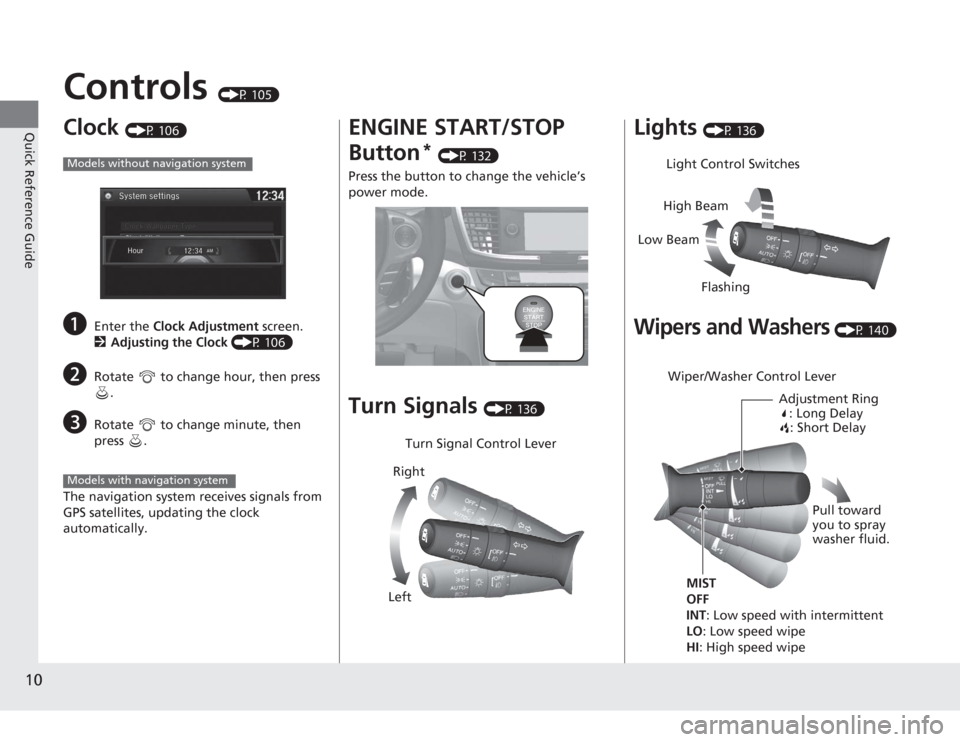
Controls
(P 105)
Clock
(P 106)
a
Enter the Clock Adjustment screen.
2 Adjusting the Clock (P 106)
b
Rotate to change hour, then press
.
c
Rotate to change minute, then
press .
The navigation system receives signals from
GPS satellites, updating the clock
automatically.
Models without navigation systemModels with navigation system
ENGINE START/STOP
Button
* (P 132)
Press the button to change the vehicle’s
power mode.
Turn Signals
(P 136)
Turn Signal Control Lever
Right
Left
Lights
(P 136)
Wipers and Washers
(P 140)
Light Control Switches
Low Beam High Beam
FlashingWiper/Washer Control Lever Adjustment Ring: Long Delay: Short Delay
MIST
OFF
INT: Low speed with intermittent
LO : Low speed wipe
HI: High speed wipe Pull toward
you to spray
washer fluid.
Page 88 of 595
87
uuIndicators uMulti-Information Display Wa rning and Information Messages
*
Continued
Instrument Panel
Message
Condition
Explanation
●
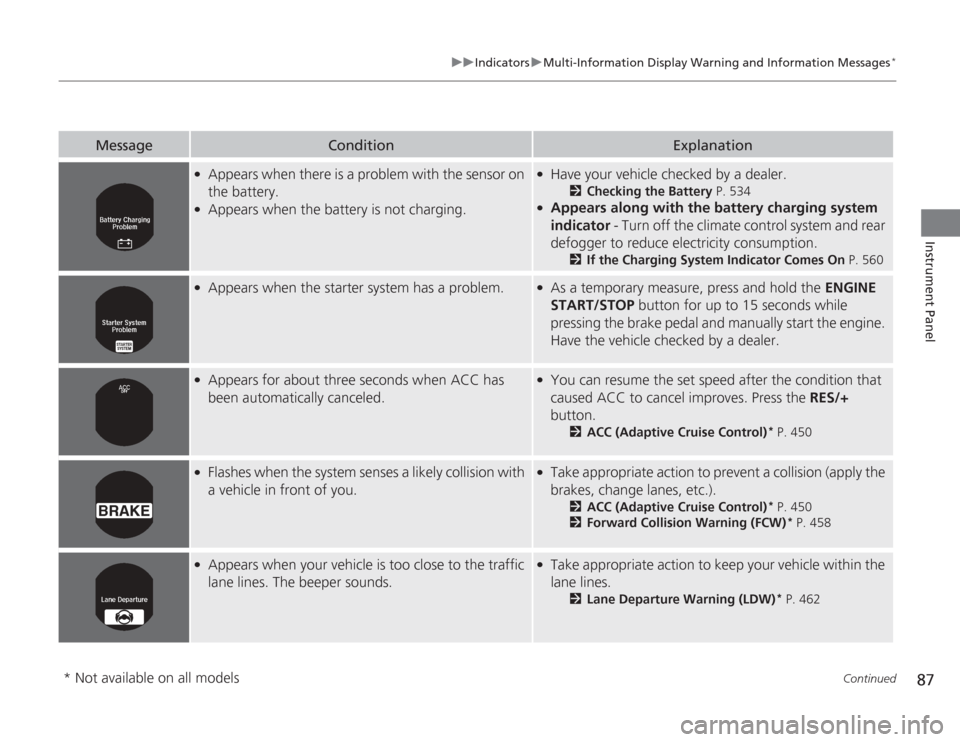
Appears when there is a problem with the sensor on
the battery.
●
Appears when the battery is not charging.
●
Have your vehicle checked by a dealer.
2Checking the Battery P. 534
●
Appears along with the battery charging system
indicator - Turn off the climate control system and rear
defogger to reduce electricity consumption.
2 If the Charging System Indicator Comes On P. 560
●
Appears when the starter system has a problem.
●
As a temporary measure, press and hold the ENGINE
START/STOP button for up to 15 seconds while
pressing the brake pedal and manually start the engine.
Have the vehicle checked by a dealer.
●
Appears for about three seconds when ACC has
been automatically canceled.
●
You can resume the set speed after the condition that
caused ACC to cancel improves. Press the RES/+
button.
2 ACC (Adaptive Cruise Control)
* P. 450
●
Flashes when the system senses a likely collision with
a vehicle in front of you.
●
Take appropriate action to prevent a collision (apply the
brakes, change lanes, etc.).
2ACC (Adaptive Cruise Control)
* P. 450
2 Forward Collision Warning (FCW)
* P. 458
●
Appears when your vehicle is too close to the traffic
lane lines. The beeper sounds.
●
Take appropriate action to keep your vehicle within the
lane lines.
2Lane Departure Warning (LDW)
* P. 462
* Not available on all models
Page 99 of 595
98
uuGauges and Displays uMulti-Information Display
*
Instrument Panel
■
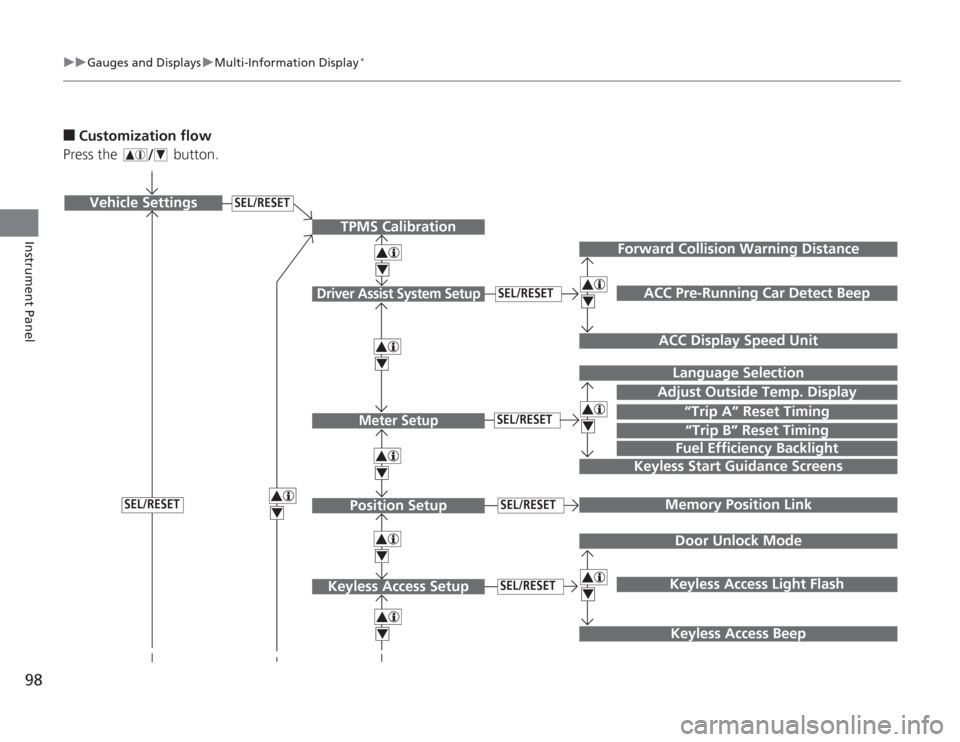
Customization flow
Press the button.
SEL/RESET
Vehicle Settings
“Trip A” Reset TimingLanguage Selection
Adjust Outside Temp. DisplayMemory Position LinkDoor Unlock ModeKeyless Access Light Flash
4444
TPMS Calibration
Driver Assist System Setup
Meter SetupPosition Setup
Keyless Access Setup
SEL/RESETSEL/RESETSEL/RESETSEL/RESET
“Trip B” Reset TimingFuel Efficiency Backlight
4
ACC Pre-Running Car Detect Beep
ACC Display Speed Unit
4
Keyless Start Guidance Screens
SEL/RESET
Keyless Access Beep
Forward Collision Warning Distance
444
Page 102 of 595
101
uuGauges and Displays uMulti-Information Display
*
Continued
Instrument Panel
*1: Default SettingSetup Group Customizable Features Description Selectable Settings
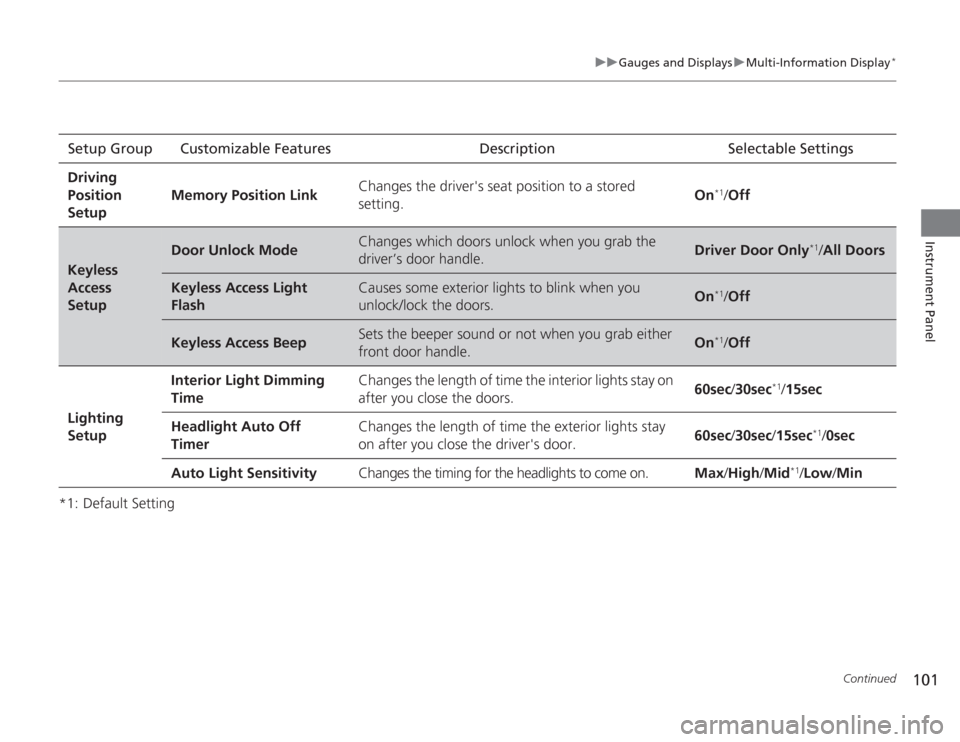
Driving
Position
Setup Memory Position Link
Changes the driver's seat position to a stored
setting.
On
*1/
Off
Keyless
Access
Setup
Door Unlock Mode
Changes which doors unlock when you grab the
driver’s door handle.
Driver Door Only
*1/All Doors
Keyless Access Light
Flash
Causes some exterior lights to blink when you
unlock/lock the doors.
On
*1/ Off
Keyless Access Beep
Sets the beeper sound or not when you grab either
front door handle.
On
*1/Off
Lighting
Setup Interior Light Dimming
Time
Changes the length of time the interior lights stay on
after you close the doors.
60sec
/30sec
*1/15sec
Headlight Auto Off
Timer Changes the length of time the exterior lights stay
on after you close the driver's door.
60sec
/30sec /15sec
*1/ 0sec
Auto Light Sensitivity Changes the timing for the headlights to come on. Max/High /Mid
*1/Low /Min
Page 103 of 595
102
uuGauges and Displays uMulti-Information Display
*
Instrument Panel
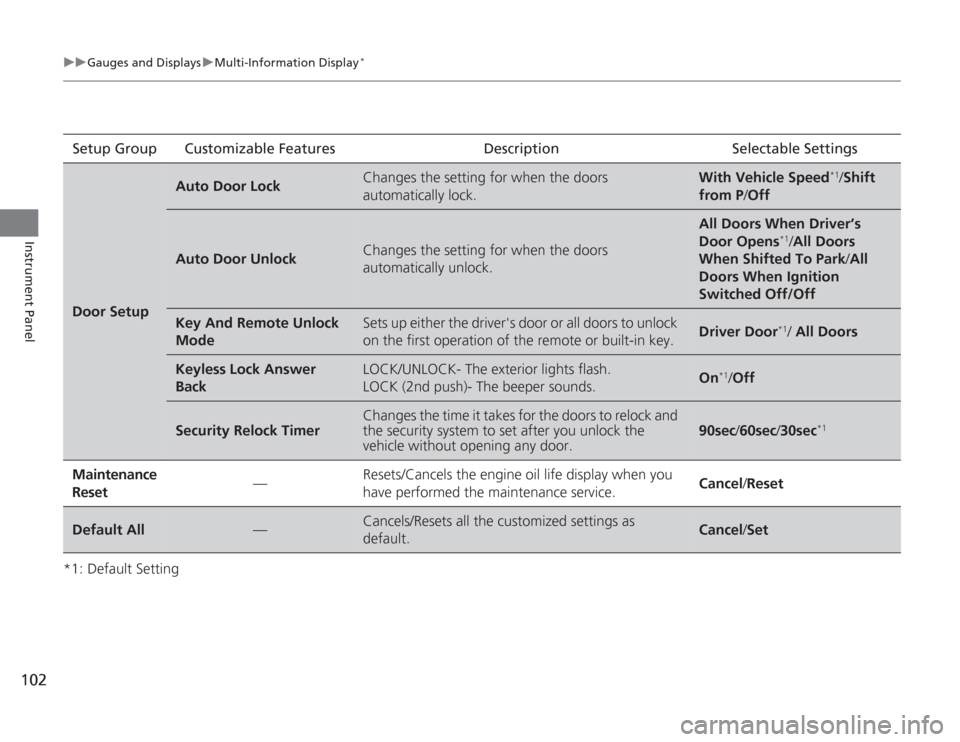
*1: Default SettingSetup Group Customizable Features Description Selectable SettingsDoor Setup
Auto Door Lock
Changes the setting for when the doors
automatically lock.
With Vehicle Speed
*1/
Shift
from P /Off
Auto Door Unlock
Changes the setting for when the doors
automatically unlock.
All Doors When Driver’s
Door Opens
*1/All Doors
When Shifted To Park /All
Doors When Ignition
Switched Off/Off
Key And Remote Unlock
Mode
Sets up either the driver's door or all doors to unlock
on the first operation of the remote or built-in key.
Driver Door
*1/ All Doors
Keyless Lock Answer
Back
LOCK/UNLOCK- The exterior lights flash.
LOCK (2nd push)- The beeper sounds.
On
*1/ Off
Security Relock Timer
Changes the time it takes for the doors to relock and
the security system to set after you unlock the
vehicle without opening any door.
90sec /60sec /30sec
*1
Maintenance
Reset
—
Resets/Cancels the engine oil life display when you
have performed the maintenance service.
Cancel /Reset
Default All
—
Cancels/Resets all the customized settings as
default.
Cancel /Set
Page 112 of 595
111
uuLocking and Unlocking the Doors uLocking/Unlocking the Doors from the Outside
Continued
Controls
Locking/Unlocking the Doors from the Outside
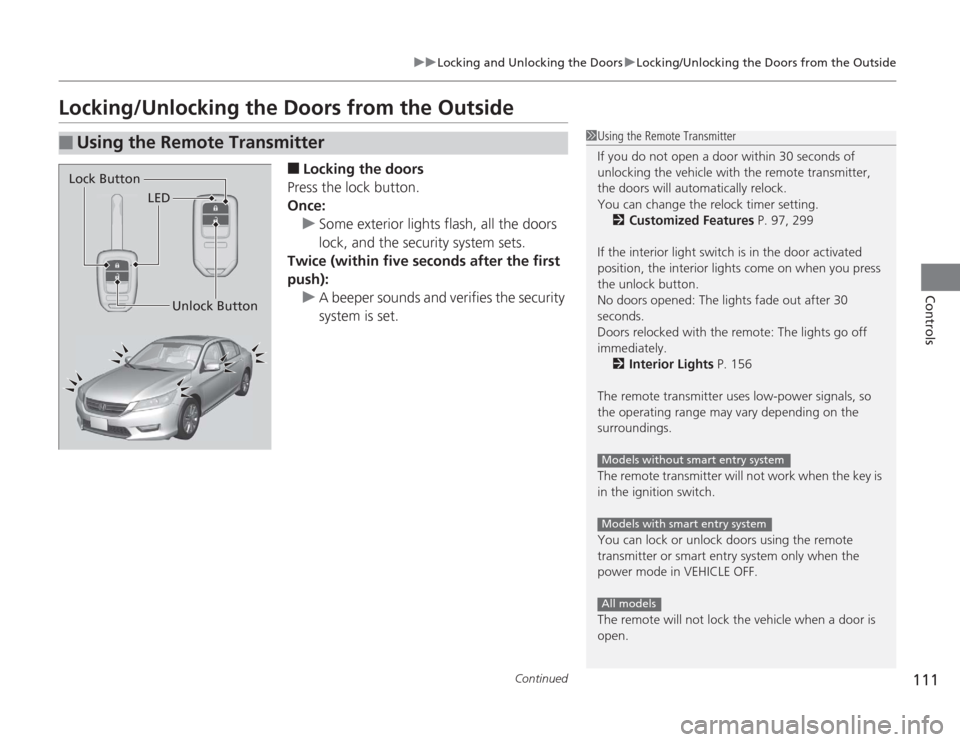
■
Locking the doors
Press the lock button.
Once: u Some exterior lights flash, all the doors
lock, and the security system sets.
Twice (within five seconds after the first
push):
u A beeper sounds and verifies the security
system is set.
■
Using the Remote Transmitter
1Using the Remote Transmitter
If you do not open a door within 30 seconds of
unlocking the vehicle with the remote transmitter,
the doors will automatically relock.
You can change the relock timer setting.
2 Customized Features P. 97, 299
If the interior light switch is in the door activated
position, the interior lights come on when you press
the unlock button.
No doors opened: The lights fade out after 30
seconds.
Doors relocked with the remote: The lights go off
immediately. 2 Interior Lights P. 156
The remote transmitter uses low-power signals, so
the operating range may vary depending on the
surroundings.
The remote transmitter will not work when the key is
in the ignition switch.
You can lock or unlock doors using the remote
transmitter or smart entry system only when the
power mode in VEHICLE OFF.
The remote will not lock the vehicle when a door is
open.
Models without smart entry systemModels with smart entry systemAll models
LED
Unlock Button
Lock Button
Page 113 of 595
uuLocking and Unlocking the Doors uLocking/Unlocking the Doors from the Outside
112Controls
■
Unlocking the doors
Press the unlock button.
Once: u Some exterior lights flash twice, and the driver's door unlocks.
Twice: u The remaining doors unlock.
1Using the Remote Transmitter
If the distance at which it works varies, the battery is
probably low.
If the LED does not come on when you press a
button, the battery is dead.
2 Replacing the Button Battery P. 535
You can customize the door unlock mode setting. 2 Customized Features P. 97, 299
Page 114 of 595
Continued
113
uuLocking and Unlocking the Doors uLocking/Unlocking the Doors from the Outside
Controls
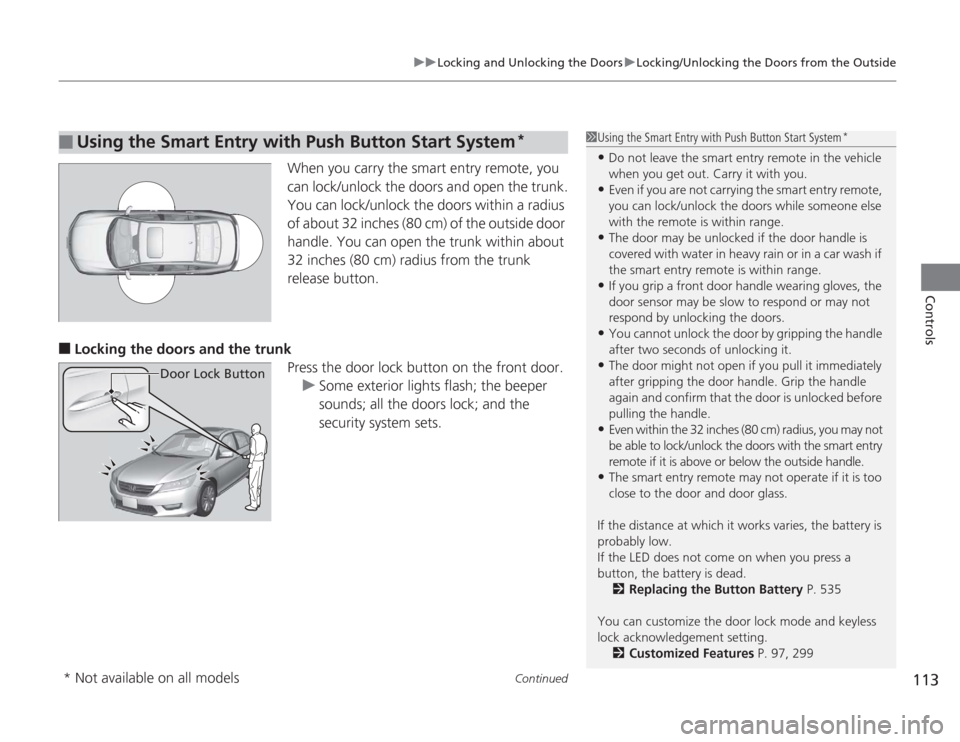
When you carry the smart entry remote, you
can lock/unlock the doors and open the trunk.
You can lock/unlock the doors within a radius
of about 32 inches (80 cm) of the outside door
handle. You can open the trunk within about
32 inches (80 cm) radius from the trunk
release button.
■
Locking the doors and the trunk
Press the door lock button on the front door.u Some exterior lights flash; the beeper
sounds; all the doors lock; and the
security system sets.
■
Using the Smart Entry with Push Button Start System
*
Door Lock Button
1Using the Smart Entry with Push Button Start System
*
•Do not leave the smart entry remote in the vehicle
when you get out. Carry it with you.•Even if you are not carrying the smart entry remote,
you can lock/unlock the doors while someone else
with the remote is within range.•The door may be unlocked if the door handle is
covered with water in heavy rain or in a car wash if
the smart entry remot e is within range.•If you grip a front door handle wearing gloves, the
door sensor may be slow to respond or may not
respond by unlocking the doors.•You cannot unlock the door by gripping the handle
after two seconds of unlocking it.•The door might not open if you pull it immediately
after gripping the door handle. Grip the handle
again and confirm that the door is unlocked before
pulling the handle.•Even within the 32 inches (80 cm) radius, you may not
be able to lock/unlock the doors with the smart entry
remote if it is above or below the outside handle.•The smart entry remote may not operate if it is too
close to the door and door glass.
If the distance at which it works varies, the battery is
probably low.
If the LED does not come on when you press a
button, the battery is dead. 2 Replacing the Button Battery P. 535
You can customize the door lock mode and keyless
lock acknowledgement setting. 2 Customized Features P. 97, 299
* Not available on all models
Page 115 of 595
uuLocking and Unlocking the Doors uLocking/Unlocking the Doors from the Outside
114Controls
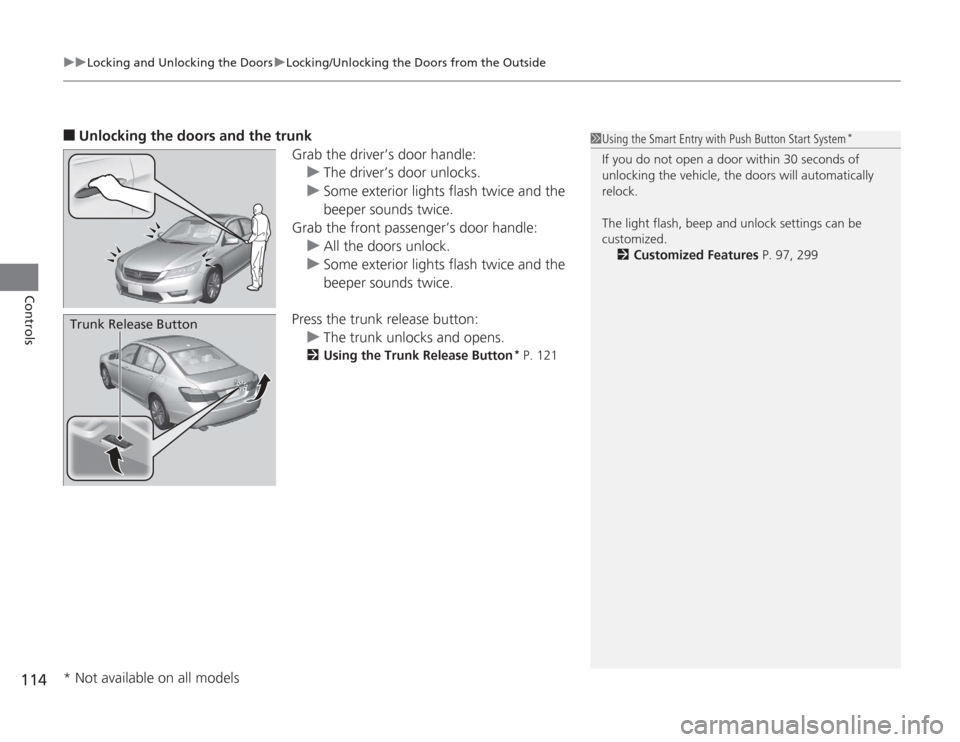
■
Unlocking the doors and the trunk
Grab the driver’s door handle:u The driver’s door unlocks.
u Some exterior lights flash twice and the
beeper sounds twice.
Grab the front passen ger’s door handle:
u All the doors unlock.
u Some exterior lights flash twice and the
beeper sounds twice.
Press the trunk release button: u The trunk unlocks and opens.
2 Using the Trunk Release Button
* P. 121
Trunk Release Button
1Using the Smart Entry with Push Button Start System
*
If you do not open a door within 30 seconds of
unlocking the vehicle, the doors will automatically
relock.
The light flash, beep and unlock settings can be
customized.
2 Customized Features P. 97, 299
* Not available on all models
Page 125 of 595
124Controls
Security SystemImmobilizer SystemThe immobilizer system prevents a key that has not been pre-registered from
starting the engine. Each key contains electronic transmitters that use electronic
signals to verify the key.
Pay attention to the following when inserting the key into the ignition switch or
pressing the ENGINE START/STOP button:
• Do not allow objects that emit strong radio waves near the ignition switch or the
ENGINE START/STOP button.
• Make sure the key is not covered by or touching a metal object.
• Do not bring a key from another vehicle's immobilizer system near the ignition
switch.Security System AlarmThe security system alarm activates when the doors, trunk, or hood are opened
without the key, remote transmitter, or smart entry system.■
When the security system alarm activates
The horn sounds intermittently and all of the exterior lights flash.
■
To deactivate the security system alarm
Unlock the vehicle using the key, remote transmitter, or smart entry system. The
system, along with the horn and flashing lights, is deactivated.
1 Immobilizer System
NOTICELeaving the ignition key in the vehicle can result in
theft or accidental movement of the vehicle.
Always take the ignition key with you whenever you
leave the vehicle unattended.
Do not alter the system or add other devices to it.
Doing so may damage the system and make your
vehicle inoperable.1Security System Alarm
The security alarm continues for a maximum of two
minutes until the security system deactivates.