light HONDA CIVIC COUPE 1999 User Guide
[x] Cancel search | Manufacturer: HONDA, Model Year: 1999, Model line: CIVIC COUPE, Model: HONDA CIVIC COUPE 1999Pages: 269, PDF Size: 2.42 MB
Page 55 of 269
Indicator Lights
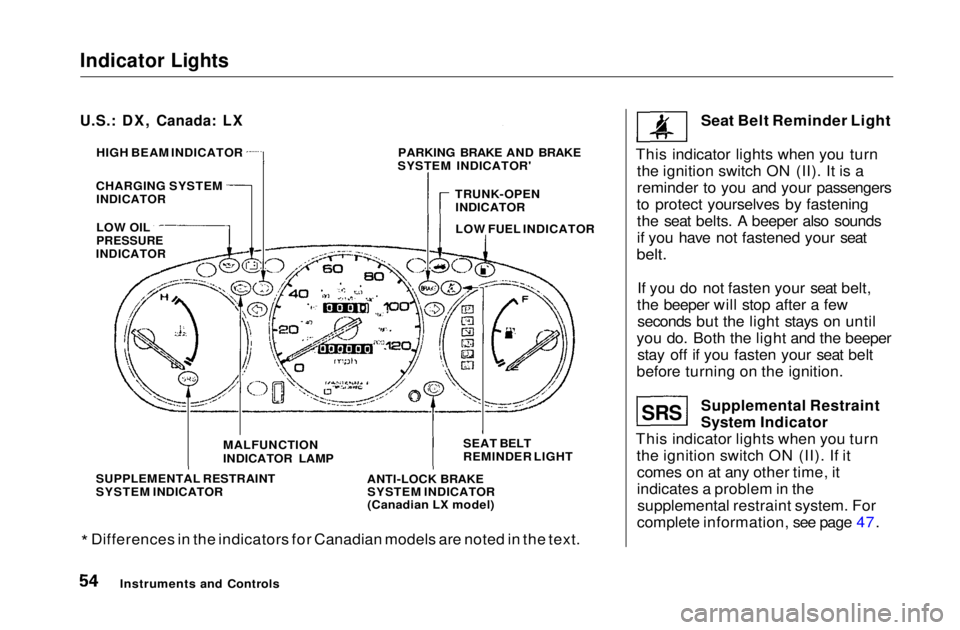
* Differences in the indicators for Canadian models are noted in the text. Seat Belt Reminder Light
This indicator lights when you turn the ignition switch ON (II). It is a
reminder to you and your passengers
to protect yourselves by fastening the seat belts. A beeper also sounds
if you have not fastened your seat
belt.
If you do not fasten your seat belt,
the beeper will stop after a few seconds but the light stays on until
you do. Both the light and the beeper stay off if you fasten your seat belt
before turning on the ignition.
Supplemental Restraint
System Indicator
This indicator lights when you turn the ignition switch ON (II). If itcomes on at any other time, it
indicates a problem in thesupplemental restraint system. For
complete information, see page 47.
Instruments and Controls
U.S.: DX, Canada: LX
HIGH BEAM INDICATOR
CHARGING SYSTEM
INDICATOR
LOW OIL
PRESSURE
INDICATOR
PARKING BRAKE AND BRAKE
SYSTEM INDICATOR'
TRUNK-OPENINDICATOR
LOW FUEL INDICATOR
SEAT BELT
REMINDER LIGHT
ANTI-LOCK BRAKE SYSTEM INDICATOR
(Canadian LX model)
MALFUNCTION
INDICATOR LAMP
SUPPLEMENTAL RESTRAINT
SYSTEM INDICATOR
SRSMain Menu Table of Contents s t
Page 56 of 269
Indicator Lights
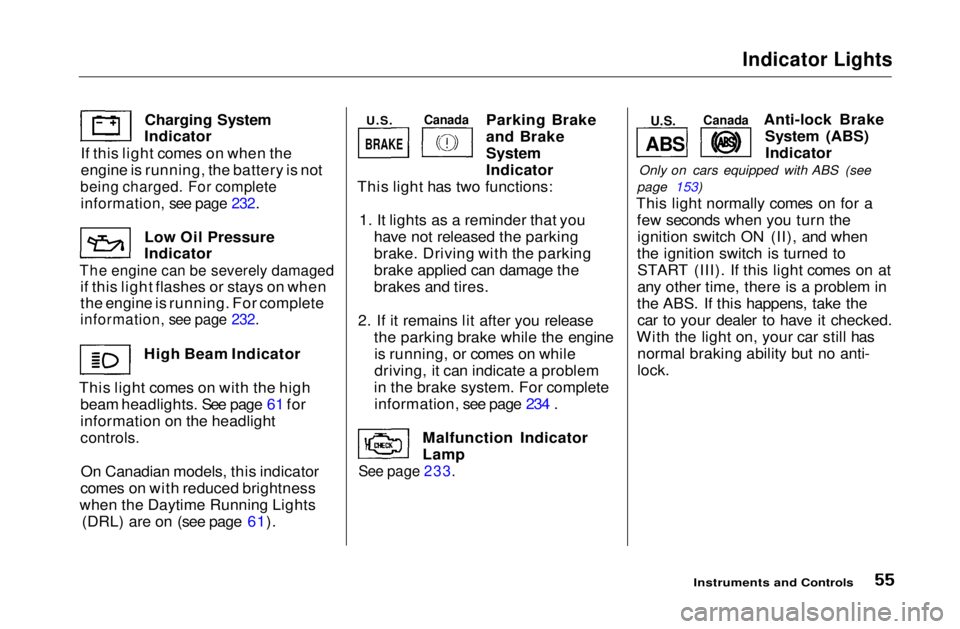
Charging System
Indicator
If this light comes on when the
engine is running, the battery is not
being charged. For complete
information, see page 232.
Low Oil Pressure
Indicator
The engine can be severely damaged
if this light flashes or stays on when
the engine is running. For complete
information, see page 232.
High Beam Indicator
This light comes on with the high beam headlights. See page 61 for
information on the headlight
controls.
On Canadian models, this indicator
comes on with reduced brightness
when the Daytime Running Lights (DRL) are on (see page 61). Parking Brake
and Brake
System
Indicator
This light has two functions:
1. It lights as a reminder that you have not released the parking
brake. Driving with the parking
brake applied can damage the
brakes and tires.
2. If it remains lit after you release the parking brake while the engineis running, or comes on while
driving, it can indicate a problem
in the brake system. For complete information, see page 234 .
Malfunction Indicator
Lamp
See page 233.
Anti-lock Brake
System (ABS)Indicator
Only on cars equipped with ABS (see
page 153)
This light normally comes on for a few seconds when you turn theignition switch ON (II), and when
the ignition switch is turned to START (III). If this light comes on at
any other time, there is a problem in
the ABS. If this happens, take the car to your dealer to have it checked.
With the light on, your car still has normal braking ability but no anti-
lock.
Instruments and Controls
U.S.
Canada
BRAKE
ABS
U.S.
CanadaMain Menu Table of Contents s t
Page 57 of 269
Indicator Lights
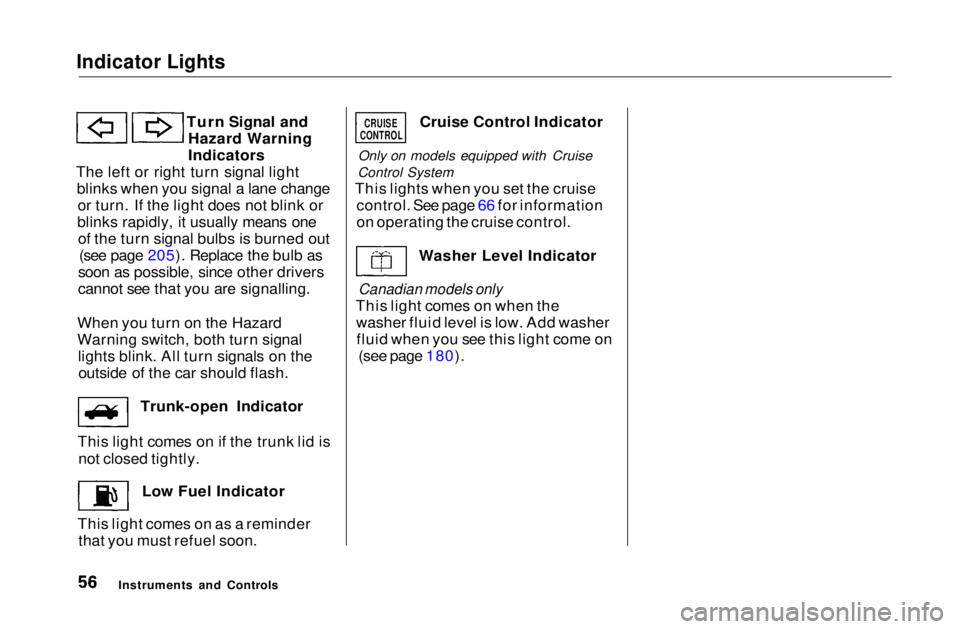
Turn Signal andHazard Warning
Indicators
The left or right turn signal light blinks when you signal a lane changeor turn. If the light does not blink or
blinks rapidly, it usually means one of the turn signal bulbs is burned out (see page 205). Replace the bulb as
soon as possible, since other drivers
cannot see that you are signalling.
When you turn on the Hazard
Warning switch, both turn signal lights blink. All turn signals on theoutside of the car should flash.
Trunk-open Indicator
This light comes on if the trunk lid is not closed tightly.
Low Fuel Indicator
This light comes on as a reminder that you must refuel soon. Cruise Control Indicator
Only on models equipped with Cruise
Control System
This lights when you set the cruise control. See page 66 for information
on operating the cruise control.
Washer Level Indicator
Canadian models only
This light comes on when the washer fluid level is low. Add washerfluid when you see this light come on (see page 180).
Instruments and Controls
CRUISE
CONTROLMain Menu Table of Contents s t
Page 59 of 269
Gauges
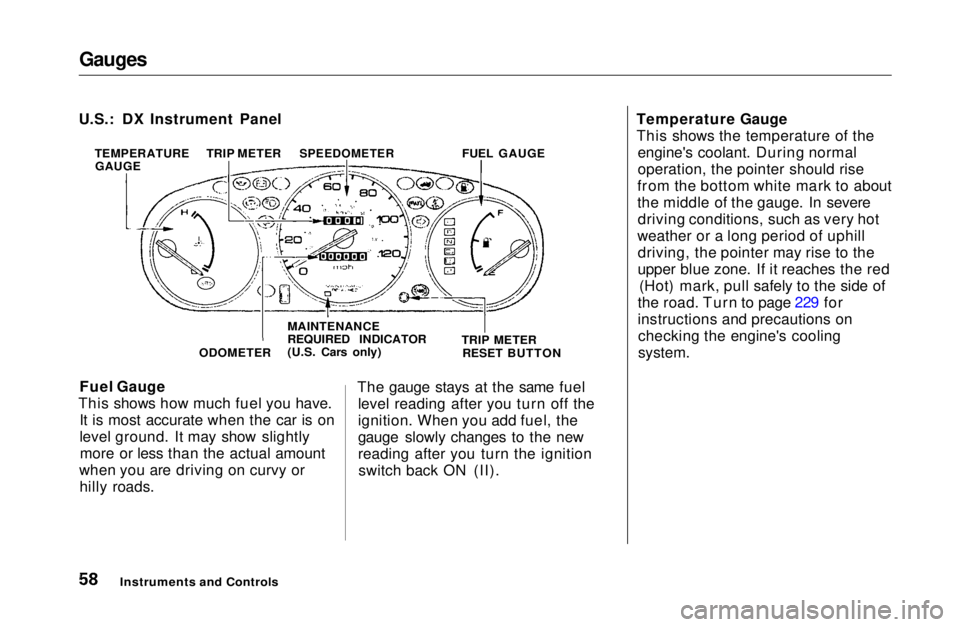
Fuel Gauge
This shows how much fuel you have. It is most accurate when the car is on
level ground. It may show slightlymore or less than the actual amount
when you are driving on curvy or hilly roads. The gauge stays at the same fuel
level reading after you turn off the
ignition. When you add fuel, the
gauge slowly changes to the new
reading after you turn the ignitionswitch back ON (II). Temperature Gauge
This shows the temperature of the
engine's coolant. During normal
operation, the pointer should rise
from the bottom white mark to about
the middle of the gauge. In severe driving conditions, such as very hot
weather or a long period of uphill driving, the pointer may rise to the
upper blue zone. If it reaches the red (Hot) mark, pull safely to the side of
the road. Turn to page 229 for
instructions and precautions on checking the engine's cooling
system.
Instruments and Controls
U.S.: DX Instrument Panel
TEMPERATUREGAUGE TRIP METER
SPEEDOMETER
FUEL GAUGE
ODOMETER MAINTENANCE
REQUIRED INDICATOR
(U.S. Cars only)
TRIP METER
RESET BUTTONMain Menu Table of Contents s t
Page 61 of 269
Controls Near the Steering Wheel
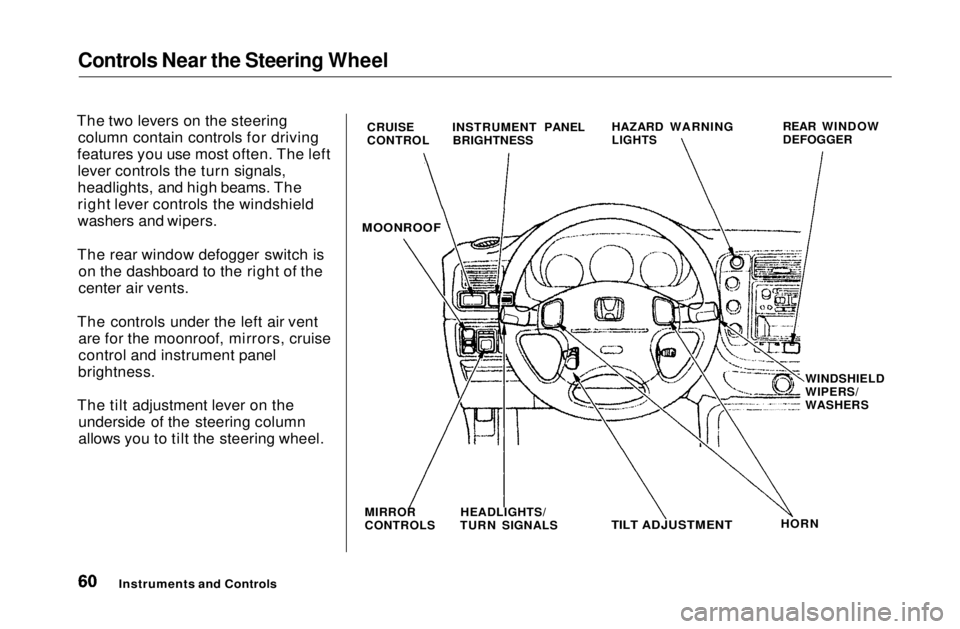
The two levers on the steering column contain controls for driving
features you use most often. The left lever controls the turn signals,
headlights, and high beams. The
right lever controls the windshield
washers and wipers.
The rear window defogger switch is on the dashboard to the right of the
center air vents.
The controls under the left air vent are for the moonroof, mirrors, cruise
control and instrument panel
brightness.
The tilt adjustment lever on the underside of the steering column
allows you to tilt the steering wheel.
Instruments and Controls
CRUISE
CONTROL
INSTRUMENT PANEL
BRIGHTNESS HAZARD WARNING
LIGHTS
REAR WINDOW
DEFOGGER
MOONROOF
MIRROR
CONTROLS HEADLIGHTS/
TURN SIGNALS
TILT ADJUSTMENT
HORNWINDSHIELD
WIPERS/
WASHERSMain Menu Table of Contents s t
Page 62 of 269
Controls Near the Steering Wheel
Headlights
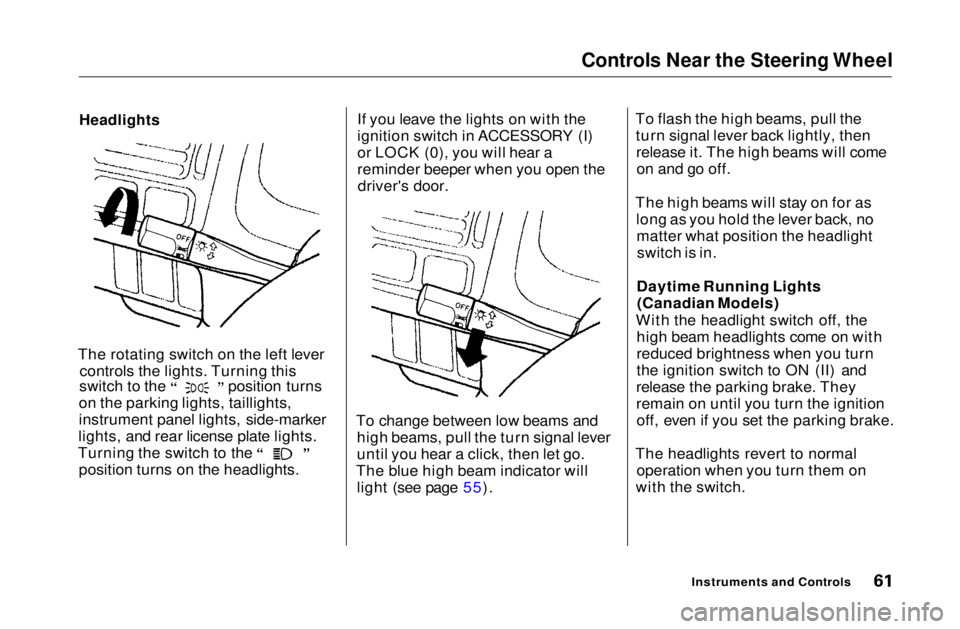
The rotating switch on the left lever controls the lights. Turning this switch to the position turns
on the parking lights, taillights,
instrument panel lights, side-marker
lights, and rear license plate lights. Turning the switch to the
position turns on the headlights. If you leave the lights on with the
ignition switch in ACCESSORY (I)
or LOCK (0), you will hear a
reminder beeper when you open the
driver's door.
To change between low beams and high beams, pull the turn signal lever
until you hear a click, then let go.
The blue high beam indicator will light (see page 55). To flash the high beams, pull the
turn signal lever back lightly, thenrelease it. The high beams will comeon and go off.
The high beams will stay on for as long as you hold the lever back, nomatter what position the headlightswitch is in.
Daytime Running Lights (Canadian Models)
With the headlight switch off, the high beam headlights come on with
reduced brightness when you turn
the ignition switch to ON (II) and
release the parking brake. They
remain on until you turn the ignition off, even if you set the parking brake.
The headlights revert to normal operation when you turn them on
with the switch.
Instruments and ControlsMain Menu Table of Contents s t
Page 63 of 269
Controls Near the Steering Wheel
Instrument Panel Brightness
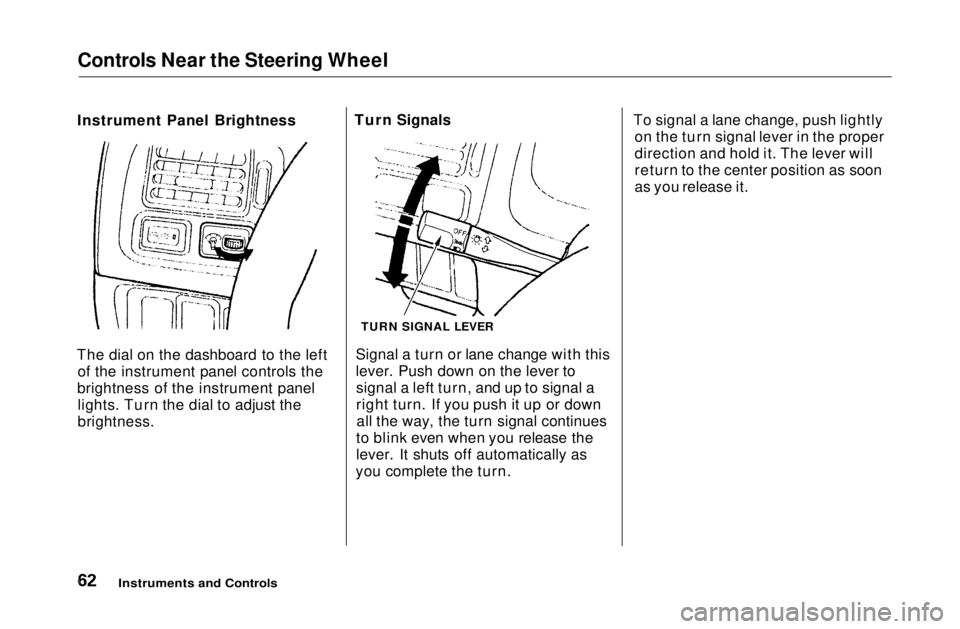
The dial on the dashboard to the left of the instrument panel controls the
brightness of the instrument panel lights. Turn the dial to adjust the
brightness. Turn Signals
Signal a turn or lane change with this
lever. Push down on the lever tosignal a left turn, and up to signal a
right turn. If you push it up or downall the way, the turn signal continues
to blink even when you release the
lever. It shuts off automatically as
you complete the turn. To signal a lane change, push lightly
on the turn signal lever in the proper
direction and hold it. The lever will
return to the center position as soon
as you release it.
Instruments and Controls
TURN SIGNAL LEVERMain Menu Table of Contents s t
Page 65 of 269
Controls Near the Steering Wheel
Hazard Warning
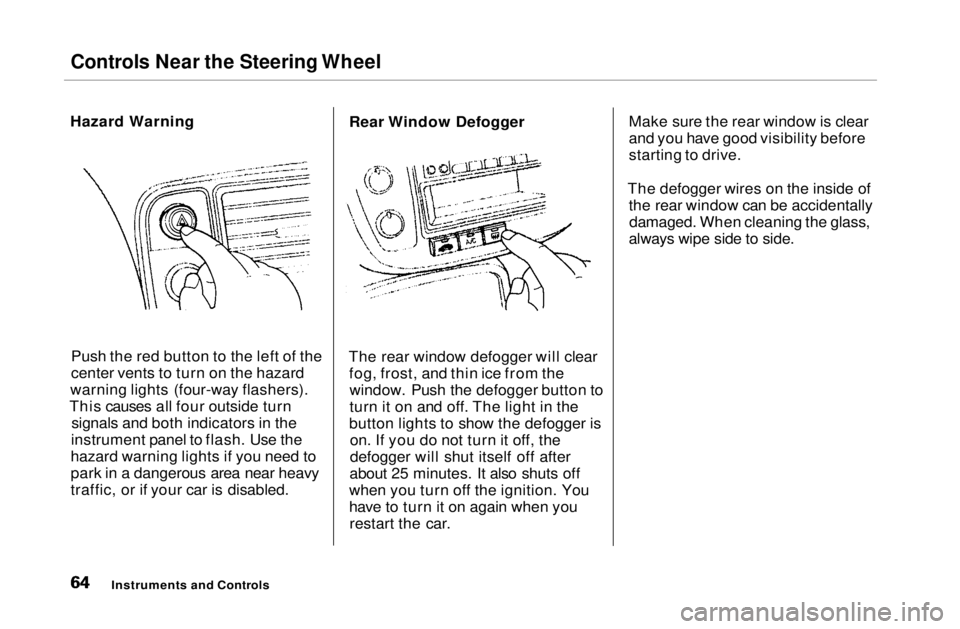
Push the red button to the left of the
center vents to turn on the hazard
warning lights (four-way flashers).
This causes all four outside turn signals and both indicators in the
instrument panel to flash. Use the
hazard warning lights if you need to
park in a dangerous area near heavy
traffic, or if your car is disabled. Rear Window Defogger
The rear window defogger will clear fog, frost, and thin ice from thewindow. Push the defogger button to
turn it on and off. The light in the
button lights to show the defogger is on. If you do not turn it off, the
defogger will shut itself off after
about 25 minutes. It also shuts off
when you turn off the ignition. You
have to turn it on again when you restart the car. Make sure the rear window is clear
and you have good visibility before
starting to drive.
The defogger wires on the inside of the rear window can be accidentallydamaged. When cleaning the glass,
always wipe side to side.
Instruments and ControlsMain Menu Table of Contents s t
Page 66 of 269
Controls Near the Steering Wheel
Steering Wheel Adjustment
See page 18 for important safety
information about how to properly
position the steering wheel.
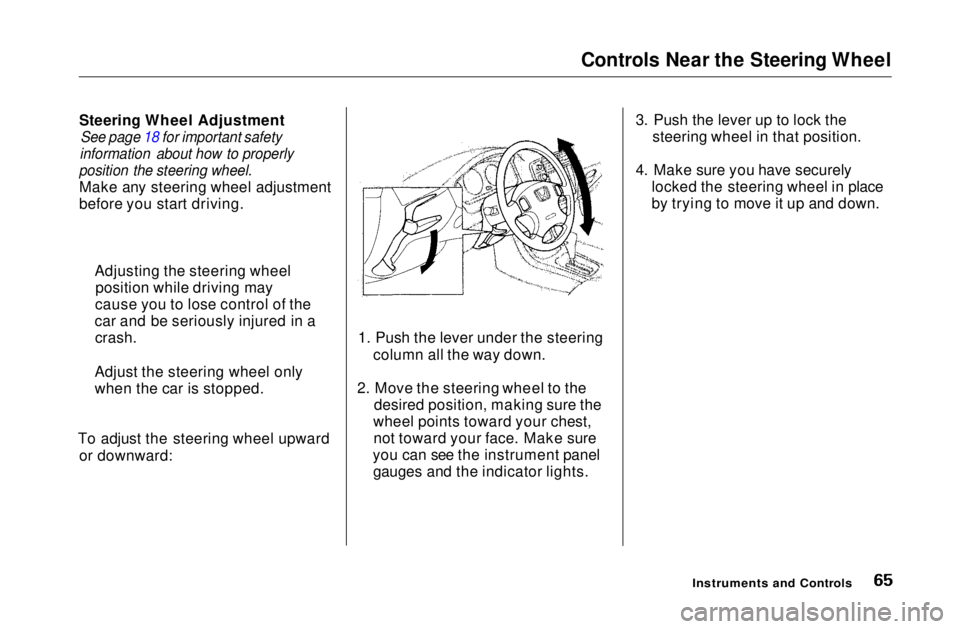
Make any steering wheel adjustment
before you start driving.
To adjust the steering wheel upward or downward: 1. Push the lever under the steering
column all the way down.
2. Move the steering wheel to the desired position, making sure the
wheel points toward your chest, not toward your face. Make sure
you can see the instrument panel gauges and the indicator lights. 3. Push the lever up to lock the
steering wheel in that position.
4. Make sure you have securely locked the steering wheel in place
by trying to move it up and down.
Instruments and Controls
Adjusting the steering wheel
position while driving may
cause you to lose control of the
car and be seriously injured in a crash.
Adjust the steering wheel only
when the car is stopped.Main Menu Table of Contents s t
Page 67 of 269
Steering Wheel Controls
Cruise Control
On EX and Si models in the U.S., and Si
and SiR models in Canada
Cruise control allows you to maintain
a set speed above 25 mph (40 km/h)
without keeping your foot on the accelerator pedal. It should be used
for cruising on straight, open highways. It is not recommended for
conditions such as city driving,
winding roads, slippery roads, heavy rain, or bad weather. You should
have full control of the car under
those conditions.
The cruise control, as it operates,
moves the accelerator pedal. You can
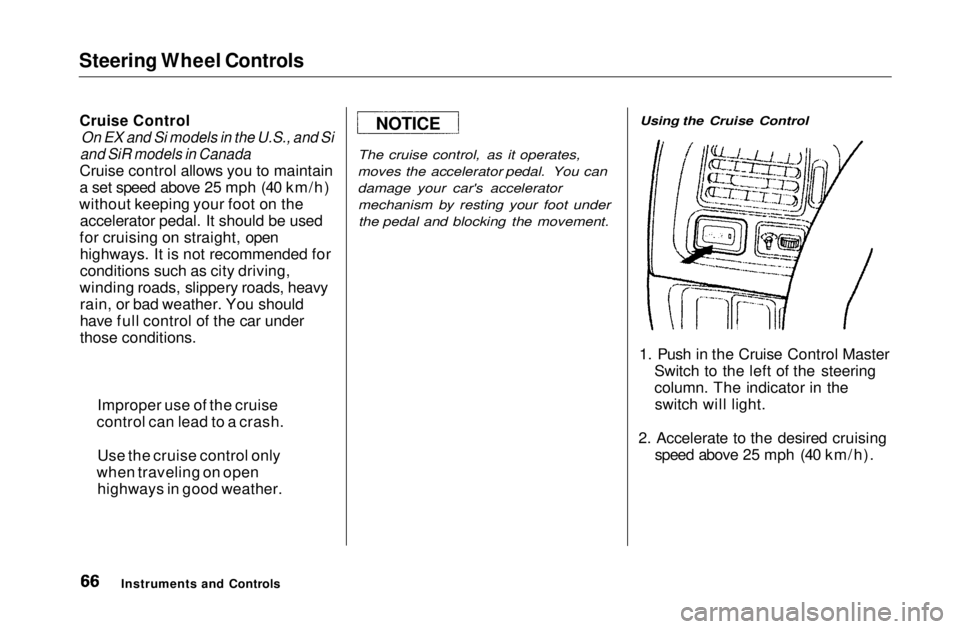
damage your car's accelerator mechanism by resting your foot underthe pedal and blocking the movement. Using the Cruise Control
1. Push in the Cruise Control Master Switch to the left of the steering
column. The indicator in theswitch will light.
2. Accelerate to the desired cruising speed above 25 mph (40 km/h).
Instruments and Controls
Improper use of the cruise
control can lead to a crash.
Use the cruise control only
when traveling on open highways in good weather.
NOTICEMain Menu Table of Contents s t