navigation system HONDA CIVIC COUPE 2012 9.G Navigation Manual
[x] Cancel search | Manufacturer: HONDA, Model Year: 2012, Model line: CIVIC COUPE, Model: HONDA CIVIC COUPE 2012 9.GPages: 204, PDF Size: 7.9 MB
Page 109 of 204
108
Navigation
Changing Your Destination
There are several methods you can use to change the route destination.
Find Nearest Place
HMAP MENU (on map) Find Nearest…
Search for the nearest place/landmark on the map screen and set it as your
destination.
1.Select Find Nearest….
2. Select a category type.
3. Select a subcategory.
4. Select a place.
5. Select Set as Dest.
6. Select an item to set the place as a
destination or add to the
destination list.
The system calcul ates the route. 2Calculating the Route P. 77
1Find Nearest Place
d “Find Nearest…” (on map screen)
The Find Nearest voice command is the fastest
method of specifying a place/landmark as your
destination. Many kinds of places can be found.
2 Find Place Commands P. 191
QRG
Index
Home
TOC
2012 Civic Navigation
Page 114 of 204
113
Audio
This section describes how to operate the audio system. You can play
music from a wide array of media so urces, and control the audio system
using the audio buttons, the to uch screen, or voice control.
Audio System........................................ 114
About Your Audio System ....................114
Auxiliary Input Jack ...... ........................114
System Theft Protection ....................... 115
Playing FM/AM Radio ...........................116
Selecting FM/AM Mode........................ 116
Audio Screen Control........................... 117
Audio Menu ........................................ 118
Radio Data System (RDS) ...................... 119
Playing XM® Radio ...............................121
Selecting XM Mode.............................. 121
Audio Screen Control........................... 122
Audio Menu ........................................ 123
XM® Radio Service .............................. 124Playing a Disc
.........................................125
Selecting Disc Mode ..............................125
Audio Screen Control............................126
Playing MP3/WMA/AAC Discs ...............127
Recommended Discs .............................128
Playing an iPod® ...................................129
Selecting iPod® Mode ..........................130
Audio Screen Control............................131
Searching for Music ..............................132
Playing a USB Flash Drive .....................133
Selecting USB Mode ..............................134
Audio Screen Control............................135
Playing Tracks in Folders ........................136 Playing
Bluetooth ® Audio................... 137
Selecting Bluetooth ® Audio Mode ....... 137
Switching to HFL Mode ........................ 138
Audio Screen Control ........................... 139
Adjusting the Sound .............................140
Audio Remote Controls ........................141
Steering Wheel Controls ...................... 141
QRG
Index
Home
2012 Civic Navigation
Page 115 of 204
114
Audio
Audio System
About Your Audio System
The audio system features FM/AM radio and XM® Radio. It can also play audio discs,
WMA/MP3/AAC tracks, iPods®, USB flash drives, and Bluetooth® devices.
The audio system is operable from the butt ons and switches on the panel, or the
remote controls on the steering wheel.
2 Audio Remote Controls P. 141
2Audio System P. 6
Auxiliary Input Jack
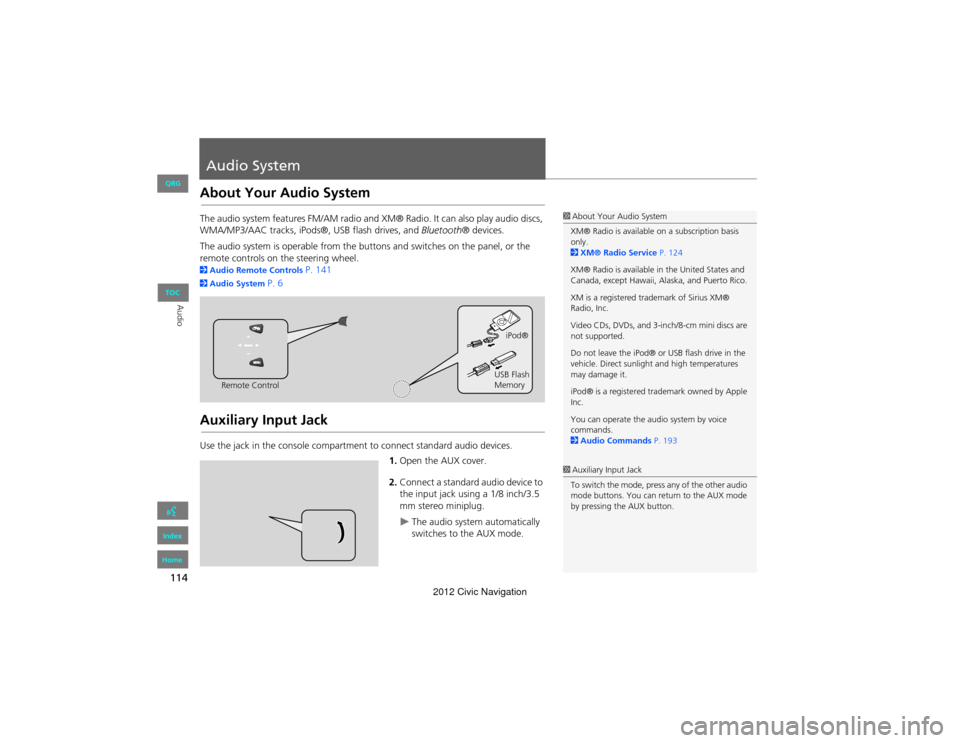
Use the jack in the cons ole compartment to connect standard audio devices.
1.Open the AUX cover.
2. Connect a standard audio device to
the input jack using a 1/8 inch/3.5
mm stereo miniplug.
The audio system automatically
switches to the AUX mode.
1About Your Audio System
XM® Radio is available on a subscription basis
only.
2 XM® Radio Service P. 124
XM® Radio is available in the United States and
Canada, except Hawaii, Alaska, and Puerto Rico.
XM is a registered trademark of Sirius XM®
Radio, Inc.
Video CDs, DVDs, and 3-in ch/8-cm mini discs are
not supported.
Do not leave the iPod® or USB flash drive in the
vehicle. Direct sunlight and high temperatures
may damage it.
iPod® is a registered tra demark owned by Apple
Inc.
You can operate the audio system by voice
commands.
2 Audio Commands P. 193
Remote Control iPod®
USB Flash
Memory
1 Auxiliary Input Jack
To switch the mode, press any of the other audio
mode buttons. You can return to the AUX mode
by pressing the AUX button.
QRG
Index
Home
TOC
2012 Civic Navigation
Page 116 of 204
115
Audio SystemSystem Theft Protection
Audio
System Theft Protection
The system is disabled when it is disconnected from the power source, such as when
the battery is disconnected or goes dead.
■ Reactivating the system
1. Turn the ignition switch to ON (II), and turn on the system.
If you turn the ignition switch to ACCESSO RY (I), you will be requested to enter
the security code. See step 3.
2. Press and hold the VOL 9 (Volume/Power) button again for more than two
seconds.
The system is reactivated when the sy stem’s control unit recognizes that the
system is in your vehicle.
If the control unit fails to recognize, “ENTER CODE” appears on the navigation
screen.
3. Enter the security code. If you do not ente r code correctly after 10 tries, leave the
system for one hour before trying again, or visit a dealer to have the system reset.
1System Theft Protection
Find the audio system’s security code and serial
number label in your Owner’s Manual kit.
Do not store the label in your vehicle. If you lose
the label, you must fi rst retrieve the serial
number, and then obtain the code from your
dealer.
U.S. Only
You can register the security code at Owner Link
( owners.honda.com. ). To find information on
how to retrieve the serial number and obtain the
code, visit radio-navicode.honda.com.
2 Entering the Security Code P. 180
QRG
Index
Home
TOC
2012 Civic Navigation
Page 117 of 204
116
Audio
Playing FM/AM Radio
Selecting FM/AM Mode
1.Press the FM/AM button.
Press the FM/AM button again,
if necessary, to select the
frequency band (FM1, FM2,
AM).
The band and frequency are
displayed.
2. Select AUDIO/STREET.
The preset keys are displayed at
the bottom of the screen.
3. Select the preset key.
You can also select a station
using the SEEK/SKIP button.
1Playing FM/AM Radio
d “Display audio screen”
You can control the radio using voice
commands.
2 Radio Commands P. 193
A visual guide helps you operate the audio
system.
2 System Controls P. 4
2 Basic Operation P. 6
The ST indicator comes on the display for stereo
FM broadcasts. Stereo reproduction in AM is not
available.
The radio can receive the complete AM and FM
bands:
AM band: 530 to 1710 kHz
FM band: 87.7 to 107.9 MHz
You can store six AM stations and 12 FM stations
in the preset buttons. FM1 and FM2 let you store
six stations each.
Preset keys
QRG
Index
Home
TOC
2012 Civic Navigation
Page 118 of 204
117
Playing FM/AM RadioAudio Screen Control
Audio
Audio Screen Control
HAUDIO button (in FM/AM mode)
Control the audio system through the navigation screen. 1.Select a frequency band ( AM,
FM1 , or FM2 ).
2. Select a preset station.
Touch and hold a preset key
until a beep sounds to store the
current station in the key.
The following items are available:
• TUNE : Tunes the radio to the frequency you select. Select b or n to select a
frequency.
• SCAN : Scans for stations with a strong signal in the current band and plays a
Stop to stop scanning and play the current selection.
• AUTO SELECT : Scans and automatically stores up to six AM stations and 12 FM
stations with a strong signal in the preset buttons.
• AUDIO MENU : Sets the RDS options and sound preferences.
• SOURCE : Changes the source mode.
• Open/Close icon: Displays/hides the detailed information.
1Audio Screen Control
The audio information is also displayed on the
multi-information display. See your Owner’s
Manual for more information.
The A.SEL indicator comes on the display when
AUTO SELECT is on. If you do not like the
stations Auto Select has stored, you can change
the frequencies stored in the preset buttons
manually.
Stereo indicator
Frequency band
Preset stations Open/Close icon
QRG
Index
Home
TOC
10-second sample. Select
2012 Civic Navigation
Page 120 of 204
119
Playing FM/AM RadioRadio Data System (RDS)
Audio
Radio Data System (RDS)
Provides text data information related to your selected RDS-capable FM station.
When RDS INFO is set to ON, the name of the FM station is displayed. When set to
OFF, the frequency of the station is displayed.
H AUDIO button (in FM/AM mode)
AUDIO MENU RDS search
Search for FM stations with a strong signal that broadcast the selected RDS category
information. 1.Select a search method ( Seek up,
Seek down , Scan ).
2. Select a category.
Scanning for stations in that
category begins. When an RDS
station is found, it begins to
play.
If there are no RDS-capable
stations in the area, “NOTHING”
briefly appears on the display.
■RDS Info Display
■Searching for Programs by RDS Category
1 RDS Info Display
RDS information is displayed on the audio
screen, if available.
QRG
Index
Home
TOC
2012 Civic Navigation
Page 121 of 204
120
Playing FM/AM RadioRadio Data System (RDS)
Audio
HAUDIO button (in FM/AM mode) AUDIO MENU Radio Text
Display the radio text information of the selected RDS station.
■Radio Text Display1 Radio Text Display
The RDS indicator comes on the display when the
selected RDS station is broadcasting text data.
QRG
Index
Home
TOC
2012 Civic Navigation
Page 122 of 204
121
Audio
Playing XM® Radio
Selecting XM Mode
1.Press the CD/XM button.
Press the CD/XM button again,
if necessary, to select the
channel band (XM1, XM2).
The band and channel are
displayed.
2. Select AUDIO/STREET .
The preset keys are displayed at
the bottom of the screen.
3. Select the preset key.
You can also select a station
using the SEEK/SKIP button.
1Playing XM® Radio
d “Display audio screen”
You can control the radio using voice
commands.
2 Radio Commands P. 193
A visual guide helps you operate the audio
system.
2 System Controls P. 4
2 Basic Operation P. 6
In the channel mode, all available channels are
selectable. In the catego ry mode, you can select
a channel within a category (Jazz, Rock, Classical,
etc.).
There may be instances when XM® Radio does
not broadcast all the data fields (artist name,
title). This does not indica te a problem with your
audio system.
You can store 12 XM stations in the preset
buttons. XM1 and XM2 let you store six stations
each.
XM® Radio display messag es will be displayed
on the audio screen.
2 XM® Radio Display Messages P. 124
Preset keys
QRG
Index
Home
TOC
2012 Civic Navigation
Page 123 of 204
122
Playing XM® RadioAudio Screen Control
Audio
Audio Screen Control
HAUDIO button (in XM mode)
Control the audio system through the navigation screen. 1.Select the channel band ( XM1,
XM2).
2. Select a preset channel.
Touch and hold a preset key
until a beep sounds to store the
current channel in the key.
The following items are available:
• CATEGORY : Tunes to the channel you select. Select b or n to select a channel.
• SCAN: Scans for channels by the scan mode (channel mode or category mode)
selected in the Audio Menu.
) Scan Channel: Scans for channels with a stro ng signal in the current band
and plays a 10-second sample. Select Scan Channel to stop scanning and play
the current selection.
A Scan Category : Scans for channels with a s trong signal in the selected
category in the current band an d plays a 10-second sample. Select Scan Category
to stop scanning and play the current selection.
• CHANNEL LIST : Displays the list of available channels. Scroll the list to select a
channel.
1 Audio Screen Control
The audio information is also displayed on the
multi-information display. See your Owner’s
Manual for more information.
Channel band
Preset channels Open/Close icon
QRG
Index
Home
TOC
2012 Civic Navigation