brake HONDA CR-V 2016 RM1, RM3, RM4 / 4.G Quick Guide
[x] Cancel search | Manufacturer: HONDA, Model Year: 2016, Model line: CR-V, Model: HONDA CR-V 2016 RM1, RM3, RM4 / 4.GPages: 80, PDF Size: 7.99 MB
Page 4 of 80
| 1
VISUAL INDEX
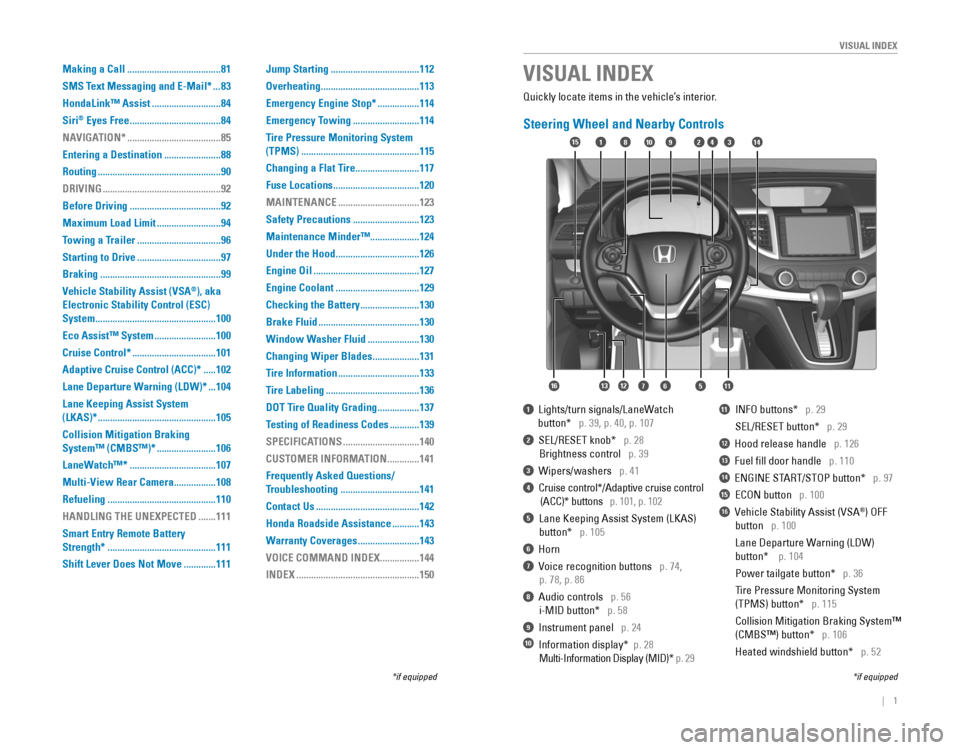
Quickly locate items in the vehicle’s interior.
Steering Wheel and Nearby Controls
1 Lights/turn signals/LaneWatch
button* p. 39, p. 40, p. 107
2 SEL/RESET knob* p. 28
Brightness control p. 39
3 Wipers/washers p. 41
4 Cruise control*/Adaptive cruise control
(ACC)* buttons p. 101, p. 102
5 Lane Keeping Assist System (LKAS)
button* p. 105
6 Horn
7 Voice recognition buttons p. 74,
p. 78, p. 86
8 Audio controls p. 56
i-MID button* p. 58
9 Instrument panel p. 24
10 Information display* p. 28
Multi-Information Display (MID)* p. 29
11 INFO buttons* p. 29
SEL/RESET button* p. 29
12 Hood release handle p. 126
13 Fuel fill door handle p. 110
14 ENGINE START/STOP button* p. 97
15 ECON button p. 100
16 Vehicle Stability Assist (VSA®) OFF
button p. 100
Lane Departure Warning (LDW)
button* p. 104
Power tailgate button* p. 36
Tire Pressure Monitoring System
(TPMS) button* p. 115
Collision Mitigation Braking System™
(CMBS™) button* p. 106
Heated windshield button* p. 52
VISUAL INDEX
*if equipped*if equipped
92
567111213
1815341014
16
Making a Call ......................................81
SMS Text Messaging and E-Mail*
...83
HondaLink™ Assist
............................84
Siri
® Eyes Free .....................................84
NAVIGATION*
......................................85
Entering a Destination
.......................88
Routing
..................................................90
DRIVING
................................................92
Before Driving
.....................................92
Maximum Load Limit
..........................94
Towing a Trailer
..................................96
Starting to Drive
..................................97
Braking
.................................................99
Vehicle Stability Assist (VSA
®), aka
Electronic Stability Control (ESC)
System
.................................................100
Eco Assist™ System
.........................100
Cruise Control*
..................................101
Adaptive Cruise Control (ACC)*
.....102
Lane Departure Warning (LDW)*
...104
Lane Keeping Assist System
(LKAS)*
................................................105
Collision Mitigation Braking
System™ (CMBS™)*
........................106
LaneWatch™*
...................................107
Multi-View Rear Camera
.................108
Refueling
............................................110
HANDLING THE UNEXPECTED
.......111
Smart Entry Remote Battery
Strength*
............................................111
Shift Lever Does Not Move
.............111 Jump Starting
....................................112
Overheating
........................................113
Emergency Engine Stop*
.................114
Emergency Towing
...........................114
Tire Pressure Monitoring System
(TPMS)
................................................115
Changing a Flat Tire
..........................117
Fuse Locations
...................................120
MAINTENANCE
.................................123
Safety Precautions
...........................123
Maintenance Minder™ ....................124
Under the Hood
..................................126
Engine Oil
...........................................127
Engine Coolant
..................................129
Checking the Battery
........................130
Brake Fluid
.........................................130
Window Washer Fluid
.....................130
Changing Wiper Blades
...................131
Tire Information
.................................133
Tire Labeling
......................................136
DOT Tire Quality Grading
.................137
Testing of Readiness Codes
............139
SPECIFICATIONS
...............................140
CUSTOMER INFORMATION
.............141
Frequently Asked Questions/
Troubleshooting
................................141
Contact Us
..........................................142
Honda Roadside Assistance
...........143
Warranty Coverages
.........................143
VOICE COMMAND INDEX
................144
INDEX
..................................................150
Page 5 of 80
2 || 3
S
AFETYVISUAL INDEX
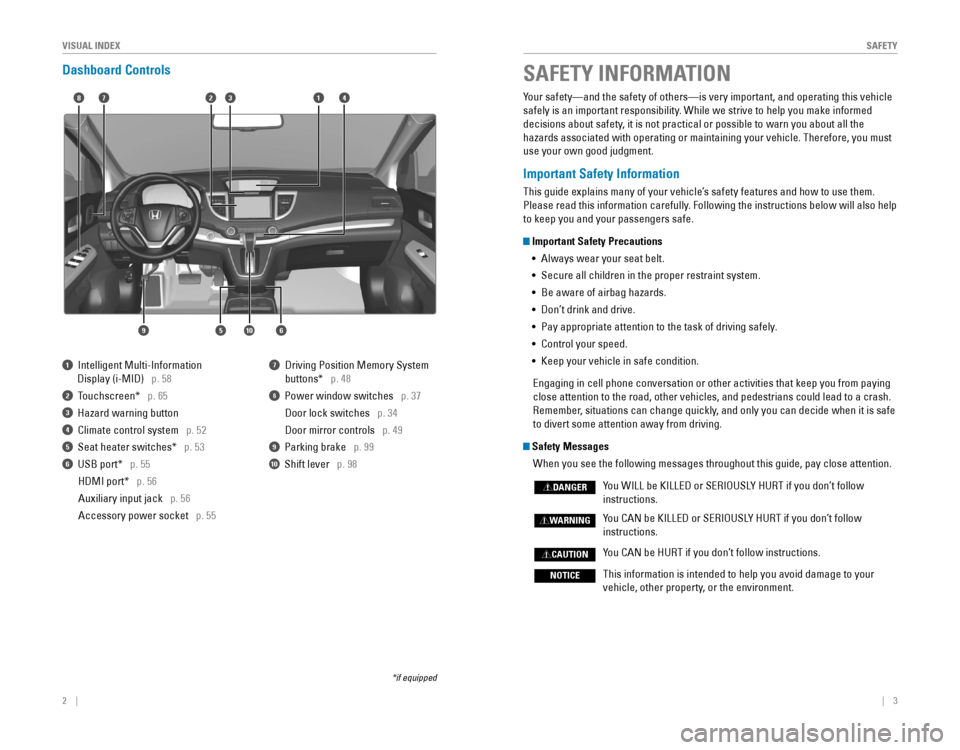
Dashboard Controls
1 Intelligent Multi-Information
Display (i-MID) p. 58
2 Touchscreen* p. 65
3 Hazard warning button
4 Climate control system p. 52
5 Seat heater switches* p. 53
6 USB port* p. 55
HDMI port* p. 56
Auxiliary input jack p. 56
Accessory power socket p. 55
7 Driving Position Memory System
buttons* p. 48
8 Power window switches p. 37
Door lock switches p. 34
Door mirror controls p. 49
9 Parking brake p. 99
10 Shift lever p. 98
*if equipped
Your safety—and the safety of others—is very important, and operati\
ng this vehicle
safely is an important responsibility. While we strive to help you make informed
decisions about safety, it is not practical or possible to warn you about all the
hazards associated with operating or maintaining your vehicle. Therefore, you must
use your own good judgment.
Important Safety Information
This guide explains many of your vehicle’s safety features and how to use them.
Please read this information carefully. Following the instructions below will also help
to keep you and your passengers safe.
Important Safety Precautions •
Always wear your seat belt.
• Secure all children in the proper restraint system.
•
Be aware of airbag hazards.
• Don’t drink and drive.
• Pay appropriate attention to the task of driving safely.
• Control your speed.
• Keep your vehicle in safe condition.
Engaging in cell phone conversation or other activities that keep you from paying
close attention to the road, other vehicles, and pedestrians could lead \
to a crash.
Remember, situations can change quickly, and only you can decide when it is safe
to divert some attention away from driving.
Safety Messages
When you see the following messages throughout this guide, pay close att\
ention.
You WILL be KILLED or SERIOUSLY HURT if you don’t follow
instructions.
You CAN be KILLED or SERIOUSLY HURT if you don’t follow
instructions.
You CAN be HURT if you don’t follow instructions.
This information is intended to help you avoid damage to your
vehicle, other property, or the environment.
DANGER
WARNING
CAUTION
NOTICE
SAFETY INFORMATION
18
56
4732
910
Page 16 of 80
24 || 25
I
NSTRUMENT PANELINSTRUMENT PANEL
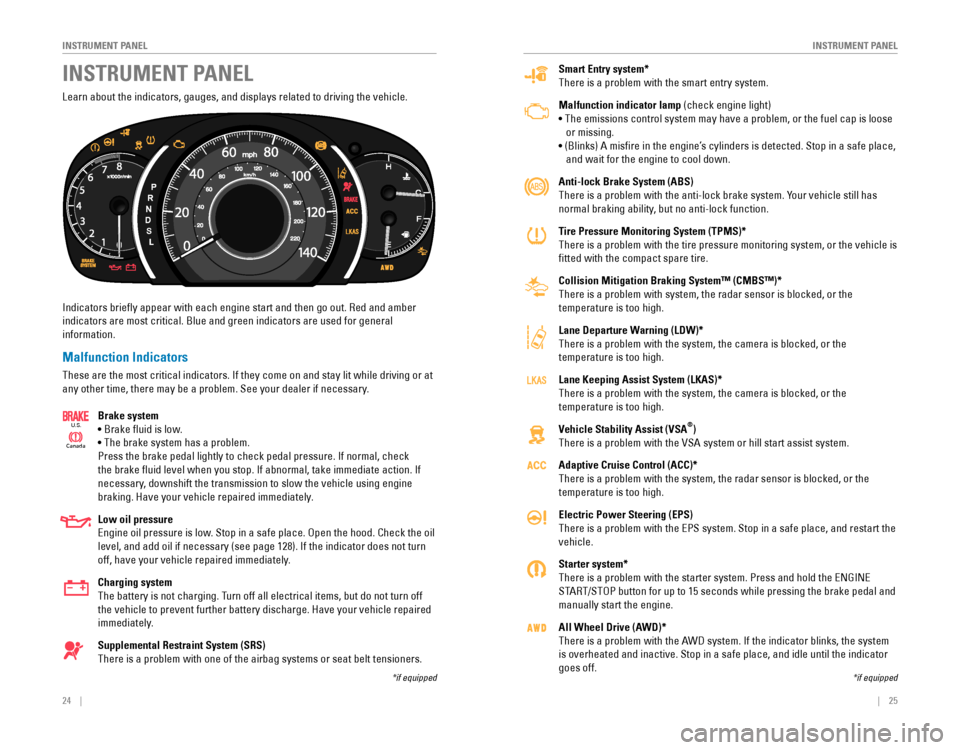
Smart Entry system*
There is a problem with the smart entry system.
Malfunction indicator lamp (check engine light)
• The emissions control system may have a problem, or the fuel cap is loose
or missing.
• (Blinks) A misfire in the engine’s cylinders is detected. Stop in a safe place,
and wait for the engine to cool down.
Anti-lock Brake System (ABS)
There is a problem with the anti-lock brake system. Your vehicle still has
normal braking ability, but no anti-lock function.
Tire Pressure Monitoring System (TPMS)*
There is a problem with the tire pressure monitoring system, or the vehicle is
fitted with the compact spare tire.
Collision Mitigation Braking System™ (CMBS™)*
There is a problem with system, the radar sensor is blocked, or the
temperature is too high.
Lane Departure Warning (LDW)*
There is a problem with the system, the camera is blocked, or the
temperature is too high.
Lane Keeping Assist System (LKAS)*
There is a problem with the system, the camera is blocked, or the
temperature is too high.
Vehicle Stability Assist (VSA
®)
There is a problem with the VSA system or hill start assist system.
Adaptive Cruise Control (ACC)*
There is a problem with the system, the radar sensor is blocked, or the
temperature is too high.
Electric Power Steering (EPS)
There is a problem with the EPS system. Stop in a safe place, and restart the
vehicle.
Starter system*
There is a problem with the starter system. Press and hold the ENGINE
START/STOP button for up to 15 seconds while pressing the brake pedal and
manually start the engine.
All Wheel Drive (AWD)*
There is a problem with the AWD system. If the indicator blinks, the system
is overheated and inactive. Stop in a safe place, and idle until the ind\
icator
goes off.
Learn about the indicators, gauges, and displays related to driving the vehicle.
Indicators briefly appear with each engine start and then go out. Red and amber
indicators are most critical. Blue and green indicators are used for general?
information.
Malfunction Indicators
These are the most critical indicators. If they come on and stay lit while driving or at
any other time, there may be a problem. See your dealer if necessary.
Brake system
• Brake fluid is low.
• The brake system has a problem.
Press the brake pedal lightly to check pedal pressure. If normal, check
the brake fluid level when you stop. If abnormal, take immediate action. If
necessary, downshift the transmission to slow the vehicle using engine
braking. Have your vehicle repaired immediately.
Low oil pressure
Engine oil pressure is low. Stop in a safe place. Open the hood. Check the oil
level, and add oil if necessary (see page 128). If the indicator does not turn
off, have your vehicle repaired immediately.
Charging system
The battery is not charging. Turn off all electrical items, but do not turn off
the vehicle to prevent further battery discharge. Have your vehicle repaired
immediately.
Supplemental Restraint System (SRS)
There is a problem with one of the airbag systems or seat belt tensioners.
Ca nada
U.S.
INSTRUMENT PANEL
*if equipped*if equipped
Page 17 of 80
26 || 27
I
NSTRUMENT PANELINSTRUMENT PANEL
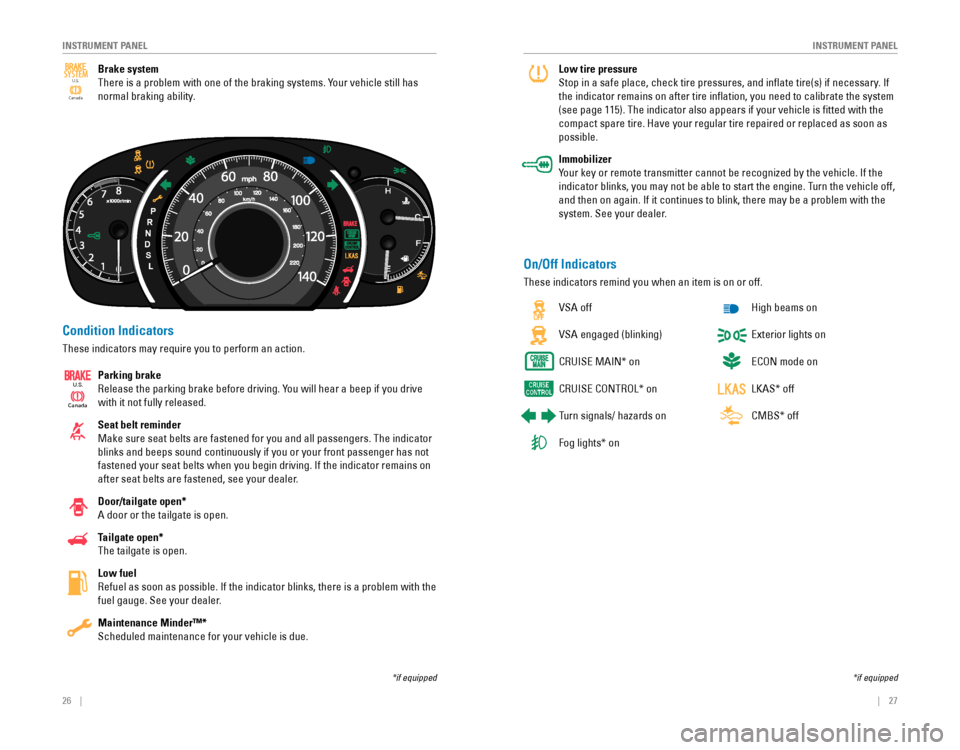
Condition Indicators
These indicators may require you to perform an action.
Parking brake
Release the parking brake before driving. You will hear a beep if you drive
with it not fully released.
Seat belt reminder
Make sure seat belts are fastened for you and all passengers. The indicator
blinks and beeps sound continuously if you or your front passenger has not
fastened your seat belts when you begin driving. If the indicator remains on
after seat belts are fastened, see your dealer.
Door/tailgate open*
A door or the tailgate is open.
Tailgate open*
The tailgate is open.
Low fuel
Refuel as soon as possible. If the indicator blinks, there is a problem with the
fuel gauge. See your dealer.
Maintenance Minder™*
Scheduled maintenance for your vehicle is due.
Ca
nada
U.S.
On/Off Indicators
These indicators remind you when an item is on or off.
VSA off
VSA engaged (blinking)
CRUISE MAIN* on
CRUISE CONTROL* on
Turn signals/ hazards on
Fog lights* on
High beams on
Exterior lights on
ECON mode on
LKAS* off
CMBS* off
Low tire pressure
Stop in a safe place, check tire pressures, and inflate tire(s) if necessary. If
the indicator remains on after tire inflation, you need to calibrate the system
(see page 115). The indicator also appears if your vehicle is fitted\
with the
compact spare tire. Have your regular tire repaired or replaced as soon \
as
possible.
Immobilizer
Your key or remote transmitter cannot be recognized by the vehicle. If the
indicator blinks, you may not be able to start the engine. Turn the vehicle off,
and then on again. If it continues to blink, there may be a problem with the
system. See your dealer.
*if equipped*if equipped
Brake system
There is a problem with one of the braking systems. Your vehicle still has
normal braking ability.Canada
U.S.
SYSTEM
Page 27 of 80

46 || 47
V
EHICLE CONTROLSVEHICLE CONTROLS
Failure to reinstall, or correctly reinstall, the head restraints can re\
sult in
severe injury during a crash.
Always replace the head restraints before driving.
WARNING
Floor Mats
Position the front seat floor mats properly, and anchor
them. If they are not properly positioned, the floor
mats can interfere with the front seat functions.
Do not put additional floor mats on top of the
anchored mats.Unlock
Lock
Rear Seats
Fold down rear seats to allow for additional storage space.
Folding Down Rear Seats
1. Store the center seat belt. Insert the latch plate
into the slot on the side of the anchor buckle.
Retract the seat belt into the holder on the ceiling
(see page 8).
2. Lower the center head restraint to its lowest
position. Put the armrest back into the seat-back.
3. From the rear door side: Pull the release strap.
From the cargo area side: Pull the release lever.
Make sure all items in the cargo area or items
extending to the rear seats are properly secured.
Loose items can fly forward if you have to brake
hard.
Returning Seats to the Upright Position
1. Pull the seat-back up and push back into place
until you hear a click.
2. Push the head restraint up to its original position.
3. Pull the seat cushion up and push it down into its
original position.
Lever
Page 50 of 80
92 || 93
DRIVING
DRIVING
Learn about preparation for driving, as well as other features.
Before Driving
Check the following items before you begin driving.
Exterior Checks
•
Make sure there are no obstructions on the windows, door mirrors, exterior
lights, or other parts of the vehicle.
• Remove any frost, snow, or ice.
• Make sure the hood is securely closed.
•
Heat from the engine and exhaust can ignite flammable materials left under
the hood, causing a fire. If you’ve parked your vehicle for an extended period,
inspect and remove any debris that may have collected, such as dried grass
and leaves that have fallen or have been carried in for use as a nest by a small
animal. Also check under the hood for leftover flammable materials after you or
someone else has performed maintenance on your vehicle.
• Make sure the tires are in good condition.
•
Make sure there are no people or objects behind or around the vehicle.
DRIVING
If the doors are frozen shut, use warm water around the door edges to melt any
ice. Do not try to force them open, as this can damage the rubber trim around the
doors. When done, wipe dry to avoid further freezing.
NOTICE
Improper accessories or modifications can affect your vehicle’s handling, and
stability, and performance, and cause a crash in which you can be seriously
hurt or killed.
Follow all instructions in the vehicle owner’s manual regarding accessories
and modifications.
WARNING
In addition:
• During the first 600 miles (1,000 km) of operation, avoid sudden acceleration or
full throttle operation so as not to damage the engine or powertrain.
•
Avoid hard braking for the first 200 miles (300 km). You should also follow this
when the brake pads are replaced.
Your vehicle has been designed primarily for use on pavement; however, its higher
ground clearance allows you to occasionally travel on unpaved roads. It is not
designed for trail-blazing or other challenging off-road activities.
If you decide to drive on unpaved roads, you will find that it requires somewhat
different driving skills and that your vehicle will handle somewhat diff\
erently than
it does on pavement. Pay attention to the precautions and tips in this s\
ection, and
get acquainted with your vehicle before leaving the pavement.
Improperly operating this vehicle on or off pavement can cause a crash or
rollover in which you and your passengers can be seriously hurt or killed.
Follow all instructions and guidelines in this guide.
Keep your speed low, and don’t drive faster than conditions permit.
WARNING
Interior Checks •
Store or secure all items on board properly.
• Do not pile items higher than the seat height.
• Do not place anything in the front seat footwells. Make sure to secure the floor
mats.
•
If you have any animals on board, do not let them move freely around in the
vehicle.
• Securely close and lock all doors and the tailgate.
• Adjust your seating position, mirrors, and steering wheel properly.
•
Make sure items placed on the floor behind the front seats cannot roll under the
seats.
•
Everyone in the vehicle must fasten their seat belt.
• Make sure that the indicators in the instrument panel come on when you s\
tart
the vehicle, and go off soon after.
Page 52 of 80
96 || 97
DRIVING
DRIVING
Exceeding any load limit or improperly loading your vehicle and trailer can
cause a crash in which you can be seriously hurt or killed.
Check the loading of your vehicle and trailer carefully before starting to drive.
WARNING
Towing a Trailer
Your vehicle can tow a trailer if you carefully observe the load limits, use the proper
equipment, and follow the towing guidelines. See the Owner’s Manual on the Owner
Information CD or at owners.honda.com (U.S.) or www.myhonda.ca (Canada) for
more information.
Towing Load Limits
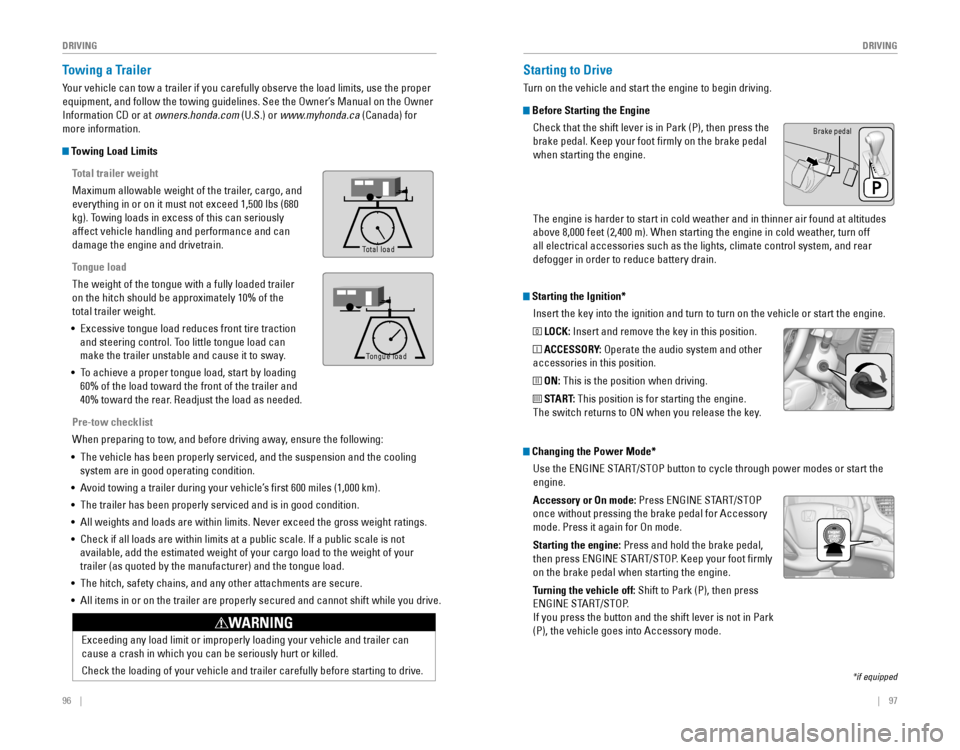
Total trailer weight
Maximum allowable weight of the trailer, cargo, and
everything in or on it must not exceed 1,500 lbs (680
kg). Towing loads in excess of this can seriously
affect vehicle handling and performance and can
damage the engine and drivetrain.
Tongue load
The weight of the tongue with a fully loaded trailer
on the hitch should be approximately 10% of the
total trailer weight.
•
Excessive tongue load reduces front tire traction
and steering control. Too little tongue load can
make the trailer unstable and cause it to sway.
• To achieve a proper tongue load, start by loading
60% of the load toward the front of the trailer and
40% toward the rear. Readjust the load as needed.
Pre-tow checklist
When preparing to tow, and before driving away, ensure the following:
• The vehicle has been properly serviced, and the suspension and the cooling
system are in good operating condition.
• Avoid towing a trailer during your vehicle’s first 600 miles (1,000 km).
•
The trailer has been properly serviced and is in good condition.
• All weights and loads are within limits. Never exceed the gross weight r\
atings.
•
Check if all loads are within limits at a public scale. If a public scale is not
available, add the estimated weight of your cargo load to the weight of your
trailer (as quoted by the manufacturer) and the tongue load.
• The hitch, safety chains, and any other attachments are secure.
• All items in or on the trailer are properly secured and cannot shift whi\
le you drive.
To ng ue Loa d
Tong ue Loa d
Total load
Tongue load
Starting the Ignition*
Insert the key into the ignition and turn to turn on the vehicle or start the engine.
0 LOCK: Insert and remove the key in this position.
I ACCESSORY: Operate the audio system and other
accessories in this position.
II ON: This is the position when driving.
III START: This position is for starting the engine.
The switch returns to ON when you release the key.
Starting to Drive
Turn on the vehicle and start the engine to begin driving.
Before Starting the Engine
Check that the shift lever is in Park (P), then press the
brake pedal. Keep your foot firmly on the brake pedal
when starting the engine.
Brake pedal
The engine is harder to start in cold weather and in thinner air found a\
t altitudes
above 8,000 feet (2,400 m). When starting the engine in cold weather, turn off
all electrical accessories such as the lights, climate control system, a\
nd rear
defogger in order to reduce battery drain.
*if equipped
Changing the Power Mode*Use the
ENGINE START/STOP button to cycle through power modes or start the
engine.
Accessory or On mode:
Press ENGINE START/STOP
once without pressing the brake pedal for Accessory
mode. Press it again for On mode.
Starting the engine:
Press and hold the brake pedal,
then press ENGINE START/STOP. Keep your foot firmly
on the brake pedal when starting the engine.
Turning the vehicle off: Shift to Park (P), then press
ENGINE START/STOP.
If you press the button and the shift lever is not in Park
(P), the vehicle goes into Accessory mode.
Page 53 of 80
98 || 99
DRIVING
DRIVING
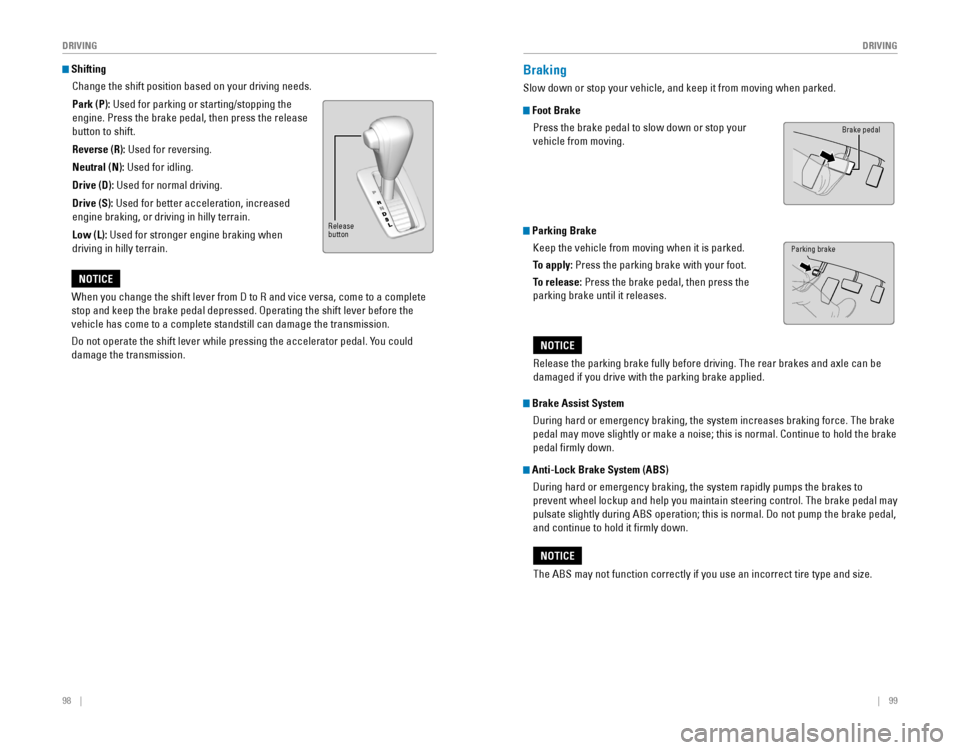
Shifting
Change the shift position based on your driving needs.
Park (P): Used for parking or starting/stopping the
engine. Press the brake pedal, then press the release
button to shift.
Reverse (R): Used for reversing.
Neutral (N): Used for idling.
Drive (D): Used for normal driving.
Drive (S):
Used for better acceleration, increased
engine braking, or driving in hilly terrain.
Low (L): Used for stronger engine braking when
driving in hilly terrain.
When you change the shift lever from D to R and vice versa, come to a complete
stop and keep the brake pedal depressed. Operating the shift lever before the
vehicle has come to a complete standstill can damage the transmission.
Do not operate the shift lever while pressing the accelerator pedal. You could
damage the transmission.
NOTICE
Braking
Slow down or stop your vehicle, and keep it from moving when parked.
Foot Brake
Press the brake pedal to slow down or stop your
vehicle from moving.
Parking Brake
Keep the vehicle from moving when it is parked.
To apply:
Press the parking brake with your foot.
To release: Press the brake pedal, then press the
parking brake until it releases.
Brake Assist System
During hard or emergency braking, the system increases braking force. The brake
pedal may move slightly or make a noise; this is normal. Continue to hold the brake
pedal firmly down.
Anti-Lock Brake System (ABS)
During hard or emergency braking, the system rapidly pumps the brakes to
prevent wheel lockup and help you maintain steering control. The brake pedal may
pulsate slightly during ABS operation; this is normal. Do not pump the brake pedal,
and continue to hold it firmly down.
The ABS may not function correctly if you use an incorrect tire type and size.
NOTICE
Brake pedal
Release
button
Parking brake
Release the parking brake fully before driving. The rear brakes and axle can be
damaged if you drive with the parking brake applied.
NOTICE
Page 54 of 80
100 || 101
DRIVING
DRIVING
Vehicle Stability Assist (VSA®), aka Electronic Stability Control
(ESC) System
Helps to stabilize the vehicle during cornering if the vehicle turns more or less
than what was intended. It assists in maintaining traction on slippery surfaces by
regulating engine output and selectively applying the brakes.
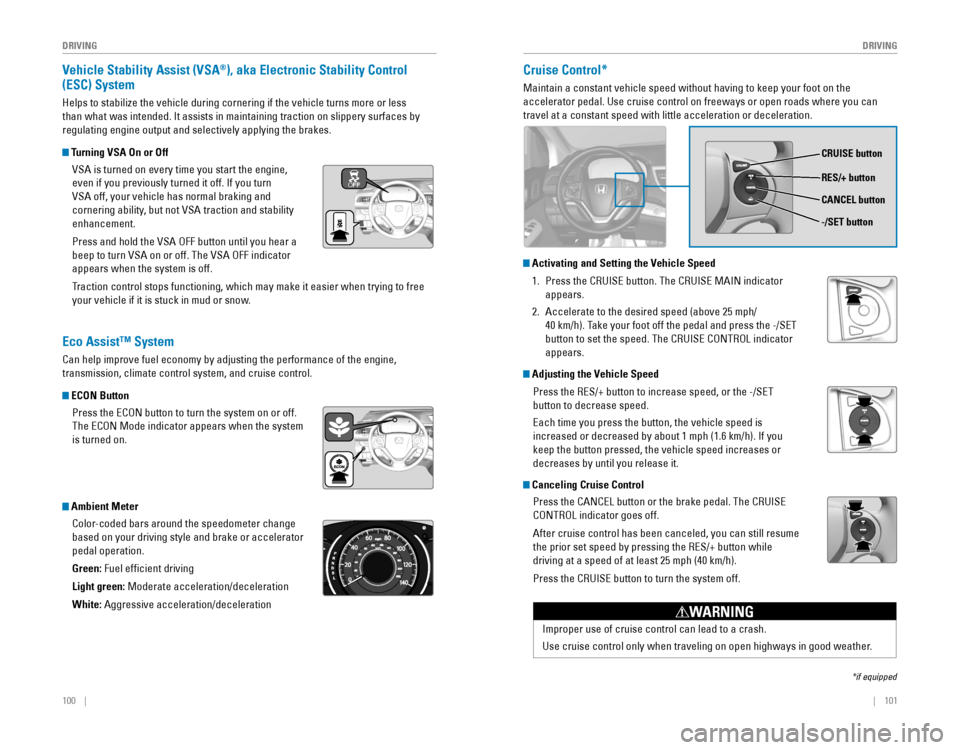
Turning VSA On or Off
VSA is turned on every time you start the engine,
even if you previously turned it off. If you turn
VSA off, your vehicle has normal braking and
cornering ability, but not VSA traction and stability
enhancement.
Press and hold the VSA OFF button until you hear a
beep to turn VSA on or off. The VSA OFF indicator
appears when the system is off.
Traction control stops functioning, which may make it easier when trying to free
your vehicle if it is stuck in mud or snow.
Cruise Control*
Maintain a constant vehicle speed without having to keep your foot on th\
e
accelerator pedal. Use cruise control on freeways or open roads where yo\
u can
travel at a constant speed with little acceleration or deceleration.
*if equipped
Eco Assist™ System
Can help improve fuel economy by adjusting the performance of the engine,
transmission, climate control system, and cruise control.
ECON Button
Press the ECON button to turn the system on or off.
The ECON Mode indicator appears when the system
is turned on.
Ambient Meter
Color-coded bars around the speedometer change
based on your driving style and brake or accelerator
pedal operation.
Green: Fuel efficient driving
Light green:
Moderate acceleration/deceleration
White: Aggressive acceleration/deceleration
CRUISE button
RES/+ button
-/SET button CANCEL button
Improper use of cruise control can lead to a crash.
Use cruise control only when traveling on open highways in good weather.
WARNING
Activating and Setting the Vehicle Speed
1. Press the CRUISE button. The CRUISE MAIN indicator
appears.
2. Accelerate to the desired speed (above 25 mph/
40 km/h). Take your foot off the pedal and press the -/SET
button to set the speed. The CRUISE CONTROL indicator
appears.
Adjusting the Vehicle Speed
Press the RES/+ button to increase speed, or the -/SET
button to decrease speed.
Each time you press the button, the vehicle speed is
increased or decreased by about 1 mph (1.6 km/h). If you
keep the button pressed, the vehicle speed increases or
decreases by until you release it.
Canceling Cruise Control
Press the CANCEL button or the brake pedal. The CRUISE
CONTROL indicator goes off.
After cruise control has been canceled, you can still resume
the prior set speed by pressing the RES/+ button while
driving at a speed of at least 25 mph (40 km/h).
Press the CRUISE button to turn the system off.
Page 55 of 80
102 || 103
DRIVING
DRIVING
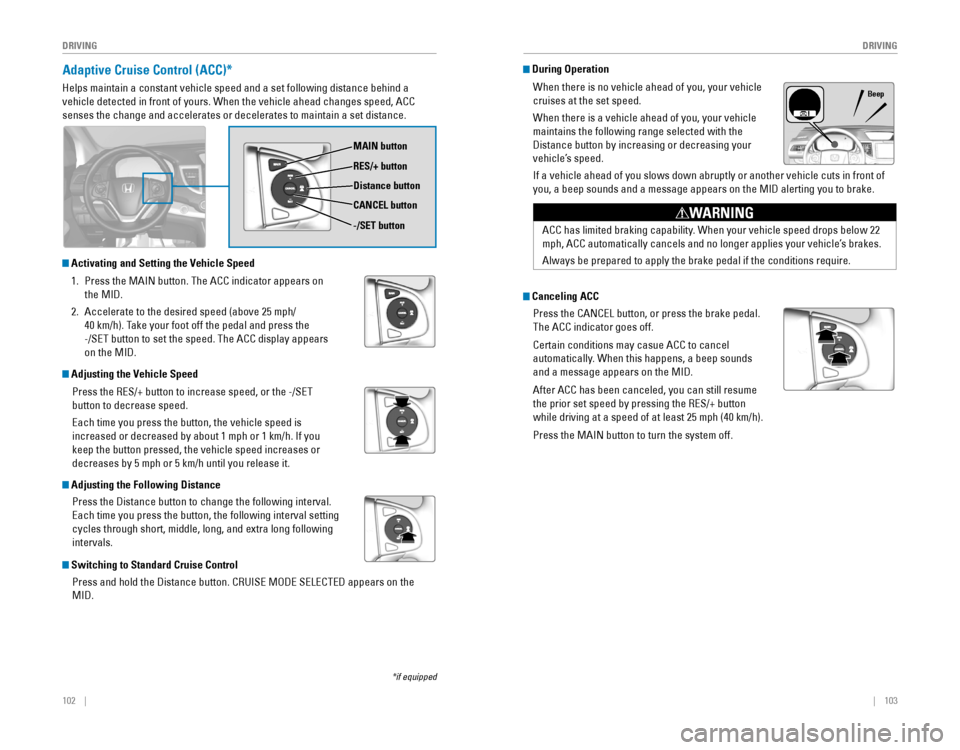
Adaptive Cruise Control (ACC)*
Helps maintain a constant vehicle speed and a set following distance behind a
vehicle detected in front of yours. When the vehicle ahead changes speed\
, ACC
senses the change and accelerates or decelerates to maintain a set dista\
nce.
*if equipped
MAIN button
RES/+ button
Distance button
CANCEL button
-/SET button
During Operation
When there is no vehicle ahead of you, your vehicle
cruises at the set speed.
When there is a vehicle ahead of you, your vehicle
maintains the following range selected with the
Distance button by increasing or decreasing your
vehicle’s speed.
If a vehicle ahead of you slows down abruptly or another vehicle cuts in front of
you, a beep sounds and a message appears on the MID alerting you to brake.
Beep
Adjusting the Vehicle Speed
Press the RES/+ button to increase speed, or the -/SET
button to decrease speed.
Each time you press the button, the vehicle speed is
increased or decreased by about 1 mph or 1 km/h. If you
keep the button pressed, the vehicle speed increases or
decreases by 5 mph or 5 km/h until you release it.
Activating and Setting the Vehicle Speed
1. Press the MAIN button. The ACC indicator appears on
the MID.
2. Accelerate to the desired speed (above 25 mph/
40 km/h). Take your foot off the pedal and press the
-/SET button to set the speed. The ACC display appears
on the MID.
Adjusting the Following Distance
Press the Distance button to change the following interval.
Each time you press the button, the following interval setting
cycles through short, middle, long, and extra long following
intervals.
Switching to Standard Cruise Control
Press and hold the Distance button. CRUISE MODE SELECTED appears on the
MID.
ACC has limited braking capability. When your vehicle speed drops below 22
mph, ACC automatically cancels and no longer applies your vehicle’s brakes.
Always be prepared to apply the brake pedal if the conditions require.
WARNING
Canceling ACC
Press the CANCEL button, or press the brake pedal.
The ACC indicator goes off.
Certain conditions may casue ACC to cancel
automatically. When this happens, a beep sounds
and a message appears on the MID.
After ACC has been canceled, you can still resume
the prior set speed by pressing the RES/+ button
while driving at a speed of at least 25 mph (40 km/h).
Press the MAIN button to turn the system off.