ECO mode HONDA CR-Z 2012 1.G Owner's Guide
[x] Cancel search | Manufacturer: HONDA, Model Year: 2012, Model line: CR-Z, Model: HONDA CR-Z 2012 1.GPages: 333, PDF Size: 10.43 MB
Page 138 of 333
137
uuAudio SystemuUSB Adapter Cable
Features
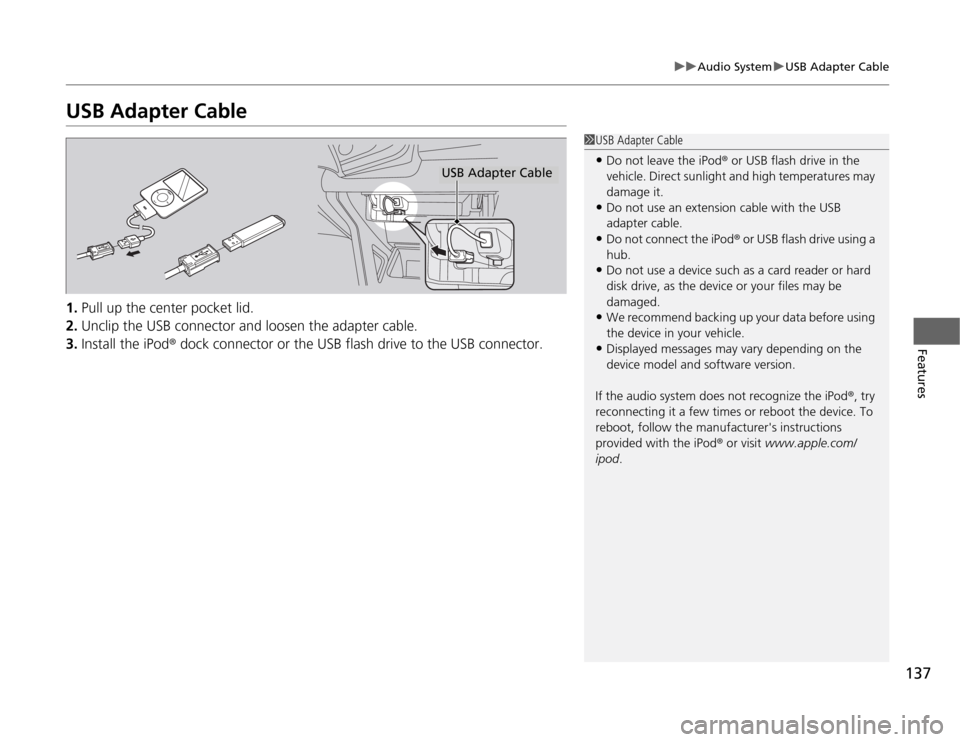
USB Adapter Cable 1.Pull up the center pocket lid.
2. Unclip the USB connector and loosen the adapter cable.
3. Install the iPod ® dock connector or the USB flash drive to the USB connector.
1USB Adapter Cable
• Do not leave the iPod ® or USB flash drive in the
vehicle. Direct sunlight and high temperatures may damage it.
• Do not use an extension cable with the USB
adapter cable.
• Do not connect the iPod ® or USB flash drive using a
hub.
• Do not use a device such as a card reader or hard
disk drive, as the device or your files may be damaged.
• We recommend backing up your data before using
the device in your vehicle.
• Displayed messages may vary depending on the
device model and software version.
If the audio system does not recognize the iPod ®, try
reconnecting it a few times or reboot the device. To
reboot, follow the manufacturer's instructions
provided with the iPod ® or visit www.apple.com/
ipod .
USB Adapter Cable
Page 140 of 333
139
uuAudio SystemuAudio System Theft Protection
Features
Audio System Theft Protection
The audio system is disabled when it is disconnected from the power source, such as
when the 12 volt battery is disconnected or goes dead. ■Reactivating the audio system
1. Turn the ignition switch to ON
(w , and turn on the audio system.
uIf you turn the ignition switch to ACCESSORY (q , you will be requested to
enter the audio security code.
2. Enter the audio security code using the preset buttons.
Touch the icon to enter the code, then touch the Done icon to set it.
If you enter an incorrect digit, continue to the last digit, then try again. If you do
not enter the code correctly after 10 tries, leave the system for one hour before
trying again, or visit a dealer to have the system reset.
1Audio System Theft Protection
Find the audio system's security code and serial
number label in your owner’s manual kit.
We recommend that you write down the serial
number in this owner’s manual.
Do not store the label in your vehicle. If you lose the
label, you must first retrieve the serial number, and
then obtain the code.
You can find out about your serial number and
security code from a dealer.
You can register the security code at Owner Link (owners.honda.com. ), and find information on how
to retrieve the serial number and obtain the code at
radio-navicode.honda.com .
U.S. models
Models without navigation system
Models with navigation system
Page 147 of 333
uuAudio without Navigation SystemuPlaying a CD
146
Features
1. Press to switch the display to a folder list.
2. Rotate to select a folder.
uPress button to play the first file on the selected folder.
3. Press to change the display to a list of files in that folder.
4. Rotate to select a file, then press .
■How to Select a File from a Folder with the Selector Knob (MP3/WMA)1Playing a CD
NOTICE
Do not use CDs with adhesive labels. The label can cause the CD to jam in the unit.
WMA files protected by digital rights management
(DRM) cannot be played.
The audio system displays “UNSUPPORTED,” then
skips to the next file.
Text data appears on the display under the following circumstances: •When you select a new folder, file, or track.
• When you change the audio mode to CD.
• When you insert a CD.
The display shows up to 31 characters of text data.
Press and hold the TITLE button to see additional
characters. indicates that the text data continues.
The display goes back to the previous screen if you
press and hold the button again.
If you eject the CD but do not remove it from the slot,
the system reloads the CD automatically after several
seconds.
Page 153 of 333
uuAudio with Navigation System*uAudio System Basic Operation
152
Features
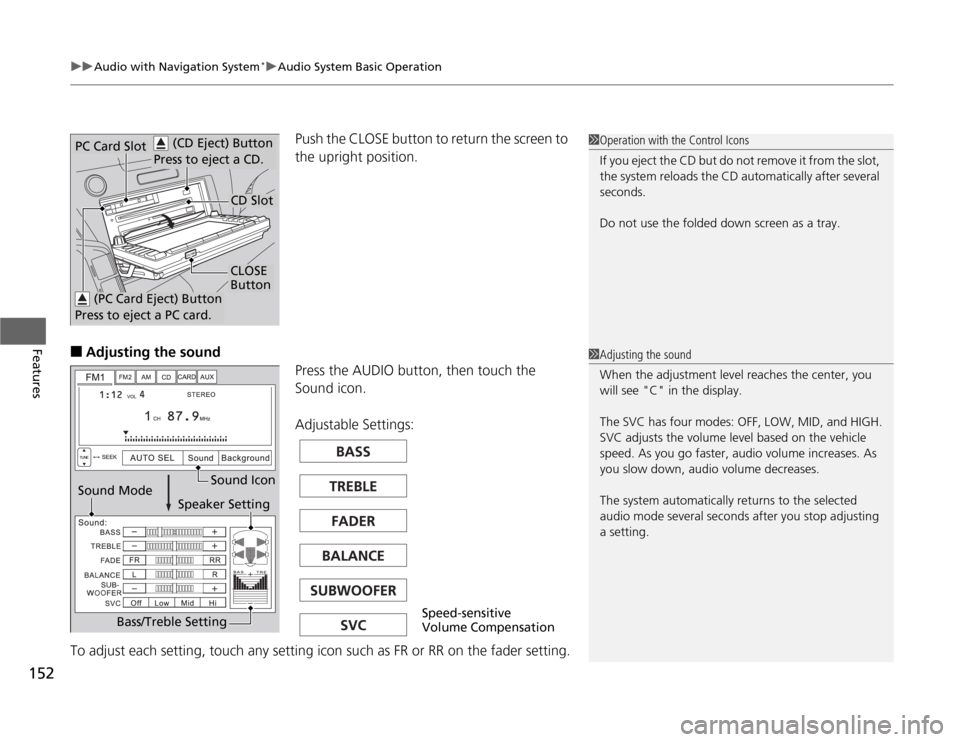
Push the CLOSE button to return the screen to
the upright position.
■ Adjusting the sound
Press the AUDIO button, then touch the
Sound icon.
Adjustable Settings:
To adjust each setting, touch any setting icon such as FR or RR on the fader setting.1Operation with the Control Icons
If you eject the CD but do not remove it from the slot,
the system reloads the CD automatically after several
seconds.
Do not use the folded down screen as a tray. (CD Eject) Button
Press to eject a CD.PC Card Slot
CD Slot
CLOSE
Button
(PC Card Eject) Button
Press to eject a PC card.
1Adjusting the sound
When the adjustment level reaches the center, you
will see "C" in the display.
The SVC has four modes: OFF, LOW, MID, and HIGH.
SVC adjusts the volume level based on the vehicle
speed. As you go faster, audio volume increases. As
you slow down, audio volume decreases.
The system automatically re turns to the selected
audio mode several seconds after you stop adjusting
a setting.
Sound Mode Sound Icon
Speaker Setting
Bass/Treble Setting
Speed-sensitive
Volume Compensation
Page 155 of 333
154
uuAudio with Navigation System*uPlaying the AM/FM Radio
Features
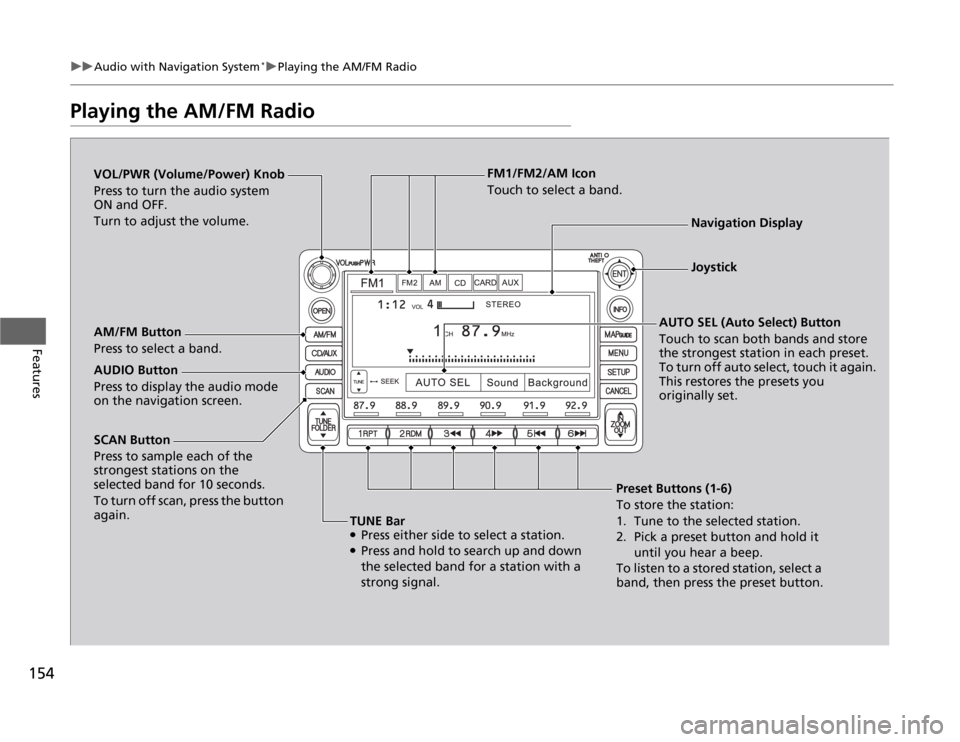
Playing the AM/FM Radio
SCAN Button
Press to sample each of the
strongest stations on the
selected band for 10 seconds.
To turn off scan, press the button
again.
VOL/PWR (Volume/Power) Knob
Press to turn the audio system
ON and OFF.
Turn to adjust the volume.
Preset Buttons (1-6)
To store the station:
1. Tune to the selected station.
2. Pick a preset button and hold it until you hear a beep.
To listen to a stored station, select a
band, then press the preset button.
AM/FM Button
Press to select a band.
AUTO SEL (Auto Select) Button
Touch to scan both bands and store the strongest station in each preset.
To turn off auto select, touch it again.
This restores the presets you originally set.
TUNE Bar ● Press either side to select a station.
● Press and hold to search up and down
the selected band for a station with a
strong signal.
AUDIO Button
Press to display the audio mode on the navigation screen. FM1/FM2/AM Icon
Touch to select a band.
Navigation Display
Joystick
Page 157 of 333
156
uuAudio with Navigation System*uPlaying a CD
Features
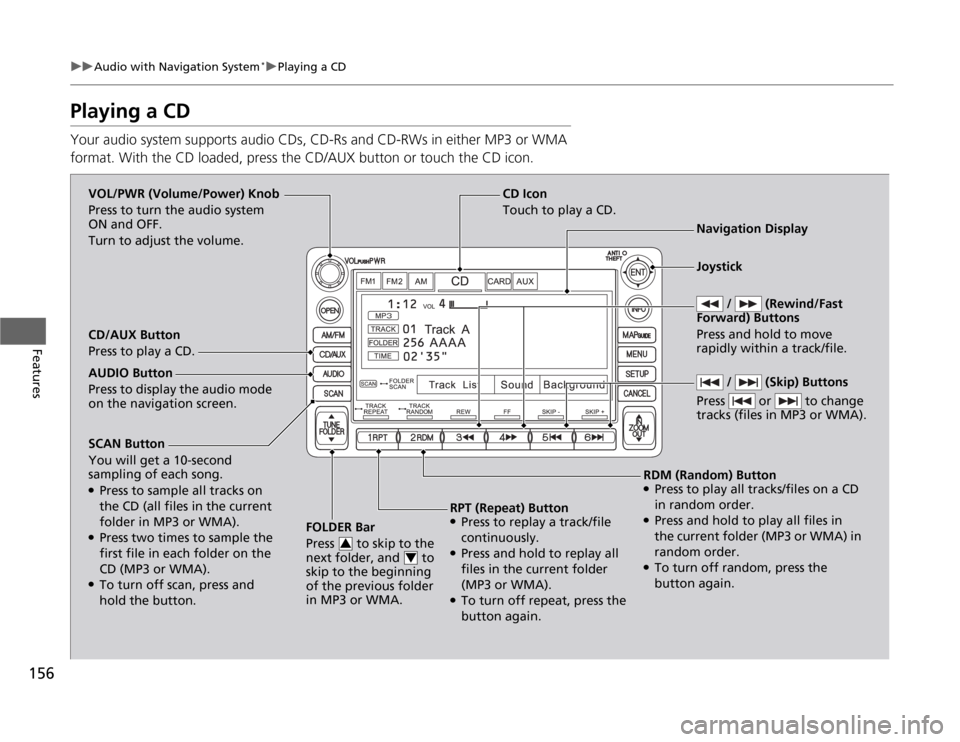
Playing a CD
Your audio system supports audio CDs, CD-Rs and CD-RWs in either MP3 or WMA
format. With the CD loaded, press the CD/AUX button or touch the CD icon.
SCAN Button You will get a 10-second
sampling of each song. ●
Press to sample all tracks on
the CD (all files in the current
folder in MP3 or WMA).
● Press two times to sample the
first file in each folder on the
CD (MP3 or WMA).
● To turn off scan, press and
hold the button. FOLDER Bar
Press to skip to the
next folder, and to
skip to the beginning
of the previous folder in MP3 or WMA.
3
4
CD Icon
Touch to play a CD.
VOL/PWR (Volume/Power) Knob
Press to turn the audio system
ON and OFF.
Turn to adjust the volume.
Navigation Display
CD/AUX Button
Press to play a CD.
RDM (Random) Button● Press to play all tracks/files on a CD
in random order.
● Press and hold to play all files in
the current folder (MP3 or WMA) in
random order.
● To turn off random, press the
button again.
RPT (Repeat) Button
● Press to replay a track/file
continuously.
● Press and hold to replay all
files in the current folder (MP3 or WMA).
● To turn off repeat, press the
button again.
AUDIO Button
Press to display the audio mode on the navigation screen.
/ (Skip) Buttons
Press or to change
tracks (files in MP3 or WMA).
Joystick
/ (Rewind/Fast
Forward) Buttons Press and hold to move
rapidly within a track/file.
Page 159 of 333
158
uuAudio with Navigation System*uPlaying a PC Card
Features
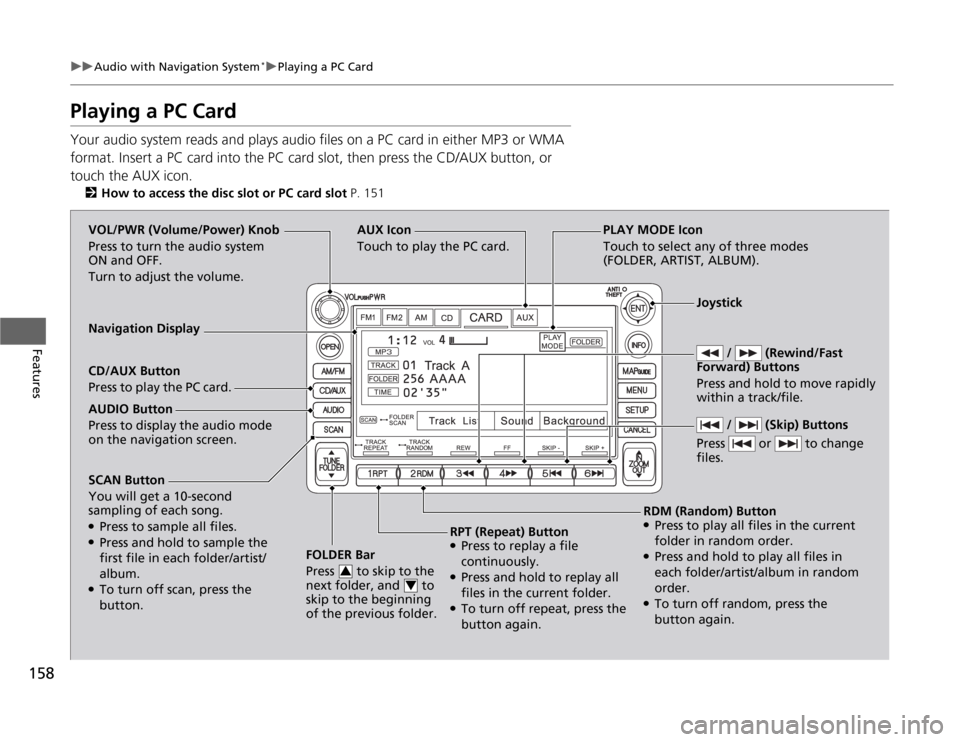
Playing a PC Card
Your audio system reads and plays audio files on a PC card in either MP3 or WMA
format. Insert a PC card into the PC card slot, then press the CD/AUX button, or touch the AUX icon.
2 How to access the disc slot or PC card slot P. 151
SCAN Button You will get a 10-second
sampling of each song. ●
Press to sample all files.
● Press and hold to sample the
first file in each folder/artist/ album.
● To turn off scan, press the
button. FOLDER Bar
Press to skip to the
next folder, and to
skip to the beginning
of the previous folder.
3
4
AUX Icon Touch to play the PC card.
/ (Rewind/Fast
Forward) Buttons
Press and hold to move rapidly within a track/file. VOL/PWR (Volume/Power) Knob
Press to turn the audio system
ON and OFF.
Turn to adjust the volume.
Navigation Display CD/AUX Button
Press to play the PC card.
RDM (Random) Button
● Press to play all files in the current
folder in random order.
● Press and hold to play all files in
each folder/artist/album in random order.
● To turn off random, press the
button again.
RPT (Repeat) Button
● Press to replay a file
continuously.
● Press and hold to replay all
files in the current folder.
● To turn off repeat, press the
button again.
AUDIO Button
Press to display the audio mode on the navigation screen.
/ (Skip) Buttons
Press or to change files.
Joystick
PLAY MODE Icon
Touch to select any of three modes
(FOLDER, ARTIST, ALBUM).
Page 160 of 333
Continued159
uuAudio with Navigation System*uPlaying a PC Card
Features
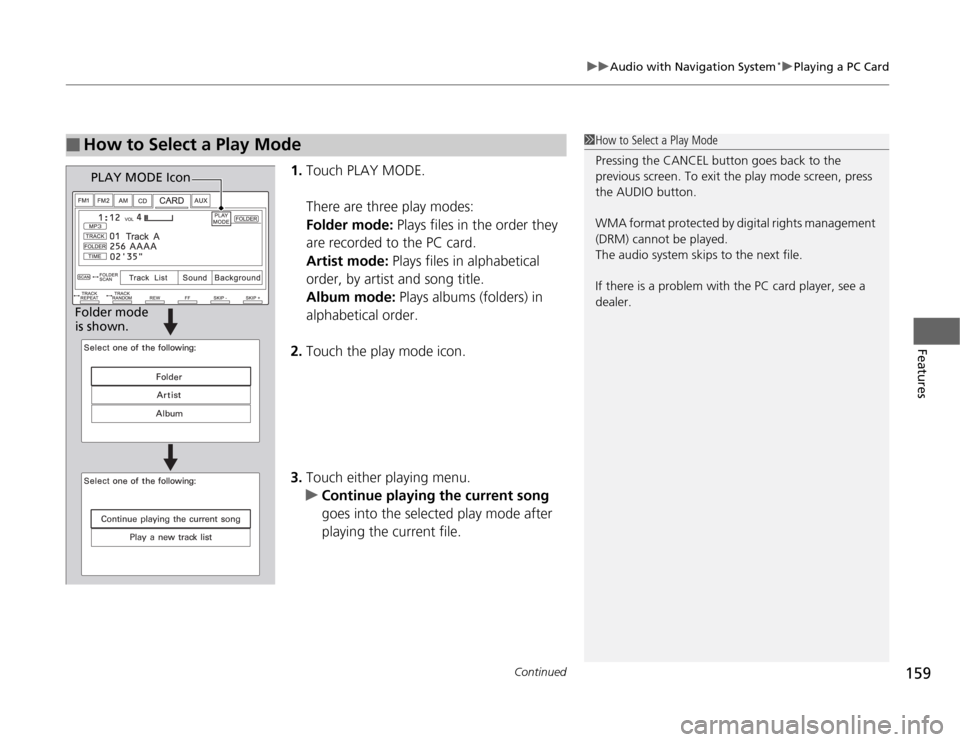
1.
Touch PLAY MODE.
There are three play modes: Folder mode: Plays files in the order they
are recorded to the PC card.Artist mode: Plays files in alphabetical
order, by artist and song title. Album mode: Plays albums (folders) in
alphabetical order.
2. Touch the play mode icon.
3. Touch either playing menu.
uContinue playing the current song
goes into the selected play mode after
playing the current file.
■How to Select a Play Mode1How to Select a Play Mode
Pressing the CANCEL button goes back to the
previous screen. To exit the play mode screen, press
the AUDIO button.
WMA format protected by digital rights management
(DRM) cannot be played.
The audio system skips to the next file.
If there is a problem with the PC card player, see a
dealer.
PLAY MODE Icon
Folder mode
is shown.
Page 166 of 333
165
uuAudio with Navigation System*uPlaying a USB Flash Drive
Continued
Features
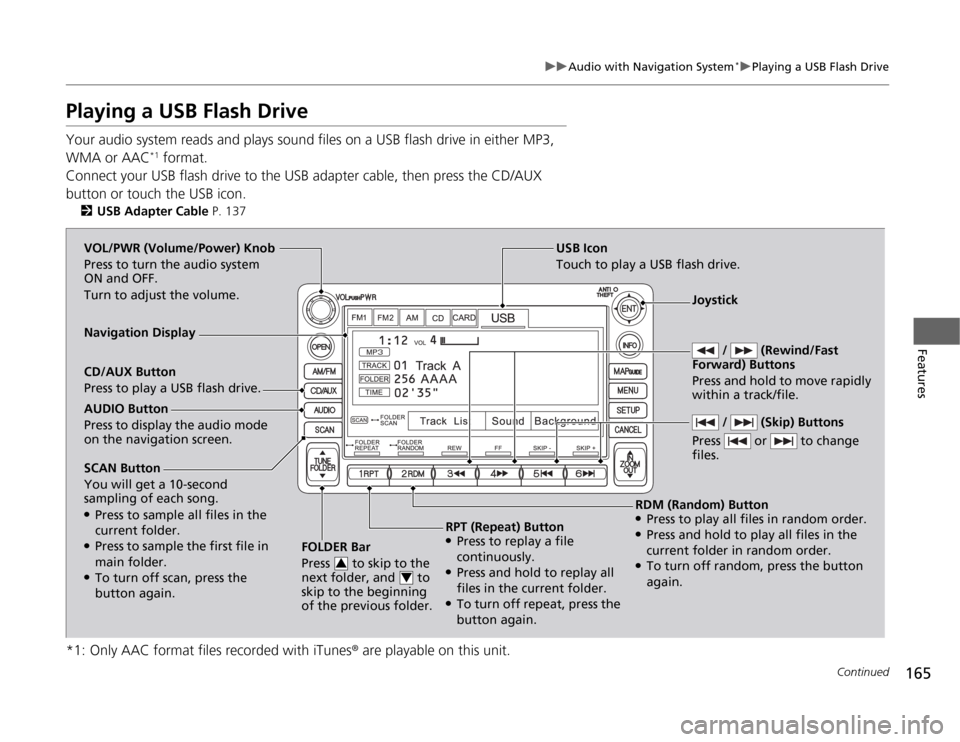
Playing a USB Flash Drive
Your audio system reads and plays sound files on a USB flash drive in either MP3,
WMA or AAC*1
format.
Connect your USB flash drive to the USB adapter cable, then press the CD/AUX
button or touch the USB icon. 2 USB Adapter Cable P. 137
*1: Only AAC format files recorded with iTunes ® are playable on this unit.
SCAN Button You will get a 10-second
sampling of each song. ●
Press to sample all files in the current folder.
● Press to sample the first file in main folder.
● To turn off scan, press the
button again. FOLDER Bar
Press to skip to the
next folder, and to
skip to the beginning
of the previous folder.
3
4
USB Icon
Touch to play a USB flash drive.
/ (Rewind/Fast
Forward) Buttons
Press and hold to move rapidly within a track/file. VOL/PWR (Volume/Power) Knob
Press to turn the audio system
ON and OFF.
Turn to adjust the volume.
Navigation Display CD/AUX Button
Press to play a USB flash drive.
RDM (Random) Button
● Press to play all files in random order.
● Press and hold to play all files in the
current folder in random order.
● To turn off random, press the button
again.
RPT (Repeat) Button
● Press to replay a file
continuously.
● Press and hold to replay all
files in the current folder.
● To turn off repeat, press the
button again.
AUDIO Button
Press to display the audio mode on the navigation screen.
/ (Skip) Buttons
Press or to change files.
Joystick
Page 172 of 333
171
uuGeneral Information on the Audio SystemuCompatible iPod® and USB Flash Drives
Features
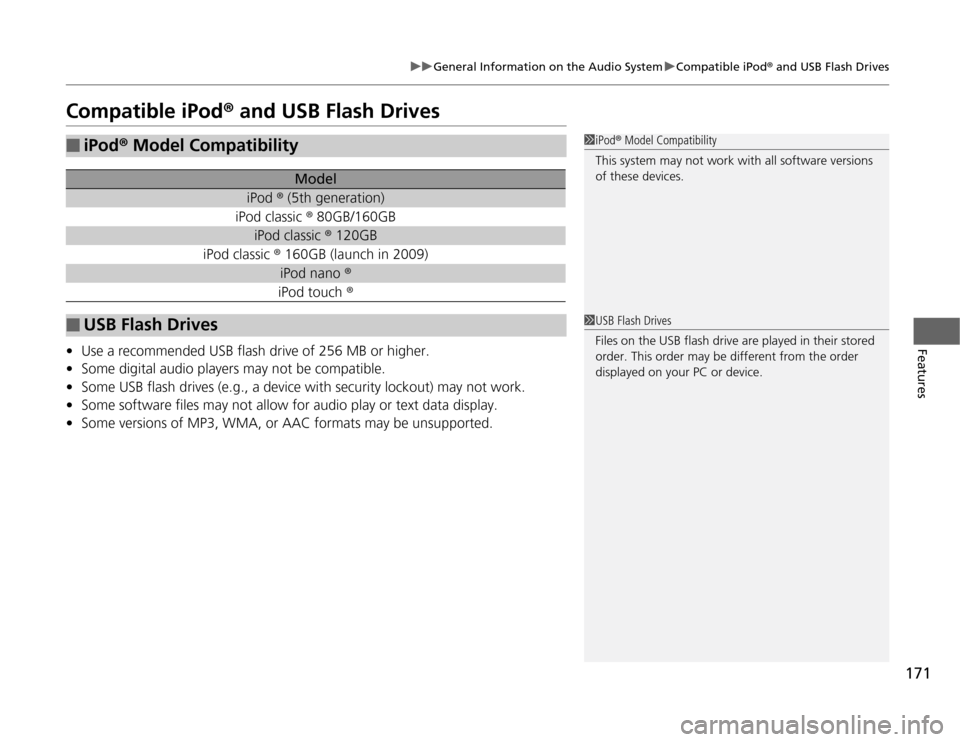
Compatible iPod ® and USB Flash Drives
• Use a recommended USB flash drive of 256 MB or higher.
• Some digital audio players may not be compatible.
• Some USB flash drives (e.g., a device with security lockout) may not work.
• Some software files may not allow for audio play or text data display.
• Some versions of MP3, WMA, or AAC formats may be unsupported.
■iPod ® Model Compatibility
Model
iPod ® (5th generation)
iPod classic ® 80GB/160GB
iPod classic ® 120GB
iPod classic ® 160GB (launch in 2009)
iPod nano ®
iPod touch ®
■USB Flash Drives
1iPod® Model Compatibility
This system may not work with all software versions
of these devices.
1USB Flash Drives
Files on the USB flash drive are played in their stored
order. This order may be different from the order
displayed on your PC or device.