ECO mode HONDA CR-Z 2012 1.G Owner's Manual
[x] Cancel search | Manufacturer: HONDA, Model Year: 2012, Model line: CR-Z, Model: HONDA CR-Z 2012 1.GPages: 333, PDF Size: 10.43 MB
Page 87 of 333
uuGauges and Multi-Information DisplayuMulti-Information Display
86
Instrument Panel
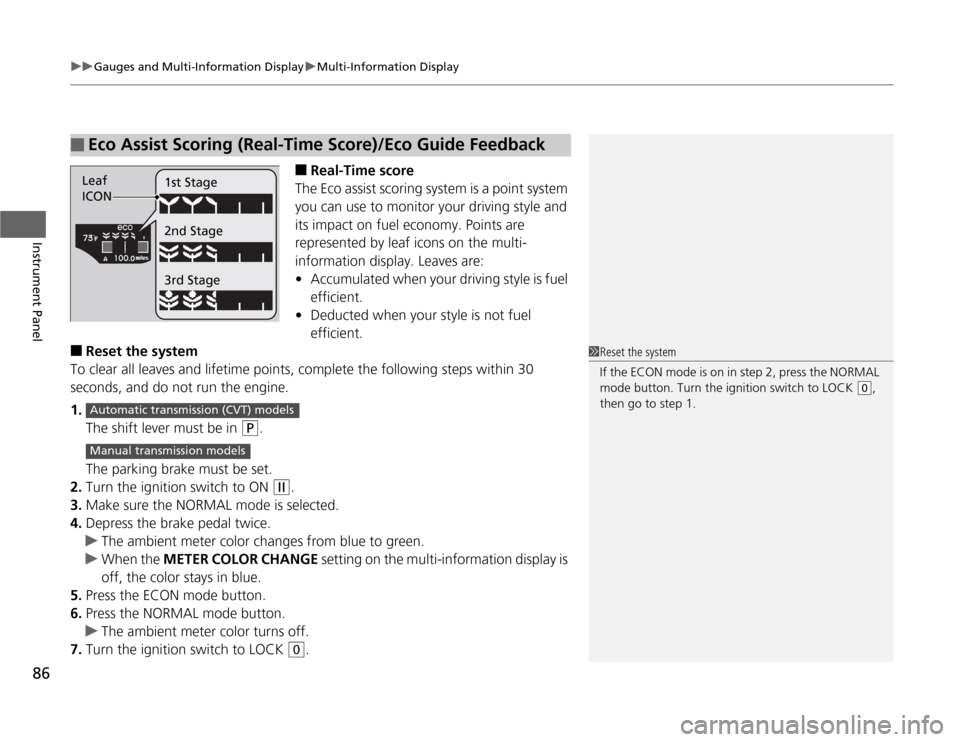
■ Real-Time score
The Eco assist scoring system is a point system
you can use to monitor your driving style and
its impact on fuel economy. Points are
represented by leaf icons on the multi-
information display. Leaves are:• Accumulated when your driving style is fuel
efficient.
• Deducted when your style is not fuel efficient.
■ Reset the system
To clear all leaves and lifetime points, complete the following steps within 30 seconds, and do not run the engine. 1. The shift lever must be in
(P .
The parking brake must be set.
2. Turn the ignition switch to ON
(w .
3. Make sure the NORMAL mode is selected.
4. Depress the brake pedal twice.
uThe ambient meter color changes from blue to green.
uWhen the METER COLOR CHANGE setting on the multi-information display is
off, the color stays in blue.
5. Press the ECON mode button.
6. Press the NORMAL mode button.
uThe ambient meter color turns off.
7. Turn the ignition switch to LOCK
(0 .
■Eco Assist Scoring (Real-Time Score )/Eco Guide Feedback
Leaf
ICON1st Stage 2nd Stage 3rd Stage
1Reset the system
If the ECON mode is on in step 2, press the NORMAL
mode button. Turn the ignition switch to LOCK
(0
,
then go to step 1.
Automatic transmiss ion (CVT) models
Manual transmission models
Page 88 of 333
Continued87
uuGauges and Multi-Information DisplayuMulti-Information Display
Instrument Panel
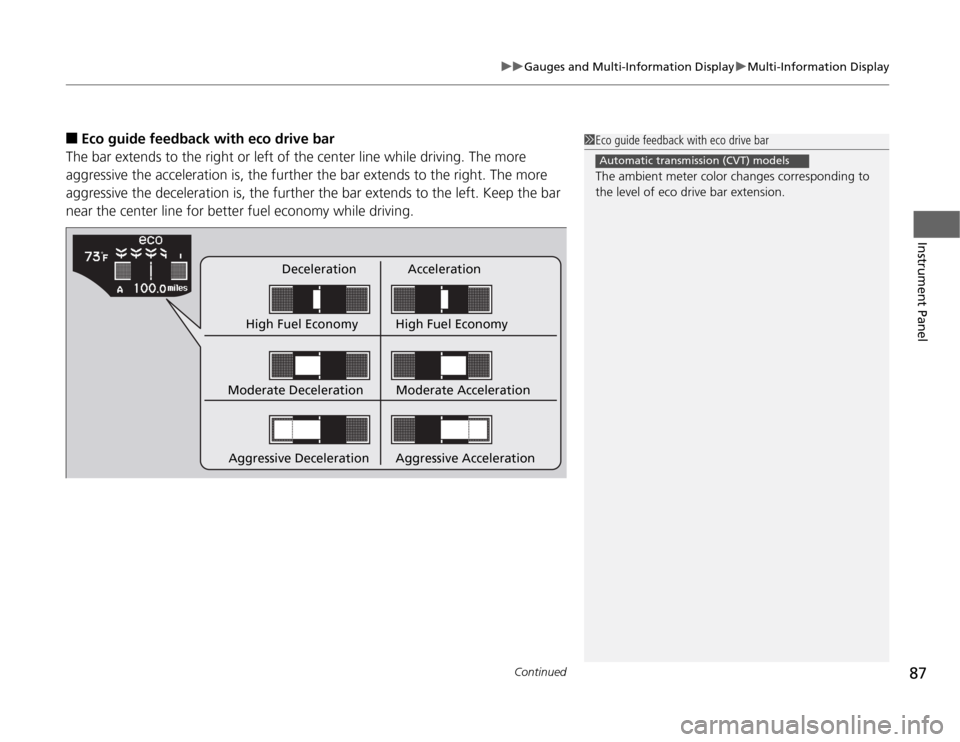
■Eco guide feedback with eco drive bar
The bar extends to the right or left of the center line while driving. The more
aggressive the acceleration is, the further the bar extends to the right. The more
aggressive the deceleration is, the further the bar extends to the left. Keep the bar
near the center line for better fu el economy while driving.
Deceleration Acceleration
High Fuel Economy High Fuel Economy
Moderate Deceleration
Aggressive Deceleration Moderate Acceleration
Aggressive Acceleration
1Eco guide feedback with eco drive bar
The ambient meter color changes corresponding to the level of eco drive bar extension.
Automatic transmission (CVT) models
Page 92 of 333
91
uuGauges and Multi-Information DisplayuMulti-Information Display
Continued
Instrument Panel
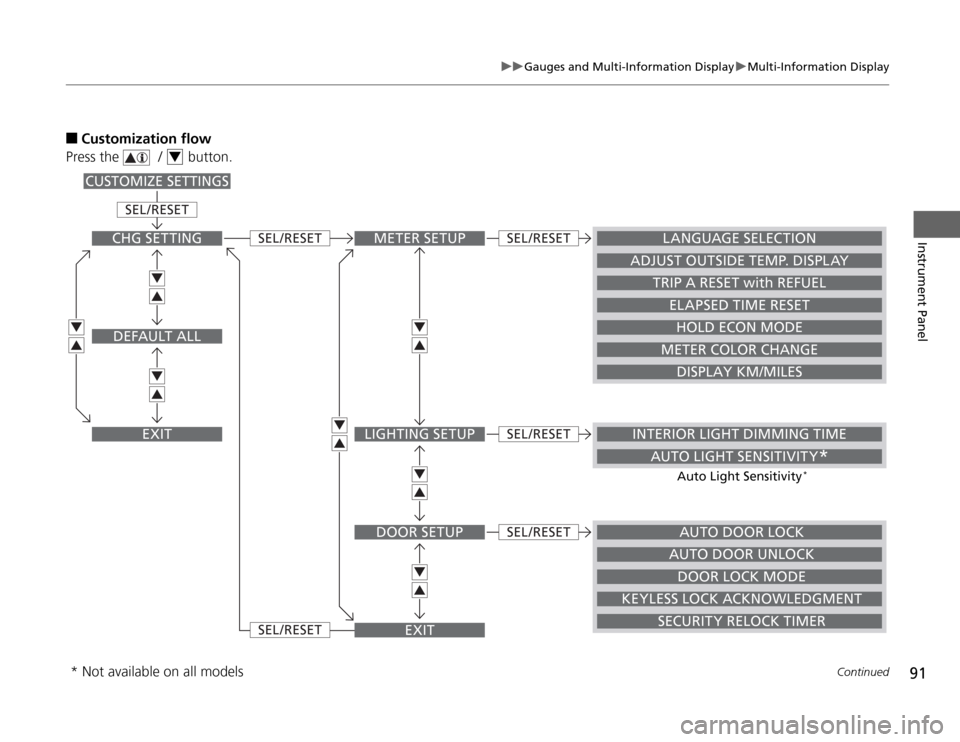
■Customization flow
Press the / button.
4
METER SETUP
AUTO DOOR LOCK
INTERIOR LIGHT DIMMING TIME
AUTO LIGHT SENSITIVITY *
LANGUAGE SELECTION
ADJUST OUTSIDE TEMP. DISPLAY
TRIP A RESET with REFUEL
ELAPSED TIME RESET
HOLD ECON MODE
METER COLOR CHANGE
DISPLAY KM/MILES
LIGHTING SETUP
DOOR SETUP
EXIT
SEL /RESET
SEL /RESET
SEL /RESET
SEL /RESET
SEL /RESET
SEL /RESET
CHG SETTING
DEFAULT ALL
EXIT
CUSTOMIZE SETTINGS
DOOR LOCK MODE
KEYLESS LOCK ACKNOWLEDGMENT SECURITY RELOCK TIMERAUTO DOOR UNLOCK
Auto Light Sensitivity
*
* Not available on all models
Page 93 of 333
92
uuGauges and Multi-Information DisplayuMulti-Information Display
Instrument Panel
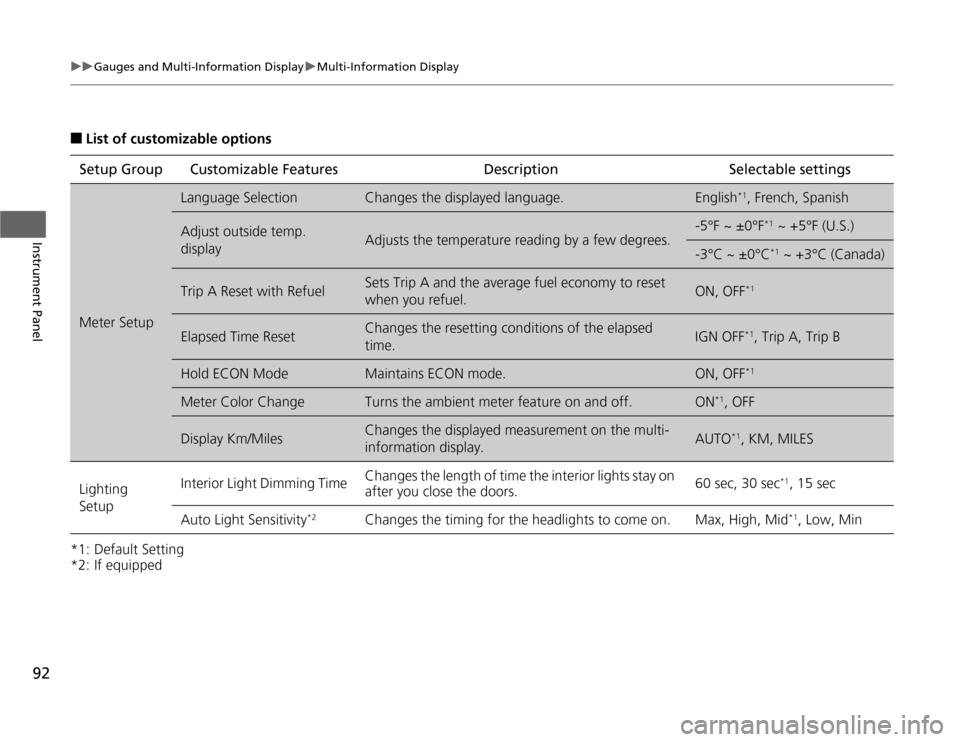
■List of customizable options
*1: Default Setting
*2: If equipped Setup Group Customizable
Features Description Selectable settings
Meter Setup
Language SelectionChanges the displayed language.English*1
, French, Spanish
Adjust outside temp.
displayAdjusts the temperature reading by a few degrees.
-5°F ~ ±0°F *1
~ +5°F (U.S.)
-3°C ~ ±0°C *1
~ +3°C (Canada)
Trip A Reset with RefuelSets Trip A and the average fuel economy to reset
when you refuel.ON, OFF *1
Elapsed Time ResetChanges the resetting conditions of the elapsed time.IGN OFF*1
, Trip A, Trip B
Hold ECON ModeMaintains ECON mode.ON, OFF *1
Meter Color ChangeTurns the ambient meter feature on and off.ON*1
, OFF
Display Km/MilesChanges the displayed measurement on the multi-
information display.AUTO *1
, KM, MILES
Lighting Setup Interior Light Dimming Time
Changes the length of time the interior lights stay on
after you close the doors. 60 sec, 30 sec
*1
, 15 sec
Auto Light Sensitivity *2
Changes the timing for the headlights to come on. Max, High, Mid *1
, Low, Min
Page 101 of 333
100
uuLocking and Unlocking the DoorsuLocking/Unlocking the Doors from the Outside
Controls
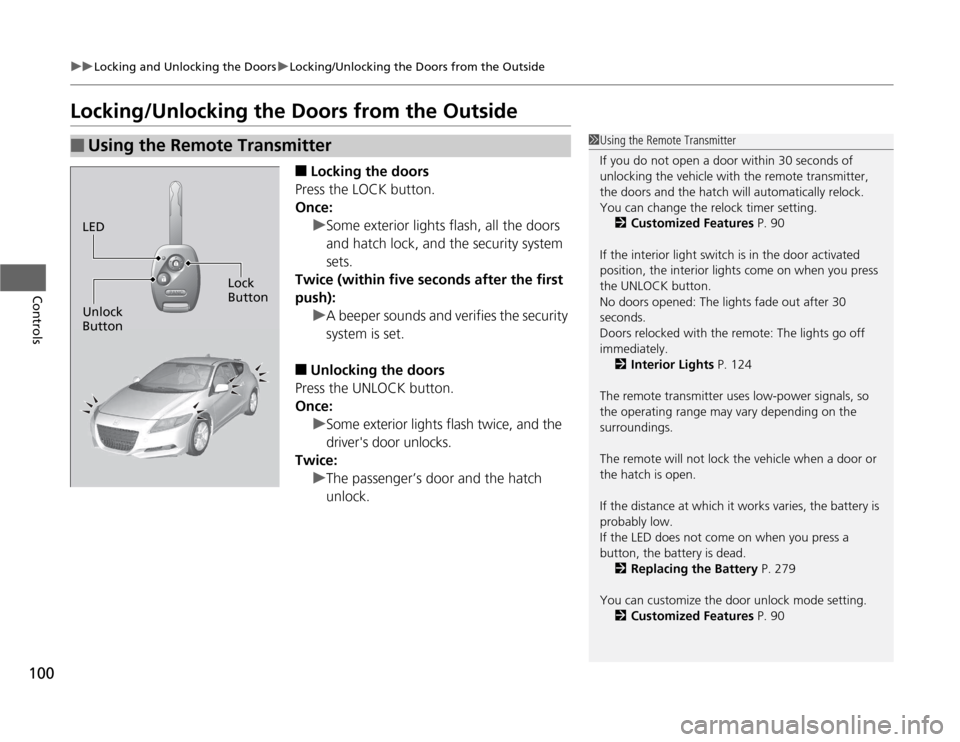
Locking/Unlocking the Doors from the Outside■Locking the doors
Press the LOCK button.
Once:
uSome exterior lights flash, all the doors
and hatch lock, and the security system sets.
Twice (within five seconds after the first push):
uA beeper sounds and verifies the security system is set.
■ Unlocking the doors
Press the UNLOCK button.
Once:
uSome exterior lights flash twice, and the
driver's door unlocks.
Twice:
uThe passenger’s door and the hatch unlock.
■Using the Remote Transmitter1Using the Remote Transmitter
If you do not open a door within 30 seconds of
unlocking the vehicle with the remote transmitter,
the doors and the hatch will automatically relock.
You can change the relock timer setting. 2 Customized Features P. 90
If the interior light switch is in the door activated
position, the interior lights come on when you press
the UNLOCK button.
No doors opened: The lights fade out after 30
seconds.
Doors relocked with the remote: The lights go off
immediately. 2 Interior Lights P. 124
The remote transmitter uses low-power signals, so
the operating range may vary depending on the surroundings.
The remote will not lock the vehicle when a door or the hatch is open.
If the distance at which it works varies, the battery is
probably low.
If the LED does not come on when you press a
button, the battery is dead. 2 Replacing the Battery P. 279
You can customize the door unlock mode setting. 2 Customized Features P. 90
LED
Unlock Button Lock
Button
Page 102 of 333
101
uuLocking and Unlocking the DoorsuLocking/Unlocking the Doors from the Outside
Controls
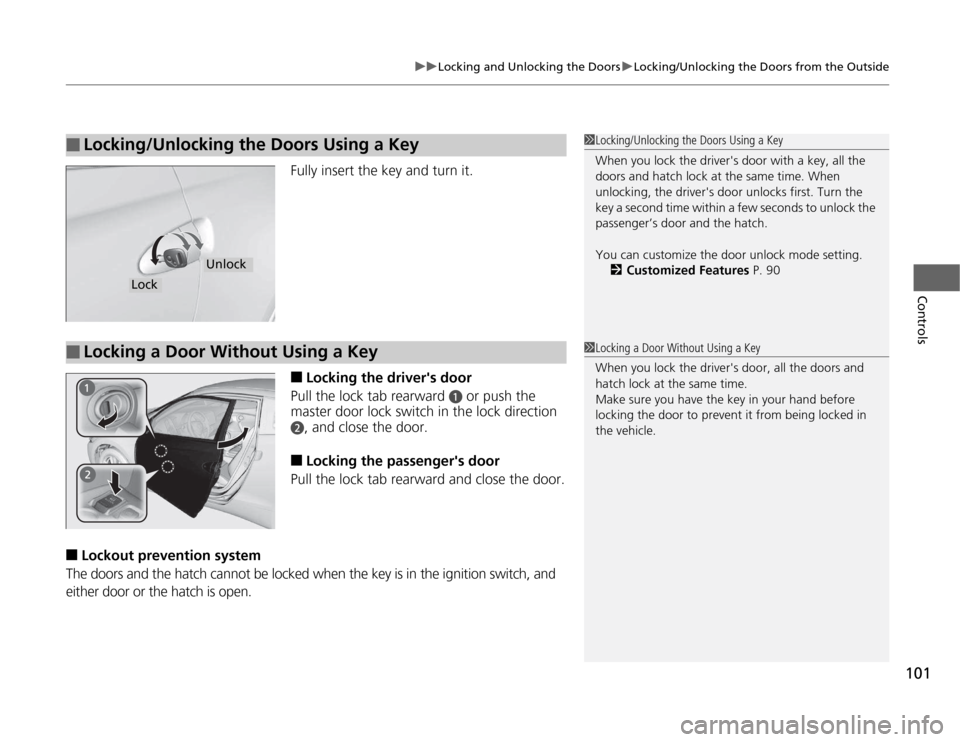
Fully insert the key and turn it. ■Locking the driver's door
Pull the lock tab rearward
a or push the
master door lock switch in the lock direction
b, and close the door.
■ Locking the passenger's door
Pull the lock tab rearward and close the door.
■ Lockout preventi on system
The doors and the hatch cannot be locked when the key is in the ignition switch, and either door or the hatch is open.
■Locking/Unlocking the Doors Using a Key1Locking/Unlocking the Doors Using a Key
When you lock the driver's door with a key, all the
doors and hatch lock at the same time. When
unlocking, the driver's door unlocks first. Turn the
key a second time within a few seconds to unlock the
passenger’s door and the hatch.
You can customize the door unlock mode setting. 2 Customized Features P. 90
Lock
Unlock
■Locking a Door Without Using a Key1Locking a Door Without Using a Key
When you lock the driver's door, all the doors and
hatch lock at the same time.
Make sure you have the key in your hand before
locking the door to prevent it from being locked in the vehicle.
Page 107 of 333
uuSecurity SystemuSecurity System Alarm
106
Controls
■ Setting the securi ty system alarm
The security system alarm automatically sets when the following conditions have been met: • The ignition switch is in LOCK
(0 , and the key has been removed from the
ignition switch.
• The hood is closed.
• Both doors and the hatch are locked with the key or the remote transmitter.
■ When the security system alarm sets
The security system alarm indicator in the instrument panel blinks. When the
blinking interval changes after about 15 seconds, the security system alarm is set. ■ To cancel the security system alarm
The security system alarm is canceled when the vehicle is unlocked using the key or
remote transmitter. The security system alarm indicator goes off at the same time.
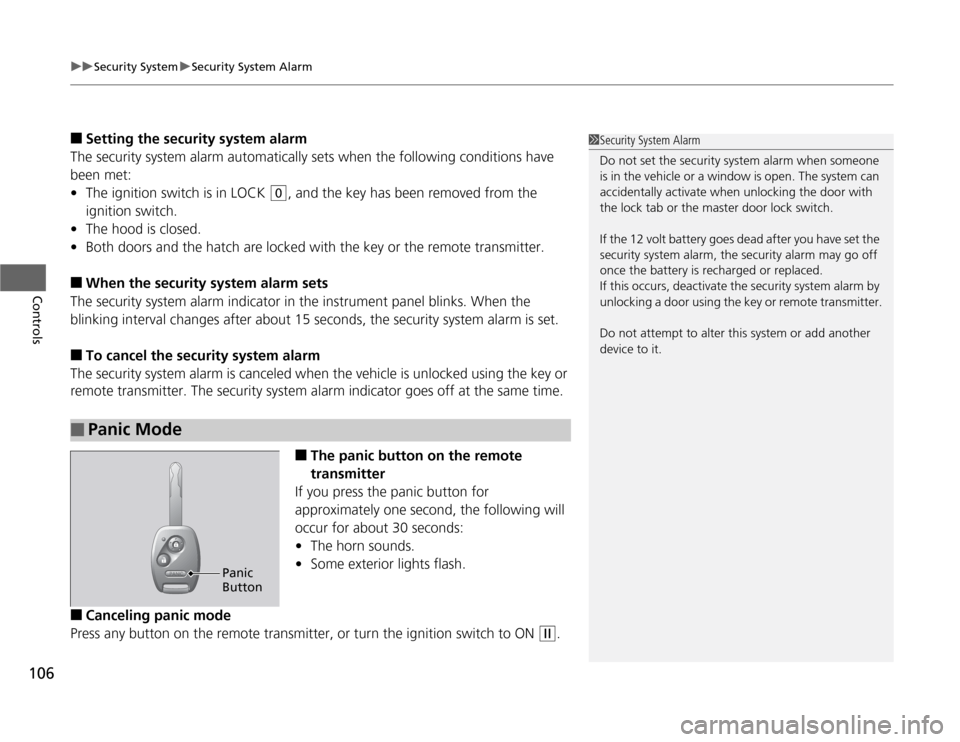
■The panic button on the remote
transmitter
If you press the panic button for
approximately one second, the following will
occur for about 30 seconds: • The horn sounds.
• Some exterior lights flash.
■ Canceling panic mode
Press any button on the remote transmitter, or turn the ignition switch to ON
(w .
■Panic Mode
1Security System Alarm
Do not set the security system alarm when someone
is in the vehicle or a window is open. The system can
accidentally activate when unlocking the door with
the lock tab or the master door lock switch.
If the 12 volt battery goes de ad after you have set the
security system alarm, the security alarm may go off
once the battery is recharged or replaced.
If this occurs, deactivate the security system alarm by
unlocking a door using the key or remote transmitter.
Do not attempt to alter this system or add another
device to it.
Panic Button
Page 112 of 333
111
uuOperating the Switches Around the Steering WheeluLight Switches
Controls
Automatic lighting control can be used when
the ignition switch is in ON
(w.
When you turn the light switch to
#Y , the
headlights and other exterior lights will switch
on and off automatically depending on the
ambient brightness.
uYou can change the AUTO light
sensitivity setting.
2 Customized Features P. 90
■Automatic Lighting Control *1Automatic Lighting Control
*
We recommend that you turn on the lights manually
when driving at night, in a dense fog, or in dark areas
such as long tunnels or parking facilities.
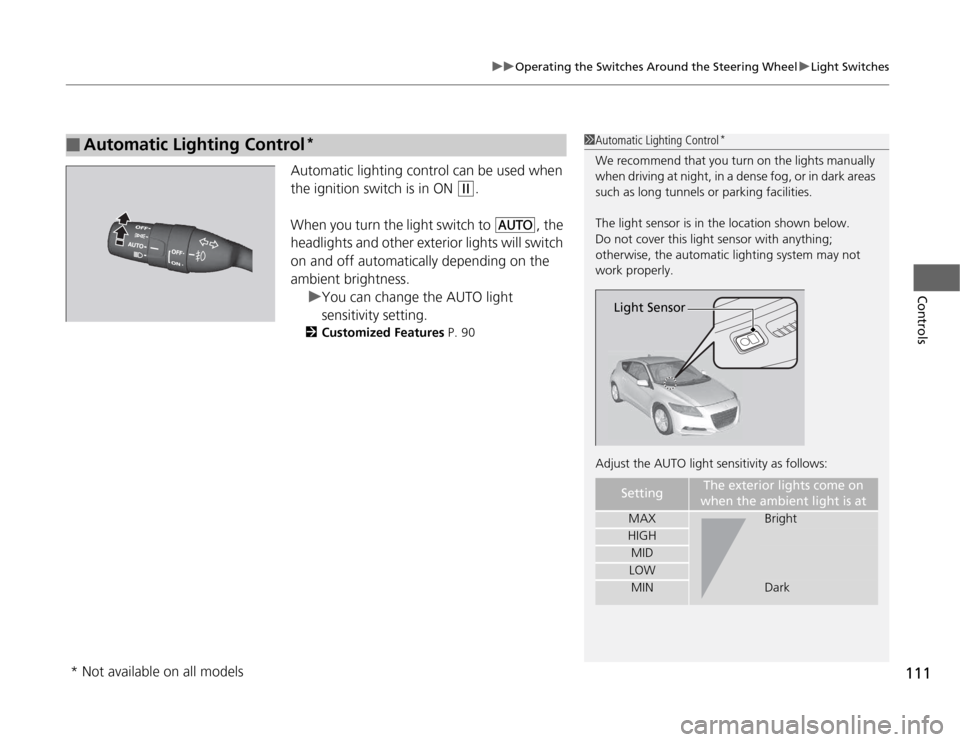
The light sensor is in the location shown below.
Do not cover this light sensor with anything;
otherwise, the automatic lighting system may not work properly.
Adjust the AUTO light sensitivity as follows:
SettingThe exterior lights come on
when the ambient light is at
MAXBright
HIGH
MID
LOW
MINDark
Light Sensor
* Not available on all models
Page 133 of 333
132
Controls
Climate Control System
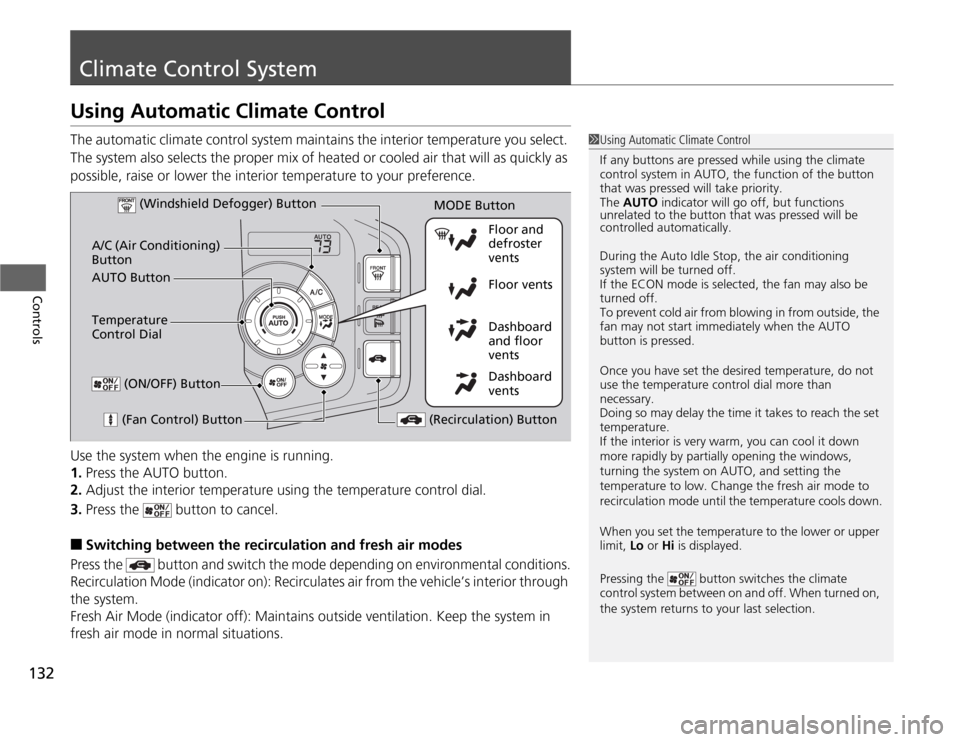
Using Automatic Climate Control
The automatic climate control system maintains the interior temperature you select.
The system also selects the proper mix of heated or cooled air that will as quickly as
possible, raise or lower the interior temperature to your preference.
Use the system when the engine is running. 1.Press the AUTO button.
2. Adjust the interior temperature using the temperature control dial.
3. Press the button to cancel.
■ Switching between the recirculation and fresh air modes
Press the button and sw itch the mode depending on environmental conditions.
Recirculation Mode (indicator on): Recirculates air from the vehicle’s interior through
the system.
Fresh Air Mode (indicator off): Maintains outside ventilation. Keep the system in
fresh air mode in normal situations.
1Using Automatic Climate Control
If any buttons are pressed while using the climate
control system in AUTO, the function of the button
that was pressed will take priority.
The AUTO indicator will go off, but functions
unrelated to the button that was pressed will be
controlled automatically.
During the Auto Idle Stop, the air conditioning
system will be turned off.
If the ECON mode is selected, the fan may also be
turned off.
To prevent cold air from blowing in from outside, the
fan may not start immediately when the AUTO
button is pressed.
Once you have set the desired temperature, do not use the temperature control dial more than necessary.
Doing so may delay the time it takes to reach the set temperature.
If the interior is very warm, you can cool it down
more rapidly by partially opening the windows,
turning the system on AUTO, and setting the
temperature to low. Change the fresh air mode to
recirculation mode until the temperature cools down.
When you set the temperature to the lower or upper
limit, Lo or Hi is displayed.
Pressing the button switches the climate
control system between on and off. When turned on,
the system returns to your last selection.
Dashboard
vents
Dashboard
and floor
vents
Floor vents
Floor and defroster
vents
AUTO Button
A/C (Air Conditioning) Button
(Fan Control) Button
(Recirculation) Button
Temperature
Control Dial (Windshield Defogger) Button
(ON/OFF) Button
MODE Button
Page 136 of 333
135
Features
This chapter describes how to operate the audio system an d other technology features.
Audio System
About Your Audio System ................ 136
USB Adapter Cable .......................... 137
Auxiliary Input Jack .......................... 138
Audio System Theft Protection ......... 139
Audio Remote Controls .................... 140
Audio without Navigation System Audio System Basic Operation .......... 141
Playing the AM/FM Radio ................. 143
Playing a CD .................................... 145
Playing an iPod ®............................... 147
Playing a USB Flash Drive ................. 149 Audio with Navigation System
*
Audio System Basic Operation.......... 151
Playing the AM/FM Radio ................. 154
Playing a CD .................................... 156
Playing a PC Card ............................ 158
Playing an iPod ®............................... 162
Playing a USB Flash Drive ................. 165
Audio Error Messages CD Player ......................................... 167
iPod ®/USB Flash Drive....................... 168 General Information on the Audio System
Recommended CDs ......................... 169
Compatible iPod® and USB Flash Drives ... 171
Recommended PC Card ................... 172
Bluetooth ® HandsFreeLink ®*
Using HFL ........................................ 173
HFL Menus ...................................... 175
* Not available on all models