lock HONDA CR-Z 2012 1.G Repair Manual
[x] Cancel search | Manufacturer: HONDA, Model Year: 2012, Model line: CR-Z, Model: HONDA CR-Z 2012 1.GPages: 333, PDF Size: 10.43 MB
Page 269 of 333
268
uuChecking and Maintaining Wiper BladesuChanging the Rear Wiper Blade Rubber
Maintenance
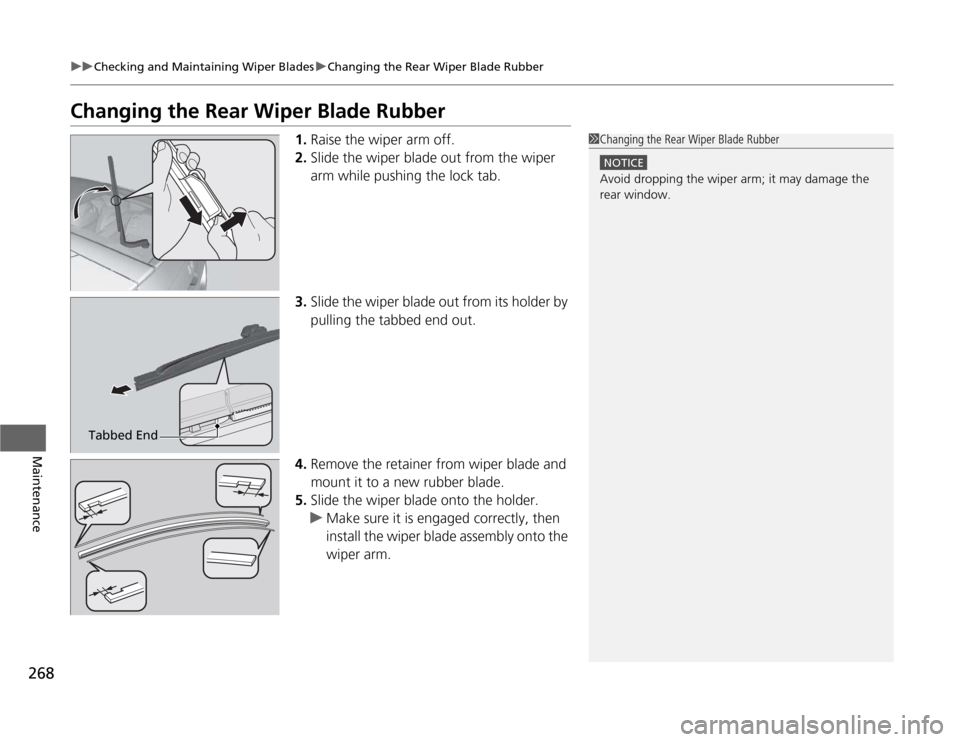
Changing the Rear Wiper Blade Rubber1.Raise the wiper arm off.
2. Slide the wiper blade out from the wiper
arm while pushing the lock tab.
3. Slide the wiper blade out from its holder by
pulling the tabbed end out.
4. Remove the retainer from wiper blade and
mount it to a new rubber blade.
5. Slide the wiper blade onto the holder.
uMake sure it is engaged correctly, then
install the wiper blade assembly onto the
wiper arm.
1Changing the Rear Wiper Blade Rubber
NOTICE
Avoid dropping the wiper arm; it may damage the rear window.
Tabbed End
Page 279 of 333
278
Maintenance
12 Volt Battery
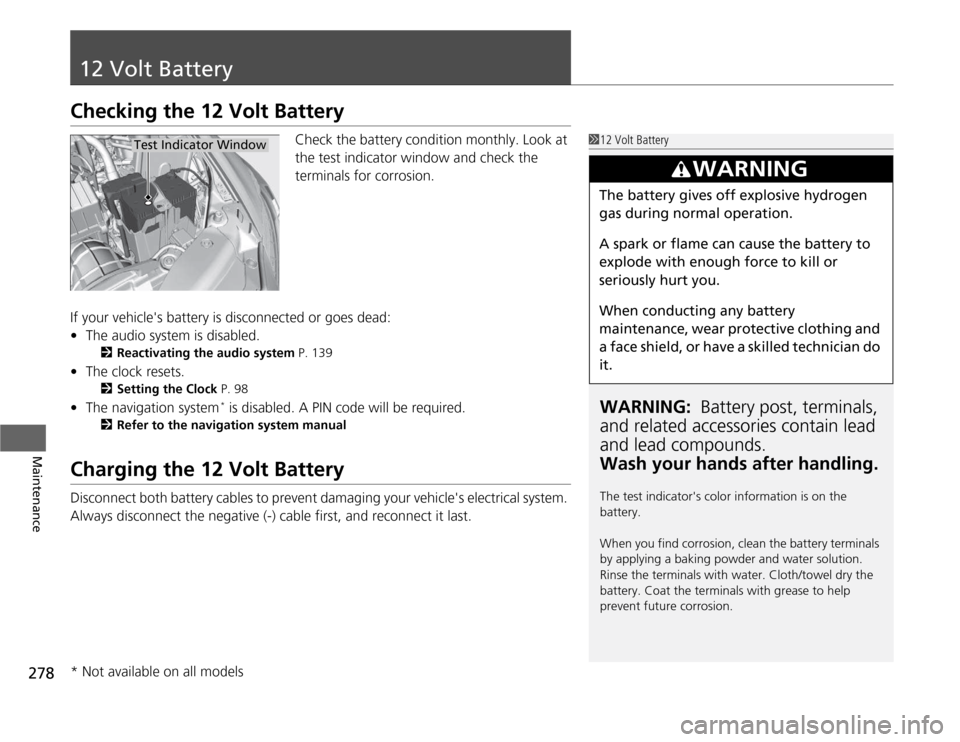
Checking the 12 Volt BatteryCheck the battery condition monthly. Look at
the test indicator window and check the
terminals for corrosion.
If your vehicle's battery is disconnected or goes dead: • The audio system is disabled.
2 Reactivating the audio system P. 139
• The clock resets.
2 Setting the Clock P. 98
• The navigation system *
is disabled. A PIN code will be required.
2 Refer to the navigation system manual
Charging the 12 Volt Battery
Disconnect both battery cables to prevent damaging your vehicle's electrical system.
Always disconnect the negative (-) cable first, and reconnect it last.
112 Volt Battery
WARNING: Battery post, terminals,
and related accessori es contain lead
and lead compounds. Wash your hands after handling.
The test indicator's color information is on the
battery.
When you find corrosion, clean the battery terminals
by applying a baking powder and water solution.
Rinse the terminals with water. Cloth/towel dry the
battery. Coat the terminals with grease to help
prevent future corrosion.
3WARNING
The battery gives off explosive hydrogen
gas during normal operation.
A spark or flame can cause the battery to
explode with enough force to kill or seriously hurt you.
When conducting any battery
maintenance, wear protective clothing and
a face shield, or have a skilled technician do
it.
Test Indicator Window
* Not available on all models
Page 283 of 333
uuCleaninguInterior Care
282
Maintenance
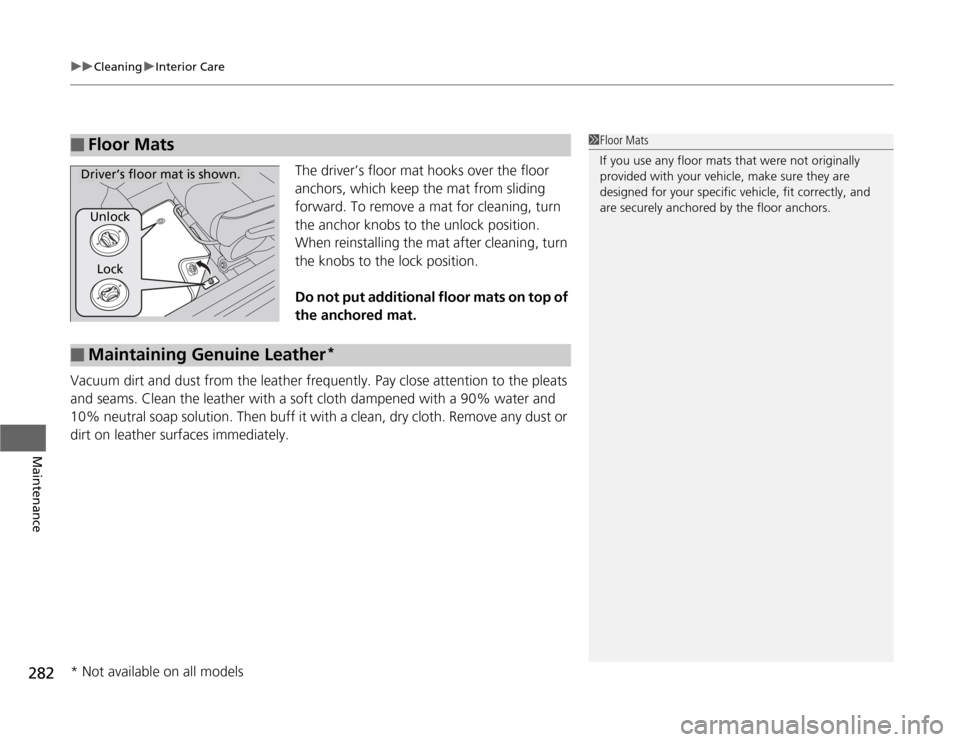
The driver’s floor mat hooks over the floor
anchors, which keep the mat from sliding
forward. To remove a mat for cleaning, turn
the anchor knobs to the unlock position.
When reinstalling the mat after cleaning, turn
the knobs to the lock position.
Do not put additional floor mats on top of the anchored mat.
Vacuum dirt and dust from the leather frequently. Pay close attention to the pleats
and seams. Clean the leather with a soft cloth dampened with a 90% water and
10% neutral soap solution. Then buff it with a clean, dry cloth. Remove any dust or
dirt on leather surfaces immediately.
■Floor Mats1Floor Mats
If you use any floor mats that were not originally
provided with your vehicle, make sure they are
designed for your specific vehicle, fit correctly, and
are securely anchored by the floor anchors.
Unlock Lock
Driver’s floor mat is shown.
■Maintaining Genuine Leather *
* Not available on all models
Page 288 of 333
287
Continued
Handling the Unexpected
If a Tire Goes Flat
Changing a Flat Tire
If a tire goes flat while driving, grasp the steering wheel firmly, and brake gradually
to reduce speed. Then, stop in a safe place. Replace the flat tire with a compact
spare tire. Go to a dealer as soon as possible to have the full-size tire repaired or
replaced. 1.
Park the vehicle on firm, level, and non-slippery ground.
2. Put the shift lever in
(P .
2. Put the shift lever in
(R .
3. Set the parking brake.
4. Turn on the hazard warning lights and turn the ignition switch to LOCK
(0 .
1Changing a Flat Tire
Follow compact spare precautions:
Periodically check the tire pressure of the compact
spare. It should be set to the specified pressure.
Specified Pressure: 60 psi (420 kPa, 4.2 kgf/cm 2
)
When driving with the compact spare tire, keep the
vehicle speed under 50 mph (80 km/h). Replace with
a full-size tire as soon as possible.
The compact spare tire and wheel in your vehicle are
specifically for this model.
Do not use them with another vehicle.
Do not use another type of compact spare tire or
wheel with your vehicle.
Do not mount tire chains on a compact spare tire.
If a chain-mounted front tire goes flat, remove one of
the full-size rear tires and replace it with the compact
spare tire. Remove the flat front tire and replace it
with the full-size tire th at was removed from the rear.
Mount the tire chains on the front tire.
Do not use a puncture-repairing agent on a flat tire,
as it can damage the tire pressure sensor.
U.S. models only
Automatic transmiss ion (CVT) models
Manual transmission models
All models
Page 290 of 333
289
uuIf a Tire Goes FlatuChanging a Flat Tire
Continued
Handling the Unexpected
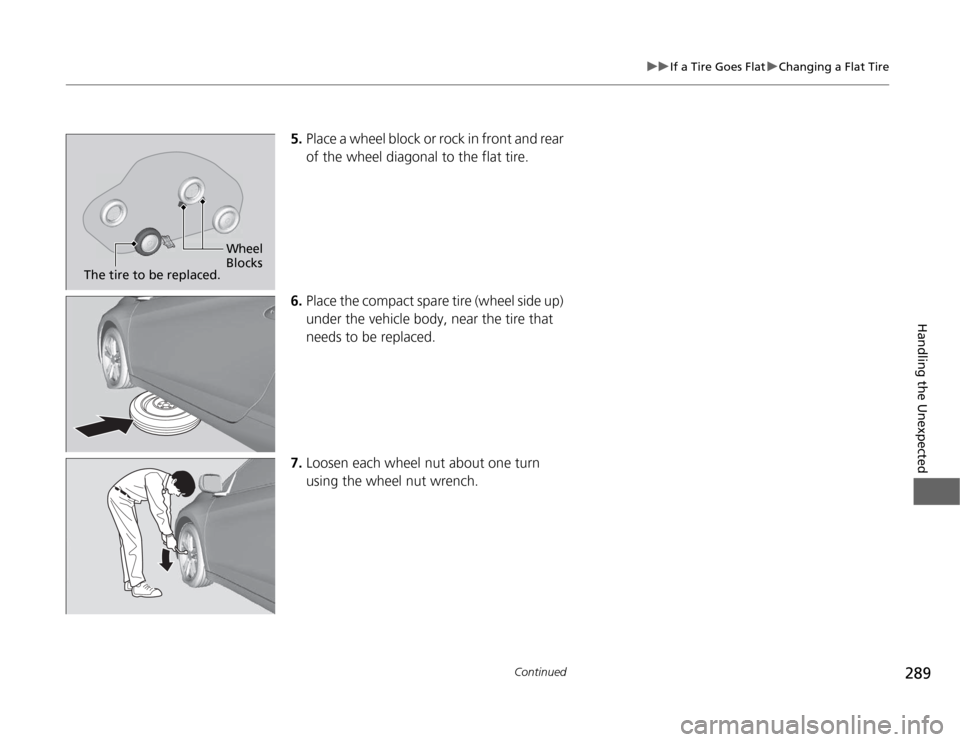
5.Place a wheel block or rock in front and rear
of the wheel diagonal to the flat tire.
6. Place the compact spare tire (wheel side up)
under the vehicle body, near the tire that
needs to be replaced.
7. Loosen each wheel nut about one turn
using the wheel nut wrench.
Wheel
Blocks
The tire to be replaced.
Page 291 of 333
uuIf a Tire Goes FlatuChanging a Flat Tire
290
Handling the Unexpected
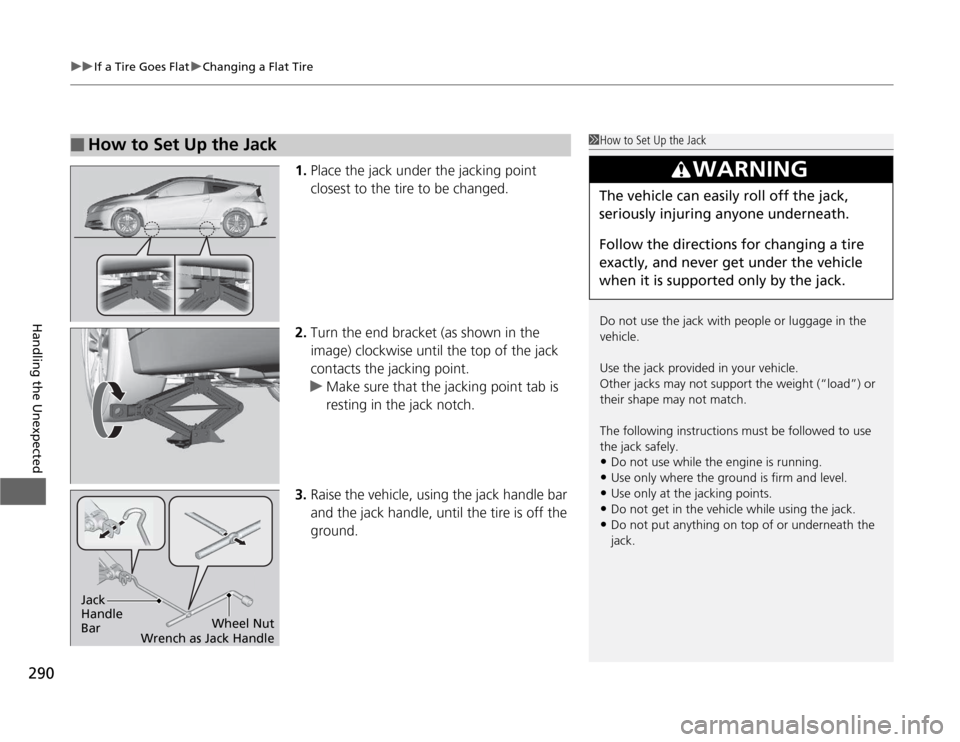
1. Place the jack under the jacking point
closest to the tire to be changed.
2. Turn the end bracket (as shown in the
image) clockwise until the top of the jack
contacts the jacking point.
uMake sure that the jacking point tab is
resting in the jack notch.
3. Raise the vehicle, using the jack handle bar
and the jack handle, until the tire is off the
ground.
■How to Set Up the Jack1How to Set Up the Jack
Do not use the jack with people or luggage in the
vehicle.
Use the jack provided in your vehicle.
Other jacks may not support the weight (“load”) or their shape may not match.
The following instructions must be followed to use the jack safely.
• Do not use while the engine is running.
• Use only where the ground is firm and level.
• Use only at the jacking points.
• Do not get in the vehicle while using the jack.
• Do not put anything on top of or underneath the
jack.
3WARNING
The vehicle can easily roll off the jack,
seriously injuring anyone underneath.
Follow the directions for changing a tire
exactly, and never get under the vehicle
when it is supported only by the jack.
Jack Handle BarWheel Nut
Wrench as Jack Handle
Page 297 of 333
296
Handling the Unexpected
Shift Lever Does Not Move
Follow the procedure below if you cannot move the shift lever out of the (P
position.
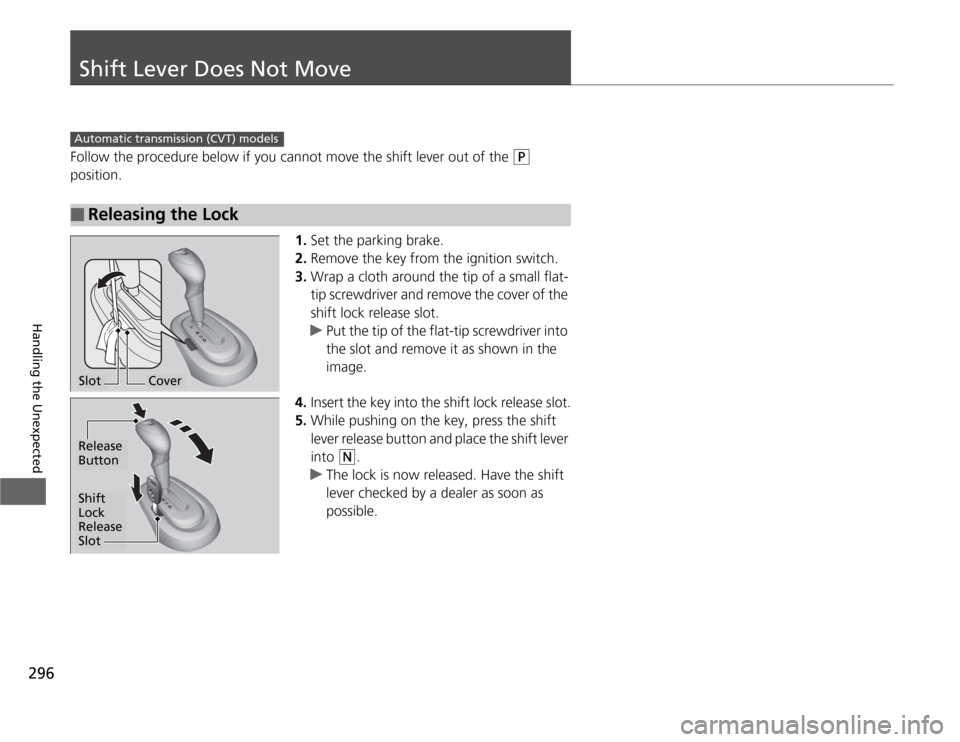
1.Set the parking brake.
2. Remove the key from the ignition switch.
3. Wrap a cloth around the tip of a small flat-
tip screwdriver and remove the cover of the
shift lock release slot.
uPut the tip of the flat-tip screwdriver into
the slot and remove it as shown in the image.
4. Insert the key into the shift lock release slot.
5. While pushing on the key, press the shift
lever release button and place the shift lever
into
(N .
uThe lock is now released. Have the shift
lever checked by a dealer as soon as
possible.
■Releasing the Lock
Automatic transmiss ion (CVT) models
SlotCover
Release Button
Shift
Lock Release
Slot
Page 305 of 333
304
Handling the Unexpected
Fuses
Fuse Locations
If any electrical devices are not working, turn the ignition switch to LOCK
(0 and
check to see if any applicable fuse is blown.
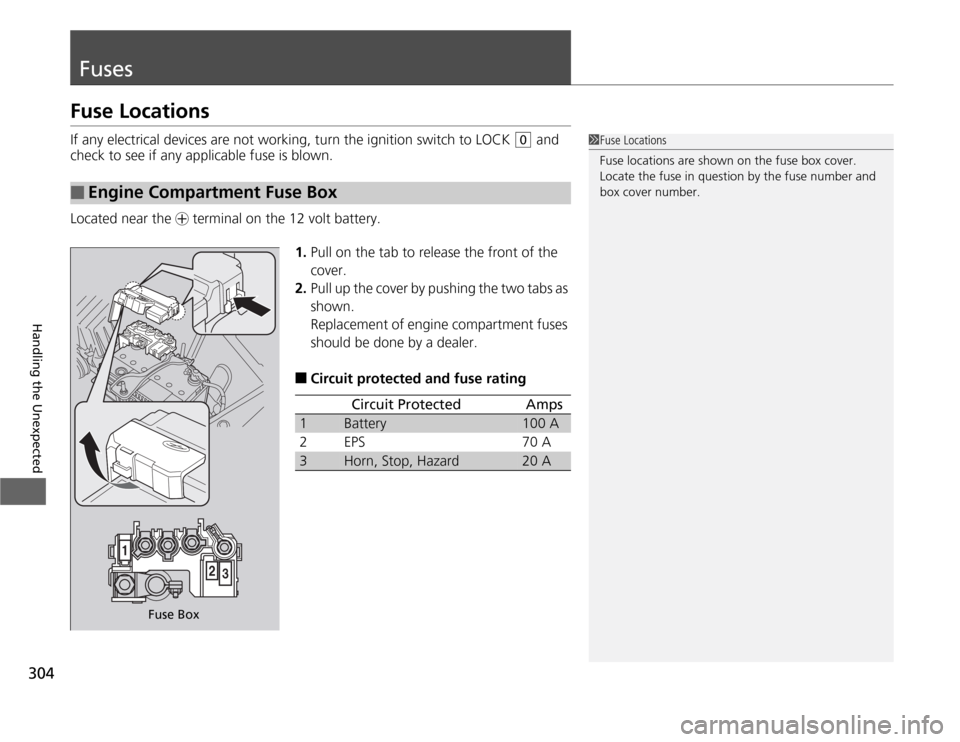
Located near the + terminal on the 12 volt battery.
1.Pull on the tab to release the front of the
cover.
2. Pull up the cover by pushing the two tabs as
shown.
Replacement of engine compartment fuses
should be done by a dealer.
■ Circuit protected and fuse rating
■Engine Compartment Fuse Box
1Fuse Locations
Fuse locations are shown on the fuse box cover.
Locate the fuse in question by the fuse number and
box cover number.
Fuse Box
Circuit ProtectedAmps
1Battery100 A
2EPS70 A
3Horn, Stop, Hazard20 A
Page 306 of 333
305
uuFusesuFuse Locations
Continued
Handling the Unexpected
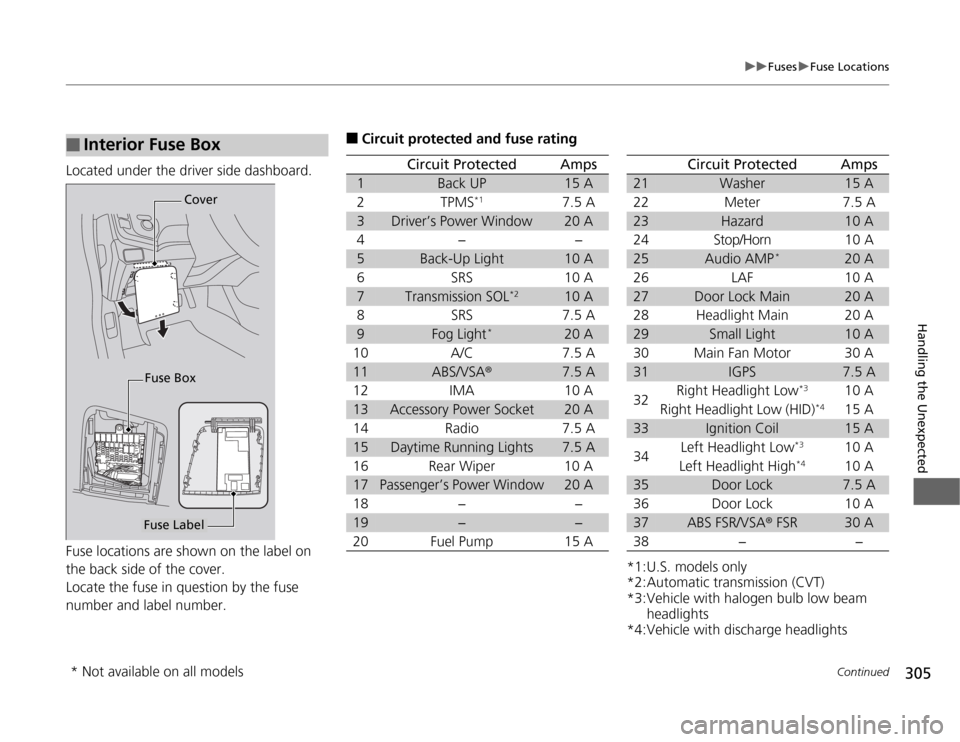
Located under the driver side dashboard.
Fuse locations are shown on the label on
the back side of the cover.
Locate the fuse in question by the fuse
number and label number.
■Interior Fuse Box
Fuse LabelCover
Fuse Box
■ Circuit protected and fuse rating
Circuit ProtectedAmps
1Back UP15 A
2TPMS*17.5 A
3Driver’s Power Window20 A
4−−
5Back-Up Light10 A
6SRS10 A
7Transmission SOL *210 A
8SRS7.5 A
9Fog Light*20 A
10 A/C 7.5 A
11ABS/VSA ®7.5 A
12 IMA 10 A
13Accessory Power Socket20 A
14 Radio 7.5 A
15Daytime Running Lights7.5 A
16 Rear Wiper 10 A
17Passenger’s Power Window20 A
18 − −
19−−
20 Fuel Pump 15 A
*1:U.S. models only
*2:Automatic transmission (CVT)
*3:Vehicle with halogen bulb low beam headlights
*4:Vehicle with discharge headlights
Circuit ProtectedAmps
21Washer15 A
22 Meter 7.5 A
23Hazard10 A
24 Stop/Horn 10 A
25Audio AMP *20 A
26 LAF 10 A
27Door Lock Main20 A
28 Headlight Main 20 A
29Small Light10 A
30 Main Fan Motor 30 A
31IGPS7.5 A
32 Right Headlight Low
*3
10 A
Right Headlight Low (HID) *4
15 A
33Ignition Coil15 A
34 Left Headlight Low
*3
10 A
Left Headlight High *4
10 A
35Door Lock7.5 A
36 Door Lock 10 A
37ABS FSR/VSA ® FSR30 A
38 − −
* Not available on all models
Page 307 of 333
306
uuFusesuFuse Locations
Handling the Unexpected
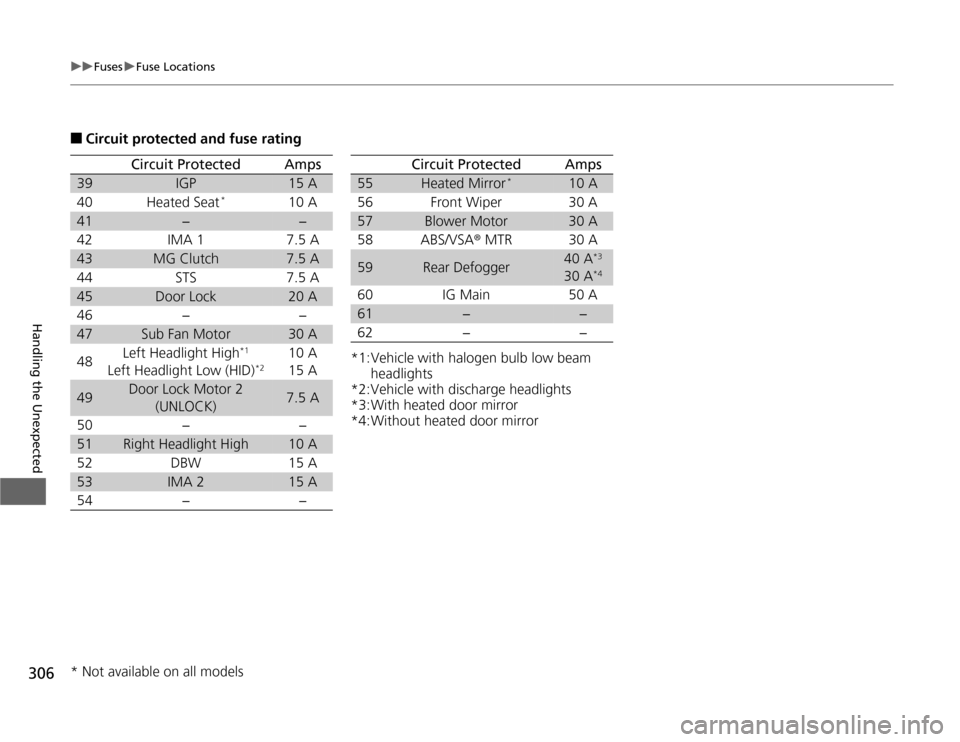
■Circuit protected and fuse rating
Circuit ProtectedAmps
39IGP15 A
40 Heated Seat *
10 A
41−−
42 IMA 1 7.5 A
43MG Clutch7.5 A
44 STS 7.5 A
45Door Lock20 A
46 − −
47Sub Fan Motor30 A
48 Left Headlight High
*1
Left Headlight Low (HID) *210 A 15 A
49Door Lock Motor 2
(UNLOCK)7.5 A
50 − −
51Right Headlight High10 A
52 DBW 15 A
53IMA 215 A
54 − −
*1:Vehicle with halogen bulb low beam headlights
*2:Vehicle with discharge headlights
*3:With heated door mirror
*4:Without heated door mirror
Circuit ProtectedAmps
55Heated Mirror *10 A
56 Front Wiper 30 A
57Blower Motor30 A
58 ABS/VSA ® MTR 30 A
59Rear Defogger40 A *3
30 A *4
60 IG Main 50 A
61−−
62 − −
* Not available on all models