driver HONDA CR-Z 2013 1.G Workshop Manual
[x] Cancel search | Manufacturer: HONDA, Model Year: 2013, Model line: CR-Z, Model: HONDA CR-Z 2013 1.GPages: 325, PDF Size: 11.73 MB
Page 255 of 325
254
uuChecking and Maintaining TiresuTire and Loading Information Label
Maintenance
Tire and Loading Information Label
The label attached to the driver’s doorjamb provides necessary tire and loading
information.
Tire LabelingThe tires that came on your vehicle have a
number of markings. Those you should be
aware of are described below.
Whenever tires are replaced, they should be replaced with tires of the same size.
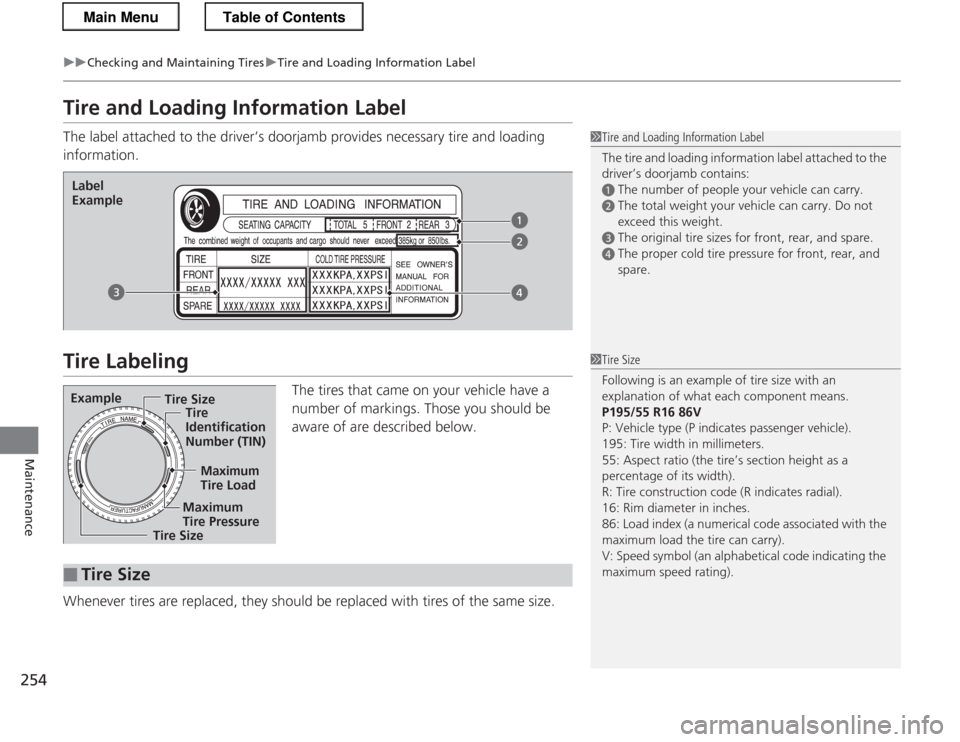
1Tire and Loading Information Label
The tire and loading information label attached to the driver’s doorjamb contains:
aThe number of people your vehicle can carry.
bThe total weight your vehicle can carry. Do not
exceed this weight.
cThe original tire sizes for front, rear, and spare.
dThe proper cold tire pressure for front, rear, and spare.
Label
Example
Example Tire Size
Tire Identification
Number (TIN)
Maximum
Tire Load
Maximum
Tire Pressure
Tire Size
■Tire Size
1Tire Size
Following is an example of tire size with an
explanation of what each component means. P195/55 R16 86V
P: Vehicle type (P indicates passenger vehicle).
195: Tire width in millimeters.
55: Aspect ratio (the tire’s section height as a percentage of its width).
R: Tire construction code (R indicates radial).
16: Rim diameter in inches.
86: Load index (a numerical code associated with the
maximum load the tire can carry).
V: Speed symbol (an alphabetical code indicating the maximum speed rating).
Main MenuTable of Contents
Page 264 of 325
263
Maintenance
Remote Transmitter Care
Replacing the Button Battery
If the indicator does not come on when the button is pressed, replace the battery.
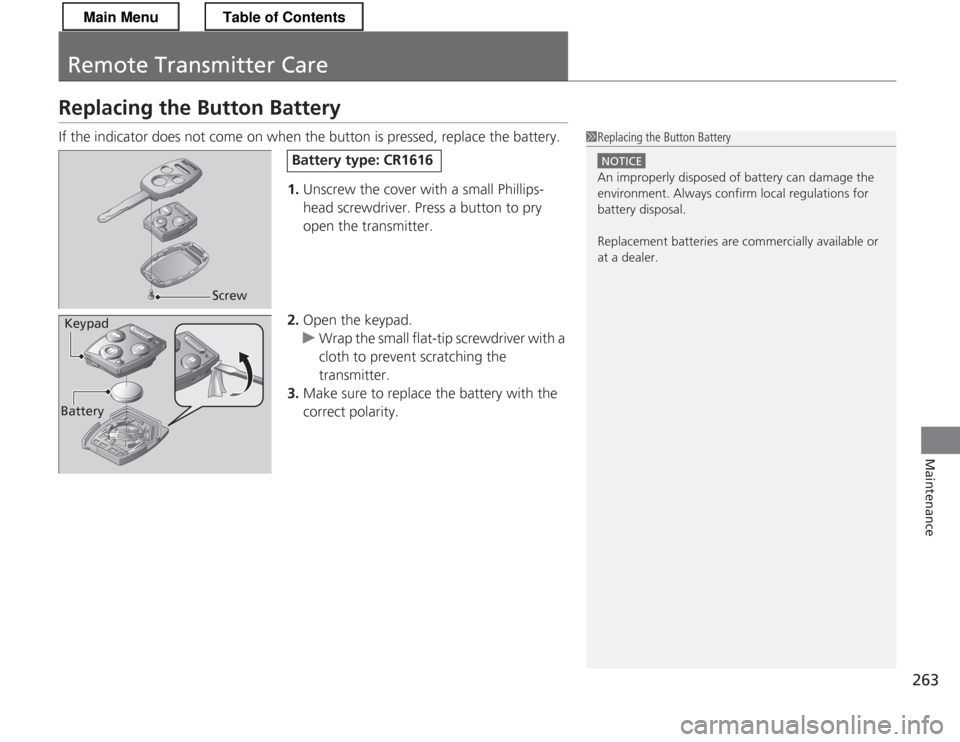
1.Unscrew the cover with a small Phillips- head screwdriver. Press a button to pry
open the transmitter.
2. Open the keypad.
uWrap the small flat-tip screwdriver with a
cloth to prevent scratching the transmitter.
3. Make sure to replace the battery with the
correct polarity.
1Replacing the Button Battery
NOTICE
An improperly disposed of battery can damage the
environment. Always confirm local regulations for
battery disposal.
Replacement batteries are commercially available or
at a dealer.
Screw
Battery type: CR1616
BatteryKeypad
Main MenuTable of Contents
Page 267 of 325
uuCleaninguInterior Care
266
Maintenance
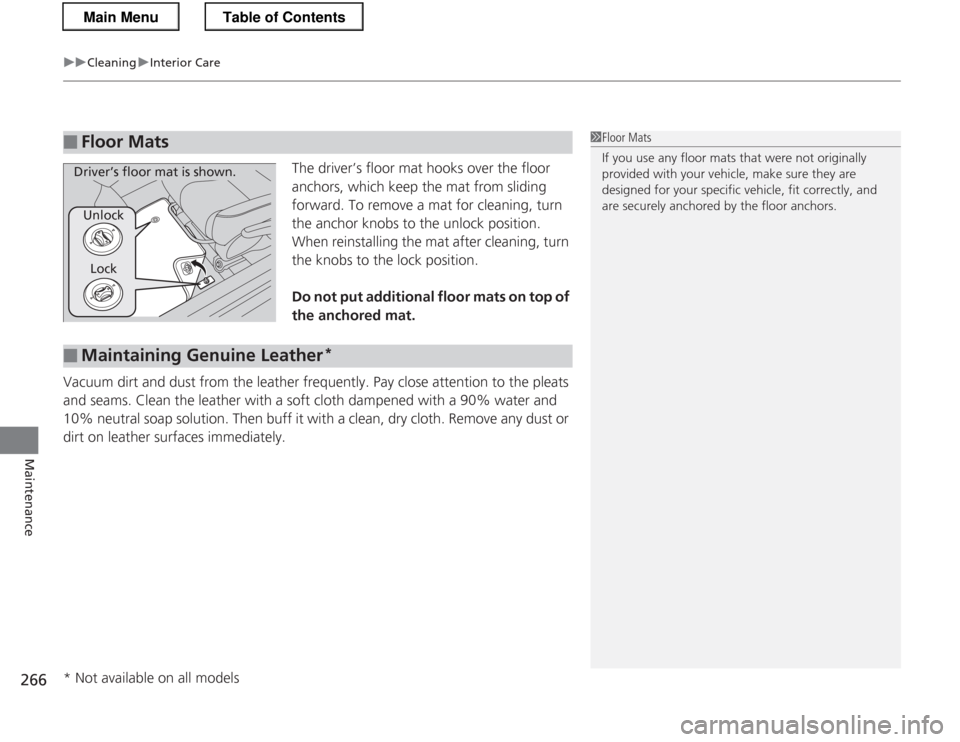
The driver’s floor mat hooks over the floor
anchors, which keep the mat from sliding
forward. To remove a mat for cleaning, turn
the anchor knobs to the unlock position.
When reinstalling the mat after cleaning, turn
the knobs to the lock position.
Do not put additional floor mats on top of the anchored mat.
Vacuum dirt and dust from the leather frequently. Pay close attention to the pleats
and seams. Clean the leather with a soft cloth dampened with a 90% water and
10% neutral soap solution. Then buff it with a clean, dry cloth. Remove any dust or
dirt on leather surfaces immediately.
■Floor Mats1Floor Mats
If you use any floor mats that were not originally
provided with your vehicle, make sure they are
designed for your specific vehicle, fit correctly, and
are securely anchored by the floor anchors.
Unlock Lock
Driver’s floor mat is shown.
■Maintaining Genuine Leather *
* Not available on all models
Main MenuTable of Contents
Page 281 of 325
uuIf a Tire Goes FlatuTemporarily Repairing a Flat Tire
280
Handling the Unexpected
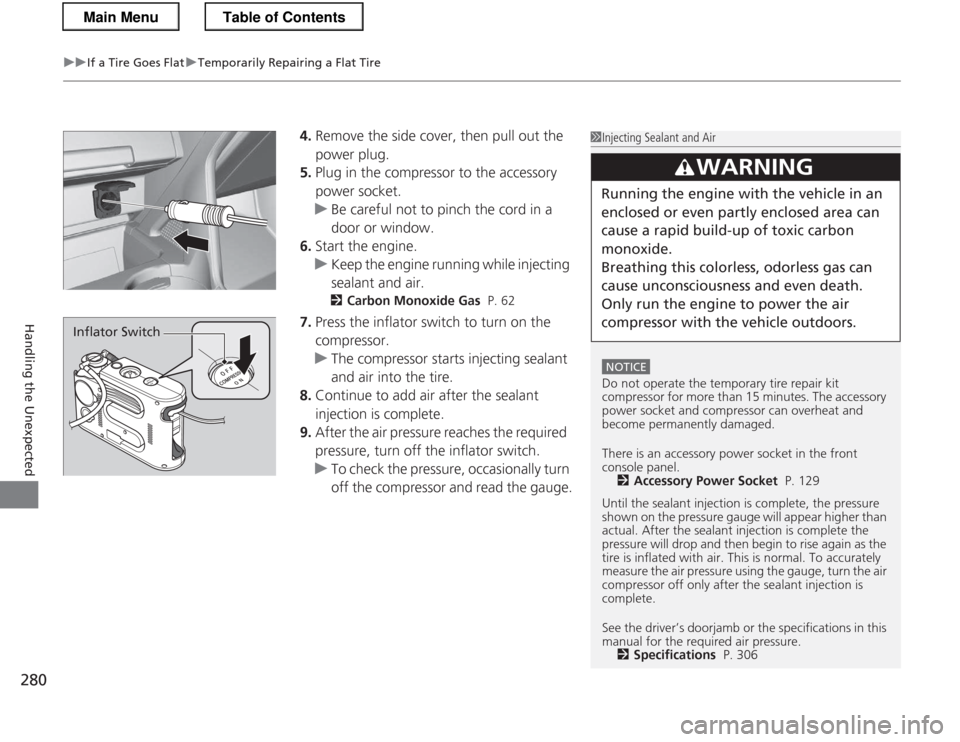
4. Remove the side cover, then pull out the
power plug.
5. Plug in the compressor to the accessory
power socket.
uBe careful not to pinch the cord in a
door or window.
6. Start the engine.
uKeep the engine running while injecting sealant and air.
2 Carbon Monoxide Gas P. 62
7. Press the inflator switch to turn on the compressor.
uThe compressor starts injecting sealant and air into the tire.
8. Continue to add air after the sealant
injection is complete.
9. After the air pressure reaches the required
pressure, turn off the inflator switch.
uTo check the pressure, occasionally turn
off the compressor and read the gauge.
1Injecting Sealant and Air
NOTICE
Do not operate the temporary tire repair kit
compressor for more than 15 minutes. The accessory
power socket and compressor can overheat and become permanently damaged.
There is an accessory power socket in the front
console panel.
2 Accessory Power Socket P. 129
Until the sealant injectio n is complete, the pressure
shown on the pressure gauge will appear higher than
actual. After the sealan t injection is complete the
pressure will drop and then begin to rise again as the
tire is inflated with air. Th is is normal. To accurately
measure the air pressure using the gauge, turn the air
compressor off only after the sealant injection is complete.
See the driver’s doorjamb or the specifications in this
manual for the required air pressure. 2 Specifications P. 306
3WARNING
Running the engine with the vehicle in an
enclosed or even partly enclosed area can
cause a rapid build-up of toxic carbon
monoxide.
Breathing this colorless, odorless gas can
cause unconsciousness and even death. Only run the engi ne to power the air
compressor with the vehicle outdoors.
Inflator Switch
Main MenuTable of Contents
Page 284 of 325
Continued283
uuIf a Tire Goes FlatuTemporarily Repairing a Flat Tire
Handling the Unexpected
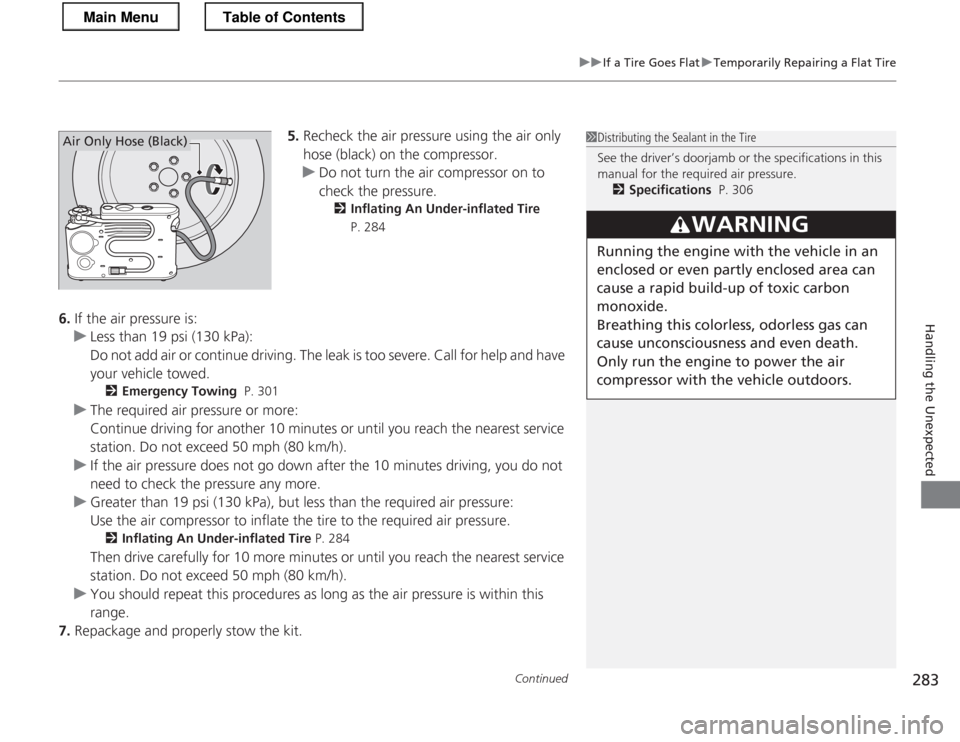
5.Recheck the air pressure using the air only
hose (black) on the compressor.
uDo not turn the air compressor on to
check the pressure.
2 Inflating An Under-inflated Tire
P. 284
6. If the air pressure is:
uLess than 19 psi (130 kPa):
Do not add air or continue driving. The leak is too severe. Call for help and have
your vehicle towed.
2 Emergency Towing P. 301
uThe required air pressure or more:
Continue driving for another 10 minutes or until you reach the nearest service
station. Do not exceed 50 mph (80 km/h).
uIf the air pressure does not go down after the 10 minutes driving, you do not
need to check the pressure any more.
uGreater than 19 psi (130 kPa), but less than the required air pressure:
Use the air compressor to inflate the tire to the required air pressure.
2 Inflating An Under-inflated Tire P. 284
Then drive carefully for 10 more minutes or until you reach the nearest service
station. Do not exceed 50 mph (80 km/h).
uYou should repeat this procedures as long as the air pressure is within this range.
7. Repackage and properly stow the kit.
1Distributing the Sealant in the Tire
See the driver’s doorjamb or the specifications in this
manual for the required air pressure.
2 Specifications P. 306
3WARNING
Running the engine with the vehicle in an
enclosed or even partly enclosed area can
cause a rapid build-up of toxic carbon
monoxide.
Breathing this colorless, odorless gas can
cause unconsciousness and even death. Only run the engi ne to power the air
compressor with the vehicle outdoors.
Air Only Hose (Black)
Main MenuTable of Contents
Page 290 of 325
289
Handling the Unexpected
Shift Lever Does Not Move
Follow the procedure below if you cannot move the shift lever out of the (P
position.
1.Set the parking brake.
2. Remove the key from the ignition switch.
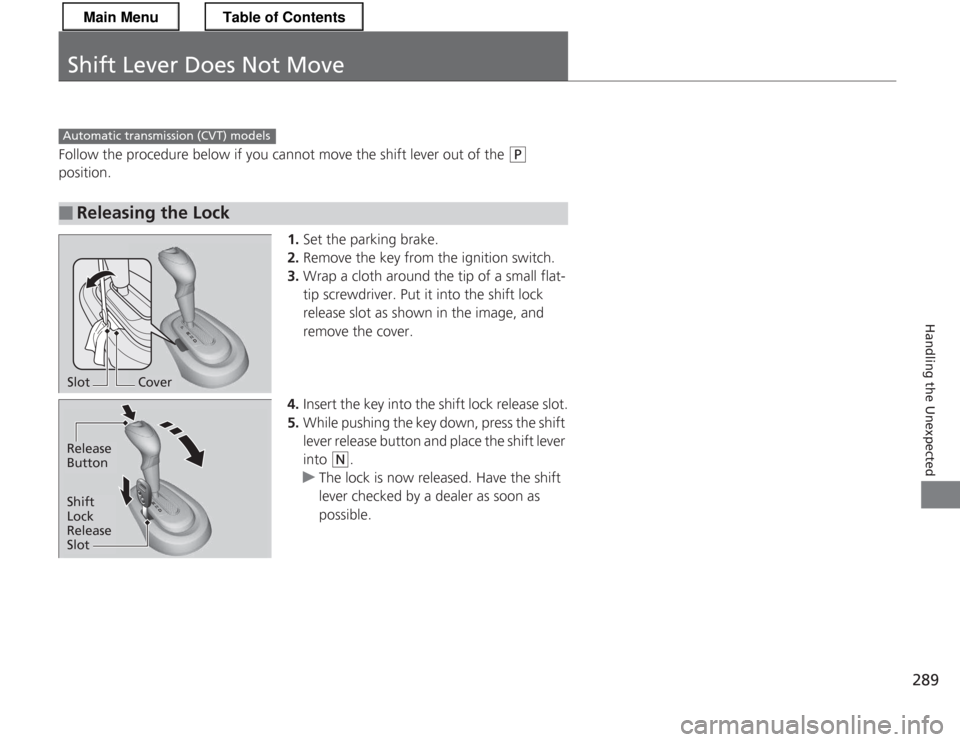
3. Wrap a cloth around the tip of a small flat-
tip screwdriver. Put it into the shift lock
release slot as shown in the image, and remove the cover.
4. Insert the key into the shift lock release slot.
5. While pushing the key down, press the shift
lever release button and place the shift lever
into
(N .
uThe lock is now released. Have the shift
lever checked by a dealer as soon as
possible.
■Releasing the Lock
Automatic transmiss ion (CVT) models
SlotCover
Release Button
Shift
Lock Release
Slot
Main MenuTable of Contents
Page 297 of 325
296
uuIndicator, Coming On/BlinkinguIf the IMA Indicator Comes On
Handling the Unexpected
If the IMA Indicator Comes On■Reasons for the indicator to come on
Comes on when there is a problem with the IMA system. ■ What to do when the indicator come on
Avoid high speeds and immediately get your vehicle inspected by a dealer.
If the Low Tire Pressure/TPMS Indicator Comes On or
Blinks ■Reasons for the indi cator to come on or blink
A tire pressure is significantly low. If there is a problem with the TPMS or
the compact spare tire *
is installed, the indicator blinks for about one
minute, and then stays on. ■ What to do when the indicator comes on
Drive carefully and avoid abrupt cornering and hard braking.
Stop your vehicle in a safe place. Check the tire pressure and adjust the
pressure to the specified level. The specified tire pressure is on a label on
the driver side doorjamb.
■ What to do when the indicator blinks, then remains on
Have the tire inspected by a dealer as soon as possible. If the compact
spare tire *
causes the indicator to blink, change the tire to a full-size tire.
The indicator goes off after driving for a few miles (kilometers).
U.S. models
1If the Low Tire Pressure/TPMS Indicator Comes On or Blinks
NOTICE
Driving on an extremely underinflated tire can cause
it to overheat. An overheated tire can fail. Always
inflate your tires to the prescribed level.
* Not available on all models
Main MenuTable of Contents
Page 299 of 325
298
uuFusesuFuse Locations
Handling the Unexpected
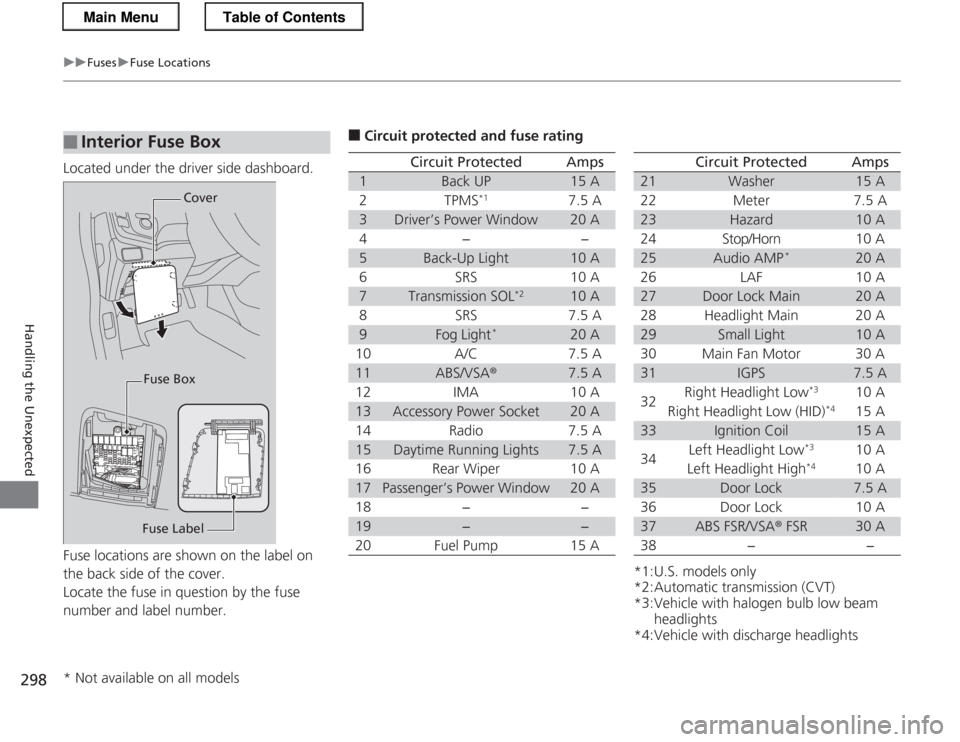
Located under the driver side dashboard.
Fuse locations are shown on the label on
the back side of the cover.
Locate the fuse in question by the fuse
number and label number.
■Interior Fuse Box
Fuse LabelCover
Fuse Box
■ Circuit protected and fuse rating
Circuit ProtectedAmps
1Back UP15 A
2TPMS *17.5 A
3Driver’s Power Window20 A
4−−
5Back-Up Light10 A
6SRS10 A
7Transmission SOL *210 A
8SRS7.5 A
9Fog Light*20 A
10 A/C 7.5 A
11ABS/VSA ®7.5 A
12 IMA 10 A
13Accessory Power Socket20 A
14 Radio 7.5 A
15Daytime Running Lights7.5 A
16 Rear Wiper 10 A
17Passenger’s Power Window20 A
18 − −
19−−
20 Fuel Pump 15 A
*1:U.S. models only
*2:Automatic transmission (CVT)
*3:Vehicle with halogen bulb low beam headlights
*4:Vehicle with discharge headlights
Circuit ProtectedAmps
21Washer15 A
22 Meter 7.5 A
23Hazard10 A
24 Stop/Horn 10 A
25Audio AMP *20 A
26 LAF 10 A
27Door Lock Main20 A
28 Headlight Main 20 A
29Small Light10 A
30 Main Fan Motor 30 A
31IGPS7.5 A
32 Right Headlight Low
*3
10 A
Right Headlight Low (HID) *4
15 A
33Ignition Coil15 A
34 Left Headlight Low
*3
10 A
Left Headlight High *4
10 A
35Door Lock7.5 A
36 Door Lock 10 A
37ABS FSR/VSA ® FSR30 A
38 − −
* Not available on all models
Main MenuTable of Contents
Page 304 of 325

303
Handling the Unexpected
When You Cannot Open the Hatch
If you cannot open the hatch, use the following procedure.1.Remove the cover on the back of the hatch
by prying it off with a small flat-tip screwdriver.
uWrap the flat-tip screwdriver with a cloth to prevent scratches.
2. Push the release lever until the hatch
unlocks. Push the hatch up to open.
■What to Do When Unable to Open the Hatch1What to Do When Unable to Open the Hatch
After taking these steps, contact a dealer to have the
vehicle checked.
When you open the hatch from inside, make sure
there is enough space around the hatch, and it does
not hit anyone or any object.
Unlock (Open)
Main MenuTable of Contents