driver HONDA CR-Z 2013 1.G Owner's Manual
[x] Cancel search | Manufacturer: HONDA, Model Year: 2013, Model line: CR-Z, Model: HONDA CR-Z 2013 1.GPages: 325, PDF Size: 11.73 MB
Page 102 of 325
101
uuLocking and Unlocking the DoorsuLocking/Unlocking the Doors from the Outside
Controls
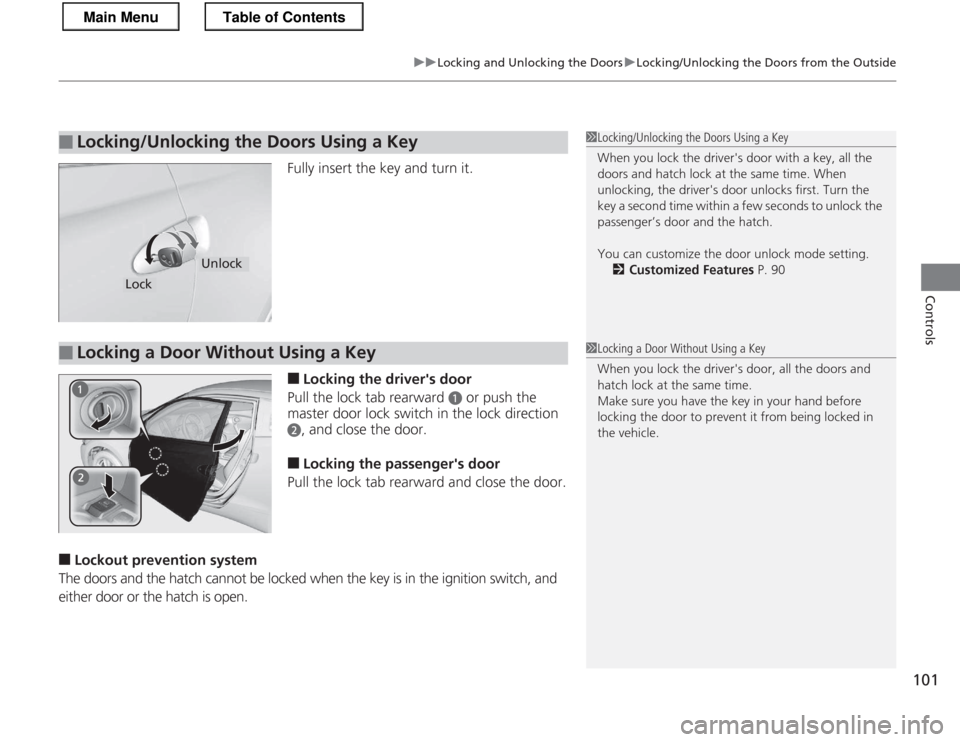
Fully insert the key and turn it. ■Locking the driver's door
Pull the lock tab rearward
a or push the
master door lock switch in the lock direction
b, and close the door.
■ Locking the passenger's door
Pull the lock tab rearward and close the door.
■ Lockout preventi on system
The doors and the hatch cannot be locked when the key is in the ignition switch, and either door or the hatch is open.
■Locking/Unlocking the Doors Using a Key1Locking/Unlocking the Doors Using a Key
When you lock the driver's door with a key, all the
doors and hatch lock at the same time. When
unlocking, the driver's door unlocks first. Turn the
key a second time within a few seconds to unlock the
passenger’s door and the hatch.
You can customize the door unlock mode setting. 2 Customized Features P. 90
Lock
Unlock
■Locking a Door Without Using a Key1Locking a Door Without Using a Key
When you lock the driver's door, all the doors and
hatch lock at the same time.
Make sure you have the key in your hand before
locking the door to prevent it from being locked in the vehicle.
Main MenuTable of Contents
Page 103 of 325
102
uuLocking and Unlocking the DoorsuLocking/Unlocking the Doors from the Inside
Controls
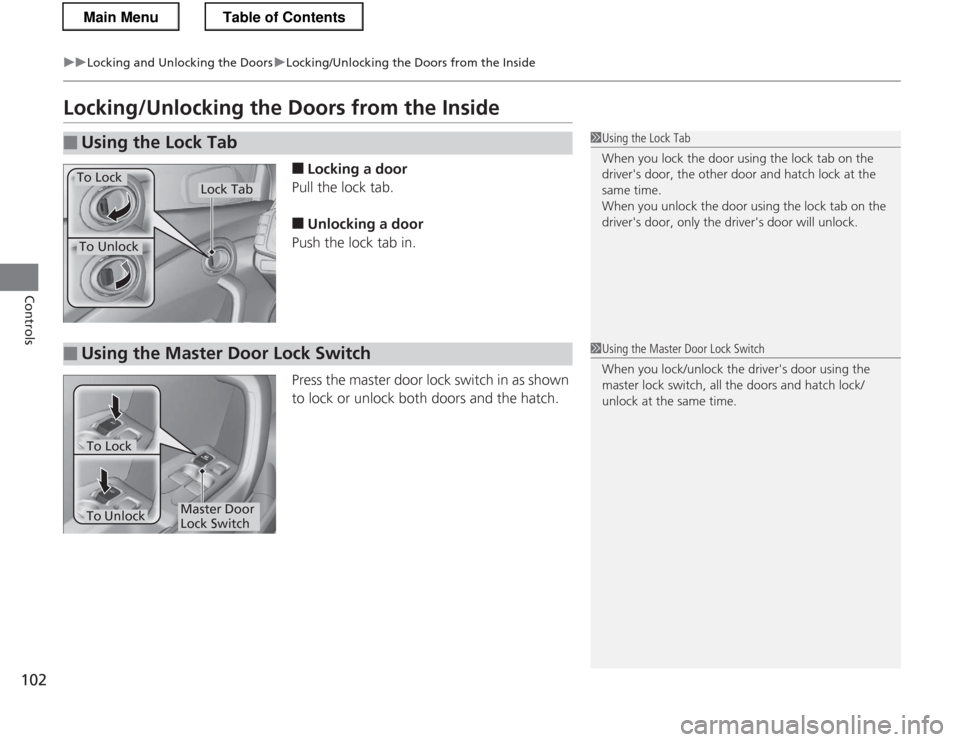
Locking/Unlocking the Doors from the Inside■Locking a door
Pull the lock tab. ■ Unlocking a door
Push the lock tab in.
Press the master door lock switch in as shown
to lock or unlock both doors and the hatch.
■Using the Lock Tab1Using the Lock Tab
When you lock the door using the lock tab on the
driver's door, the other door and hatch lock at the
same time.
When you unlock the door using the lock tab on the
driver's door, only the driver's door will unlock.
To Unlock
Lock TabTo Lock
■Using the Master Door Lock Switch1Using the Master Door Lock Switch
When you lock/unlock the driver's door using the
master lock switch, all the doors and hatch lock/ unlock at the same time.
Master Door
Lock Switch
To Lock
To Unlock
Main MenuTable of Contents
Page 104 of 325
103
uuLocking and Unlocking the DoorsuAuto Door Locking/Unlocking
Controls
Auto Door Locking/Unlocking
Your vehicle locks all doors and unlocks the driver’s door automatically when a
certain condition is met. ■Drive lock mode
The auto door lock function automatically locks all the doors and hatch when the
vehicle reaches about 10 mph (15 km/h). ■ Park unlock mode
The driver’s door unlocks when the shift lever is moved into
(P with the brake pedal
depressed. The settings can be changed to unlock all doors.
■ Ignition switch unlock mode
The driver’s door unlocks when the igni tion switch is moved out of ON
(w. The
settings can be changed to unlock all doors.
■Auto Door Locking
■Auto Door Unlocking
1Auto Door Locking/Unlocking
You can turn off or change to another auto door
locking/unlocking setting using the multi-information
display. 2 Customized Features P. 90
Automatic transmission (CVT) models
Manual transmission models
Main MenuTable of Contents
Page 106 of 325
105
uuOpening and Closing the HatchuOpening/Closing the Hatch
Controls
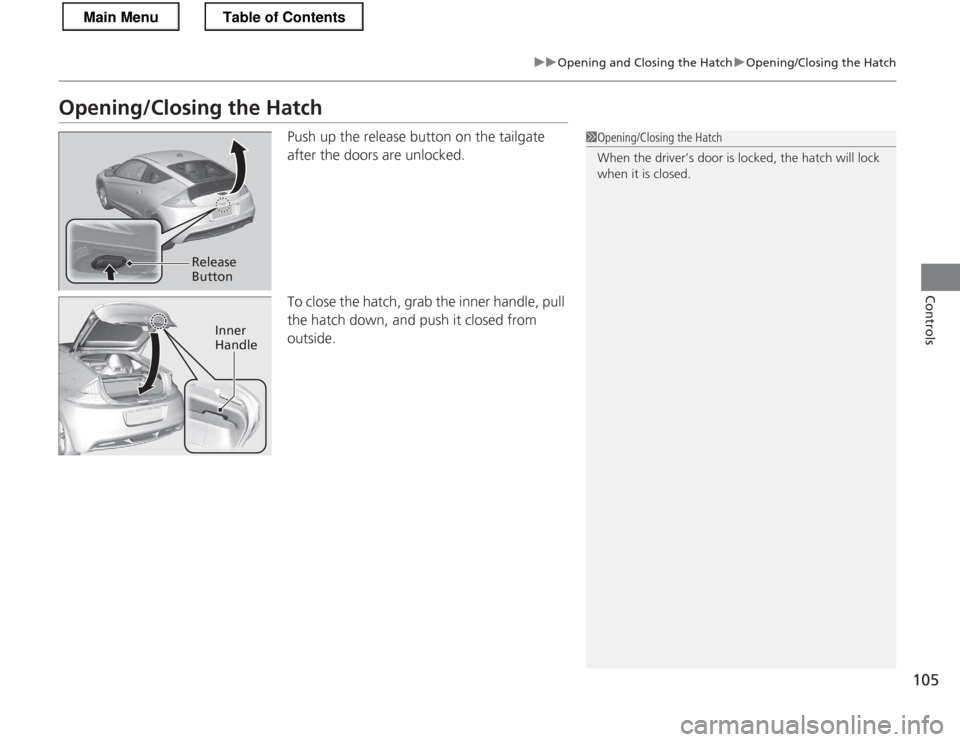
Opening/Closing the HatchPush up the release button on the tailgate
after the doors are unlocked.
To close the hatch, grab the inner handle, pull
the hatch down, and push it closed from
outside.
1Opening/Closing the Hatch
When the driver’s door is locked, the hatch will lock
when it is closed.
Release
Button
Inner Handle
Main MenuTable of Contents
Page 109 of 325
108
Controls
Opening and Closing the Windows
Opening/Closing the Power Windows
The power windows can be opened and closed when the ignition switch is in ON
(w, using the switches on the doors. The driver side switches can be used to open
and close both windows.
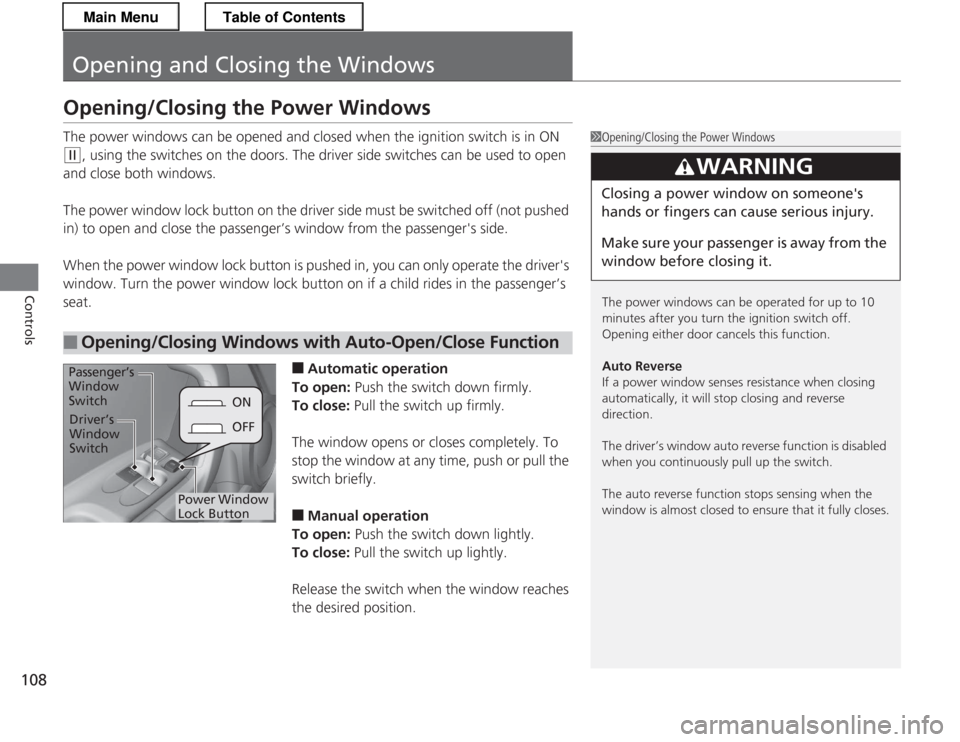
The power window lock button on the driver side must be switched off (not pushed
in) to open and close the passenger’s window from the passenger's side.
When the power window lock button is pushed in, you can only operate the driver's
window. Turn the power window lock button on if a child rides in the passenger’s seat.
■Automatic operation
To open: Push the switch down firmly.
To close: Pull the switch up firmly.
The window opens or closes completely. To stop the window at any time, push or pull the
switch briefly. ■ Manual operation
To open: Push the switch down lightly.
To close: Pull the switch up lightly.
Release the switch when the window reaches the desired position.
■Opening/Closing Windows with Auto-Open/Close Function
1Opening/Closing the Power Windows
The power windows can be operated for up to 10
minutes after you turn the ignition switch off.
Opening either door cancels this function.
Auto Reverse
If a power window senses resistance when closing
automatically, it will stop closing and reverse direction.
The driver’s window auto reverse function is disabled
when you continuously pull up the switch.
The auto reverse function stops sensing when the
window is almost closed to ensure that it fully closes.
3WARNING
Closing a power window on someone's
hands or fingers can cause serious injury.
Make sure your passenger is away from the
window before closing it.
ON
OFF
Power Window Lock Button
Driver’s
Window Switch
Passenger’s
Window Switch
Main MenuTable of Contents
Page 111 of 325
110
Controls
Operating the Switches Around the Steering Wheel
Ignition Switch
1Ignition Switch
You cannot take the key out unless the shift lever is
in
(P.
If you open the driver's door when the key is in LOCK
(0 or ACCESSORY (q, a warning buzzer will sound
to remind you to take the key out.
When this happens, the following messages appear
on the multi-information display: • In LOCK
(0 : REMOVE KEY
• In ACCESSORY
(q : RETURN IGNITION SWITCH
TO LOCK (0) POSITION
The buzzer will stop when you take the key out.
If the key won't turn from LOCK
(0 to ACCESSORY
(q, turn the key while moving the steering wheel left
and right. The steering wheel will unlock, allowing
the key to turn.
3WARNING
Removing the key from the ignition switch
while driving locks the steering. This can
cause you to lose co ntrol of the vehicle.
Remove the key from the ignition switch
only when parked.
Manual transmission models
Automatic transmission (CVT) models
All models
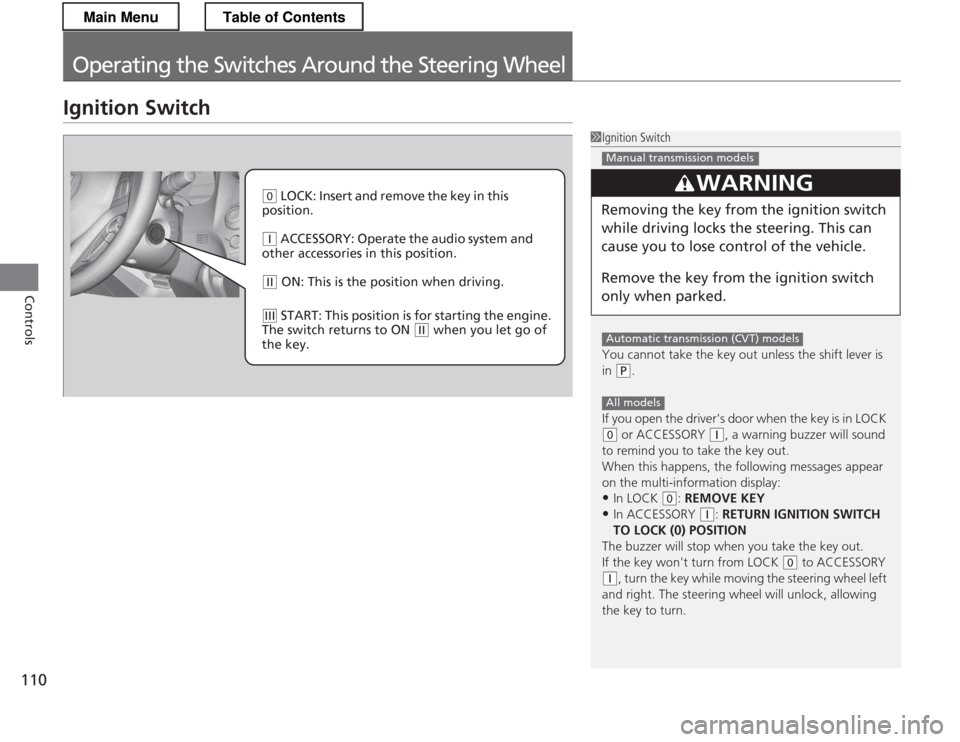
(0 LOCK: Insert and remove the key in this
position.
(q ACCESSORY: Operate the audio system and
other accessories in this position.
(w ON: This is the pos ition when driving.
(e START: This position is for starting the engine.
The switch returns to ON
(w when you let go of
the key.
Main MenuTable of Contents
Page 112 of 325
111
uuOperating the Switches Around the Steering WheeluTurn Signals
Continued
Controls
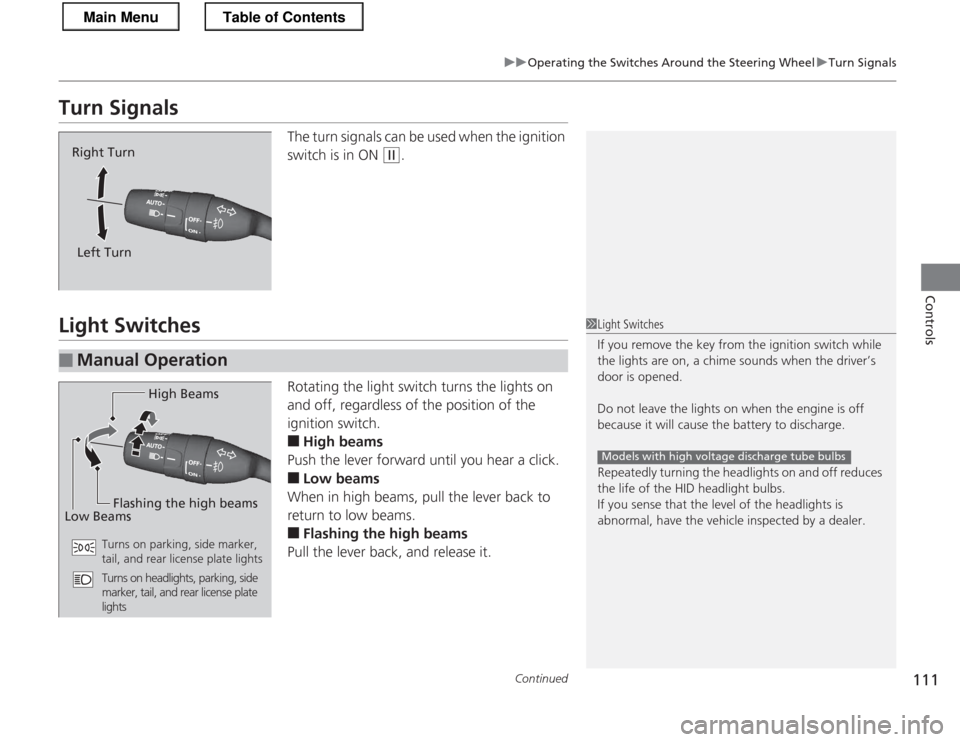
Turn SignalsThe turn signals can be used when the ignition
switch is in ON
(w.
Light Switches
Rotating the light switch turns the lights on
and off, regardless of the position of the
ignition switch. ■High beams
Push the lever forward until you hear a click. ■ Low beams
When in high beams, pull the lever back to
return to low beams. ■ Flashing the high beams
Pull the lever back, and release it.
Right Turn
Left Turn
■Manual Operation
1Light Switches
If you remove the key fr om the ignition switch while
the lights are on, a chime sounds when the driver’s door is opened.
Do not leave the lights on when the engine is off
because it will cause the battery to discharge.
Repeatedly turning the headlights on and off reduces
the life of the HID headlight bulbs.
If you sense that the level of the headlights is
abnormal, have the vehicle inspected by a dealer.
Models with high voltage discharge tube bulbs
High Beams
Flashing the high beams
Low Beams
Turns on parking, side marker,
tail, and rear license plate lights
Turns on headlights, parking, side
marker, tail, and rear license plate
lights
Main MenuTable of Contents
Page 121 of 325
120
uuAdjusting the MirrorsuPower Door Mirrors
Controls
Power Door MirrorsYou can adjust the door mirrors when the
ignition switch is in ON
(w.
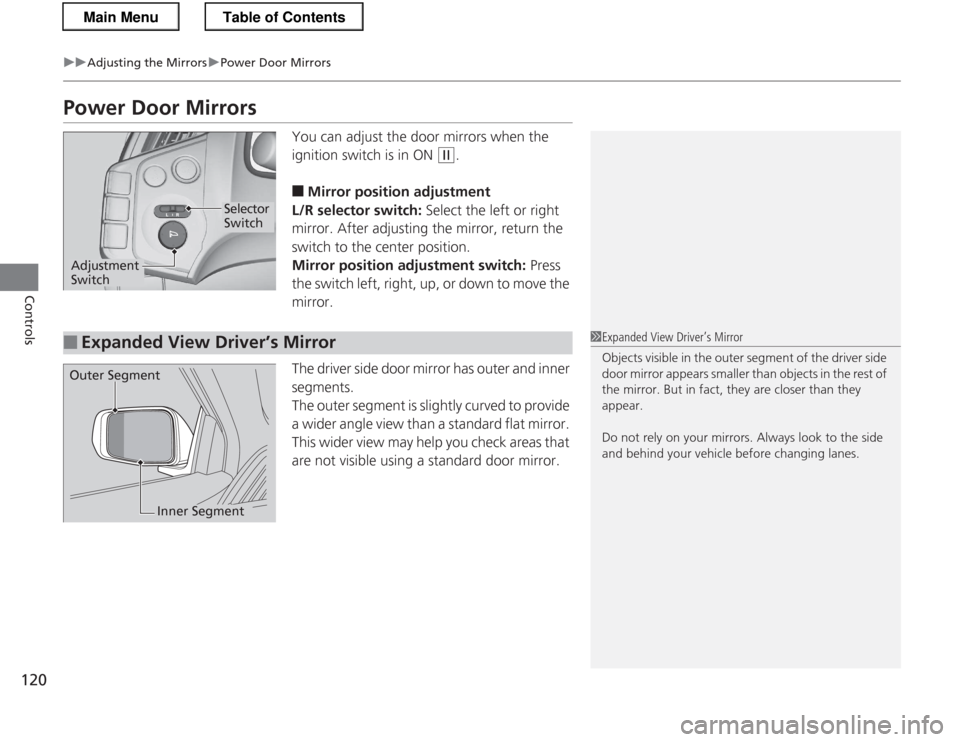
■ Mirror position adjustment
L/R selector switch: Select the left or right
mirror. After adjusting the mirror, return the
switch to the center position.
Mirror position adjustment switch: Press
the switch left, right, up, or down to move the mirror.
The driver side door mirror has outer and inner segments.
The outer segment is slightly curved to provide
a wider angle view than a standard flat mirror.
This wider view may help you check areas that
are not visible using a standard door mirror.
Selector Switch
Adjustment Switch
■Expanded View Driver’s Mirror1Expanded View Driver’s Mirror
Objects visible in the outer segment of the driver side
door mirror appears smaller than objects in the rest of
the mirror. But in fact, they are closer than they
appear.
Do not rely on your mirrors. Always look to the side
and behind your vehicle before changing lanes.
Outer Segment
Inner Segment
Main MenuTable of Contents
Page 122 of 325
121
Continued
Controls
Adjusting the Seats
Adjusting the Seat Positions
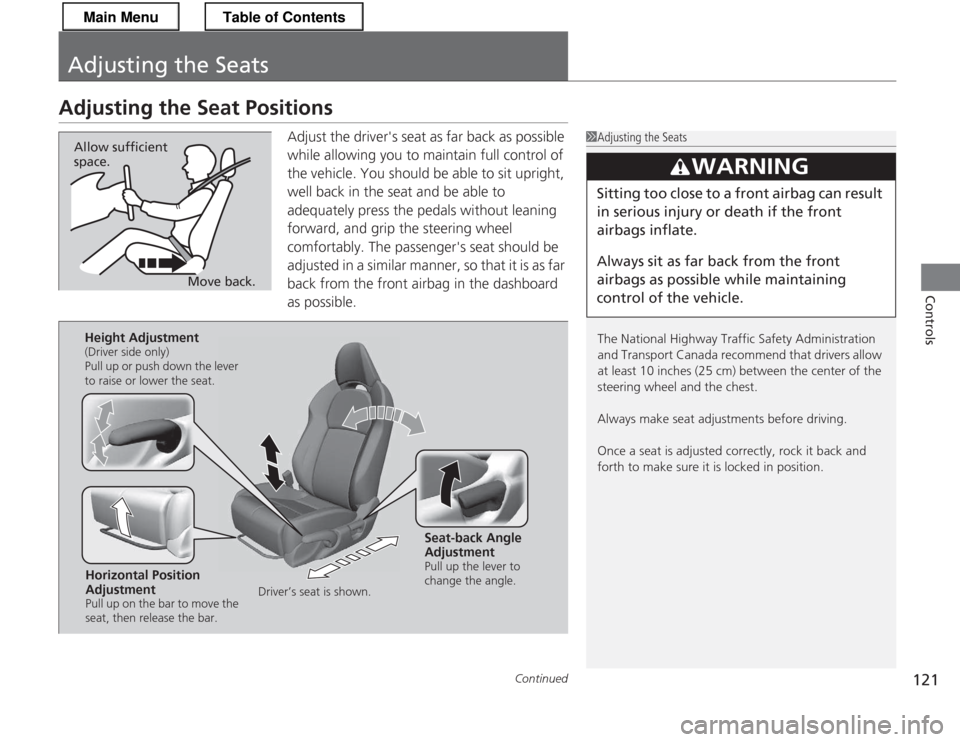
Adjust the driver's seat as far back as possible
while allowing you to maintain full control of
the vehicle. You should be able to sit upright,
well back in the seat and be able to
adequately press the pedals without leaning
forward, and grip the steering wheel
comfortably. The passenger's seat should be
adjusted in a similar manner, so that it is as far
back from the front airbag in the dashboard
as possible.
1Adjusting the Seats
The National Highway Traffic Safety Administration
and Transport Canada recommend that drivers allow
at least 10 inches (25 cm) between the center of the
steering wheel and the chest.
Always make seat adjustments before driving.
Once a seat is adjusted correctly, rock it back and forth to make sure it is locked in position.
3WARNING
Sitting too close to a front airbag can result
in serious injury or death if the front
airbags inflate.
Always sit as far back from the front
airbags as possible while maintaining
control of the vehicle.
Move back.
Allow sufficient space.
Horizontal Position
Adjustment
Pull up on the bar to move the
seat, then release the bar.
Height Adjustment
(Driver side only)
Pull up or push down the lever
to raise or lower the seat.
Seat-back Angle
Adjustment
Pull up the lever to
change the angle.
Driver’s seat is shown.
Main MenuTable of Contents
Page 123 of 325
uuAdjusting the SeatsuAdjusting the Seat Positions
122
Controls
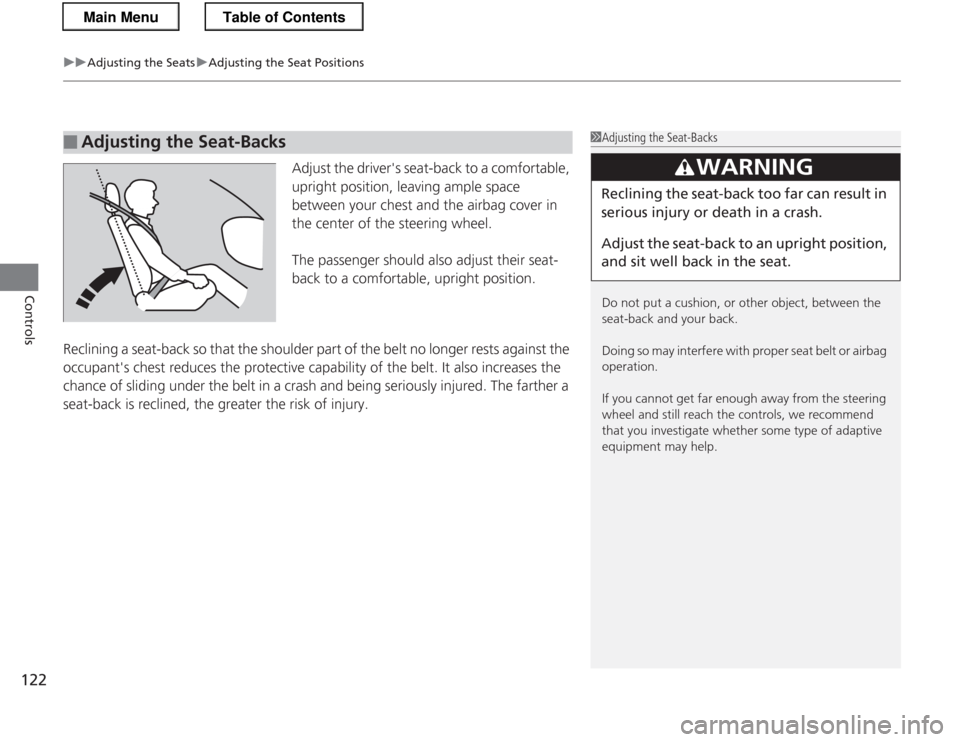
Adjust the driver's seat-back to a comfortable,
upright position, leaving ample space
between your chest and the airbag cover in
the center of the steering wheel.
The passenger should also adjust their seat-
back to a comfortable, upright position.
Reclining a seat-back so that the shoulder part of the belt no longer rests against the
occupant's chest reduces the protective capability of the belt. It also increases the
chance of sliding under the belt in a crash and being seriously injured. The farther a
seat-back is reclined, the greater the risk of injury.
■Adjusting the Seat-Backs1Adjusting the Seat-Backs
Do not put a cushion, or other object, between the
seat-back and your back.
Doing so may interfe re with proper seat belt or airbag
operation.
If you cannot get far enough away from the steering
wheel and still reach the controls, we recommend
that you investigate whether some type of adaptive
equipment may help.
3WARNING
Reclining the seat-back too far can result in
serious injury or death in a crash.
Adjust the seat-back to an upright position,
and sit well back in the seat.
Main MenuTable of Contents