steering HONDA FIT 2020 (in English) Workshop Manual
[x] Cancel search | Manufacturer: HONDA, Model Year: 2020, Model line: FIT, Model: HONDA FIT 2020Pages: 599, PDF Size: 41.91 MB
Page 408 of 599
406
uuTowing a Trailer uTowing Your Vehicle
Driving
Towing Your Vehicle
Your vehicle is not designed to be towed be hind a motorhome. If your vehicle needs
to be towed in an emergency, refe r to the emergency towing information.
2Emergency Towing P. 571
Your vehicle can be towed behind a motorhome.
Perform the following procedure before towing your vehicle.
1. Shift to
(N.
2. Release the parking brake.
3. Turn the ignition sw itch to ACCESSORY
(q*1.
u Make sure the steering wheel does not lock.
4. Turn off all the electric devices. Do not use any accessory power sockets.
u This can prevent the battery from running down.
*1 : Models with the smart entry system have an ENGINE START/STOP button instead of an ignition switch.
■When Your Vehicle is Towed Behind a Motorhome
1Towing Your Vehicle
Do not exceed 65 mph (100 km/h).
Consult your towing parts sales or rental agency if
any other items are recommended or required for
your towing situation.Continuously variable transmission models
Manual transmission models
20 FIT-31T5A6500.book 406 ページ 2019年9月26日 木曜日 午後4時41分
Page 409 of 599
Continued407
uuTowing a Trailer uTowing Your Vehicle
Driving
■Extended Towing
If you tow more than eight hours in one day, you should repeat the “When Your
Vehicle is Towed Behind a Motorhome” procedure from the previous page at least
every eight hours.
You also need to perform the following procedure to prevent the battery from
running down.
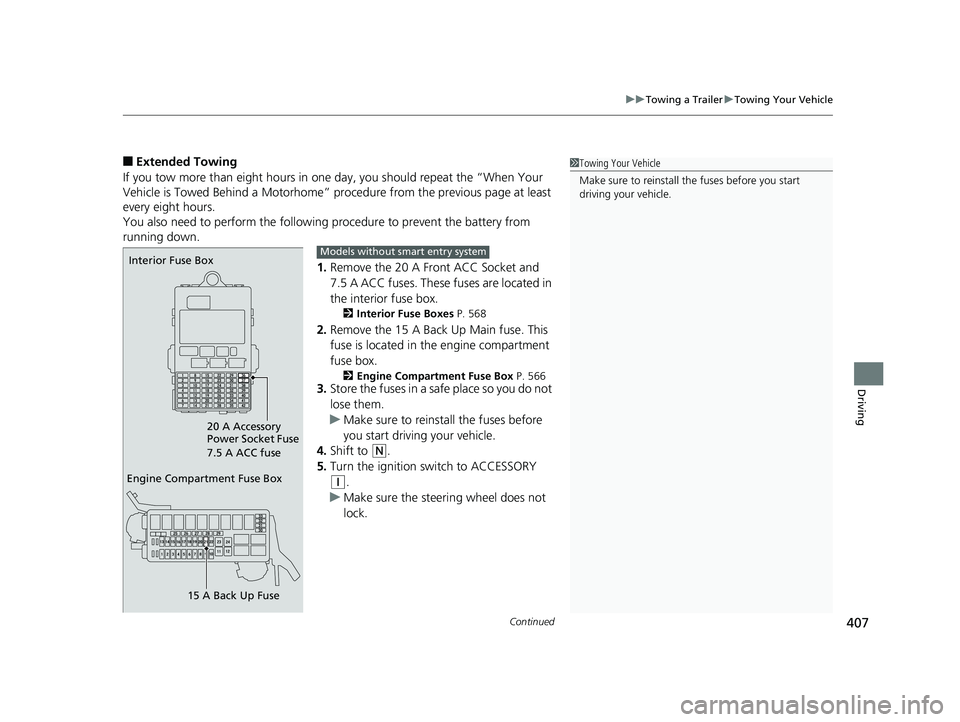
1.Remove the 20 A Front ACC Socket and
7.5 A ACC fuses. These fuses are located in
the interior fuse box.
2 Interior Fuse Boxes P. 568
2.Remove the 15 A Back Up Main fuse. This
fuse is located in the engine compartment
fuse box.
2 Engine Compartment Fuse Box P. 5663.Store the fuses in a safe place so you do not
lose them.
u Make sure to reinstall the fuses before
you start driving your vehicle.
4. Shift to
(N.
5. Turn the ignition switch to ACCESSORY
(q.
u Make sure the steering wheel does not
lock.
1Towing Your Vehicle
Make sure to reinstall the fuses before you start
driving your vehicle.
Engine Compartment Fuse Box
15 A Back Up Fuse
Interior Fuse Box
20 A Accessory
Power Socket Fuse
7.5 A ACC fuseModels without smart entry system
20 FIT-31T5A6500.book 407 ページ 2019年9月26日 木曜日 午後4時41分
Page 410 of 599
408
uuTowing a Trailer uTowing Your Vehicle
Driving
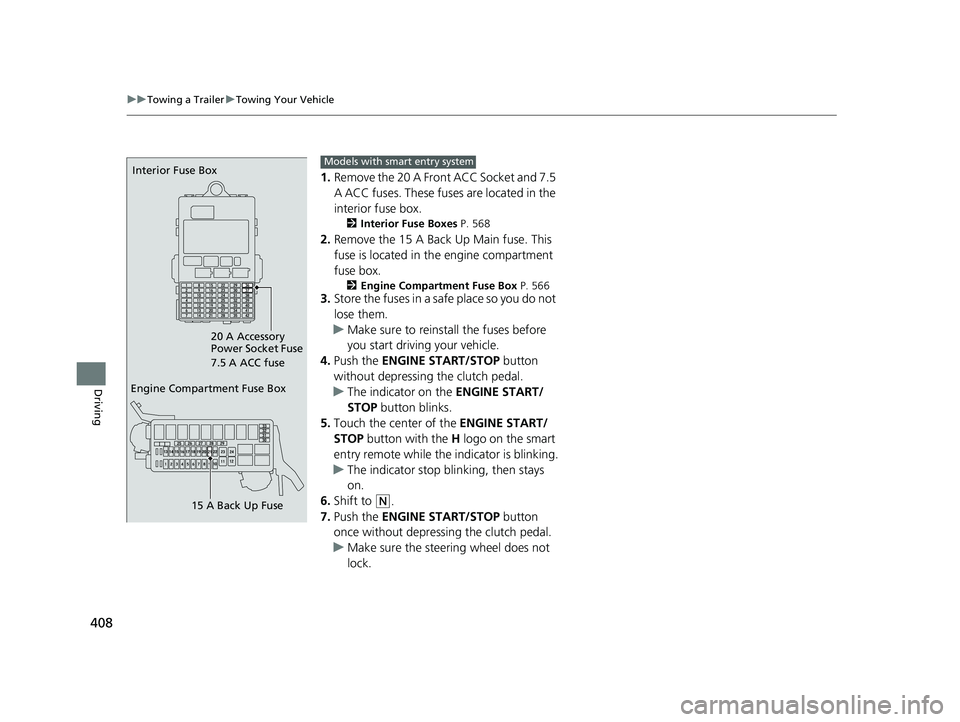
1. Remove the 20 A Front ACC Socket and 7.5
A ACC fuses. These fuses are located in the
interior fuse box.
2 Interior Fuse Boxes P. 568
2.Remove the 15 A Back Up Main fuse. This
fuse is located in th e engine compartment
fuse box.
2 Engine Compartment Fuse Box P. 5663.Store the fuses in a safe place so you do not
lose them.
u Make sure to reinstall the fuses before
you start driving your vehicle.
4. Push the ENGINE START/STOP button
without depressing the clutch pedal.
u The indicator on the ENGINE START/
STOP button blinks.
5. Touch the center of the ENGINE START/
STOP button with the H logo on the smart
entry remote while the indicator is blinking.
u The indicator stop blinking, then stays
on.
6. Shift to
(N.
7. Push the ENGINE START/STOP button
once without depressing the clutch pedal.
u Make sure the steering wheel does not
lock.
Engine Compartment Fuse Box
15 A Back Up Fuse
Interior Fuse Box
20 A Accessory
Power Socket Fuse
7.5 A ACC fuseModels with smart entry system
20 FIT-31T5A6500.book 408 ページ 2019年9月26日 木曜日 午後4時41分
Page 417 of 599
415
uuWhen Driving uPrecautions While Driving
Continued
Driving
Precautions While Driving
Avoid driving in deep water and on flooded roads. This can damage the engine or
driveline, or cause electrical component failure.
■In Rain1Precautions While Driving
NOTICE
Do not operate the shift lever while pressing the
accelerator pedal. You could damage the transmission.
NOTICE
If you repeatedly turn the steering wheel at an
extremely low speed, or hold the steering wheel in
the full left or right position for a while, the electric
power steering (EPS) system heats up. The system
goes into a protective mode, and limits its
performance. The steering wheel becomes harder
and harder to operate. Once the system cools down,
the EPS system is restored.
Repeated operation under these conditions can
eventually damage the system.
If the ignition switch is turned to ACCESSORY
( q*1
while driving, the engine will shut down and all
steering and brake power a ssist functions will stop,
making it difficult to control the vehicle.
Do not put the transmission into
( N, as you will lose
engine braking (and acce leration) performance.
During the first 600 miles (1,000 km) of operation,
avoid sudden acceleration or full throttle operation so
as to not damage the engine or powertrain.
Avoid hard braking for the first 200 miles (300 km).
You should also follow this when the brake pads are
replaced.
*1: Models with the sma rt entry system have an ENGINE
START/STOP button instead of an ignition switch.
20 FIT-31T5A6500.book 415 ページ 2019年9月26日 木曜日 午後4時41分
Page 423 of 599
Continued421
uuWhen Driving uShifting
Driving
Use the paddle shifters to change between 1st and 7th speeds without releasing
your hands from the steering wheel. The transmission switches to the 7-speed
manual shift mode when you pull a paddle shifter while driving. This mode is useful
when engine braking is needed.
■When the shift lever is in (D:
The shift mode goes into the 7-speed ma nual shift mode temporarily, and the
number is displayed in the shift indicator.
The 7-speed manual shift mode is canceled automatically if you drive at constant
speed or accelerate, and the number in the shift indicator goes off.
You can cancel this mode by pulling the paddle shifter for a few seconds.
The 7-speed manual shift mode is especial ly useful when reducing the vehicle speed
temporarily before making a turn.
■When the shift lever is in (S:
The shift mode goes into the 7-speed manual shift mode. The M indicator and the
speed number are displayed in the shift indicator. As the vehicle speed slows down,
the transmission automatically shifts down accordingly. When the vehicle comes to
a stop, it automatically shifts down into 1st.
If the vehicle speed increases and the engi ne speed reaches near the tachometer’s
red zone, the transmission automatically shifts up.
■7-Speed Manual Shift Mode1 7-Speed Manual Shift Mode
In the 7-speed manual shif t mode, the transmission
shifts up or down by opera ting either paddle shifter
under the following conditions:
Shift Up: The engine sp eed reaches the lowest
threshold of the higher speed position.
Shift Down: The engine sp eed reaches the highest
threshold of the lower speed position.
When the engine speed reaches near the
tachometer’s red zone, the transmission shifts up
automatically.
When the engine speed reaches the lowest threshold
of the selected speed positi on, the transmission shifts
down automatically.
Operating the paddle shifte rs on slippery surfaces
may cause the tires to lock up. In this case, the 7-
speed manual shift mode is canceled and goes back
to the normal
( D driving mode.
20 FIT-31T5A6500.book 421 ページ 2019年9月26日 木曜日 午後4時41分
Page 430 of 599
428
uuWhen Driving uCruise Control*
Driving
Cruise Control*
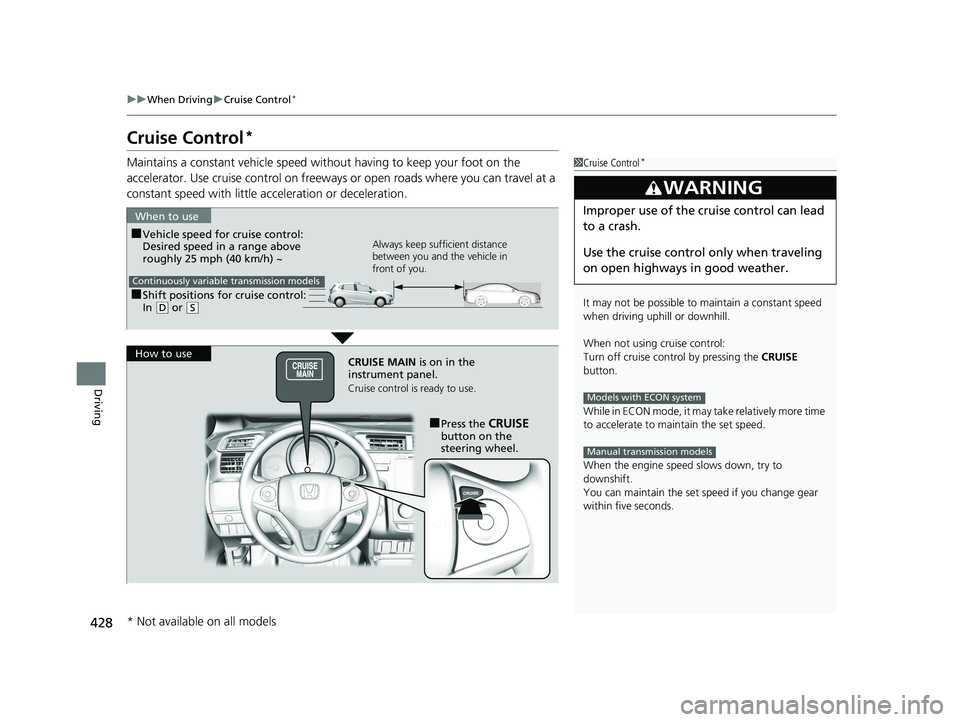
Maintains a constant vehicle speed without having to keep your foot on the
accelerator. Use cruise control on freeways or open roads where you can travel at a
constant speed with little acceleration or deceleration.1Cruise Control*
It may not be possible to maintain a constant speed
when driving uphill or downhill.
When not using cruise control:
Turn off cruise control by pressing the CRUISE
button.
While in ECON mode, it may take relatively more time
to accelerate to maintain the set speed.
When the engine speed slows down, try to
downshift.
You can maintain the set sp eed if you change gear
within five seconds.
3WARNING
Improper use of the cruise control can lead
to a crash.
Use the cruise control only when traveling
on open highways in good weather.
Models with ECON system
Manual transmission models
■Shift positions for cruise control:
In ( D or (S
When to use
Always keep sufficient distance
between you and the vehicle in
front of you.
Continuously variable transmission models
■Vehicle speed for cruise control:
Desired speed in a range above
roughly 25 mph (40 km/h) ~
How to use CRUISE MAIN is on in the
instrument panel.
Cruise control is ready to use.
■Press the CRUISE
button on the
steering wheel.
* Not available on all models
20 FIT-31T5A6500.book 428 ページ 2019年9月26日 木曜日 午後4時41分
Page 432 of 599
uuWhen Driving uCruise Control*
430
Driving
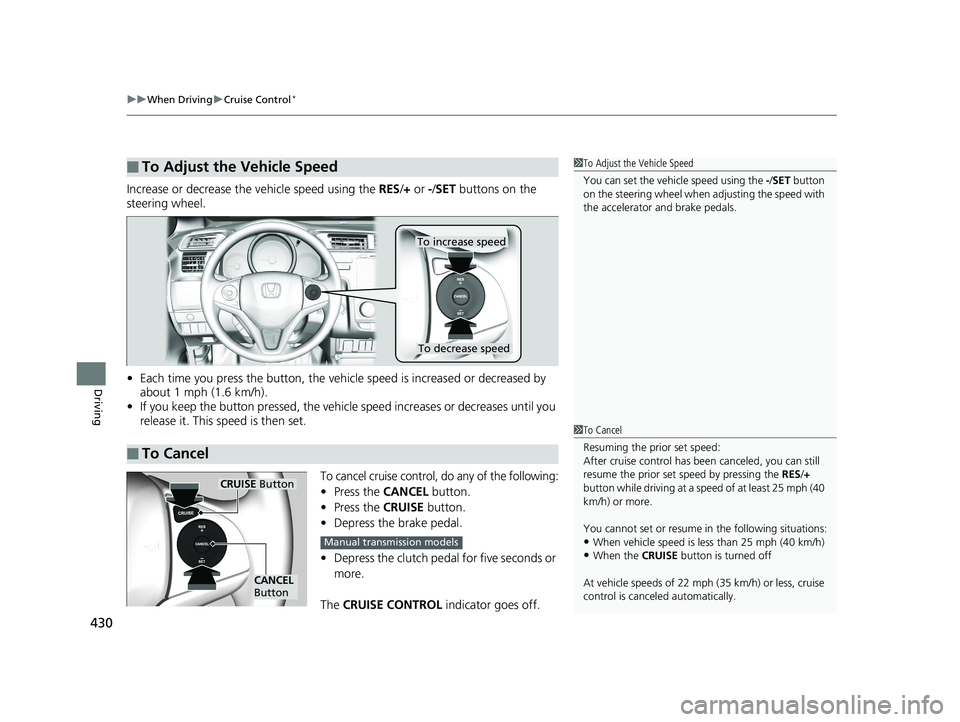
Increase or decrease the vehicle speed using the RES/+ or -/SET buttons on the
steering wheel.
• Each time you press the button, the vehicl e speed is increased or decreased by
about 1 mph (1.6 km/h).
• If you keep the button pressed, the vehicl e speed increases or decreases until you
release it. This speed is then set.
To cancel cruise control, do any of the following:
• Press the CANCEL button.
• Press the CRUISE button.
• Depress the brake pedal.
• Depress the clutch pedal for five seconds or
more.
The CRUISE CONTROL indicator goes off.
■To Adjust the Vehicle Speed1To Adjust the Vehicle Speed
You can set the vehicle speed using the -/SET button
on the steering wheel when adjusting the speed with
the accelerator and brake pedals.
■To Cancel
To decrease speed
To increase speed
1 To Cancel
Resuming the prior set speed:
After cruise control has be en canceled, you can still
resume the prior set speed by pressing the RES/+
button while driving at a speed of at least 25 mph (40
km/h) or more.
You cannot set or resume in the following situations:
•When vehicle speed is less than 25 mph (40 km/h)•When the CRUISE button is turned off
At vehicle speeds of 22 m ph (35 km/h) or less, cruise
control is canceled automatically.
CRUISE Button
CANCEL
Button
Manual transmission models
20 FIT-31T5A6500.book 430 ページ 2019年9月26日 木曜日 午後4時41分
Page 436 of 599
uuWhen Driving uAdaptive Cruise Control (ACC)*
434
Driving
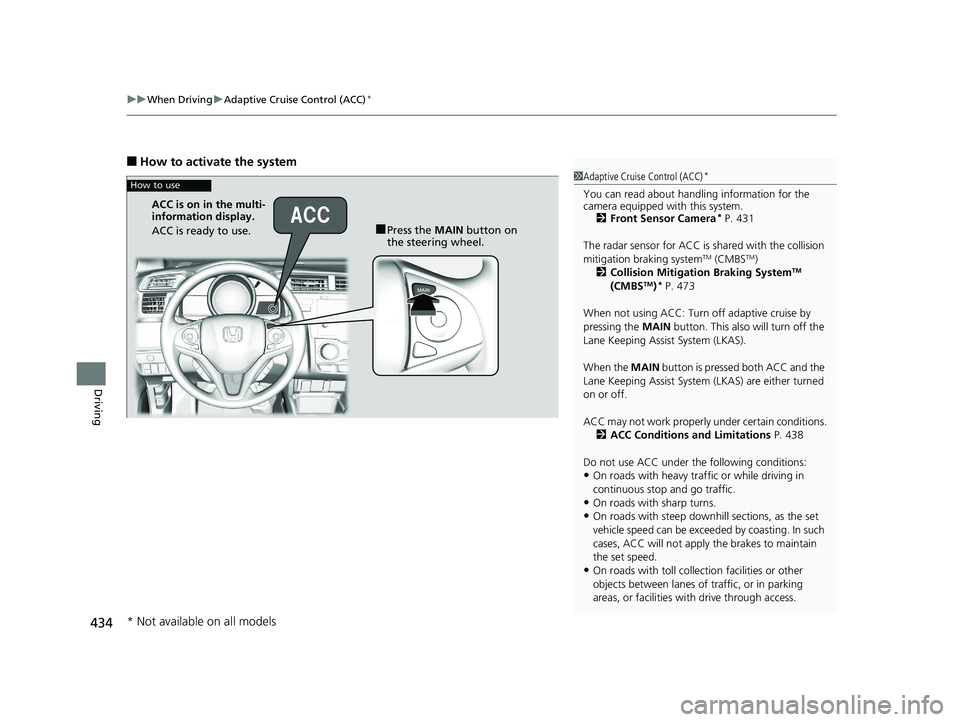
■How to activate the system
1Adaptive Cruise Control (ACC)*
You can read about handling information for the
camera equipped with this system.
2 Front Sensor Camera
* P. 431
The radar sensor for ACC is shared with the collision
mitigation braking system
TM (CMBSTM)
2 Collision Mitigation Braking SystemTM
(CMBSTM)* P. 473
When not using ACC: Turn off adaptive cruise by
pressing the MAIN button. This also will turn off the
Lane Keeping Assist System (LKAS).
When the MAIN button is pressed both ACC and the
Lane Keeping Assist System (LKAS) are either turned
on or off.
ACC may not work properly under certain conditions. 2 ACC Conditions and Limitations P. 438
Do not use ACC under the following conditions:
•On roads with heavy traf fic or while driving in
continuous stop and go traffic.
•On roads with sharp turns.
•On roads with steep downhill sections, as the set
vehicle speed can be exceeded by coasting. In such
cases, ACC will not apply the brakes to maintain
the set speed.
•On roads with toll collection facilities or other
objects between lanes of traffic, or in parking
areas, or faci lities with driv e through access.
How to use
■Press the MAIN button on
the steering wheel.
ACC is on in the multi-
information display.
ACC is ready to use.
* Not available on all models
20 FIT-31T5A6500.book 434 ページ 2019年9月26日 木曜日 午後4時41分
Page 442 of 599
uuWhen Driving uAdaptive Cruise Control (ACC)*
440
Driving
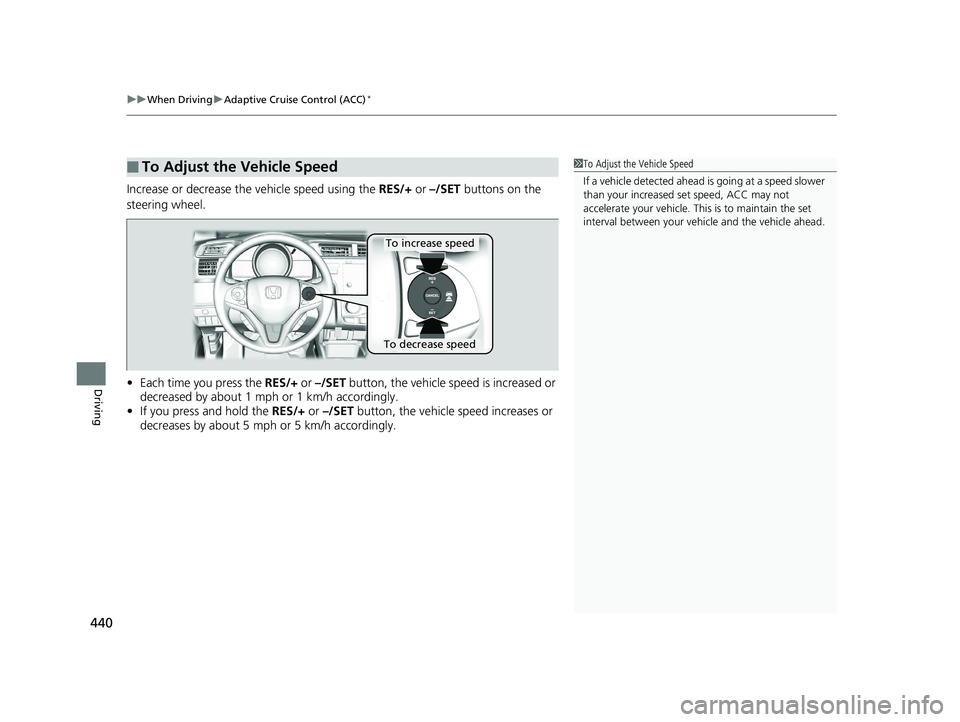
Increase or decrease the vehicle speed using the RES/+ or –/SET buttons on the
steering wheel.
• Each time you press the RES/+ or –/SET button, the vehicle speed is increased or
decreased by about 1 mph or 1 km/h accordingly.
• If you press and hold the RES/+ or –/SET button, the vehicle speed increases or
decreases by about 5 mph or 5 km/h accordingly.
■To Adjust the Vehicle Speed1 To Adjust the Vehicle Speed
If a vehicle detected ahead is going at a speed slower
than your increased set speed, ACC may not
accelerate your vehicle. This is to maintain the set
interval between your vehi cle and the vehicle ahead.
To increase speed
To decrease speed
20 FIT-31T5A6500.book 440 ページ 2019年9月26日 木曜日 午後4時41分
Page 446 of 599
uuWhen Driving uAdaptive Cruise Control (ACC)*
444
Driving
■Automatic cancellation
The beeper sounds and a me ssage appears on the multi-information display when
ACC is automatically canceled. Any of these conditions may cause the ACC to
automatically cancel:
• Bad weather (rain, fog, snow, etc.)
• When the radar sensor inside the front grille gets dirty.
• The vehicle ahead of you cannot be detected.
• An abnormal tire condition is detected, or the tires are skidding.
• Driving on a mountainous road, or driving off road for extended periods.
• Abrupt steering wheel movement.
• When the ABS, VSA ® or CMBS
TM is activated.
• When the ABS or VSA ® system indicator comes on.
• When you manually apply the parking brake.
• When the detected vehicle within the ACC range is too close to your vehicle.
• The camera behind the rearview mirror, or the area around the camera, including
the windshield, gets dirty.
• When you do not shift down about for ten seconds after the shift down indicator
coming on
• When the engine speed reache s the tachometer’s red zonen
• When the engine speed reaches 1,000 rpm or less
• When you keep
(N while driving
• When you put the transmission into
(N without depressing the clutch pedal
1Automatic cancellation
Even though ACC has been automatically canceled,
you can still resume the prior set speed.
Wait until the condition that caused ACC to cancel
improves, then press the RES/+ button.
Models with manual transmission
20 FIT-31T5A6500.book 444 ページ 2019年9月26日 木曜日 午後4時41分