TPMS HONDA INSIGHT 2019 Owner's Manual (in English)
[x] Cancel search | Manufacturer: HONDA, Model Year: 2019, Model line: INSIGHT, Model: HONDA INSIGHT 2019Pages: 675, PDF Size: 36.97 MB
Page 32 of 675
30
Quick Reference Guide
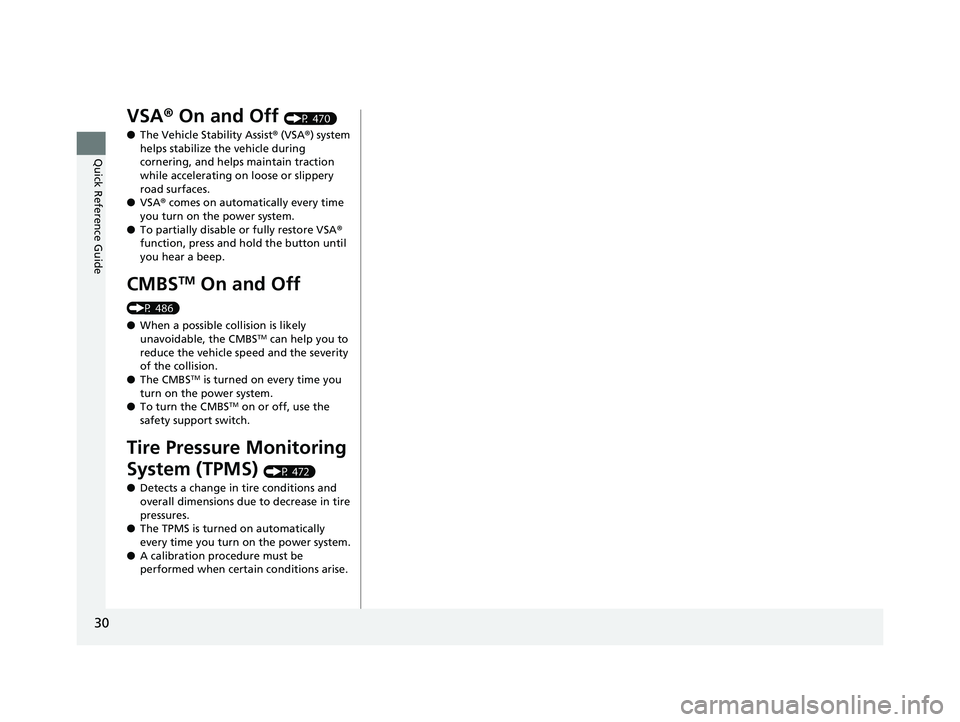
VSA® On and Off (P 470)
● The Vehicle Stability Assist ® (VSA ®) system
helps stabilize the vehicle during
cornering, and helps maintain traction
while accelerating on loose or slippery
road surfaces.
● VSA ® comes on automatically every time
you turn on the power system.
● To partially disable or fully restore VSA ®
function, press and ho ld the button until
you hear a beep.
CMBSTM On and Off
(P 486)
● When a possible collision is likely
unavoidable, the CMBS
TM can help you to
reduce the vehicle sp eed and the severity
of the collision.
● The CMBS
TM is turned on every time you
turn on the power system.
● To turn the CMBS
TM on or off, use the
safety support switch.
Tire Pressure Monitoring
System (TPMS)
(P 472)
● Detects a change in tire conditions and
overall dimensions due to decrease in tire
pressures.
● The TPMS is turned on automatically
every time you turn on the power system.
● A calibration procedure must be
performed when certain conditions arise.
19 INSIGHT HMIN-31TXM6000.book 30 ページ 2018年4月20日 金曜日 午後4時22分
Page 38 of 675
36
Quick Reference Guide
Why does a beeper sound
when I walk away from the
vehicle after I close the
door?The beeper sounds if you move outside the walk away auto lock
operating range before the door completely closes.
2Locking the doors (Walk away auto lock ®) (P171)
Why does the beeper
sound when I start driving?The beeper sounds when the driver and/or front passenger are
not wearing their seat belts.
Pressing the electric
parking brake switch does
not release the parking
brake. Why?Press the electric parking brake switch with the brake pedal
depressed.
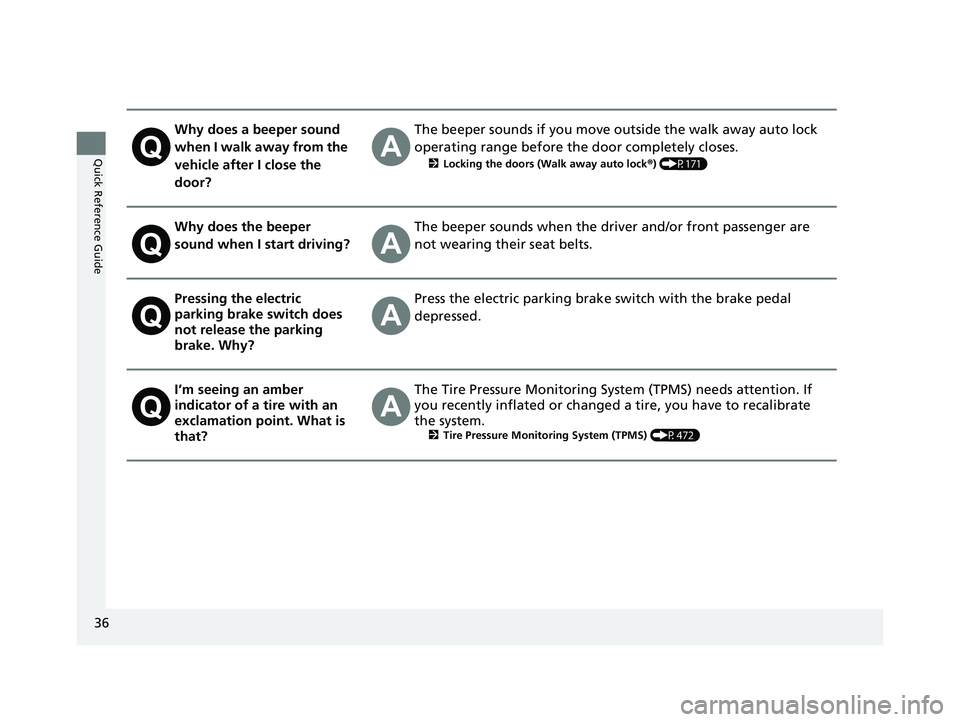
I’m seeing an amber
indicator of a tire with an
exclamation point. What is
that?The Tire Pressure Monitoring Syst em (TPMS) needs attention. If
you recently inflated or changed a tire, you have to recalibrate
the system.
2 Tire Pressure Monitoring System (TPMS) (P472)
19 INSIGHT HMIN-31TXM6000.book 36 ページ 2018年4月20日 金曜日 午後4時22分
Page 82 of 675
80
Instrument Panel
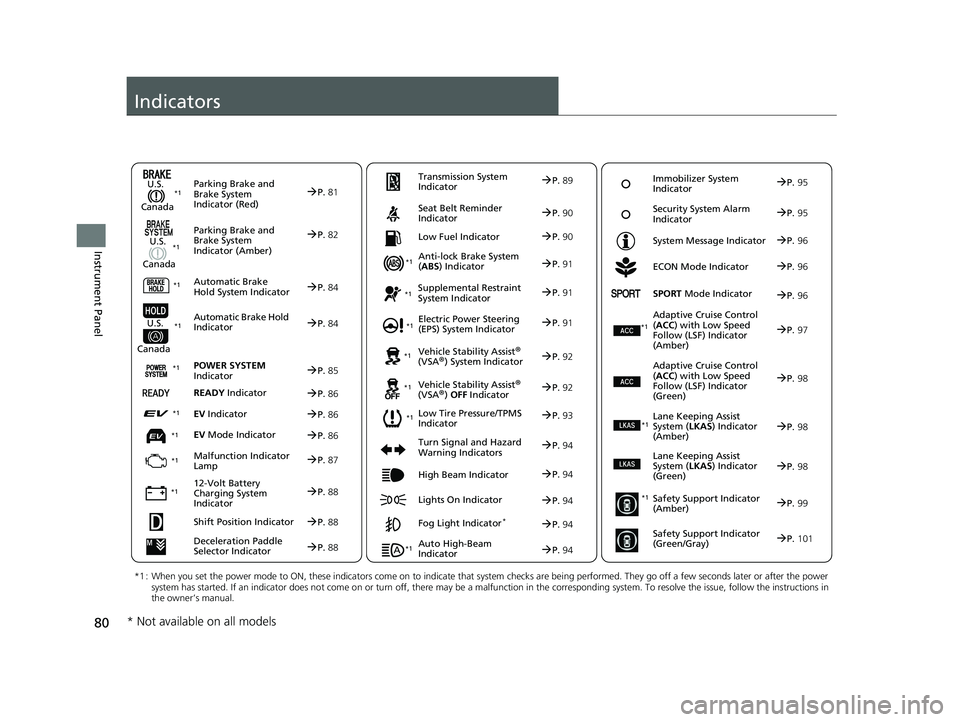
Indicators
Deceleration Paddle
Selector IndicatorP.88
Parking Brake and
Brake System
Indicator (Red)
Parking Brake and
Brake System
Indicator (Amber)
U.S.
Canada
U.S.
Canada Automatic Brake
Hold System Indicator
Automatic Brake Hold
IndicatorU.S.
Canada
*1 : When you set the power mode to ON, these indicators come on to indicate that system checks are being performed. They go off a few seconds later or after the power
system has started. If an indicator does not come on or turn o ff, there may be a malfunction in the corresponding system. To re solve the issue, follow the instructions in
the owner’s manual.
P. 81*1
Malfunction Indicator
Lamp
12-Volt Battery
Charging System
Indicator
Anti-lock Brake System
(ABS ) Indicator
Seat Belt Reminder
Indicator
Low Fuel Indicator
Vehicle Stability Assist®
(VSA®) System Indicator
Vehicle Stability Assist
®
(VSA®) OFF Indicator
Supplemental Restraint
System Indicator
Auto High-Beam
Indicator
Low Tire Pressure/TPMS
Indicator Electric Power Steering
(EPS) System Indicator
Turn Signal and Hazard
Warning Indicators
Lights On Indicator High Beam Indicator
Fog Light Indicator*
ECON Mode Indicator
System Message Indicator
SPORT
Mode Indicator
Adaptive Cruise Control
( ACC ) with Low Speed
Follow (LSF) Indicator
(Amber)
Lane Keeping Assist
System ( LKAS) Indicator
(Amber)
Safety Support Indicator
(Amber)
Safety Support Indicator
(Green/Gray)
P. 82
P.84
P.84
P.87
P.88
*1
*1
*1 *1
P.
93
*1
*1
Shift Position IndicatorP. 88 Transmission System
Indicator
P.
89
P.90
P.90
P.91
P.91
P.94
P.92
*1
*1 *1
P. 92
*1P.91
P.94
P.97
*1
P.94
P.94
P.96
P.94 Immobilizer System
Indicator
P.
95
Security System Alarm
Indicator P.95
P.96
P.96
P.98
P.99
P.101
*1
Adaptive Cruise Control
(ACC ) with Low Speed
Follow (LSF) Indicator
(Green)P. 98
*1
Lane Keeping Assist
System ( LKAS) Indicator
(Green)P. 98
*1
POWER SYSTEM
IndicatorP. 85*1
READY IndicatorP.86
EV IndicatorP.86*1
EV Mode IndicatorP.86*1
*1
* Not available on all models
19 INSIGHT HMIN-31TXM6000.book 80 ページ 2018年4月20日 金曜日 午後4時22分
Page 95 of 675
93
uuIndicators u
Continued
Instrument Panel
IndicatorNameOn/BlinkingExplanationMessage
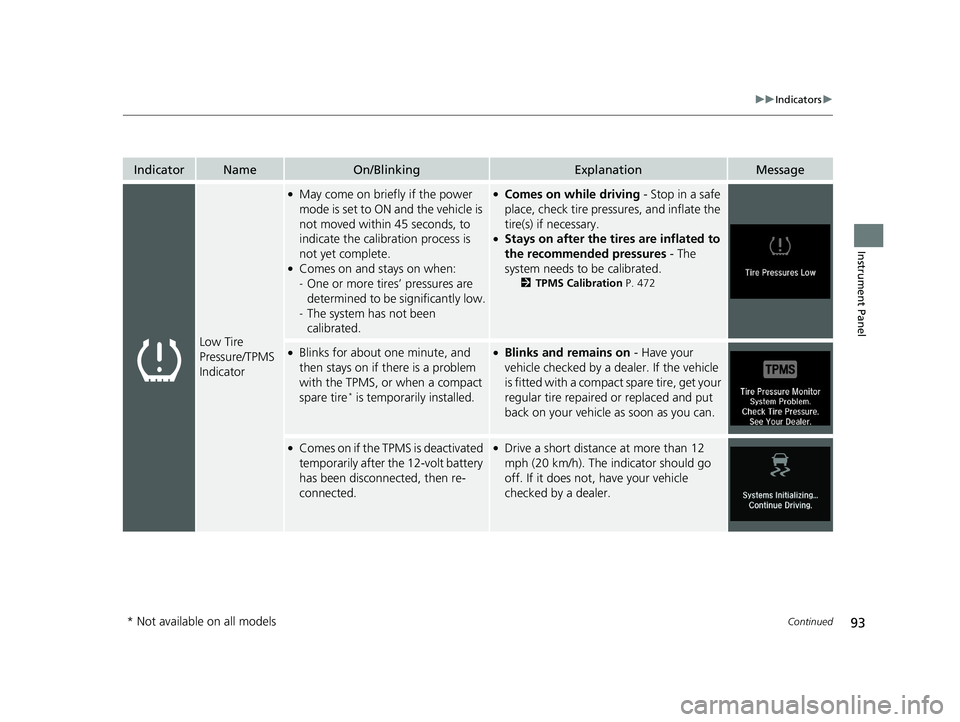
Low Tire
Pressure/TPMS
Indicator
●May come on briefly if the power
mode is set to ON and the vehicle is
not moved within 45 seconds, to
indicate the calibration process is
not yet complete.
●Comes on and stays on when:
-One or more tires’ pressures are
determined to be significantly low.
- The system has not been
calibrated.
●Comes on while driving - Stop in a safe
place, check tire pres sures, and inflate the
tire(s) if necessary.
●Stays on after the ti res are inflated to
the recommended pressures - The
system needs to be calibrated.
2 TPMS Calibration P. 472
●Blinks for about one minute, and
then stays on if there is a problem
with the TPMS, or when a compact
spare tire
* is temporarily installed.
●Blinks and remains on - Have your
vehicle checked by a dealer. If the vehicle
is fitted with a compact spare tire, get your
regular tire repaired or replaced and put
back on your vehicle as soon as you can.
●Comes on if the TPMS is deactivated
temporarily after the 12-volt battery
has been disconnected, then re-
connected.●Drive a short distance at more than 12
mph (20 km/h). The indicator should go
off. If it does not, have your vehicle
checked by a dealer.
* Not available on all models
19 INSIGHT HMIN-31TXM6000.book 93 ページ 2018年4月20日 金曜日 午後4時22分
Page 156 of 675
154
uuGauges and Driver Information Interface uDriver Information Interface
Instrument Panel
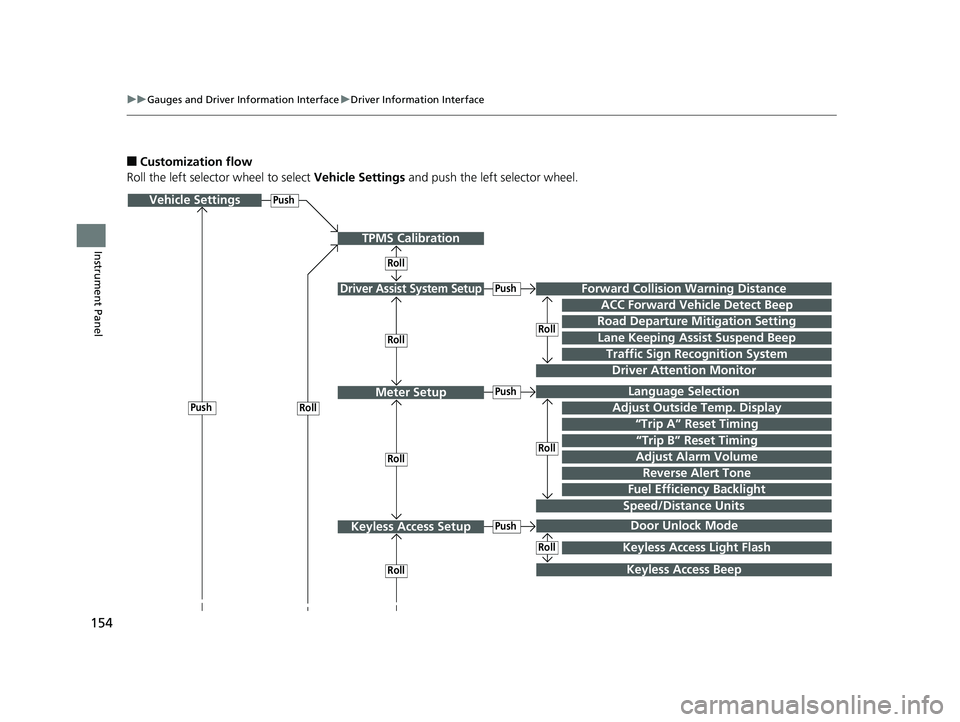
■Customization flow
Roll the left selector wheel to select Vehicle Settings and push the left selector wheel.
Vehicle Settings
“Trip A” Reset Timing
Language Selection
Adjust Outside Temp. Display
Door Unlock Mode
Driver Assist System Setup
Meter Setup
Keyless Access Setup
“Trip B” Reset Timing
Forward Collision Warning Distance
ACC Forward Vehicle Detect Beep
Road Departure Mi tigation Setting
Push
Traffic Sign Recognition System
Driver Attention Monitor
Roll
Keyless Access Beep
Push
Keyless Access Light Flash
Roll
Speed/Distance Units
Lane Keeping Assi st Suspend Beep
Adjust Alarm VolumeRollRoll
Roll
Push
Push
Push
Roll
Roll
Reverse Alert Tone
Fuel Efficiency Backlight
TPMS Calibration
Roll
19 INSIGHT HMIN-31TXM6000.book 154 ページ 2018年4月20日 金曜日 午後4時22分
Page 158 of 675
156
uuGauges and Driver Information Interface uDriver Information Interface
Instrument Panel
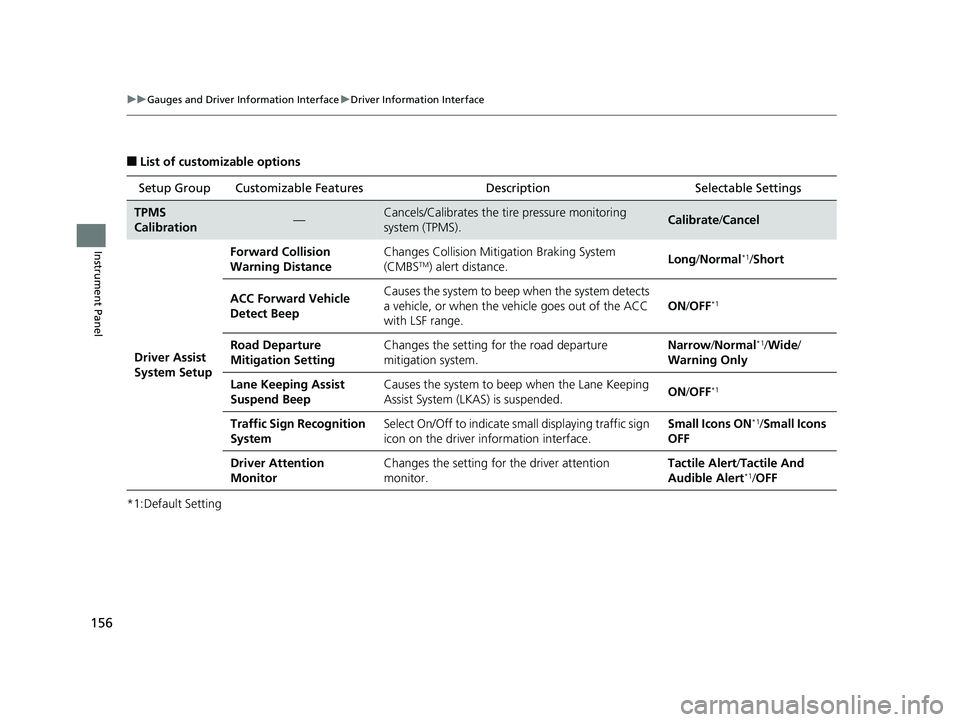
■List of customizable options
*1:Default Setting Setup Group Customizable Features
Description Selectable Settings
TPMS
Calibration—Cancels/Calibrates the tire pressure monitoring
system (TPMS).Calibrate/Cancel
Driver Assist
System Setup Forward Collision
Warning Distance
Changes Collision Mitigation Braking System
(CMBS
TM) alert distance.
Long
/Normal*1/Short
ACC Forward Vehicle
Detect Beep Causes the system to beep when the system detects
a vehicle, or when the vehicle goes out of the ACC
with LSF range.
ON
/OFF
*1
Road Departure
Mitigation Setting Changes the setting for the road departure
mitigation system. Narrow
/Normal*1/Wide /
Warning Only
Lane Keeping Assist
Suspend Beep Causes the system to beep
when the Lane Keeping
Assist System (LKAS) is suspended. ON
/OFF
*1
Traffic Sign Recognition
System Select On/Off to indicate small displaying traffic sign
icon on the driver information interface. Small Icons ON*1/
Small Icons
OFF
Driver Attention
Monitor Changes the setting for the driver attention
monitor. Tactile Alert
/Tactile And
Audible Alert
*1/ OFF
19 INSIGHT HMIN-31TXM6000.book 156 ページ 2018年4月20日 金曜日 午後4時22分
Page 372 of 675
370
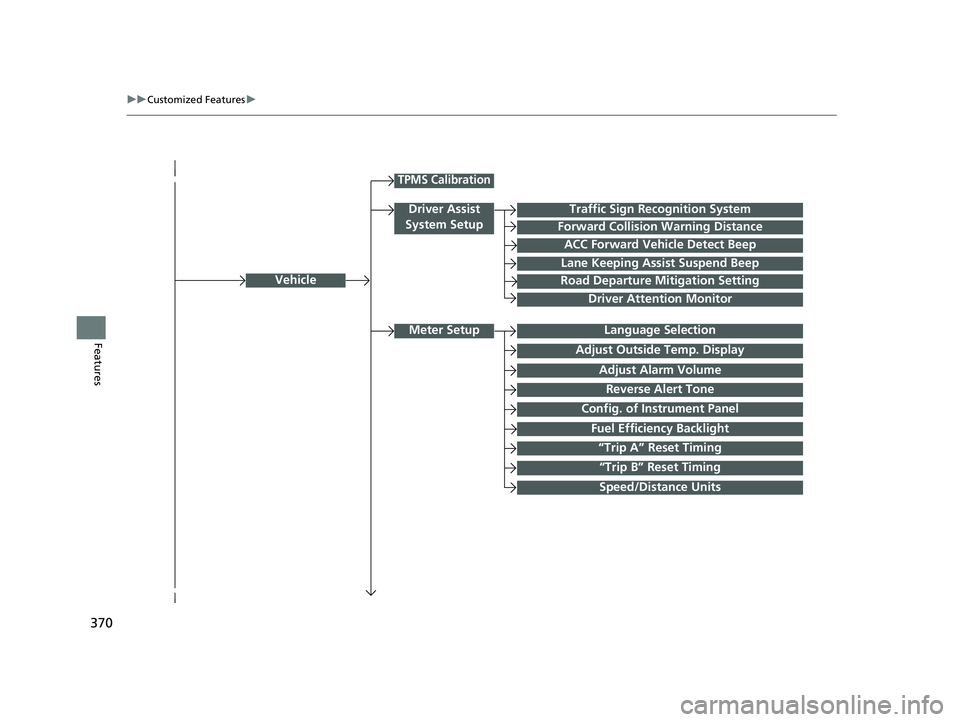
uuCustomized Features u
FeaturesLanguage Selection
Vehicle
Meter Setup
Adjust Outside Temp. Display
“Trip A” Reset Timing
“Trip B” Reset Timing
Reverse Alert Tone
Config. of Instrument Panel
Adjust Alarm Volume
Fuel Efficiency Backlight
TPMS Calibration
Driver Assist
System SetupTraffic Sign Recognition System
Forward Collision Warning Distance
ACC Forward Vehicle Detect Beep
Lane Keeping Assist Suspend Beep
Road Departure Mitigation Setting
Driver Attention Monitor
Speed/Distance Units
19 INSIGHT HMIN-31TXM6000.book 370 ページ 2018年4月20日 金曜日 午後4時22分
Page 380 of 675
378
uuCustomized Features u
Features
*1:Default SettingSetup
Group Customizable Features Description Selectable Settings
Display
Day ModeChanges between the daytime mode and nighttime
mode.
2
Display Setup P. 247
—Night Mode
Sound Bass / Treble Treble
Adjusts the settings of the audio speakers’ sound.
2Adjusting the Sound P. 284—
Midrange
Bass
Subwoofer*
Balance / Fader
DTS Neural Surround
*
Speed Volume Compensation
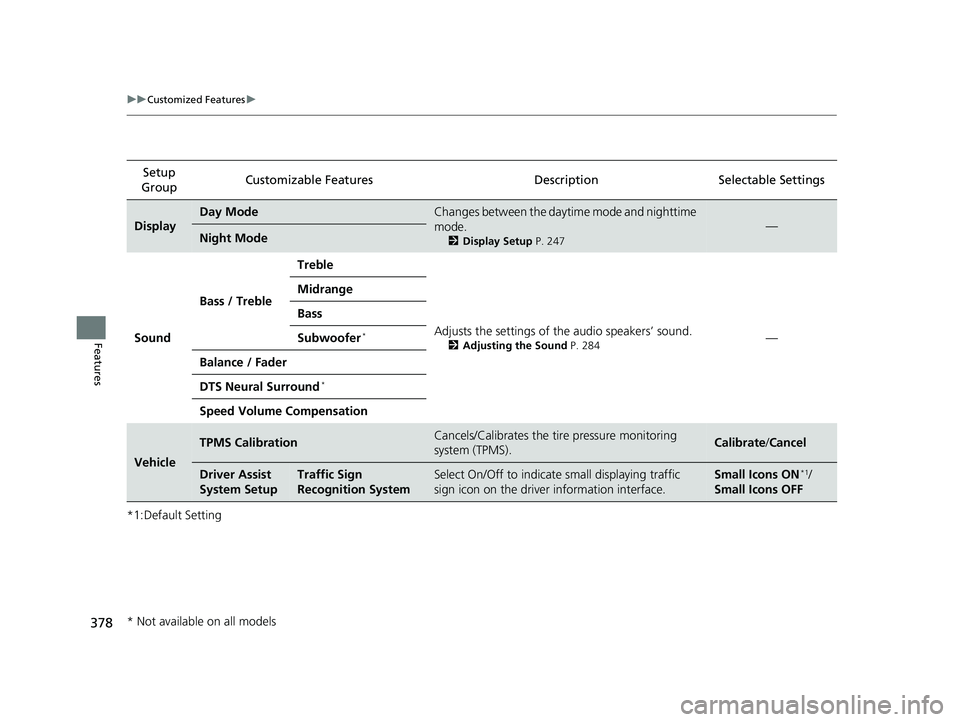
Vehicle
TPMS CalibrationCancels/Calibrates the tire pressure monitoring
system (TPMS).Calibrate
/Cancel
Driver Assist
System SetupTraffic Sign
Recognition SystemSelect On/Off to indicate small displaying traffic
sign icon on the driver information interface.Small Icons ON*1/
Small Icons OFF
* Not available on all models
19 INSIGHT HMIN-31TXM6000.book 378 ページ 2018年4月20日 金曜日 午後4時22分
Page 443 of 675
441
Driving
This chapter discusses driving and refueling.
Before Driving................................... 442
Towing a Trailer ................................ 447
When Driving
Turning on the Power ...................... 448
Precautions While Driving................. 454
Transmission .................................... 456
Shifting ............................................ 457
SPORT Mode.................................... 463
Deceleration Paddle Selector ............ 464
ECON Mode .................................... 467
Acoustic Vehicle Al erting System ...... 468
Vehicle Stability Assist® (VSA®), aka Electronic
Stability Control (ESC), System ...............469
Agile Handling Assist ............................. 471Tire Pressure Monitoring System (TPMS)..... 472Tire Pressure Monitoring System (TPMS) - Required Federal Explanation ......... 475
High Voltage Battery ........................ 477
LaneWatch
TM*.................................. 478
Honda Sensing ®................................ 480
Collision Mitigati on Braking System
TM
(CMBSTM) ....................................... 483
Adaptive Cruise Control (ACC) with Low Speed Follow (LSF) ......................... 492
Lane Keeping Assist System (LKAS).... 509
Road Departure Mi tigation (RDM)
System ........................................ 517
Traffic Sign Recognition System ....... 522
Front Sensor Camera ....................... 528
Radar Sensor ................................... 530
Braking
Brake System ................................... 531
Anti-lock Brake System (ABS) ........... 539
Brake Assist System ......................... 540
Parking Your Vehicle ........................ 541
Multi-View Rear Camera .................. 543
Refueling ........................................... 546
Fuel Economy and CO
2 Emissions .... 549
* Not available on all models
19 INSIGHT HMIN-31TXM6000.book 441 ページ 2018年4月20日 金曜日 午後4時22分
Page 474 of 675
472
uuWhen Driving uTire Pressure Monitoring System (TPMS)
Driving
Tire Pressure Monitoring System (TPMS)
Instead of directly measuring the pressu re in each tire, the TPMS on this vehicle
monitors and compares the rolling radius and rotational characteristics of each
wheel and tire while you are driving to determine if one or more tires are
significantly under-inflated. This will caus e the low tire pressure/TPMS indicator to
come on and a message to appear on the driver information interface.
You must start TPMS calibration every time you:
• Adjust the pressure in one or more tires.
• Rotate the tires.
• Replace one or more tires.
Before calibrating the TPMS:
• Set the cold tire pressu re in all four tires.
2Checking Tires P. 582
Make sure:
•The vehicle is at a complete stop.
• The transmission is in
(P.
• The power mode is in ON.
■TPMS Calibration
1Tire Pressure Monitoring System (TPMS)
The system does not monitor the tires when driving
at low speed.
Conditions such as low ambient temperature and
altitude change directly a ffect tire pressure and can
trigger the low tire pressure/TPMS indicator to come on.
Tire pressure checked and inflated in:
•Warm weather can beco me under-inflated in
colder weather.
•Cold weather can become over-inflated in warmer
weather.
The low tire pressure/TPMS indicator will not come
on as a result of over inflation.
The TPMS may not function pr operly if tire type and
size are mixed. Make sure to use the same size and
type of tire. 2 Checking and Maintaining Tires P. 582
The low tire pressure/TPMS indicator may come on
with a delay or may not come on at all when:
•You rapidly accelerate, decelerate, or turn the
steering wheel.
•You drive on snowy or slippery roads.
•Tire chains are used.
19 INSIGHT HMIN-31TXM6000.book 472 ページ 2018年4月20日 金曜日 午後4時22分