engine HONDA ODYSSEY 1999 User Guide
[x] Cancel search | Manufacturer: HONDA, Model Year: 1999, Model line: ODYSSEY, Model: HONDA ODYSSEY 1999Pages: 343, PDF Size: 3.73 MB
Page 78 of 343

Keys and Locks
These keys contain electronic circuits that are activated by the
Immobilizer System. They will not
work to start the engine if the circuits are damaged. Protect the keys from direct
sunlight, high temperature, and
high humidity. Do not drop the keys or set heavy
objects on them.
Keep the keys away from liquids.
If they get wet, dry them immedi-
ately with a soft cloth.
The keys do not contain batteries. Do not try to take them apart.
Remote Transmitter
Some models also come with a
remote transmitter; see page 81 for
an explanation of its operation.
Immobilizer System
The Immobilizer System protects your vehicle from theft. A properly-coded master or valet key must be
used in the ignition switch for theengine to start. If an improperly-
coded key (or other device) is used,
the engine's fuel system is disabled.
When you turn the ignition switch to ON (II), the Immobilizer System
indicator should come on for a few seconds, then go out. If the indicator
starts to blink, it means the system does not recognize the coding of the
key. Turn the ignition switch to LOCK (0), remove the key, reinsert
it, and turn the switch to ON (II)
again.
The system may not recognize your
key's coding if any other immobilizer
key is near the ignition switch. To make sure the system recognizes the
key code, keep each immobilizer key on a separate ring.
If the system repeatedly does not
recognize the coding of your key, contact your Honda dealer.
This indicator will also blink several times when you turn the ignitionswitch from ON (II) to ACCESSORY (I) or LOCK (0).
Do not attempt to alter this system
or add other devices to it. Electrical
problems could result that may make
your vehicle undriveable.
If you have lost your key and you
cannot start the engine, contact your
Honda dealer.
Instruments and Controls CONTINUEDProCarManuals.comMain Menu Table of Contents s t
Page 80 of 343
Keys and Locks
ACCESSORY (I) — In this position, you can operate the audio system and the accessory power socket.
ON (II) — This is the normal key
position when driving. All features and accessories on the vehicle are
usable. Several of the lights on the
instrument panel come on as a test
when you turn the ignition switch from ACCESSORY to ON (see page 57). START (III) — Use this position
only to start the engine. The switch
returns to ON (II) when you let go of
the key.
The engine will not start if the Immobilizer System does not
recognize the key's coding (see page
77).
You will hear a reminder beeper if
you leave the key in the ignition switch in the LOCK (0) or
ACCESSORY (I) position and open the driver's door. Remove the key to
turn off the beeper. Power Door Locks
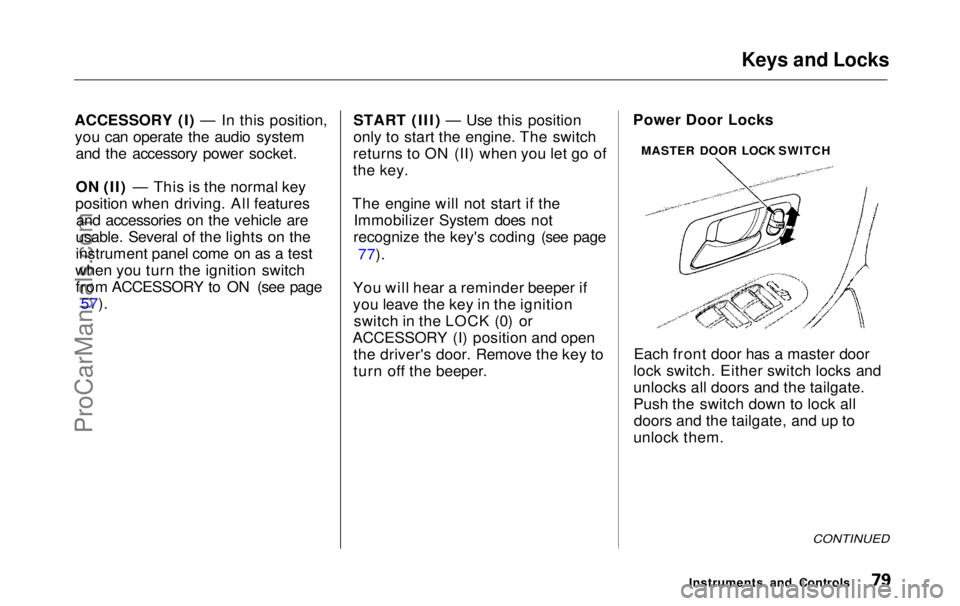
Each front door has a master door
lock switch. Either switch locks and
unlocks all doors and the tailgate.
Push the switch down to lock all doors and the tailgate, and up to
unlock them.
CONTINUED
Instruments and Controls
MASTER DOOR LOCK SWITCHProCarManuals.comMain Menu Table of Contents s t
Page 117 of 343
Mirrors, Parking Brake
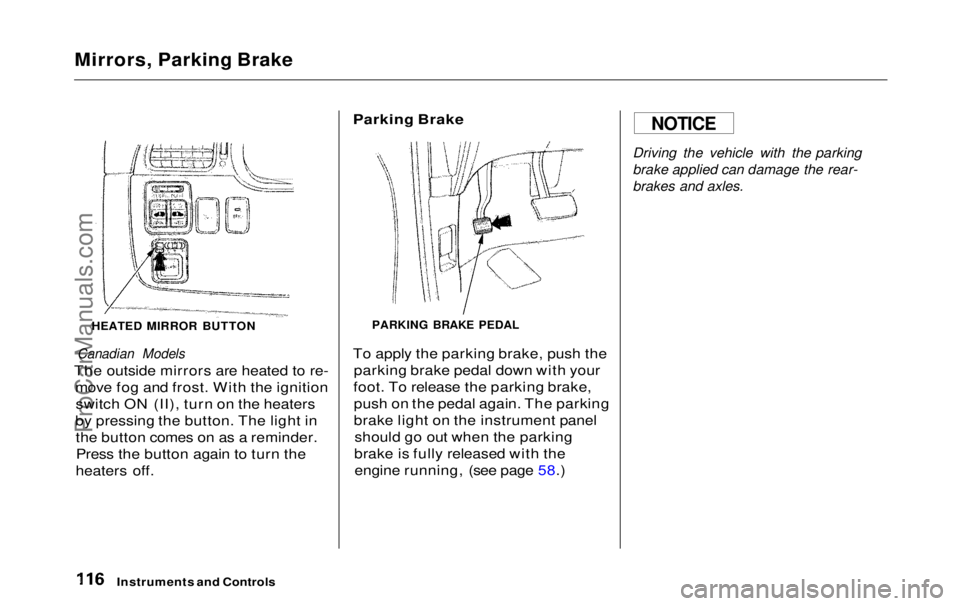
HEATED MIRROR BUTTON
Canadian Models
The outside mirrors are heated to re- move fog and frost. With the ignitionswitch ON (II), turn on the heaters
by pressing the button. The light in the button comes on as a reminder.Press the button again to turn the
heaters off.
Parking Brake
PARKING BRAKE PEDAL
To apply the parking brake, push the parking brake pedal down with your
foot. To release the parking brake, push on the pedal again. The parking
brake light on the instrument panel should go out when the parking
brake is fully released with the engine running, (see page 58.)
Driving the vehicle with the parking
brake applied can damage the rear-
brakes and axles.
Instruments and Controls
NOTICEProCarManuals.comMain Menu Table of Contents s t
Page 134 of 343
Heating and Cooling
How to Use the System
This section covers how to set up the system controls for ventilation,
heating, cooling, dehumidifying, and defrosting.
The engine must be running for the heater and air conditioning to
generate hot and cold air. The heater
uses engine coolant to warm the air.If the engine is cold, it will be several
minutes before you feel warm air
coming from the system.
The air conditioning does not rely on engine temperature.
It is best to leave the system in Fresh
Air mode under almost all conditions. Keeping the system in Recirculation
mode, particularly with the A/C off,can cause the windows to fog up.
Switch to Recirculation mode when
you are driving through smoky or dusty conditions, then switch back to
Fresh Air mode when the condition
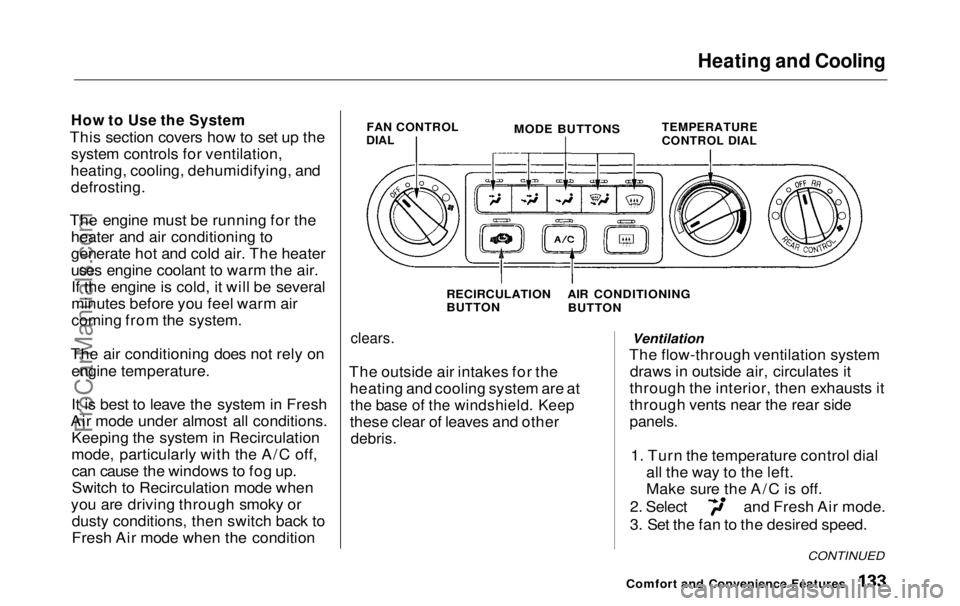
FAN CONTROL
DIAL
MODE BUTTONS
TEMPERATURE
CONTROL DIAL
RECIRCULATION
BUTTON
clears.
The outside air intakes for the heating and cooling system are at
the base of the windshield. Keep
these clear of leaves and other
debris.
Ventilation
The flow-through ventilation system draws in outside air, circulates it
through the interior, then exhausts it
through vents near the rear side
panels.
1. Turn the temperature control dial all the way to the left.
Make sure the A/C is off. 2. Select and Fresh Air mode.
3. Set the fan to the desired speed.
Comfort and Convenience Features
CONTINUED
AIR CONDITIONING BUTTO
NProCarManuals.comMain Menu Table of Contents s t
Page 135 of 343
Heating and Cooling
To Cool with A/C
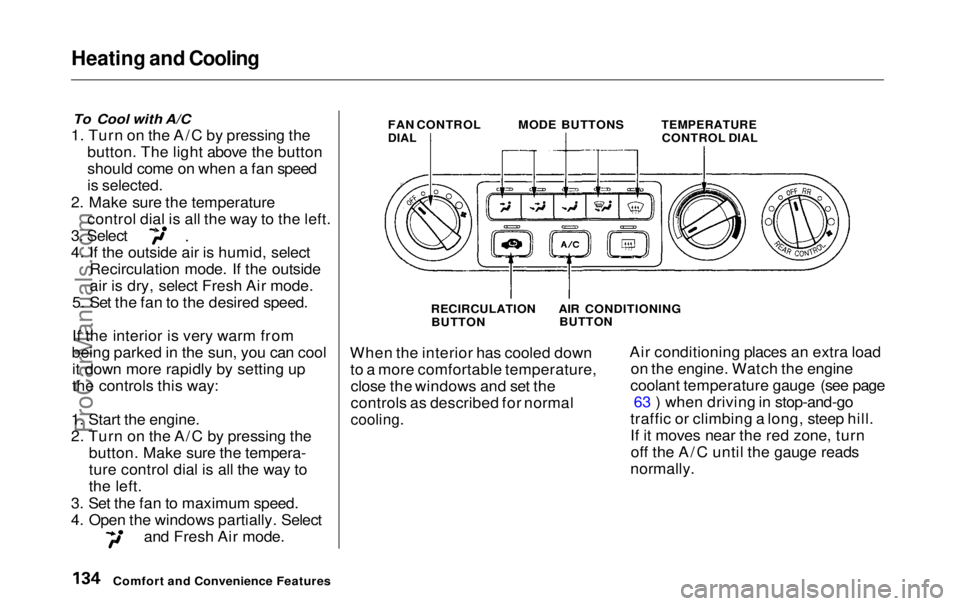
1. Turn on the A/C by pressing the button. The light above the button
should come on when a fan speed
is selected.
2. Make sure the temperature control dial is all the way to the left. 3. Select
4. If the outside air is humid, select
Recirculation mode. If the outside
air is dry, select Fresh Air mode.
5. Set the fan to the desired speed.
If the interior is very warm from
being parked in the sun, you can cool it down more rapidly by setting up
the controls this way:
1. Start the engine.
2. Turn on the A/C by pressing the button. Make sure the tempera-
ture control dial is all the way to
the left.
3. Set the fan to maximum speed.
4. Open the windows partially. Select and Fresh Air mode. FAN CONTROL
DIAL
MODE BUTTONS
TEMPERATURE
CONTROL DIAL
RECIRCULATION BUTTON
When the interior has cooled down to a more comfortable temperature,close the windows and set the
controls as described for normal
cooling.
Air conditioning places an extra load
on the engine. Watch the engine
coolant temperature gauge (see page 63 ) when driving in stop-and-go
traffic or climbing a long, steep hill.
If it moves near the red zone, turn off the A/C until the gauge reads
normally.
Comfort and Convenience Features AIR CONDITIONING
BUTTONProCarManuals.comMain Menu Table of Contents s t
Page 136 of 343
Heating and Cooling
To Heat
To warm the interior:
1. Start the engine. 2. Select and Fresh Air mode.
3. Set the fan to the desired speed.
4. Adjust the warmth of the air with
the temperature control dial.
To Heat and Dehumidify with Air
Conditioning
Air conditioning, as it cools, removes moisture from the air. When used in
combination with the heater, it
makes the interior warm and dry.
1. Switch the fan on.
2. Turn on the air conditioning. 3. Select and Fresh Air mode.
4. Adjust the temperature control
dial so the mixture of heated and
cooled air feels comfortable.
This setting is suitable for all driving conditions whenever the outside
temperature is above 32°F (0°C).
To Defog and Defrost
To remove fog from the inside of the
windows:
1. Switch the fan on. 2. Select
When you select the
system automatically switches to
Fresh Air mode and turns on the
A/C.
3. Adjust the temperature control dial so the air flow from the
defroster vents feels warm.
4. Turn on the rear window defogger to help clear the rear window.
When you switch to another mode from the A/C stays on.
Press the A/C button to turn it off.
CONTINUED
Comfort and Convenience FeaturesProCarManuals.comMain Menu Table of Contents s t
Page 137 of 343
Heating and Cooling
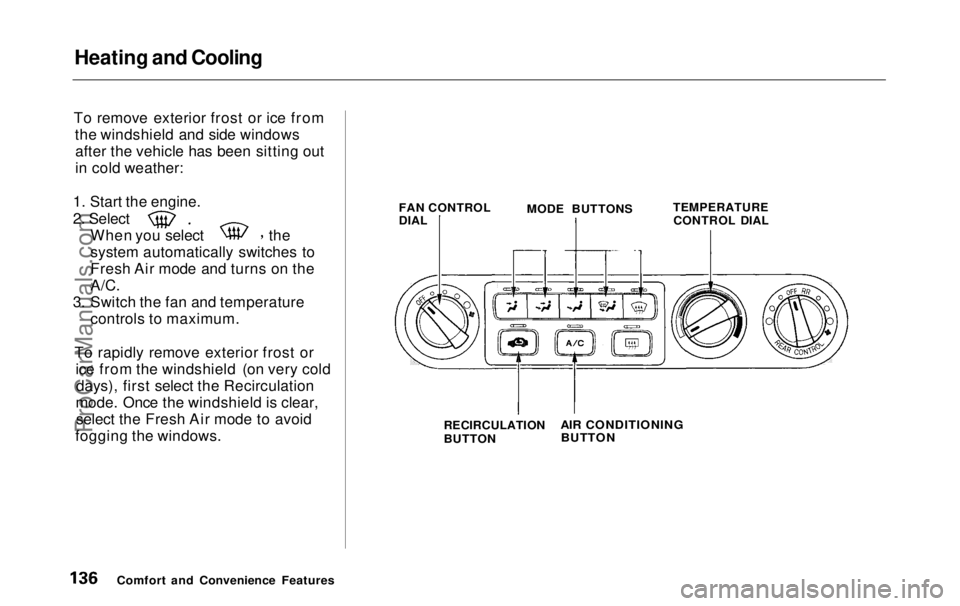
To remove exterior frost or ice from the windshield and side windowsafter the vehicle has been sitting out
in cold weather:
1. Start the engine. 2. Select
When you select the
system automatically switches to
Fresh Air mode and turns on the
A/C.
3. Switch the fan and temperature controls to maximum.
To rapidly remove exterior frost or ice from the windshield (on very colddays), first select the Recirculation
mode. Once the windshield is clear, select the Fresh Air mode to avoid
fogging the windows. FAN CONTROL
DIAL
MODE BUTTONS
TEMPERATURE
CONTROL DIAL
Comfort and Convenience Features RECIRCULATION
BUTTON
AIR CONDITIONING
BUTTONProCarManuals.comMain Menu Table of Contents s t
Page 138 of 343

Heating and Cooling
These settings direct all the air flow to the defroster vents at the base ofthe windshield and the side windowdefroster vents. The air flow will get
warmer and clear the windows faster as the engine warms up. You can
close the corner vents with the dial
beside each vent. This will send
more warm air to the windshield
defroster vents.
For safety, make sure you have a
clear view through all the windows
before driving away. To Turn Everything Off
To shut off the system temporarily,
turn the fan speed and temperaturecontrol dials all the way to the left.
You should shut the system completely off only for the first few
minutes of driving in cold weather,
until the engine coolant warms up
enough to operate the heater. Keep
the fan on at all other times so stale air does not build up in the interior.
Comfort and Convenience FeaturesProCarManuals.comMain Menu Table of Contents s t
Page 139 of 343
Climate Control System
On EX model
The automatic climate control system in your Honda picks the
proper combination of air condi-
tioning, heating, and ventilation to maintain the interior temperature
you select. The system also adjusts the fan speed and air flow levels.
Your vehicle also has a rear A/C unit that allows the rear passengers toadjust the heating, cooling, and air
flow (see page 146).
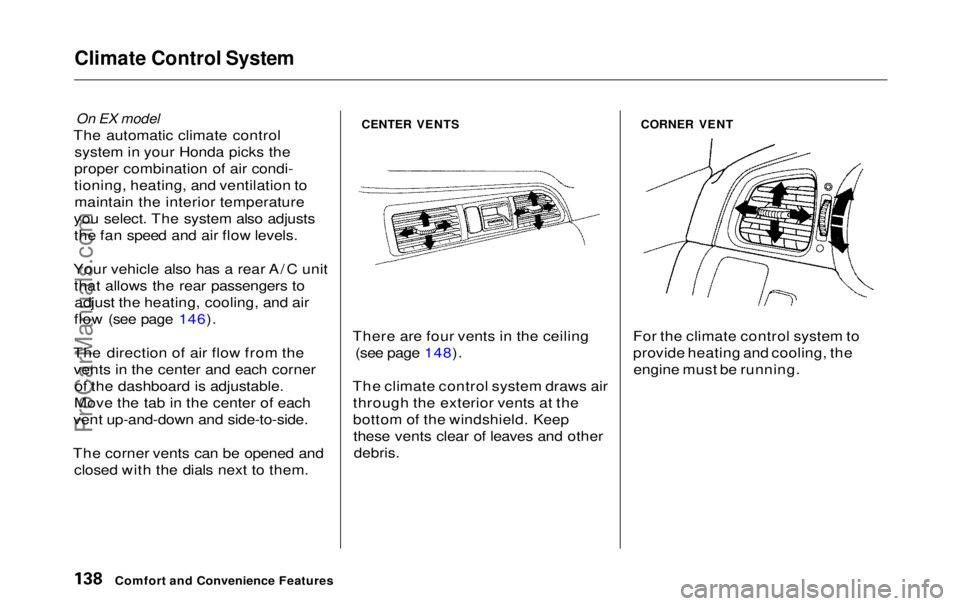
The direction of air flow from the vents in the center and each corner of the dashboard is adjustable.
Move the tab in the center of each
vent up-and-down and side-to-side.
The corner vents can be opened and closed with the dials next to them.
CENTER VENTS
There are four vents in the ceiling (see page 148).
The climate control system draws air through the exterior vents at the
bottom of the windshield. Keepthese vents clear of leaves and other
debris.
CORNER VENT
For the climate control system to
provide heating and cooling, the engine must be running.
Comfort and Convenience FeaturesProCarManuals.comMain Menu Table of Contents s t
Page 182 of 343

Before Driving
Before you begin driving your Honda,
you should know what gasoline to use, and how to check the levels of
important fluids. You also need to
know how to properly store luggageor packages. The information in thissection will help you. If you plan to
add any accessories to your vehicle,
please read the information in this section first. Break-in Period.............................. 182
Gasoline.......................................... 182
Service Station Procedures .......... 183 Filling the Fuel Tank................. 183Opening the Hood..................... 184 Oil Check................................ 186
Engine Coolant Check.......... 187
Fuel Economy................................ 188
Vehicle Condition...................... 188Driving Habits............................ 188
Accessories and Modifications.... 189 Carrying Cargo.............................. 191
Before DrivingProCarManuals.comMain Menu s t