engine HONDA ODYSSEY 1999 Owner's Guide
[x] Cancel search | Manufacturer: HONDA, Model Year: 1999, Model line: ODYSSEY, Model: HONDA ODYSSEY 1999Pages: 343, PDF Size: 3.73 MB
Page 202 of 343

Automatic Transmission
Second (2) — To shift to Second,
pull the shift lever towards you, then shift to the lower gear. This position
locks the transmission in second
gear. It does not downshift to first gear when you come to a stop.Second gives you more power when
climbing, and increased engine
braking when going down steep hills. Use second gear when starting out
on a slippery surface or in deep snow.
It will help reduce wheelspin.
When driving down hill with a trailer, use the Second position.
First (1) — To shift from Second toFirst, pull the shift lever towards you,
then shift to the lower gear. With the
lever in this position, the transmis- sion locks in First gear. By upshift-
ing and downshifting through 1, 2,
D3 and D4, you can operate this
transmission much like a manual
transmission without a clutch pedal. Engine Speed Limiter
If you exceed the maximum speed
for the gear you are in, the engine
speed will enter into the
tachometer's red zone. If this occurs,
you may feel the engine cut in and out. This is caused by a limiter
in the engine's computer controls.
The engine will run normally
when you reduce the RPM below the
red zone.
Shift Lock Release
This allows you to move the shift lever out of Park if the normal
method of pushing on the brakepedal and pulling the shift lever doesnot work.
1. Set the Parking brake.
2. Remove the key from the ignition
switch.
3. Place a cloth on the edge of the shift lock release slot cover on thesteering column. Remove the
cover by carefully prying on the
edge with a small flat-tipped screwdriver (not included in the
tool kit).
Driving
CONTINUEDProCarManuals.comMain Menu Table of Contents s t
Page 203 of 343
Automatic Transmission
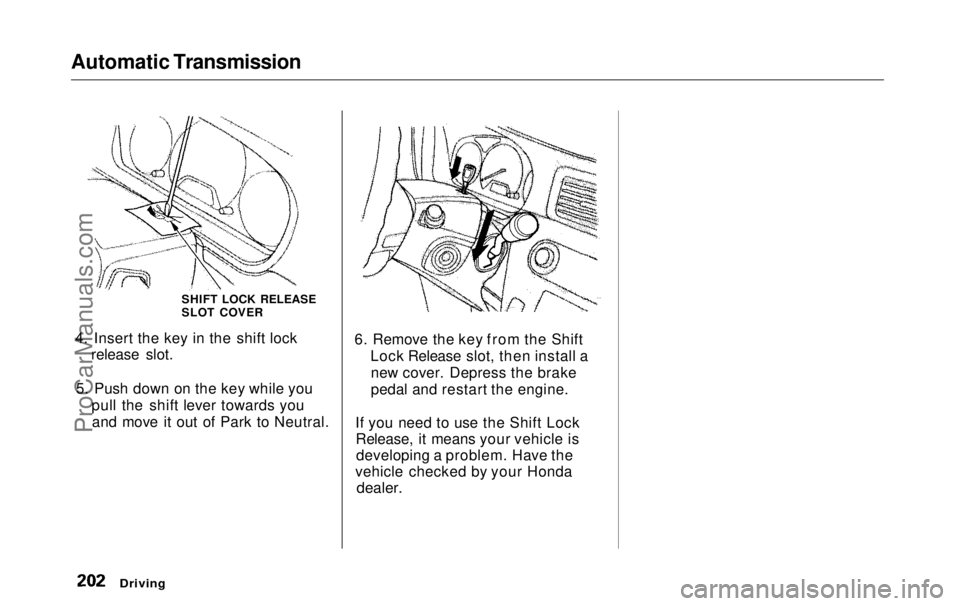
4. Insert the key in the shift lock release slot.
5. Push down on the key while you pull the shift lever towards youand move it out of Park to Neutral. 6. Remove the key from the Shift
Lock Release slot, then install anew cover. Depress the brake
pedal and restart the engine.
If you need to use the Shift Lock Release, it means your vehicle isdeveloping a problem. Have the
vehicle checked by your Honda
dealer.
Driving
SHIFT LOCK RELEASE
SLOT COVERProCarManuals.comMain Menu Table of Contents s t
Page 205 of 343

The Braking System
Your Honda is equipped with front disc brakes. The brakes on the rear
wheels are drum. A power assist helps reduce the effort needed on
the brake pedal. The ABS helps you retain steering control when braking
very hard.
Put your foot on the brake pedal only
when you intend to brake. Resting
your foot on the pedal keeps the brakes applied lightly, causing themto build up heat. Heat build-up can
reduce how well your brakes work. Italso keeps your brake lights on all
the time, confusing drivers behind
you.
Constant application of the brakes
when going down a long hill builds up heat and reduces their effective-
ness. Use the engine to assist the
brakes by downshifting to a lower gear and taking your foot off the
accelerator pedal.
Check your brakes after driving
through deep water. Apply the
brakes moderately to see if they feel normal. If not, apply them gently and
frequently until they do. Since a
longer distance is needed to stop
with wet brakes, be extra cautious and alert in your driving. Brake Wear Indicators
The front disc brakes on all vehicles have audible brake wear indicators.
When the brake pads need replacing,
you will hear a distinctive metallic "screeching" sound when you apply
the brakes. If you do not have the
brake pads replaced, they will begin screeching all the time.
Your brakes may sometimes squeal or squeak when you apply them
lightly. Do not confuse this with the
brake wear indicators. They make a
very audible "screeching."
DrivingProCarManuals.comMain Menu Table of Contents s t
Page 207 of 343
The Braking System
Important Safety Reminders
ABS does not reduce the time or distance it takes to stop the
vehicle, it only helps with steering control during braking. You should
always maintain a safe followingdistance from other vehicles.
ABS will not prevent a skid that results from changing direction
abruptly, such as trying to take a
corner too fast or making a sudden
lane change. Always drive at a safe, prudent speed for the road and
weather conditions.
ABS cannot prevent a loss of stability. Always steer moderately
when you are braking hard. Severe or sharp steering wheel movement
can still cause your vehicle to veer
into oncoming traffic or off the road. A vehicle with ABS may require a
longer distance to stop on loose or
uneven surfaces, such as gravel orsnow, than a vehicle without anti-
lock. Slow down and allow a greater distance between vehicles under
those conditions.
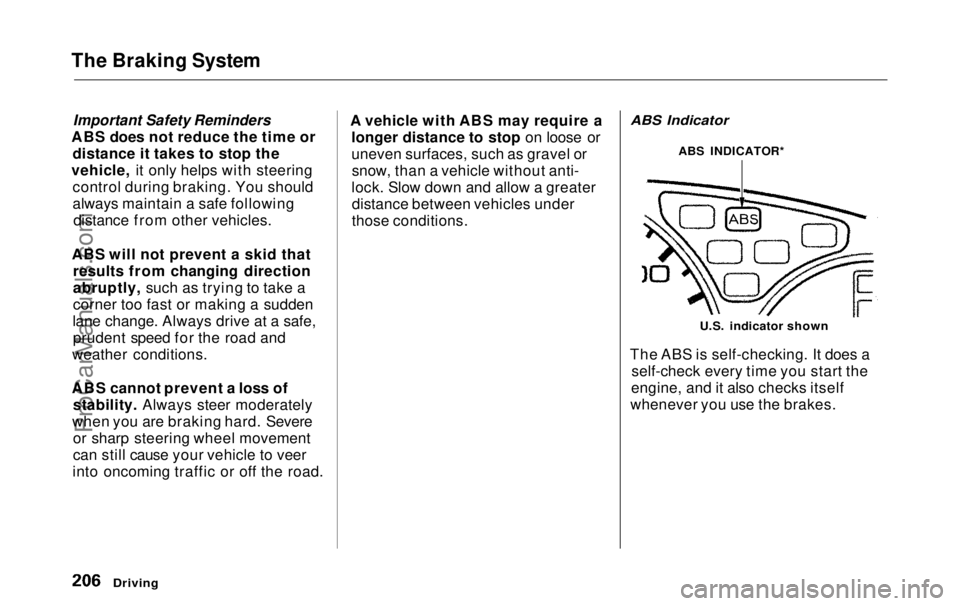
ABS Indicator
U.S. indicator shown
The ABS is self-checking. It does a self-check every time you start the
engine, and it also checks itself
whenever you use the brakes.
Driving
ABS INDICATOR*ProCarManuals.comMain Menu Table of Contents s t
Page 210 of 343
Traction Control System
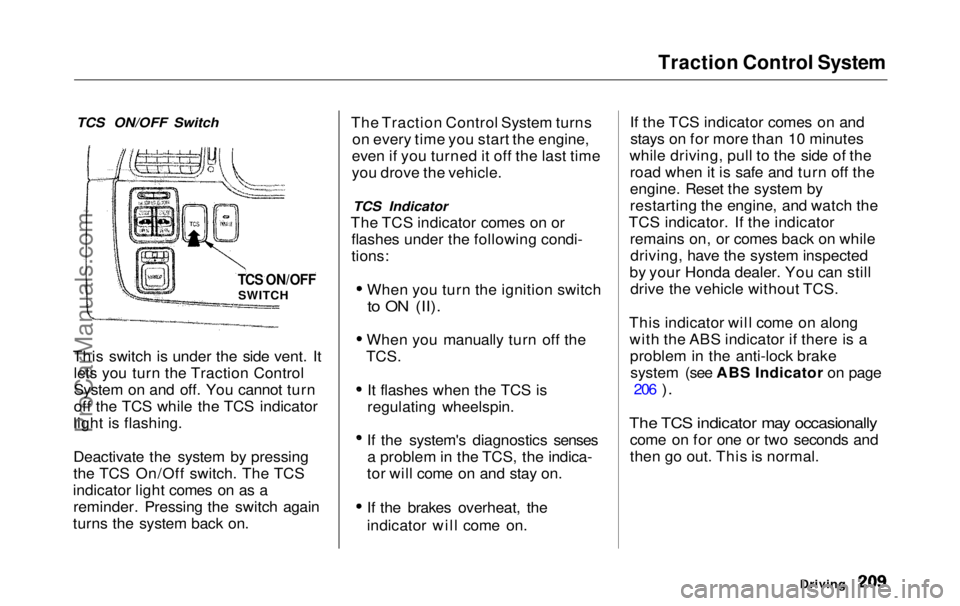
TCS ON/OFF Switch
This switch is under the side vent. It lets you turn the Traction Control
System on and off. You cannot turn
off the TCS while the TCS indicator
light is flashing.
Deactivate the system by pressing
the TCS On/Off switch. The TCS
indicator light comes on as a reminder. Pressing the switch again
turns the system back on. The Traction Control System turns
on every time you start the engine,
even if you turned it off the last time
you drove the vehicle.
TCS Indicator
The TCS indicator comes on or flashes under the following condi-
tions:
When you turn the ignition switch
to ON (II).
When you manually turn off the
TCS.
It flashes when the TCS is
regulating wheelspin.
If the system's diagnostics senses a problem in the TCS, the indica-
tor will come on and stay on.
If the brakes overheat, the
indicator will come on. If the TCS indicator comes on and
stays on for more than 10 minutes
while driving, pull to the side of the road when it is safe and turn off the
engine. Reset the system by
restarting the engine, and watch the
TCS indicator. If the indicator remains on, or comes back on whiledriving, have the system inspected
by your Honda dealer. You can still drive the vehicle without TCS.
This indicator will come on along with the ABS indicator if there is aproblem in the anti-lock brakesystem (see ABS Indicator on page 206
).
The TCS indicator may occasionally
come on for one or two seconds and
then go out. This is normal.
Driving
TCS ON/OFF
SWITCHProCarManuals.comMain Menu Table of Contents s t
Page 213 of 343
Towing a Trailer
Your Odyssey has been designed totow a trailer, as well as for carrying
passengers and their cargo.
To safely tow a trailer, you must observe the load limits, use the
proper equipment, and follow the
guidelines in this section.
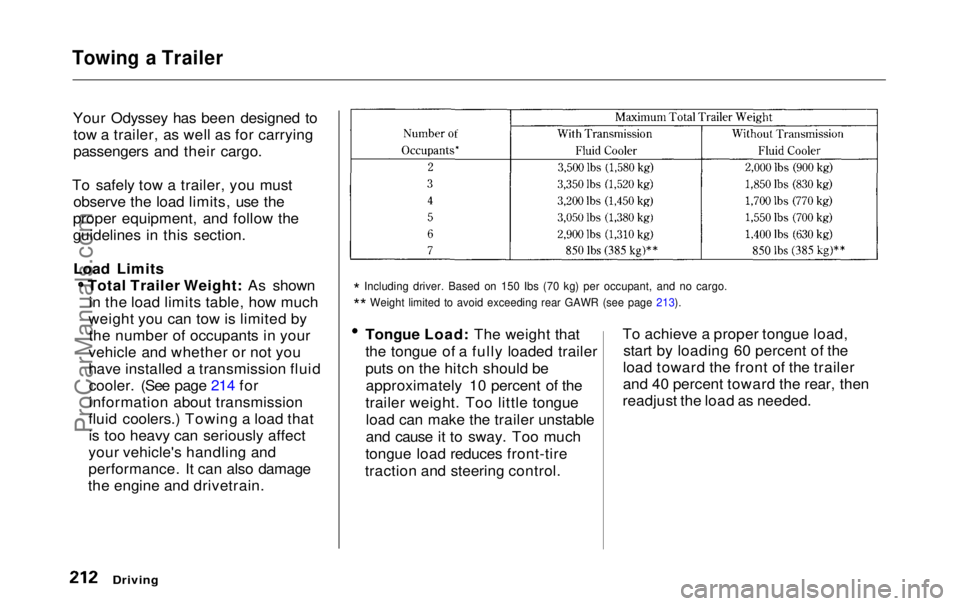
Load Limits Total Trailer Weight: As shownin the load limits table, how much
weight you can tow is limited by the number of occupants in your
vehicle and whether or not you
have installed a transmission fluid cooler. (See page 214 for
information about transmission
fluid coolers.) Towing a load that is too heavy can seriously affect
your vehicle's handling and
performance. It can also damage
the engine and drivetrain.
*
Including driver. Based on 150 Ibs (70 kg) per occupant, and no cargo\
.
*
*
Weight limited to avoid exceeding rear GAWR (see page 213).
Tongue Load: The weight that
the tongue of a fully loaded trailer
puts on the hitch should be
approximately 10 percent of the
trailer weight. Too little tongue load can make the trailer unstable
and cause it to sway. Too much
tongue load reduces front-tire
traction and steering control. To achieve a proper tongue load,
start by loading 60 percent of the
load toward the front of the trailer
and 40 percent toward the rear, then
readjust the load as needed.
Driving
ProCarManuals.comMain Menu Table of Contents s t
Page 218 of 343

Towing a Trailer
Driving Safely With a Trailer
The added weight, length, and height of a trailer will affect your
vehicle's handling and performance, so driving with a trailer requires
some special driving skills and
techniques.
For your safety and the safety of
others, take time to practice driving
maneuvers before heading for the
open road, and follow the guidelines
discussed below.
Towing Speeds and Gears
Driving slower than normal in all driving situations, and obey posted
speed limits for vehicles with trailers.
Use the D 4
position when towing
a trailer on level roads. D 3
is the
proper shift lever position to use when towing a trailer in hilly terrain.
(See "Driving on Hills" in the next
column for additional gear
information.)
Making Turns and Braking
Make turns more slowly and wider
than normal. The trailer tracks a smaller arc than your vehicle, and it
can hit or run over something the
vehicle misses. Allow more time and distance for braking. Do not brake or
turn suddenly as this could cause the
trailer to jackknife or turn over.
Driving on Hills
When climbing hills, closely watch your temperature gauge. If it nearsthe red mark, turn the air
conditioning off, reduce speed and, if
necessary, pull to the side of the
road to let the engine cool. Do notdrive over 45 mph (72 km/h) on a
long uphill stretch.
If the transmission shifts frequently
between 3rd and 4th gears while
going up a hill, shift to D 3
. If you must stop when facing uphill,
use the foot brake or parking brake.
Do not try to hold the vehicle in
place by pressing on the accelerator,
as this can cause the transmission to
overheat.
When driving down hills, reduce your speed and shift down to 2ndgear. Do not "ride" the brakes, and
remember it will take longer to slowdown and stop when towing a trailer.
CONTINUED
DrivingProCarManuals.comMain Menu Table of Contents s t
Page 220 of 343
Maintenance
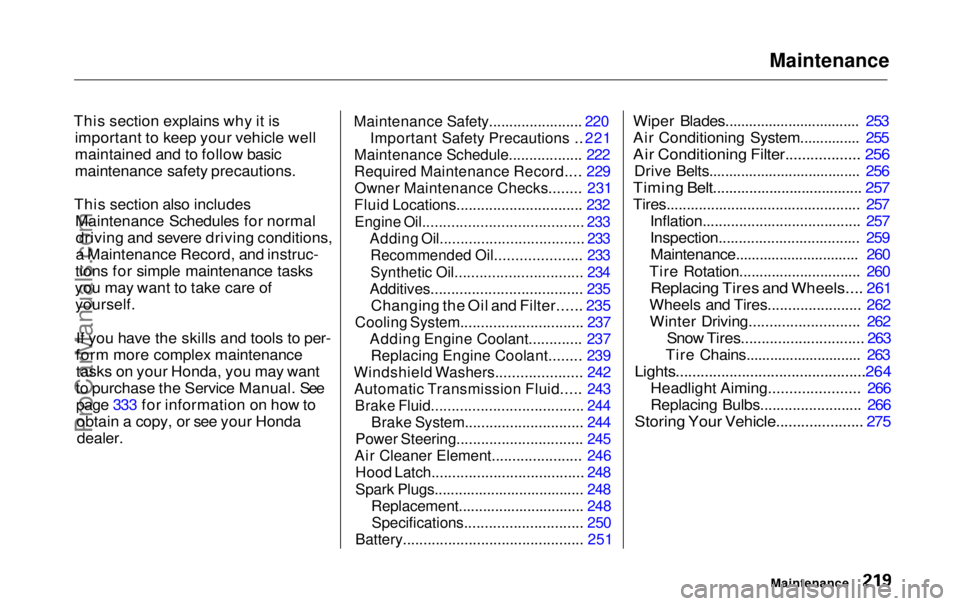
This section explains why it is important to keep your vehicle well
maintained and to follow basic
maintenance safety precautions.
This section also includes Maintenance Schedules for normaldriving and severe driving conditions,
a Maintenance Record, and instruc-
tions for simple maintenance tasks
you may want to take care of yourself.
If you have the skills and tools to per-
form more complex maintenance tasks on your Honda, you may want
to purchase the Service Manual. See page 333 for information on how toobtain a copy, or see your Honda
dealer.
Maintenance Safety.......................
220
Important Safet
y
Precautions ..
221
Maintenance Schedule.................
.
222
Required Maintenance Record.... 229
Owner Maintenance Checks........ 231
Fluid Locations............................... 232
Engine Oil....................................... 233
Adding Oil................................... 233
Recommended Oil..................... 233
Synthetic Oil............................... 234
Additives..................................... 235
Changing the Oil and Filter...... 235
Cooling System.............................. 237
Adding Engine Coolant............. 237Replacing Engine Coolant........ 239
Windshield Washers..................... 242
Automatic Transmission Fluid..... 243
Brake Fluid..................................... 244
Brake System............................. 244
Power Steering............................... 245
Air Cleaner Element...................... 246
Hood Latch..................................... 248
Spark Plugs..................................... 248
Replacement............................... 248
Specifications............................. 250
Battery............................................ 251
Wiper Blades.................................. 253
Air Conditioning System............... 255
Air Conditioning Filter.................. 256
Drive Belts...................................... 256
Timing Belt..................................... 257
Tires................................................ 257 Inflation....................................... 257
Inspection................................... 259Maintenance............................... 260
Tire Rotation.............................. 260
Replacing Tires and Wheels.... 261
Wheels and Tires....................... 262 Winter Driving........................... 262
Snow Tires.............................. 263
Tire Chains............................. 263
Lights..............................................264
Headlight Aiming...................... 266
Replacing Bulbs......................... 266
Storing Your Vehicle..................... 275
MaintenanceProCarManuals.comMain Menu s t
Page 222 of 343

Maintenance Safety
Important Safety Precautions
Before you begin any maintenance,
make sure your vehicle is parked on
level ground and that the parking brake is set. Also, be sure the engine
is off. This will help to eliminateseveral potential hazards:
Carbon monoxide poisoning
from engine exhaust. Be sure there is adequate ventilation
whenever you operate the engine.
Burns from hot parts. Let theengine and exhaust system cool
before touching any parts.
Injury from moving parts. Do
not run the engine unless in-
structed to do so. Read the instructions before you
begin, and make sure you have the
tools and skills required.
To reduce the possibility of fire or explosion, be careful when workingaround gasoline or batteries. Use a
commercially available degreaser or
parts cleaner, not gasoline, to clean
parts. Keep cigarettes, sparks, and
flames away from the battery and all
fuel-related parts.
You should wear eye protection and protective clothing when workingnear the battery or when using
compressed air.
MaintenanceProCarManuals.comMain Menu Table of Contents s t
Page 223 of 343
Maintenance Schedule
The Maintenance Schedule specifies how often you should have your
vehicle serviced and what things need attention. It is essential that
you have your vehicle serviced as scheduled to retain its high level of
safety, dependability, and emissions
control performance.
The services and time or distance intervals shown in the maintenanceschedule assume you will use your
vehicle as normal transportation for passengers and their possessions.You should also follow these
recommendations:
Avoid exceeding your vehicle'sload limit. This puts excess stresson the engine, brakes, and many
other parts of your vehicle. The
load limit is shown on the tire
information label on the driver's doorjamb.
Operate your vehicle on
reasonable roads within the legal speed limit.
Drive your vehicle regularly over a distance of several miles (kilometers).
Always use unleaded gasoline with the proper octane rating (see page
182
).
Which Schedule to Follow:
Service your vehicle according to the
time and mileage periods on one of
the Maintenance Schedules on the
following pages. Select the schedule
for "Severe Conditions" if most of
your driving is done under one or more of the conditions listed on that
page. Otherwise, follow the schedule
for "Normal Conditions."
MaintenanceProCarManuals.comMain Menu Table of Contents s t