ECO HONDA ODYSSEY 2019 Owner's Manual (in English)
[x] Cancel search | Manufacturer: HONDA, Model Year: 2019, Model line: ODYSSEY, Model: HONDA ODYSSEY 2019Pages: 767, PDF Size: 47.46 MB
Page 2 of 767
Event Data Recorders
This vehicle is equipped with an event data recorder (EDR).
The main purpose of an EDR is to record, in certain crash or near
crash-like situations, such as an air bag deployment or hitting a
road obstacle, data that will assist in understanding how a vehicle’s
systems performed. The EDR is designed to record data related
to vehicle dynamics and safety systems for a short period of
time, typically 30 seconds or le ss. The EDR in this vehicle is
designed to record such data as:
• How various systems in your vehicle were operating;
• Whether or not the driver and passenger safety belts were
buckled/fastened;
3WARNING
California Proposition 65 Warning
Operating, servicing and maintaining a
passenger vehicle or off-highway motor
vehicle can expose you to chemicals including
engine exhaust, carbon monoxide,
phthalates, and lead, which are known to the
State of California to cause cancer and birth
defects or other reproductive harm. To
minimize exposure, avoid breathing exhaust,
do not idle the engine except as necessary,
service your vehicle in a well-ventilated area
and wear gloves or wash your hands
frequently when servicing your vehicle. For
more information go to
www.P65Warnings.ca.gov/passenger-vehicle.
• How far (if at all) the driver was depressing the accelerator
and/or brake pedal; and,
• How fast the vehicle was traveling.
These data can help provide a better understanding of the
circumstances in which crashes and injuries occur. NOTE: EDR data
are recorded by your vehicle only if a non-trivial crash situation
occurs; no data are recorded by the EDR under normal driving
conditions and no personal data (e.g., name, gender, age, and
crash location) are recorded. Howeve r, other parties, such as law
enforcement, could co mbine the EDR data with the type of
personally identifying data rout inely acquired during a crash
investigation.
To read data recorded by an ED R, special equipment is required,
and access to the vehicle or the EDR is needed. In addition to the
vehicle manufacturer, other parties, such as law enforcement, that
have the special equipment, can re ad the information if they have
access to the vehicle or the EDR.
The data belongs to the vehicle ow ner and may not be accessed by
anyone else except as legally requir ed or with the permission of the
vehicle owner.
Service Diagnostic Recorders
This vehicle is equipped with se rvice-related devices that record
information about powertrain perfo rmance. The data can be used
to verify emissions law requirem ents and/or help technicians
diagnose and solve service problems. It may also be combined with
data from other sources for res earch purposes, but it remains
confidential. Some diagnostic and maintenance information is
uploaded to Honda upon vehicle start up.
19 ODYSSEY-31THR6120.book 0 ページ 2018年12月6日 木曜日 午後4時35分
Page 5 of 767
Contents
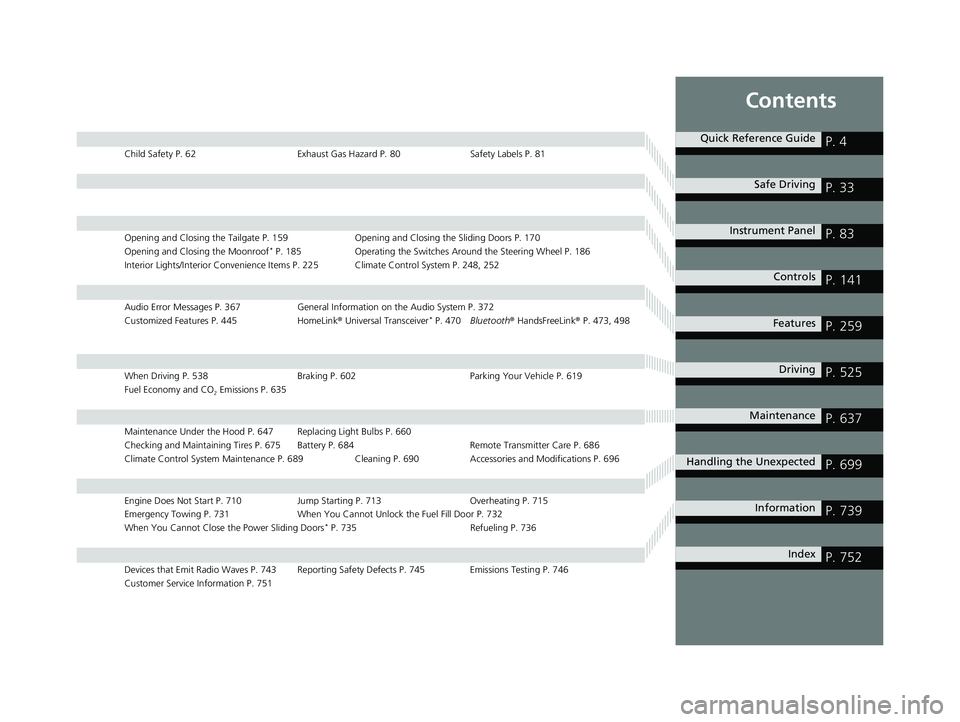
Child Safety P. 62Exhaust Gas Hazard P. 80Safety Labels P. 81
Opening and Closing the Tailgate P. 159 Opening and Closing the Sliding Doors P. 170
Opening and Closing the Moonroof* P. 185 Operating the Switches Around the Steering Wheel P. 186
Interior Lights/Interior Convenience Items P. 225 Climate Control System P. 248, 252
Audio Error Messages P. 367 General Information on the Audio System P. 372
Customized Features P. 445 HomeLink® Universal Transceiver* P. 470 Bluetooth ® HandsFreeLink ® P. 473, 498
When Driving P. 538 Braking P. 602Parking Your Vehicle P. 619
Fuel Economy and CO
2 Emissions P. 635
Maintenance Under the Hood P. 647 Replacing Light Bulbs P. 660
Checking and Maintaining Tires P. 675 Battery P. 684 Remote Transmitter Care P. 686
Climate Control System Maintenance P. 689 Cleaning P. 690 Accessories and Modifications P. 696
Engine Does Not Start P. 710 Jump Starting P. 713Overheating P. 715
Emergency Towing P. 731 When You Cannot Unlock the Fuel Fill Door P. 732
When You Cannot Close the Power Sliding Doors
* P. 735 Refueling P. 736
Devices that Emit Radio Waves P. 743 Reporting Safety Defects P. 745 Emissions Testing P. 746
Customer Service Information P. 751
Quick Reference GuideP. 4
Safe DrivingP. 33
Instrument PanelP. 83
ControlsP. 141
FeaturesP. 259
DrivingP. 525
MaintenanceP. 637
Handling the UnexpectedP. 699
InformationP. 739
IndexP. 752
19 ODYSSEY-31THR6120.book 3 ページ 2018年12月6日 木曜日 午後4時35分
Page 6 of 767
4
Quick Reference Guide
Quick Reference Guide
Visual Index
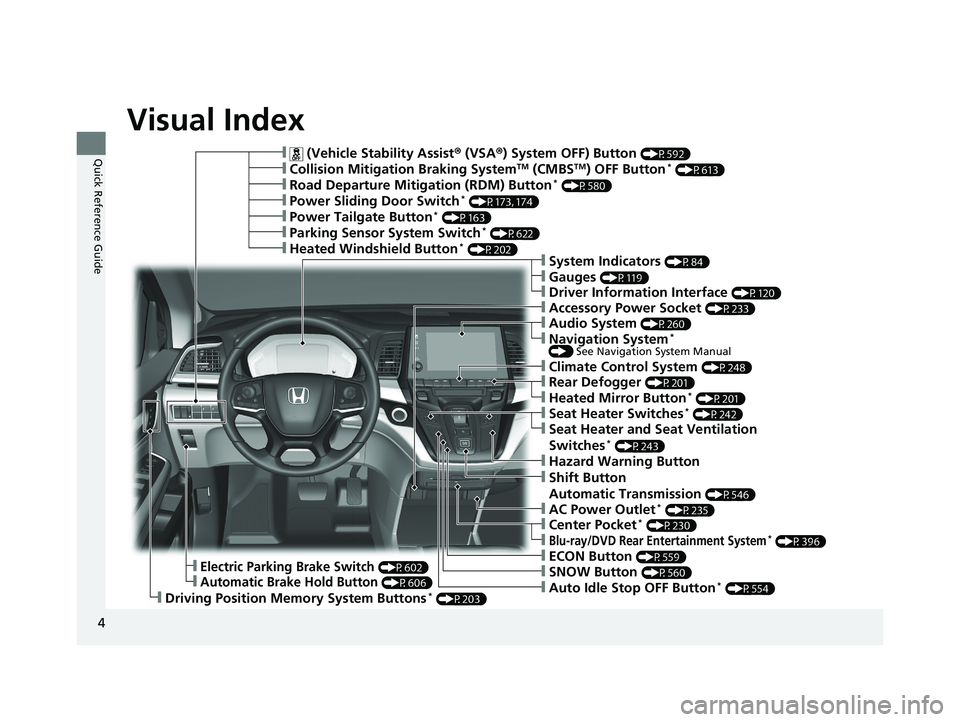
❙ (Vehicle Stability Assist® (VSA ®) System OFF) Button (P592)
❙Road Departure Mitigation (RDM) Button* (P580)
❙Power Sliding Door Switch* (P173, 174)
❙Climate Control System (P248)
❙Driving Position Memory System Buttons* (P203)
❙Accessory Power Socket (P233)
❙Power Tailgate Button* (P163)
❙Parking Sensor System Switch* (P622)
❙Collision Mitigation Braking SystemTM (CMBSTM) OFF Button* (P613)
❙Heated Windshield Button* (P202)
❙Electric Parking Brake Switch (P602)
❙Automatic Brake Hold Button (P606)
❙Shift Button
Automatic Transmission
(P546)
❙ECON Button (P559)
❙SNOW Button (P560)
❙Auto Idle Stop OFF Button* (P554)
❙Hazard Warning Button
❙AC Power Outlet* (P235)
❙System Indicators (P84)
❙Gauges (P119)
❙Driver Information Interface (P120)
❙Audio System (P260)
❙Navigation System* () See Navigation System Manual
❙Rear Defogger (P201)
❙Heated Mirror Button* (P201)
❙Seat Heater Switches* (P242)
❙Seat Heater and Seat Ventilation
Switches* (P243)
❙Center Pocket* (P230)
❙Blu-ray/DVD Rear Entertainment System* (P396)
19 ODYSSEY-31THR6120.book 4 ページ 2018年12月6日 木曜日 午後4時35分
Page 9 of 767
7
Quick Reference Guide
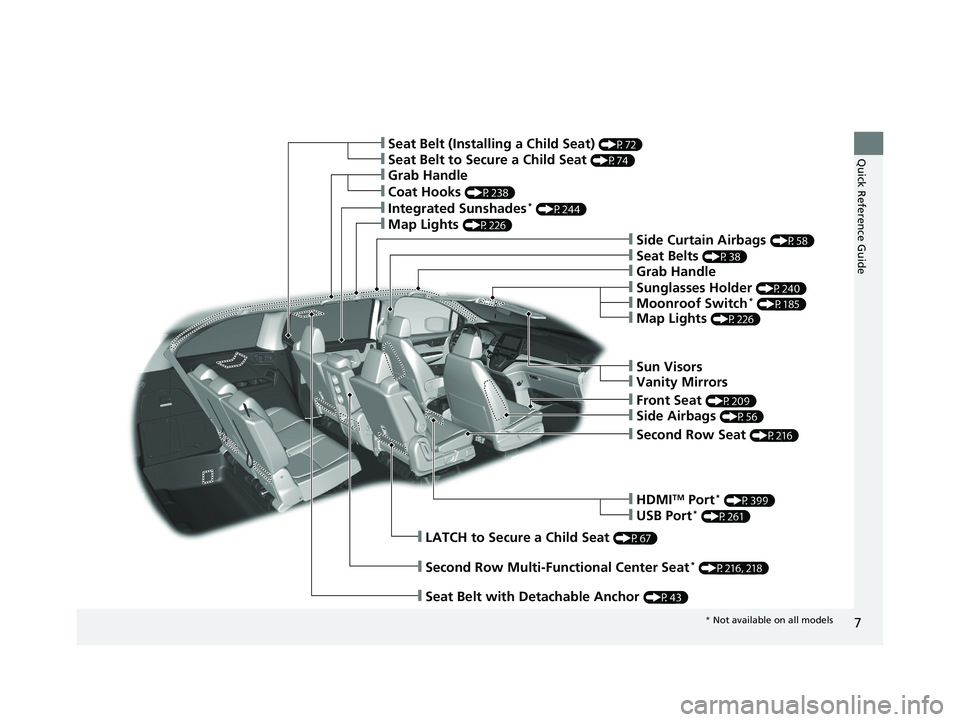
❙Seat Belts (P38)
❙Seat Belt to Secure a Child Seat (P74)
❙Seat Belt (Installing a Child Seat) (P72)
❙Side Curtain Airbags (P58)
❙Front Seat (P209)
❙Second Row Multi-Functional Center Seat* (P216, 218)
❙Grab Handle
❙Sun Visors
❙Vanity Mirrors
❙Side Airbags (P56)
❙Second Row Seat (P216)
❙HDMITM Port* (P399)
❙USB Port* (P261)
❙LATCH to Secure a Child Seat (P67)
❙Coat Hooks (P238)
❙Integrated Sunshades* (P244)
❙Map Lights (P226)
❙Sunglasses Holder (P240)
❙Moonroof Switch* (P185)
❙Map Lights (P226)
❙Grab Handle
❙Seat Belt with Detachable Anchor (P43)
* Not available on all models
19 ODYSSEY-31THR6120.book 7 ページ 2018年12月6日 木曜日 午後4時35分
Page 12 of 767
10
Quick Reference Guide
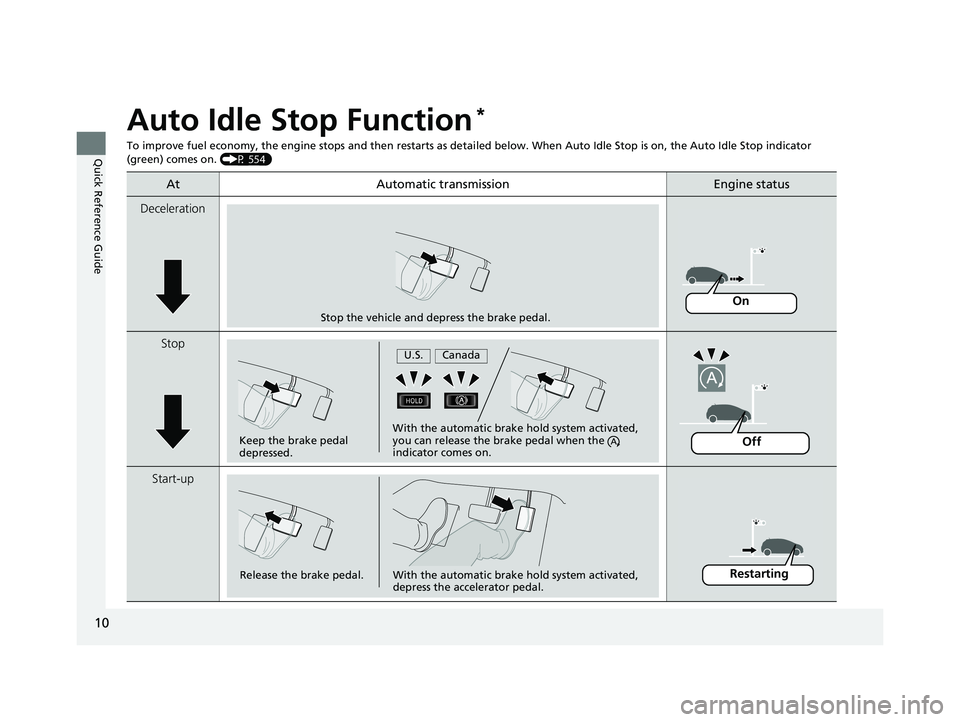
Auto Idle Stop Function*
To improve fuel economy, the engine stops and then restarts as detailed below. When Auto Idle Stop is on, the Auto Idle Stop indicator
(green) comes on. (P 554)
At Automatic transmissionEngine status
Deceleration
Stop
Start-up
Stop the vehicle and depress the brake pedal.
On
Keep the brake pedal
depressed.With the automatic brake hold system activated,
you can release the brake pedal when the
indicator comes on.
U.S.Canada
Off
Release the brake pedal.With the automatic brake hold system activated,
depress the accelerator pedal.Restarting
19 ODYSSEY-31THR6120.book 10 ページ 2018年12月6日 木曜日 午後4時35分
Page 13 of 767
11
Quick Reference Guide
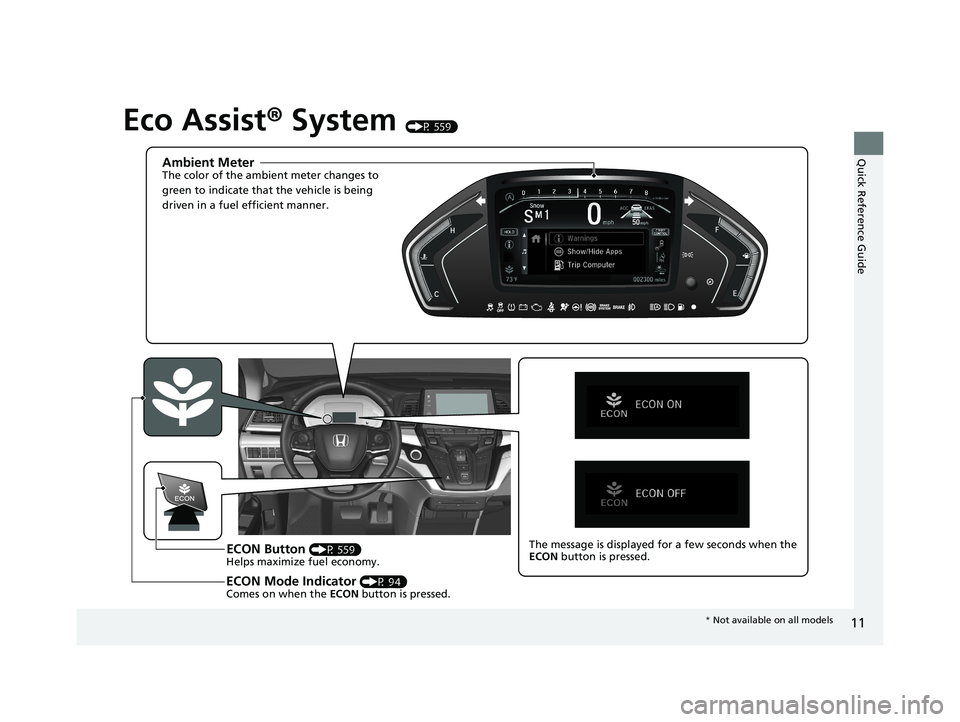
Eco Assist® System (P 559)
Ambient MeterThe color of the ambient meter changes to
green to indicate that the vehicle is being
driven in a fuel efficient manner.
ECON Button (P 559)
Helps maximize fuel economy.
ECON Mode Indicator (P 94)
Comes on when the ECON button is pressed.
The message is displayed for a few seconds when the
ECON button is pressed.
* Not available on all models
19 ODYSSEY-31THR6120.book 11 ページ 2018年12月6日 木曜日 午後4時35分
Page 15 of 767
13
Quick Reference Guide
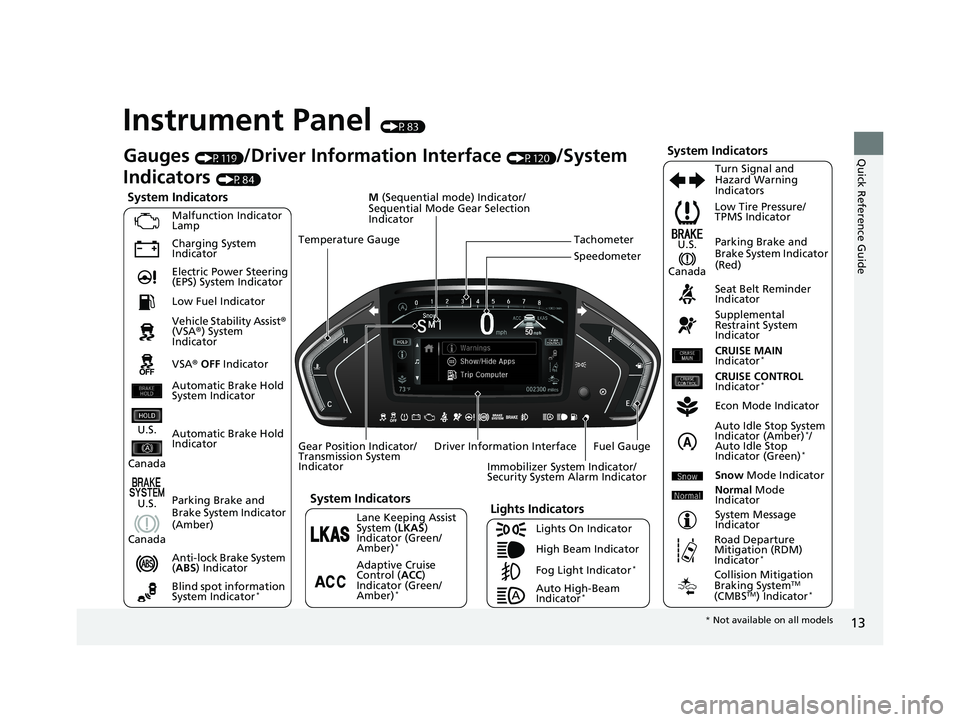
Instrument Panel (P83)
System Indicators
Malfunction Indicator
Lamp
Charging System
Indicator
Anti-lock Brake System
(ABS ) Indicator
Vehicle Stability Assist
®
(VSA ®) System
Indicator
VSA ® OFF Indicator Low Tire Pressure/
TPMS Indicator
Immobilizer System Indicator/
Security System Alarm Indicator
Lights Indicators
Lights On Indicator
High Beam Indicator
Fog Light Indicator
*
Lane Keeping Assist
System ( LKAS)
Indicator (Green/
Amber)
*
Seat Belt Reminder
Indicator
System Indicators
Econ Mode Indicator
System Message
Indicator Parking Brake and
Brake System Indicator
(Red)
Supplemental
Restraint System
Indicator
Driver Information Interface CRUISE MAIN
Indicator
*
Tachometer
M
(Sequential mode) Indicator/
Sequential Mode Gear Selection
Indicator
Speedometer
Fuel Gauge
Gear Position Indicator/
Transmission System
Indicator Auto Idle Stop System
Indicator (Amber)
*/
Auto Idle Stop
Indicator (Green)
*
Gauges (P119)/Driver Information Interface (P120)/System
Indicators
(P84)
Automatic Brake Hold
Indicator Adaptive Cruise
Control (ACC)
Indicator (Green/
Amber)
*
Turn Signal and
Hazard Warning
Indicators
Electric Power Steering
(EPS) System Indicator
Blind spot information
System Indicator
*
CRUISE CONTROL
Indicator*
Temperature Gauge
Parking Brake and
Brake System Indicator
(Amber)
U.S.
Canada
U.S.
Canada
System Indicators
U.S.
Canada
Low Fuel Indicator
Automatic Brake Hold
System Indicator
Auto High-Beam
Indicator*
Snow Mode Indicator
Normal Mode
Indicator
Road Departure
Mitigation (RDM)
Indicator
*
Collision Mitigation
Braking SystemTM
(CMBSTM) Indicator*
* Not available on all models
19 ODYSSEY-31THR6120.book 13 ページ 2018年12月6日 木曜日 午後4時35分
Page 16 of 767
14
Quick Reference Guide
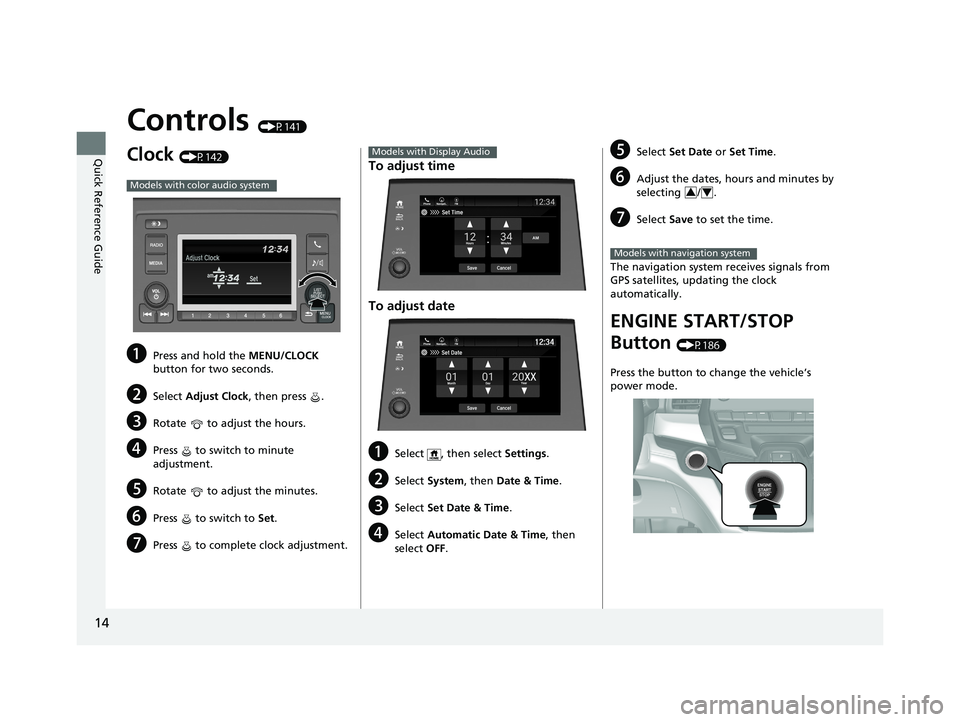
Controls (P141)
Clock (P142)
aPress and hold the MENU/CLOCK
button for two seconds.
bSelect Adjust Clock, then press .
cRotate to adjust the hours.
dPress to switch to minute
adjustment.
eRotate to adjust the minutes.
fPress to switch to Set.
gPress to complete clock adjustment.
Models with color audio system
To adjust time
To adjust date
aSelect , then select Settings .
bSelect System , then Date & Time .
cSelect Set Date & Time .
dSelect Automatic Date & Time , then
select OFF.
Models with Display Audio
Set DateBlu-Ray
Save
Month DayYearXX
Cancel
Phone Navigati.. FM12:34
eSelect
Set Date or Set Time .
fAdjust the dates, hours and minutes by
selecting / .
gSelect Save to set the time.
The navigation system receives signals from
GPS satellites, updating the clock
automatically.
ENGINE START/STOP
Button
(P186)
Press the button to change the vehicle’s
power mode.
34
Models with navigation system
19 ODYSSEY-31THR6120.book 14 ページ 2018年12月6日 木曜日 午後4時35分
Page 28 of 767
26
Quick Reference Guide
VSA® On and Off (P592)
● The Vehicle Stability Assist ® (VSA ®) system
helps stabilize the vehicle during
cornering, and helps maintain traction
while accelerating on loose or slippery
road surfaces.
● VSA ® comes on automatically every time
you start the engine.
● To partially disable or fully restore VSA ®
function, press and ho ld the button until
you hear a beep.
Cruise Control* (P 561)
● Cruise control allows you to maintain a
set speed without keeping your foot on
the accelerator pedal.
● To use cruise control, press the CRUISE
button, then press the –/SET button once
you have achieved the desired speed
(above 25 mph or 40 km/h).
CMBSTM On and Off*
(P 613)
● When a possible collision is likely
unavoidable, the CMBS
TM can help you to
reduce the vehicle sp eed and the severity
of the collision.
● The CMBS
TM is turned on every time you
start the engine.
● To turn the CMBS
TM on or off, press and
hold the button until you hear a beep.
Tire Pressure Monitoring System (TPMS) with Tire
Fill Assist
(P 594, 722)
● The TPMS monitors tire pressure.
● TPMS is turned on automatically every time you start the engine.
● TPMS fill assist provides audible and visual guidance during tire pressure adjustment.
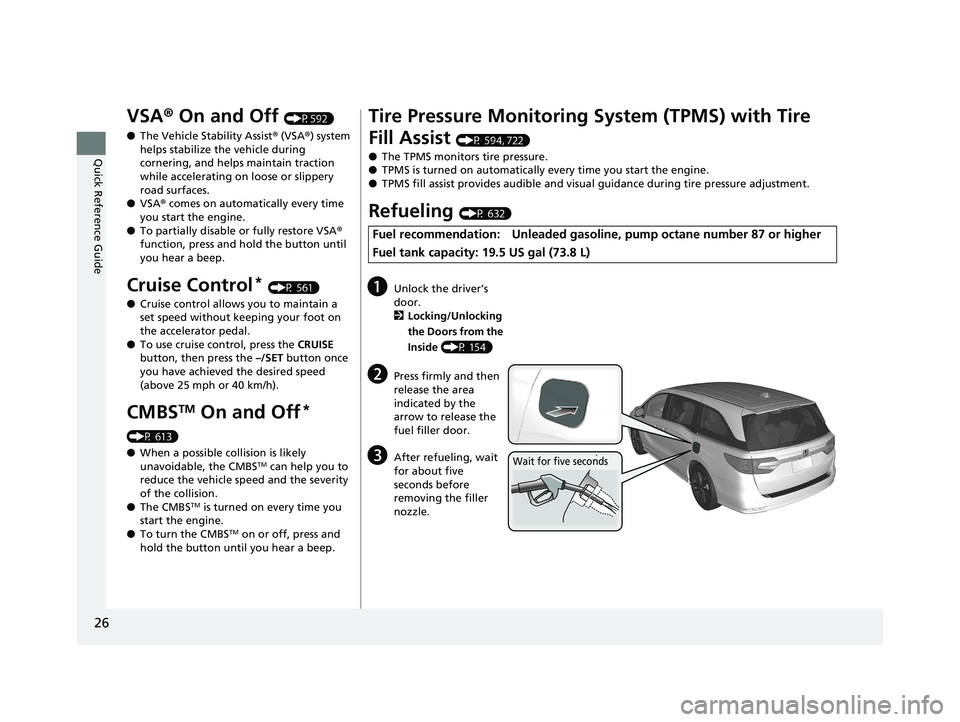
Refueling (P 632)
Fuel recommendation: Unleaded gasoline , pump octane number 87 or higher
Fuel tank capacity: 19.5 US gal (73.8 L)
aUnlock the driver’s
door.
2 Locking/Unlocking
the Doors from the
Inside (P 154)
bPress firmly and then
release the area
indicated by the
arrow to release the
fuel filler door.
cAfter refueling, wait
for about five
seconds before
removing the filler
nozzle.Wait for five seconds
19 ODYSSEY-31THR6120.book 26 ページ 2018年12月6日 木曜日 午後4時35分
Page 31 of 767
Quick Reference Guide
29
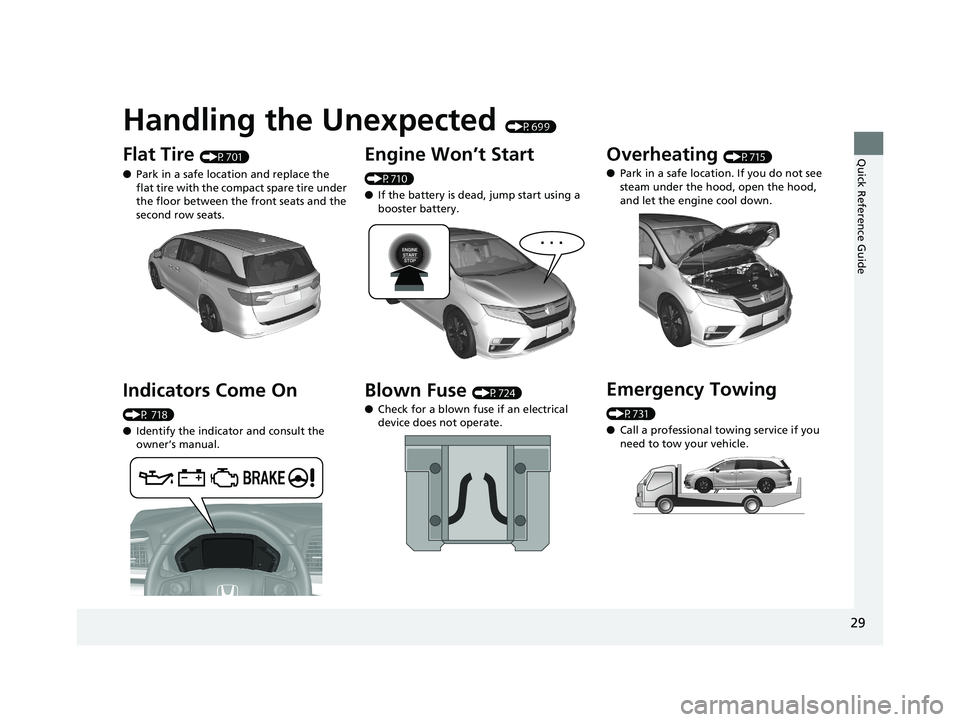
Handling the Unexpected (P699)
Flat Tire (P701)
● Park in a safe location and replace the
flat tire with the compact spare tire under
the floor between the front seats and the
second row seats.
Indicators Come On
(P 718)
●Identify the indica tor and consult the
owner’s manual.
Engine Won’t Start
(P710)
● If the battery is dead, jump start using a
booster battery.
Blown Fuse (P724)
● Check for a blown fuse if an electrical
device does not operate.
Overheating (P715)
● Park in a safe location. If you do not see
steam under the hood, open the hood,
and let the engine cool down.
Emergency Towing
(P731)
●Call a professional towing service if you
need to tow your vehicle.
19 ODYSSEY-31THR6120.book 29 ページ 2018年12月6日 木曜日 午後4時35分