audio HONDA ODYSSEY 2020 (in English) Owner's Guide
[x] Cancel search | Manufacturer: HONDA, Model Year: 2020, Model line: ODYSSEY, Model: HONDA ODYSSEY 2020Pages: 767, PDF Size: 43.89 MB
Page 147 of 767
145
uuClock uAdjusting the Clock
Controls
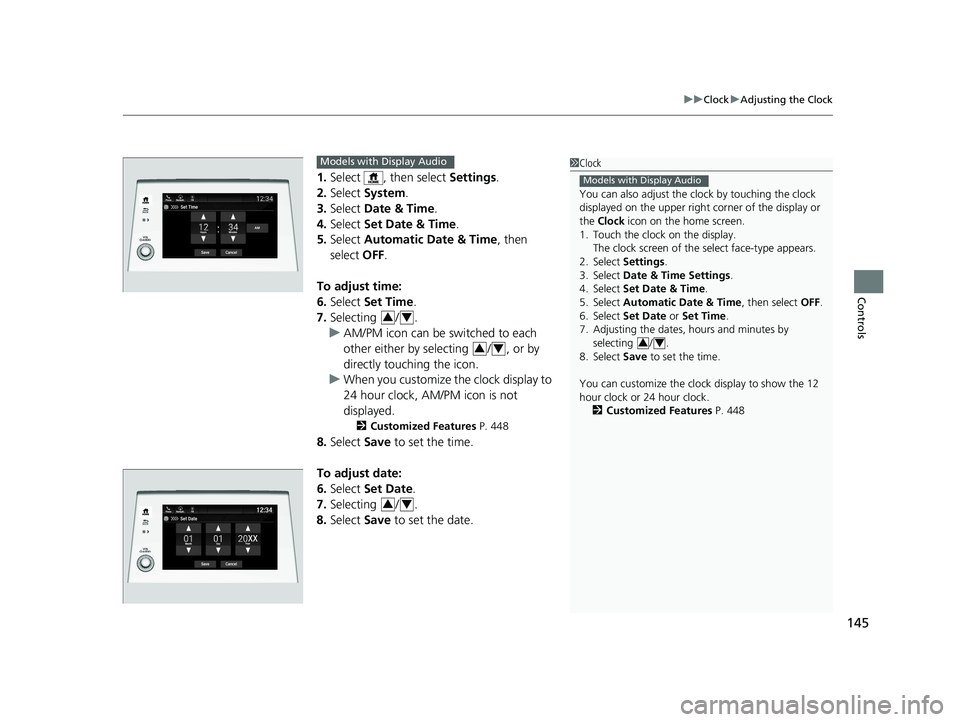
1. Select , then select Settings.
2. Select System.
3. Select Date & Time .
4. Select Set Date & Time .
5. Select Automatic Date & Time , then
select OFF.
To adjust time:
6. Select Set Time.
7. Selecting / .
u AM/PM icon can be switched to each
other either by selecting / , or by
directly touching the icon.
u When you customize the clock display to
24 hour clock, AM/PM icon is not
displayed.
2 Customized Features P. 448
8.Select Save to set the time.
To adjust date:
6. Select Set Date.
7. Selecting / .
8. Select Save to set the date.
1Clock
You can also adjust the clock by touching the clock
displayed on the upper right corner of the display or
the Clock icon on the home screen.
1. Touch the clock on the display.
The clock screen of the select face-type appears.
2. Select Settings .
3. Select Date & Time Settings .
4. Select Set Date & Time .
5. Select Automatic Date & Time , then select OFF.
6. Select Set Date or Set Time.
7. Adjusting the dates, hours and minutes by selecting / .
8. Select Save to set the time.
You can customize the clock display to show the 12
hour clock or 24 hour clock. 2 Customized Features P. 448
Models with Display Audio
34
Set Time
Save
Hours MinutesAM
Cancel
Phone Navigati.. FM
Models with Display Audio
34
34
34
20 US ODYSSEY-31THR6210.book 145 ページ 2020年2月28日 金曜日 午前7時26分
Page 152 of 767
uuLocking and Unlocking the Doors uLocking/Unlocking the Doors from the Outside
150
Controls
■Locking the doors and tailgate (Walk
away auto lock)
When you walk away from the vehicle while
carrying the remote, the doors will
automatically lock.
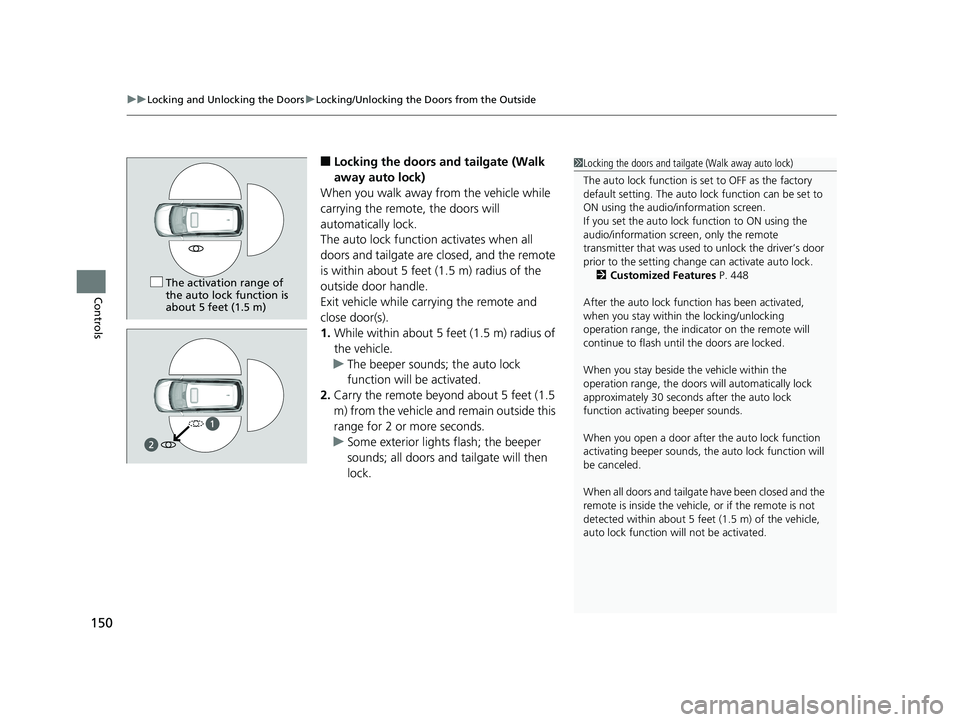
The auto lock function activates when all
doors and tailgate are closed, and the remote
is within about 5 feet (1.5 m) radius of the
outside door handle.
Exit vehicle while carrying the remote and
close door(s).
1. While within about 5 feet (1.5 m) radius of
the vehicle.
u The beeper sounds; the auto lock
function will be activated.
2. Carry the remote beyond about 5 feet (1.5
m) from the vehicle and remain outside this
range for 2 or more seconds.
u Some exterior lights flash; the beeper
sounds; all doors and tailgate will then
lock.1Locking the doors and tailgate (Walk away auto lock)
The auto lock function is set to OFF as the factory
default setting. The auto lo ck function can be set to
ON using the audio/information screen.
If you set the auto lock function to ON using the
audio/information screen, only the remote
transmitter that was used to unlock the driver’s door
prior to the setting change can activate auto lock. 2 Customized Features P. 448
After the auto lock function has been activated,
when you stay within the locking/unlocking
operation range, the indica tor on the remote will
continue to fl ash until the door s are locked.
When you stay beside the vehicle within the
operation range, the doors wi ll automatically lock
approximately 30 seconds after the auto lock
function activating beeper sounds.
When you open a door after the auto lock function
activating beeper sounds, the auto lock function will
be canceled.
When all doors and tailgate have been closed and the
remote is inside the vehicle, or if the remote is not
detected within about 5 feet (1.5 m) of the vehicle,
auto lock function wi ll not be activated.
The activation range of
the auto lock function is
about 5 feet (1.5 m)
20 US ODYSSEY-31THR6210.book 150 ページ 2020年2月28日 金曜日 午前7時26分
Page 155 of 767
Continued153
uuLocking and Unlocking the Doors uLocking/Unlocking the Doors from the Outside
Controls
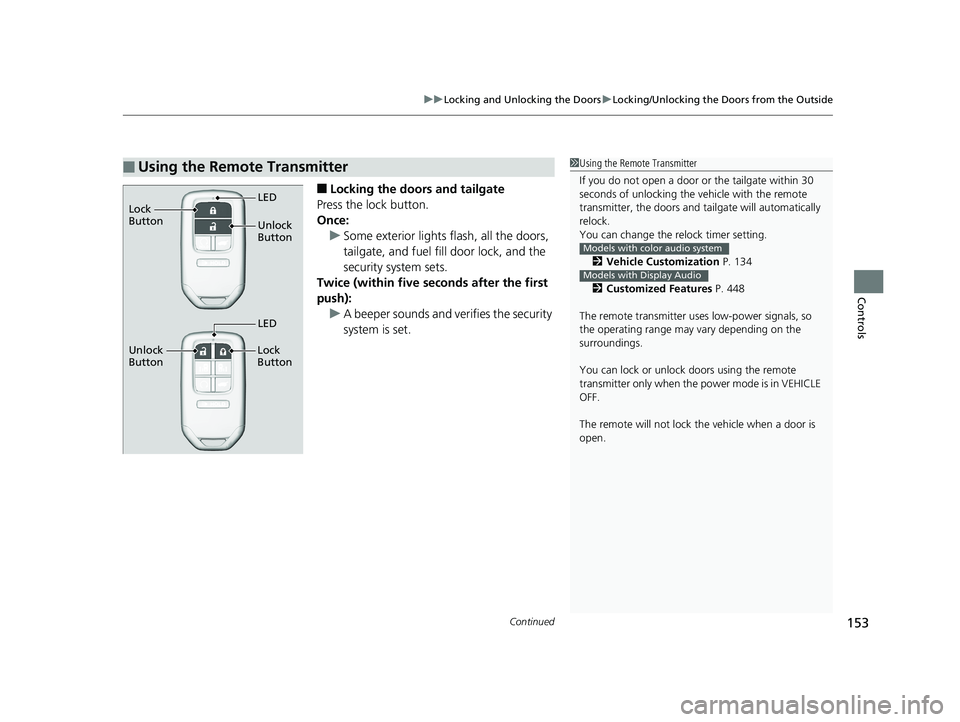
■Locking the doors and tailgate
Press the lock button.
Once: u Some exterior lights flash, all the doors,
tailgate, and fuel fill door lock, and the
security system sets.
Twice (within five se conds after the first
push):
u A beeper sounds and verifies the security
system is set.
■Using the Remote Transmitter1Using the Remote Transmitter
If you do not open a door or the tailgate within 30
seconds of unlocking the vehicle with the remote
transmitter, the doors and ta ilgate will automatically
relock.
You can change the relock timer setting.
2 Vehicle Customization P. 134
2 Customized Features P. 448
The remote transmitter us es low-power signals, so
the operating range may vary depending on the
surroundings.
You can lock or unlock doors using the remote
transmitter only when the power mode is in VEHICLE
OFF.
The remote will not lock th e vehicle when a door is
open.
Models with color audio system
Models with Display Audio
Unlock
Button LED
Lock
Button
Unlock
Button Lock
Button
LED
20 US ODYSSEY-31THR6210.book 153 ページ 2020年2月28日 金曜日 午前7時26分
Page 156 of 767
uuLocking and Unlocking the Doors uLocking/Unlocking the Doors from the Outside
154
Controls
■Unlocking the doors and tailgate
Press the unlock button.
Once: u Some exterior lights flash twice, and the driver’s door and fuel fill door unlocks.
Twice: u The remaining doors and the tailgate unlock.
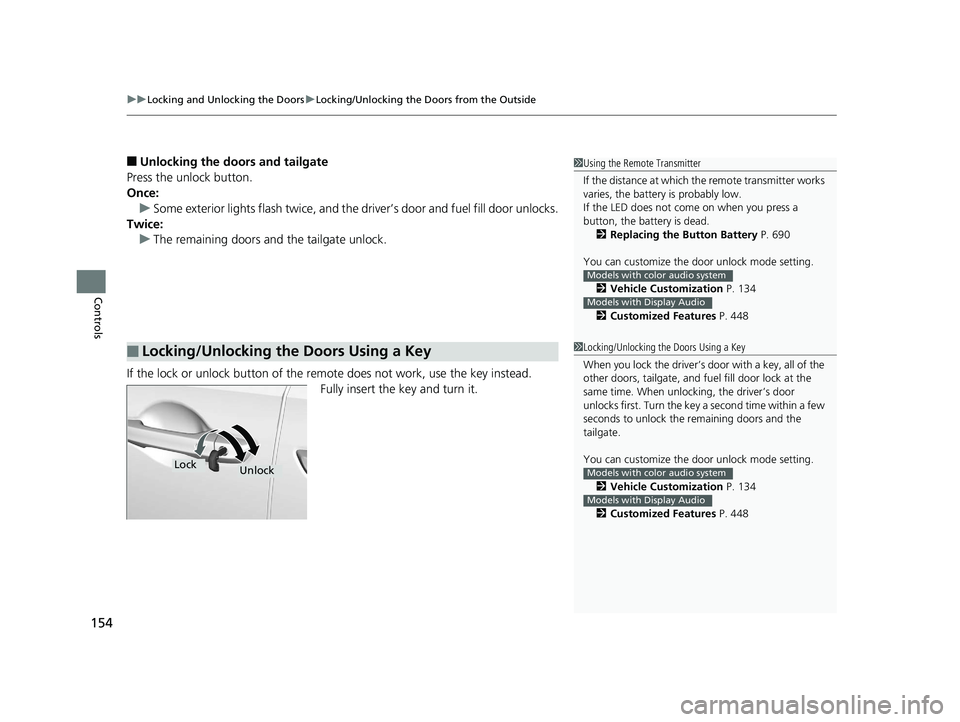
If the lock or unlock button of the re mote does not work, use the key instead.
Fully insert the key and turn it.
■Locking/Unlocking the Doors Using a Key
1 Using the Remote Transmitter
If the distance at which the remote transmitter works
varies, the batter y is probably low.
If the LED does not come on when you press a
button, the battery is dead. 2 Replacing the Button Battery P. 690
You can customize the door unlock mode setting. 2 Vehicle Customization P. 134
2 Customized Features P. 448
Models with color audio system
Models with Display Audio
1Locking/Unlocking the Doors Using a Key
When you lock the driver’s door with a key, all of the
other doors, tailgate, and fu el fill door lock at the
same time. When unlocking, the driver’s door
unlocks first. Turn the key a second time within a few
seconds to unlock the remaining doors and the
tailgate.
You can customize the door unlock mode setting.
2 Vehicle Customization P. 134
2 Customized Features P. 448
Models with color audio system
Models with Display Audio
LockUnlock
20 US ODYSSEY-31THR6210.book 154 ページ 2020年2月28日 金曜日 午前7時26分
Page 159 of 767
Continued157
uuLocking and Unlocking the Doors uLocking/Unlocking the Doors from the Inside
Controls
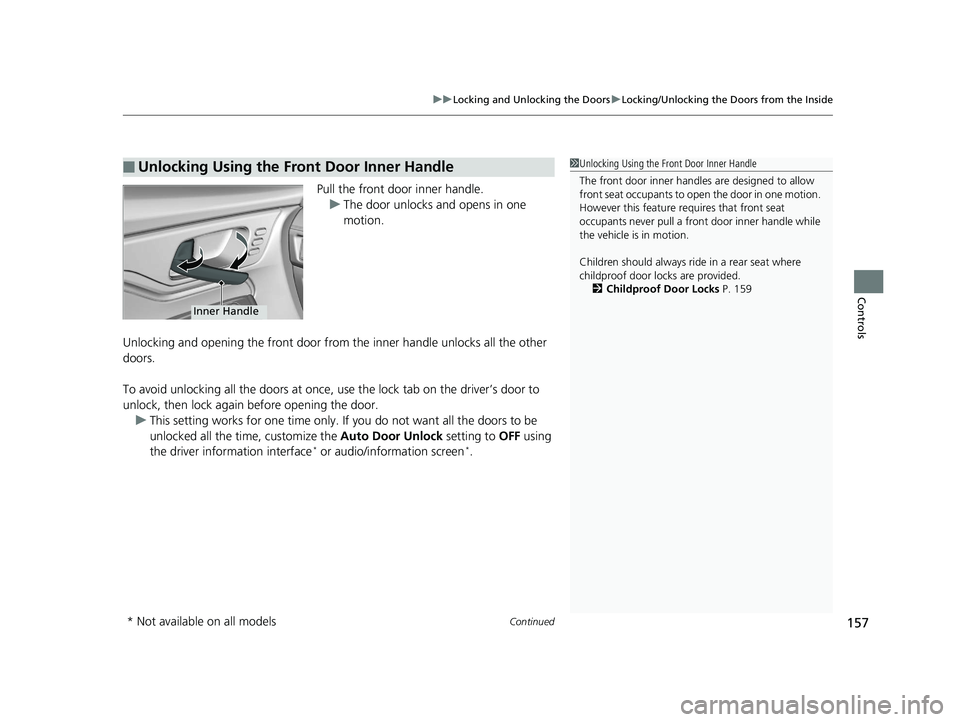
Pull the front door inner handle.
u The door unlocks and opens in one
motion.
Unlocking and opening the front door from the inner handle unlocks all the other
doors.
To avoid unlocking all the doors at once, use the lock tab on the driver’s door to
unlock, then lock again before opening the door.
u This setting works for one time only. If you do not want all the doors to be
unlocked all the ti me, customize the Auto Door Unlock setting to OFF using
the driver information interface
* or audio/information screen*.
■Unlocking Using the Front Door Inner Handle1 Unlocking Using the Front Door Inner Handle
The front door inner handles are designed to allow
front seat occupants to open the door in one motion.
However this feature requires that front seat
occupants never pull a front door inner handle while
the vehicle is in motion.
Children should always ride in a rear seat where
childproof door locks are provided. 2 Childproof Door Locks P. 159
Inner Handle
* Not available on all models
20 US ODYSSEY-31THR6210.book 157 ページ 2020年2月28日 金曜日 午前7時26分
Page 162 of 767
160
uuLocking and Unlocking the Doors uAuto Door Locking/Unlocking
Controls
Auto Door Locking/Unlocking
Your vehicle locks and unlocks all door s and the tailgate automatically when a
certain condition is met.
■Drive lock mode
All doors and the tailgate lock when the vehicle’s speed reaches about 10 mph (15
km/h).
■Driver’s door open mode
All doors and the tailgate unlock when the driver’s door is opened.
■Auto Door Locking
■Auto Door Unlocking
1 Auto Door Locking/Unlocking
You can turn off or cha nge to another auto door
locking/unlocking sett ing using the driver
information interface
* or audio/information screen*.
2 Vehicle Customization P. 134
2 Customized Features P. 448Models with color audio system
Models with Display Audio
* Not available on all models
20 US ODYSSEY-31THR6210.book 160 ページ 2020年2月28日 金曜日 午前7時26分
Page 165 of 767
163
uuOpening and Closing the Tailgate uOpening/Closing the Power Tailgate*
Continued
Controls
Opening/Closing the Power Tailgate*
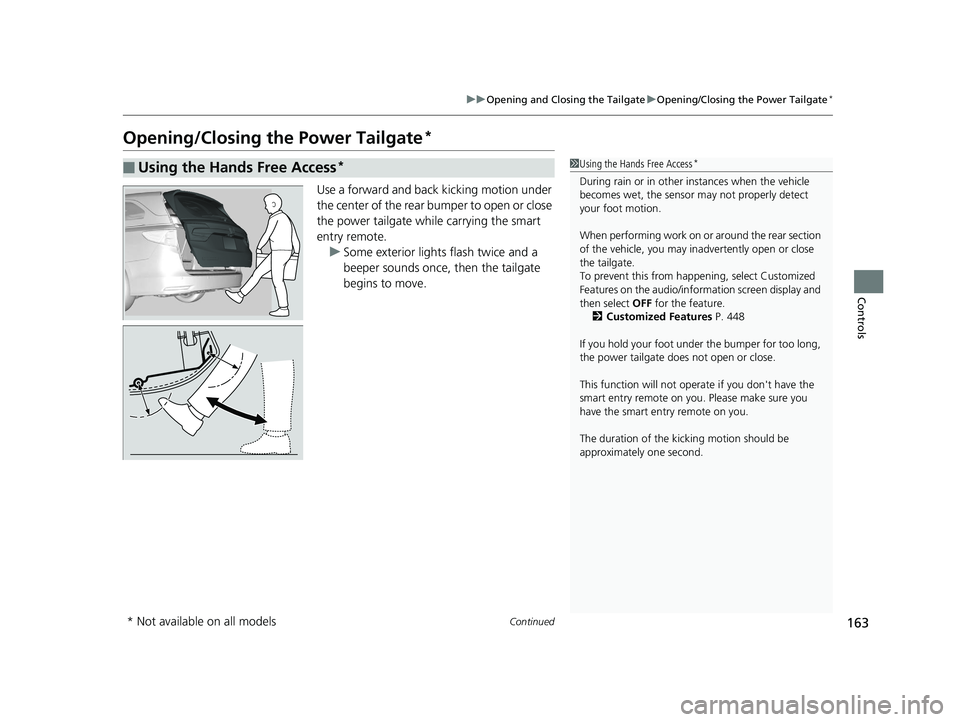
Use a forward and back kicking motion under
the center of the rear bumper to open or close
the power tailgate while carrying the smart
entry remote.
u Some exterior lights flash twice and a
beeper sounds once, then the tailgate
begins to move.
■Using the Hands Free Access*1Using the Hands Free Access*
During rain or in other instances when the vehicle
becomes wet, the sensor may not properly detect
your foot motion.
When performing work on or around the rear section
of the vehicle, you may in advertently open or close
the tailgate.
To prevent this from happe ning, select Customized
Features on the audio/info rmation screen display and
then select OFF for the feature.
2 Customized Features P. 448
If you hold your foot under the bumper for too long,
the power tailgate does not open or close.
This function will not opera te if you don't have the
smart entry remote on you. Please make sure you
have the smart entry remote on you.
The duration of the kick ing motion should be
approximately one second.
* Not available on all models
20 US ODYSSEY-31THR6210.book 163 ページ 2020年2月28日 金曜日 午前7時26分
Page 183 of 767
181Continued
Controls
Security System
Immobilizer System
The immobilizer system prevents a key that has not been pre-registered from
starting the engine. Each key contains electronic transmitters that use electronic
signals to verify the key.
Pay attention to the follo wing when pressing the ENGINE START/STOP button:
• Do not allow objects that emit strong radio waves near the ENGINE START/
STOP button.
• Make sure the key is not covered by or touching a metal object.
• Do not bring a key from another vehicle’s immobilizer system near the ENGINE
START/STOP button.
• Do not put the key near magnetic items. Electronic devices, such as televisions
and audio systems emit strong magnetic fields. Note that even a key chain can
become magnetic.
Security System Alarm
The security system alarm activates when the tailgate, hood, or doors are forcibly
opened.
The alarm does not activate if the tailgate or doors are opened with the key, remote
transmitter or smart entry system
*.
However, the alarm activates if a door is opened with the key, then the hood is
opened before the power mode is set to ON.
■When the security system alarm activates
The horn sounds intermittently, and some exterior lights flash.
1 Immobilizer System
NOTICE
Leaving the key in the vehicl e can result in theft or
accidental movement of the vehicle.
Always take the key with you whenever you leave the
vehicle unattended.
Do not alter the system or add other devices to it.
Doing so may damage the system and make your
vehicle inoperable.
Canadian models only: Apply and hold the brake
pedal before turning the vehicle on the first time after
the battery has been disconnected.
1 Security System Alarm
The security alarm continues for a maximum of two
minutes until the security system deactivates.
* Not available on all models
20 US ODYSSEY-31THR6210.book 181 ページ 2020年2月28日 金曜日 午前7時26分
Page 190 of 767
188
Controls
Operating the Switches Around the Steering Wheel
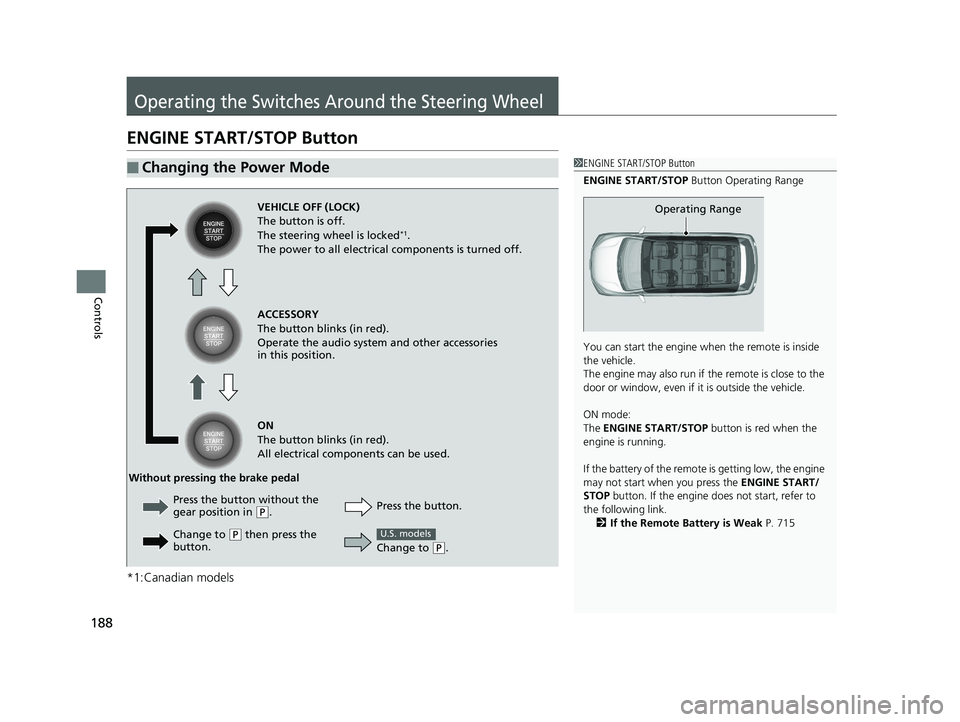
ENGINE START/STOP Button
*1:Canadian models
■Changing the Power Mode1ENGINE START/STOP Button
ENGINE START/STOP Button Operating Range
You can start the engine wh en the remote is inside
the vehicle.
The engine may also run if the remote is close to the
door or window, even if it is outside the vehicle.
ON mode:
The ENGINE START/STOP button is red when the
engine is running.
If the battery of the remote is getting low, the engine
may not start when you press the ENGINE START/
STOP button. If the engine do es not start, refer to
the following link. 2 If the Remote Battery is Weak P. 715
Operating RangeVEHICLE OFF (LOCK)
The button is off.
The steering wheel is locked
*1.
The power to all electrical components is turned off.
ACCESSORY
The button blinks (in red).
Operate the audio system and other accessories
in this position.
ON
The button blinks (in red).
All electrical components can be used.
Press the button.
Without pressing the brake pedal
Change to
(P.
U.S. models
Press the button without the
gear position in (P.
Change to
( P then press the
button.
20 US ODYSSEY-31THR6210.book 188 ページ 2020年2月28日 金曜日 午前7時26分
Page 196 of 767
uuOperating the Switches Around the Steering Wheel uLight Switches
194
Controls
The headlights automatically co me on when the wipers are used several times within
a certain number of intervals wi th the headlight switch in AUTO.
The headlights automatically go off a few minutes later if the wipers are stopped.
The headlights, all other exterior lights, an d the instrument panel lights turn off 15
seconds after you set the power mode to VE HICLE OFF, take the remote with you,
and close the driver’s door.
If you set the power mode to VEHICLE OFF with the headlight switch on, but do not
open the door, the lights turn off after 10 minutes (3 minutes, if the switch is in the
AUTO
* position).
The lights turn on again when you unlock or open the driver’s door. If you unlock
the door, but do not open it within 15 seconds, the lights go off. If you open the
driver’s door, you will hear a lights on reminder chime.
■Headlight Integration with Wiper*
■Automatic Lighting Off Feature
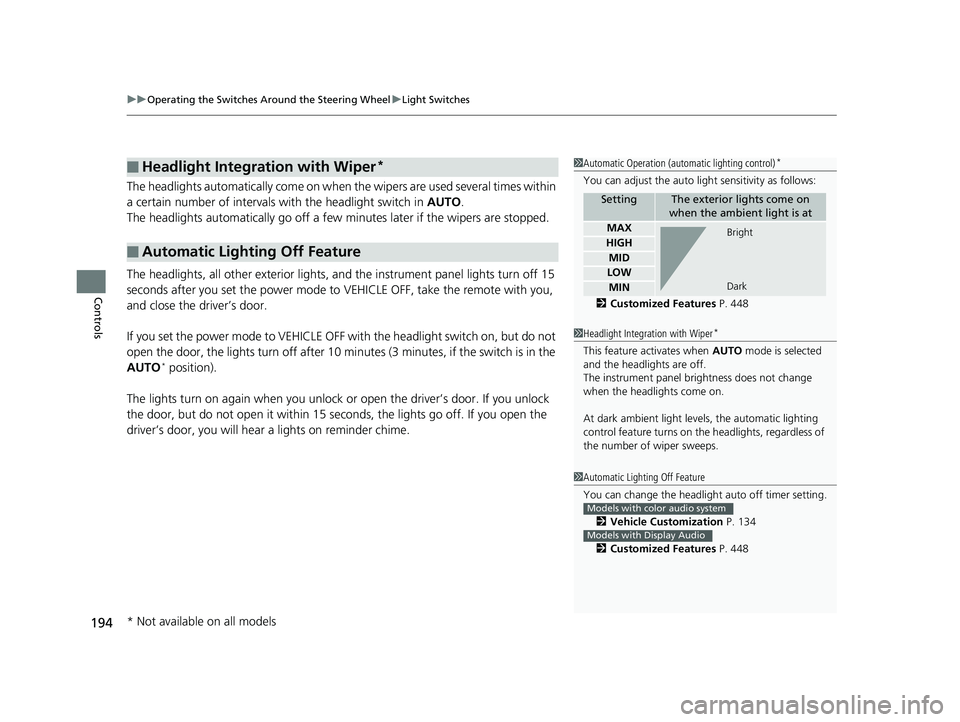
1Automatic Operation (aut omatic lighting control)*
You can adjust the auto li ght sensitivity as follows:
2 Customized Features P. 448
SettingThe exterior lights come on
when the ambient light is at
MAX
HIGH
MID
LOW
MIN
Bright
Dark
1 Headlight Integration with Wiper*
This feature activates when AUTO mode is selected
and the headlights are off.
The instrument panel brightness does not change
when the headlights come on.
At dark ambient light leve ls, the automatic lighting
control feature turns on the headlights, regardless of
the number of wiper sweeps.
1 Automatic Lighting Off Feature
You can change the headlight auto off timer setting.
2 Vehicle Customization P. 134
2 Customized Features P. 448
Models with color audio system
Models with Display Audio
* Not available on all models
20 US ODYSSEY-31THR6210.book 194 ページ 2020年2月28日 金曜日 午前7時26分