audio HONDA PILOT 2013 2.G Repair Manual
[x] Cancel search | Manufacturer: HONDA, Model Year: 2013, Model line: PILOT, Model: HONDA PILOT 2013 2.GPages: 488, PDF Size: 10.18 MB
Page 225 of 488
224
uuAudio System Basic OperationuPlaying the XM® Radio
Features
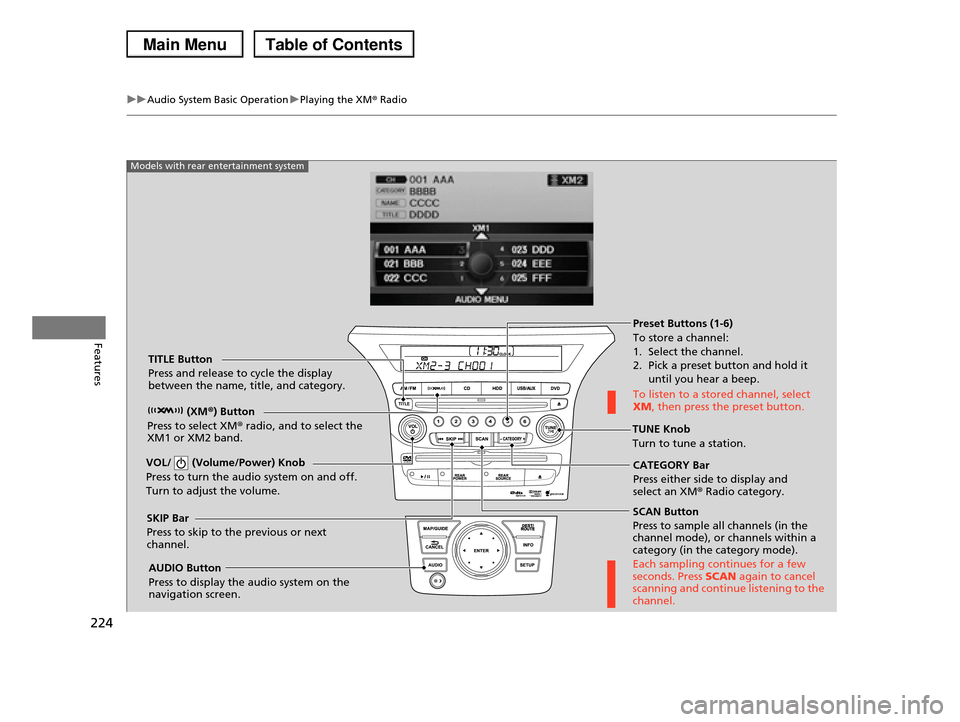
SCAN Button
Press to sample all channels (in the channel mode), or channels within a category (in the category mode).
Each sampling continues for a few seconds. Press SCAN again to cancel scanning and continue listening to the channel.
VOL/ (Volume/Power) Knob
Press to turn the audio system on and off.
Turn to adjust the volume.
Preset Buttons (1-6)
To store a channel:
1. Select the channel. 2. Pick a preset button and hold it
until you hear a beep.
To listen to a stored channel, select XM, then press the preset button.
SKIP Bar
Press to skip to the previous or next channel.
CATEGORY Bar
Press either side to display and select an XM® Radio category.
TITLE Button
Press and release to cycle the display between the name, title, and category.
(XM®) Button
Press to select XM® radio, and to select the XM1 or XM2 band.TUNE Knob
Turn to tune a station.
AUDIO Button
Press to display the audio system on the navigation screen.
Models with rear entertainment system
Page 226 of 488
225
uuAudio System Basic OperationuPlaying the XM® Radio
Features
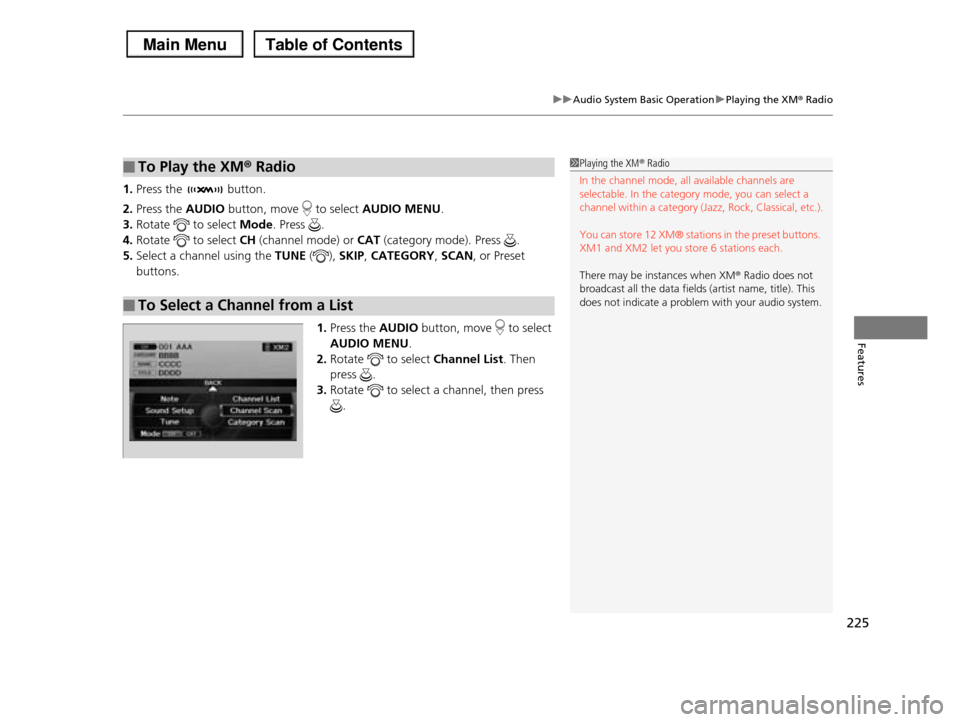
1.Press the button.
2.Press the AUDIO button, move to select AUDIO MENU.
3.Rotate to select Mode. Press .
4.Rotate to select CH (channel mode) or CAT (category mode). Press .
5.Select a channel using the TUNE (), SKIP, CATEGORY, SCAN, or Preset
buttons.
1.Press the AUDIO button, move to select
AUDIO MENU.
2.Rotate to select Channel List. Then
press .
3.Rotate to select a channel, then press
.
■To Play the XM® Radio
■To Select a Channel from a List
1Playing the XM® Radio
In the channel mode, all available channels are selectable. In the category mode, you can select a
channel within a category (Jazz, Rock, Classical, etc.).
You can store 12 XM® stations in the preset buttons.
XM1 and XM2 let you store 6 stations each.
There may be instances when XM® Radio does not
broadcast all the data fields (artist name, title). This
does not indicate a problem with your audio system.
Page 227 of 488
226
uuAudio System Basic OperationuPlaying a CD
Features
Playing a CD
Your audio system supports audio CDs, CD-Rs and CD-RWs in either MP3 or WMA
format. With the CD loaded, press the CD button.
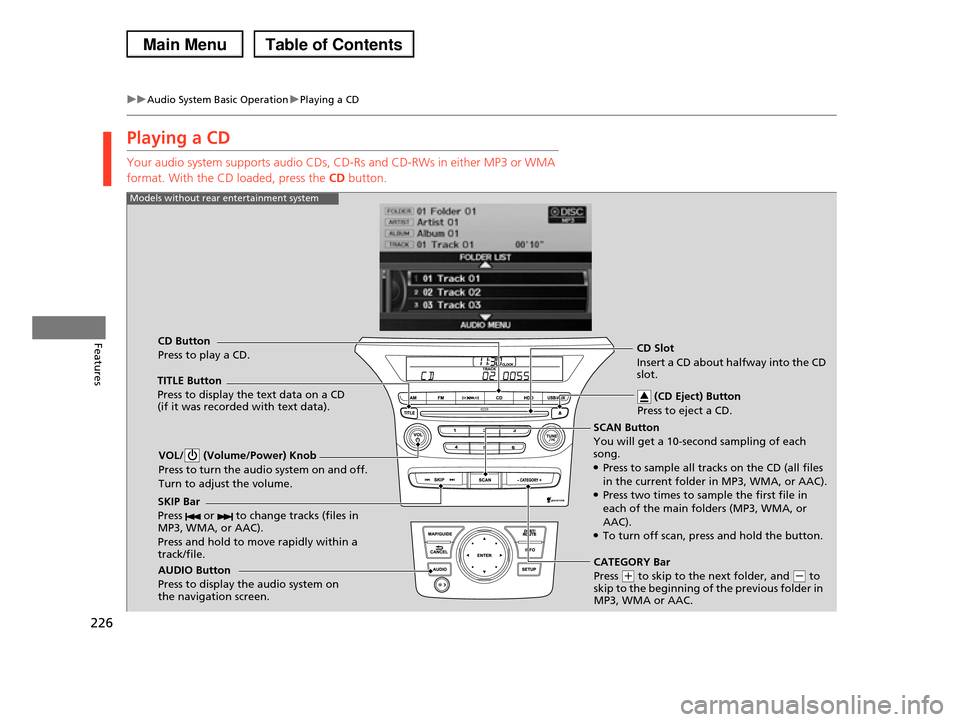
SCAN Button
You will get a 10-second sampling of each song.●Press to sample all tracks on the CD (all files
in the current folder in MP3, WMA, or AAC).●Press two times to sample the first file in each of the main folders (MP3, WMA, or
AAC).●To turn off scan, press and hold the button.
VOL/ (Volume/Power) Knob
Press to turn the audio system on and off.
Turn to adjust the volume.
CD Slot
Insert a CD about halfway into the CD slot.
AUDIO Button
Press to display the audio system on the navigation screen.
CD Button
Press to play a CD.
(CD Eject) Button
Press to eject a CD.
Models without rear entertainment system
TITLE Button
Press to display the text data on a CD (if it was recorded with text data).
SKIP Bar
Press or to change tracks (files in MP3, WMA, or AAC).
Press and hold to move rapidly within a track/file.CATEGORY Bar
Press (+ to skip to the next folder, and (- to skip to the beginning of the previous folder in MP3, WMA or AAC.
Page 228 of 488
227
uuAudio System Basic OperationuPlaying a CD
Continued
Features
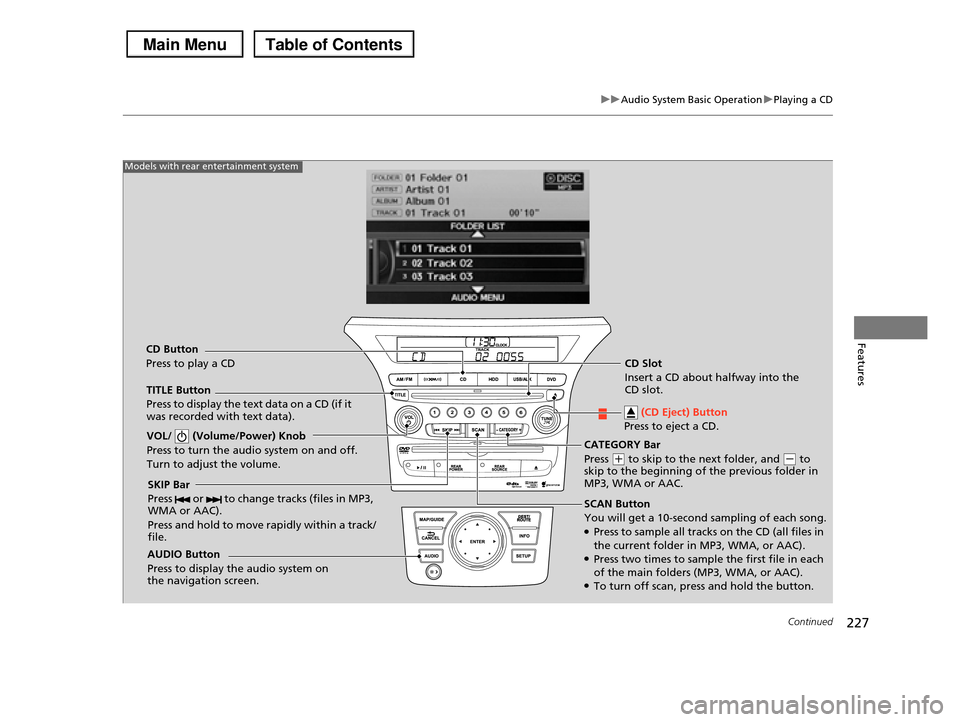
SCAN Button
You will get a 10-second sampling of each song.●Press to sample all tracks on the CD (all files in
the current folder in MP3, WMA, or AAC).●Press two times to sample the first file in each of the main folders (MP3, WMA, or AAC).●To turn off scan, press and hold the button.
VOL/ (Volume/Power) Knob
Press to turn the audio system on and off.
Turn to adjust the volume.
SKIP Bar
Press or to change tracks (files in MP3, WMA or AAC).
Press and hold to move rapidly within a track/ file.
TITLE Button
Press to display the text data on a CD (if it was recorded with text data).
AUDIO Button
Press to display the audio system on the navigation screen.
Models with rear entertainment system
CD Button
Press to play a CDCD Slot
Insert a CD about halfway into the CD slot.
(CD Eject) Button
Press to eject a CD.
CATEGORY Bar
Press (+ to skip to the next folder, and (- to skip to the beginning of the previous folder in MP3, WMA or AAC.
Page 229 of 488
uuAudio System Basic OperationuPlaying a CD
228
Features
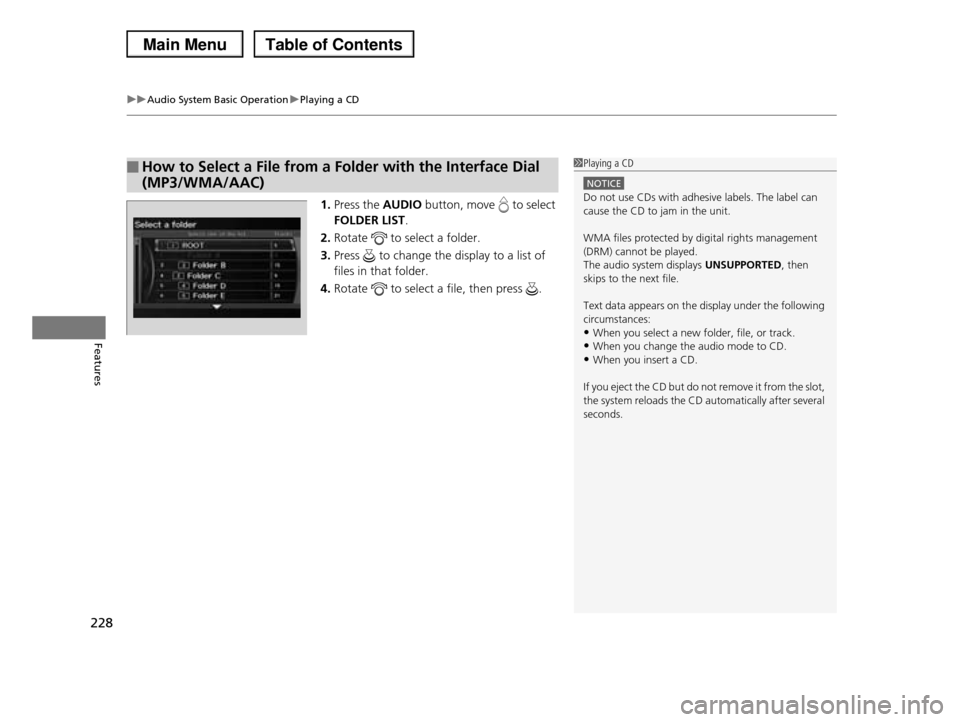
1.Press the AUDIO button, move to select
FOLDER LIST.
2.Rotate to select a folder.
3.Press to change the display to a list of
files in that folder.
4.Rotate to select a file, then press .
■How to Select a File from a Folder with the Interface Dial
(MP3/WMA/AAC)
1Playing a CD
NOTICE
Do not use CDs with adhesive labels. The label can cause the CD to jam in the unit.
WMA files protected by digital rights management (DRM) cannot be played.
The audio system displays UNSUPPORTED, then
skips to the next file.
Text data appears on the display under the following
circumstances:•When you select a new folder, file, or track.
•When you change the audio mode to CD.
•When you insert a CD.
If you eject the CD but do not remove it from the slot,
the system reloads the CD automatically after several seconds.
Page 230 of 488
229
uuAudio System Basic OperationuPlaying a CD
Features
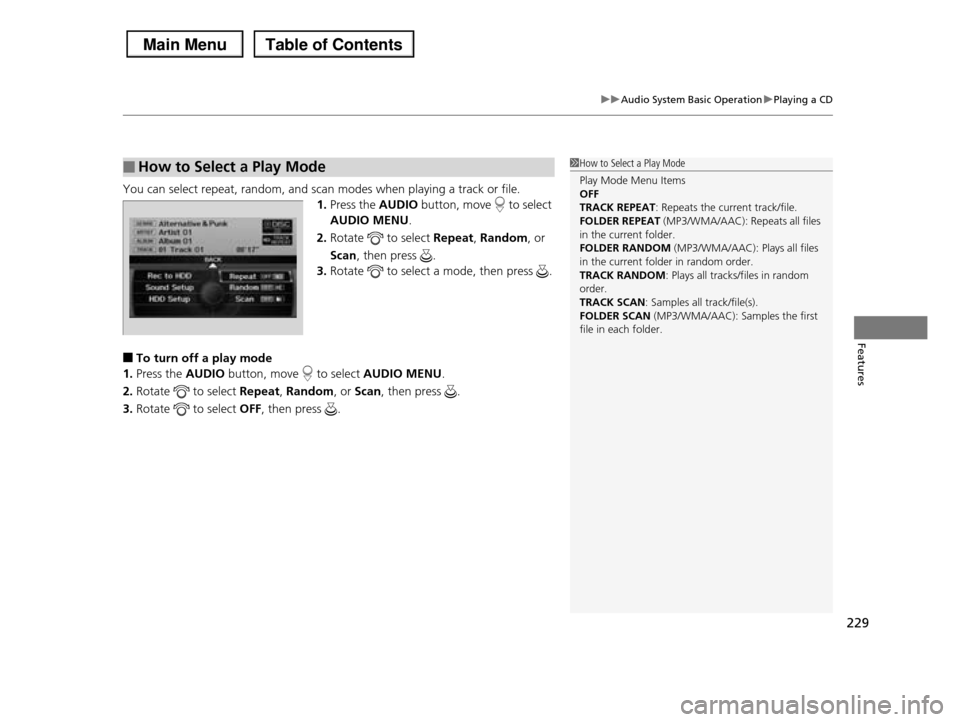
You can select repeat, random, and scan modes when playing a track or file.
1.Press the AUDIO button, move to select
AUDIO MENU.
2.Rotate to select Repeat, Random, or
Scan, then press .
3.Rotate to select a mode, then press .
■To turn off a play mode
1.Press the AUDIO button, move to select AUDIO MENU.
2.Rotate to select Repeat, Random, or Scan, then press .
3.Rotate to select OFF, then press .
■How to Select a Play Mode1How to Select a Play Mode
Play Mode Menu Items OFF
TRACK REPEAT: Repeats the current track/file.
FOLDER REPEAT (MP3/WMA/AAC): Repeats all files in the current folder.
FOLDER RANDOM (MP3/WMA/AAC): Plays all files
in the current folder in random order. TRACK RANDOM: Plays all tracks/files in random
order.
TRACK SCAN: Samples all track/file(s).FOLDER SCAN (MP3/WMA/AAC): Samples the first
file in each folder.
Page 231 of 488
230
uuAudio System Basic OperationuPlaying Hard Disc Drive (HDD) Audio
Features
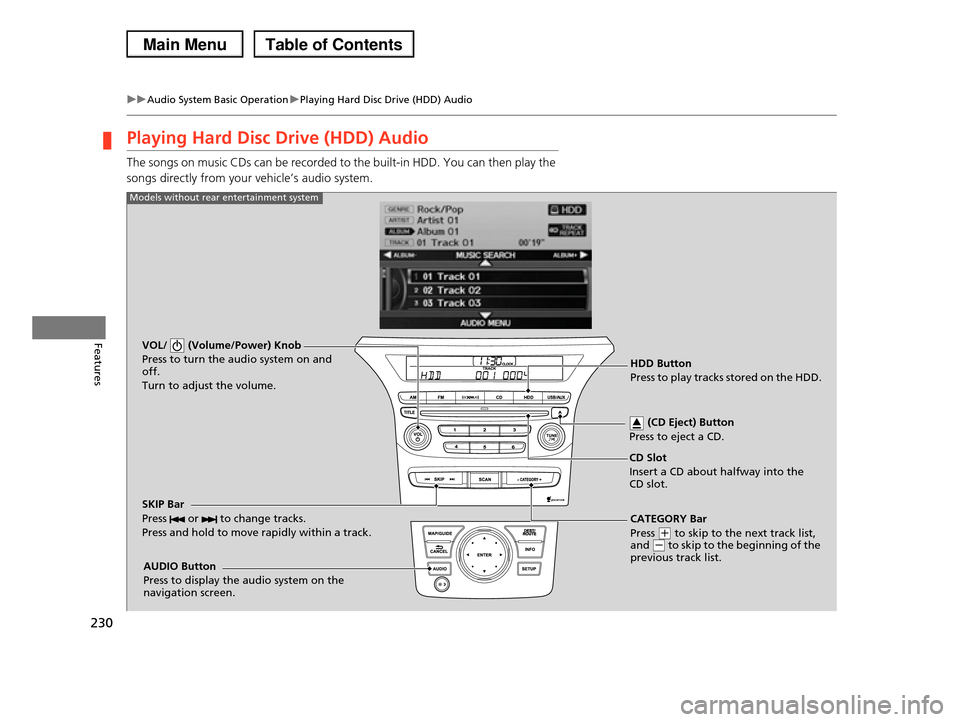
Playing Hard Disc Drive (HDD) Audio
The songs on music CDs can be recorded to the built-in HDD. You can then play the
songs directly from your vehicle’s audio system.
VOL/ (Volume/Power) Knob
Press to turn the audio system on and off.
Turn to adjust the volume.
HDD Button
Press to play tracks stored on the HDD.
AUDIO Button
Press to display the audio system on the navigation screen.
Models without rear entertainment system
CD Slot
Insert a CD about halfway into the CD slot.
(CD Eject) Button
Press to eject a CD.
SKIP Bar
Press or to change tracks.
Press and hold to move rapidly within a track.
CATEGORY Bar
Press (+ to skip to the next track list, and (- to skip to the beginning of the previous track list.
Page 232 of 488
231
uuAudio System Basic OperationuPlaying Hard Disc Drive (HDD) Audio
Continued
Features
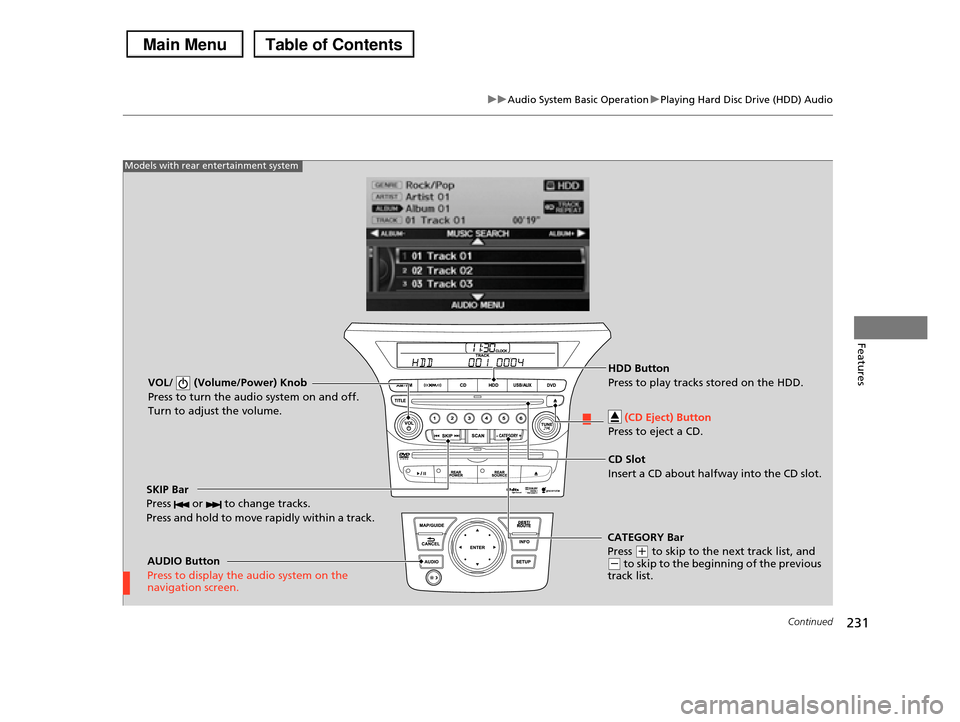
VOL/ (Volume/Power) Knob
Press to turn the audio system on and off.
Turn to adjust the volume.
SKIP Bar
Press or to change tracks.
Press and hold to move rapidly within a track.
AUDIO Button
Press to display the audio system on the navigation screen.
Models with rear entertainment system
HDD Button
Press to play tracks stored on the HDD.
CD Slot
Insert a CD about halfway into the CD slot.
(CD Eject) Button
Press to eject a CD.
CATEGORY Bar
Press (+ to skip to the next track list, and (- to skip to the beginning of the previous track list.
Page 233 of 488
uuAudio System Basic OperationuPlaying Hard Disc Drive (HDD) Audio
232
Features
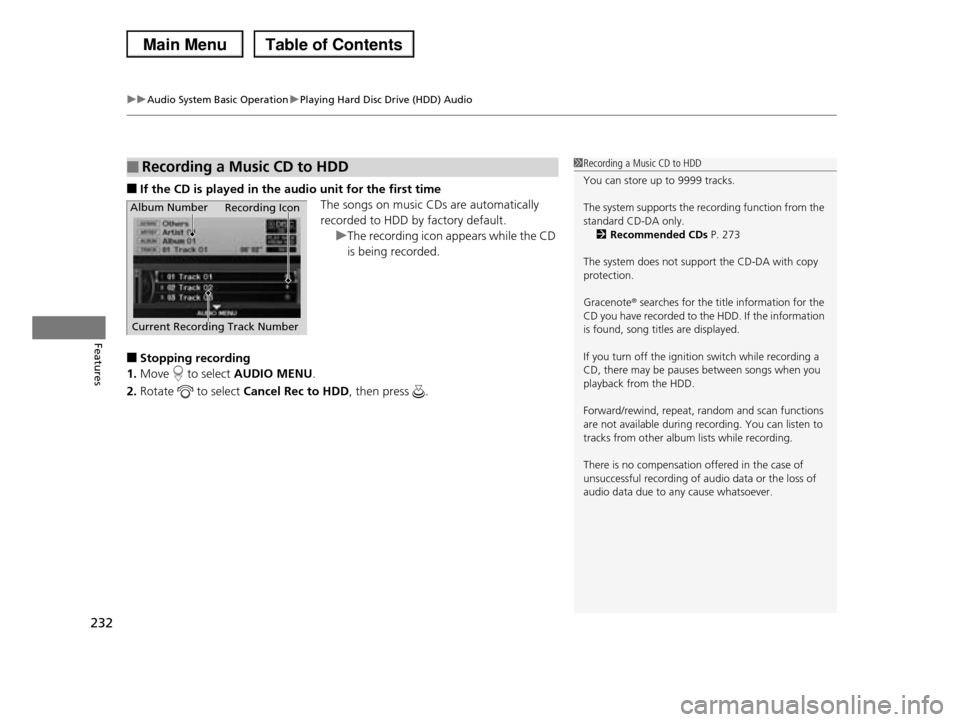
■If the CD is played in the audio unit for the first time
The songs on music CDs are automatically
recorded to HDD by factory default.
uThe recording icon appears while the CD
is being recorded.
■Stopping recording
1.Move to select AUDIO MENU.
2.Rotate to select Cancel Rec to HDD, then press .
■Recording a Music CD to HDD1Recording a Music CD to HDD
You can store up to 9999 tracks.
The system supports the recording function from the
standard CD-DA only.2Recommended CDs P. 273
The system does not support the CD-DA with copy protection.
Gracenote® searches for the title information for the CD you have recorded to the HDD. If the information
is found, song titles are displayed.
If you turn off the ignition switch while recording a
CD, there may be pauses between songs when you
playback from the HDD.
Forward/rewind, repeat, random and scan functions
are not available during recording. You can listen to
tracks from other album lists while recording.
There is no compensation offered in the case of
unsuccessful recording of audio data or the loss of audio data due to any cause whatsoever.
Album Number
Current Recording Track Number
Recording Icon
Page 234 of 488
Continued233
uuAudio System Basic OperationuPlaying Hard Disc Drive (HDD) Audio
Features
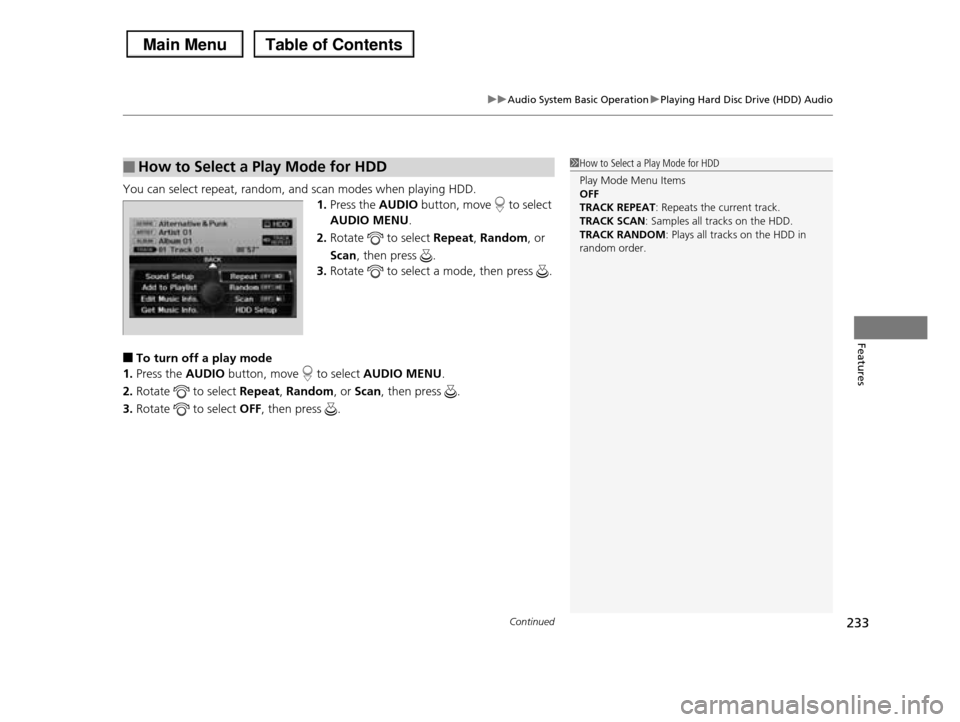
You can select repeat, random, and scan modes when playing HDD.
1.Press the AUDIO button, move to select
AUDIO MENU.
2.Rotate to select Repeat, Random, or
Scan, then press .
3.Rotate to select a mode, then press .
■To turn off a play mode
1.Press the AUDIO button, move to select AUDIO MENU.
2.Rotate to select Repeat, Random, or Scan, then press .
3.Rotate to select OFF, then press .
■How to Select a Play Mode for HDD1How to Select a Play Mode for HDD
Play Mode Menu Items OFF
TRACK REPEAT: Repeats the current track.
TRACK SCAN: Samples all tracks on the HDD.TRACK RANDOM: Plays all tracks on the HDD in
random order.