tail light HONDA PILOT 2014 2.G User Guide
[x] Cancel search | Manufacturer: HONDA, Model Year: 2014, Model line: PILOT, Model: HONDA PILOT 2014 2.GPages: 488, PDF Size: 12.11 MB
Page 126 of 488
125
uu Operating the Switches Around the Steering Wheel u Turn Signals
Continued
Controls
Turn Signals
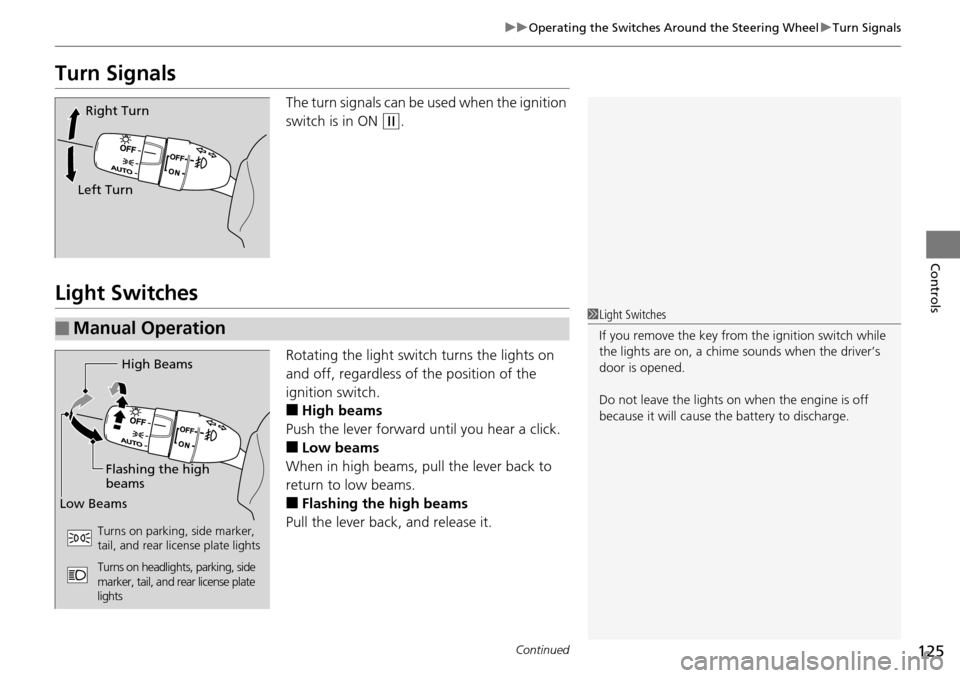
The turn signals can be used when the ignition
switch is in ON
(w
.
Light Switches
Rotating the light switch turns the lights on
and off, regardless of the position of the
ignition switch.
■High beams
Push the lever forward until you hear a click.
■Low beams
When in high beams, pull the lever back to
re
turn to low beams.
■Flashing the high beams
Pull the lever back, and release it.
Right Turn
Left Turn
■Manual Operation1 Light Switches
If you remove the key from the ignition switch while
the lights are on, a chime sounds when the driver’s
door is opened.
Do not leave the lights on when the engine is off
because it will cause the battery to discharge.
High Beams
Flashing the high
beams
Low Beams
Turns on parking, side marker,
tail, and rear license plate lights
Turns on headlights, parking, side
marker, tail, and rear license plate
lights
Page 151 of 488
150
Controls
Interior Lights/Interior Convenience Items
Interior Lights
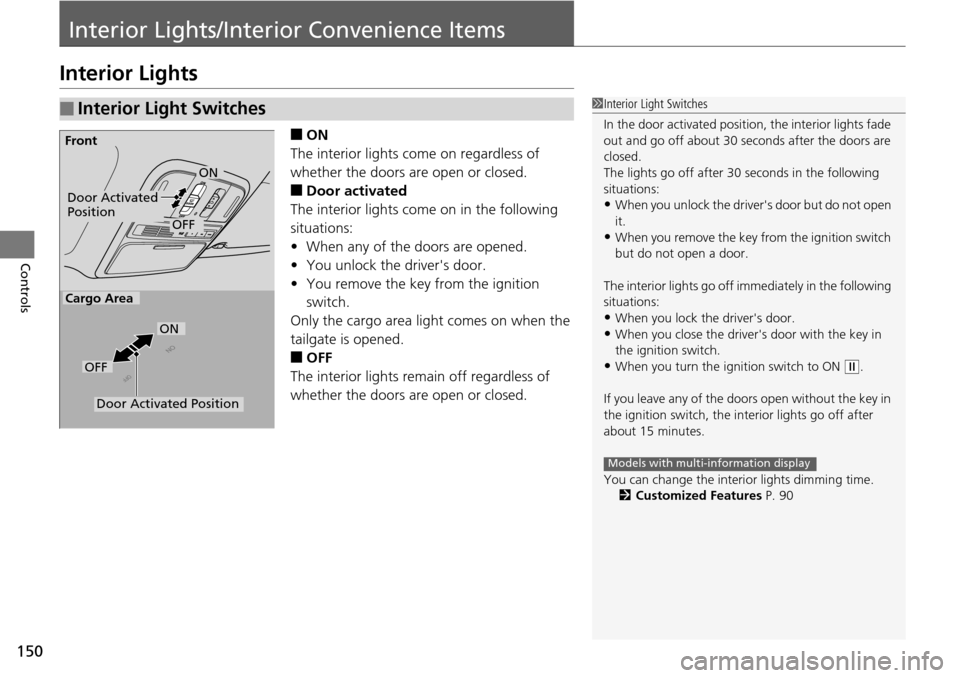
■ON
The interior lights come on regardless of
whet
her the doors are open or closed.
■Door activated
The interior lights come on in the following
situ
ations:
• W
hen any of the doors are opened.
•You un
lock the driver's door.
•You remove the k
ey from the ignition
switch.
Only the cargo area light comes on when the
tailgate is ope
ned.
■OFF
The interior lights remain off regardless of
whet
her the doors are open or closed.
■Interior Light Switches1Interior Light Switches
In the door activated position, the interior lights fade
out and go off about 30 se conds after the doors are
closed.
The lights go off after 30 seconds in the following
situations:
•When you unlock the driver's door but do not open
it.
•When you remove the key from the ignition switch
but do not open a door.
The interior lights go off i mmediately in the following
situations:
•When you lock the driver's door.
•When you close the driver's door with the key in
the ignition switch.
•When you turn the ignition switch to ON (
w
.
If you leave any of the doors open without the key in
the ignition switch, the interior lights go off after
about 15 minutes.
You can change the interi or lights dimming time.
2 Customized Features P. 90
Models with multi-information display
Door Activated
Position
OFF
Front
Door Activated Position
ON
OFF
Cargo Area
ON
Page 326 of 488
Continued325
uu Before Driving u Driving Preparation
Driving
• Store or secure all items on board properly.
u Carrying too much cargo, or improperly storing it, can affect your vehicle's
handling, stability, sto pping distance, and tires, and make it unsafe.
2Maximum Load Limit P. 327
• Do not pile items higher than the seat height.
u Th
ey can block your view and may be thrown forward in the event of sudden
braking.
• Do not pla
ce anything in the front seat footwells. Make sure to secure the floor
mat.
u An object or unsecured floor m
at can interfere with your brake and accelerator
pedal operation while driving.
• If yo
u have any animals on board, do not let them move around in the vehicle.
u Th
ey may interfere with driving and a crash could occur.
• Secure
ly close and lock al l doors and the tailgate.
2Locking/Unlocking the Doors from the Inside P. 103
• Adjust your seating position properly.
u Adjust the head re
straint, too.
2Adjusting the Seats P. 137
2 Adjusting the Head Restraints P. 141
•Adjust the mirrors and steering wh eel properly for your driving.
u Ad
just them while sitting in the proper driving position.
2 Adjusting the Steering Wheel P. 134
2 Adjusting the Mirrors P. 135
■Interior Checks1Interior Checks
The headlight aim is set by the factory, and does not
need to be adjusted. Howeve r, if you regularly carry
heavy items in the cargo area or tow a trailer, have
the aiming readjusted at a dealer or by a qualified
technician.
Page 336 of 488
Continued335
uu Towing a Trailer u Towing Preparation
Driving
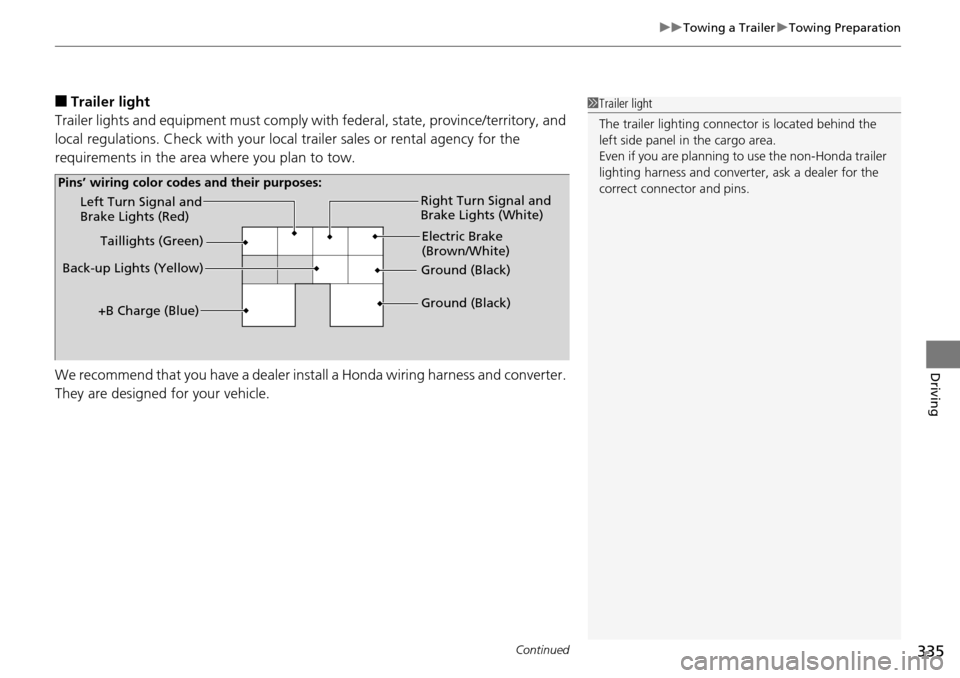
■Trailer light
Trailer lights and equipment must comply with federal, sta
te, province/territory, and
local regulations. Check with your local trailer sales or rental agency for the
requirements in the area where you plan to tow.
We recommend that you have a dealer inst all
a Honda wiring harness and converter.
They are designed for your vehicle.
1 Trailer light
The trailer lighting connect or is located behind the
left side panel in the cargo area.
Even if you are planning to use the non-Honda trailer
lighting harness and converte r, ask a dealer for the
correct connector and pins.
Left Turn Signal and
Brake Lights (Red)
Back-up Lights (Yellow) Electric Brake
(Brown/White)
Right Turn Signal and
Brake Lights (White)
Ground (Black)
Ground (Black)
Taillights (Green)
+B Charge (Blue)
Pins’ wiring color codes and their purposes:
Page 343 of 488
342
Driving
When Driving
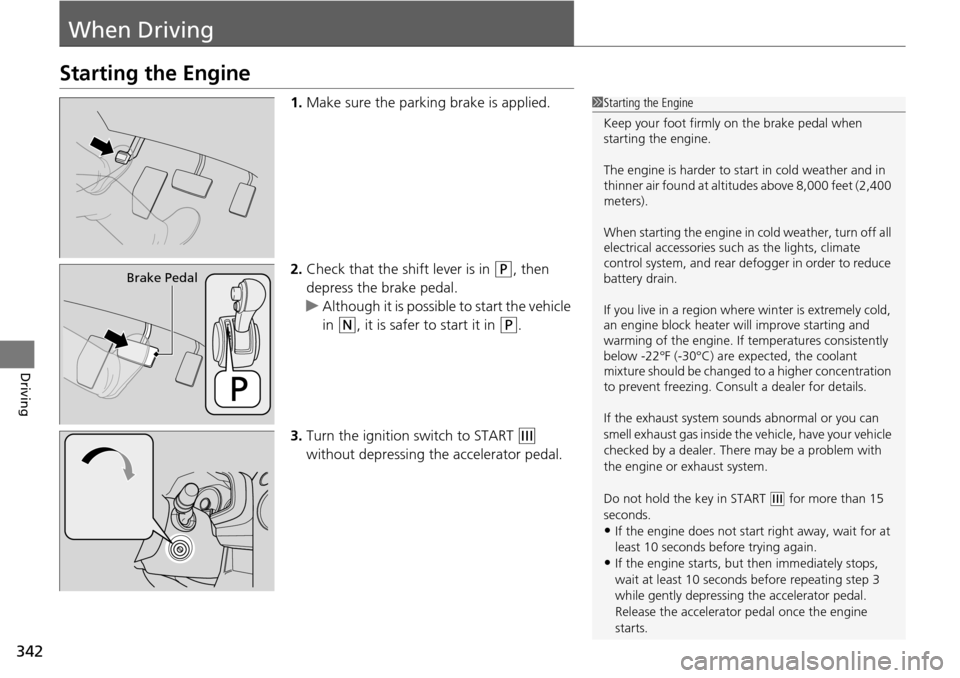
Starting the Engine
1.Make sure the parking brake is applied.
2. Check
that the shift lever is in (P
, then
depress the brake pedal.
u Althou
gh it is possible to start the vehicle
in
(N
, it is safer to start it in (P
.
3. Turn
the ignition switch to START (e
without depressing the accelerator pedal.
1 Starting the Engine
Keep your foot firmly on the brake pedal when
starting the engine.
The engine is harder to st art in cold weather and in
thinner air found at altitudes above 8,000 feet (2,400
meters).
When starting the engine in cold weather, turn off all
electrical accessories such as the lights, climate
control system, and rear de fogger in order to reduce
battery drain.
If you live in a region where winter is extremely cold,
an engine block heater will improve starting and
warming of the engine. If temperatures consistently
below -22°F (-30°C) are expected, the coolant
mixture should be changed to a higher concentration
to prevent freezing. Cons ult a dealer for details.
If the exhaust system sounds abnormal or you can
smell exhaust gas inside the vehicle, have your vehicle
checked by a dealer. There may be a problem with
the engine or exhaust system.
Do not hold the key in START
(
e
for more than 15
seconds.
•If the engine does not start right away, wait for at
least 10 seconds before trying again.
•If the engine starts, but then immediately stops,
wait at least 10 seconds before repeating step 3
while gently depressing the accelerator pedal.
Release the accelerator pedal once the engine
starts.
Brake Pedal
Page 370 of 488
369
Driving
Rearview Camera *
About Your Rearview Camera
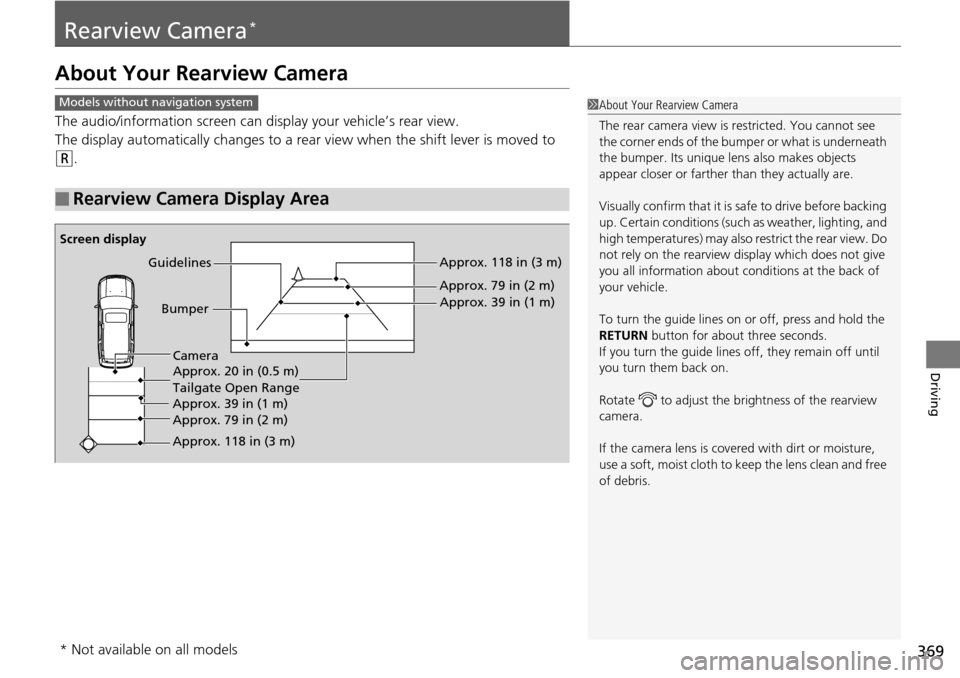
The audio/information screen can display your vehicle’s rear view.
The display automatically changes to a rear
view when the shift lever is moved to
(R
.
■Rearview Camera Display Area
1About Your Rearview Camera
The rear camera view is restricted. You cannot see
the corner ends of the bum per or what is underneath
the bumper. Its unique le ns also makes objects
appear closer or farther than they actually are.
Visually confirm that it is safe to drive before backing
up. Certain conditions (such as weather, lighting, and
high temperatures) may also restrict the rear view. Do
not rely on the rearview display which does not give
you all information about conditions at the back of
your vehicle.
To turn the guide lines on or off, press and hold the
RETURN button for about three seconds.
If you turn the guide lines off, they remain off until
you turn them back on.
Rotate to adjust the br ightness of the rearview
camera.
If the camera lens is cove red with dirt or moisture,
use a soft, moist cloth to keep the lens clean and free
of debris.Models without navigation system
Screen display
Bumper
Guidelines
Approx. 118 in (3 m)
Approx. 79 in (2 m) Approx. 39 in (1 m)
Approx. 20 in (0.5 m)
Tailgate Open Range
Approx. 118 in (3 m) Approx. 79 in (2 m) Approx. 39 in (1 m) Camera
* Not available on all models
Page 379 of 488
378
Maintenance
Before Performing Maintenance
Inspection and Maintenance
For your safety, perform all listed inspections and maintenance to keep your vehicle
in good condition. If you become aware of any abnormality (noise, smell, insufficient
brake fluid, oil residue on the ground, etc.), have your vehicle inspected by a dealer.
(Note, however, that service at a dealer is not mandatory to keep your warranties in
effect.) Refer to the separate maintena nce booklet for detailed maintenance and
inspection information.
■Daily inspections
Perform inspections before long distance tri ps
, when washing the vehicle, or when
refueling.
■Periodic inspections
• Che
ck the automatic transmi ssion fluid level monthly.
2Automatic Transmission Fluid P. 399
• Check the brake fluid level monthly.
2 Checking the Brake Fluid P. 400
• Check the tire pressure monthly. Examin e the tread for wear and foreign objects.
2Checking and Maintaining Tires P. 414
• Check the operation of the exterior lights monthly.
2 Replacing Light Bulbs P. 402
• Check the condition of the wiper bl ades at least every six months.
2Checking and Maintaining Wiper Blades P. 410
■Types of Inspection and Maintenance
1Inspection and Maintenance
Maintenance, replacement, or repair of
emissions control devices and systems may be
done by any automotive repair establishment or
individuals using parts that are “certified” to
EPA standards.
According to state and fede ral regulations, failure to
perform maintenance on the maintenance main
items marked with # will not void your emissions
warranties. However, all ma intenance services should
be performed in accordan ce with the intervals
indicated by the information display
*/multi-
information display *.
2 Maintenance Service Items P. 383
If you want to perform complex maintenance tasks
that require more skills and tools, purchase the
service manual.
2 Authorized Manuals P. 474
If you want to perform ma intenance yourself, make
sure that you have the necessary tools and skills first.
After performing ma intenance, update the records in
the separate maintenance booklet.
U.S. models
* Not available on all models
Page 407 of 488
406
uu Replacing Light Bulbs u Brake Light, Taillight, Back-Up Light, Rear Turn Signal Light and Rear Side Marker Light Bulbs
Maintenance
Brake Light, Taillight, Back-Up Light, Rear Turn
Signal Light and Rear Side Marker Light Bulbs
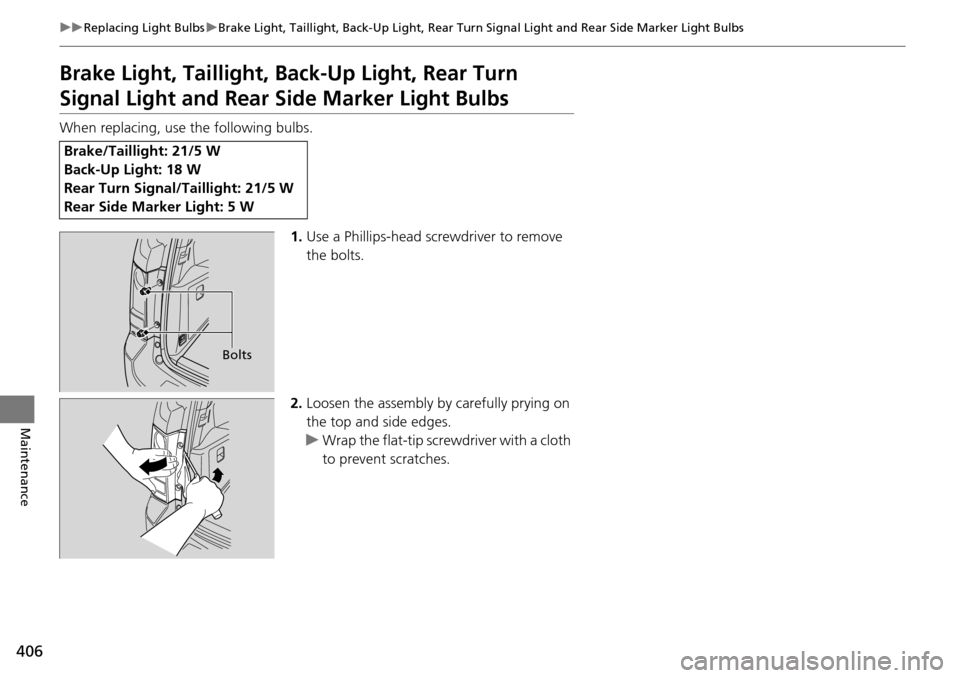
When replacing, use the following bulbs.
1.Use
a Phillips-head screwdriver to remove
the bolts.
2. L
oosen the assembly by carefully prying on
the top and side edges.
u Wrap the
flat-tip screwdriver with a cloth
to prevent scratches.
Brake/Taillight: 21/5 W
Back-Up Light: 18 W
Rear Turn Signal/Taillight: 21/5 W
Rear Side Marker Light: 5 W
Bolts
Page 408 of 488
407
uu Replacing Light Bulbs u Brake Light, Taillight, Back-Up Light, Rear Turn Signal Light and Rear Side Marker Light Bulbs
Maintenance
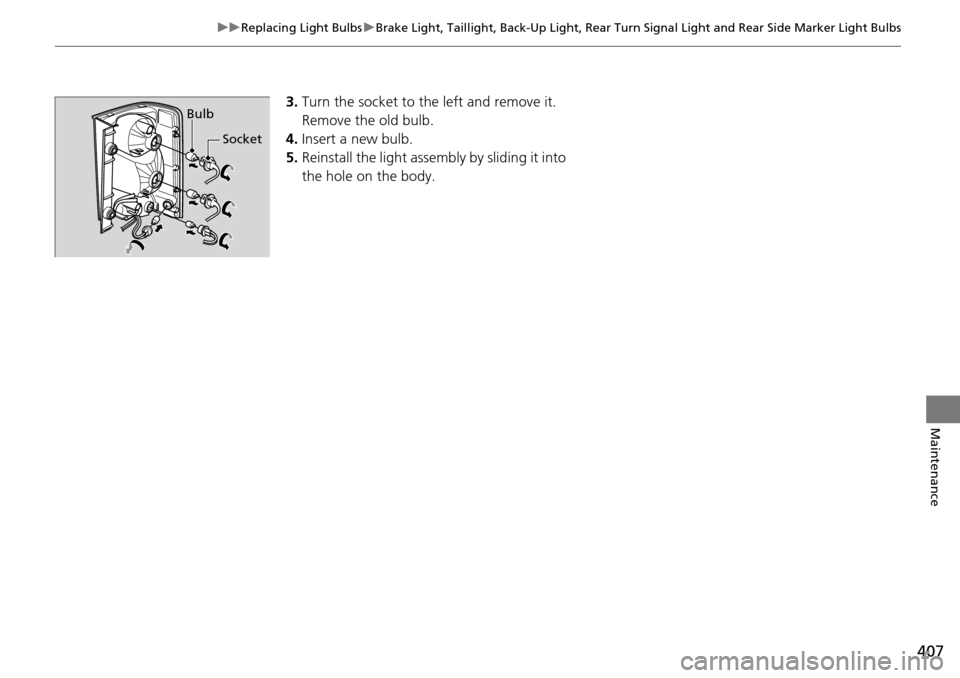
3.Turn the socket to th e left and remove it.
Remove the old bulb.
4. Insert a new bulb.
5. Rein
stall the light assembly by sliding it into
the hole on the body.
Bulb
Socket
Page 456 of 488
455
uu Fuses u Fuse Locations
Continued
Handling the Unexpected
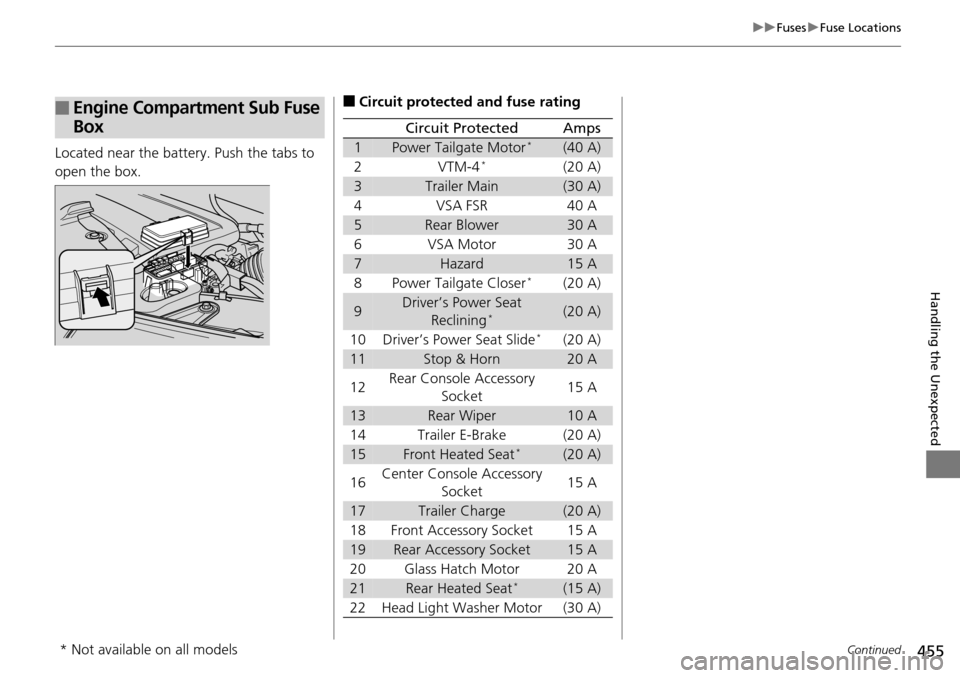
Located near the battery. Push the tabs to
open the box.
■Engine Compartment Sub Fuse
Box■Circuit protected and fuse rating
Circuit ProtectedAmps
1Power Tailgate Motor *(40 A)
2 VTM-4 *(20 A)
3Trailer Main(30 A)
4VSA FSR 40 A
5Rear Blower30 A
6 VSA Motor 30
A
7Hazard15 A
8 Power Tailgate Closer *(20 A)
9Driver’s Power Seat
Reclining *(20 A)
10 Driver’s Power Seat Slide
*(20 A)
11Stop & Horn20 A
12 Rear Console Accessory
Socket 15
A
13Rear Wiper10 A
14 Trailer E-Brake (20
A)
15Front Heated Seat *(20 A)
16 Center Console Accessory
Socket 15
A
17Trailer Charge(20 A)
18 Front Accessory Socket 15
A
19Rear Accessory Socket15 A
20 Glass Hatch Motor 20
A
21Rear Heated Seat *(15 A)
22 Head Light Washer Motor (30 A)
* Not available on all models