display HONDA PILOT 2016 3.G Owners Manual
[x] Cancel search | Manufacturer: HONDA, Model Year: 2016, Model line: PILOT, Model: HONDA PILOT 2016 3.GPages: 661, PDF Size: 37.79 MB
Page 3 of 661
Contents
This owner’s manual should be considered a permanent part of the
vehicle and should remain with the vehicle when it is sold.
This owner’s manual covers all models of your vehicle. You may find
descriptions of equipment and features that are not on your
particular model.
Images throughout this owner’s manu al (including the front cover)
represent features and equipment that are available on some, but
not all, models. Your particular mo del may not have some of these
features.
This owner’s manual is for vehicles sold in the United States and
Canada.
The information and specifications in cluded in this publication were
in effect at the time of approval for printing. Honda Motor Co., Ltd.
reserves the right, however, to discontinue or change specifications
or design at any time without notice and without incurring any
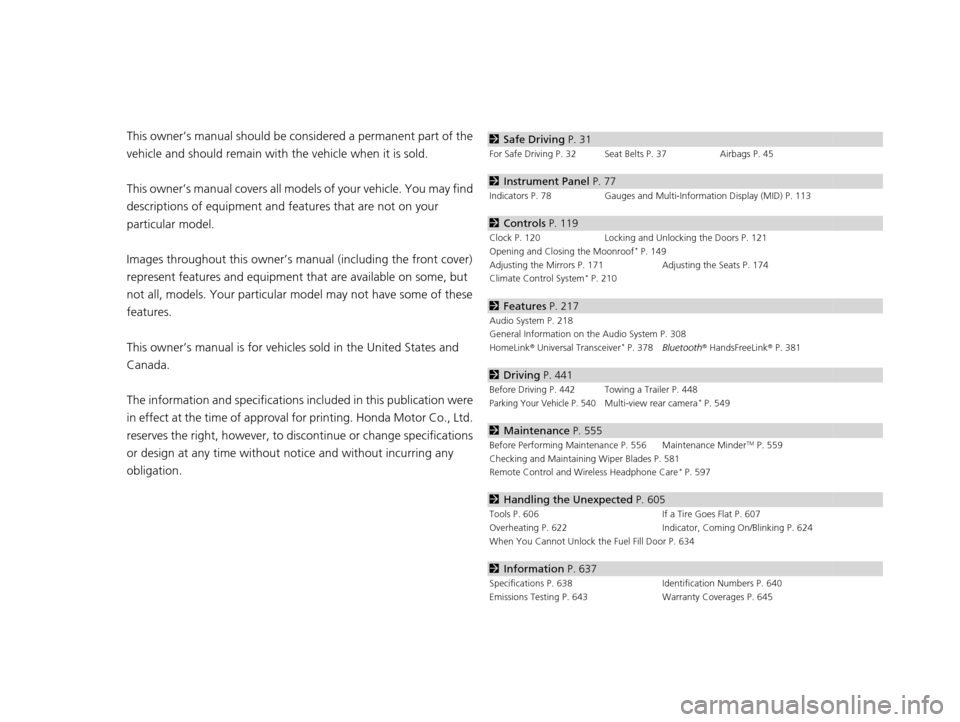
obligation.2 Safe Driving P. 31
For Safe Driving P. 32 Seat Belts P. 37 Airbags P. 45
2Instrument Panel P. 77
Indicators P. 78 Gauges and Multi-Information Display (MID) P. 113
2Controls P. 119
Clock P. 120 Locking and Unlocking the Doors P. 121
Opening and Closing the Moonroof* P. 149
Adjusting the Mirrors P. 171 Adjusting the Seats P. 174
Climate Control System
* P. 210
2 Features P. 217
Audio System P. 218
General Information on the Audio System P. 308
HomeLink ® Universal Transceiver
* P. 378 Bluetooth ® HandsFreeLink ® P. 381
2 Driving P. 441
Before Driving P. 442 Towing a Trailer P. 448
Parking Your Vehicle P. 540Multi-view rear camera* P. 549
2Maintenance P. 555
Before Performing Maintenance P. 556 Maintenance MinderTM P. 559
Checking and Maintaining Wiper Blades P. 581
Remote Control and Wireless Headphone Care
* P. 597
2 Handling the Unexpected P. 605
Tools P. 606 If a Tire Goes Flat P. 607
Overheating P. 622 Indicator, Coming On/Blinking P. 624
When You Cannot Unlock the Fuel Fill Door P. 634
2 Information P. 637
Specifications P. 638 Identification Numbers P. 640
Emissions Testing P. 643 Warranty Coverages P. 645
16 PILOT-31TG76000.book 2 ページ 2015年6月15日 月曜日 午前11時30分
Page 5 of 661
4
Quick Reference Guide
Quick Reference Guide
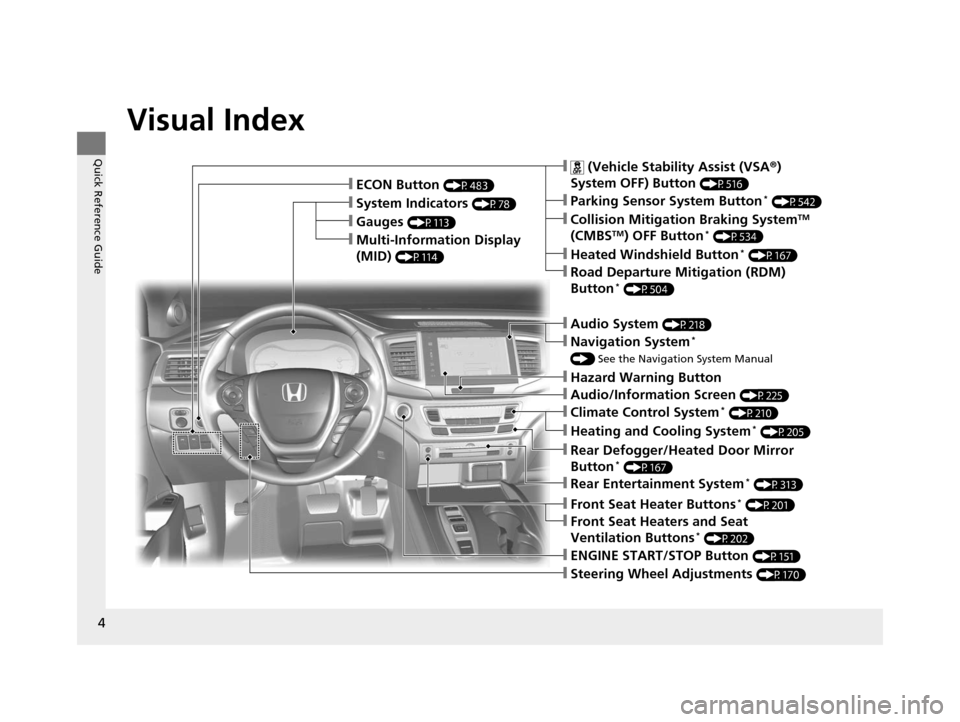
Visual Index
❙Gauges (P113)
❙Multi-Information Display
(MID)
(P114)
❙System Indicators (P78)
❙ECON Button (P483)
❙Audio System (P218)
❙Navigation System*
() See the Navigation System Manual
❙Audio/Information Screen (P225)
❙Hazard Warning Button
❙ (Vehicle Stability Assist (VSA ®)
System OFF) Button
(P516)
❙Collision Mitigation Braking SystemTM
(CMBSTM) OFF Button* (P534)
❙Heated Windshield Button* (P167)
❙Road Departure Mitigation (RDM)
Button* (P504)
❙Parking Sensor System Button* (P542)
❙Climate Control System* (P210)
❙Heating and Cooling System* (P205)
❙Rear Defogger/Heated Door Mirror
Button* (P167)
❙Rear Entertainment System* (P313)
❙Front Seat Heaters and Seat
Ventilation Buttons* (P202)
❙Front Seat Heater Buttons* (P201)
❙Steering Wheel Adjustments (P170)
❙ENGINE START/STOP Button (P151)
16 PILOT-31TG76000.book 4 ページ 2015年6月15日 月曜日 午前11時30分
Page 13 of 661
12
Quick Reference Guide
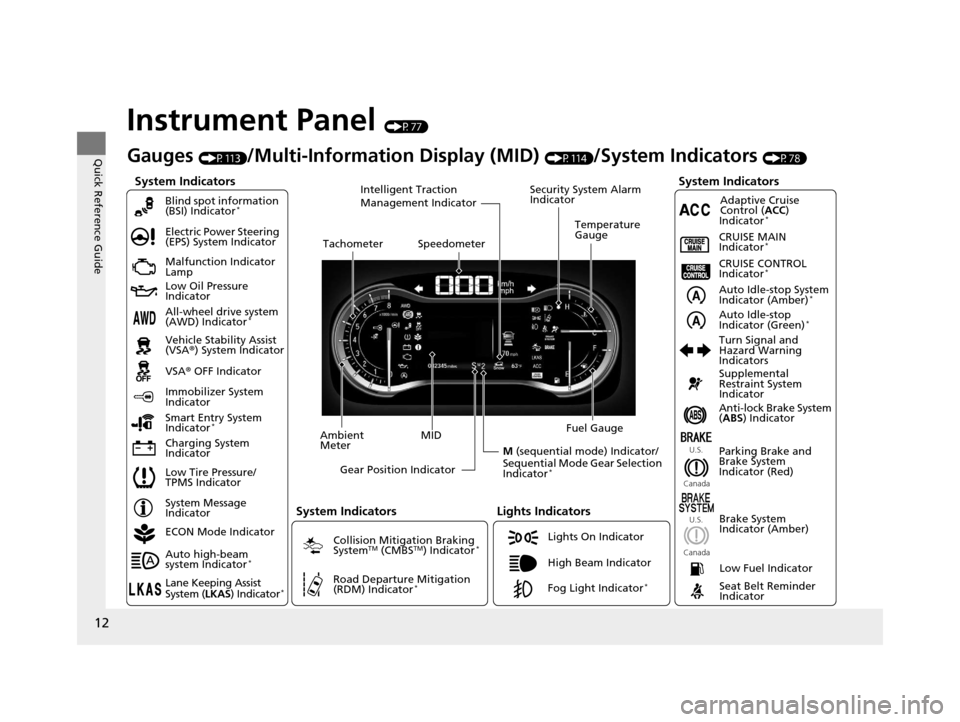
Instrument Panel (P77)
System Indicators
Malfunction Indicator
Lamp
Low Oil Pressure
Indicator
Charging System
IndicatorAnti-lock Brake System
(
ABS ) Indicator
Vehicle Stability Assist
(VSA
®) System Indicator
VSA ® OFF Indicator
Electric Power Steering
(EPS) System Indicator
Lights Indicators
Lights On Indicator
High Beam Indicator
Immobilizer System
Indicator
Seat Belt Reminder
Indicator
System Indicators
System Message
IndicatorParking Brake and
Brake System
Indicator (Red)Supplemental
Restraint System
Indicator
Low Fuel Indicator
Gauges (P113)/Multi-Information Display (MID) (P114)/System Indicators (P78)
Low Tire Pressure/
TPMS Indicator Turn Signal and
Hazard Warning
Indicators
Smart Entry System
Indicator
*Ambient
Meter Gear Position Indicator Fuel Gauge
Tachometer
Temperature
Gauge
Speedometer
MID
M (sequential mode) Indicator/
Sequential Mode Gear Selection
Indicator
*
Brake System
Indicator (Amber)
All-wheel drive system
(AWD) Indicator*
Blind spot information
(BSI) Indicator*
System Indicators
Collision Mitigation Braking
SystemTM (CMBSTM) Indicator*
Road Departure Mitigation
(RDM) Indicator*
Security System Alarm
Indicator
U.S.
Canada U.S.
Canada
Fog Light Indicator*
Auto Idle-stop System
Indicator (Amber)*
Auto Idle-stop
Indicator (Green)*
ECON Mode Indicator
Auto high-beam
system Indicator
*
Lane Keeping Assist
System ( LKAS) Indicator*
CRUISE MAIN
Indicator*
CRUISE CONTROL
Indicator*
Adaptive Cruise
Control ( ACC)
Indicator
*
Intelligent Traction
Management Indicator
16 PILOT-31TG76000.book 12 ページ 2015年6月15日 月曜日 午前11時30分
Page 14 of 661
13
Quick Reference Guide
Controls (P119)
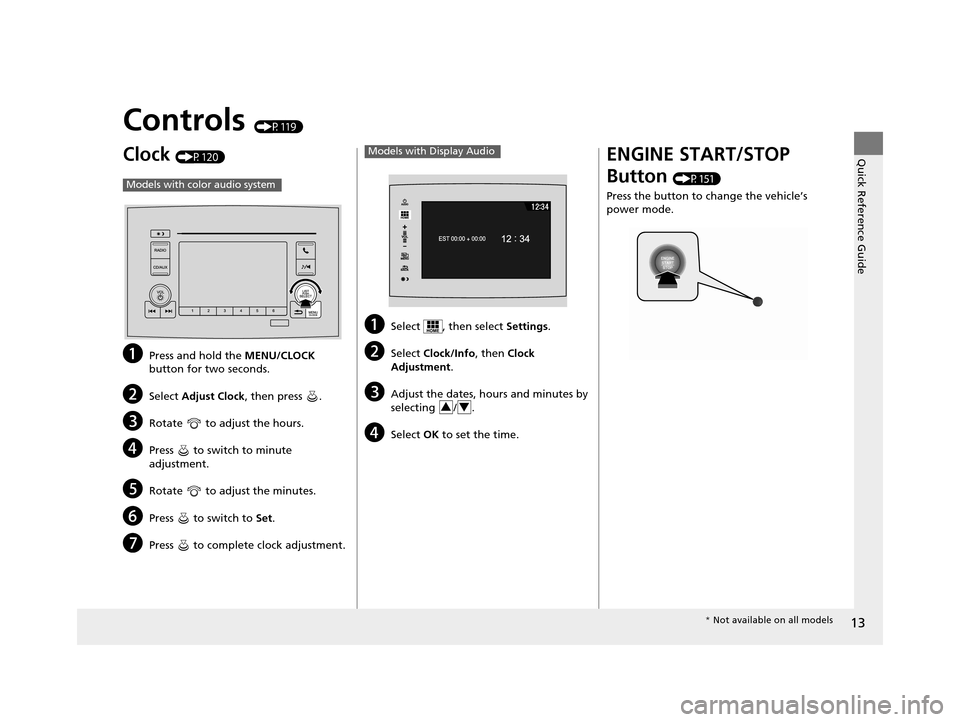
Clock (P120)
aPress and hold the MENU/CLOCK
button for two seconds.
bSelect Adjust Clock , then press .
cRotate to adjust the hours.
dPress to switch to minute
adjustment.
eRotate to adjust the minutes.
fPress to switch to Set.
gPress to complete clock adjustment.
Models with color audio system
aSelect , then select Settings.
bSelect Clock/Info , then Clock
Adjustment .
cAdjust the dates, hours and minutes by
selecting / .
dSelect OK to set the time.
Models with Display Audio
34
ENGINE START/STOP
Button
(P151)
Press the button to change the vehicle’s
power mode.
* Not available on all models
16 PILOT-31TG76000.book 13 ページ 2015年6月15日 月曜日 午前11時30分
Page 18 of 661
17
Quick Reference Guide
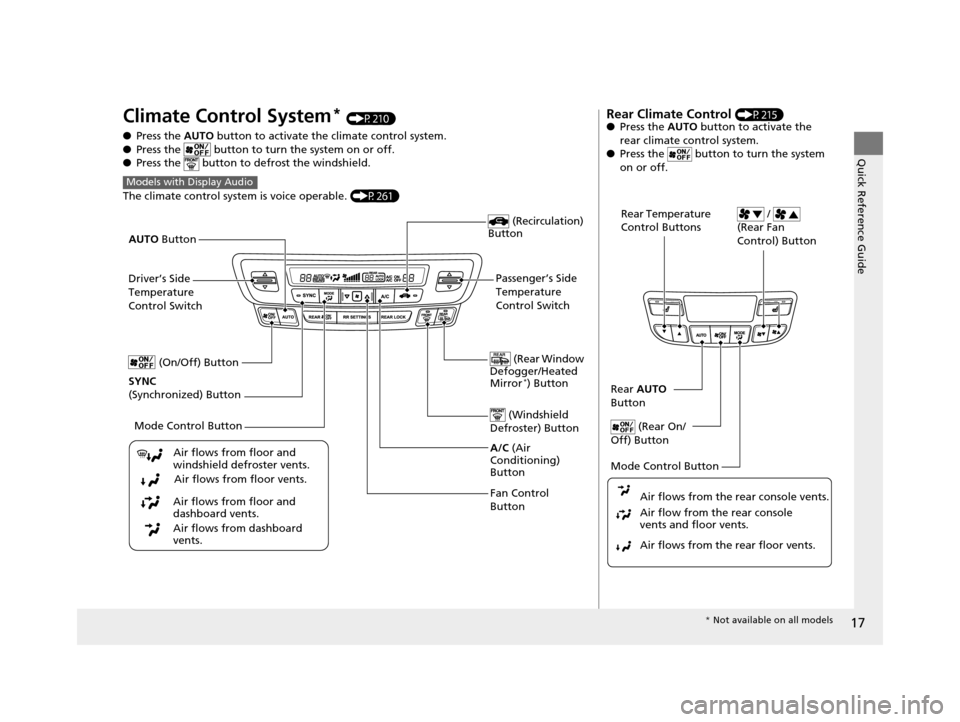
Climate Control System* (P210)
● Press the AUTO button to activate th e climate control system.
● Press the button to turn the system on or off.
● Press the button to de frost the windshield.
The climate control system is voice operable. (P261)
Models with Display Audio
Fan Control
Button (Rear Window
Defogger/Heated
Mirror
*) Button
(Windshield
Defroster) Button
A/C (Air
Conditioning)
Button
Air flows from floor and
windshield defroster vents.
Air flows from floor vents.
Air flows from floor and
dashboard vents.
Air flows from dashboard
vents.
(Recirculation)
Button
Passenger’s Side
Temperature
Control Switch
AUTO
Button
Driver’s Side
Temperature
Control Switch
Mode Control Button
SYNC
(Synchronized) Button (On/Off) Button
Rear Climate Control (P215)
● Press the AUTO button to activate the
rear climate control system.
● Press the button to turn the system
on or off.
Rear Temperature
Control Buttons /
(Rear Fan
Control) Button
Rear AUTO
Button
(Rear On/
Off) Button
Mode Control Button
Air flows from the rear floor vents. Air flow from the rear console
vents and floor vents. Air flows from the rear console vents.
* Not available on all models
16 PILOT-31TG76000.book 17 ページ 2015年6月15日 月曜日 午前11時30分
Page 20 of 661
19
Quick Reference Guide
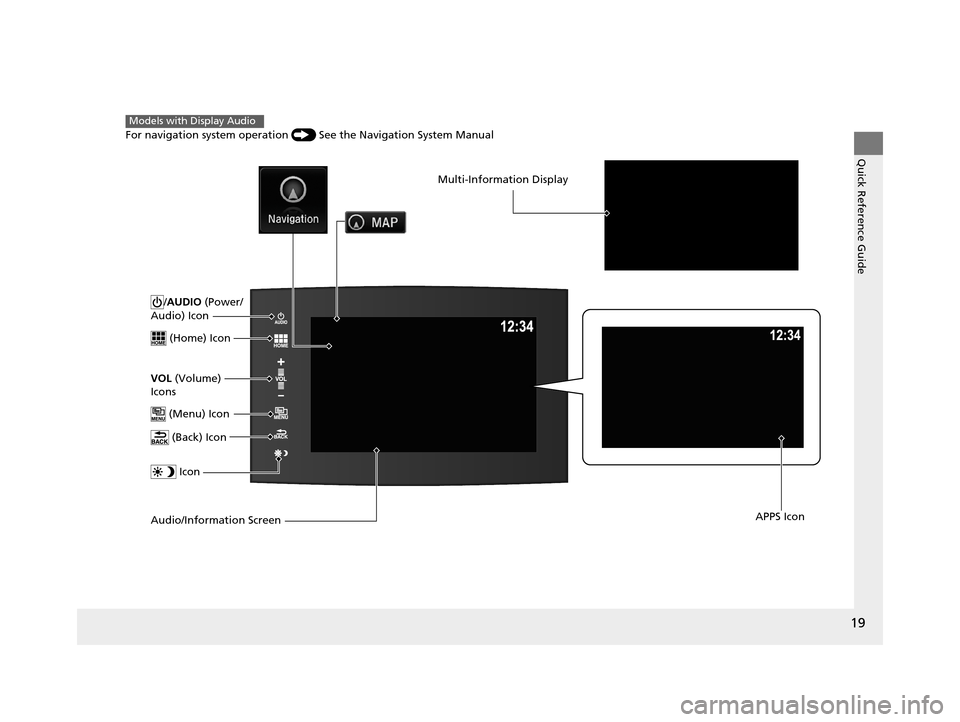
/AUDIO (Power/
Audio) Icon
(Home) Icon
VOL (Volume)
Icons
(Menu) Icon
(Back) Icon
Icon
Audio/Information Screen
Multi-Information Display
APPS Icon
For navigation system operation () See the Navigation System Manual
Models with Display Audio
16 PILOT-31TG76000.book 19 ページ 2015年6月15日 月曜日 午前11時30分
Page 21 of 661
20
Quick Reference Guide
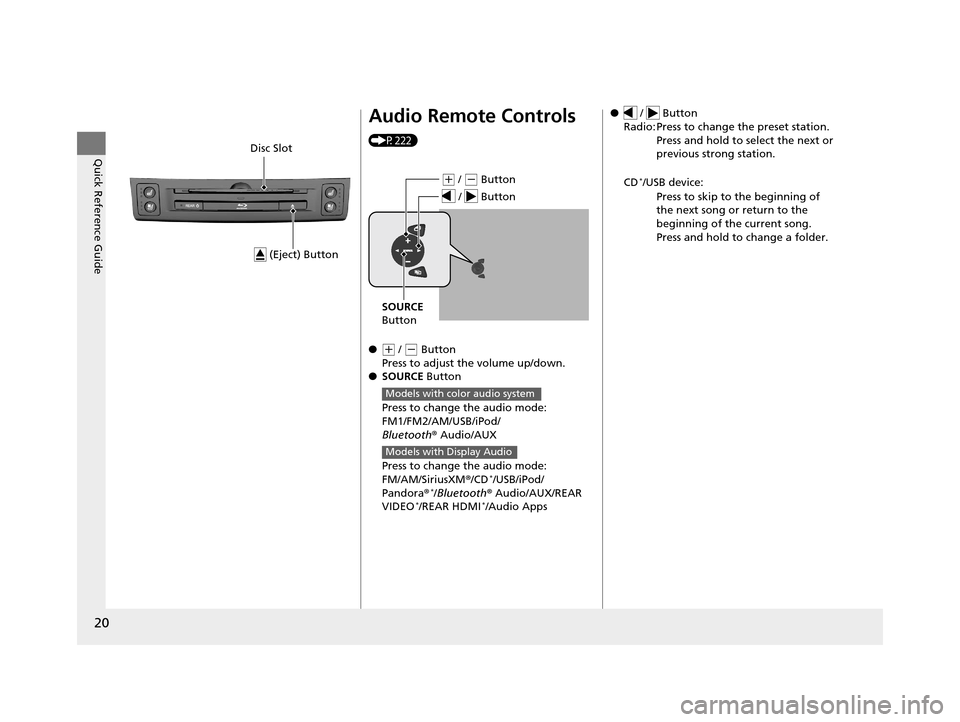
(Eject) Button
Disc Slot
Audio Remote Controls
(P222)
●
(+ / (- Button
Press to adjust the volume up/down.
● SOURCE Button
Press to change the audio mode:
FM1/FM2/AM/USB/iPod/
Bluetooth ® Audio/AUX
Press to change the audio mode:
FM/AM/SiriusXM ®/CD
*/USB/iPod/
Pandora ®*/Bluetooth® Audio/AUX/REAR
VIDEO*/REAR HDMI*/Audio Apps
( + / (- Button
SOURCE
Button
/ Button
Models with color audio system
Models with Display Audio
● / Button
Radio: Press to change the preset station. Press and hold to select the next or
previous strong station.
CD
*/USB device: Press to skip to the beginning of
the next song or return to the
beginning of the current song.
Press and hold to change a folder.
16 PILOT-31TG76000.book 20 ページ 2015年6月15日 月曜日 午前11時30分
Page 37 of 661
uuFor Safe Driving uYour Vehicle’s Safety Features
36
Safe DrivingFor the safety of you and your passenge rs, make a habit of checking these items
each time before you drive.
• After everyone has entered the vehicle, be sure all doors and the tailgate are
closed and locked. Locking the doors and the tailgate helps prevent an occupant
from being ejected and an outsider from unexpectedly opening a door or the
tailgate.
2 Locking/Unlocking the Doors from the Inside P. 131
•Adjust your seat to a position suitable for driving. Be sure the front seats are
adjusted as far to the rear as possible while allowing the driver to control the
vehicle. Sitting too close to a front airbag can result in serious or fatal injury in a
crash.
2 Adjusting the Seats P. 174
•Adjust head restraints to the proper position. Head restraints are most effective
when the center of the head restraint alig ns with the center of your head. Taller
persons should adjust their head restraint to the highest position.
2 Adjusting the Head Restraints P. 179
•Always wear your seat belt, and make sure you wear it properly. Confirm that any
passengers are properly belted as well.
2 Fastening a Seat Belt P. 40
•Protect children by using seat belts or chil d seats according to a child’s age, height
and weight.
2 Child Safety P. 58
■Safety Checklist1Safety Checklist
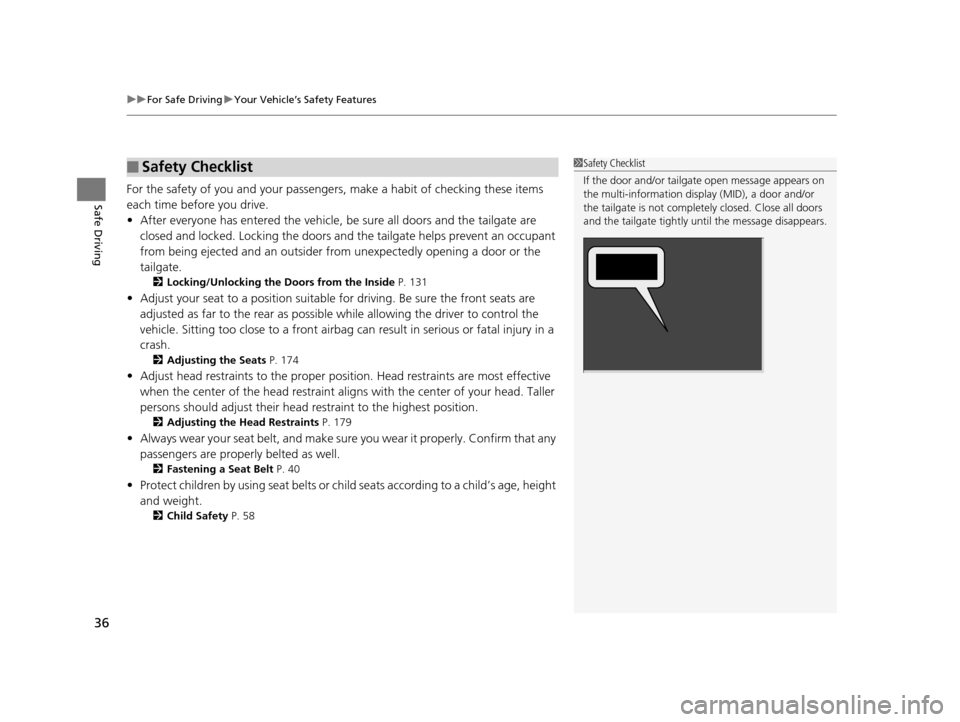
If the door and/or tailga te open message appears on
the multi-information display (MID), a door and/or
the tailgate is not completely closed. Close all doors
and the tailgate tightly unt il the message disappears.
16 PILOT-31TG76000.book 36 ページ 2015年6月15日 月曜日 午前11時30分
Page 78 of 661
77
Instrument Panel
This chapter describes the buttons, indicators, and gauges that are used while driving.
Indicators............................................ 78
Multi-Information Display (MID) Warning and Information Messages ............... 97
Gauges and Multi-Information Display (MID)Gauges ............................................ 113
MID ................................................. 114
16 PILOT-31TG76000.book 77 ページ 2015年6月15日 月曜日 午前11時30分
Page 85 of 661
84
uuIndicators u
Instrument Panel
IndicatorNameOn/BlinkingExplanationMessage
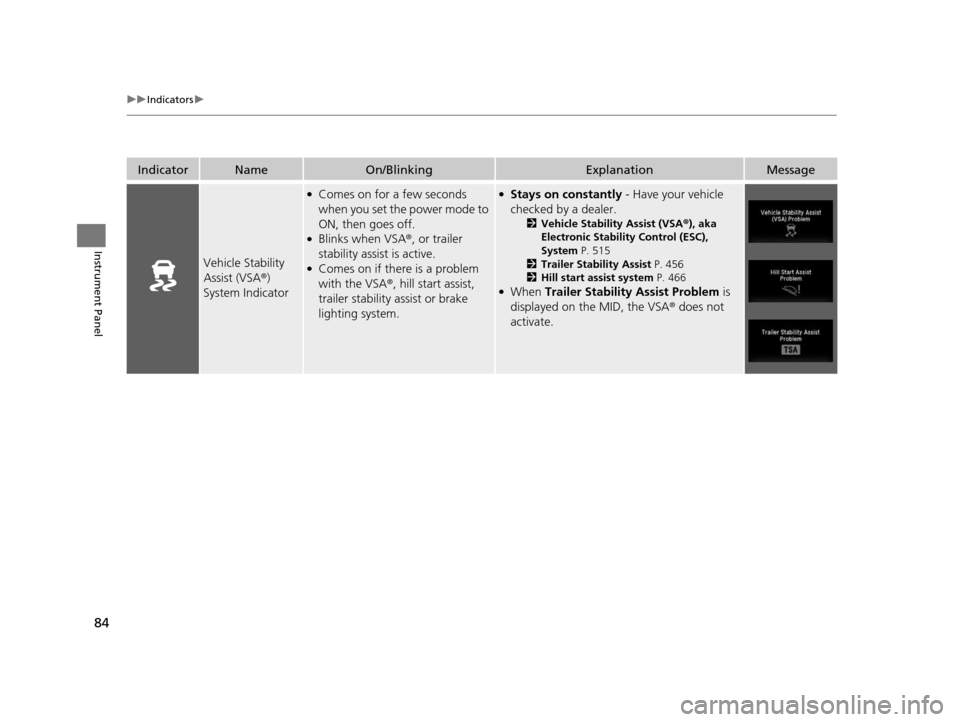
Vehicle Stability
Assist (VSA ®)
System Indicator
●Comes on for a few seconds
when you set the power mode to
ON, then goes off.
●Blinks when VSA ®, or trailer
stability assist is active.
●Comes on if there is a problem
with the VSA ®, hill start assist,
trailer stability assist or brake
lighting system.
●Stays on constantly - Have your vehicle
checked by a dealer.
2 Vehicle Stability Assist (VSA ®), aka
Electronic Stability Control (ESC),
System P. 515
2 Trailer Stability Assist P. 456
2 Hill start assist system P. 466
●When Trailer Stability Assist Problem is
displayed on the MID, the VSA ® does not
activate.
16 PILOT-31TG76000.book 84 ページ 2015年6月15日 月曜日 午前11時30分