lock HONDA PRELUDE 1992 Service Manual
[x] Cancel search | Manufacturer: HONDA, Model Year: 1992, Model line: PRELUDE, Model: HONDA PRELUDE 1992Pages: 225, PDF Size: 2.1 MB
Page 119 of 225
Driving in Bad Weather
Driving Technique — Always
drive slower than you would in dry
weather. It takes your car longer to react, even in conditions that may
seem just barely damp. Apply
smooth, even pressure to all the
controls. Abrupt steering wheel
movements or sudden, hard appli-
cation of the brakes can cause loss
of control in wet weather. Be extra
cautious for the first few miles of
driving while you adjust to the change in driving conditions. This
is especially true in snow. A person
can forget some snow-driving tech- niques during the summer months.
Practice is needed to relearn those
skills.
Exercise extra caution when
driving in rain after a long dry spell.
After months of dry weather, the
first rains bring oil to the surface of
the roadway, making it slippery. Visibility — Being able to see
clearly in all directions and being
visible to other drivers are impor-
tant in all weather conditions. This is more difficult in bad weather. To
be seen more clearly during day-
light hours, turn on your headlights.
Inspect your windshield wipers and
washers frequently. Keep the wind- shield washer reservoir full of the
proper fluid. Replace the wind-
shield wiper blades if they start to
streak the windshield or leave parts
unwiped. Use the defrosters and air conditioner to keep the windows
from fogging up on the inside (see
page 73).
Traction — Check your tires
frequently for wear and proper pressure. Both are important in
preventing "hydroplaning" (loss of
traction on a wet surface). In the
winter, mount snow tires on all four
wheels for the best handling.
Watch road conditions carefully, they can change from moment to
moment. Wet leaves can be as slip-
pery as ice. "Clear" roads can have
patches of ice. Driving conditions
can be very hazardous when the
outside temperature is near freez-
ing. The road surface can become
covered with areas of water pud-
dles mixed with areas of ice, so
your traction can change without
warning.
Be careful when downshifting. If
traction is low, you can lock up the
drive wheels for a moment and
cause a skid.
DrivingProCarManuals.comMain Menu Table of Contents s t
Page 125 of 225
Maintenance
Regularly maintaining your Honda
is the best way to protect your investment. You will be rewarded
with safer, more economical,
trouble-free driving. This section
lists items that need to be checked
regularly and explains how to check them. It also details some
simple maintenance tasks you can
do yourself. The maintenance
schedules for normal and severe
driving conditions show you when
these things need to be done.
If you are interested in how to per-
form more complex maintenance
on your Honda, you can purchase
the Service Manual. See page 221 for information on how to
obtain a copy, or see your Honda
dealer.
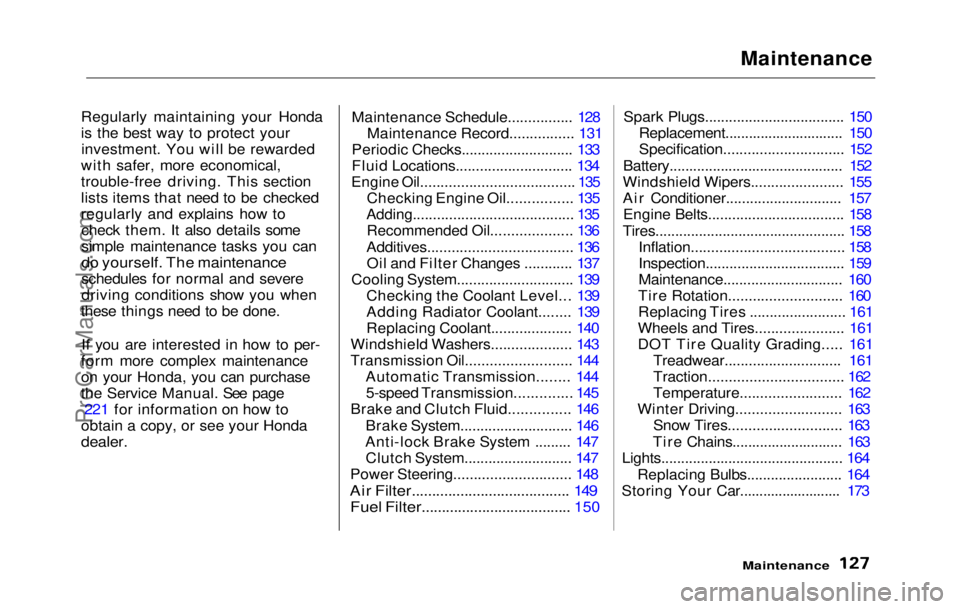
Maintenance Schedule................ 128
Maintenance Record................ 131
Periodic Checks............................ 133
Fluid Locations............................. 134
Engine Oil...................................... 135
Checking Engine Oil................ 135
Adding........................................ 135
Recommended Oil.................... 136
Additives.................................... 136 Oil and Filter Changes ............ 137
Cooling System............................. 139 Checking the Coolant Level... 139
Adding Radiator Coolant........ 139
Replacing Coolant.................... 140
Windshield Washers.................... 143
Transmission Oil.......................... 144
Automatic Transmission........ 144
5-speed Transmission.............. 145
Brake and Clutch Fluid............... 146
Brake System............................ 146
Anti-lock Brake System ......... 147 Clutch System........................... 147
Power Steering............................. 148
Air Filter....................................... 149
Fuel Filter..................................... 150
Spark Plugs.................................. .
150
Replacement.............................. 150
Specification.............................. 152
Battery............................................ 152
Windshield Wipers....................... 155
Air Conditioner............................. 157 Engine Belts.................................. 158
Tires................................................ 158 Inflation...................................... 158
Inspection................................... 159
Maintenance.............................. 160
Tire Rotation............................ 160
Replacing Tires ........................ 161
Wheels and Tires...................... 161
DOT Tire Quality Grading..... 161 Treadwear............................. 161
Traction................................. 162
Temperature......................... 162
Winter Driving.......................... 163 Snow Tires............................ 163
Tire Chains............................ 163
Lights.............................................. 164
Replacing Bulbs........................ 164
Storing Your Car.......................... 173
MaintenanceProCarManuals.comMain Menu s t
Page 129 of 225
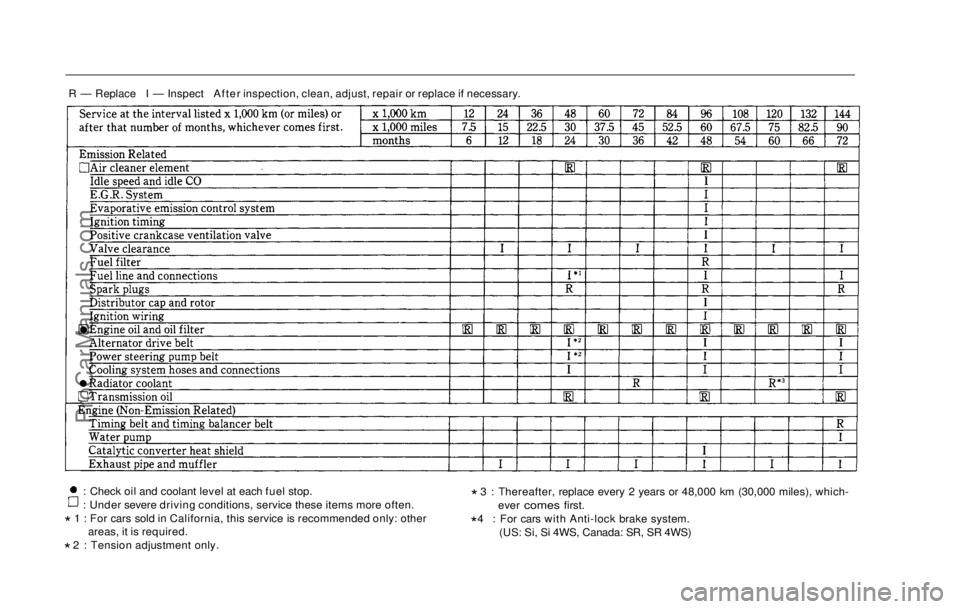
R — Replace I — Inspect After inspection, clean, adjust, repair or replace if necessary.
: Check oil and coolant level at each fuel stop.
: Under severe driving conditions, service these items more often.
* 1 : For cars sold in California, this service is recommended only: other
areas, it is required.
* 2 : Tension adjustment only. *
3 : Thereafter, replace every 2 years or 48,000 km (30,000 miles), which
-
ever comes first.
* 4 : For
cars with Anti-lock brake system.
(US: Si, Si 4WS, Canada
: SR, SR 4WS)
ProCarManuals.comMain Menu Table of Contents s t
Page 132 of 225
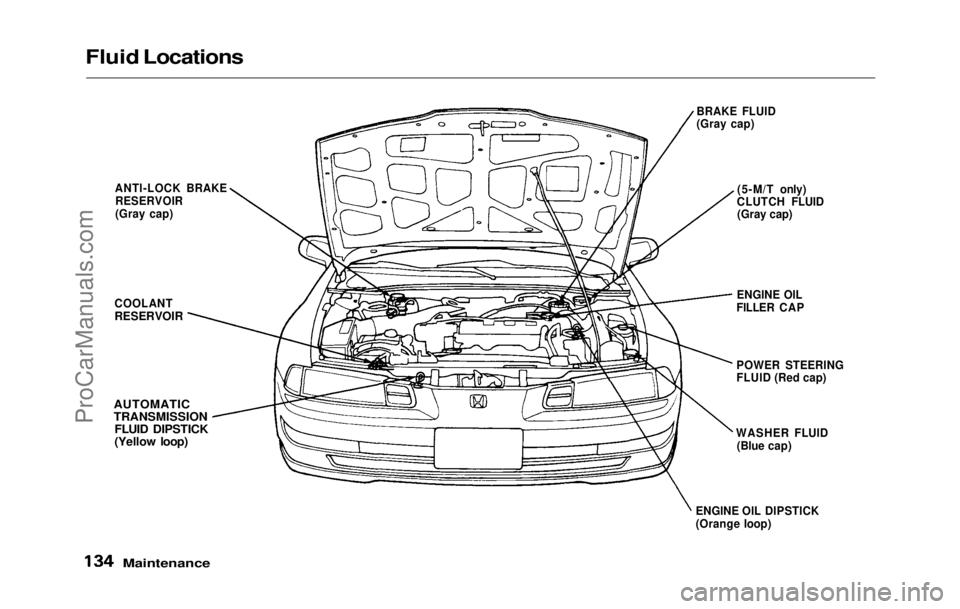
Fluid Locations
Maintenance
BRAKE FLUID
(Gray cap)
(5-M/T only)
CLUTCH FLUID (Gray cap)
ENGINE OIL
FILLER CAP
POWER STEERING
FLUID (Red cap)
ANTI-LOCK BRAKE
RESERVOIR
(Gray cap)
COOLANT
RESERVOIR
AUTOMATIC
TRANSMISSION FLUID DIPSTICK
(Yellow loop)
ENGINE OIL DIPSTICK
(Orange loop)WASHER FLUID
(Blue cap)ProCarManuals.comMain Menu Table of Contents s t
Page 138 of 225
Cooling System
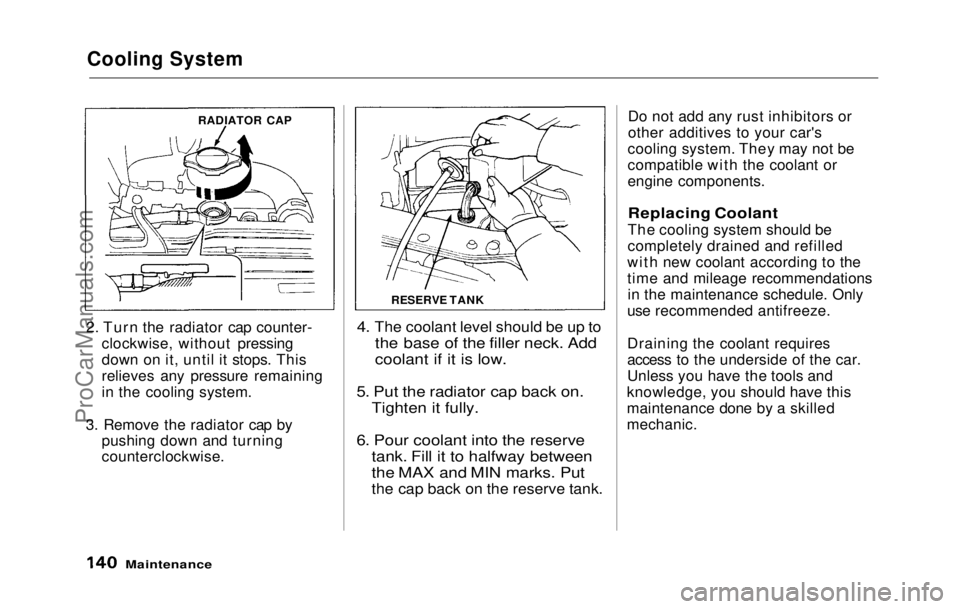
2. Turn the radiator cap counter- clockwise, without pressing
down on it, until it stops. This
relieves any pressure remaining
in the cooling system.
3. Remove the radiator cap by pushing down and turning
counterclockwise.
4. The coolant level should be up to
the base of the filler neck. Add
coolant if it is low.
5. Put
the radiator cap back on.
Tighten it fully.
6. Pour coolant into the reserve tank. Fill it to halfway between
the MAX and MIN marks. Put
the cap back on the reserve tank.
Do no t
add any rust inhibitors or
other additives to your car's
cooling system. They may not be
compatible with the coolant or
engine components.
Replacing Coolant
The cooling system should be
completely drained and refilled
with new coolant according to the
time and mileage recommendations in the maintenance schedule. Only
use recommended antifreeze.
Draining the coolant requires
access to the underside of the car.
Unless you have the tools and
knowledge, you should have this
maintenance done by a skilled
mechanic.
Maintenance
RADIATOR CAP
RESERVE TANKProCarManuals.comMain Menu Table of Contents s t
Page 139 of 225
Cooling System
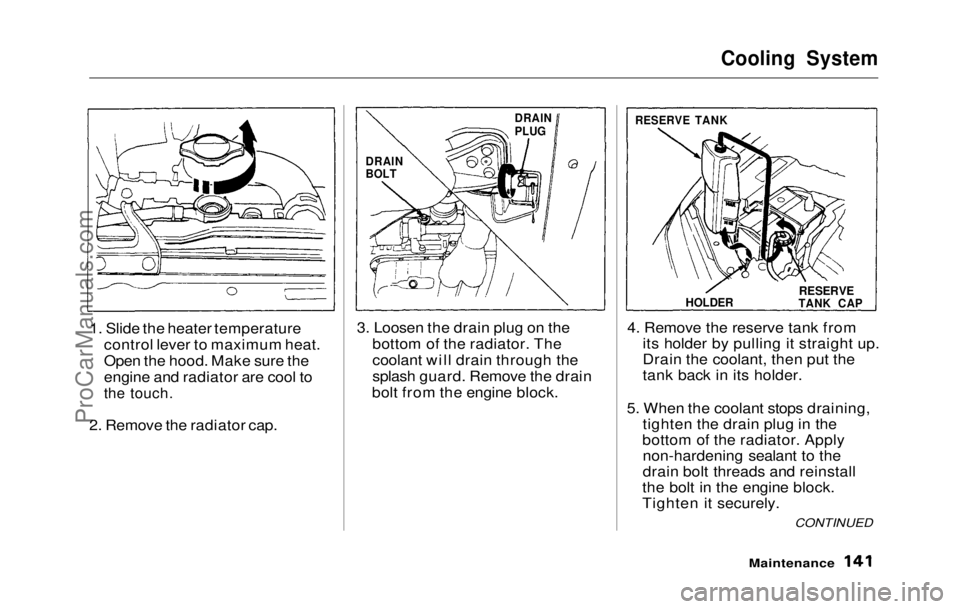
1. Slide the heater temperature control lever to maximum heat.
Open the hood. Make sure the
engine and radiator are cool to
the touch.
2. Remove the radiator cap. 3. Loosen the drain plug on the
bottom of the radiator. The
coolant will drain through the
splash guard. Remove the drain
bolt from the engine block. 4. Remove the reserve tank from
its holder by pulling it straight up.
Drain the coolant, then put the
tank back in its holder.
5. When the coolant stops draining, tighten the drain plug in the
bottom of the radiator. Apply non-hardening sealant to the
drain bolt threads and reinstall
the bolt in the engine block.
Tighten it securely.
Maintenance
DRAIN
PLUG
DRAIN
BOLT RESERVE TANK
HOLDER
RESERVE
TANK CAP
CONTINUEDProCarManuals.comMain Menu Table of Contents s t
Page 144 of 225
Brake and Clutch Fluid
Brake and Clutch Fluid
Check the fluid level in the reser-
voirs monthly. There are up to
three reservoirs, depending on
model. They are:
Brake fluid reservoir (all models) Clutch fluid reservoir
(5-speed transmission only)
ABS reservoir
(Si and Si 4WS models in U.S.
and SR and SR 4WS models in
Canada)
The brake fluid in the brake and
Anti-lock brake systems should be
replaced every 2 years or 48,000 km
(30,000 miles).
Brake System
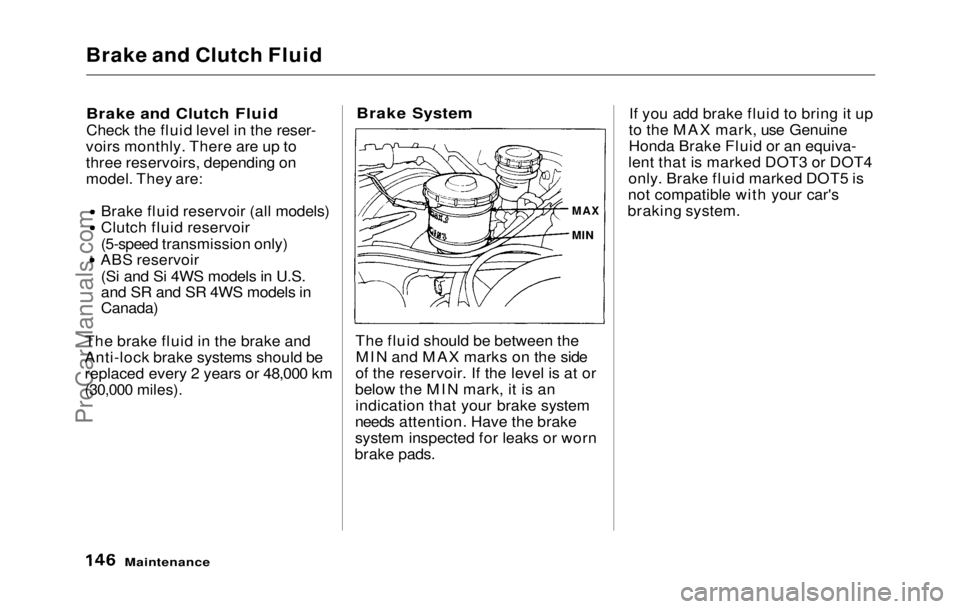
The fluid should be between the MIN and MAX marks on the side
of the reservoir. If the level is at or
below the MIN mark, it is an indication that your brake system
needs attention. Have the brake
system inspected for leaks or worn
brake pads. If you add brake fluid to bring it up
to the MAX mark, use Genuine
Honda Brake Fluid or an equiva-
lent that is marked DOT3 or DOT4
only. Brake fluid marked DOT5 is
not compatible with your car's
braking system.
Maintenance
MAX
MINProCarManuals.comMain Menu Table of Contents s t
Page 145 of 225
Brake and Clutch Fluid
Anti-lock Brake System
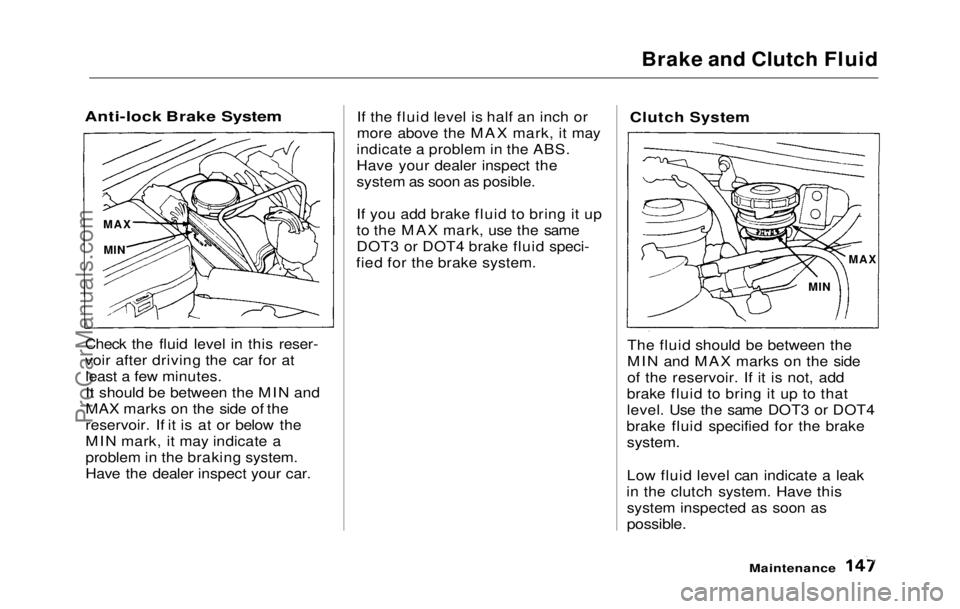
Check the fluid level in this reser-
voir after driving the car for atleast a few minutes.
It should be between the MIN and
MAX marks on the side of the
reservoir. If it is at or below the
MIN mark, it may indicate a
problem in the braking system.
Have the dealer inspect your car. If the fluid level is half an inch or
more above the MAX mark, it may
indicate a problem in the ABS.
Have your dealer inspect the
system as soon as posible.
If you add brake fluid to bring it up
to the MAX mark, use the same
DOT3 or DOT4 brake fluid speci-
fied for the brake system.
Clutch System
The fluid should be between the
MIN and MAX marks on the side
of the reservoir. If it is not, add
brake fluid to bring it up to that
level. Use the same DOT3 or DOT4
brake fluid specified for the brake
system.
Low fluid level can indicate a leak
in the clutch system. Have this system inspected as soon as
possible.
Maintenance
MAX
MIN MAX
MINProCarManuals.comMain Menu Table of Contents s t
Page 153 of 225
Windshield Wipers
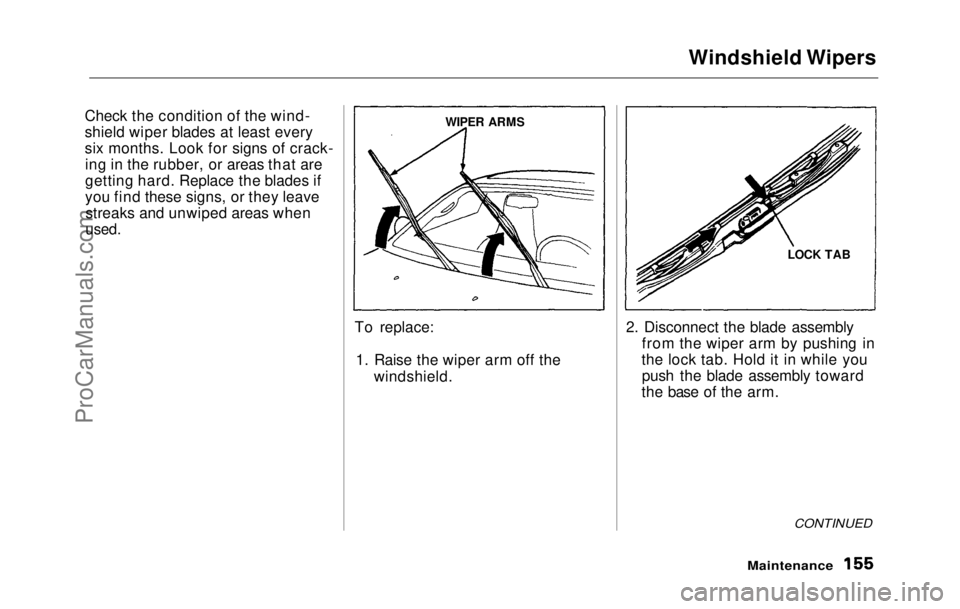
Check the condition of the wind-
shield wiper blades at least every
six months. Look for signs of crack- ing in the rubber, or areas that are
getting hard. Replace the blades if
you find these signs, or they leavestreaks and unwiped areas when
used.
To replace:1. Raise the wiper arm off the windshield. 2. Disconnect the blade assembly
from the wiper arm by pushing in
the lock tab. Hold it in while you push the blade assembly toward
the base of the arm.
CONTINUED
Maintenance
WIPER ARMS
LOCK TABProCarManuals.comMain Menu Table of Contents s t
Page 154 of 225
Windshield Wipers
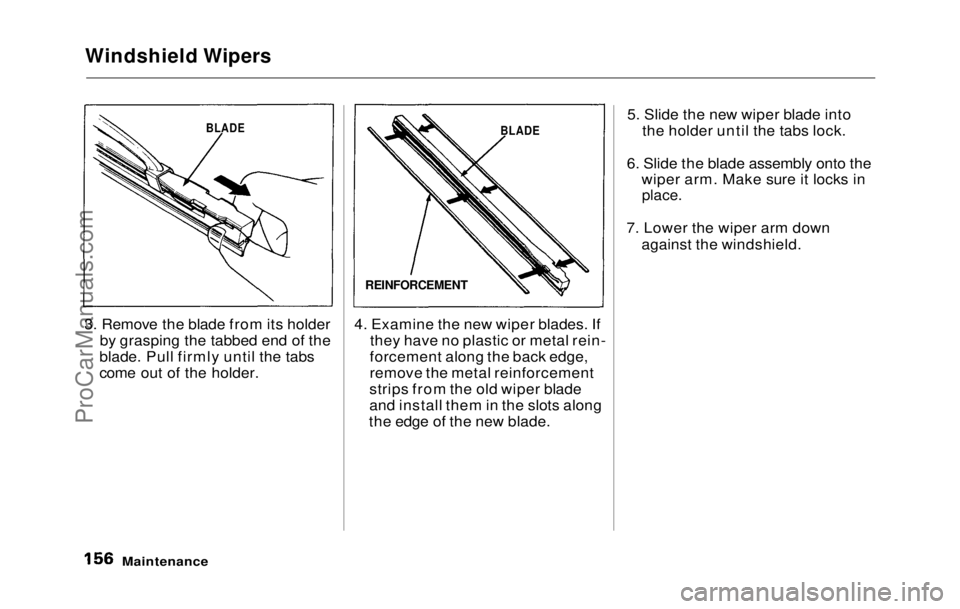
3. Remove the blade from its holder by grasping the tabbed end of the
blade. Pull firmly until the tabs
come out of the holder. 4. Examine the new wiper blades. If
they have no plastic or metal rein-
forcement along the back edge,
remove the metal reinforcement
strips from the old wiper blade
and install them in the slots along
the edge of the new blade. 5. Slide the new wiper blade into
the holder until the tabs lock.
6. Slide the blade assembly onto the wiper arm. Make sure it locks in
place.
7. Lower the wiper arm down against the windshield.
Maintenance
BLADE
REINFORCEMENT
BLADEProCarManuals.comMain Menu Table of Contents s t