check HONDA RIDGELINE 2017 2.G Owner's Guide
[x] Cancel search | Manufacturer: HONDA, Model Year: 2017, Model line: RIDGELINE, Model: HONDA RIDGELINE 2017 2.GPages: 606, PDF Size: 13.21 MB
Page 86 of 606
85
uuIndicators u
Continued
Instrument Panel
IndicatorNameOn/BlinkingExplanationMessage
Blind spot
information (BSI)
Indicator
*
●Comes on for a few seconds
when you set the power mode to
ON, then goes off.
●Stays on while BSI is turned off.
—
●Comes on when mud, snow, or
ice accumulates in the vicinity of
sensor.●Comes on while driving - Remove the
obstacle in the vicinity of sensor.
2 Blind spot information (BSI) System*
P. 470
●Comes on if there is a problem
with the system.●Comes on while driving - Have your
vehicle checked by a dealer.
ECON Mode
Indicator
●Comes on when you press the
ECON button.
2ECON Button P. 428
* Not available on all models
Page 87 of 606
86
uuIndicators u
Instrument Panel
IndicatorNameOn/BlinkingExplanationMessage
Collision
Mitigation Braking
System
TM
(CMBSTM)
Indicator*
●Comes on for a few seconds
when you set the power mode to
ON, then goes off.
●Comes on when you deactivate
the CMBSTM. A multi-information
display message appears for five
seconds.
●Comes on if there is a problem
with the CMBSTM.
●Stays on constantly without the CMBSTM
off - Have your vehicle checked by a dealer.
2Collision Mitigation Braking SystemTM
(CMBSTM)* P. 478
* Not available on all models
Page 88 of 606
87
uuIndicators u
Continued
Instrument Panel
IndicatorNameOn/BlinkingExplanationMessage
Collision
Mitigation Braking
System
TM
(CMBSTM)
Indicator*
●Comes on when the CMBSTM
system shuts itself off.●Stays on - The area around the camera is
blocked by dirt, mud, etc. Stop your vehicle in
a safe place, and wipe it off with a soft cloth.
2 Front Sensor Camera* P. 434
●When the radar sensor gets dirty, stop your
vehicle in a safe place, and wipe off dirt using
a soft cloth.
●Have your vehicle checked by a dealer if the
message does not disappear even after you
clean the sensor cover.
2Collision Mitigation Braking SystemTM
(CMBSTM)* P. 478
●Stays on - The temperature inside the
camera is too high. Use the climate control
system
*/heating and cooling system* to cool
down the camera. The system activates when
the temperature inside the camera cools
down.
2 Front Sensor Camera* P. 434
* Not available on all models
Page 91 of 606
90
uuIndicators uMulti-Information Display Warn ing and Information Messages
Instrument Panel
MessageConditionExplanation
●Appears when there is a problem with the sensor on the
battery.●Have your vehicle checked by a dealer.
2Checking the Battery P. 540
●Appears along with the battery charging system
indicator when the battery is not charging.●Turn off the climate control system*/heating and cooling
system* and rear defogger to reduce electricity
consumption.
2 If the Charging System Indicator Comes On P. 571
●Appears when the scheduled maintenance is due soon.●Consequently, Maintenance Due Now and
Maintenance Past Due follow.2Maintenance Minder Messages on the Multi-
Information Display P. 508
●Appears when the engine coolant temperature gets
abnormally high.
2Overheating P. 569
* Not available on all models
Page 92 of 606
91
uuIndicators uMulti-Information Display Warning and Information Messages
Continued
Instrument Panel
MessageConditionExplanation
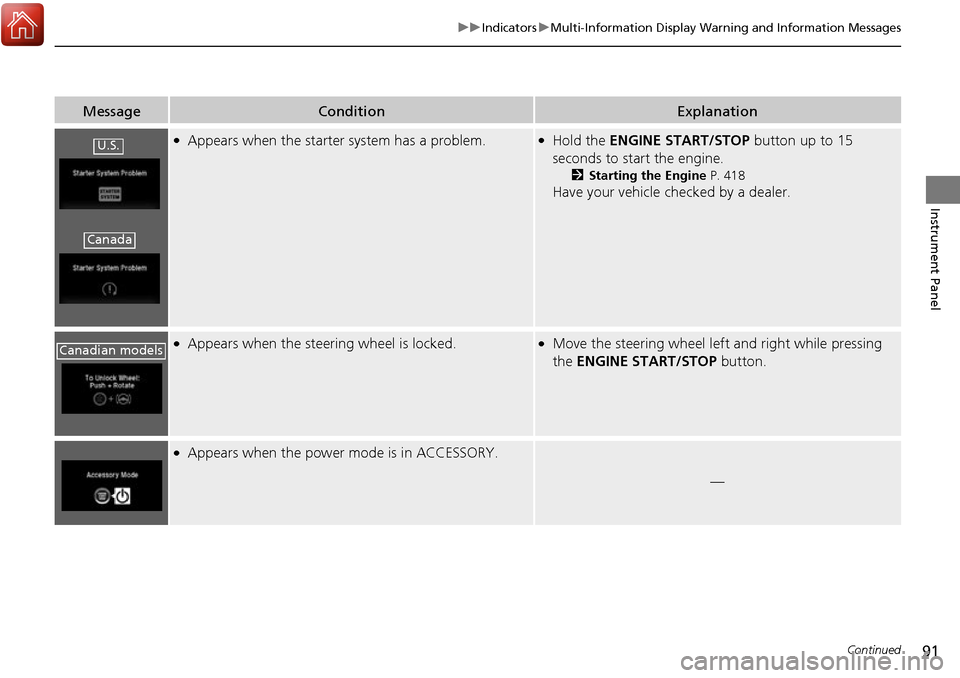
●Appears when the starter system has a problem.●Hold the ENGINE START/STOP button up to 15
seconds to start the engine.
2 Starting the Engine P. 418
Have your vehicle checked by a dealer.
●Appears when the steering wheel is locked.●Move the steering wheel left and right while pressing
the ENGINE START/STOP button.
●Appears when the power mode is in ACCESSORY.
—
U.S.
Canada
Canadian models
Page 94 of 606
93
uuIndicators uMulti-Information Display Warning and Information Messages
Continued
Instrument Panel
MessageConditionExplanation
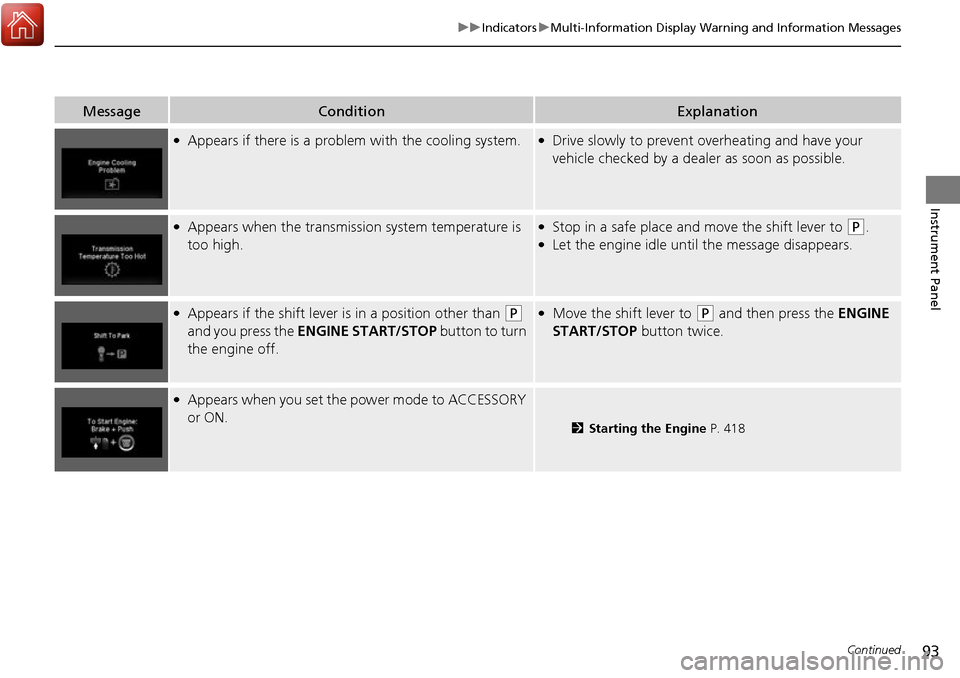
●Appears if there is a problem with the cooling system.●Drive slowly to prevent overheating and have your
vehicle checked by a dealer as soon as possible.
●Appears when the transmission system temperature is
too high.●Stop in a safe place and move the shift lever to (P.●Let the engine idle until the message disappears.
●Appears if the shift lever is in a position other than (P
and you press the ENGINE START/STOP button to turn
the engine off. ●Move the shift lever to (P and then press the ENGINE
START/STOP button twice.
●Appears when you set the power mode to ACCESSORY
or ON.
2 Starting the Engine P. 418
Page 96 of 606
95
uuIndicators uMulti-Information Display Warning and Information Messages
Continued
Instrument Panel
MessageConditionExplanation
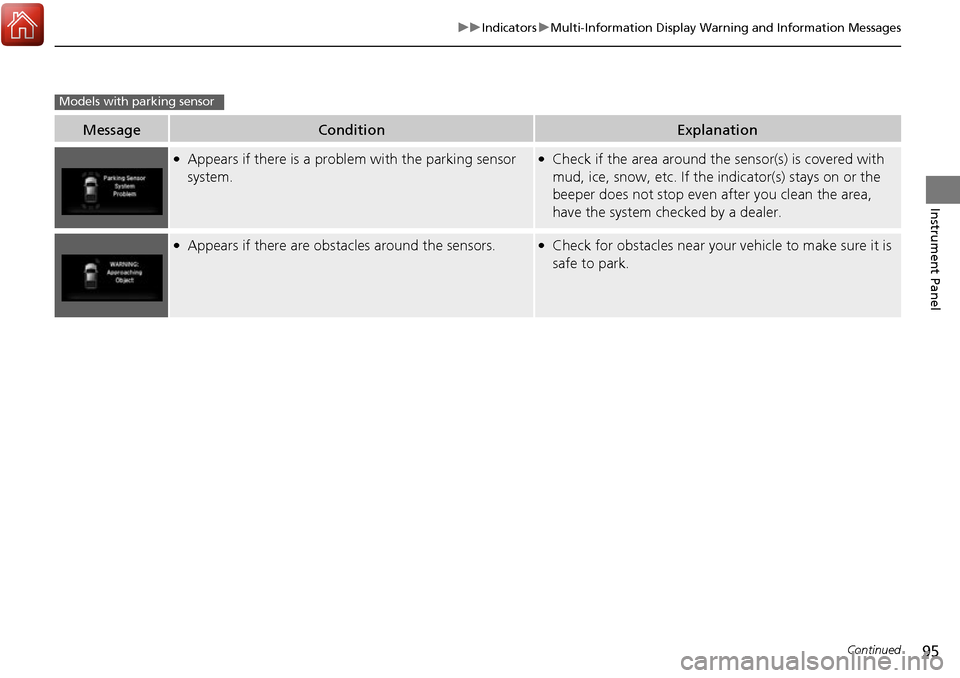
●Appears if there is a problem with the parking sensor
system.●Check if the area around the sensor(s) is covered with
mud, ice, snow, etc. If the indicator(s) stays on or the
beeper does not stop even after you clean the area,
have the system checked by a dealer.
●Appears if there are obstacles around the sensors.●Check for obstacles near your vehicle to make sure it is
safe to park.
Models with parking sensor
Page 100 of 606
99
uuIndicators uMulti-Information Display Warning and Information Messages
Continued
Instrument Panel
MessageConditionExplanation
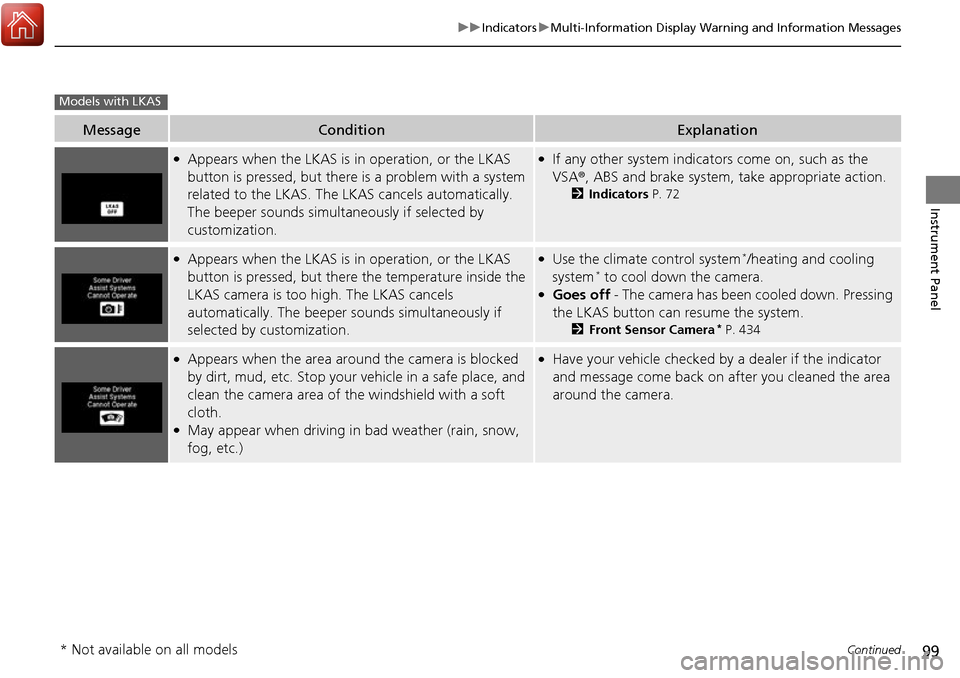
●Appears when the LKAS is in operation, or the LKAS
button is pressed, but there is a problem with a system
related to the LKAS. The LKAS cancels automatically.
The beeper sounds simultaneously if selected by
customization.●If any other system indicators come on, such as the
VSA ®, ABS and brake system, take appropriate action.
2Indicators P. 72
●Appears when the LKAS is in operation, or the LKAS
button is pressed, but there the temperature inside the
LKAS camera is too high. The LKAS cancels
automatically. The beeper sounds simultaneously if
selected by customization.●Use the climate control system*/heating and cooling
system* to cool down the camera.●Goes off - The camera has been cooled down. Pressing
the LKAS button can resume the system.
2 Front Sensor Camera* P. 434
●Appears when the area arou nd the camera is blocked
by dirt, mud, etc. Stop your vehicle in a safe place, and
clean the camera area of the windshield with a soft
cloth.
●May appear when driving in bad weather (rain, snow,
fog, etc.)
●Have your vehicle checked by a dealer if the indicator
and message come back on after you cleaned the area
around the camera.
Models with LKAS
* Not available on all models
Page 101 of 606
100
uuIndicators uMulti-Information Display Warn ing and Information Messages
Instrument Panel
MessageConditionExplanation
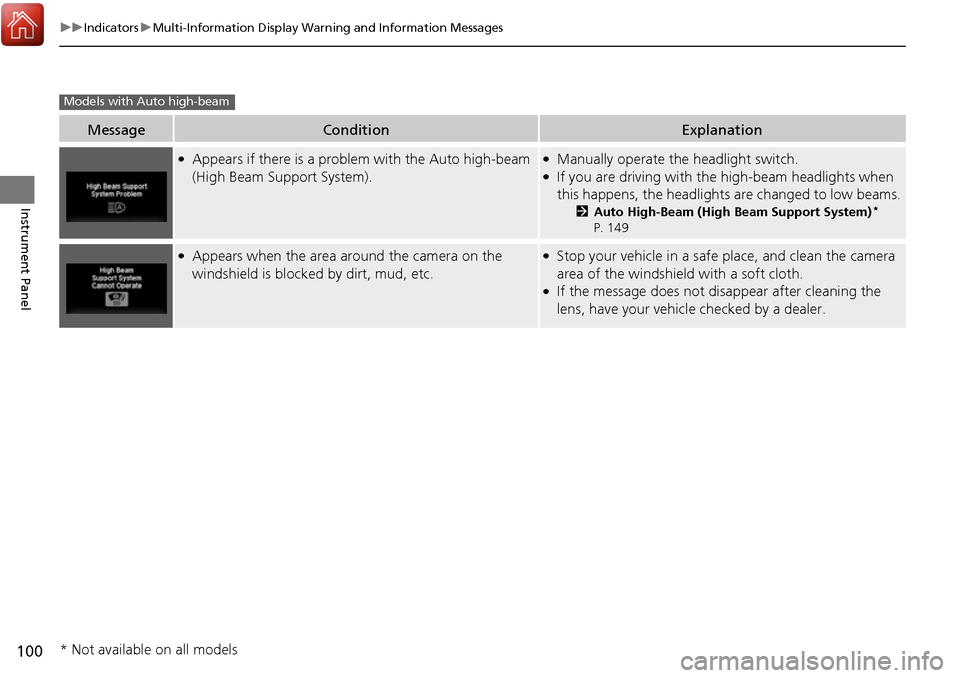
●Appears if there is a problem with the Auto high-beam
(High Beam Support System).●Manually operate the headlight switch.●If you are driving with the high-beam headlights when
this happens, the headlight s are changed to low beams.
2Auto High-Beam (High Beam Support System)*
P. 149
●Appears when the area around the camera on the
windshield is blocked by dirt, mud, etc.●Stop your vehicle in a safe place, and clean the camera
area of the windshield with a soft cloth.
●If the message does not disappear after cleaning the
lens, have your vehicl e checked by a dealer.
Models with Auto high-beam
* Not available on all models
Page 117 of 606
uuLocking and Unlocking the Doors uLocking/Unlocking the Doors from the Outside
116
Controls
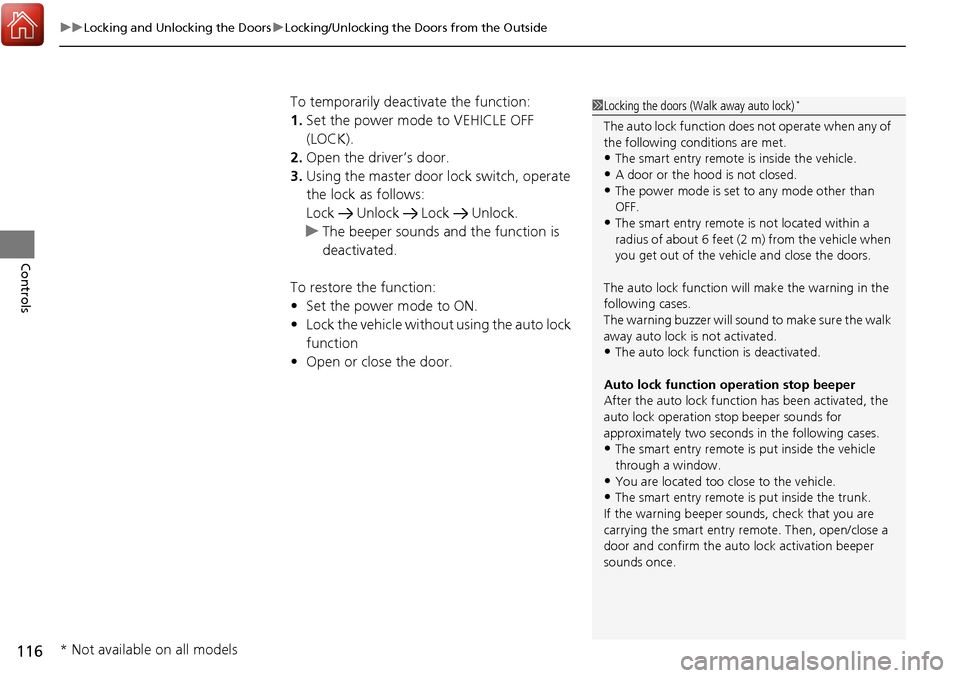
To temporarily deactivate the function:
1. Set the power mode to VEHICLE OFF
(LOCK).
2. Open the driver’s door.
3. Using the master door lock switch, operate
the lock as follows:
Lock Unlock Lock Unlock.
u The beeper sounds and the function is
deactivated.
To restore the function:
• Set the power mode to ON.
• Lock the vehicle without using the auto lock
function
• Open or close the door.1Locking the doors (Walk away auto lock)*
The auto lock function does not operate when any of
the following conditions are met.
•The smart entry remote is inside the vehicle.
•A door or the hood is not closed.
•The power mode is set to any mode other than
OFF.
•The smart entry remote is not located within a
radius of about 6 feet (2 m) from the vehicle when
you get out of the vehicle and close the doors.
The auto lock function will make the warning in the
following cases.
The warning buzzer will sound to make sure the walk
away auto lock is not activated.
•The auto lock func tion is deactivated.
Auto lock function operation stop beeper
After the auto lock function has been activated, the
auto lock operation stop beeper sounds for
approximately two seconds in the following cases.
•The smart entry remote is put inside the vehicle
through a window.
•You are located too close to the vehicle.•The smart entry remote is put inside the trunk.
If the warning beeper sounds, check that you are
carrying the smart entry remote. Then, open/close a
door and confirm the auto lock activation beeper
sounds once.
* Not available on all models