change Hyundai Azera 2017 Owner's Guide
[x] Cancel search | Manufacturer: HYUNDAI, Model Year: 2017, Model line: Azera, Model: Hyundai Azera 2017Pages: 520, PDF Size: 16.33 MB
Page 132 of 520
453
Features of your vehicle
Reprogramming a single
HomeLink®button
To program a device to HomeLink®
using a HomeLink®button previously
trained, follow these steps:
1. Press and hold the desired HomeLink
®button. DO NOT
release the button.
2. The indicator light will begin to flash after 20 seconds. Without
releasing the HomeLink
®button,
proceed with "Programming" step
2.
For questions or comments, contact
HomeLink
®at www.homelink.comor
1-800-355-3515. Erasing HomeLink
®buttons
Individual buttons cannot be erased.
However, to erase all three pro-
grammed buttons:
1. Press and hold the two outer HomeLink
®buttons until the indi-
cator light begins to flash after 10
seconds.
2. Release both buttons. Do not hold for longer than 20 seconds.
The Integrated HomeLink
®Wireless
Control System is now in the training
(learn) mode and can be pro-
grammed at any time following the
appropriate steps in the Programming
sections above. FCC ID: NZLTLMHL4
IC: 4112A-TLMHL4
This device complies with Part 15
of the FCC Rules.
Operation is subject to the following
two conditions:
1. This device may not cause harm-
ful interference, and
2. This device must accept any inter- ference received, including inter-
ference that may cause undesired
operation.
WARNING
The transceiver has been tested
and complies with FCC and
Industry Canada rules. Changes
or modifications not expressly
approved by the party responsi-
ble for compliance could void
the user's authority to operate
the device.
Page 141 of 520
Features of your vehicle
62
4
LCD display control
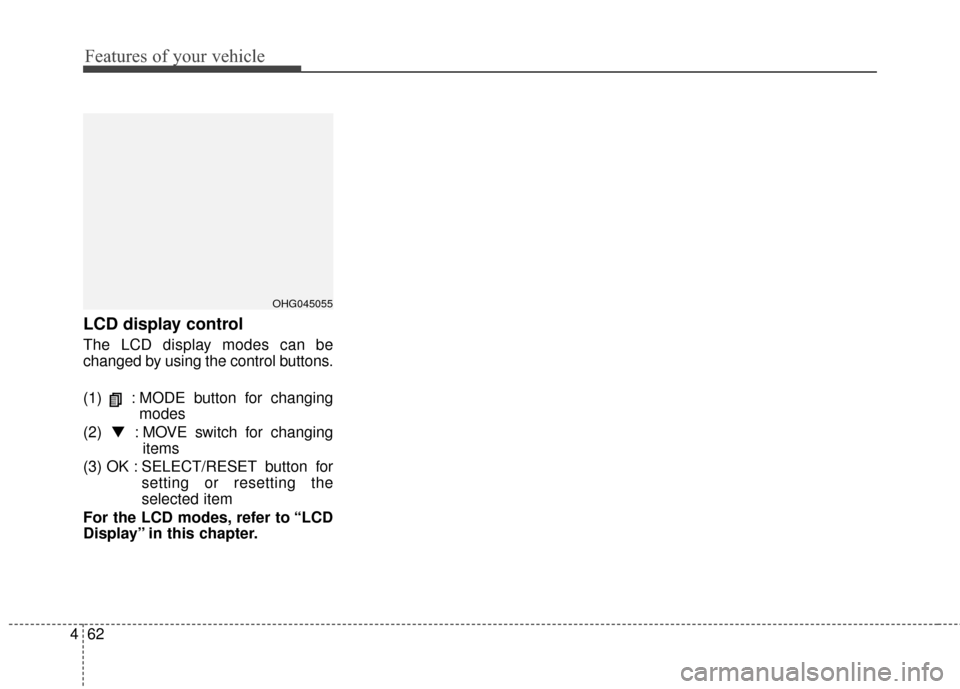
The LCD display modes can be
changed by using the control buttons.
(1) : MODE button for changing
modes
(2) ▼ : MOVE switch for changing
items
(3) OK : SELECT/RESET button for setting or resetting the
selected item
For the LCD modes, refer to “LCD
Display” in this chapter.
OHG045055
Page 142 of 520
463
Features of your vehicle
LCD modes
LCD DISPLAY
For controlling the LCD modes, refer to "LCD Display Control" in this chapter.
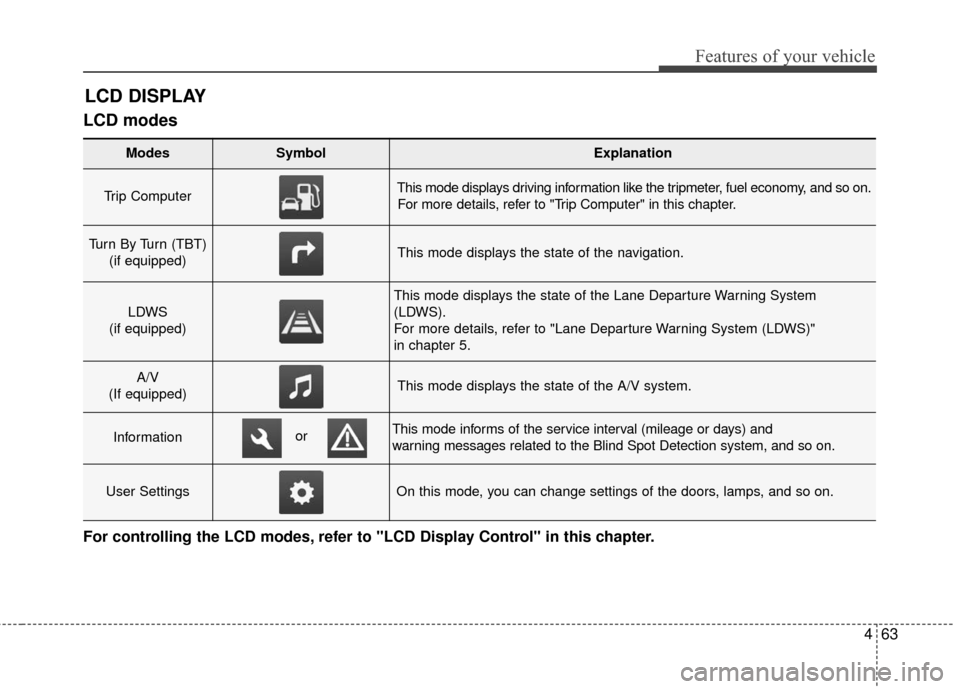
Modes SymbolExplanation
Trip Computer This mode displays driving information like the tripmeter, fuel economy, and so on.For more details, refer to "Trip Computer" in this chapter.
Turn By Turn (TBT) (if equipped)This mode displays the state of the navigation.
LDWS
(if equipped)
This mode displays the state of the Lane Departure Warning System
(LDWS).
For more details, refer to "Lane Departure Warning System (LDWS)"
in chapter 5.
A/V
(If equipped)This mode displays the state of the A/V system.
InformationThis mode informs of the service interval (mileage or days) and
warning messages related to the Blind Spot Detection system, and so on.
User SettingsOn this mode, you can change settings of the doors, lamps, and so on.
or
Page 143 of 520
Features of your vehicle
64
4
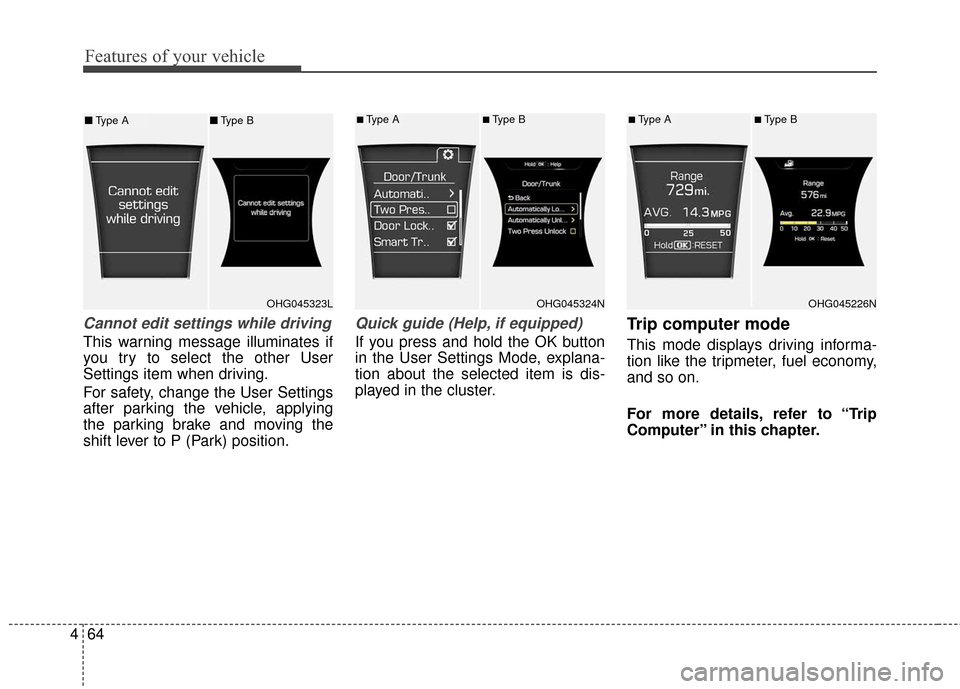
Cannot edit settings while driving
This warning message illuminates if
you try to select the other User
Settings item when driving.
For safety, change the User Settings
after parking the vehicle, applying
the parking brake and moving the
shift lever to P (Park) position.
Quick guide (Help, if equipped)
If you press and hold the OK button
in the User Settings Mode, explana-
tion about the selected item is dis-
played in the cluster.
Trip computer mode
This mode displays driving informa-
tion like the tripmeter, fuel economy,
and so on.
For more details, refer to “Trip
Computer” in this chapter.
OHG045323LOHG045324N
■Type A■Type B
OHG045226N
■Type A■Type B■ Type A ■Type B
Page 147 of 520
Features of your vehicle
68
4
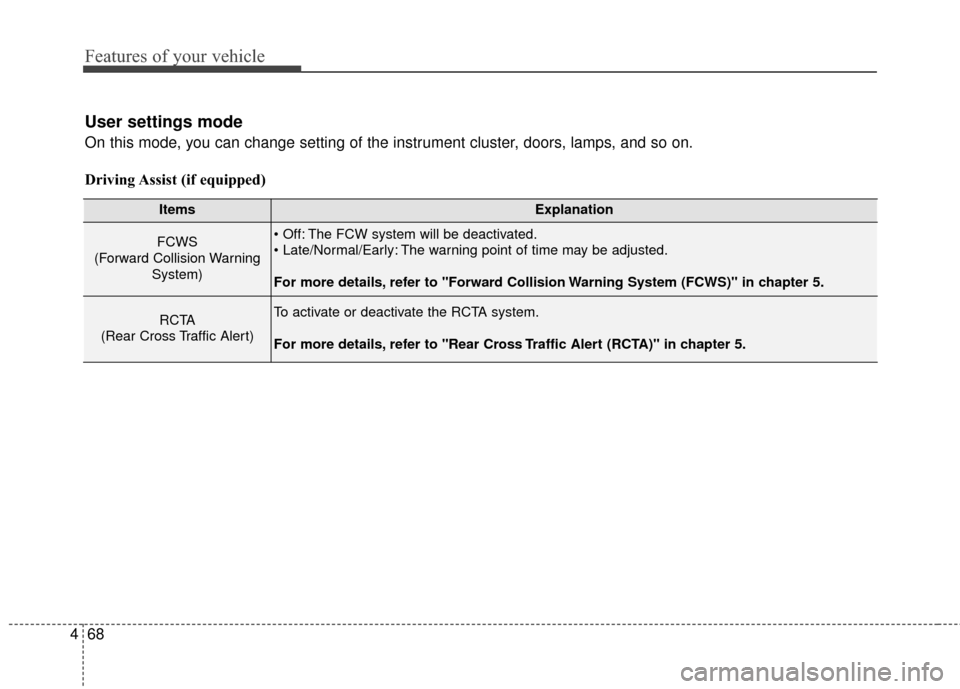
User settings mode
On this mode, you can change setting of the instrument cluster, doors, lamps, and so on.
Driving Assist (if equipped)
ItemsExplanation
FCWS
(Forward Collision Warning System) The FCW system will be deactivated.
The warning point of time may be adjusted.
For more details, refer to "Forward Collision Warning System (FCWS)" in chapter 5.
RCTA
(Rear Cross Traffic Alert)To activate or deactivate the RCTA system.
For more details, refer to "Rear Cross Traffic Alert (RCTA)" in chapter 5.
Page 149 of 520
Features of your vehicle
70
4
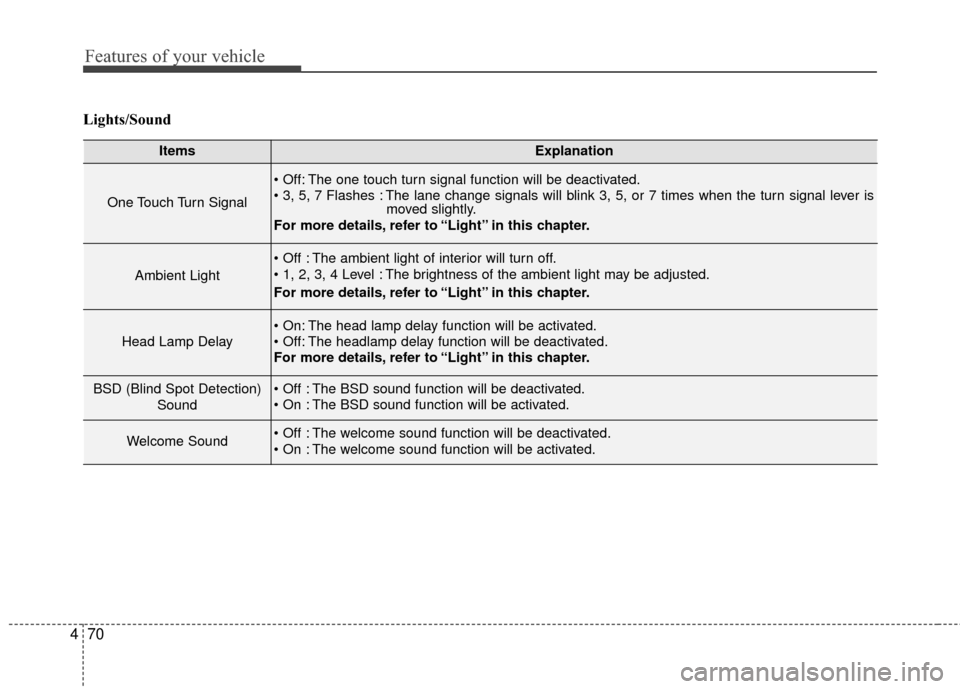
Lights/Sound
ItemsExplanation
One Touch Turn Signal
The one touch turn signal function will be deactivated.
The lane change signals will blink 3, 5, or 7 times when the turn signal lever is
moved slightly.
For more details, refer to “Light” in this chapter.
Ambient Light
The ambient light of interior will turn off.
The brightness of the ambient light may be adjusted.
For more details, refer to “Light” in this chapter.
Head Lamp Delay
The head lamp delay function will be activated.
The headlamp delay function will be deactivated.
For more details, refer to “Light” in this chapter.
BSD (Blind Spot Detection)
Sound The BSD sound function will be deactivated.
The BSD sound function will be activated.
Welcome Sound The welcome sound function will be deactivated.
The welcome sound function will be activated.
Page 150 of 520
471
Features of your vehicle
ItemsExplanation
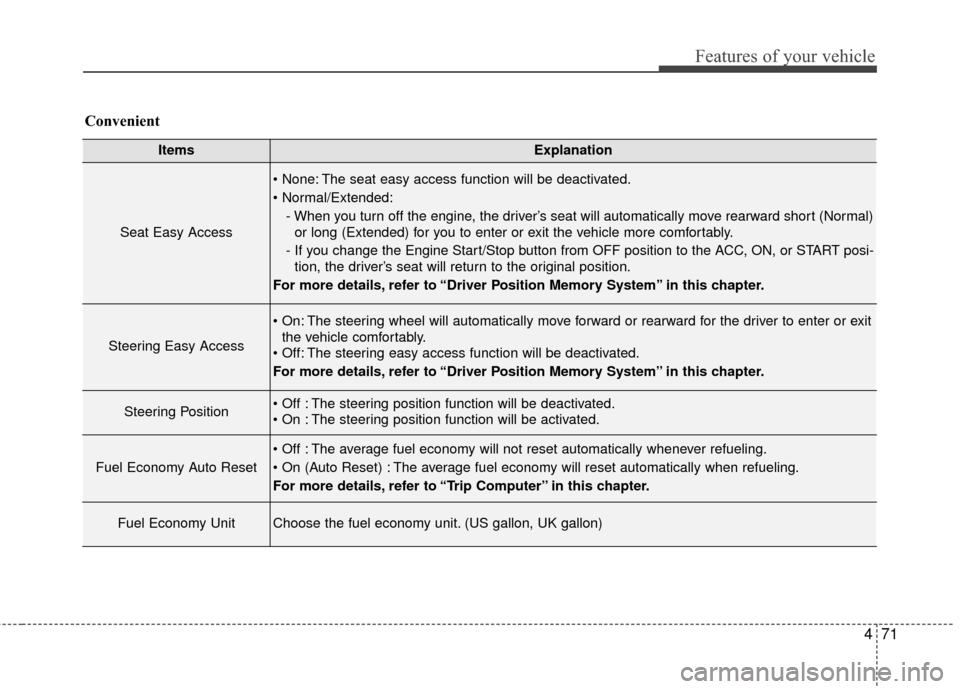
Seat Easy Access
The seat easy access function will be deactivated.
- When you turn off the engine, the driver’s seat will automatically move rearward short (Normal)or long (Extended) for you to enter or exit the vehicle more comfortably.
- If you change the Engine Start/Stop button from OFF position to the ACC, ON, or START posi- tion, the driver’s seat will return to the original position.
For more details, refer to “Driver Position Memory System” in this chapter.
Steering Easy Access
The steering wheel will automatically move forward or rearward for the driver to enter or exit the vehicle comfortably.
The steering easy access function will be deactivated.
For more details, refer to “Driver Position Memory System” in this chapter.
Steering Position The steering position function will be deactivated.
The steering position function will be activated.
Fuel Economy Auto Reset
The average fuel economy will not reset automatically whenever refueling.
The average fuel economy will reset automatically when refueling.
For more details, refer to “Trip Computer” in this chapter.
Fuel Economy UnitChoose the fuel economy unit. (US gallon, UK gallon)
Convenient
Page 152 of 520
473
Features of your vehicle
TRIP COMPUTER
Overview
Description
The trip computer is a microcomput-
er-controlled driver information sys-
tem that displays information related
to driving.
✽ ✽NOTICE
Some driving information stored in
the trip computer (for example
Average Vehicle Speed) resets if the
battery is disconnected.
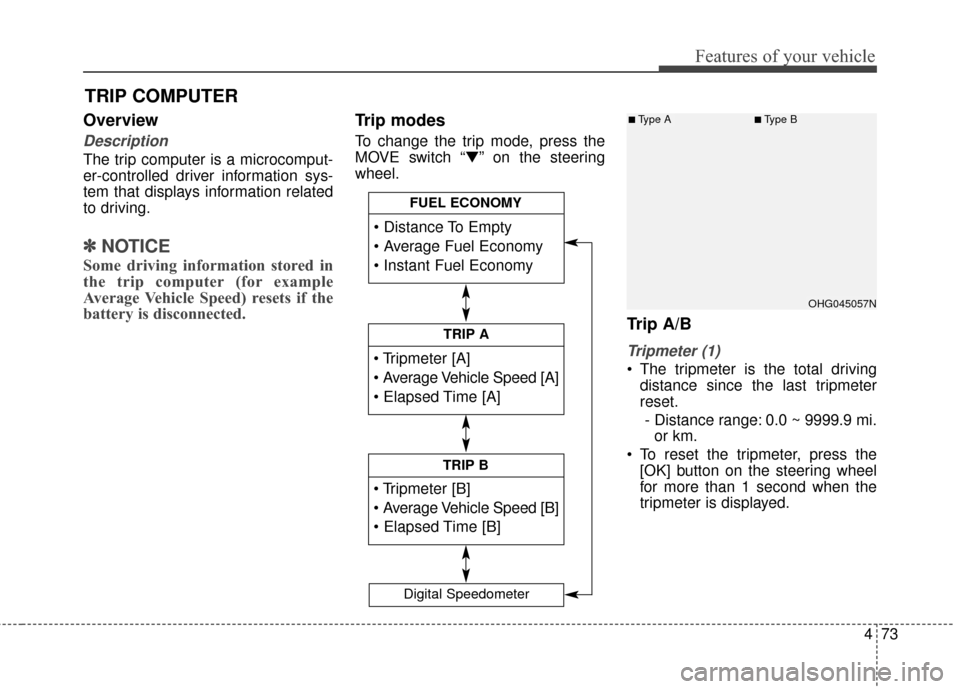
Trip modes
To change the trip mode, press the
MOVE switch “▼” on the steering
wheel.
Trip A/B
Tripmeter (1)
The tripmeter is the total driving
distance since the last tripmeter
reset.
- Distance range: 0.0 ~ 9999.9 mi. or km.
To reset the tripmeter, press the [OK] button on the steering wheel
for more than 1 second when the
tripmeter is displayed.
TRIP A
TRIP B
FUEL ECONOMY
Digital Speedometer
OHG045057N
■Type A■Type B
Page 162 of 520
483
Features of your vehicle
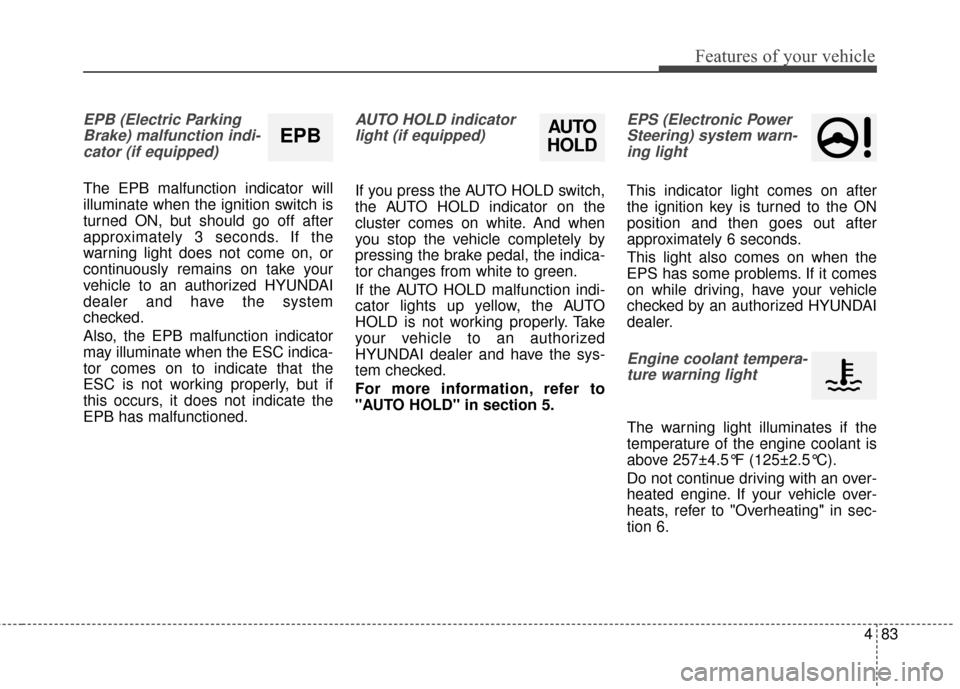
EPB (Electric ParkingBrake) malfunction indi-cator (if equipped)
The EPB malfunction indicator will
illuminate when the ignition switch is
turned ON, but should go off after
approximately 3 seconds. If the
warning light does not come on, or
continuously remains on take your
vehicle to an authorized HYUNDAI
dealer and have the system
checked.
Also, the EPB malfunction indicator
may illuminate when the ESC indica-
tor comes on to indicate that the
ESC is not working properly, but if
this occurs, it does not indicate the
EPB has malfunctioned.
AUTO HOLD indicatorlight (if equipped)
If you press the AUTO HOLD switch,
the AUTO HOLD indicator on the
cluster comes on white. And when
you stop the vehicle completely by
pressing the brake pedal, the indica-
tor changes from white to green.
If the AUTO HOLD malfunction indi-
cator lights up yellow, the AUTO
HOLD is not working properly. Take
your vehicle to an authorized
HYUNDAI dealer and have the sys-
tem checked.
For more information, refer to
"AUTO HOLD" in section 5.
EPS (Electronic PowerSteering) system warn-ing light
This indicator light comes on after
the ignition key is turned to the ON
position and then goes out after
approximately 6 seconds.
This light also comes on when the
EPS has some problems. If it comes
on while driving, have your vehicle
checked by an authorized HYUNDAI
dealer.
Engine coolant tempera-ture warning light
The warning light illuminates if the
temperature of the engine coolant is
above 257±4.5°F (125±2.5°C).
Do not continue driving with an over-
heated engine. If your vehicle over-
heats, refer to "Overheating" in sec-
tion 6.
EPBAUTO
HOLD
Page 167 of 520
Features of your vehicle
88
4
LCD display warning
(if equipped)
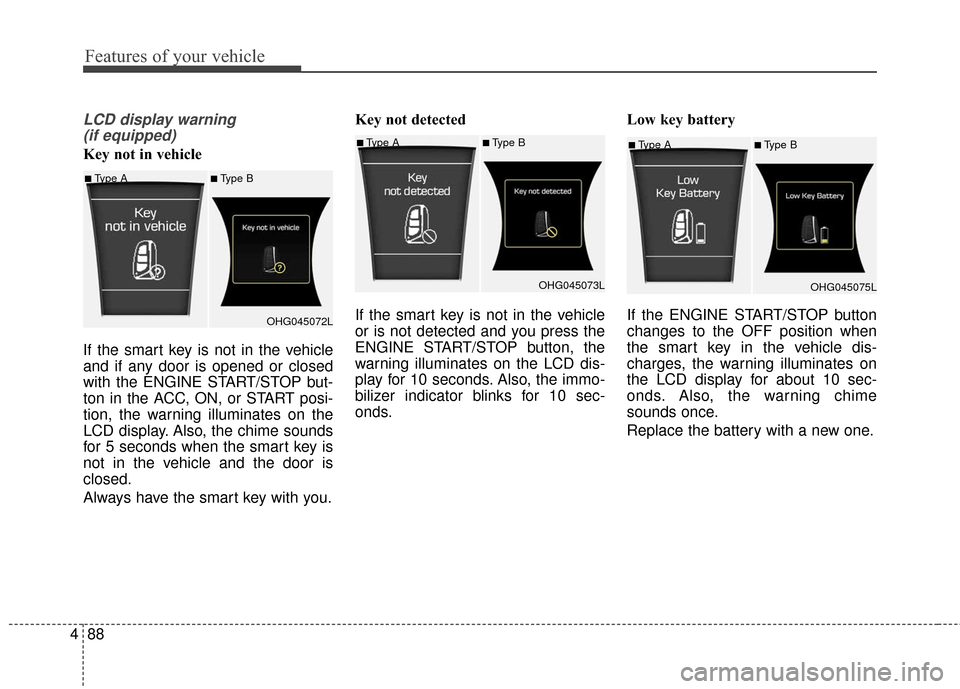
Key not in vehicle
If the smart key is not in the vehicle
and if any door is opened or closed
with the ENGINE START/STOP but-
ton in the ACC, ON, or START posi-
tion, the warning illuminates on the
LCD display. Also, the chime sounds
for 5 seconds when the smart key is
not in the vehicle and the door is
closed.
Always have the smart key with you. Key not detected
If the smart key is not in the vehicle
or is not detected and you press the
ENGINE START/STOP button, the
warning illuminates on the LCD dis-
play for 10 seconds. Also, the immo-
bilizer indicator blinks for 10 sec-
onds.
Low key battery
If the ENGINE START/STOP button
changes to the OFF position when
the smart key in the vehicle dis-
charges, the warning illuminates on
the LCD display for about 10 sec-
onds. Also, the warning chime
sounds once.
Replace the battery with a new one.■Type A■Type B
OHG045075L
■Type A■Type B
OHG045072L
■Type A■Type BOHG045073L