change Hyundai Azera 2017 Owner's Guide
[x] Cancel search | Manufacturer: HYUNDAI, Model Year: 2017, Model line: Azera, Model: Hyundai Azera 2017Pages: 520, PDF Size: 16.33 MB
Page 168 of 520
489
Features of your vehicle
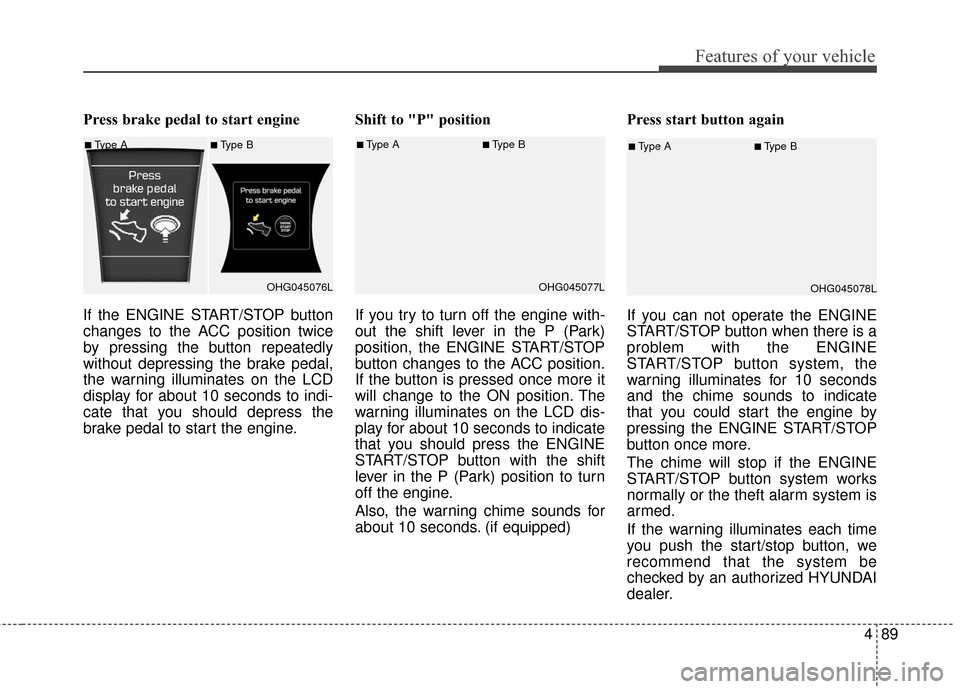
Press brake pedal to start engine
If the ENGINE START/STOP button
changes to the ACC position twice
by pressing the button repeatedly
without depressing the brake pedal,
the warning illuminates on the LCD
display for about 10 seconds to indi-
cate that you should depress the
brake pedal to start the engine.Shift to "P" position
If you try to turn off the engine with-
out the shift lever in the P (Park)
position, the ENGINE START/STOP
button changes to the ACC position.
If the button is pressed once more it
will change to the ON position. The
warning illuminates on the LCD dis-
play for about 10 seconds to indicate
that you should press the ENGINE
START/STOP button with the shift
lever in the P (Park) position to turn
off the engine.
Also, the warning chime sounds for
about 10 seconds. (if equipped)Press start button again
If you can not operate the ENGINE
START/STOP button when there is a
problem with the ENGINE
START/STOP button system, the
warning illuminates for 10 seconds
and the chime sounds to indicate
that you could start the engine by
pressing the ENGINE START/STOP
button once more.
The chime will stop if the ENGINE
START/STOP button system works
normally or the theft alarm system is
armed.
If the warning illuminates each time
you push the start/stop button, we
recommend that the system be
checked by an authorized HYUNDAI
dealer.
■Type A■Type B
OHG045076L■Type A■Type BOHG045077L■Type A■Type BOHG045078L
Page 184 of 520
4105
Features of your vehicle
The high beam switches to low beam
in the below conditions.
- When the Smart High Beam is off.
- When the light switch is not in theAUTO position.
- When the headlamp is detected from the on-coming vehicle.
- When the tail lamp is detected from the front vehicle.
- When the surrounding is bright enough high beams are not need-
ed.
- When streetlights or other lights are detected.
- When vehicle speed is below 22 mph (35 km/h).
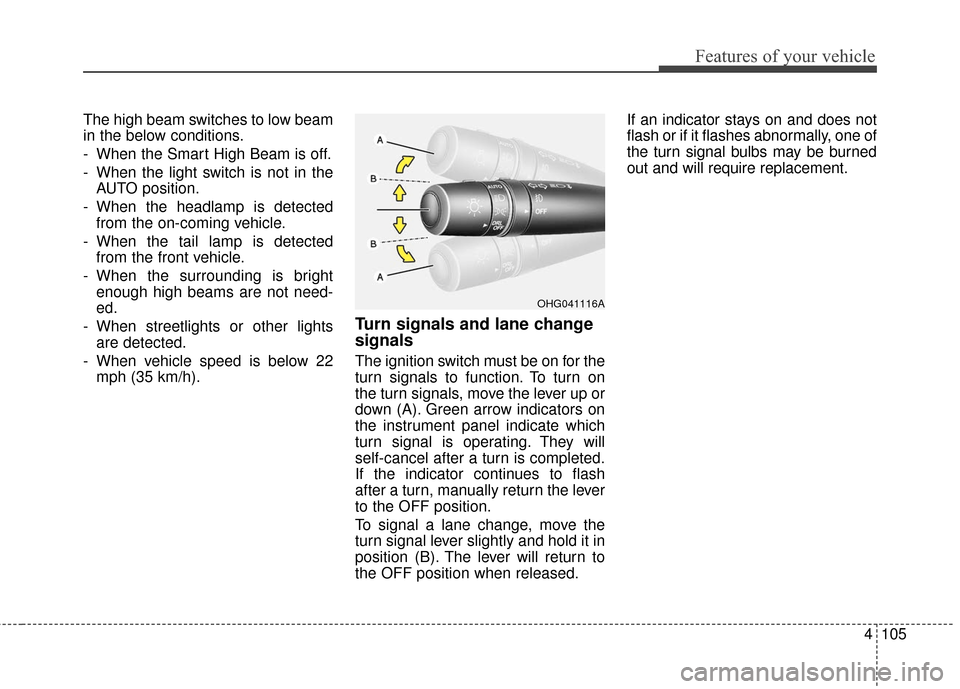
Turn signals and lane change
signals
The ignition switch must be on for the
turn signals to function. To turn on
the turn signals, move the lever up or
down (A). Green arrow indicators on
the instrument panel indicate which
turn signal is operating. They will
self-cancel after a turn is completed.
If the indicator continues to flash
after a turn, manually return the lever
to the OFF position.
To signal a lane change, move the
turn signal lever slightly and hold it in
position (B). The lever will return to
the OFF position when released. If an indicator stays on and does not
flash or if it flashes abnormally, one of
the turn signal bulbs may be burned
out and will require replacement.
OHG041116A
Page 185 of 520
Features of your vehicle
106
4
One-touch turn signal
To activate the one-touch turn signal
move the turn signal lever slightly
and then release it. The lane change
signals will blink 3, 5 or 7 times.
You can activate or deactivate the
One-touch turn signal function or
choose the number of blinking (3, 5,
or 7) from the User Settings Mode on
the LCD display.
✽ ✽
NOTICE
If an indicator flash is abnormally
quick or slow, a bulb may be burned
out or have a poor electrical connec-
tion in the circuit.
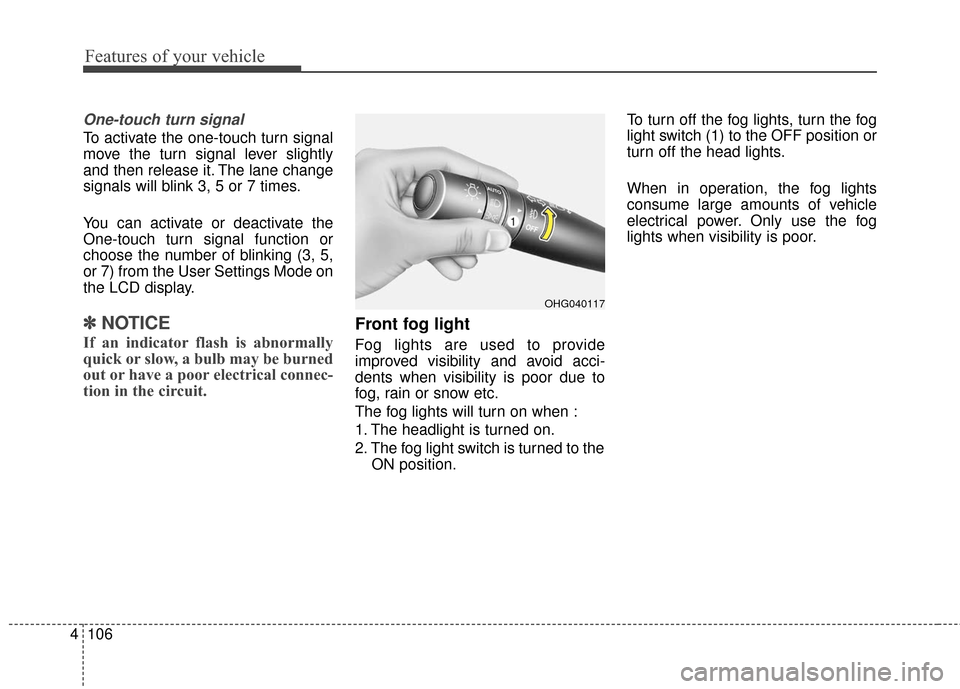
Front fog light
Fog lights are used to provide
improved visibility and avoid acci-
dents when visibility is poor due to
fog, rain or snow etc.
The fog lights will turn on when :
1. The headlight is turned on.
2. The fog light switch is turned to the
ON position. To turn off the fog lights, turn the fog
light switch (1) to the OFF position or
turn off the head lights.
When in operation, the fog lights
consume large amounts of vehicle
electrical power. Only use the fog
lights when visibility is poor.
OHG040117
Page 188 of 520
4109
Features of your vehicle
INTERIOR LIGHT
Automatic turn off function
(if equipped)
The interior lights automatically turn
off approximately 20 minutes after
the ignition switch is turned off.
With the theft alarm system, the inte-
rior lights automatically turns off
approximately 5 seconds after the
system is in the armed stage.
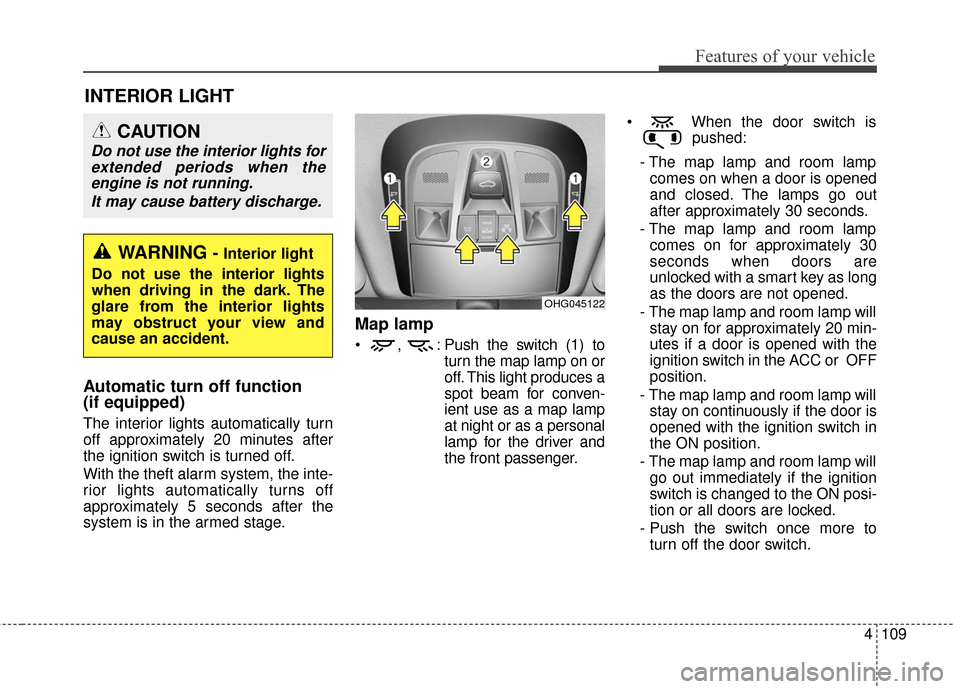
Map lamp
, : Push the switch (1) toturn the map lamp on or
off. This light produces a
spot beam for conven-
ient use as a map lamp
at night or as a personal
lamp for the driver and
the front passenger. When the door switch is
pushed:
- The map lamp and room lamp comes on when a door is opened
and closed. The lamps go out
after approximately 30 seconds.
- The map lamp and room lamp comes on for approximately 30
seconds when doors are
unlocked with a smart key as long
as the doors are not opened.
- The map lamp and room lamp will stay on for approximately 20 min-
utes if a door is opened with the
ignition switch in the ACC or OFF
position.
- The map lamp and room lamp will stay on continuously if the door is
opened with the ignition switch in
the ON position.
- The map lamp and room lamp will go out immediately if the ignition
switch is changed to the ON posi-
tion or all doors are locked.
- Push the switch once more to turn off the door switch.
OHG045122
WARNING - Interior light
Do not use the interior lights
when driving in the dark. The
glare from the interior lights
may obstruct your view and
cause an accident.
CAUTION
Do not use the interior lights for extended periods when theengine is not running.
It may cause battery discharge.
Page 197 of 520
Features of your vehicle
118
4
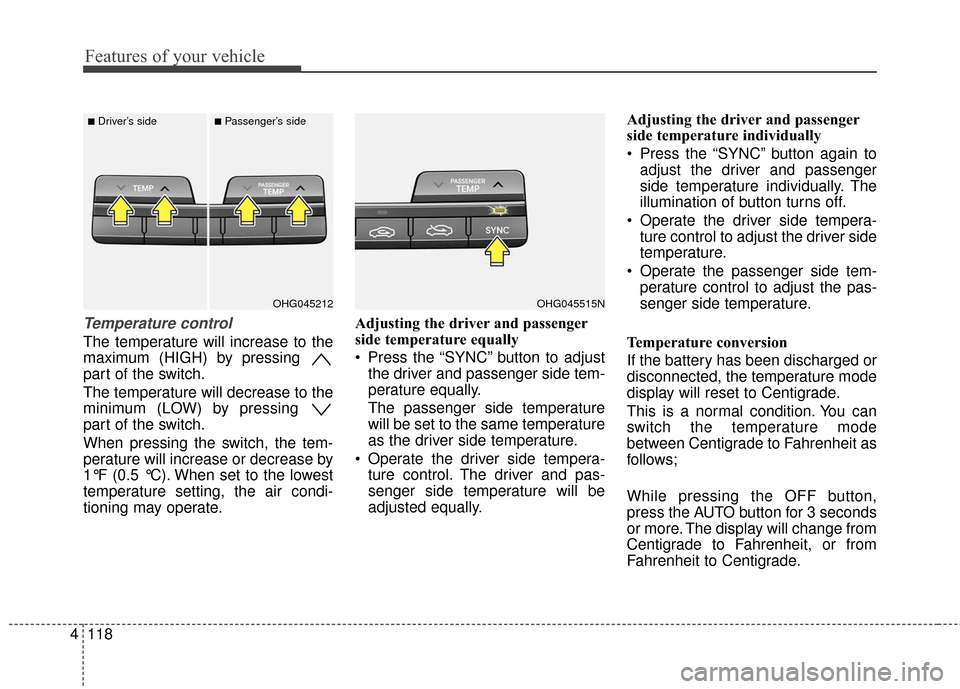
Temperature control
The temperature will increase to the
maximum (HIGH) by pressing
part of the switch.
The temperature will decrease to the
minimum (LOW) by pressing
part of the switch.
When pressing the switch, the tem-
perature will increase or decrease by
1°F (0.5 °C). When set to the lowest
temperature setting, the air condi-
tioning may operate. Adjusting the driver and passenger
side temperature equally
Press the “SYNC” button to adjust
the driver and passenger side tem-
perature equally.
The passenger side temperature
will be set to the same temperature
as the driver side temperature.
Operate the driver side tempera- ture control. The driver and pas-
senger side temperature will be
adjusted equally. Adjusting the driver and passenger
side temperature individually
Press the “SYNC” button again to
adjust the driver and passenger
side temperature individually. The
illumination of button turns off.
Operate the driver side tempera- ture control to adjust the driver side
temperature.
Operate the passenger side tem- perature control to adjust the pas-
senger side temperature.
Temperature conversion
If the battery has been discharged or
disconnected, the temperature mode
display will reset to Centigrade.
This is a normal condition. You can
switch the temperature mode
between Centigrade to Fahrenheit as
follows;
While pressing the OFF button,
press the AUTO button for 3 seconds
or more. The display will change from
Centigrade to Fahrenheit, or from
Fahrenheit to Centigrade.
OHG045515NOHG045212
■Driver’s side■Passenger’s side
Page 198 of 520

4119
Features of your vehicle
Air intake control
This is used to select the outside
(fresh) air position or recirculated air
position.
To change the air intake control posi-
tion, push the control button.Recirculated air position
With the recirculated airposition selected, air
from the passenger
compartment will be
drawn through the heat-
ing system and heated
or cooled according to
the function selected.
Outside (fresh) air position With the outside (fresh)
air position selected, air
enters the vehicle from
outside and is heated or
cooled according to the
function selected.
✽ ✽NOTICE
While driving at high speed with the
recirculation air position mode,
fresh air may automatically enter
the vehicle to provide ventilation of
the inside air.
WARNING
Continuous use of the climate
control system in the recircu-
lated air position can cause
drowsiness or sleepiness, and
loss of vehicle control. Set the
air intake control to the outside
(fresh) air position as much as
possible while driving.
Continued climate control system operation in the recir-
culated air position may allow
humidity to increase inside
vehicle which may fog the
glass and obscure visibility.
Do not sleep in a vehicle with the air conditioning or heating
system on. It may cause seri-
ous harm or death due to a
drop in the oxygen level
and/or body temperature.
OHG045219
Page 199 of 520
Features of your vehicle
120
4
It should be noted that prolonged
operation of the heating in recirculat-
ed air position will cause fogging of
the windshield and side windows and
the air within the passenger com-
partment will become stale.
In addition, prolonged use of the air
conditioning with the recirculated air
position selected, will result in exces-
sively dry air in the passenger com-
partment.
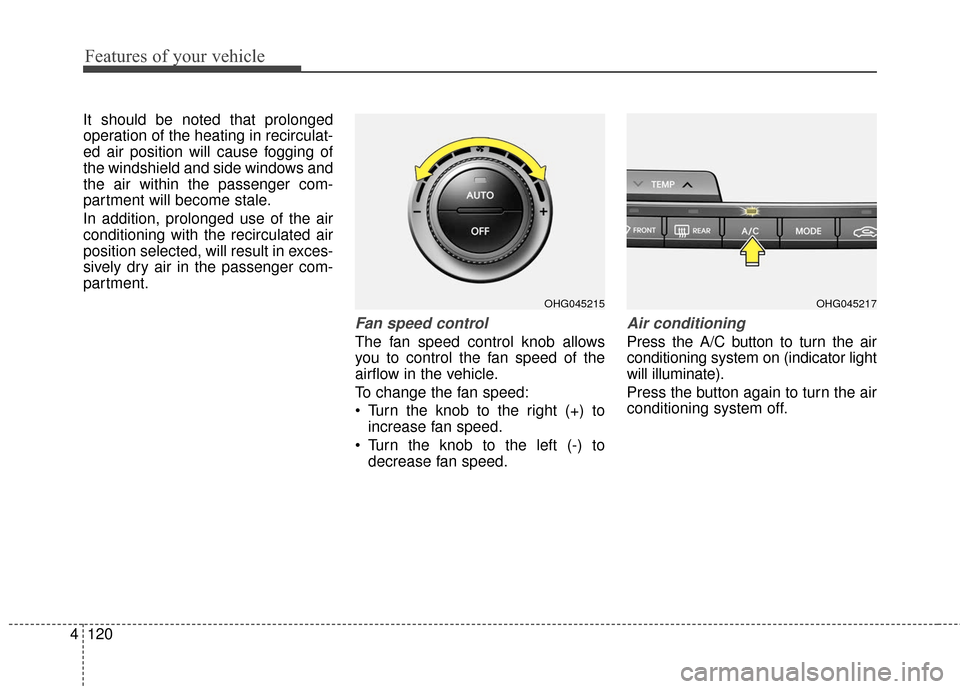
Fan speed control
The fan speed control knob allows
you to control the fan speed of the
airflow in the vehicle.
To change the fan speed:
Turn the knob to the right (+) to
increase fan speed.
Turn the knob to the left (-) to decrease fan speed.
Air conditioning
Press the A/C button to turn the air
conditioning system on (indicator light
will illuminate).
Press the button again to turn the air
conditioning system off.
OHG045217OHG045215
Page 201 of 520
Features of your vehicle
122
4
Air conditioning
HYUNDAI Air Conditioning Systems
are filled with environmentally friend-
ly R-134a refrigerant.
1. Start the engine. Press the air
conditioning button.
2. Set the mode to the position.
3. Set the air intake control to the outside air or recirculated air posi-
tion.
4. Adjust the fan speed control and temperature control to maintain
maximum comfort.
✽ ✽NOTICE- Excessive A/C
When using the air conditioning sys-
tem, monitor the engine coolant
closely while driving up hills or in
heavy traffic when outside tempera-
tures are high. Air conditioning sys-
tem operation may cause engine
overheating and potential engine
damage. Continue to use the blower
fan but turn the air conditioning
system off if the engine coolant tem-
perature gauge indicates engine
overheating.
Air conditioning system operation tips
If the vehicle has been parked in
direct sunlight during hot weather,
open the windows for a short time
to let the hot air inside the vehicle
escape.
To help reduce moisture inside of the windows on rainy or humid
days, decrease the humidity inside
the vehicle by operating the air
conditioning system.
During air conditioning system operation, you may occasionally
notice a slight change in engine
speed as the air conditioning com-
pressor cycles. This is a normal
system operation characteristic.
Use the air conditioning system every month only for a few minutes
to ensure maximum system per-
formance.
When using the air conditioning system, you may notice clear water
dripping (or even puddling) on the
ground under the passenger side
of the vehicle. This is a normal sys-
tem operation characteristic. Operating the air conditioning sys-
tem in the recirculated air position
provides maximum cooling, how-
ever, continual operation in this
mode may cause the air inside the
vehicle to become stale.
After sufficient cooling has been
achieved, switch back from the
recirculated air to the fresh outside
air position.
During cooling operation, you may occasionally notice a misty air flow
because of rapid cooling and
humid air intake. This is a normal
system operation characteristic.
Page 202 of 520
4123
Features of your vehicle
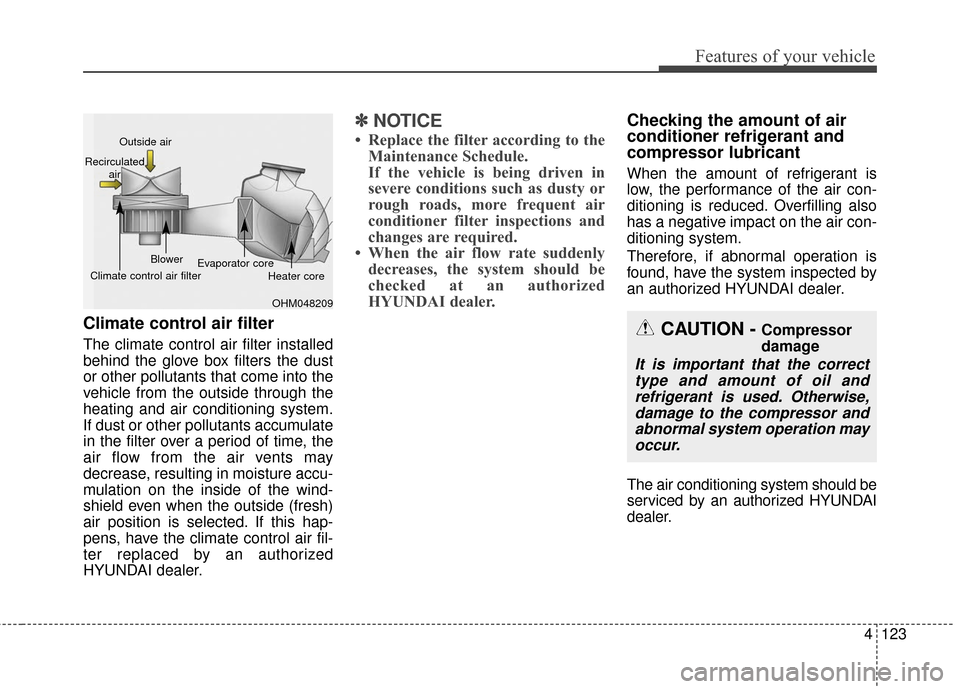
Climate control air filter
The climate control air filter installed
behind the glove box filters the dust
or other pollutants that come into the
vehicle from the outside through the
heating and air conditioning system.
If dust or other pollutants accumulate
in the filter over a period of time, the
air flow from the air vents may
decrease, resulting in moisture accu-
mulation on the inside of the wind-
shield even when the outside (fresh)
air position is selected. If this hap-
pens, have the climate control air fil-
ter replaced by an authorized
HYUNDAI dealer.
✽ ✽NOTICE
• Replace the filter according to the
Maintenance Schedule.
If the vehicle is being driven in
severe conditions such as dusty or
rough roads, more frequent air
conditioner filter inspections and
changes are required.
• When the air flow rate suddenly decreases, the system should be
checked at an authorized
HYUNDAI dealer.
Checking the amount of air
conditioner refrigerant and
compressor lubricant
When the amount of refrigerant is
low, the performance of the air con-
ditioning is reduced. Overfilling also
has a negative impact on the air con-
ditioning system.
Therefore, if abnormal operation is
found, have the system inspected by
an authorized HYUNDAI dealer.
The air conditioning system should be
serviced by an authorized HYUNDAI
dealer.
CAUTION - Compressor
damage
It is important that the correct
type and amount of oil andrefrigerant is used. Otherwise,damage to the compressor andabnormal system operation mayoccur.
OHM048209
Outside air
Recirculated air
Climate control air filter Blower
Evaporator core
Heater core
Page 208 of 520
4129
Features of your vehicle
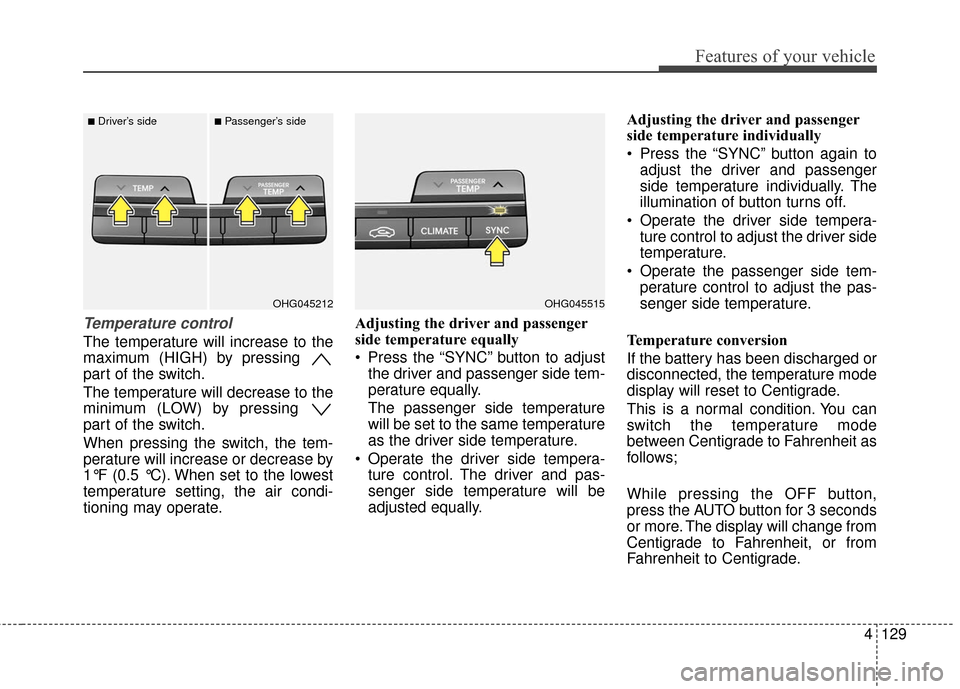
Temperature control
The temperature will increase to the
maximum (HIGH) by pressing
part of the switch.
The temperature will decrease to the
minimum (LOW) by pressing
part of the switch.
When pressing the switch, the tem-
perature will increase or decrease by
1°F (0.5 °C). When set to the lowest
temperature setting, the air condi-
tioning may operate.Adjusting the driver and passenger
side temperature equally
Press the “SYNC” button to adjust
the driver and passenger side tem-
perature equally.
The passenger side temperature
will be set to the same temperature
as the driver side temperature.
Operate the driver side tempera- ture control. The driver and pas-
senger side temperature will be
adjusted equally. Adjusting the driver and passenger
side temperature individually
Press the “SYNC” button again to
adjust the driver and passenger
side temperature individually. The
illumination of button turns off.
Operate the driver side tempera- ture control to adjust the driver side
temperature.
Operate the passenger side tem- perature control to adjust the pas-
senger side temperature.
Temperature conversion
If the battery has been discharged or
disconnected, the temperature mode
display will reset to Centigrade.
This is a normal condition. You can
switch the temperature mode
between Centigrade to Fahrenheit as
follows;
While pressing the OFF button,
press the AUTO button for 3 seconds
or more. The display will change from
Centigrade to Fahrenheit, or from
Fahrenheit to Centigrade.
OHG045515OHG045212
■Driver’s side■Passenger’s side