Drive Hyundai Creta 2019 Repair Manual
[x] Cancel search | Manufacturer: HYUNDAI, Model Year: 2019, Model line: Creta, Model: Hyundai Creta 2019Pages: 472, PDF Size: 13.39 MB
Page 165 of 472
3-80
Convenient features of your vehicle
Even with the AUTO light feature in
operation, it is recommended to
manually turn ON the lights when
driving at night or in a fog, or when
you enter dark areas, such as tun-
nels and parking facilities.
• Do not cover or spill anything on
the sensor (1) located on the
instrument panel.
Do not clean the sensor using a
window cleaner, the cleanser may
leave a light film which could
interfere with sensor operation.
If your vehicle has window tint
or other types of metallic coat-
ing on the front windshield, the
AUTO light system may not work
properly.
High beam operation
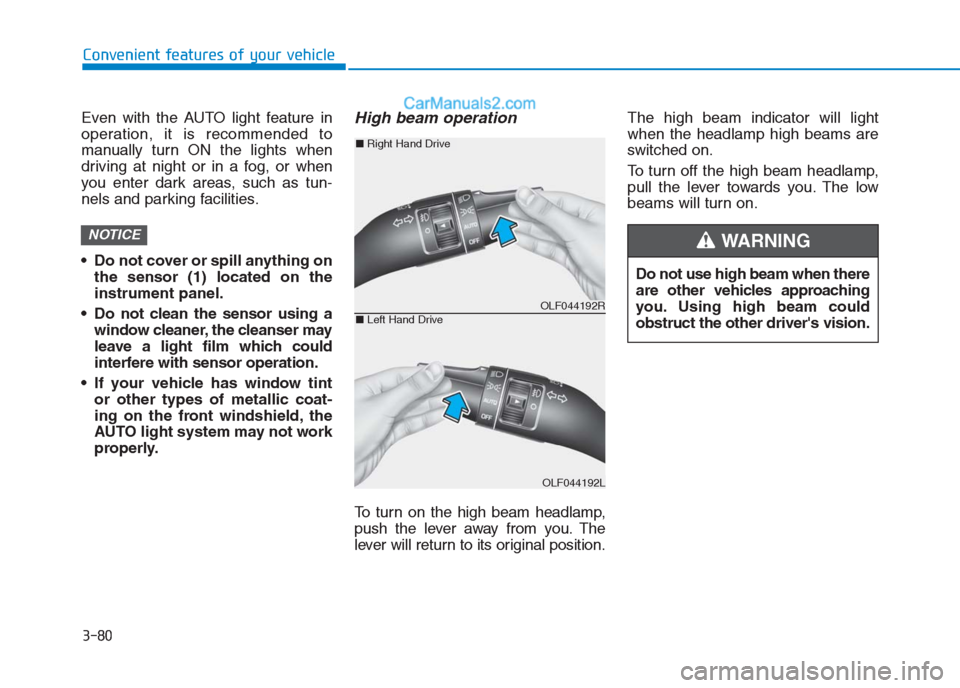
To turn on the high beam headlamp,
push the lever away from you. The
lever will return to its original position.The high beam indicator will light
when the headlamp high beams are
switched on.
To turn off the high beam headlamp,
pull the lever towards you. The low
beams will turn on.
NOTICE
Do not use high beam when there
are other vehicles approaching
you. Using high beam could
obstruct the other driver's vision.
WARNING
OLF044192R
OLF044192L
■Right Hand Drive
■Left Hand Drive
Page 166 of 472
3-81
Convenient features of your vehicle
3
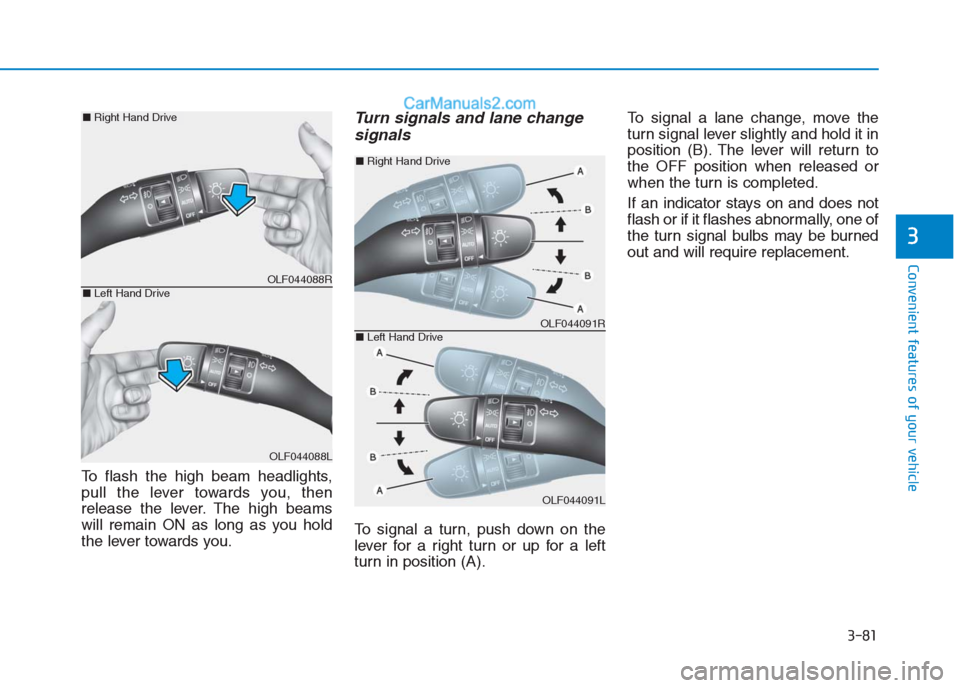
To flash the high beam headlights,
pull the lever towards you, then
release the lever. The high beams
will remain ON as long as you hold
the lever towards you.
Turn signals and lane change
signals
To signal a turn, push down on the
lever for a right turn or up for a left
turn in position (A).To signal a lane change, move the
turn signal lever slightly and hold it in
position (B). The lever will return to
the OFF position when released or
when the turn is completed.
If an indicator stays on and does not
flash or if it flashes abnormally, one of
the turn signal bulbs may be burned
out and will require replacement.
OLF044088R
OLF044088L
■Right Hand Drive
■Left Hand Drive
OLF044091R
OLF044091L
■Right Hand Drive
■Left Hand Drive
Page 168 of 472
3-83
Convenient features of your vehicle
3
Front fog light (if equipped)
Fog lights are used to provide
improved visibility when visibility is
poor due to fog, rain or snow, etc.
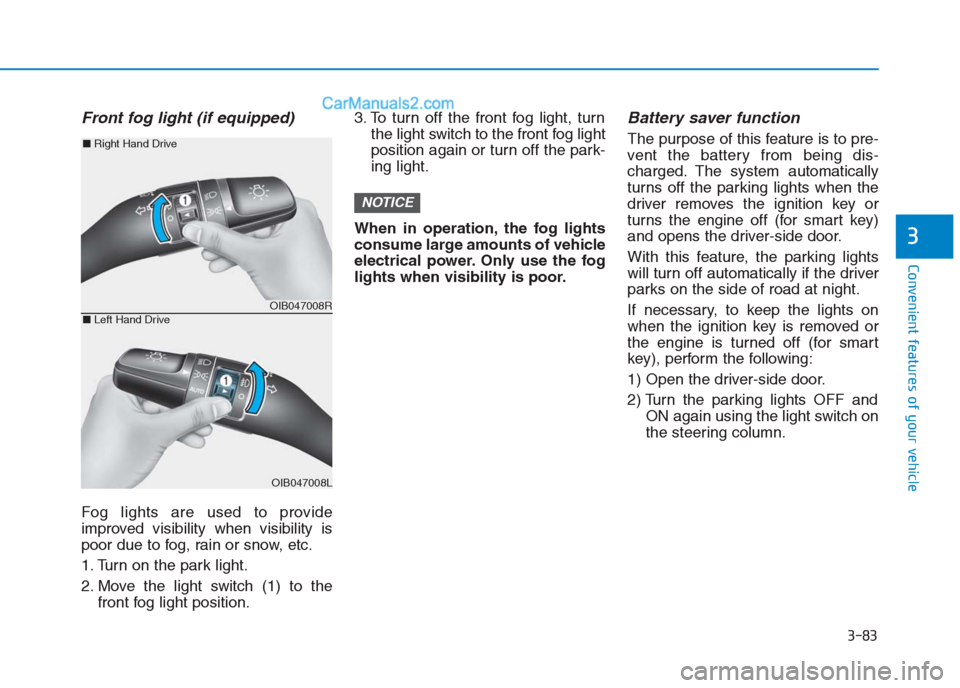
1. Turn on the park light.
2. Move the light switch (1) to the
front fog light position.3. To turn off the front fog light, turn
the light switch to the front fog light
position again or turn off the park-
ing light.
When in operation, the fog lights
consume large amounts of vehicle
electrical power. Only use the fog
lights when visibility is poor.
Battery saver function
The purpose of this feature is to pre-
vent the battery from being dis-
charged. The system automatically
turns off the parking lights when the
driver removes the ignition key or
turns the engine off (for smart key)
and opens the driver-side door.
With this feature, the parking lights
will turn off automatically if the driver
parks on the side of road at night.
If necessary, to keep the lights on
when the ignition key is removed or
the engine is turned off (for smart
key), perform the following:
1) Open the driver-side door.
2) Turn the parking lights OFF and
ON again using the light switch on
the steering column.
NOTICE
OIB047008R
OIB047008L
■Right Hand Drive
■Left Hand Drive
Page 169 of 472
Headlamp delay function
(if equipped)
If the key is removed from the ignition
switch or placed in the ACC or
LOCK/OFF position with the head-
lights ON, the headlights (and/or
parking lights) remain on for about 5
minutes. However, with the engine off
if the driver’s door is opened and
closed, the headlights (and/or parking
lights) are turned off after 15 seconds.
The headlights (and/or parking
lights) can be turned off by pressing
the lock button on the remote key (or
smart key) twice or turning the light
switch to the OFF or AUTO position.
However, if you turn the light switch
to the AUTO position when it is dark
outside, the headlights will not be
turned off.If the driver gets out of the vehicle
through other doors (except dri-
ver's door), the battery saver func-
tion does not operate and the
headlamp delay function does not
turn off automatically. Therefore, It
causes the battery to be dis-
charged. In this case, make sure
to turn off the lamp before getting
out of the vehicle.
Daytime running light (DRL)
(if equipped)
The Daytime Running Lights (DRL)
can make it easier for others to see
the front of your vehicle during the
day, especially after dawn and before
sunset.
The DRL system will turn the dedi-
cated lamp OFF when:
1. The headlights or front fog lights
are in the ON position.
2. The engine is turned off.
NOTICE
3-84
Convenient features of your vehicle
Page 170 of 472
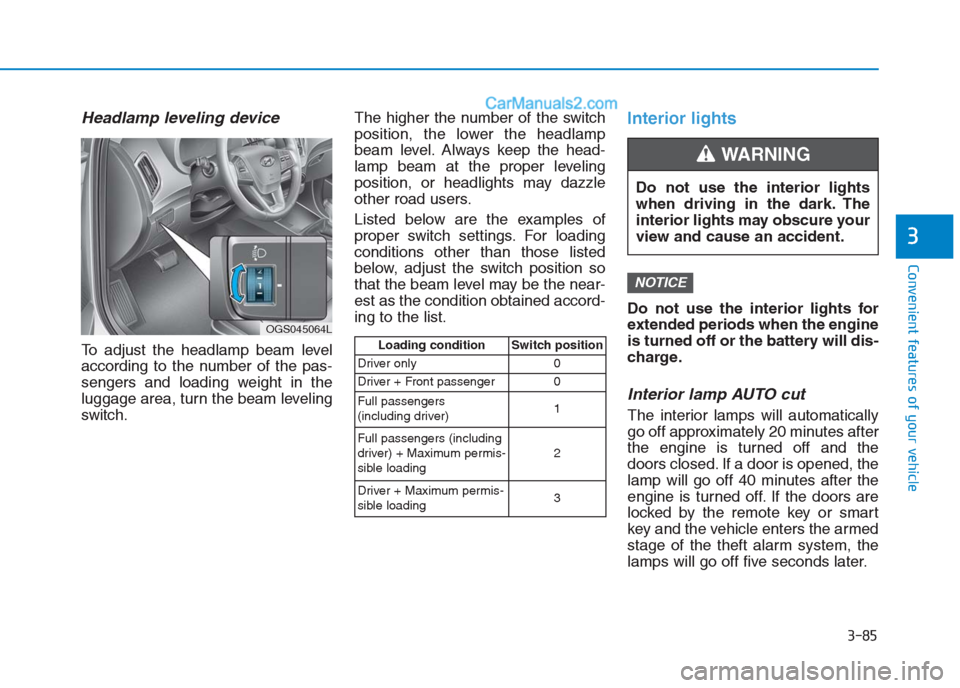
Headlamp leveling device
To adjust the headlamp beam level
according to the number of the pas-
sengers and loading weight in the
luggage area, turn the beam leveling
switch.The higher the number of the switch
position, the lower the headlamp
beam level. Always keep the head-
lamp beam at the proper leveling
position, or headlights may dazzle
other road users.
Listed below are the examples of
proper switch settings. For loading
conditions other than those listed
below, adjust the switch position so
that the beam level may be the near-
est as the condition obtained accord-
ing to the list.
Interior lights
Do not use the interior lights for
extended periods when the engine
is turned off or the battery will dis-
charge.
Interior lamp AUTO cut
The interior lamps will automatically
go off approximately 20 minutes after
the engine is turned off and the
doors closed. If a door is opened, the
lamp will go off 40 minutes after the
engine is turned off. If the doors are
locked by the remote key or smart
key and the vehicle enters the armed
stage of the theft alarm system, the
lamps will go off five seconds later.
NOTICE
3-85
Convenient features of your vehicle
3
OGS045064L
Loading condition Switch position
Driver only 0
Driver + Front passenger 0
Full passengers
(including driver)1
Full passengers (including
driver) + Maximum permis-
sible loading2
Driver + Maximum permis-
sible loading 3
Do not use the interior lights
when driving in the dark. The
interior lights may obscure your
view and cause an accident.
WARNING
Page 171 of 472
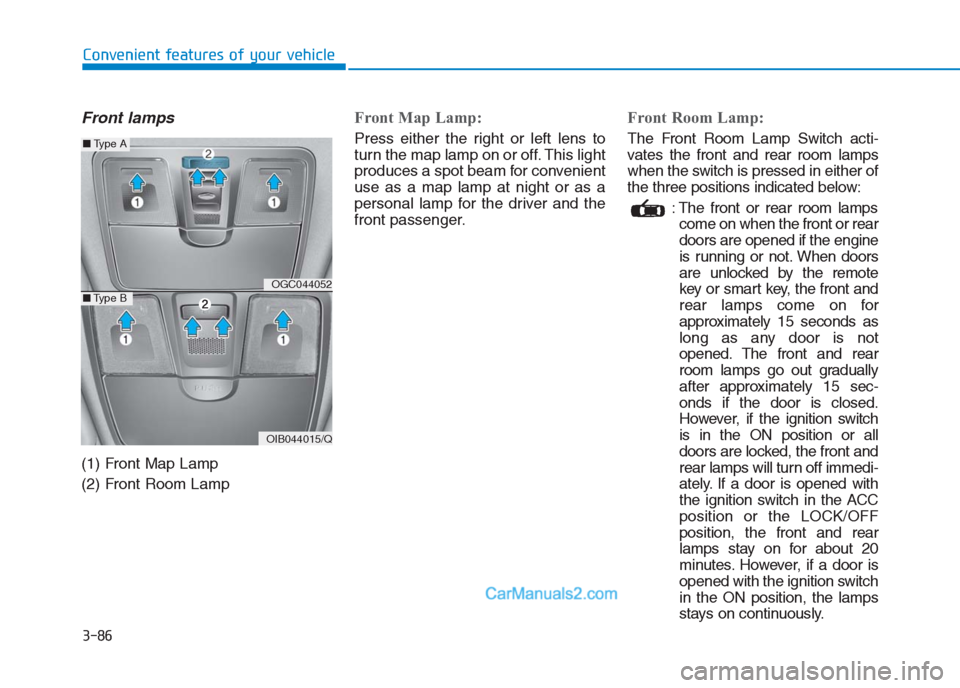
Front lamps
(1) Front Map Lamp
(2) Front Room Lamp
Front Map Lamp:
Press either the right or left lens to
turn the map lamp on or off. This light
produces a spot beam for convenient
use as a map lamp at night or as a
personal lamp for the driver and the
front passenger.
Front Room Lamp:
The Front Room Lamp Switch acti-
vates the front and rear room lamps
when the switch is pressed in either of
the three positions indicated below:
: The front or rear room lamps
come on when the front or rear
doors are opened if the engine
is running or not. When doors
are unlocked by the remote
key or smart key, the front and
rear lamps come on for
approximately 15 seconds as
long as any door is not
opened. The front and rear
room lamps go out gradually
after approximately 15 sec-
onds if the door is closed.
However, if the ignition switch
is in the ON position or all
doors are locked, the front and
rear lamps will turn off immedi-
ately. If a door is opened with
the ignition switch in the ACC
position or the LOCK/OFF
position, the front and rear
lamps stay on for about 20
minutes. However, if a door is
opened with the ignition switch
in the ON position, the lamps
stays on continuously.
3-86
Convenient features of your vehicle
OGC044052
OIB044015/Q
■Type A
■Type B
Page 173 of 472
3-88
Convenient features of your vehicle
W WI
IP
PE
ER
RS
S
A
AN
ND
D
W
WA
AS
SH
HE
ER
RS
S
■
■Front (for Left-hand drive)■
■Rear (for Left-hand drive)
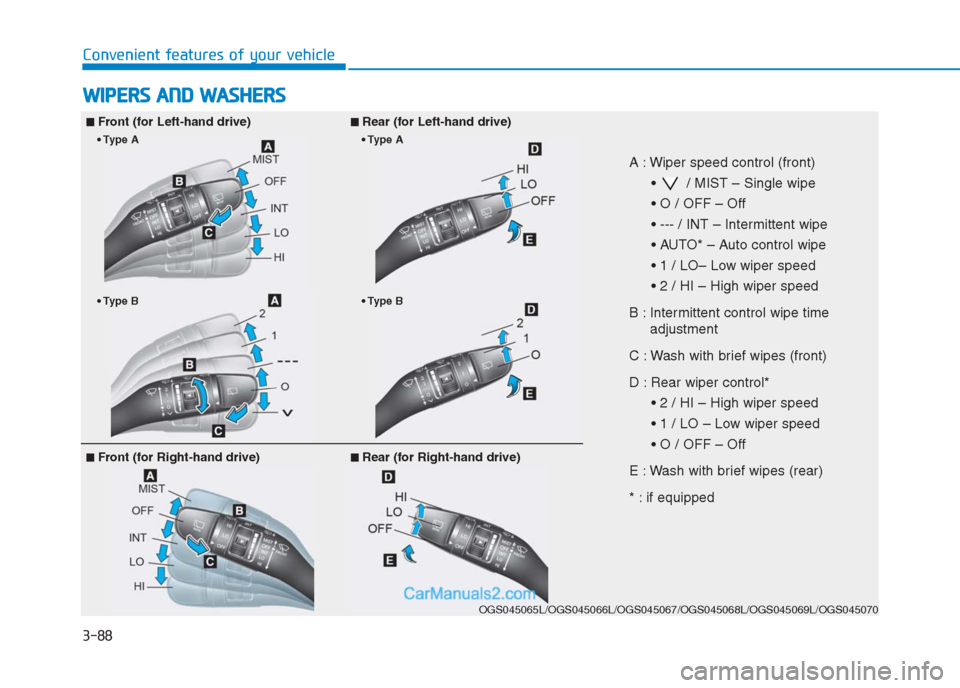
A : Wiper speed control (front)
/ MIST – Single wipe
B : Intermittent control wipe time
adjustment
C : Wash with brief wipes (front)
D : Rear wiper control*
E : Wash with brief wipes (rear)
* : if equipped
OGS045065L/OGS045066L/OGS045067/OGS045068L/OGS045069L/OGS045070
B
A
B
A
■ ■
Front (for Right-hand drive)■
■Rear (for Right-hand drive)
Page 176 of 472
3-91
Convenient features of your vehicle
3
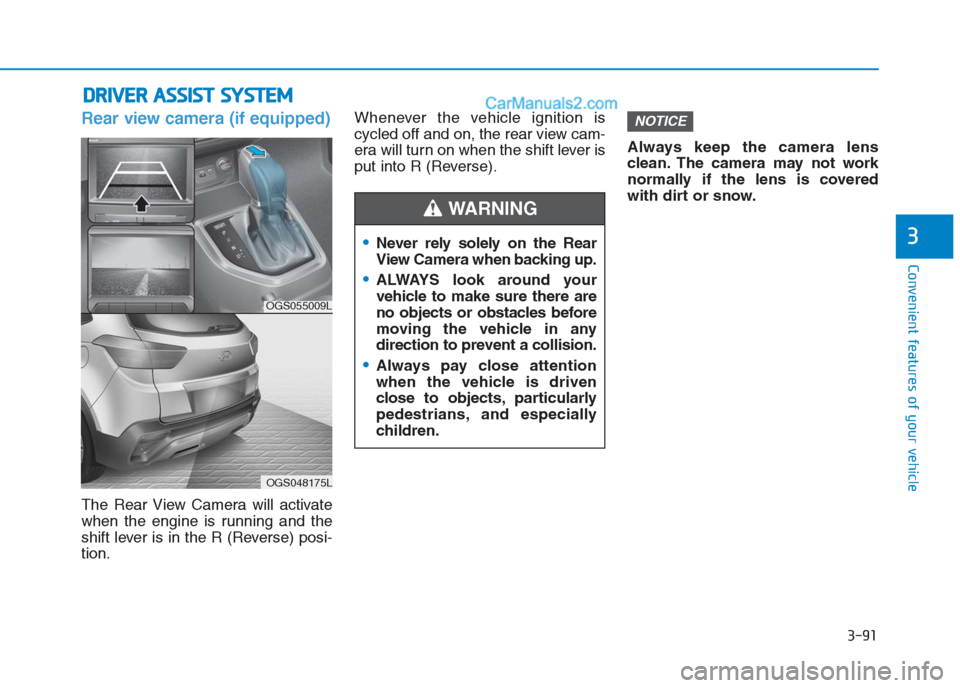
Rear view camera (if equipped)
The Rear View Camera will activate
when the engine is running and the
shift lever is in the R (Reverse) posi-
tion.Whenever the vehicle ignition is
cycled off and on, the rear view cam-
era will turn on when the shift lever is
put into R (Reverse).Always keep the camera lens
clean. The camera may not work
normally if the lens is covered
with dirt or snow.
NOTICE
D DR
RI
IV
VE
ER
R
A
AS
SS
SI
IS
ST
T
S
SY
YS
ST
TE
EM
M
Never rely solely on the Rear
View Camera when backing up.
ALWAYS look around your
vehicle to make sure there are
no objects or obstacles before
moving the vehicle in any
direction to prevent a collision.
Always pay close attention
when the vehicle is driven
close to objects, particularly
pedestrians, and especially
children.
WARNING
OGS055009L
OGS048175L
Page 177 of 472
3-92
Convenient features of your vehicle
Rear parking assist system
(if equipped)
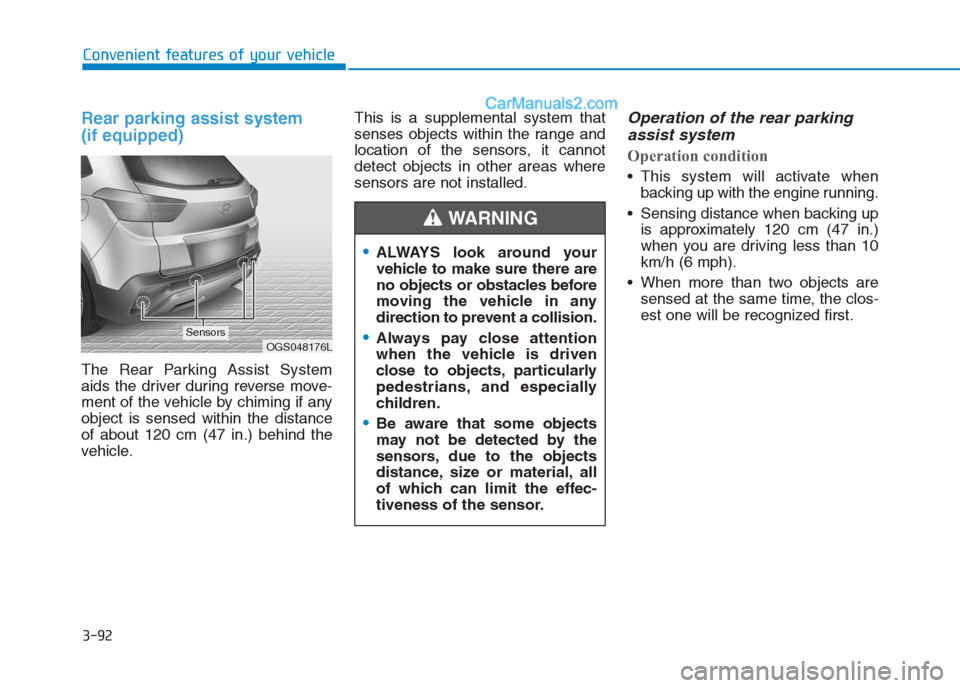
The Rear Parking Assist System
aids the driver during reverse move-
ment of the vehicle by chiming if any
object is sensed within the distance
of about 120 cm (47 in.) behind the
vehicle.This is a supplemental system that
senses objects within the range and
location of the sensors, it cannot
detect objects in other areas where
sensors are not installed.
Operation of the rear parking
assist system
Operation condition
This system will activate when
backing up with the engine running.
Sensing distance when backing up
is approximately 120 cm (47 in.)
when you are driving less than 10
km/h (6 mph).
When more than two objects are
sensed at the same time, the clos-
est one will be recognized first.
ALWAYS look around your
vehicle to make sure there are
no objects or obstacles before
moving the vehicle in any
direction to prevent a collision.
Always pay close attention
when the vehicle is driven
close to objects, particularly
pedestrians, and especially
children.
Be aware that some objects
may not be detected by the
sensors, due to the objects
distance, size or material, all
of which can limit the effec-
tiveness of the sensor.
WARNING
OGS048176LSensors
Page 179 of 472
3-94
Convenient features of your vehicle
Detecting range may decrease
when:
Outside air temperature is extremely
hot or cold.
Undetectable objects smaller than
about 1 m (40 in.) and narrower
than about 14 cm (6 in.) in diameter.
The following objects may not be
recognized by the sensor:
Sharp or slim objects such as
ropes, chains or small poles.
Objects, which tend to absorb sen-
sor frequency such as clothes,
spongy material or snow.
Information
The system may not recognize objects
less than 30 cm (12 in.) from the sen-
sor, or it may sense an incorrect dis-
tance.
Do not push, scratch or strike the
sensor with any hard objects that
could damage the surface of the
sensor. Sensor damage could
occur.
NOTICE
i
Your new vehicle warranty does
not cover any accidents or dam-
age to the vehicle or injuries to
its occupants due to a rear
parking assist system malfunc-
tion. Always drive safely and
cautiously.
WARNING