ignition HYUNDAI ELANTRA GT 2019 User Guide
[x] Cancel search | Manufacturer: HYUNDAI, Model Year: 2019, Model line: ELANTRA GT, Model: HYUNDAI ELANTRA GT 2019Pages: 486, PDF Size: 78.59 MB
Page 79 of 486
2-61
Safety system of your vehicle
2
Why Didn't My Air Bag Go Off in a Collision?
Air bags are not designed to inflate in
every collision. There are certaintypes of accidents in which the air
bag would not be expected to pro-
vide additional protection. These
include rear impacts, second or third
collisions in multiple impact acci-
dents, as well as low speed impacts.
Damage to the vehicle indicates a
collision energy absorption, and isnot an indicator of whether or not an
air bag should have inflated.
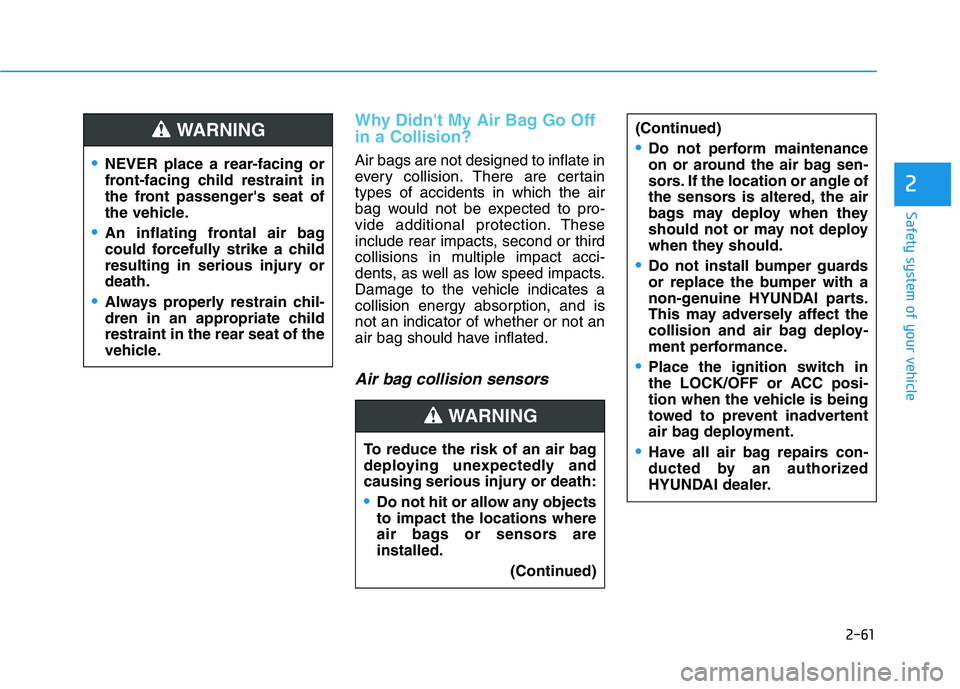
Air bag collision sensors
NEVER place a rear-facing or
front-facing child restraint in
the front passenger's seat of
the vehicle.
An inflating frontal air bag
could forcefully strike a child
resulting in serious injury ordeath.
Always properly restrain chil-
dren in an appropriate childrestraint in the rear seat of the
vehicle.
WARNING
To reduce the risk of an air bag
deploying unexpectedly and
causing serious injury or death:
Do not hit or allow any objects to impact the locations where
air bags or sensors areinstalled.(Continued)
WARNING
(Continued)
Do not perform maintenance
on or around the air bag sen-
sors. If the location or angle of
the sensors is altered, the air
bags may deploy when they
should not or may not deploy
when they should.
Do not install bumper guards
or replace the bumper with a
non-genuine HYUNDAI parts.
This may adversely affect the
collision and air bag deploy-
ment performance.
Place the ignition switch in
the LOCK/OFF or ACC posi-
tion when the vehicle is being
towed to prevent inadvertent
air bag deployment.
Have all air bag repairs con-
ducted by an authorized
HYUNDAI dealer.
Page 84 of 486
2-66
Safety system of your vehicle
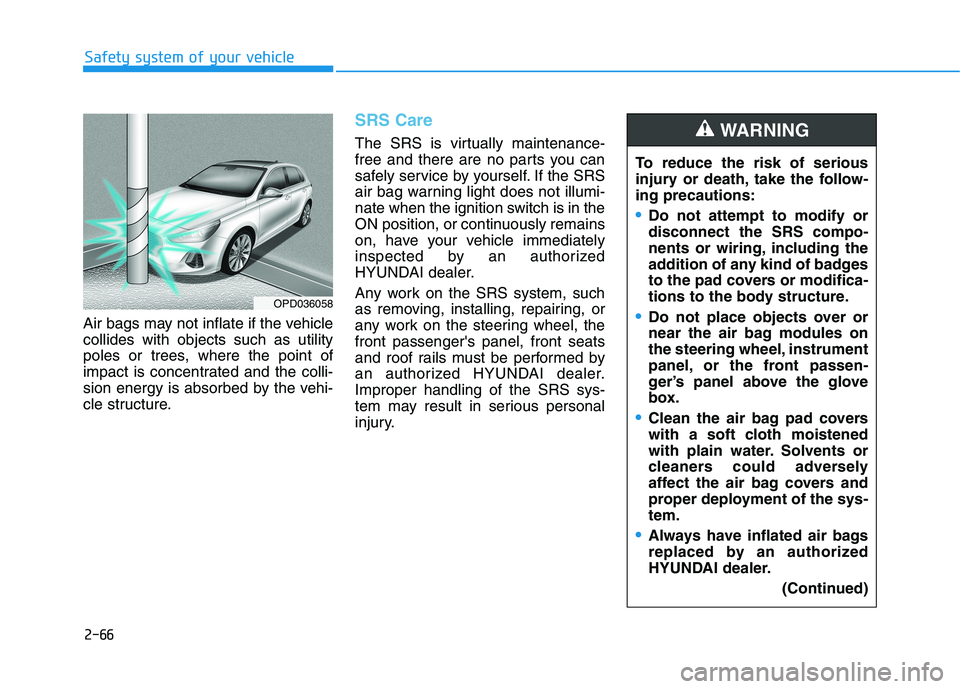
Air bags may not inflate if the vehicle collides with objects such as utility
poles or trees, where the point of
impact is concentrated and the colli-
sion energy is absorbed by the vehi-
cle structure.
SRS Care
The SRS is virtually maintenance-
free and there are no parts you can
safely service by yourself. If the SRS
air bag warning light does not illumi-
nate when the ignition switch is in the
ON position, or continuously remains
on, have your vehicle immediately
inspected by an authorized
HYUNDAI dealer.
Any work on the SRS system, such
as removing, installing, repairing, or
any work on the steering wheel, thefront passenger's panel, front seats
and roof rails must be performed by
an authorized HYUNDAI dealer.Improper handling of the SRS sys-
tem may result in serious personal
injury.To reduce the risk of serious
injury or death, take the follow-ing precautions:
Do not attempt to modify or disconnect the SRS compo-
nents or wiring, including the
addition of any kind of badges
to the pad covers or modifica-
tions to the body structure.
Do not place objects over or
near the air bag modules on
the steering wheel, instrument
panel, or the front passen-
ger’s panel above the glove
box.
Clean the air bag pad covers
with a soft cloth moistened
with plain water. Solvents or
cleaners could adversely
affect the air bag covers and
proper deployment of the sys-tem.
Always have inflated air bags
replaced by an authorized
HYUNDAI dealer.
(Continued)
WARNING
OPD036058
Page 85 of 486
2-67
Safety system of your vehicle
2
Additional Safety Precautions
Passengers should not move out
of or change seats while the vehi-
cle is moving.A passenger who is
not wearing a seat belt during a
crash or emergency stop can be
thrown against the inside of the vehi-
cle, against other occupants, or be
ejected from the vehicle.
Do not use any accessories on seat belts. Devices claiming to
improve occupant comfort or reposi-tion the seat belt can reduce the pro-
tection provided by the seat belt and
increase the chance of serious injury
in a crash. Do not modify the front seats. Modification of the front seats could
interfere with the operation of the
supplemental restraint system sens-
ing components or side air bags.
Do not place items under the front seats.
Placing items under the front
seats could interfere with the opera-
tion of the supplemental restraintsystem sensing components and
wiring harnesses.
Do not cause impact to the doors. Impact to the doors when the ignition
switch is in the ON position may
cause the air bags to inflate. Modifications to accommodate dis- abilities.
If you require modification to your
vehicle to accommodate a disability,
contact the HYUNDAI Auto Canadaat 1-888-216-2626.
Adding equipment to or modify-
ing your air bag equipped vehicle
If you modify your vehicle by chang-
ing your vehicle's frame, bumper sys-tem, front end or side sheet metal or
ride height, this may affect the opera-
tion of your vehicle's air bag system.
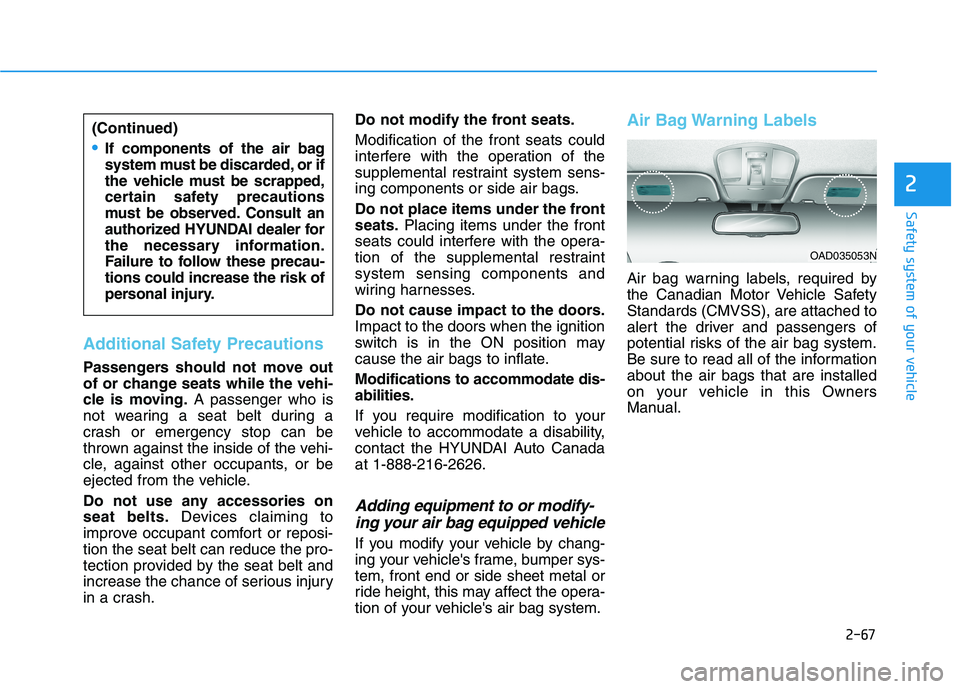
Air Bag Warning Labels
Air bag warning labels, required by
the Canadian Motor Vehicle SafetyStandards (CMVSS), are attached to
alert the driver and passengers of
potential risks of the air bag system.
Be sure to read all of the informationabout the air bags that are installed
on your vehicle in this Owners
Manual.
(Continued)
If components of the air bag
system must be discarded, or if
the vehicle must be scrapped,
certain safety precautions
must be observed. Consult an
authorized HYUNDAI dealer for
the necessary information.
Failure to follow these precau-tions could increase the risk of
personal injury.
OAD035053N
Page 89 of 486
3-4
Unlocking
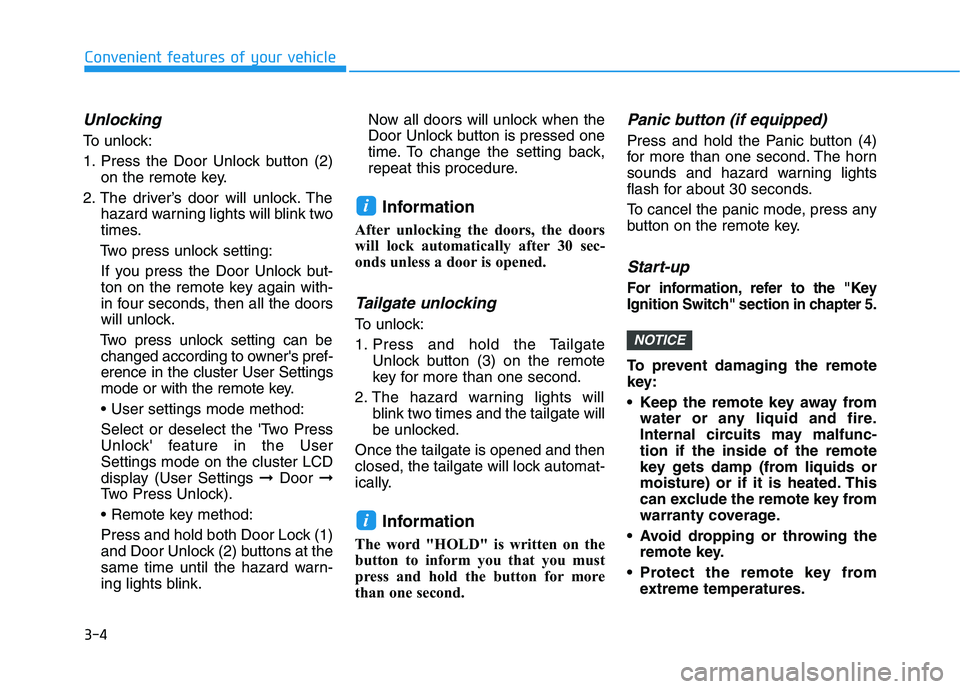
To unlock:
1. Press the Door Unlock button (2)on the remote key.
2. The driver’s door will unlock. The hazard warning lights will blink two
times.
Two press unlock setting:
If you press the Door Unlock but-
ton on the remote key again with-
in four seconds, then all the doors
will unlock.
Two press unlock setting can be changed according to owner's pref-erence in the cluster User Settings
mode or with the remote key.
Select or deselect the 'Two Press
Unlock' feature in the UserSettings mode on the cluster LCD
display (User Settings ➞Door ➞
Two Press Unlock).
Press and hold both Door Lock (1)
and Door Unlock (2) buttons at the
same time until the hazard warn-
ing lights blink. Now all doors will unlock when the
Door Unlock button is pressed one
time. To change the setting back,
repeat this procedure.
Information
After unlocking the doors, the doors
will lock automatically after 30 sec-
onds unless a door is opened.
Tailgate unlocking
To unlock:
1. Press and hold the Tailgate Unlock button (3) on the remote
key for more than one second.
2. The hazard warning lights will blink two times and the tailgate will
be unlocked.
Once the tailgate is opened and then
closed, the tailgate will lock automat-
ically.
Information
The word "HOLD" is written on the
button to inform you that you must
press and hold the button for more
than one second.
Panic button (if equipped)
Press and hold the Panic button (4)
for more than one second. The horn
sounds and hazard warning lights
flash for about 30 seconds.
To cancel the panic mode, press any
button on the remote key.
Start-up
For information, refer to the "Key
Ignition Switch" section in chapter 5.
To prevent damaging the remote
key:
• Keep the remote key away from water or any liquid and fire.
Internal circuits may malfunc-tion if the inside of the remote
key gets damp (from liquids or
moisture) or if it is heated. This
can exclude the remote key from
warranty coverage.
Avoid dropping or throwing the remote key.
Protect the remote key from extreme temperatures.
NOTICE
i
i
Convenient features of your vehicle
Page 90 of 486
3-5
Convenient features of your vehicle
Mechanical key
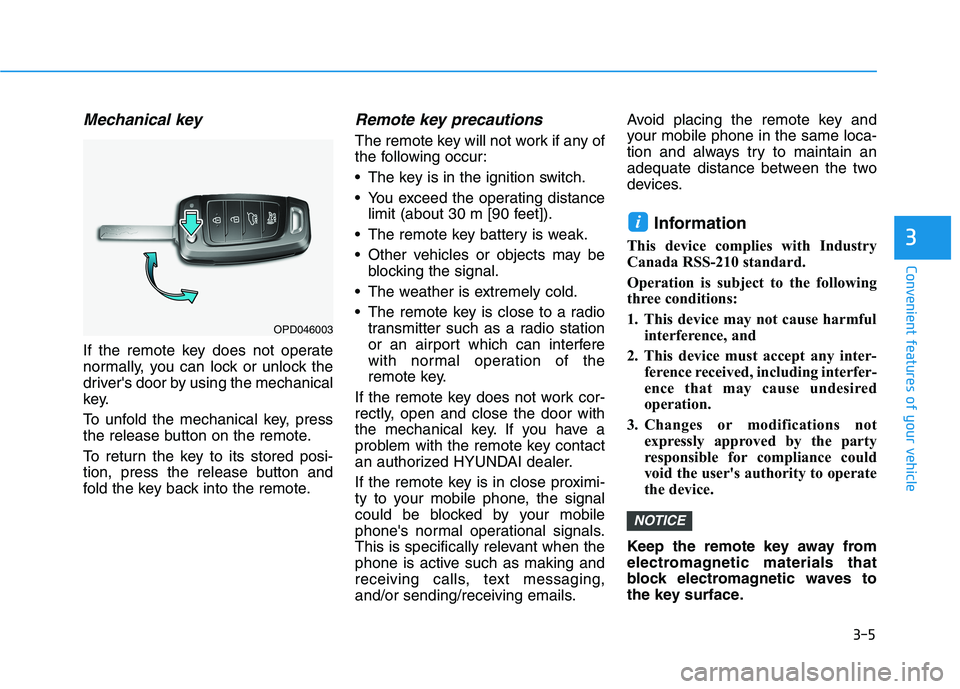
If the remote key does not operate
normally, you can lock or unlock the
driver's door by using the mechanical
key.
To unfold the mechanical key, press
the release button on the remote.
To return the key to its stored posi-
tion, press the release button and
fold the key back into the remote.
Remote key precautions
The remote key will not work if any of
the following occur:
The key is in the ignition switch.
You exceed the operating distancelimit (about 30 m [90 feet]).
The remote key battery is weak.
Other vehicles or objects may be blocking the signal.
The weather is extremely cold.
The remote key is close to a radio transmitter such as a radio station
or an airport which can interfere
with normal operation of the
remote key.
If the remote key does not work cor-
rectly, open and close the door with
the mechanical key. If you have a
problem with the remote key contact
an authorized HYUNDAI dealer.
If the remote key is in close proximi-
ty to your mobile phone, the signal
could be blocked by your mobile
phone's normal operational signals.
This is specifically relevant when the
phone is active such as making and
receiving calls, text messaging,
and/or sending/receiving emails. Avoid placing the remote key and
your mobile phone in the same loca-
tion and always try to maintain an
adequate distance between the two
devices.
Information
This device complies with Industry
Canada RSS-210 standard.
Operation is subject to the following
three conditions:
1. This device may not cause harmful interference, and
2. This device must accept any inter- ference received, including interfer-
ence that may cause undesired
operation.
3. Changes or modifications not expressly approved by the party
responsible for compliance could
void the user's authority to operate
the device.
Keep the remote key away from
electromagnetic materials that
block electromagnetic waves to
the key surface.
NOTICE
i
3
OPD046003
Page 96 of 486
3-11
Convenient features of your vehicle
If you suspect your smart key might
have sustained some damage, or
you feel your smart key is not work-
ing correctly, contact an authorized
HYUNDAI dealer.InformationAn inappropriately disposedbattery can be harmful to the
environment and human
health. Dispose of the battery
according to your local law(s)
or regulations.Immobilizer System
The immobilizer system protects
your vehicle from theft. If an improp-
erly coded key (or other device) isused, the engine's fuel system is dis-
abled.
When the ignition switch is placed in
the ON position, the immobilizer sys-
tem indicator should come on briefly,
then go off. If the indicator starts to
blink, the system does not recognize
the coding of the key.
Place the ignition switch to the LOCK/OFF position, then place the
ignition switch to the ON positionagain.
The system may not recognize your
key's coding if another immobilizer
key or other metal object (i.e., key
chain) is near the key.
The engine may not start because
the metal may interrupt the transpon-
der signal from transmitting normally. If the system repeatedly does not
recognize the coding of the key, it is
recommended that you contact your
HYUNDAI dealer. Do not attempt to alter this system or
add other devices to it. Electrical
problems could result that may make
your vehicle inoperable.
i
3
In order to prevent theft of your
vehicle, do not leave spare keys
anywhere in your vehicle. Your
immobilizer password is a cus-
tomer unique password andshould be kept confidential.
WARNING
This device complies with
Industry Canada licence-
exempt RSS standard(s).
Operation is subject to the fol-
lowing two conditions: (1) this
device may not cause interfer-
ence, and (2) this device must
accept any interference, includ-
ing interference that may causeundesired operation of the
device.
IC WARNING
Page 97 of 486
3-12
The transponder in your key is an
important part of the immobilizer
system. It is designed to give
years of trouble-free service, how-
ever you should avoid exposure to
moisture, static electricity and
rough handling. Immobilizer sys-
tem malfunction could occur.
Information
This device complies with Industry
Canada RSS-210 standard.
Operation is subject to the following
three conditions:
1. This device may not cause harmful interference, and
2. This device must accept any inter- ference received, including interfer-
ence that may cause undesired
operation.
3. Changes or modifications not expressly approved by the party
responsible for compliance could
void the user's authority to operate
the device.
"Limp Home" Mode and Related
Procedures
If the immobilizer warning indicator
blinks for five seconds when the igni-
tion key is turned to the "ON" posi-
tion, this indicates the immobilizer
system requires service. The engine
cannot be started without using the
procedure below.
The following procedure describes
how to start the engine using thelimp home function (0, 1, 2, 3 as a
sample password).
You can get a limp home pass-
word when the vehicle is first
delivered to you. If you do not
have a password, consult your
authorized HYUNDAI dealer. 1. To activate the password, turn the
ignition key "ON" and "OFF"
according to the digit numbers.
The immobilizer indicator will blink
along with the operation of the
ignition key. For example, turn the
ignition key once for digit number
"1", and twice for "2", and so on.
For the digit number "0", you must
cycle the ignition key 10 times.
2. Wait for 3~10 seconds.
3. You may set the remaining num- ber of digits by following steps 1 and 2.
4. If all of the four password digits have been successfully entered,
turn the ignition key "ON" and
check that the immobilizer indica-
tor illuminates. From this time, you
have to start your engine within 30
seconds. If you try to start your
engine after 30 seconds, your
engine will not start.
NOTICE
i
NOTICE
Convenient features of your vehicle
Page 104 of 486
3-19
Convenient features of your vehicle
TTHH EEFFTT --AA LLAA RRMM SS YY SSTT EEMM
3
SSTT EEEERR IINN GG WW HHEEEE LL
This system helps to protect your vehi-
cle and valuables. The horn will sound
and the hazard warning lights will blink
continuously if any of the following
occur:
- A door is opened without using the
remote key or smart key.
- The tailgate is opened without using the remote key or smart key.
- The engine hood is opened.
The alarm continues for 30 seconds,
then the system resets. To turn off the
alarm, unlock the doors with the
remote key or smart key.
The Theft Alarm System automatically
sets 30 seconds after you lock the
doors and the tailgate. For the system
to activate, you must lock the doors
and the tailgate from outside the vehi-
cle with the remote key or smart key or
by pressing the button on the outside
of the door handle with the smart key
in your possession.
The hazard warning lights will blink and the chime will sound once to indi-
cate the system is armed.
Once the security system is set, open-
ing any door, the tailgate, or the hood
without using the remote key or smart
key will cause the alarm to activate. The Theft Alarm System will not set if
the hood, the tailgate, or any door is
not fully closed. If the system will not
set, check the hood, the tailgate, orthe doors are fully closed. Do not attempt to alter this system or
add other devices to it.
Information
Do not lock the doors until all pas- sengers have left the vehicle. If the
remaining passenger leaves the
vehicle when the system is armed,
the alarm will be activated.
If the vehicle is not disarmed with the remote key or smart key, open
the doors by using the mechanical
key and place the ignition switch in
the ON position (for remote key) or
start the engine (for smart key) by
directly pressing the ignition switch
with the smart key.
If the system is disarmed by unlock- ing the vehicle, but neither a door or
the tailgate is opened within 30 sec-
onds, the doors will relock and the
system will rearm automatically.Electric Power Steering (EPS)
The system assists you with steering
the vehicle. If the vehicle is turned off
or if the power steering system
becomes inoperative, you may still
steer the vehicle, but it will require
increased steering effort.
Should you notice any change in the
effort required to steer during normal
vehicle operation, have the system
checked by an authorized HYUNDAI
dealer.
i
If the Electric Power Steering System does not operate nor-
mally, the warning light ( ) willilluminate on the instrument
cluster. You may steer the vehi-
cle, but it will require increased
steering efforts. Take your vehi-
cle to an authorized HYUNDAI
dealer and have the system
checked as soon as possible.
CAUTION
Page 105 of 486
3-20
Convenient features of your vehicle
Information
The following symptoms may occur
during normal vehicle operation:
The steering effort may be high immediately after placing the igni-
tion switch in the ON position.
This happens as the system per-
forms the EPS system diagnostics.
When the diagnostics are complet-
ed, the steering wheel will return to
its normal condition.
A click noise may be heard from the EPS relay after the ignition switch is
in the ON or LOCK/OFF position.
Motor noise may be heard when the vehicle is at a stop or at a low driv-
ing speed.
When you operate the steering wheel in low temperatures, abnor-
mal noise may occur. If the temper-
ature rises, the noise will disappear.
This is a normal condition.
When an error is detected from the EPS, the steering effort assist func-
tion will not be activated in order to
prevent fatal accidents. Instrument
cluster warning lights may be on or
the steering effort may be high.
When the following symptoms
occur, immediately drive the vehicle
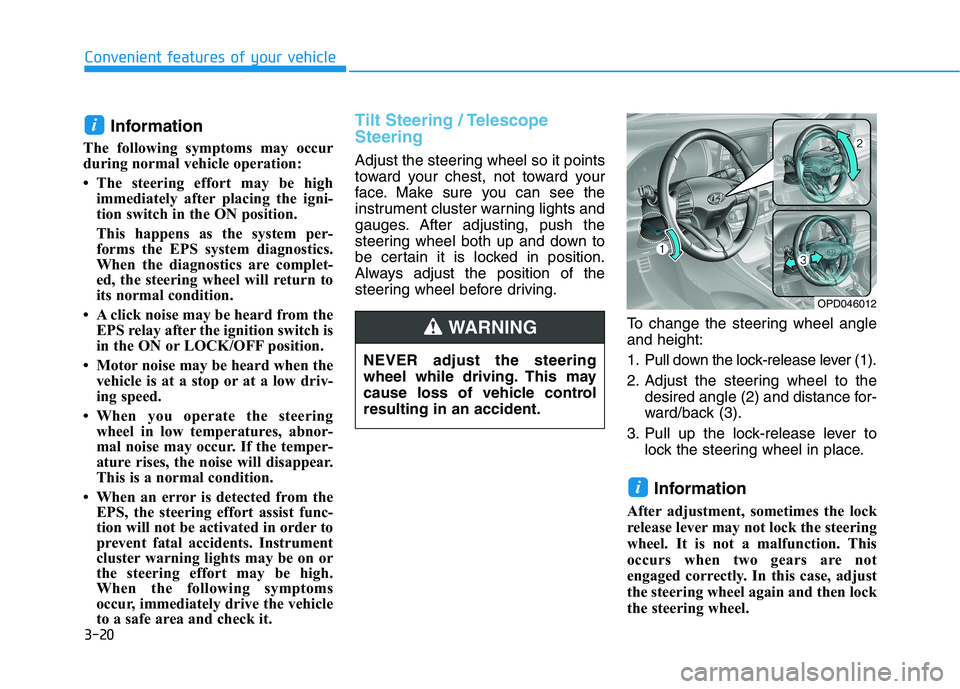
to a safe area and check it.Tilt Steering / Telescope Steering
Adjust the steering wheel so it points
toward your chest, not toward your
face. Make sure you can see the
instrument cluster warning lights and
gauges. After adjusting, push the
steering wheel both up and down to
be certain it is locked in position.
Always adjust the position of the
steering wheel before driving.
To change the steering wheel angleand height:
1. Pull down the lock-release lever (1).
2. Adjust the steering wheel to thedesired angle (2) and distance for-
ward/back (3).
3. Pull up the lock-release lever to lock the steering wheel in place.
Information
After adjustment, sometimes the lock
release lever may not lock the steering
wheel. It is not a malfunction. This
occurs when two gears are not
engaged correctly. In this case, adjust
the steering wheel again and then lock
the steering wheel.
i
i
OPD046012
NEVER adjust the steering
wheel while driving. This may
cause loss of vehicle controlresulting in an accident.
WARNING
Page 106 of 486
3-21
Convenient features of your vehicle
3
Horn
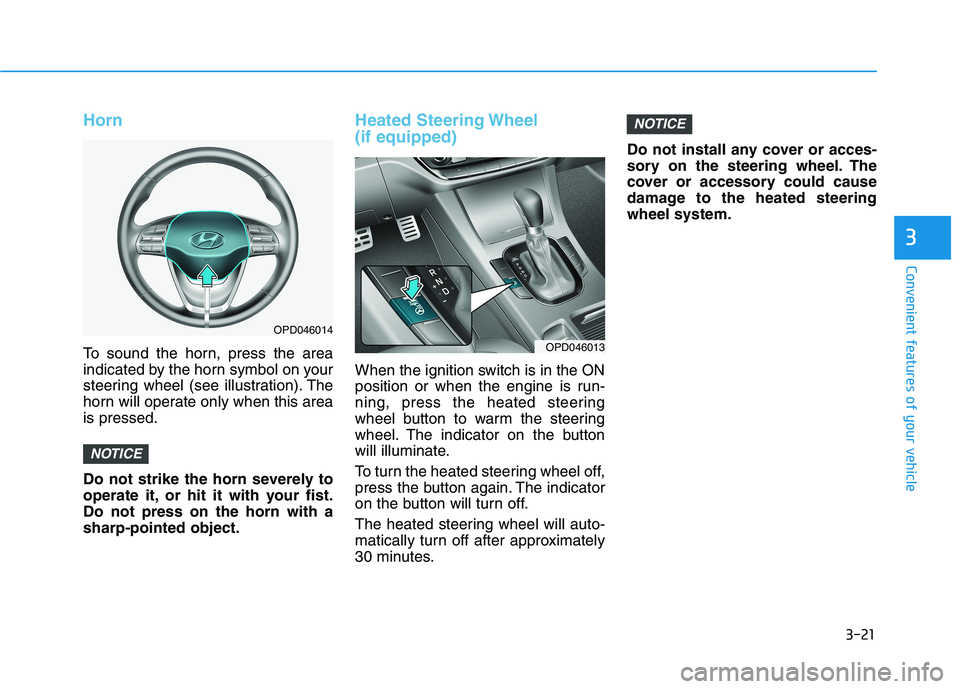
To sound the horn, press the area
indicated by the horn symbol on your
steering wheel (see illustration). The
horn will operate only when this areais pressed.
Do not strike the horn severely to
operate it, or hit it with your fist.Do not press on the horn with asharp-pointed object.
Heated Steering Wheel (if equipped)
When the ignition switch is in the ON
position or when the engine is run-
ning, press the heated steering
wheel button to warm the steering
wheel. The indicator on the button
will illuminate.
To turn the heated steering wheel off,
press the button again. The indicator
on the button will turn off.
The heated steering wheel will auto-
matically turn off after approximately
30 minutes.Do not install any cover or acces-
sory on the steering wheel. The
cover or accessory could cause
damage to the heated steeringwheel system.
NOTICE
NOTICE
OPD046013
OPD046014