fuel Hyundai Equus 2016 User Guide
[x] Cancel search | Manufacturer: HYUNDAI, Model Year: 2016, Model line: Equus, Model: Hyundai Equus 2016Pages: 477, PDF Size: 16.25 MB
Page 25 of 477
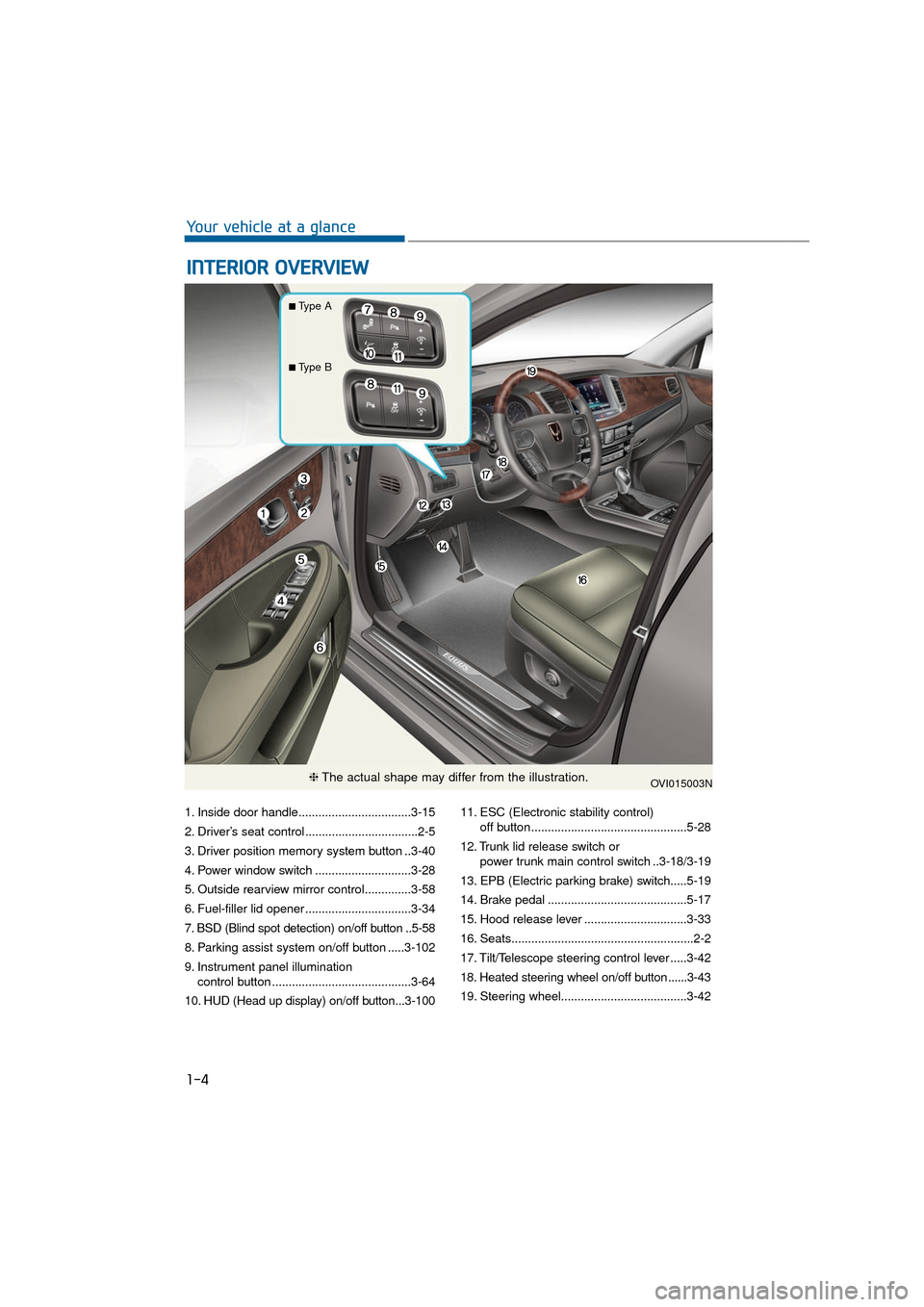
1. Inside door handle..................................3-15
2. Driver’s seat control ..................................2-5
3. Driver position memory system button ..3-40
4. Power window switch .............................3-28
5. Outside rearview mirror control..............3-58
6. Fuel-filler lid opener ................................3-34
7. BSD (Blind spot detection) on/off button ..5-58
8. Parking assist system on/off button .....3-102
9. Instrument panel illumination control button ..........................................3-64
10. HUD (Head up display) on/off button...3-100 11. ESC (Electronic stability control)
off button...............................................5-28
12. Trunk lid release switch or power trunk main control switch ..3-18/3-19
13. EPB (Electric parking brake) switch.....5-19
14. Brake pedal ..........................................5-17
15. Hood release lever ...............................3-33
16. Seats.......................................................2-2
17. Tilt/Telescope steering control lever .....3-42
18. Heated steering wheel on/off button ......3-43
19. Steering wheel......................................3-42
I I N
N T
TE
ER
R I
IO
O R
R
O
O V
VE
ER
R V
V I
IE
E W
W
1-4
Your vehicle at a glance
OVI015003N
■Type A
■Type B
❈ The actual shape may differ from the illustration.
Page 97 of 477

Hood.......................................................................3\
-33
Opening the Hood .........................................................3-33
Closing the Hood .............................................................3-33
Fuel filler lid .........................................................3-34
Opening the Fuel Filler Lid ...........................................3-34
Closing the Fuel Filler Lid .............................................3-34
Sunroof..................................................................3-37
Sliding the Sunroof .........................................................3-37
Tilting the Sunroof .........................................................3-38
Resetting the Sunroof ...................................................3-39
Sunshade ........................................................................\
...3-39
Driver position memory system .........................3-40
Storing the Position Memory .......................................3-40
Recalling the Position Memory ...................................3-41
Easy Access Function ....................................................3-41
Steering wheel......................................................3-42
Electronic Hydraulic Power Steering (EHPS) ...........3-42
Tilt Steering/Telescope Steering.................................3-42
Heated Steering Wheel ..................................................3-43
Horn ........................................................................\
............3-43
Mirrors ...................................................................3-44
Interior rearview mirrors ...............................................3-44
Electric chromic mirror (ECM) with HomeLink®
system and compass ...........................................3-44, 3-51
Outside rearview mirror ................................................3-58
Reverse Parking Aid Function......................................3-61
Convenient features of your vehicle
Page 98 of 477
Instrument cluster................................................3-62
Instrument Cluster Control............................................3-64
LCD Display Control ........................................................3-64
Gauges ........................................................................\
.......3-65
LCD display ...........................................................3-69
LCD Modes ........................................................................\
3-69
Trip Computer Mode.......................................................3-70
ASCC/LDWS Mode ..........................................................3-70
A/V Mode........................................................................\
..3-70
Turn By Turn (TBT) Mode ............................................3-70
Information Mode ...........................................................3-71
User Settings Mode ........................................................3-72
Warning Messages..........................................................3-78
Trip computer .......................................................3-86
Overview........................................................................\
....3-86
Trip A/B ........................................................................\
.....3-86
Fuel Economy...................................................................3-87
Warning and indicator lights ..............................3-89
Warning lights ..................................................................3-89
Indicator Lights ................................................................3-96
Head Up Display (HUD).....................................3-100
Description ......................................................................3-\
100
Head Up Display ON/OFF ...........................................3-101
Head Up Display Information .....................................3-101
Head Up Display Setting .............................................3-101
Parking assist system........................................3-102
Operation of the parking assist system..................3-103
Inoperable conditions of the Parking Assist
System ........................................................................\
.....3-105
Self-diagnosis ................................................................3-106
Page 105 of 477
Loss of a Smart Key
Three Smart Keys can be registered
at maximum to a single vehicle,
including a Card-type Smart Key.
When you happen to lose your Smart
Key, you should immediately take the
vehicle and the remaining keys to
your authorized EQUUS dealer, or
tow the vehicle, if necessary.
Smart key precautions
The Smart Key will not operate,when any of the followings occurs:
- The Smart Key is close to radio transmitters such as a radio sta-
tion or an airport which may
interfere with normal operation
of the Smart Key.
- The Smart Key is near to a mobile two-way radio system or
a mobile phone.
- Another vehicle’s Smart Key is being operated close to your
vehicle.
When the Smart Key does not nor- mally operate, use the mechanical
key to lock/unlock a door and con-
tact an authorized EQUUS dealer.
When the Smart Key is in close proximity to a mobile phone, the
signal may be blocked by the nor-
mal signals of your mobile phone.
This is especially important when
the phone is active, such as mak-
ing/receiving calls, text messag-
ing, or sending/receiving emails.
Avoid placing the Smart Key and
your mobile phone in the same
pants or the jacket pocket. Always
try to maintain an adequate dis-
tance between the two devices.
Record your key number
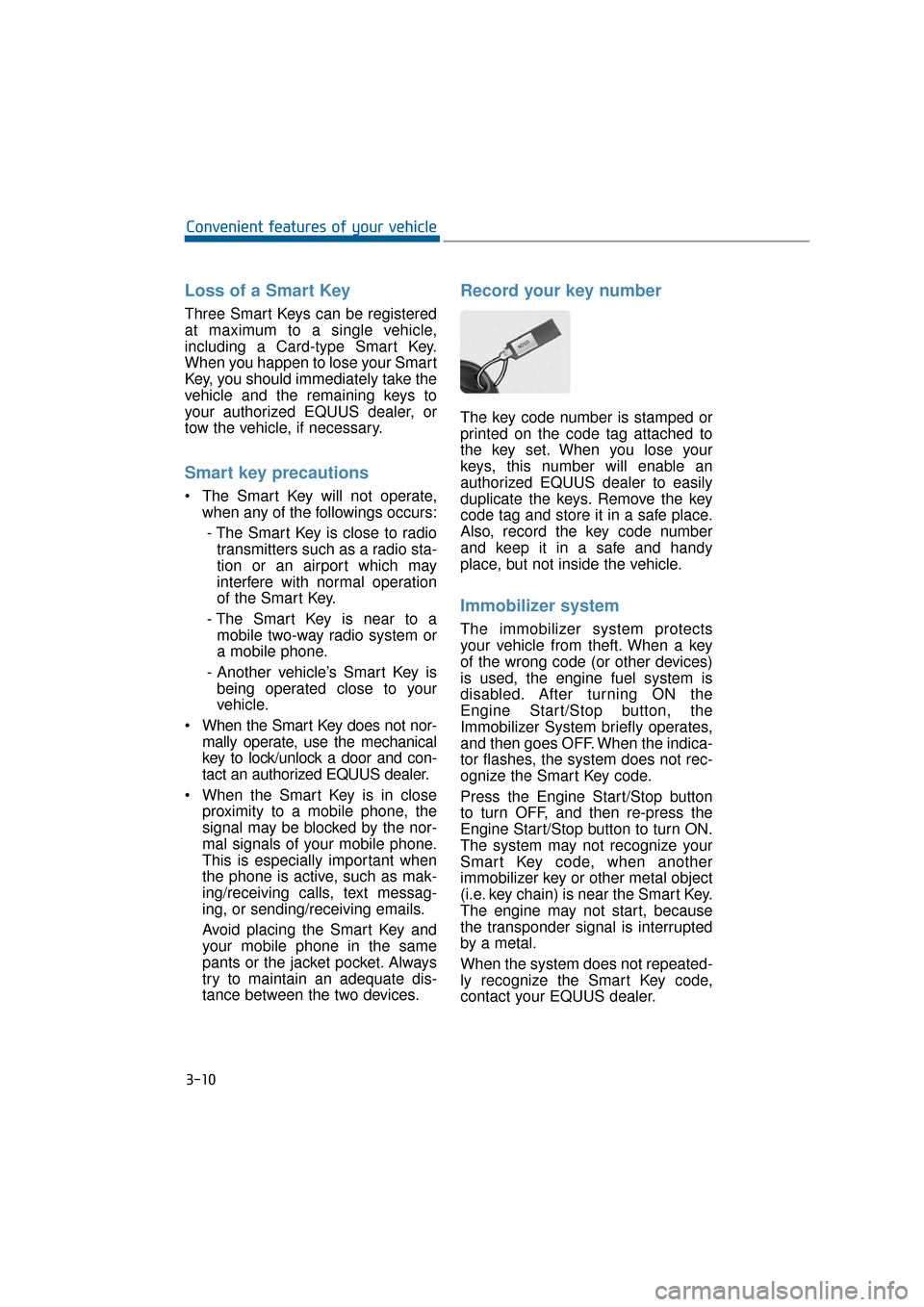
The key code number is stamped or
printed on the code tag attached to
the key set. When you lose your
keys, this number will enable an
authorized EQUUS dealer to easily
duplicate the keys. Remove the key
code tag and store it in a safe place.
Also, record the key code number
and keep it in a safe and handy
place, but not inside the vehicle.
Immobilizer system
The immobilizer system protects
your vehicle from theft. When a key
of the wrong code (or other devices)
is used, the engine fuel system is
disabled. After turning ON the
Engine Start/Stop button, the
Immobilizer System briefly operates,
and then goes OFF. When the indica-
tor flashes, the system does not rec-
ognize the Smart Key code.
Press the Engine Start/Stop button
to turn OFF, and then re-press the
Engine Start/Stop button to turn ON.
The system may not recognize your
Smart Key code, when another
immobilizer key or other metal object
(i.e. key chain) is near the Smart Key.
The engine may not start, because
the transponder signal is interrupted
by a metal.
When the system does not repeated-
ly recognize the Smart Key code,
contact your EQUUS dealer.
3-10
Convenient features of your vehicle
Page 129 of 477
Opening the Fuel Filler Lid
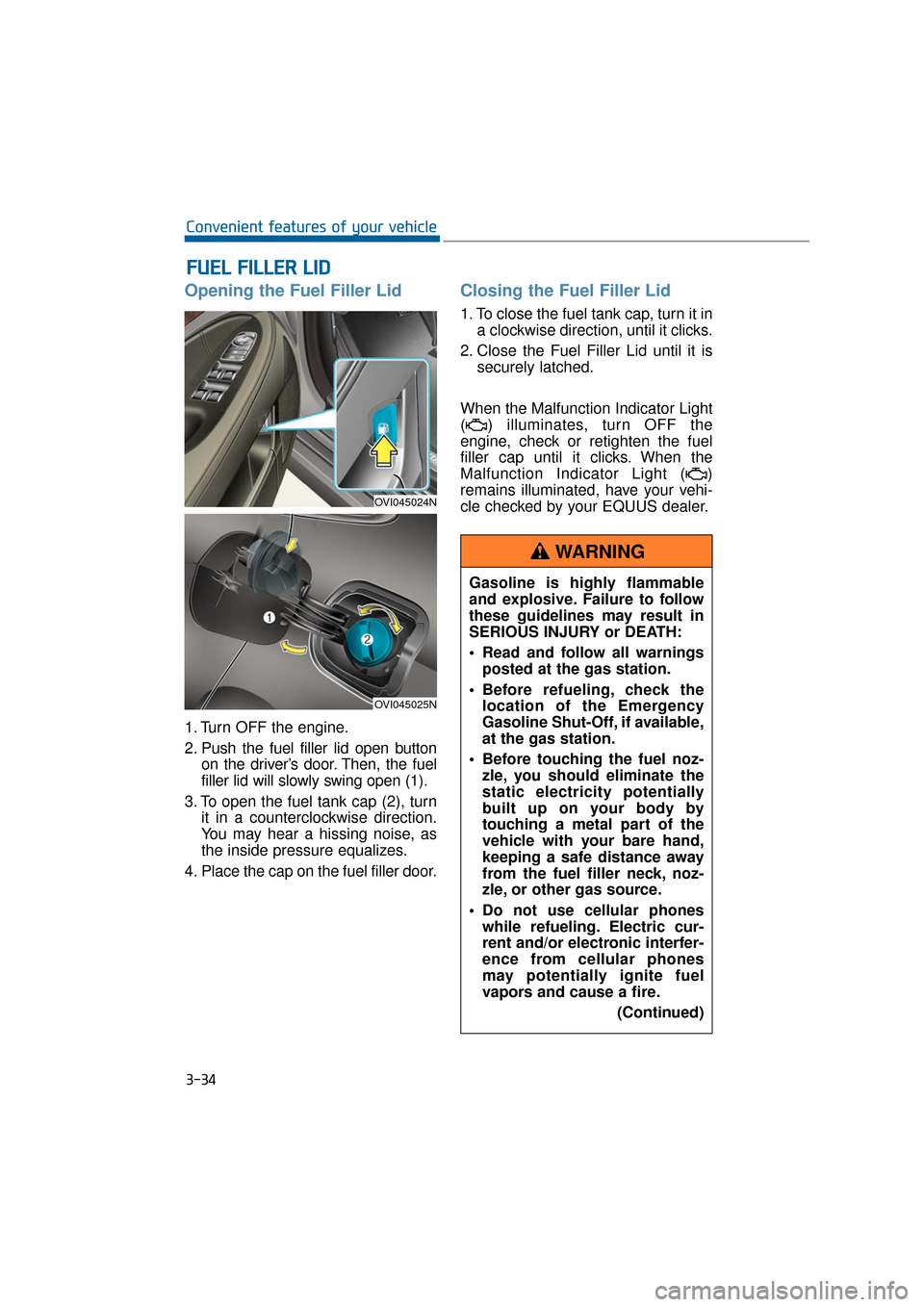
1. Turn OFF the engine.
2. Push the fuel filler lid open buttonon the driver’s door. Then, the fuel
filler lid will slowly swing open (1).
3. To open the fuel tank cap (2), turn it in a counterclockwise direction.
You may hear a hissing noise, as
the inside pressure equalizes.
4. Place the cap on the fuel filler door.
Closing the Fuel Filler Lid
1. To close the fuel tank cap, turn it in a clockwise direction, until it clicks.
2. Close the Fuel Filler Lid until it is securely latched.
When the Malfunction Indicator Light
( ) illuminates, turn OFF the
engine, check or retighten the fuel
filler cap until it clicks. When the
Malfunction Indicator Light ( )
remains illuminated, have your vehi-
cle checked by your EQUUS dealer.
F
F U
U E
EL
L
F
F I
IL
L L
LE
E R
R
L
L I
ID
D
3-34
Convenient features of your vehicle
OVI045024N
OVI045025N
Gasoline is highly flammable
and explosive. Failure to follow
these guidelines may result in
SERIOUS INJURY or DEATH:
Read and follow all warnings
posted at the gas station.
Before refueling, check the location of the Emergency
Gasoline Shut-Off, if available,
at the gas station.
Before touching the fuel noz- zle, you should eliminate the
static electricity potentially
built up on your body by
touching a metal part of the
vehicle with your bare hand,
keeping a safe distance away
from the fuel filler neck, noz-
zle, or other gas source.
Do not use cellular phones while refueling. Electric cur-
rent and/or electronic interfer-
ence from cellular phones
may potentially ignite fuel
vapors and cause a fire.
(Continued)
WARNING
Page 130 of 477
3-35
Convenient features of your vehicle03
(Continued)
Do not get back into a vehiclewhile refueling. You may build
up static electricity by touch-
ing, rubbing or sliding against
any item or fabric capable of
producing static electricity.
Static electricity discharge
may ignite fuel vapors, caus-
ing a fire. When you must re-
enter the vehicle, you should
eliminate potentially danger-
ous static electricity once
again by touching a metal part
of the vehicle with your bare
hand, keeping a safe distance
away from the fuel filler neck,
nozzle, or other gas source.
When using an approved portable fuel container, make
sure to place the container on
the ground, before refueling.
Static electricity discharged
from the container may ignite
fuel vapors, causing a fire.
Once refueling has begun,
contact between your bare
hand and the vehicle should
be maintained until the filling
is complete.
Use only approved portable plastic fuel containers
designed to carry and store
gasoline.
When refueling, always set the shift lever in P (Park), set the
parking brake, and turn OFF
the Engine Start/Stop button.
Sparks produced by electrical
components related to the
engine may ignite fuel vapors,
causing a fire.
(Continued)(Continued)
Do not use matches or alighter and do not smoke or
leave a lit cigarette in your
vehicle while at a gas station,
especially during refueling.
Do not overfill or "top-off" your vehicle tank, which may
cause gasoline spillage.
When a fire breaks out during refueling, stay away from the
vehicle, and immediately noti-
fy it to the gas station manag-
er, and call the local fire
department. Follow any safety
instructions they provide.
When pressurized fuel sprays out, it may cover your clothes
or skin. This puts you at risk
of fire and burns. Always care-
fully and slowly open the fuel
cap. When the fuel vents out
from the tank, or when you
hear a hissing sound, wait
until those stop before com-
pletely opening the cap.
Always check that the fuel cap is securely closed to prevent
fuel spillage in the event of an
accident.
Page 131 of 477
Information
• Make sure to refuel your vehicle inaccordance with the "Fuel require-
ments" in the "Foreword" chapter.
• Do not spill fuel on the exterior sur- face of the vehicle. Any type of fuel
spillage on a painted surface may
damage the paint.
When the fuel filler cap requires to
be replaced, use only a genuine
EQUUS cap or the equivalent
specified for your vehicle. An
unauthorized fuel filler cap may
result in a serious malfunction of
the fuel system or emission con-
trol system.
NOTICE
i
3-36
Convenient features of your vehicle
Page 157 of 477
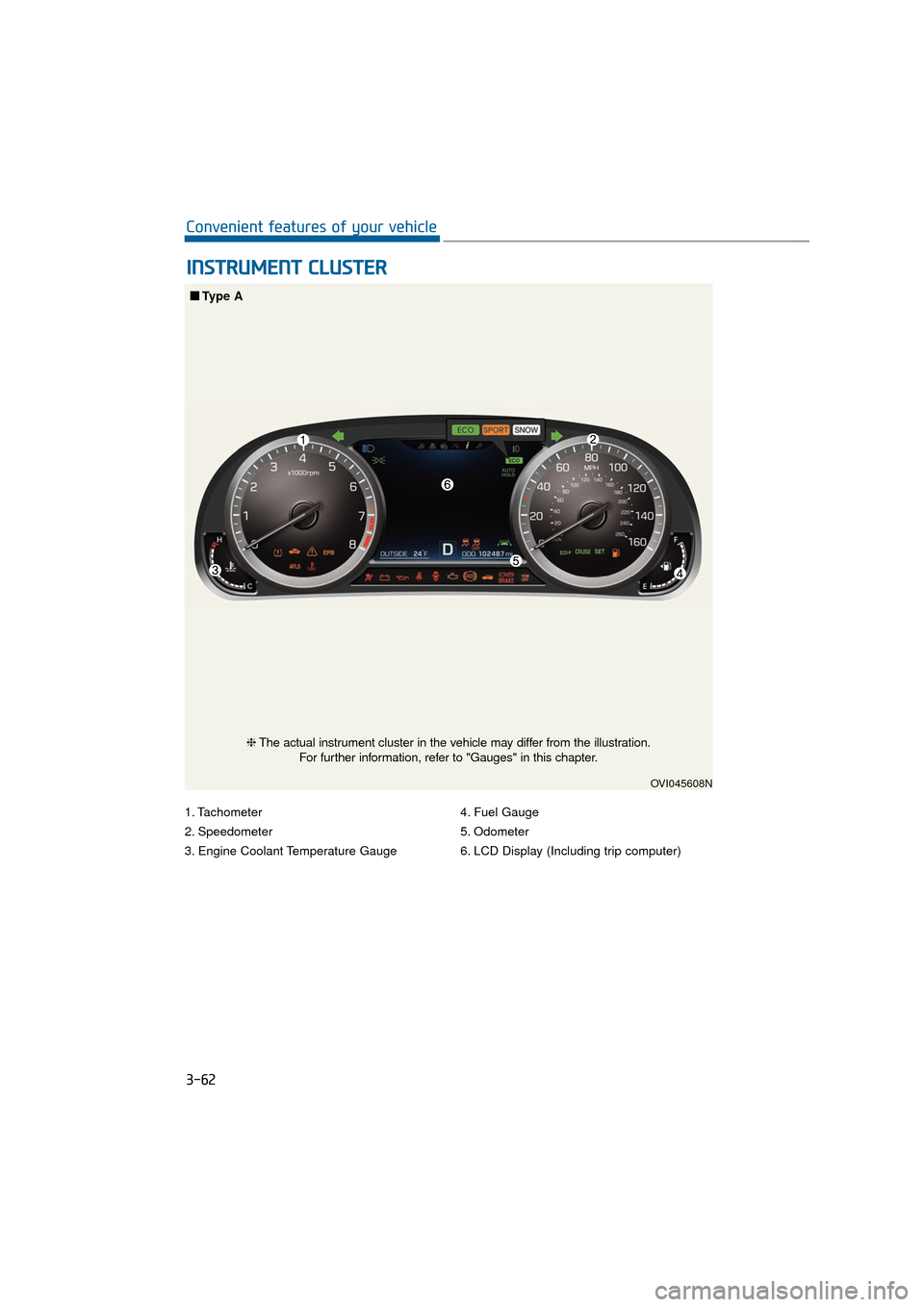
1. Tachometer
2. Speedometer
3. Engine Coolant Temperature Gauge4. Fuel Gauge
5. Odometer
6. LCD Display (Including trip computer)
I I
N
N S
ST
T R
R U
U M
M E
EN
N T
T
C
C L
LU
U S
ST
T E
ER
R
3-62
Convenient features of your vehicle
OVI045608N
■
■
Type A
❈The actual instrument cluster in the vehicle may differ from the illustration.
For further information, refer to "Gauges" in this chapter.
Page 158 of 477
3-63
Convenient features of your vehicle03
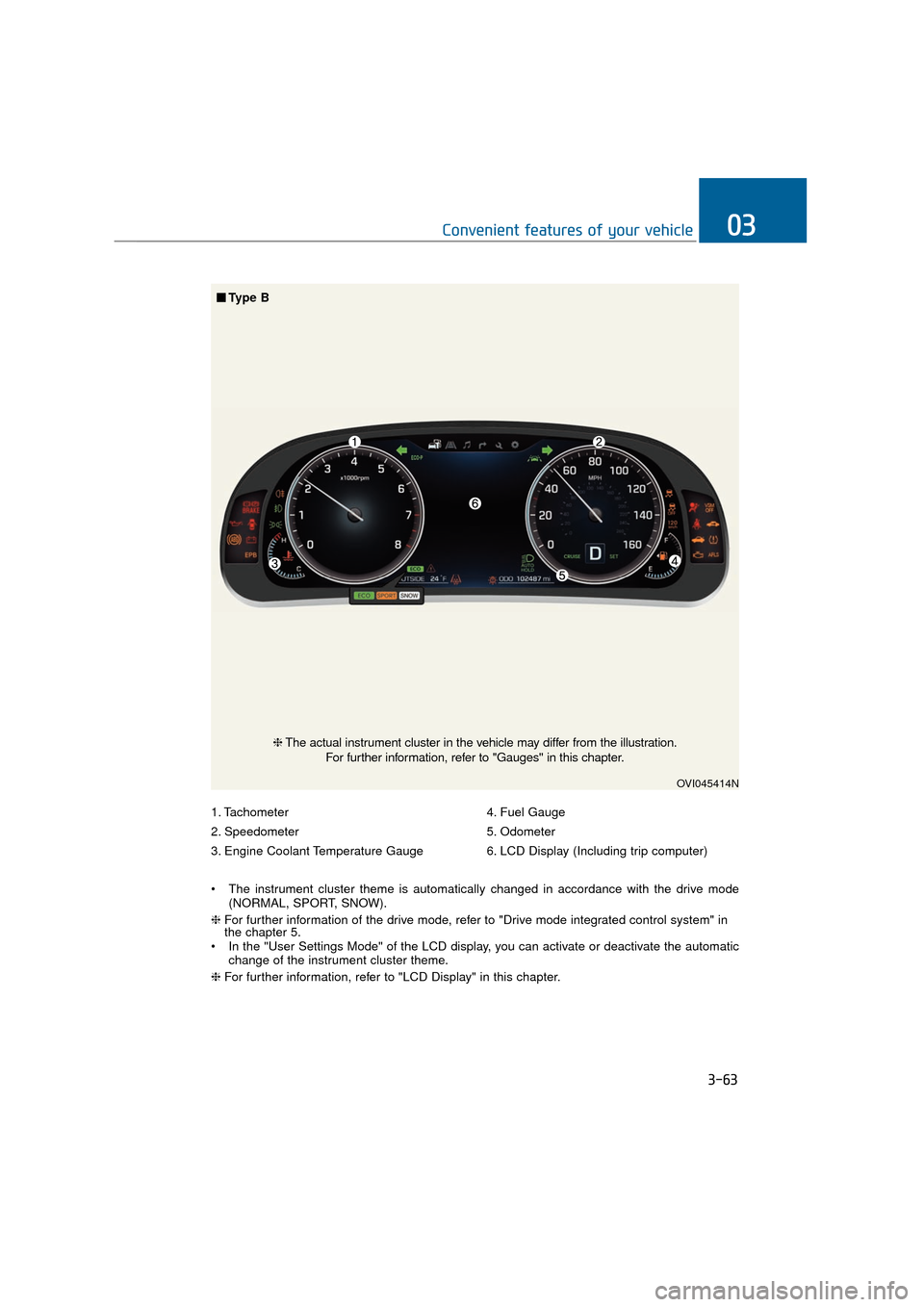
1. Tachometer
2. Speedometer
3. Engine Coolant Temperature Gauge4. Fuel Gauge
5. Odometer
6. LCD Display (Including trip computer)
The instrument cluster theme is automatically changed in accordance with the drive mode (NORMAL, SPORT, SNOW).
❈ For further information of the drive mode, refer to "Drive mode integrated control system" in
the chapter 5.
In the "User Settings Mode" of the LCD display, you can activate or deactivate the automatic change of the instrument cluster theme.
❈ For further information, refer to "LCD Display" in this chapter.
OVI045414N
❈The actual instrument cluster in the vehicle may differ from the illustration.
For further information, refer to "Gauges" in this chapter.
■ ■
Type B
Page 162 of 477
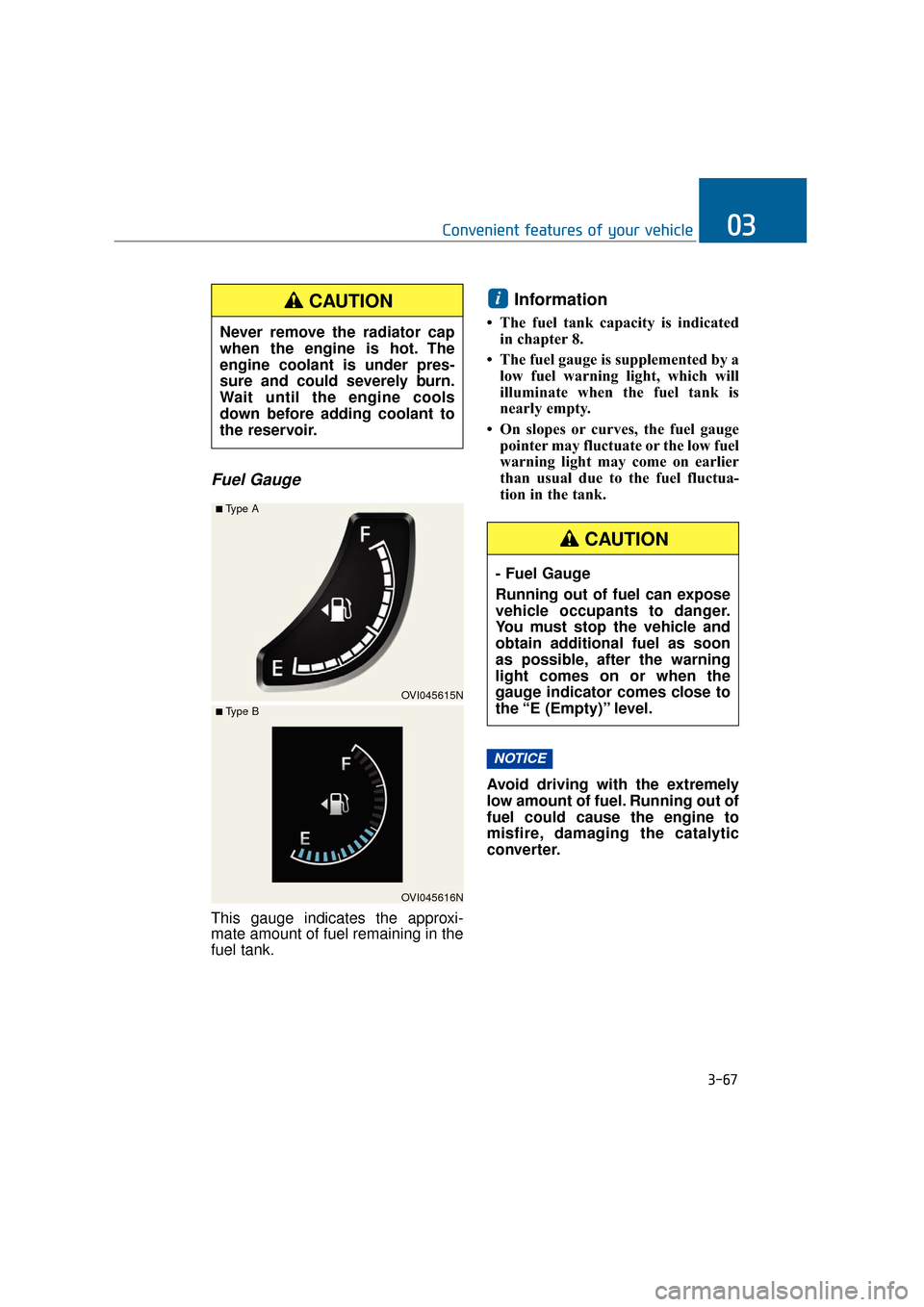
Fuel Gauge
This gauge indicates the approxi-
mate amount of fuel remaining in the
fuel tank.
Information
• The fuel tank capacity is indicatedin chapter 8.
• The fuel gauge is supplemented by a low fuel warning light, which will
illuminate when the fuel tank is
nearly empty.
• On slopes or curves, the fuel gauge pointer may fluctuate or the low fuel
warning light may come on earlier
than usual due to the fuel fluctua-
tion in the tank.
Avoid driving with the extremely
low amount of fuel. Running out of
fuel could cause the engine to
misfire, damaging the catalytic
converter.
NOTICE
i
3-67
Convenient features of your vehicle03
Never remove the radiator cap
when the engine is hot. The
engine coolant is under pres-
sure and could severely burn.
Wait until the engine cools
down before adding coolant to
the reservoir.
CAUTION
OVI045615N
■Type A
OVI045616N
■ Type B
- Fuel Gauge
Running out of fuel can expose
vehicle occupants to danger.
You must stop the vehicle and
obtain additional fuel as soon
as possible, after the warning
light comes on or when the
gauge indicator comes close to
the “E (Empty)” level.
CAUTION