engine Hyundai Equus 2016 Service Manual
[x] Cancel search | Manufacturer: HYUNDAI, Model Year: 2016, Model line: Equus, Model: Hyundai Equus 2016Pages: 477, PDF Size: 16.25 MB
Page 126 of 477
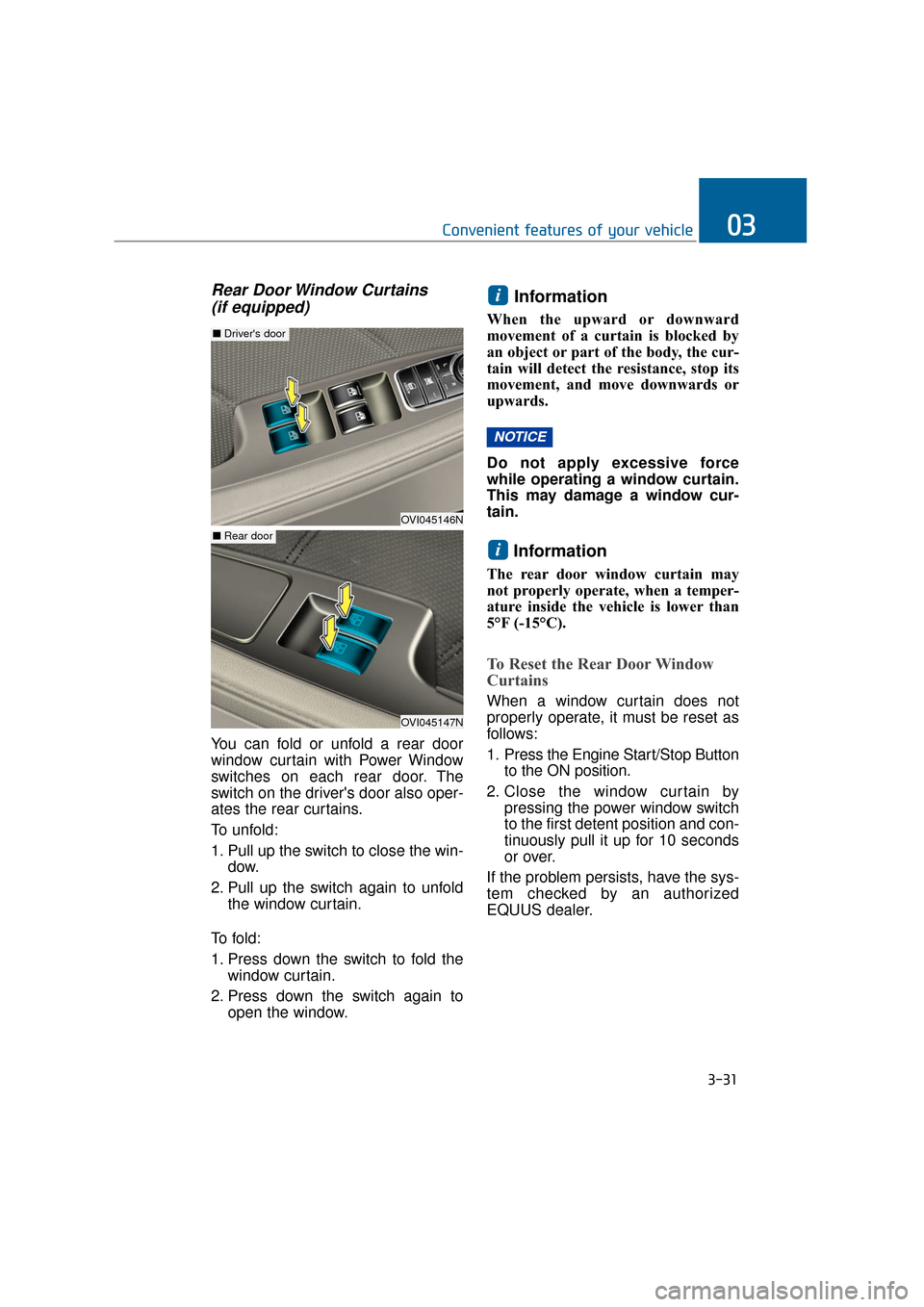
Rear Door Window Curtains (if equipped)
You can fold or unfold a rear door
window curtain with Power Window
switches on each rear door. The
switch on the driver's door also oper-
ates the rear curtains.
To unfold:
1. Pull up the switch to close the win-
dow.
2. Pull up the switch again to unfold the window curtain.
To f o l d :
1. Press down the switch to fold the window curtain.
2. Press down the switch again to open the window.
Information
When the upward or downward
movement of a curtain is blocked by
an object or part of the body, the cur-
tain will detect the resistance, stop its
movement, and move downwards or
upwards.
Do not apply excessive force
while operating a window curtain.
This may damage a window cur-
tain.
Information
The rear door window curtain may
not properly operate, when a temper-
ature inside the vehicle is lower than
5°F (-15°C).
To Reset the Rear Door Window
Curtains
When a window curtain does not
properly operate, it must be reset as
follows:
1. Press the Engine Start/Stop Button to the ON position.
2. Close the window curtain by pressing the power window switch
to the first detent position and con-
tinuously pull it up for 10 seconds
or over.
If the problem persists, have the sys-
tem checked by an authorized
EQUUS dealer.
i
NOTICE
i
3-31
Convenient features of your vehicle03
OVI045146N
■ Driver's door
OVI045147N
■ Rear door
Page 128 of 477
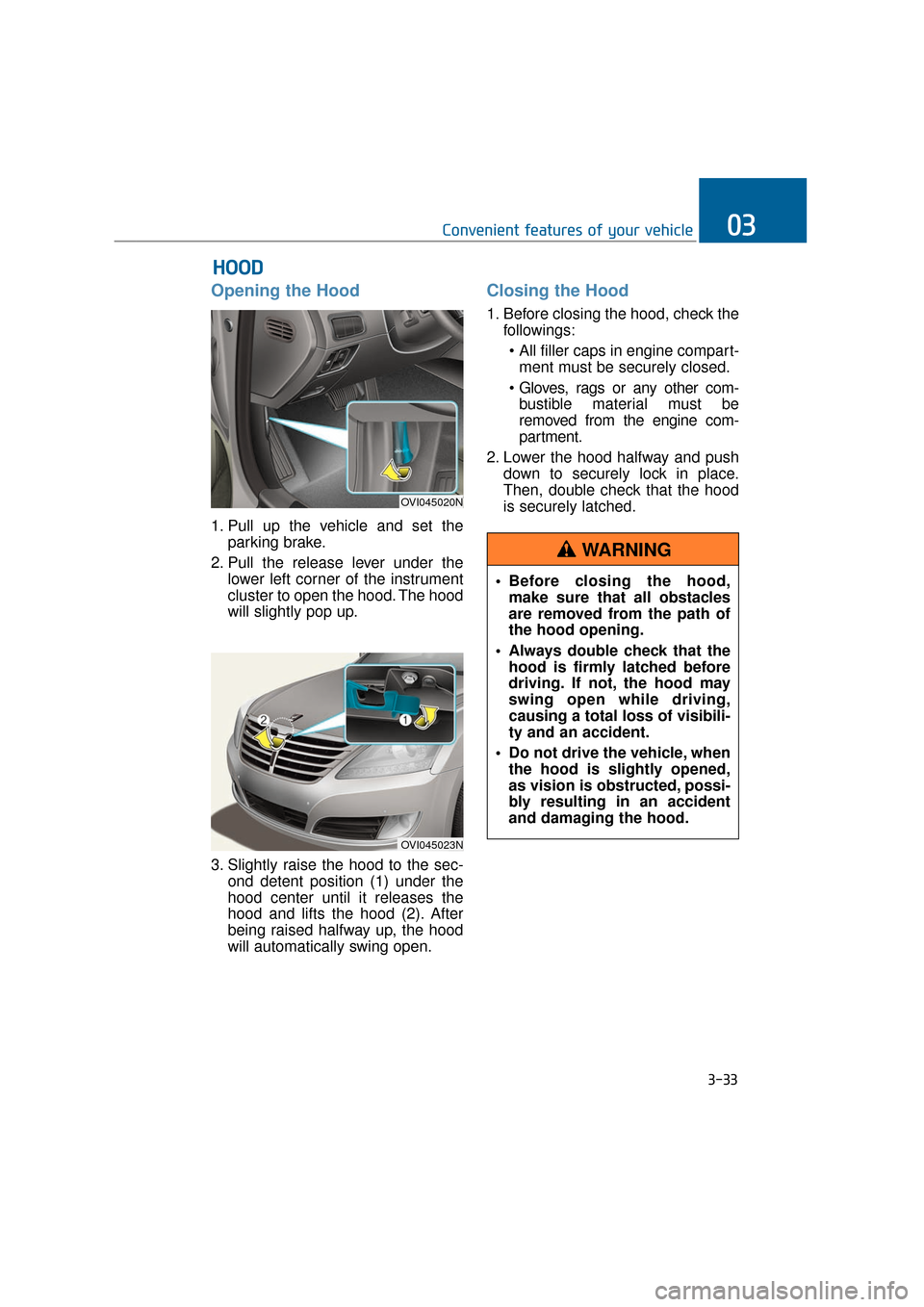
Opening the Hood
1. Pull up the vehicle and set theparking brake.
2. Pull the release lever under the lower left corner of the instrument
cluster to open the hood. The hood
will slightly pop up.
3. Slightly raise the hood to the sec- ond detent position (1) under the
hood center until it releases the
hood and lifts the hood (2). After
being raised halfway up, the hood
will automatically swing open.
Closing the Hood
1. Before closing the hood, check thefollowings:
ment must be securely closed.
bustible material must be
removed from the engine com-
partment.
2. Lower the hood halfway and push down to securely lock in place.
Then, double check that the hood
is securely latched.
H HO
O O
OD
D
3-33
Convenient features of your vehicle03
OVI045020N
OVI045023N
Before closing the hood,
make sure that all obstacles
are removed from the path of
the hood opening.
Always double check that the hood is firmly latched before
driving. If not, the hood may
swing open while driving,
causing a total loss of visibili-
ty and an accident.
Do not drive the vehicle, when the hood is slightly opened,
as vision is obstructed, possi-
bly resulting in an accident
and damaging the hood.
WARNING
Page 129 of 477
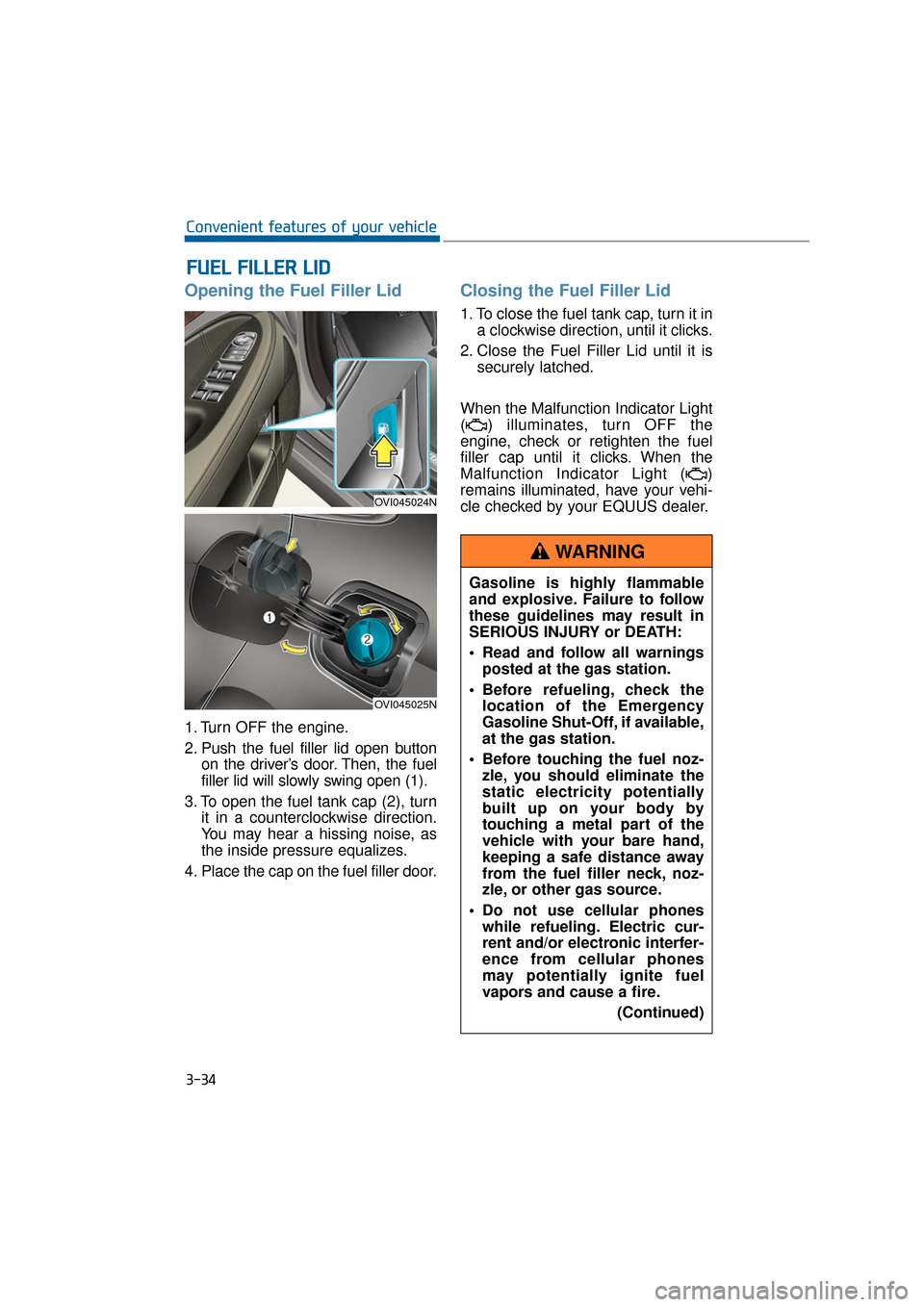
Opening the Fuel Filler Lid
1. Turn OFF the engine.
2. Push the fuel filler lid open buttonon the driver’s door. Then, the fuel
filler lid will slowly swing open (1).
3. To open the fuel tank cap (2), turn it in a counterclockwise direction.
You may hear a hissing noise, as
the inside pressure equalizes.
4. Place the cap on the fuel filler door.
Closing the Fuel Filler Lid
1. To close the fuel tank cap, turn it in a clockwise direction, until it clicks.
2. Close the Fuel Filler Lid until it is securely latched.
When the Malfunction Indicator Light
( ) illuminates, turn OFF the
engine, check or retighten the fuel
filler cap until it clicks. When the
Malfunction Indicator Light ( )
remains illuminated, have your vehi-
cle checked by your EQUUS dealer.
F
F U
U E
EL
L
F
F I
IL
L L
LE
E R
R
L
L I
ID
D
3-34
Convenient features of your vehicle
OVI045024N
OVI045025N
Gasoline is highly flammable
and explosive. Failure to follow
these guidelines may result in
SERIOUS INJURY or DEATH:
Read and follow all warnings
posted at the gas station.
Before refueling, check the location of the Emergency
Gasoline Shut-Off, if available,
at the gas station.
Before touching the fuel noz- zle, you should eliminate the
static electricity potentially
built up on your body by
touching a metal part of the
vehicle with your bare hand,
keeping a safe distance away
from the fuel filler neck, noz-
zle, or other gas source.
Do not use cellular phones while refueling. Electric cur-
rent and/or electronic interfer-
ence from cellular phones
may potentially ignite fuel
vapors and cause a fire.
(Continued)
WARNING
Page 130 of 477
3-35
Convenient features of your vehicle03
(Continued)
Do not get back into a vehiclewhile refueling. You may build
up static electricity by touch-
ing, rubbing or sliding against
any item or fabric capable of
producing static electricity.
Static electricity discharge
may ignite fuel vapors, caus-
ing a fire. When you must re-
enter the vehicle, you should
eliminate potentially danger-
ous static electricity once
again by touching a metal part
of the vehicle with your bare
hand, keeping a safe distance
away from the fuel filler neck,
nozzle, or other gas source.
When using an approved portable fuel container, make
sure to place the container on
the ground, before refueling.
Static electricity discharged
from the container may ignite
fuel vapors, causing a fire.
Once refueling has begun,
contact between your bare
hand and the vehicle should
be maintained until the filling
is complete.
Use only approved portable plastic fuel containers
designed to carry and store
gasoline.
When refueling, always set the shift lever in P (Park), set the
parking brake, and turn OFF
the Engine Start/Stop button.
Sparks produced by electrical
components related to the
engine may ignite fuel vapors,
causing a fire.
(Continued)(Continued)
Do not use matches or alighter and do not smoke or
leave a lit cigarette in your
vehicle while at a gas station,
especially during refueling.
Do not overfill or "top-off" your vehicle tank, which may
cause gasoline spillage.
When a fire breaks out during refueling, stay away from the
vehicle, and immediately noti-
fy it to the gas station manag-
er, and call the local fire
department. Follow any safety
instructions they provide.
When pressurized fuel sprays out, it may cover your clothes
or skin. This puts you at risk
of fire and burns. Always care-
fully and slowly open the fuel
cap. When the fuel vents out
from the tank, or when you
hear a hissing sound, wait
until those stop before com-
pletely opening the cap.
Always check that the fuel cap is securely closed to prevent
fuel spillage in the event of an
accident.
Page 132 of 477
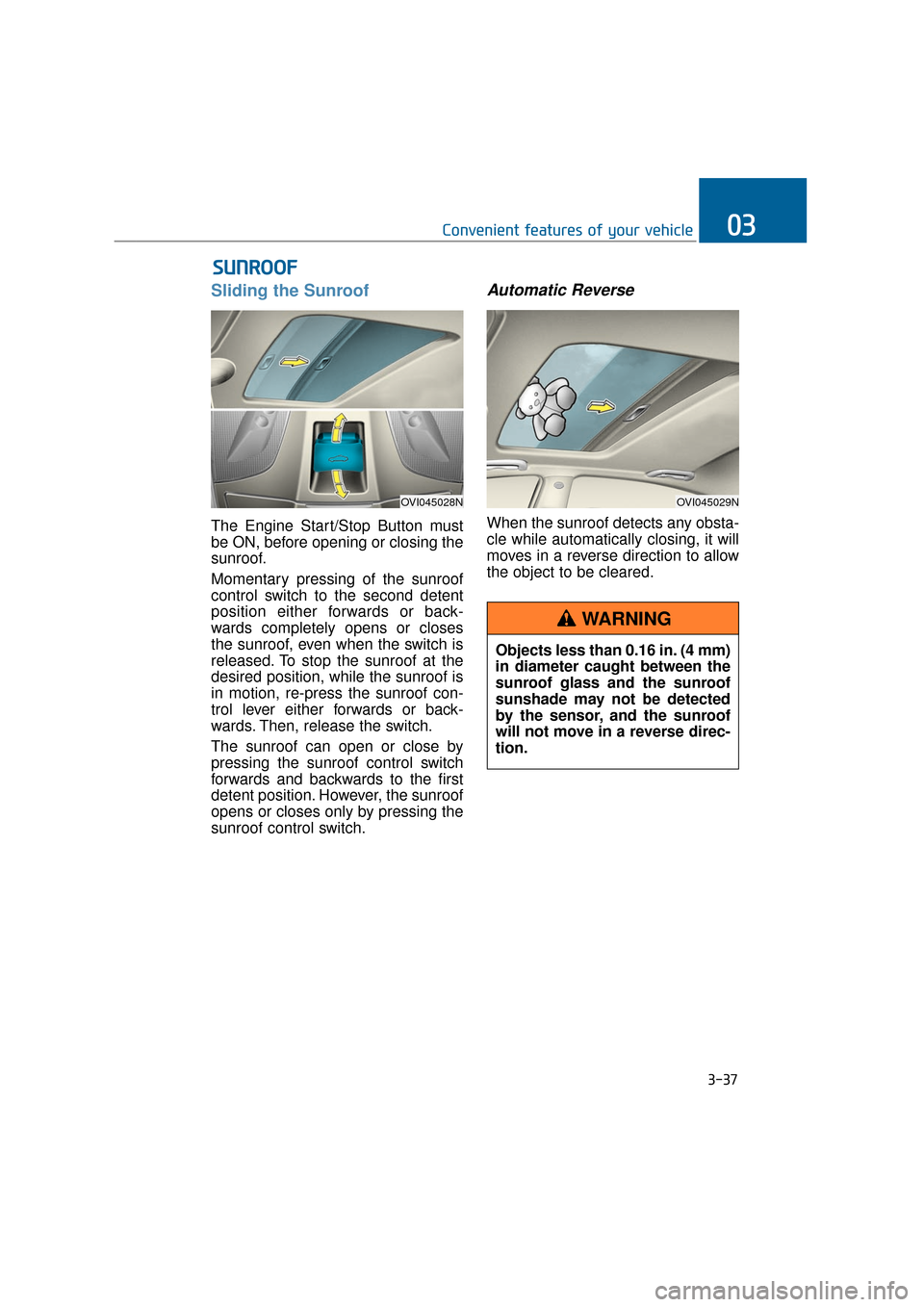
Sliding the Sunroof
The Engine Start/Stop Button must
be ON, before opening or closing the
sunroof.
Momentary pressing of the sunroof
control switch to the second detent
position either forwards or back-
wards completely opens or closes
the sunroof, even when the switch is
released. To stop the sunroof at the
desired position, while the sunroof is
in motion, re-press the sunroof con-
trol lever either forwards or back-
wards. Then, release the switch.
The sunroof can open or close by
pressing the sunroof control switch
forwards and backwards to the first
detent position. However, the sunroof
opens or closes only by pressing the
sunroof control switch.
Automatic Reverse
When the sunroof detects any obsta-
cle while automatically closing, it will
moves in a reverse direction to allow
the object to be cleared.
S SU
U N
NR
RO
O O
OF
F
3-37
Convenient features of your vehicle03
OVI045028NOVI045029N
Objects less than 0.16 in. (4 mm)
in diameter caught between the
sunroof glass and the sunroof
sunshade may not be detected
by the sensor, and the sunroof
will not move in a reverse direc-
tion.
WARNING
Page 134 of 477
Resetting the Sunroof
Sunroof needs to be reset if (in the
followings)
- Battery is discharged or discon-nected or the related fuse has been
replaced or disconnected.
- The one-touch sliding function of the sunroof does not normally oper-
ate.
1. The Engine Start/Stop Button must be ON.
2. Completely close the sunroof. Then, release the control lever.
3. Pull down the control lever and hold it, until the sunroof slightly
moves up and down. Then,
release the control lever.
4. Pull down the control lever and hold it, until the sunroof operates
as follows:
TILT DOWN → SLIDE OPEN →
SLIDE CLOSE
Then, release the control lever.
If the problem persists, have the sys-
tem checked by an EQUUS dealer.
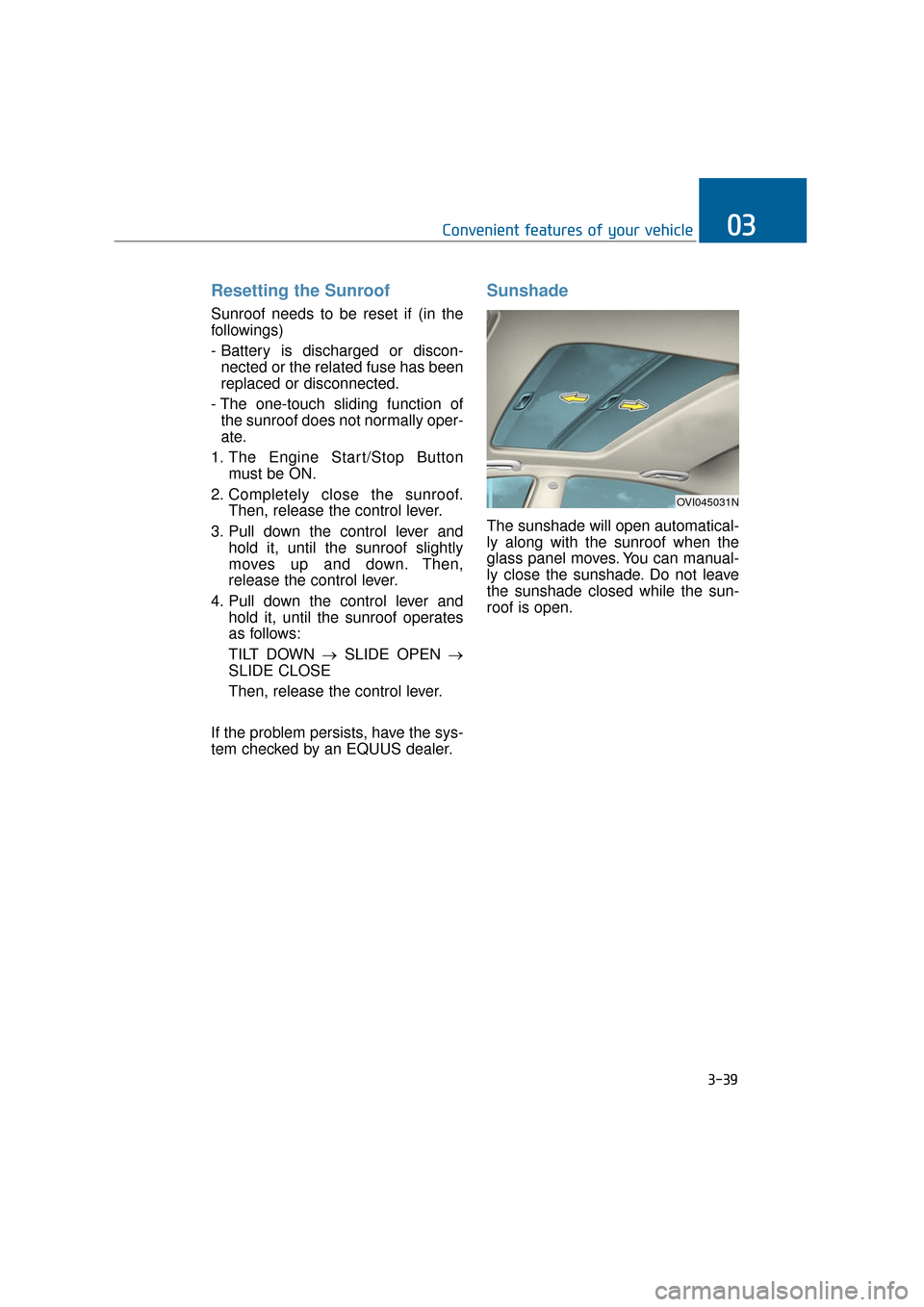
Sunshade
The sunshade will open automatical-
ly along with the sunroof when the
glass panel moves. You can manual-
ly close the sunshade. Do not leave
the sunshade closed while the sun-
roof is open.
3-39
Convenient features of your vehicle03
OVI045031N
Page 135 of 477
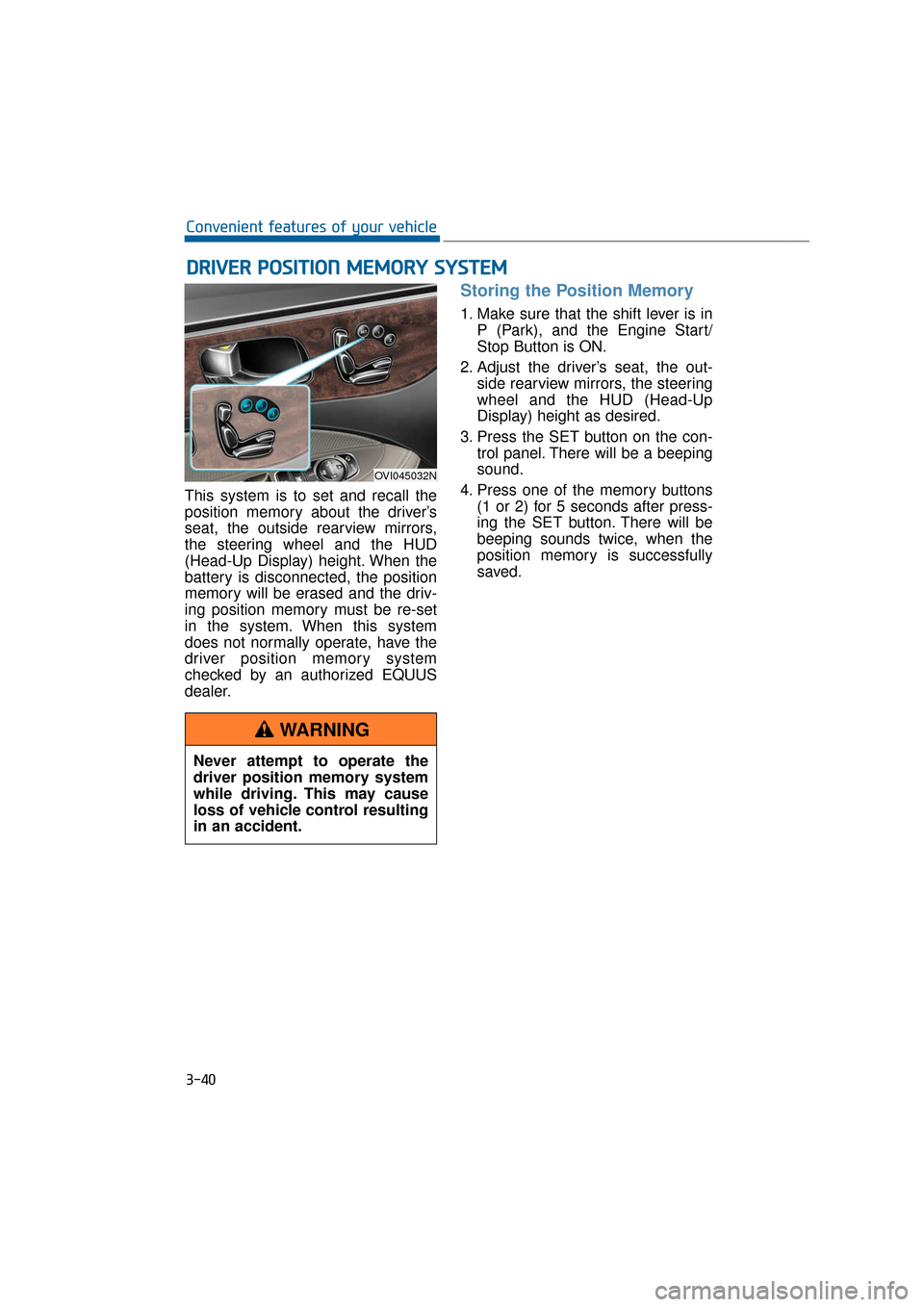
This system is to set and recall the
position memory about the driver’s
seat, the outside rearview mirrors,
the steering wheel and the HUD
(Head-Up Display) height. When the
battery is disconnected, the position
memory will be erased and the driv-
ing position memory must be re-set
in the system. When this system
does not normally operate, have the
driver position memory system
checked by an authorized EQUUS
dealer.
Storing the Position Memory
1. Make sure that the shift lever is inP (Park), and the Engine Start/
Stop Button is ON.
2. Adjust the driver’s seat, the out- side rearview mirrors, the steering
wheel and the HUD (Head-Up
Display) height as desired.
3. Press the SET button on the con- trol panel. There will be a beeping
sound.
4. Press one of the memory buttons (1 or 2) for 5 seconds after press-
ing the SET button. There will be
beeping sounds twice, when the
position memory is successfully
saved.
D DR
RI
IV
V E
ER
R
P
P O
O S
SI
IT
T I
IO
O N
N
M
M E
EM
M O
OR
RY
Y
S
S Y
Y S
ST
T E
EM
M
3-40
Convenient features of your vehicle
OVI045032N
Never attempt to operate the
driver position memory system
while driving. This may cause
loss of vehicle control resulting
in an accident.
WARNING
Page 136 of 477
Recalling the Position Memory
1. Check that the shift lever is in P(Park) and the Engine Start/Stop
button is ON.
2. Press the memory button (1 or 2) to recall the desired position.
There will be a beeping sound.
Then, the driver’s seat, outside
rearview mirrors, steering wheel
and HUD (Head-Up Display)
height will be automatically adjust-
ed, as set in the memory.
While the pre-set position is being
recalled, pressing one of the control
buttons for the driver’s seat, the out-
side rearview mirror, or the steering
wheel will stop the movement of that
component in that position. Other
components will be continuously
adjusted, as set in the memory.
Easy Access Function
When the engine is turned OFF, and
when the driver exits from the vehi-
cle, the steering wheel moves away
from the driver, and the seat moves
backwards. After entering the vehi-
cle, the steering wheel will move
toward the driver. After turning the
Engine Start/Stop button to the ACC
position, the seat will move forwards.
You can activate or deactivate the
Easy Access Function in the User
Setting Mode. Refer to "User Setting
Mode" in this chapter.
3-41
Convenient features of your vehicle03
Use caution when recalling the
position memory while sitting in
the vehicle. Immediately push
the seat position control knob,
when the seat moves too far in
any direction.
WARNING
Page 137 of 477
Electronic Hydraulic Power
Steering (EHPS)
This system uses an electromotor to
assist your steering. When the
engine is turned OFF, or when the
EHPS becomes inoperative, you
may still steer the vehicle, but it
requires more effort in steering.
When you notice such a change
while steering, have the EHPS
checked by an authorized EQUUS
dealer.
Do not turn the steering wheel to
the extreme right or left for five
seconds or over, while running the
engine. This may cause damage to
the EHPS motor pump.
Information
When there is a malfunction with the
EHPS motor pump, the efforts to steer
may greatly increase.
Information
When the vehicle is parked outside for
an extended period of time at a cold
temperature (below 14°F/-10°C), the
power steering may require more
efforts, after first starting the engine.
This is due to the increased fluid vis-
cosity at a cold temperature and does
not indicate a malfunction.
When this happens, depress the accel-
erator to increase the engine RPM,
until it reaches 1,500 rpm. Then, let
the engine idle for two-to-three min-
utes to warm up the fluid.
Tilt Steering/Telescope Steering
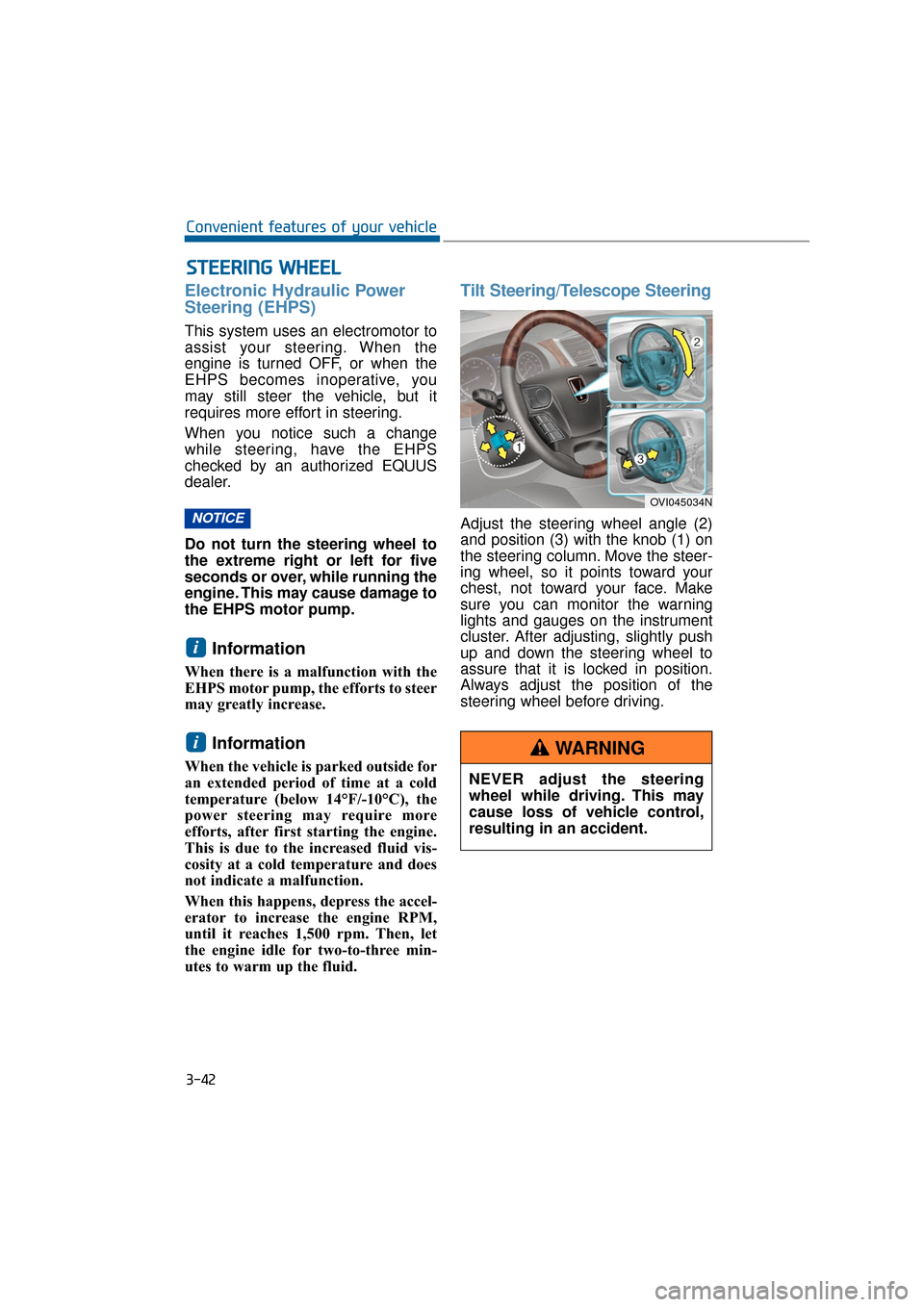
Adjust the steering wheel angle (2)
and position (3) with the knob (1) on
the steering column. Move the steer-
ing wheel, so it points toward your
chest, not toward your face. Make
sure you can monitor the warning
lights and gauges on the instrument
cluster. After adjusting, slightly push
up and down the steering wheel to
assure that it is locked in position.
Always adjust the position of the
steering wheel before driving.
i
i
NOTICE
S ST
T E
EE
ER
R I
IN
N G
G
W
W H
HE
EE
EL
L
3-42
Convenient features of your vehicle
OVI045034N
NEVER adjust the steering
wheel while driving. This may
cause loss of vehicle control,
resulting in an accident.
WARNING
Page 138 of 477
Heated Steering Wheel
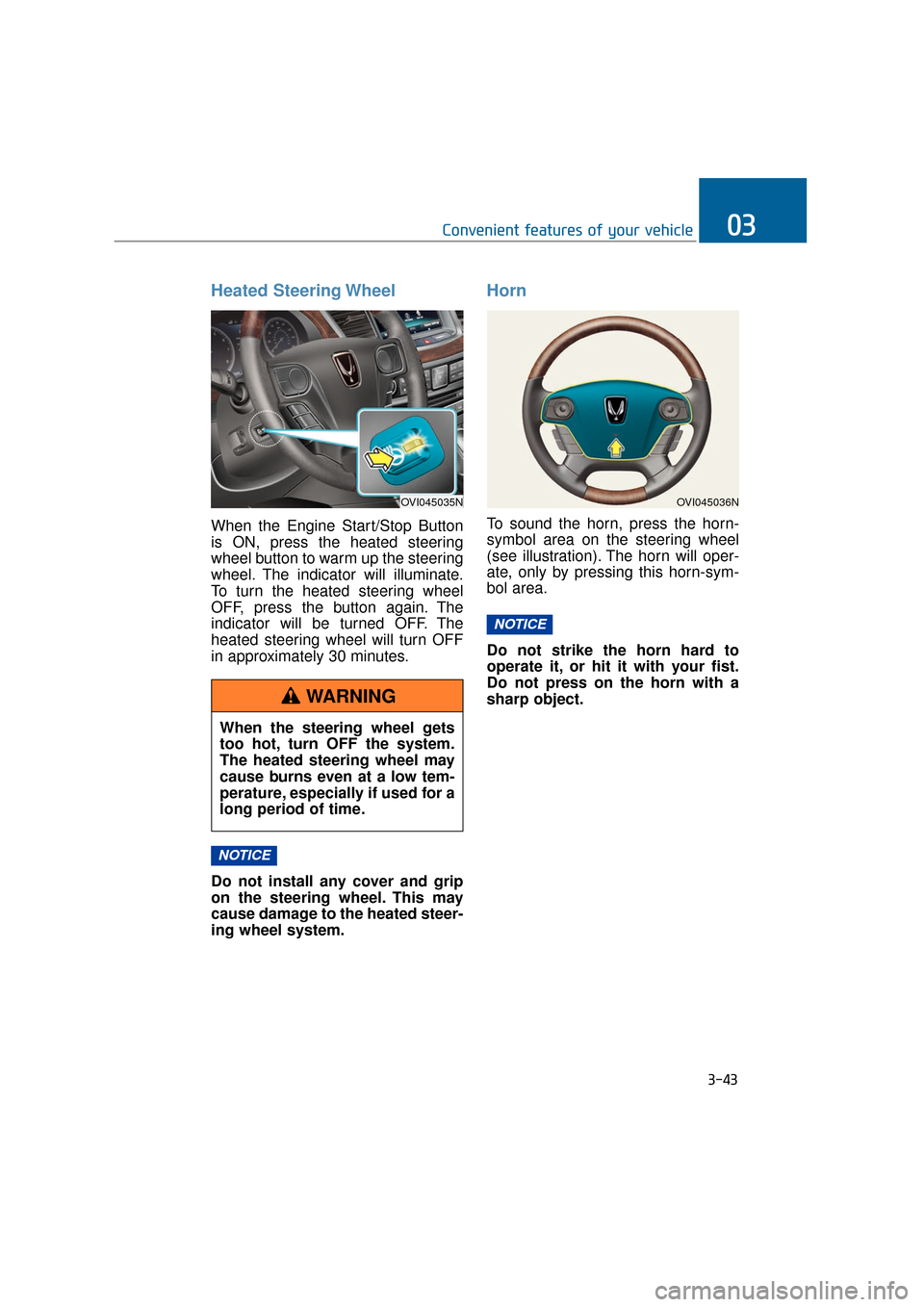
When the Engine Start/Stop Button
is ON, press the heated steering
wheel button to warm up the steering
wheel. The indicator will illuminate.
To turn the heated steering wheel
OFF, press the button again. The
indicator will be turned OFF. The
heated steering wheel will turn OFF
in approximately 30 minutes.
Do not install any cover and grip
on the steering wheel. This may
cause damage to the heated steer-
ing wheel system.
Horn
To sound the horn, press the horn-
symbol area on the steering wheel
(see illustration). The horn will oper-
ate, only by pressing this horn-sym-
bol area.
Do not strike the horn hard to
operate it, or hit it with your fist.
Do not press on the horn with a
sharp object.
NOTICE
NOTICE
3-43
Convenient features of your vehicle03
OVI045035N
When the steering wheel gets
too hot, turn OFF the system.
The heated steering wheel may
cause burns even at a low tem-
perature, especially if used for a
long period of time.
WARNING
OVI045036N