engine Hyundai Equus 2016 Workshop Manual
[x] Cancel search | Manufacturer: HYUNDAI, Model Year: 2016, Model line: Equus, Model: Hyundai Equus 2016Pages: 477, PDF Size: 16.25 MB
Page 155 of 477
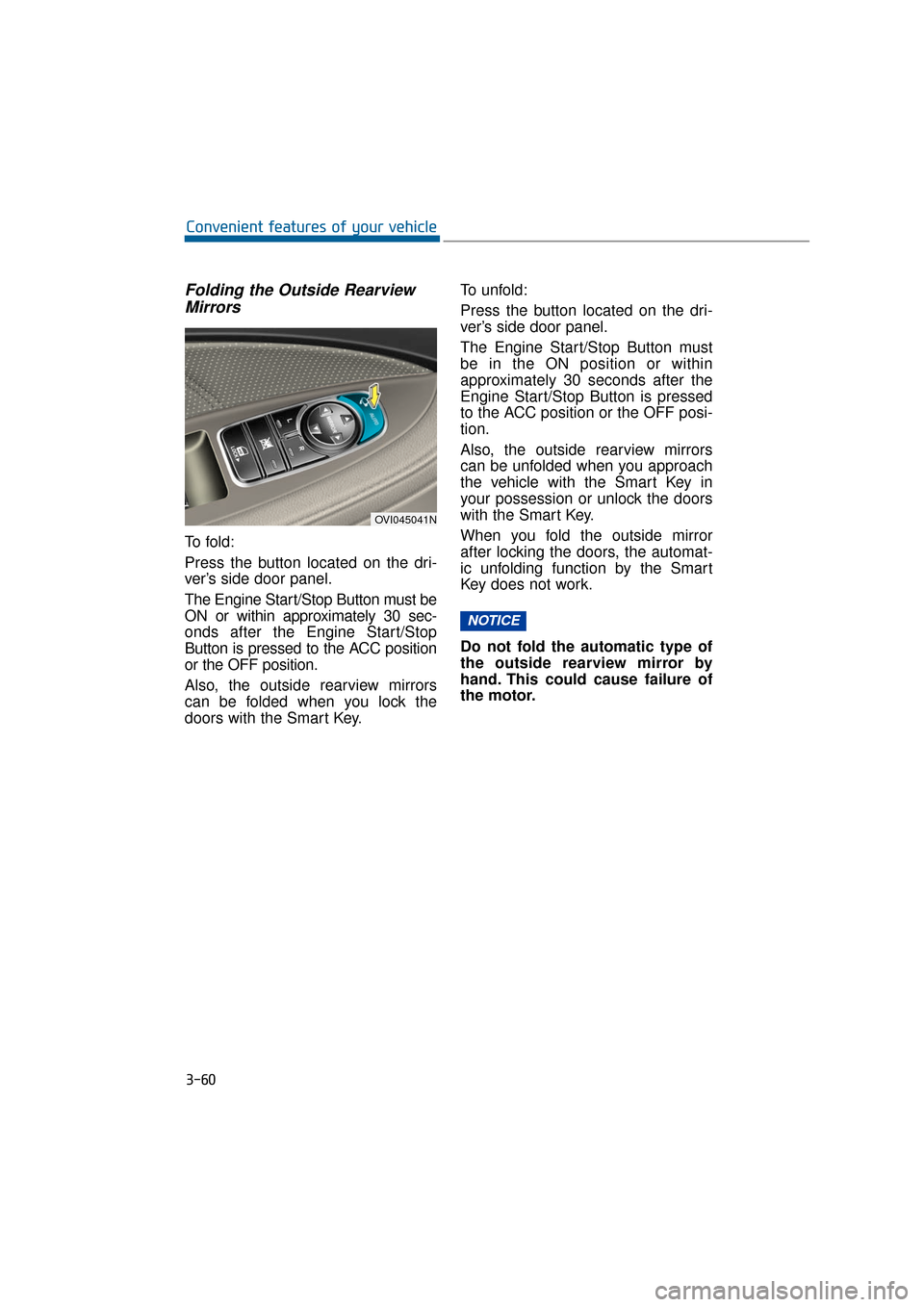
Folding the Outside RearviewMirrors
To f o l d :
Press the button located on the dri-
ver’s side door panel.
The Engine Start/Stop Button must be
ON or within approximately 30 sec-
onds after the Engine Start/Stop
Button is pressed to the ACC position
or the OFF position.
Also, the outside rearview mirrors
can be folded when you lock the
doors with the Smart Key. To unfold:
Press the button located on the dri-
ver’s side door panel.
The Engine Start/Stop Button must
be in the ON position or within
approximately 30 seconds after the
Engine Start/Stop Button is pressed
to the ACC position or the OFF posi-
tion.
Also, the outside rearview mirrors
can be unfolded when you approach
the vehicle with the Smart Key in
your possession or unlock the doors
with the Smart Key.
When you fold the outside mirror
after locking the doors, the automat-
ic unfolding function by the Smart
Key does not work.
Do not fold the automatic type of
the outside rearview mirror by
hand. This could cause failure of
the motor.
NOTICE
3-60
Convenient features of your vehicle
OVI045041N
Page 156 of 477
Electric chromic mirror (ECM) (if equipped)
The electric chromic mirror automat-
ically controls the glare from the
headlamps of the vehicles behind
during the night time or low light driv-
ing conditions. The sensor mounted
in the mirror senses the light level
around the vehicle, and automatical-
ly controls the headlamp glare from
following vehicles.
When the engine is running, the
glare is automatically controlled by
the sensor mounted in the rearview
mirror.
Whenever the shift lever is in R
(Reverse), the mirror automatically
sets to be in the brightest mode in
order to improve the driver's
rearview. When the ECM inside the
rear view mirror operates, it will oper-
ate.
When cleaning the mirror, use a
paper towel or clean cloth damp-
ened with glass cleaner. Do not
spray glass cleaner directly on the
mirror as that may cause the liq-
uid cleaner to enter the mirror
housing.
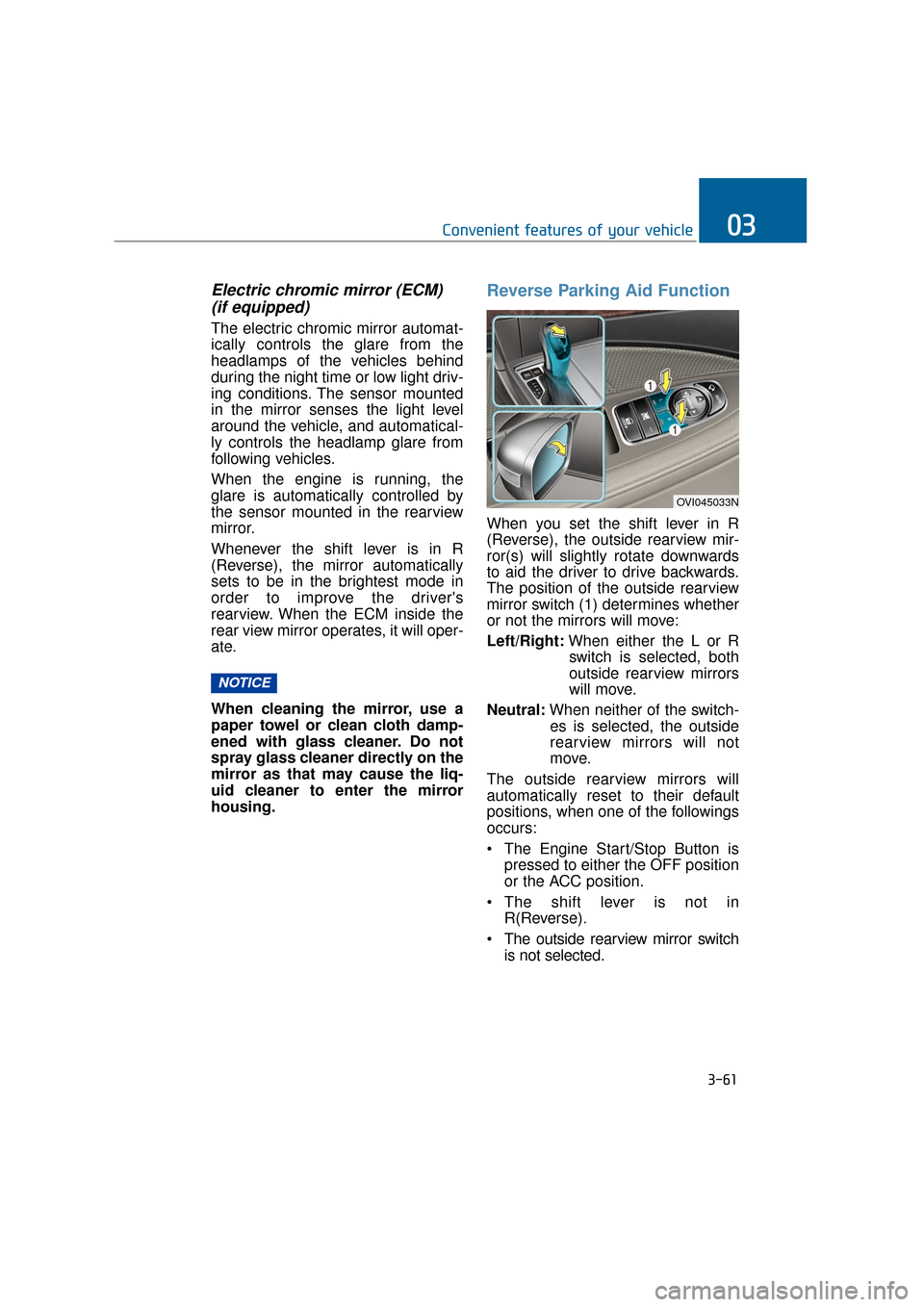
Reverse Parking Aid Function
When you set the shift lever in R
(Reverse), the outside rearview mir-
ror(s) will slightly rotate downwards
to aid the driver to drive backwards.
The position of the outside rearview
mirror switch (1) determines whether
or not the mirrors will move:
Left/Right: When either the L or R
switch is selected, both
outside rearview mirrors
will move.
Neutral: When neither of the switch-
es is selected, the outside
rearview mirrors will not
move.
The outside rearview mirrors will
automatically reset to their default
positions, when one of the followings
occurs:
The Engine Start/Stop Button is pressed to either the OFF position
or the ACC position.
The shift lever is not in R(Reverse).
The outside rearview mirror switch is not selected.
NOTICE
3-61
Convenient features of your vehicle03
OVI045033N
Page 157 of 477
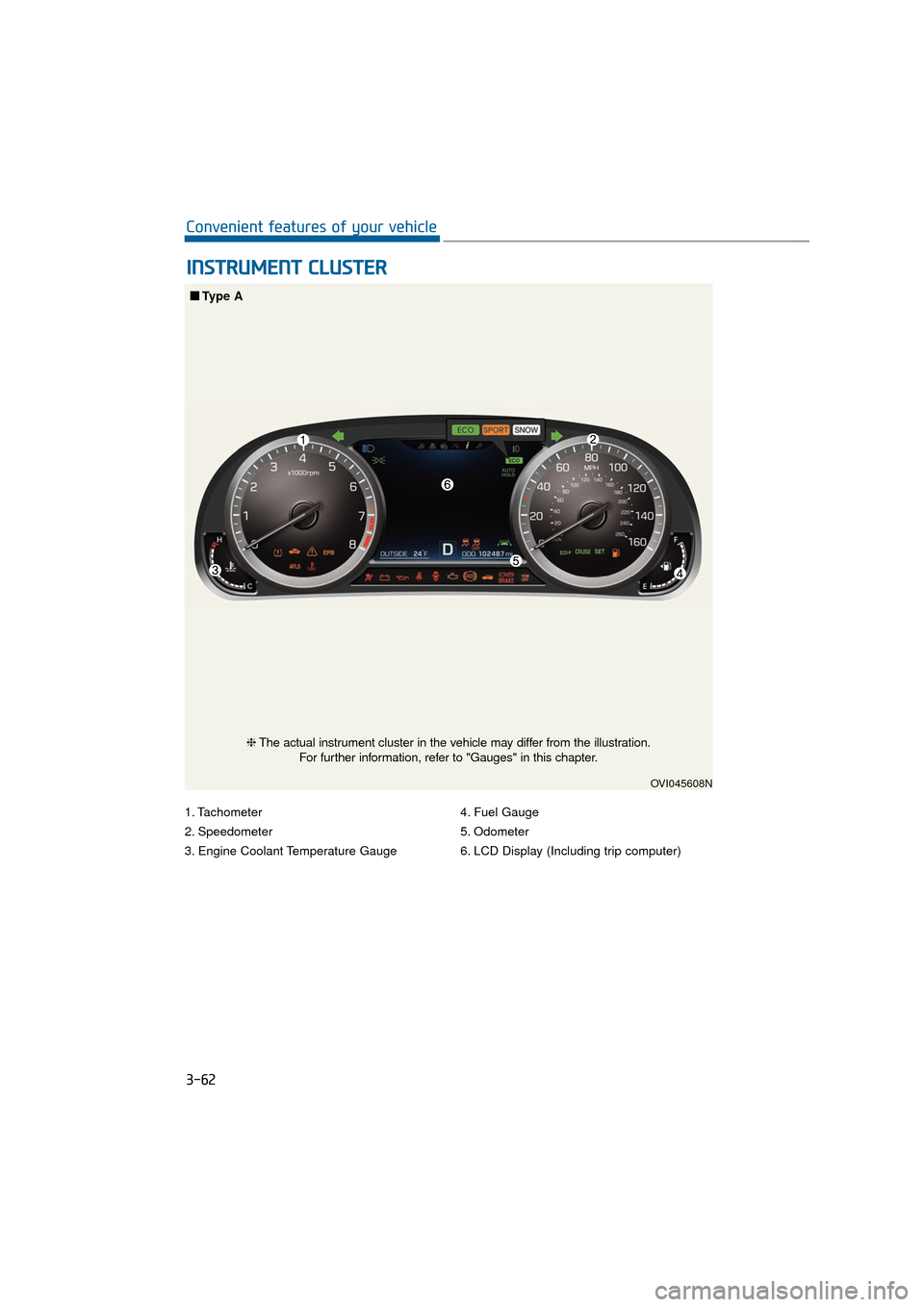
1. Tachometer
2. Speedometer
3. Engine Coolant Temperature Gauge4. Fuel Gauge
5. Odometer
6. LCD Display (Including trip computer)
I I
N
N S
ST
T R
R U
U M
M E
EN
N T
T
C
C L
LU
U S
ST
T E
ER
R
3-62
Convenient features of your vehicle
OVI045608N
■
■
Type A
❈The actual instrument cluster in the vehicle may differ from the illustration.
For further information, refer to "Gauges" in this chapter.
Page 158 of 477
3-63
Convenient features of your vehicle03
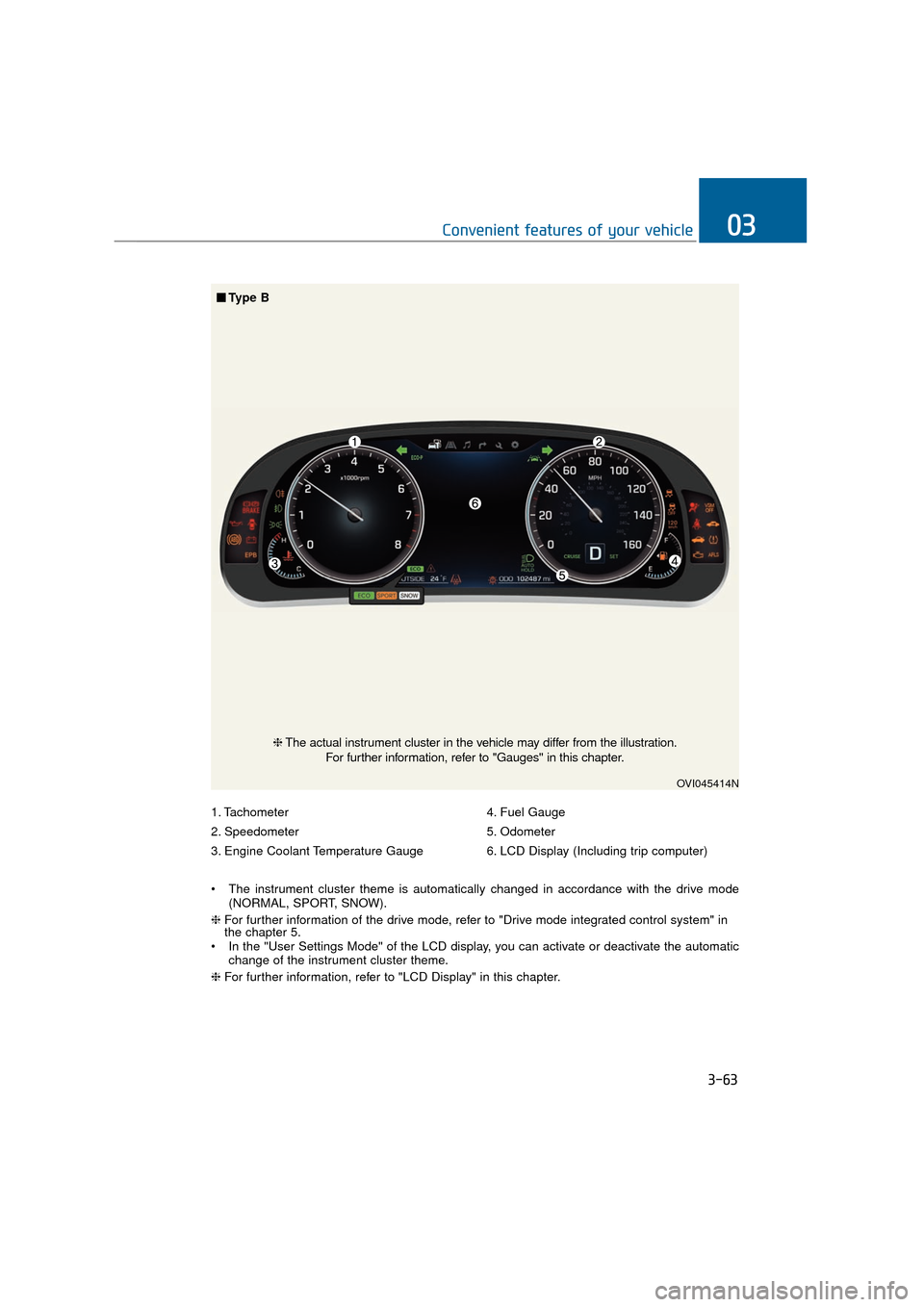
1. Tachometer
2. Speedometer
3. Engine Coolant Temperature Gauge4. Fuel Gauge
5. Odometer
6. LCD Display (Including trip computer)
The instrument cluster theme is automatically changed in accordance with the drive mode (NORMAL, SPORT, SNOW).
❈ For further information of the drive mode, refer to "Drive mode integrated control system" in
the chapter 5.
In the "User Settings Mode" of the LCD display, you can activate or deactivate the automatic change of the instrument cluster theme.
❈ For further information, refer to "LCD Display" in this chapter.
OVI045414N
❈The actual instrument cluster in the vehicle may differ from the illustration.
For further information, refer to "Gauges" in this chapter.
■ ■
Type B
Page 159 of 477
Instrument Cluster Control
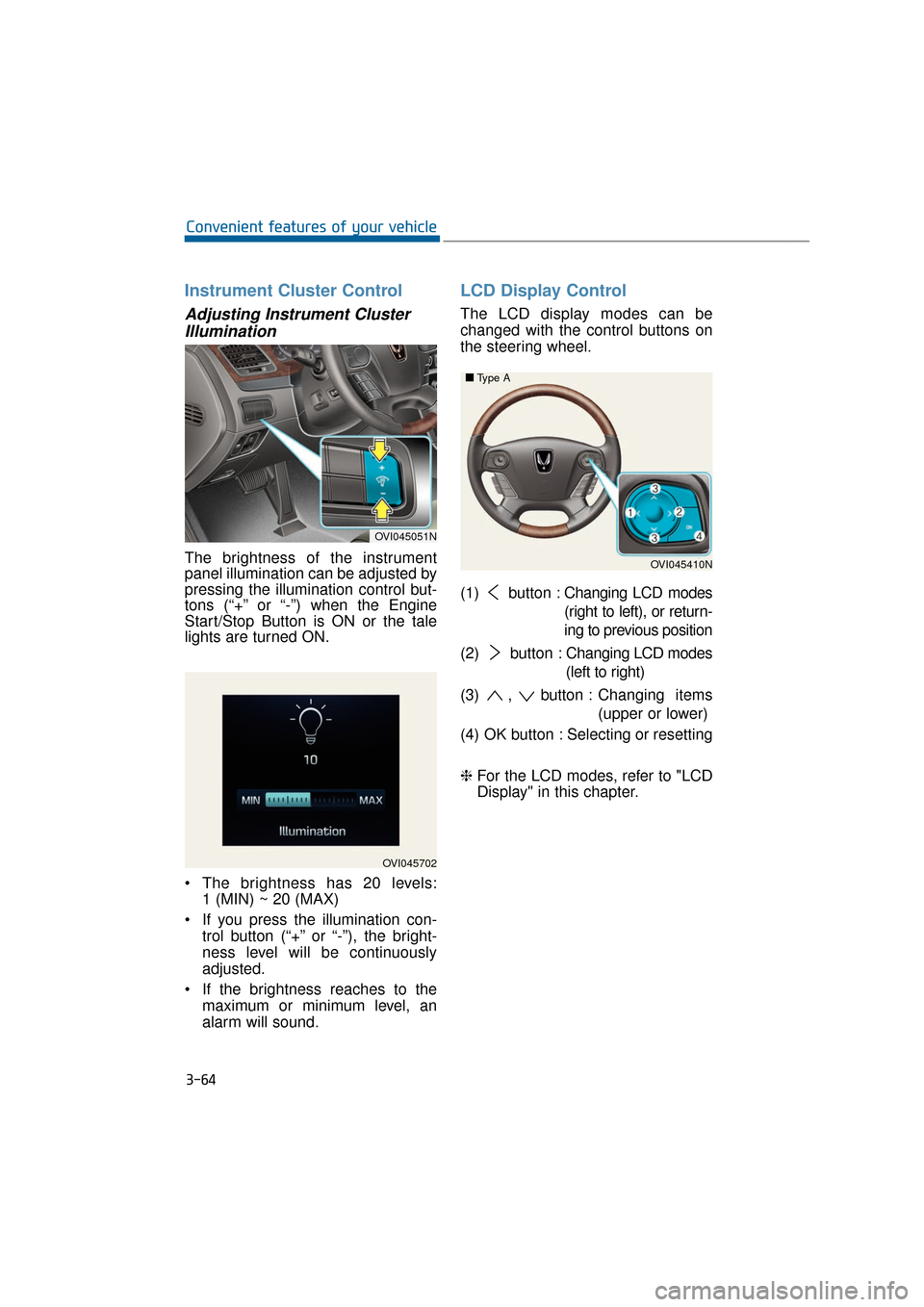
Adjusting Instrument ClusterIllumination
The brightness of the instrument
panel illumination can be adjusted by
pressing the illumination control but-
tons (“+” or “-”) when the Engine
Start/Stop Button is ON or the tale
lights are turned ON.
The brightness has 20 levels: 1 (MIN) ~ 20 (MAX)
If you press the illumination con- trol button (“+” or “-”), the bright-
ness level will be continuously
adjusted.
If the brightness reaches to the maximum or minimum level, an
alarm will sound.
LCD Display Control
The LCD display modes can be
changed with the control buttons on
the steering wheel.
(1) button : Changing LCD modes
(right to left), or return-
ing to previous position
(2) button : Changing LCD modes
(left to right)
(3) , button : Changing items
(upper or lower)
(4) OK button : Selecting or resetting
❈ For the LCD modes, refer to "LCD
Display" in this chapter.
3-64
Convenient features of your vehicle
OVI045702
OVI045051N
OVI045410N
■
■
Type A
Page 161 of 477
Tachometer
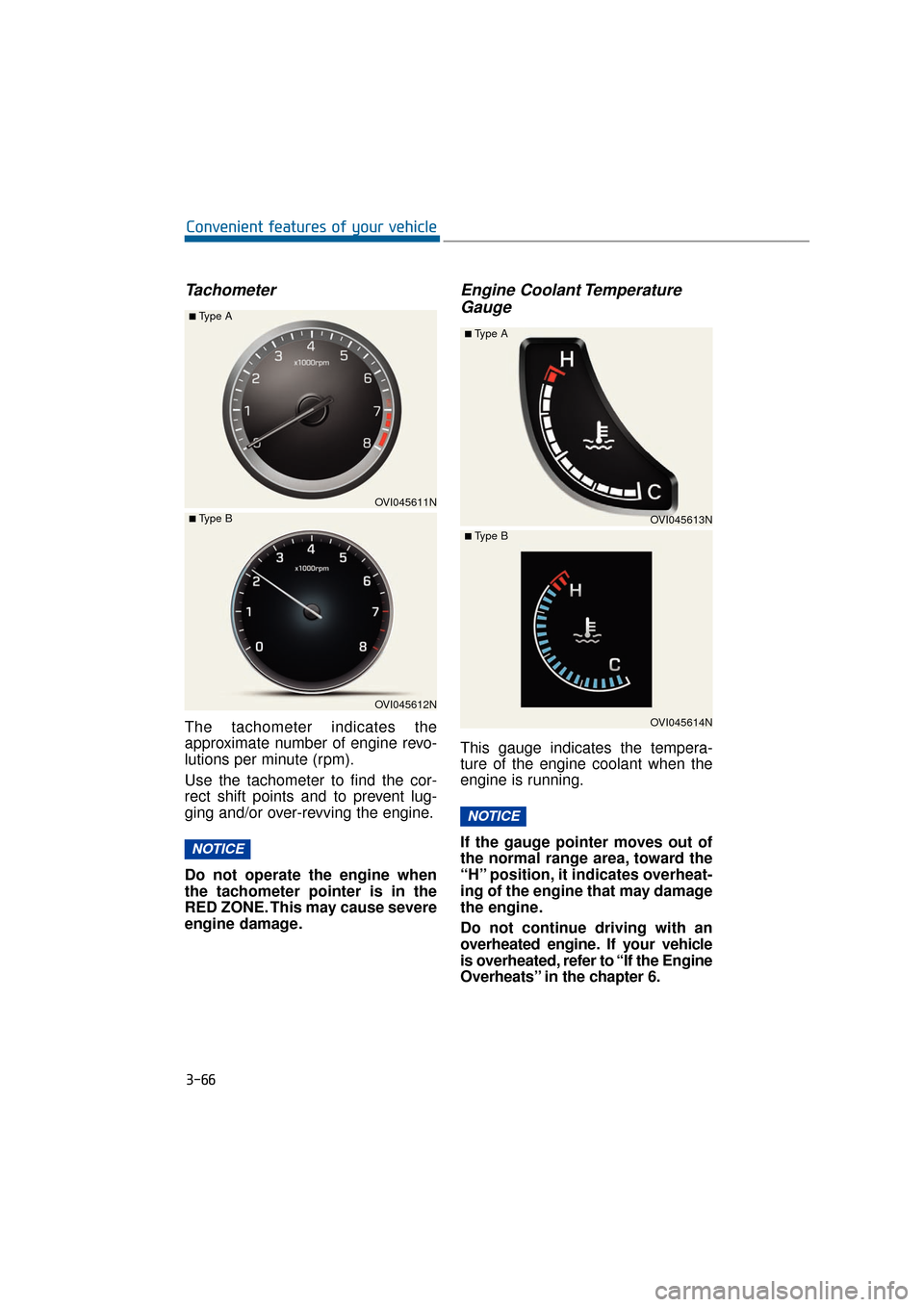
The tachometer indicates the
approximate number of engine revo-
lutions per minute (rpm).
Use the tachometer to find the cor-
rect shift points and to prevent lug-
ging and/or over-revving the engine.
Do not operate the engine when
the tachometer pointer is in the
RED ZONE. This may cause severe
engine damage.
Engine Coolant TemperatureGauge
This gauge indicates the tempera-
ture of the engine coolant when the
engine is running.
If the gauge pointer moves out of
the normal range area, toward the
“H” position, it indicates overheat-
ing of the engine that may damage
the engine.
Do not continue driving with an
overheated engine. If your vehicle
is overheated, refer to “If the Engine
Overheats” in the chapter 6.
NOTICE
NOTICE
3-66
Convenient features of your vehicle
OVI045611N
■Type A
OVI045612N
■ Type BOVI045613N
■Type A
OVI045614N
■ Type B
Page 162 of 477
Fuel Gauge
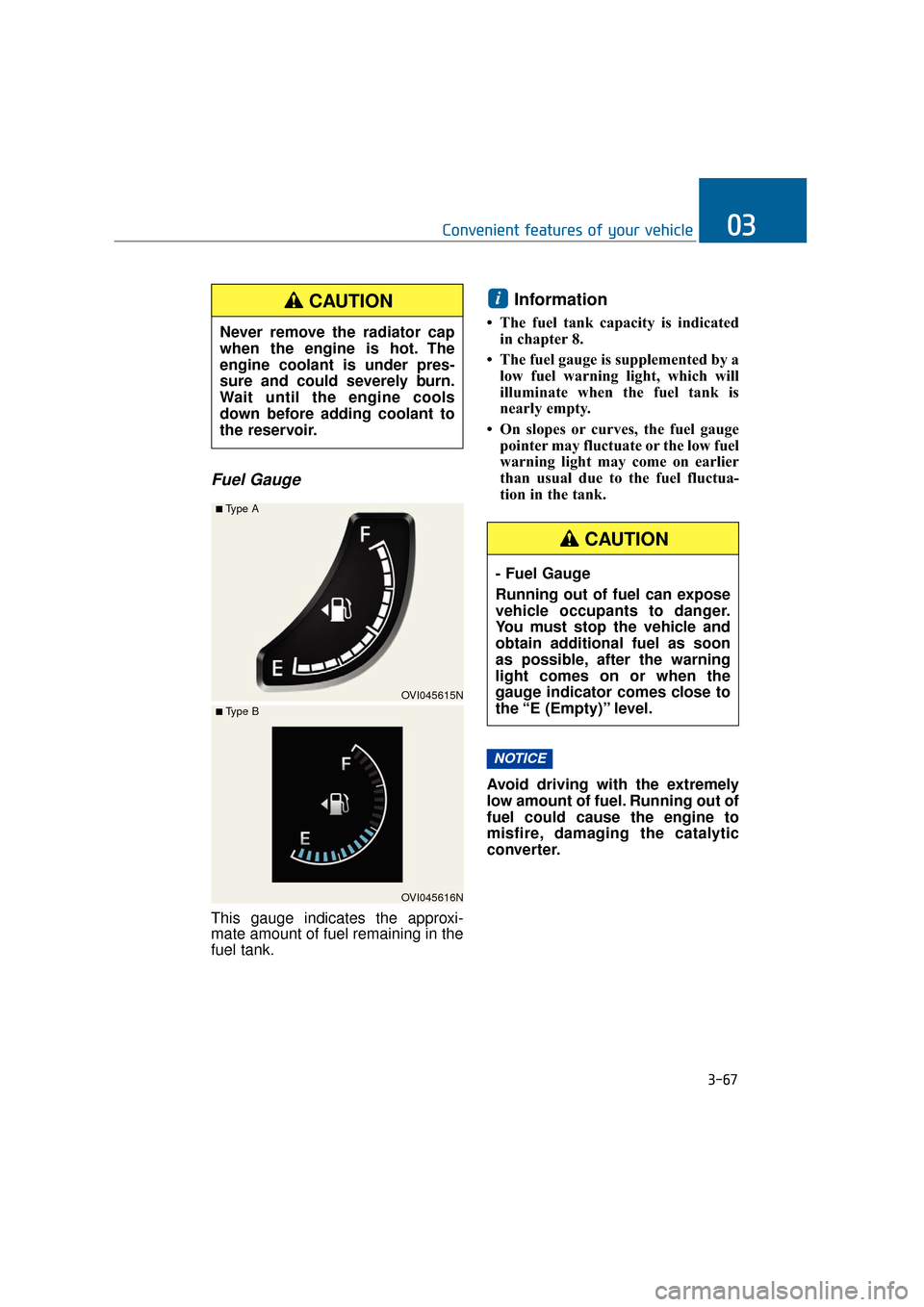
This gauge indicates the approxi-
mate amount of fuel remaining in the
fuel tank.
Information
• The fuel tank capacity is indicatedin chapter 8.
• The fuel gauge is supplemented by a low fuel warning light, which will
illuminate when the fuel tank is
nearly empty.
• On slopes or curves, the fuel gauge pointer may fluctuate or the low fuel
warning light may come on earlier
than usual due to the fuel fluctua-
tion in the tank.
Avoid driving with the extremely
low amount of fuel. Running out of
fuel could cause the engine to
misfire, damaging the catalytic
converter.
NOTICE
i
3-67
Convenient features of your vehicle03
Never remove the radiator cap
when the engine is hot. The
engine coolant is under pres-
sure and could severely burn.
Wait until the engine cools
down before adding coolant to
the reservoir.
CAUTION
OVI045615N
■Type A
OVI045616N
■ Type B
- Fuel Gauge
Running out of fuel can expose
vehicle occupants to danger.
You must stop the vehicle and
obtain additional fuel as soon
as possible, after the warning
light comes on or when the
gauge indicator comes close to
the “E (Empty)” level.
CAUTION
Page 166 of 477
Information Mode
Service Interval
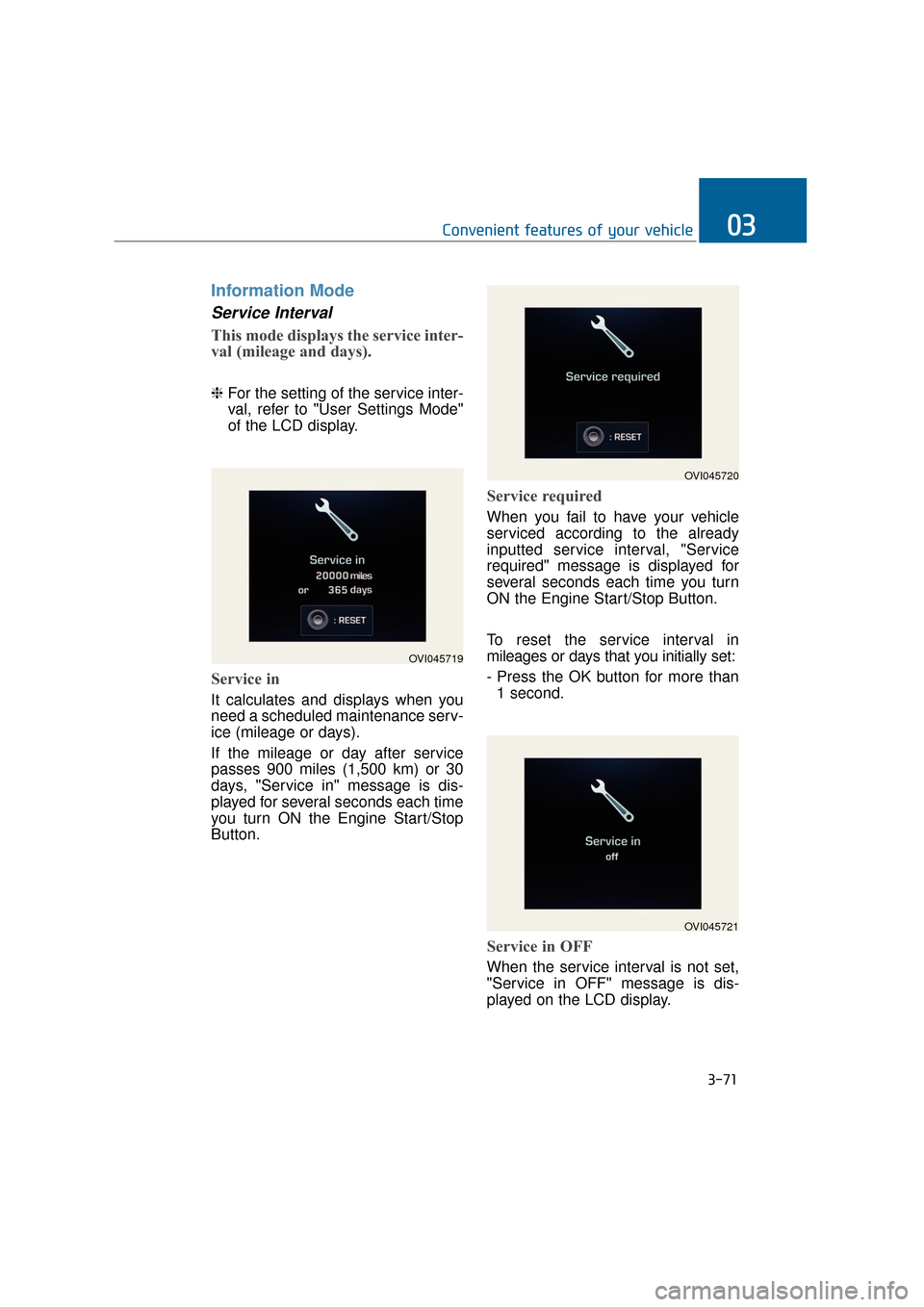
This mode displays the service inter-
val (mileage and days).
❈For the setting of the service inter-
val, refer to "User Settings Mode"
of the LCD display.
Service in
It calculates and displays when you
need a scheduled maintenance serv-
ice (mileage or days).
If the mileage or day after service
passes 900 miles (1,500 km) or 30
days, "Service in" message is dis-
played for several seconds each time
you turn ON the Engine Start/Stop
Button.
Service required
When you fail to have your vehicle
serviced according to the already
inputted service interval, "Service
required" message is displayed for
several seconds each time you turn
ON the Engine Start/Stop Button.
To reset the service interval in
mileages or days that you initially set:
- Press the OK button for more than
1 second.
Service in OFF
When the service interval is not set,
"Service in OFF" message is dis-
played on the LCD display.
3-71
Convenient features of your vehicle03
OVI045719
OVI045720
OVI045721
Page 170 of 477
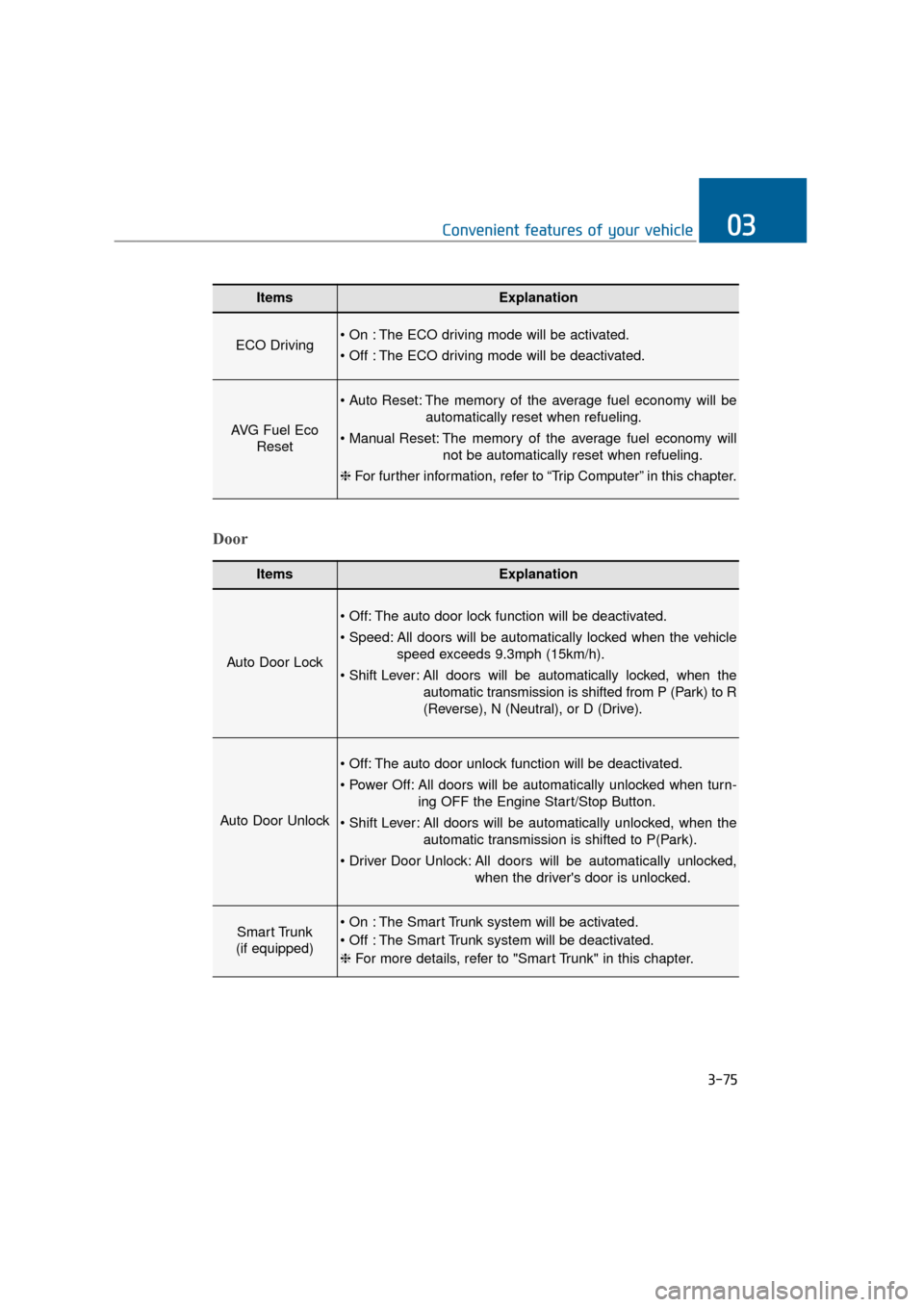
3-75
Convenient features of your vehicle03
ItemsExplanation
ECO Driving The ECO driving mode will be activated.
The ECO driving mode will be deactivated.
AVG Fuel EcoReset
The memory of the average fuel economy will be
automatically reset when refueling.
The memory of the average fuel economy will not be automatically reset when refueling.
❈ For further information, refer to “Trip Computer” in this chapter.
ItemsExplanation
Auto Door Lock
The auto door lock function will be deactivated.
All doors will be automatically locked when the vehicle
speed exceeds 9.3mph (15km/h).
All doors will be automatically locked, when the
automatic transmission is shifted from P (Park) to R
(Reverse), N (Neutral), or D (Drive).
Auto Door Unlock
The auto door unlock function will be deactivated.
All doors will be automatically unlocked when turn- ing OFF the Engine Start/Stop Button.
All doors will be automatically unlocked, when the automatic transmission is shifted to P(Park).
All doors will be automatically unlocked, when the driver's door is unlocked.
Smart Trunk
(if equipped) The Smart Trunk system will be activated.
The Smart Trunk system will be deactivated.
❈ For more details, refer to "Smart Trunk" in this chapter.
Door
Page 172 of 477
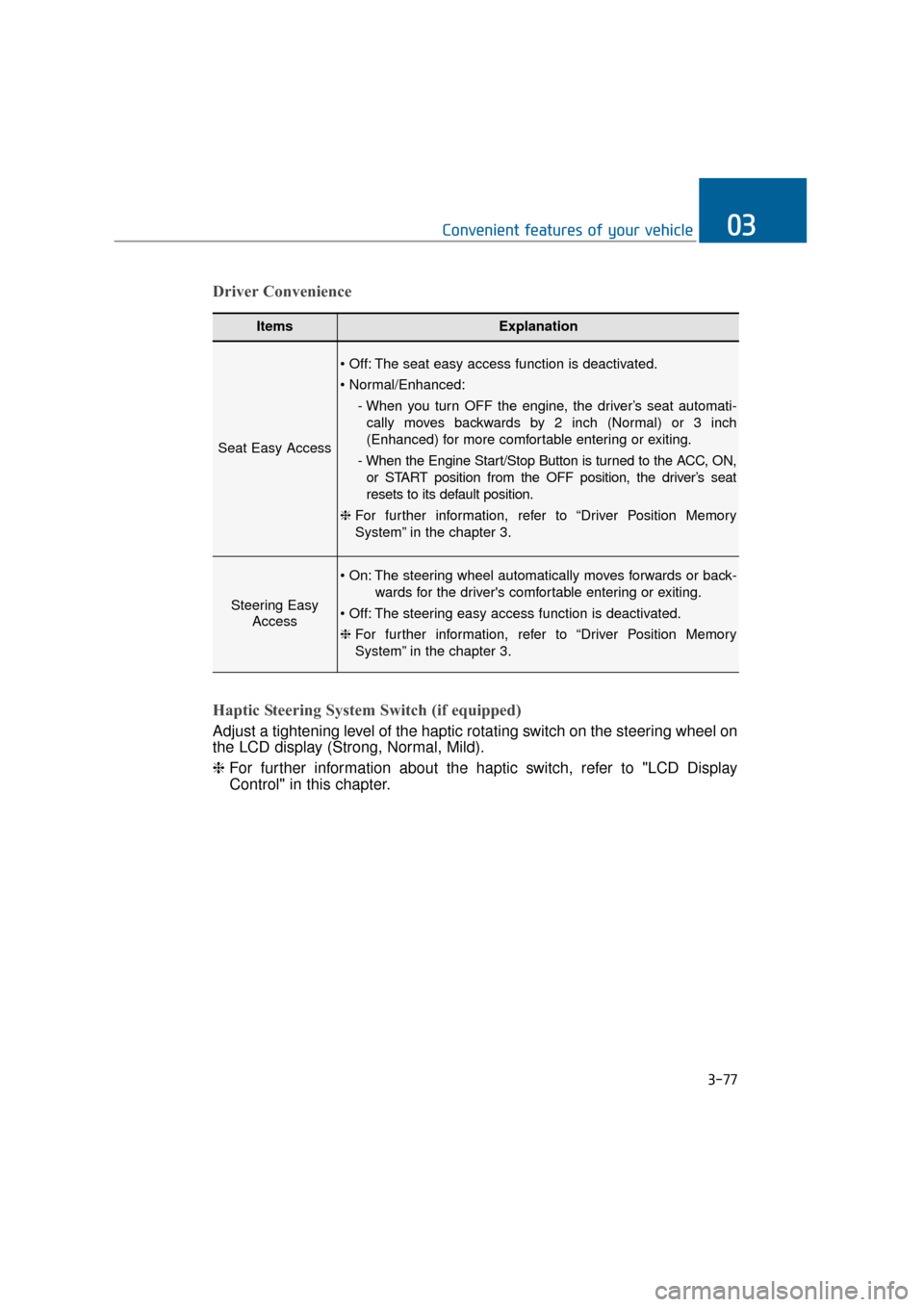
3-77
Convenient features of your vehicle03
ItemsExplanation
Seat Easy Access
The seat easy access function is deactivated.
- When you turn OFF the engine, the driver’s seat automati-cally moves backwards by 2 inch (Normal) or 3 inch
(Enhanced) for more comfortable entering or exiting.
- When the Engine Start/Stop Button is turned to the ACC, ON, or START position from the OFF position, the driver’s seat
resets to its default position.
❈ For further information, refer to “Driver Position Memory
System” in the chapter 3.
Steering Easy
Access
The steering wheel automatically moves forwards or back-
wards for the driver's comfortable entering or exiting.
The steering easy access function is deactivated.
❈ For further information, refer to “Driver Position Memory
System” in the chapter 3.
Driver Convenience
Haptic Steering System Switch (if equipped)
Adjust a tightening level of the haptic rotating switch on the steering wheel on
the LCD display (Strong, Normal, Mild).
❈ For further information about the haptic switch, refer to "LCD Display
Control" in this chapter.