automatic Hyundai Grand i10 2015 User Guide
[x] Cancel search | Manufacturer: HYUNDAI, Model Year: 2015, Model line: Grand i10, Model: Hyundai Grand i10 2015Pages: 343, PDF Size: 29.47 MB
Page 77 of 343
421
Features of your vehicle
TRUNK
Opening the trunk
With the key
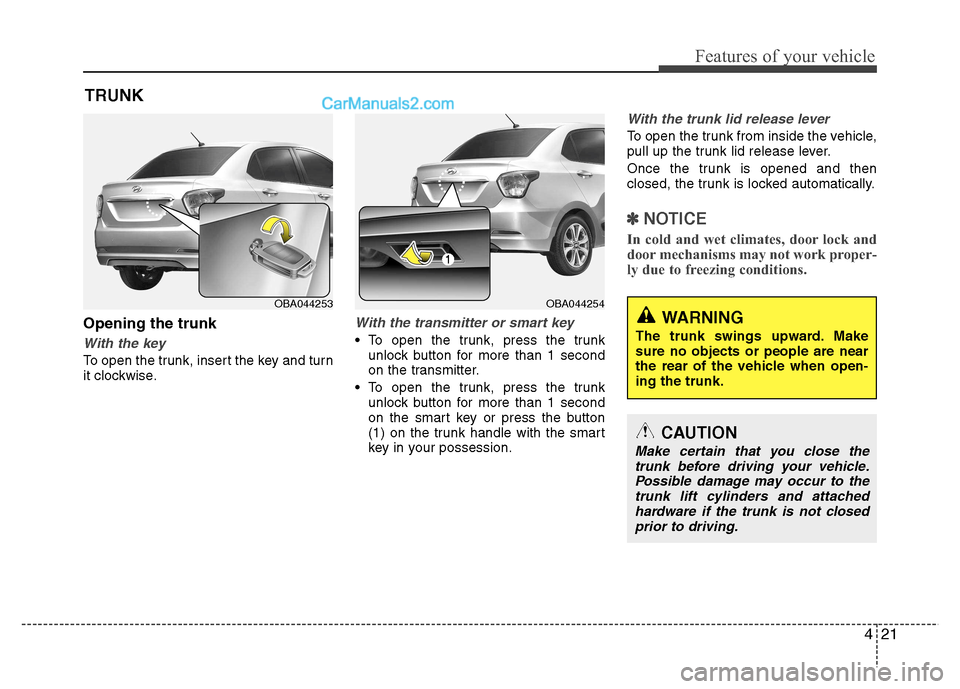
To open the trunk, insert the key and turn
it clockwise.
With the transmitter or smart key
To open the trunk, press the trunk unlock button for more than 1 second
on the transmitter.
To open the trunk, press the trunk unlock button for more than 1 second
on the smart key or press the button
(1) on the trunk handle with the smart
key in your possession.
With the trunk lid release lever
To open the trunk from inside the vehicle,
pull up the trunk lid release lever.
Once the trunk is opened and then
closed, the trunk is locked automatically.
✽✽ NOTICE
In cold and wet climates, door lock and
door mechanisms may not work proper-
ly due to freezing conditions.
CAUTION
Make certain that you close the trunk before driving your vehicle. Possible damage may occur to thetrunk lift cylinders and attached
hardware if the trunk is not closedprior to driving.
WARNING
The trunk swings upward. Make sure no objects or people are near
the rear of the vehicle when open-ing the trunk.
OBA044254OBA044253
Page 80 of 343
Features of your vehicle
24
4
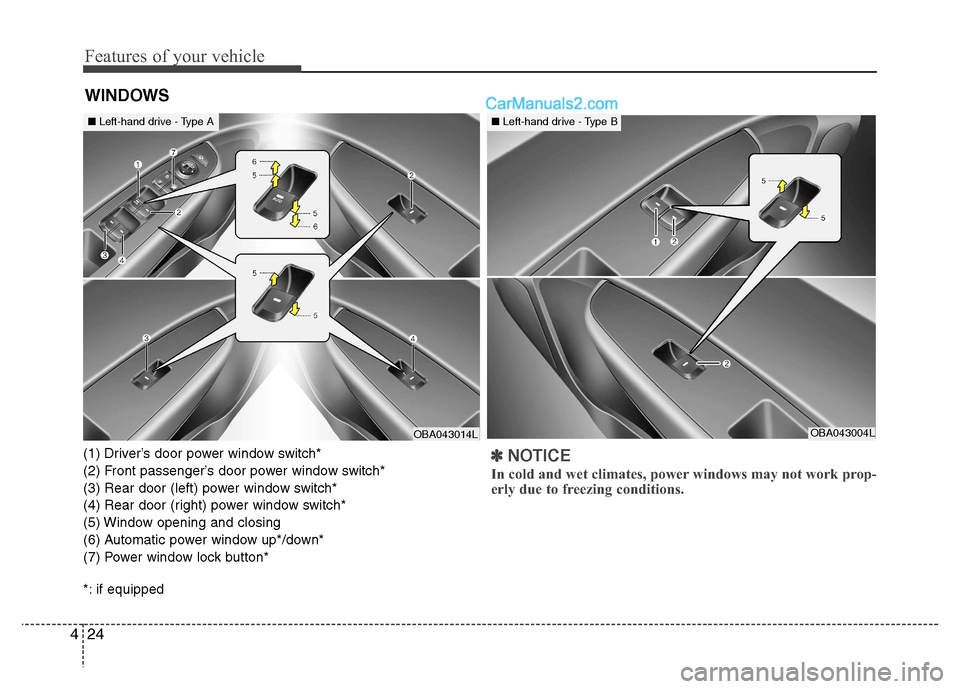
(1) Driver’s door power window switch*
(2) Front passenger’s door power window switch*
(3) Rear door (left) power window switch*
(4) Rear door (right) power window switch*
(5) Window opening and closing
(6) Automatic power window up*/down*
(7) Power window lock button*
*: if equipped✽✽
NOTICE
In cold and wet climates, power windows may not work prop-
erly due to freezing conditions.
WINDOWS
OBA043014LOBA043004L
■ Left-hand drive - Type A■Left-hand drive - Type B
Page 81 of 343
425
Features of your vehicle
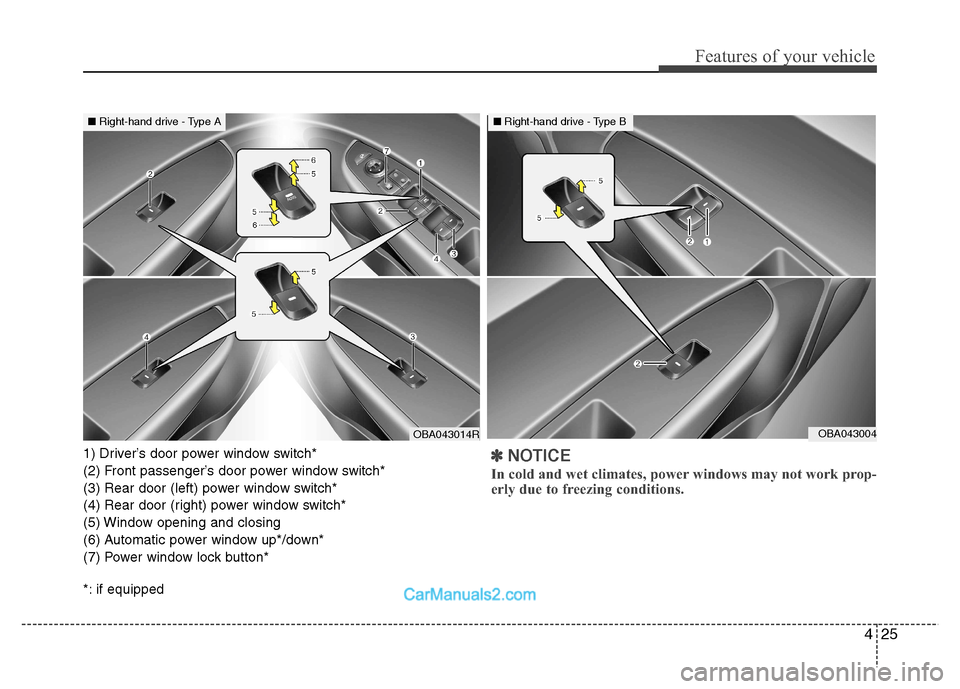
1) Driver’s door power window switch*
(2) Front passenger’s door power window switch*
(3) Rear door (left) power window switch*
(4) Rear door (right) power window switch*
(5) Window opening and closing
(6) Automatic power window up*/down*
(7) Power window lock button*
*: if equipped✽✽NOTICE
In cold and wet climates, power windows may not work prop-
erly due to freezing conditions.
OBA043014ROBA043004
■ Right-hand drive - Type A■Right-hand drive - Type B
Page 83 of 343
427
Features of your vehicle
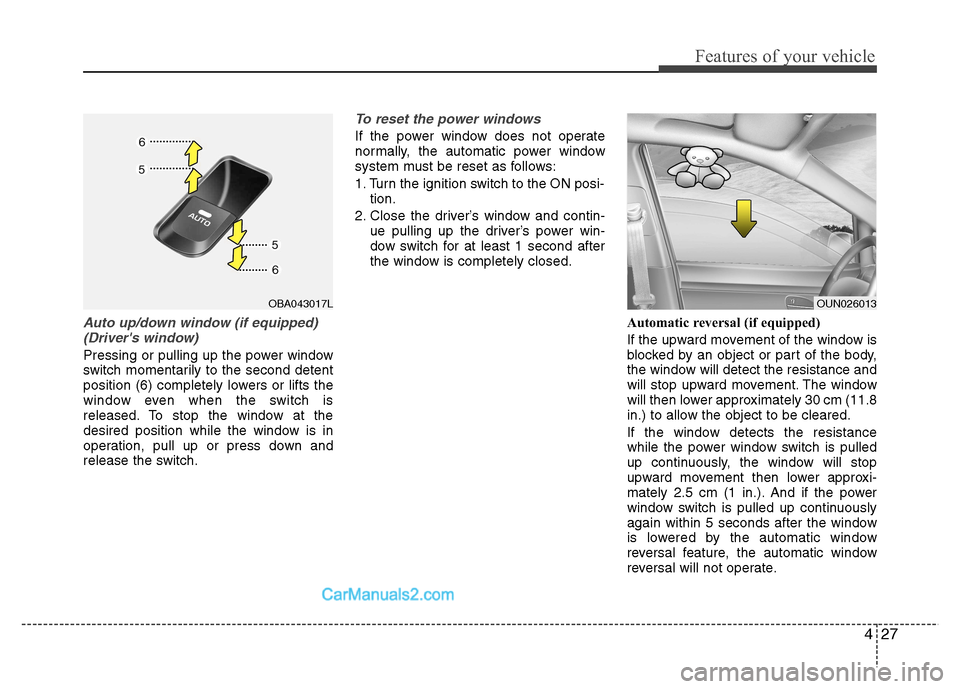
Auto up/down window (if equipped)(Driver's window)
Pressing or pulling up the power window
switch momentarily to the second detent
position (6) completely lowers or lifts the
window even when the switch is
released. To stop the window at the
desired position while the window is in
operation, pull up or press down and
release the switch.
To reset the power windows
If the power window does not operate
normally, the automatic power window
system must be reset as follows:
1. Turn the ignition switch to the ON posi- tion.
2. Close the driver’s window and contin- ue pulling up the driver’s power win-
dow switch for at least 1 second after
the window is completely closed.
Automatic reversal (if equipped)
If the upward movement of the window is
blocked by an object or part of the body,
the window will detect the resistance and
will stop upward movement. The window
will then lower approximately 30 cm (11.8
in.) to allow the object to be cleared.
If the window detects the resistance
while the power window switch is pulled
up continuously, the window will stop
upward movement then lower approxi-
mately 2.5 cm (1 in.). And if the power
window switch is pulled up continuously
again within 5 seconds after the window
is lowered by the automatic window
reversal feature, the automatic window
reversal will not operate.
OUN026013OBA043017L
Page 84 of 343
Features of your vehicle
28
4
✽✽
NOTICE
The automatic reverse feature for the
driver’s window is only active when the
“auto up” feature is used by fully
pulling up the switch.
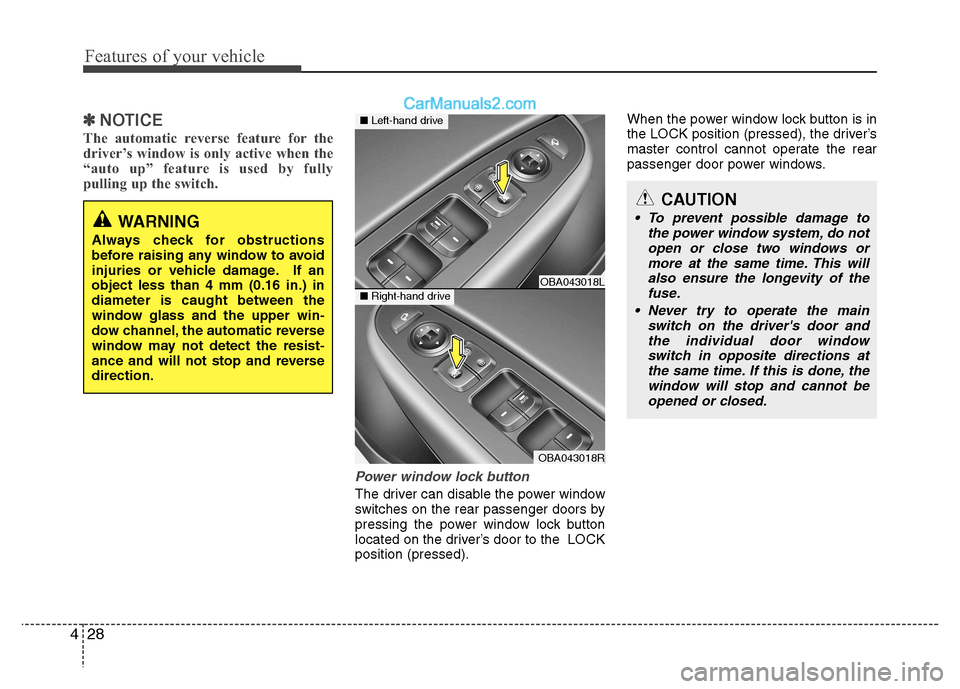
Power window lock button
The driver can disable the power window
switches on the rear passenger doors by
pressing the power window lock button
located on the driver’s door to the LOCKposition (pressed). When the power window lock button is in
the LOCK position (pressed), the driver’s
master control cannot operate the rear
passenger door power windows.
CAUTION
To prevent possible damage to
the power window system, do not
open or close two windows ormore at the same time. This will also ensure the longevity of thefuse.
Never try to operate the main switch on the driver's door andthe individual door windowswitch in opposite directions atthe same time. If this is done, the
window will stop and cannot be opened or closed.WARNING
Always check for obstructions
before raising any window to avoid
injuries or vehicle damage. If anobject less than 4 mm (0.16 in.) indiameter is caught between the
window glass and the upper win-
dow channel, the automatic reverse
window may not detect the resist-
ance and will not stop and reversedirection.
OBA043018L
OBA043018R
■ Left-hand drive
■Right-hand drive
Page 89 of 343
433
Features of your vehicle
Closing the fuel filler lid
1. To install the cap, turn it clockwise untilit “clicks”. This indicates that the cap is securely tightened.
2. Close the fuel filler lid and push it light- ly and make sure that it is securelyclosed.WARNING - Refueling
dangers
Automotive fuels are flammable
materials. When refueling, please
note the following guidelines care-
fully. Failure to follow these guide-
lines may result in severe personal
injury, severe burns or death by fire
or explosion.
Read and follow all warning at the gas station facility.
Before refueling note the location of the Emergency Gasoline Shut-
Off, if available, at the gas station
facility.
Before touching the fuel nozzle, you should eliminate potentially
dangerous static electricity dis-
charge by touching another metal
part of the vehicle, a safe dis-
tance away from the fuel filler
neck, nozzle, or other gas source.
(Continued)
WARNING - Refueling
If pressurized fuel sprays out, it can cover your clothes or skin
and subject you to the risk of fire
and burns. Always remove the
fuel cap carefully and slowly. If
the cap is venting fuel or if you
hear a hissing sound, wait until
the condition stops before com-
pletely removing the cap.
Do not "top off" after the nozzle automatically shuts off whenrefueling.
Always check that the fuel cap is installed securely to prevent fuel
spillage in the event of an acci-dent.
(Continued)
Do not get back into a vehicle once
you have begun refueling since
you can generate static electricity
by touching, rubbing or sliding
against any item or fabric (poly-
ester, satin, nylon, etc.) capable of
producing static electricity. Static
electricity discharge can ignite
fuel vapors resulting in rapid burn-
ing. If you must re-enter the vehi-
cle, you should once again elimi-
nate potentially dangerous static
electricity discharge by touching a
metal part of the vehicle, away
from the fuel filler neck, nozzle or
other gasoline source.
When using an approved portable fuel container be sure toplace the container on the
ground prior to refueling. Static
electricity discharge from the
container can ignite fuel vapors
causing a fire. Once refueling
has begun, contact with the vehi-
cle should be maintained until
the filling is complete.
(Continued)
Page 108 of 343
Features of your vehicle
52
4
Your vehicle is equipped with dual-diago-
nal braking systems. This means you still
have braking on two wheels even if one of
the dual systems should fail. With only one
of the dual systems working, more than
normal pedal travel and greater pedal
pressure are required to stop the vehicle.
Also, the vehicle will not stop in as short a
distance with only a portion of the brake
system working. If the brakes fail while you
are driving, shift to a lower gear for addi-
tional engine braking and stop the vehicle
as soon as it is safe to do so.
To check bulb operation, check whether
the parking brake and brake fluid warning
light illuminates when the ignition switchis in the ON position.Front fog light indicator
(if equipped)
This indicator illuminates when the front
fog lights are ON.
Rear fog light indicator (If equipped)
This indicator illuminates when the rear
fog lights are ON.
Shift pattern indicator (if equipped)
The indicator displays which automatic
transaxle shift lever is selected.
WARNING
Driving the vehicle with a warning
light on is dangerous. If the brake
warning light remains on, we recom-
mend that the system be checked by
an authorized HYUNDAI dealer.
Page 115 of 343
459
Features of your vehicle
Battery saver function (if equipped)
The purpose of this feature is to pre-vent the battery from being dis-
charged. The system automatically
turns off the exterior lights when the
driver removes the ignition key and
opens the driver-side door.
With this feature, the parking lights will turn off automatically if the driver parkson the side of road at night.
If necessary, to keep the lights on
when the ignition key is removed, per-
form the following :
1) Open the driver-side door.
2) Turn the parking lights OFF and ON again using the light switch on the
steering column. Lighting control
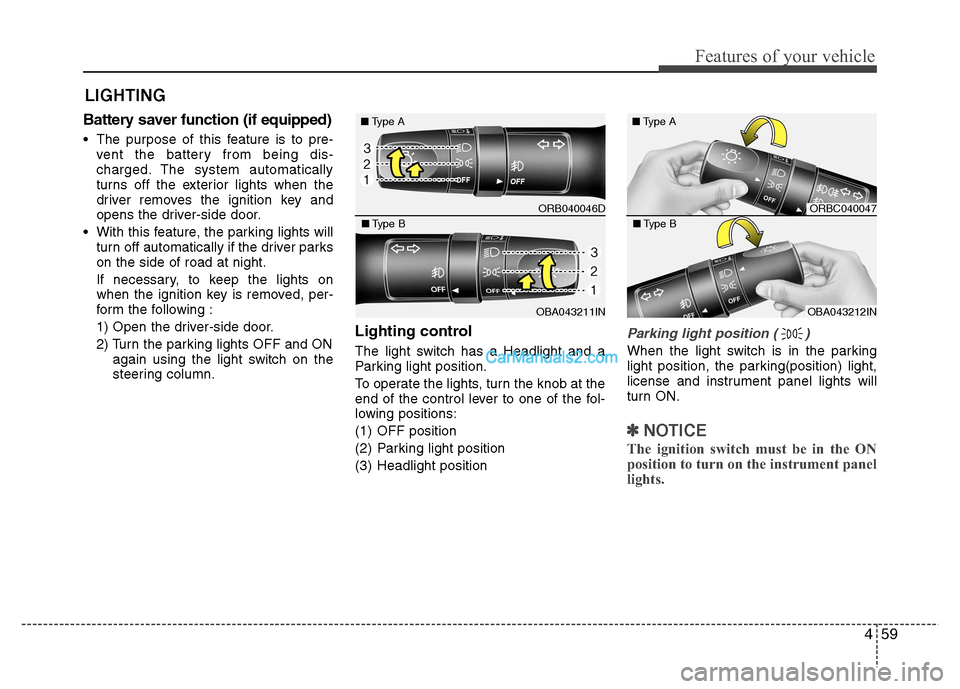
The light switch has a Headlight and a
Parking light position.
To operate the lights, turn the knob at the
end of the control lever to one of the fol-
lowing positions:
(1) OFF position
(2) Parking light position
(3) Headlight position
Parking light position ( )
When the light switch is in the parking
light position, the parking(position) light,
license and instrument panel lights will
turn ON.
✽✽
NOTICE
The ignition switch must be in the ON
position to turn on the instrument panel
lights.
LIGHTING
ORB040046D
■
Type A
OBA043211IN
■
Type B
ORBC040047
■
Type A
OBA043212IN
■
Type B
Page 126 of 343
Features of your vehicle
70
4
✽✽
NOTICE
If you want to defrost and defog the
front windshield, refer to “Windshield
defrosting and defogging” in this chap-
ter.
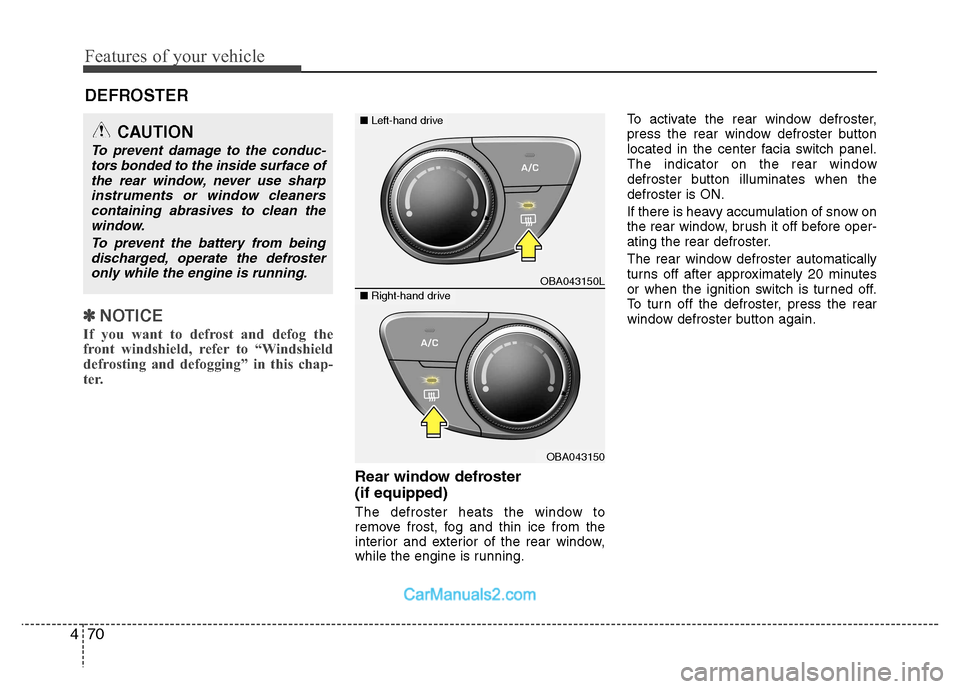
Rear window defroster (if equipped)
The defroster heats the window to
remove frost, fog and thin ice from the
interior and exterior of the rear window,
while the engine is running. To activate the rear window defroster,
press the rear window defroster button
located in the center facia switch panel.
The indicator on the rear window
defroster button illuminates when thedefroster is ON.
If there is heavy accumulation of snow on
the rear window, brush it off before oper-
ating the rear defroster.
The rear window defroster automatically
turns off after approximately 20 minutes
or when the ignition switch is turned off.
To turn off the defroster, press the rear
window defroster button again.
DEFROSTER
CAUTION
To prevent damage to the conduc-
tors bonded to the inside surface of
the rear window, never use sharpinstruments or window cleanerscontaining abrasives to clean the window.
To prevent the battery from beingdischarged, operate the defrosteronly while the engine is running.
OBA043150L
OBA043150
■ Left-hand drive
■Right-hand drive
Page 136 of 343
Features of your vehicle
80
4
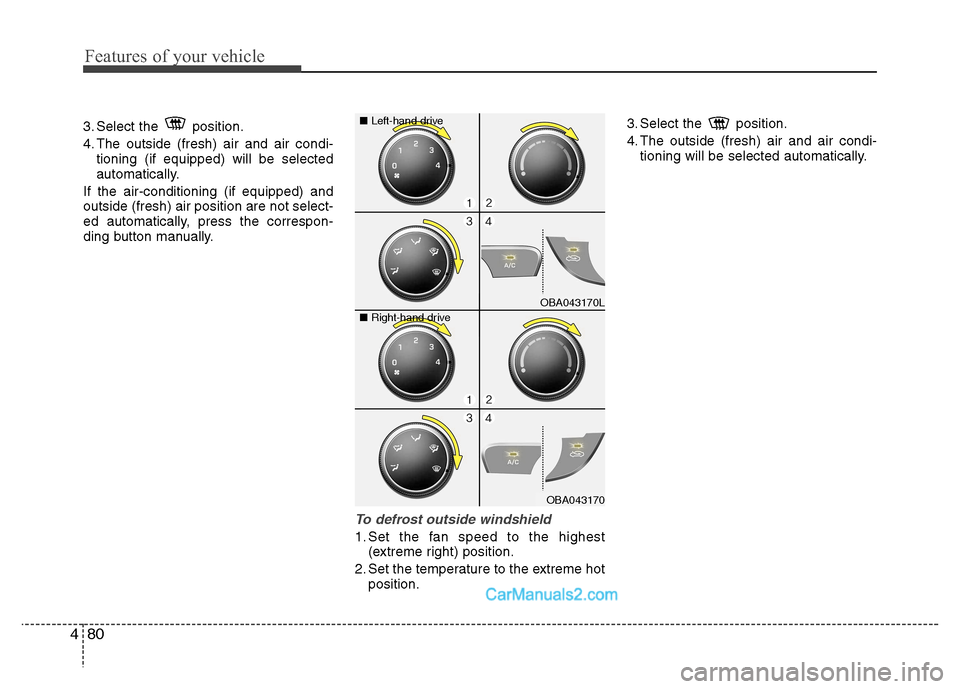
3. Select the position.
4. The outside (fresh) air and air condi-
tioning (if equipped) will be selected
automatically.
If the air-conditioning (if equipped) andoutside (fresh) air position are not select-
ed automatically, press the correspon-
ding button manually.
To defrost outside windshield
1. Set the fan speed to the highest (extreme right) position.
2. Set the temperature to the extreme hot position. 3. Select the position.
4. The outside (fresh) air and air condi-
tioning will be selected automatically.
OBA043170L
OBA043170
■
Left-hand drive
■ Right-hand drive