ignition Hyundai H350 2016 User Guide
[x] Cancel search | Manufacturer: HYUNDAI, Model Year: 2016, Model line: H350, Model: Hyundai H350 2016Pages: 473, PDF Size: 26.4 MB
Page 66 of 473
3-4
Convenient features of your vehicle
Record your key number
The key code number is stamped on the
key code tag
attached to the keyset.
Should you lose your keys, we rec-
ommend that you contact an author-
ized HYUNDAI dealer. Remove the
key code tag and store it in a safe
place. Also, record the code number
and keep it in a safe and handy
place, but not in the vehicle.
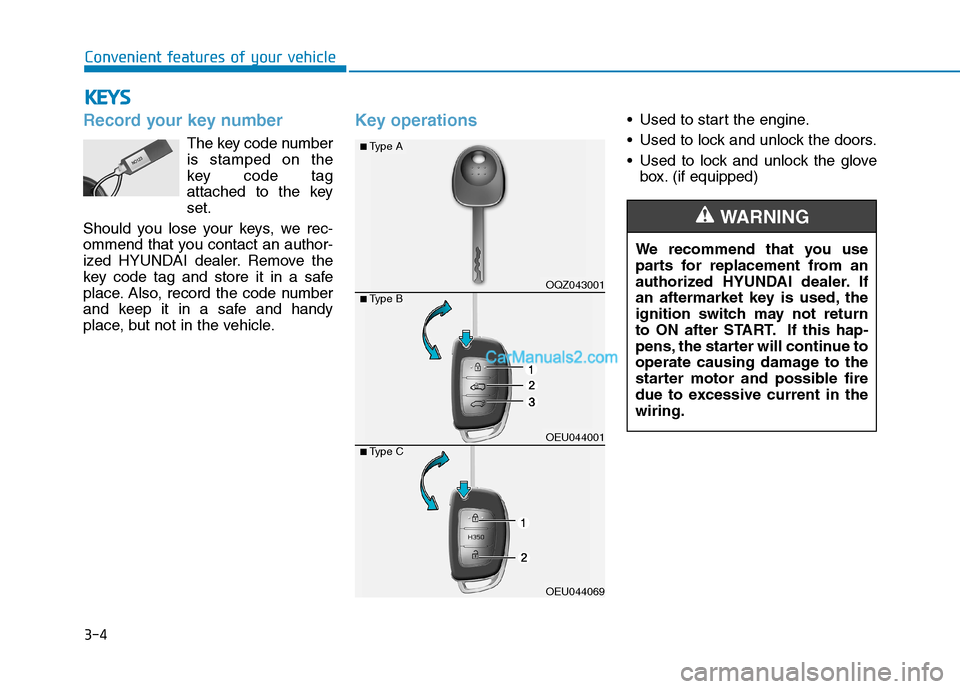
Key operations• Used to start the engine.
Used to lock and unlock the doors.
Used to lock and unlock the glove box. (if equipped)
KKEEYY SS
We recommend that you use
parts for replacement from an
authorized HYUNDAI dealer. If
an aftermarket key is used, the
ignition switch may not return
to ON after START. If this hap-
pens, the starter will continue to
operate causing damage to the
starter motor and possible fire
due to excessive current in thewiring.
WARNING
OQZ043001
OEU044001
OEU044069
■Type A
■Type B
■Type C
Page 67 of 473
3-5
Convenient features of your vehicle
Immobilizer system
Your vehicle may be equipped with
an electronic engine immobilizer sys-
tem to reduce the risk of unautho-
rized vehicle use.
Your immobilizer system is com-
prised of a small transponder in the
ignition key and electronic devices
inside the vehicle.
With the immobilizer system, when-
ever you insert your ignition key into
the ignition switch and turn it to ON,
it checks and determines and verifies
if the ignition key is valid or not.
If the key is determined to be valid,
the engine will start.
If the key is determined to be invalid,
the engine will not start.
To deactivate the immobilizersystem:
Insert the ignition key into the key
cylinder and turn it to the OFF posi-tion.
To activate the immobilizer sys-tem:
Turn the ignition key to the ON posi-tion.
The immobilizer system activates
automatically. Without a valid ignition
key for your vehicle, the engine will
not start.
3
Ignition key
Leaving children unattended in
a vehicle with the ignition key is
dangerous even if the key is not
in the ignition or start is ACC orON position.
Children copy adults and they
could place the key in the igni-tion.
The ignition key would enable
children to operate power win-
dows or other controls, or even
make the vehicle move, which
could result in serious bodily
injury or even death.
Never leave the keys in your
vehicle with unsupervised chil-
dren, when the engine is run-ning.
WARNING
In order to prevent theft of your
vehicle, do not leave spare keys
anywhere in your vehicle. Your
immobilizer password is a cus-
tomer unique password and
should be kept confidential. Do
not leave this number anywhere
in your vehicle.
WARNING
Page 68 of 473
3-6Information
When starting the engine, do not use
the key with other immobilizer keys
around. Otherwise the engine may not
start or may stop soon after it starts.
Keep each key separately not to have
any malfunction after you receive
your new vehicle.
Information
If you need additional keys or lose
your keys, we recommend that you
consult an authorized HYUNDAI
dealer. The transponder in your ignition
key is an important part of the
immobilizer system. It is designed
to give years of trouble-free serv-
ice, however you should avoid
exposure to moisture, static elec-
tricity and rough handling.
Immobilizer system malfunction
could occur.
Remote keyless entry system operations
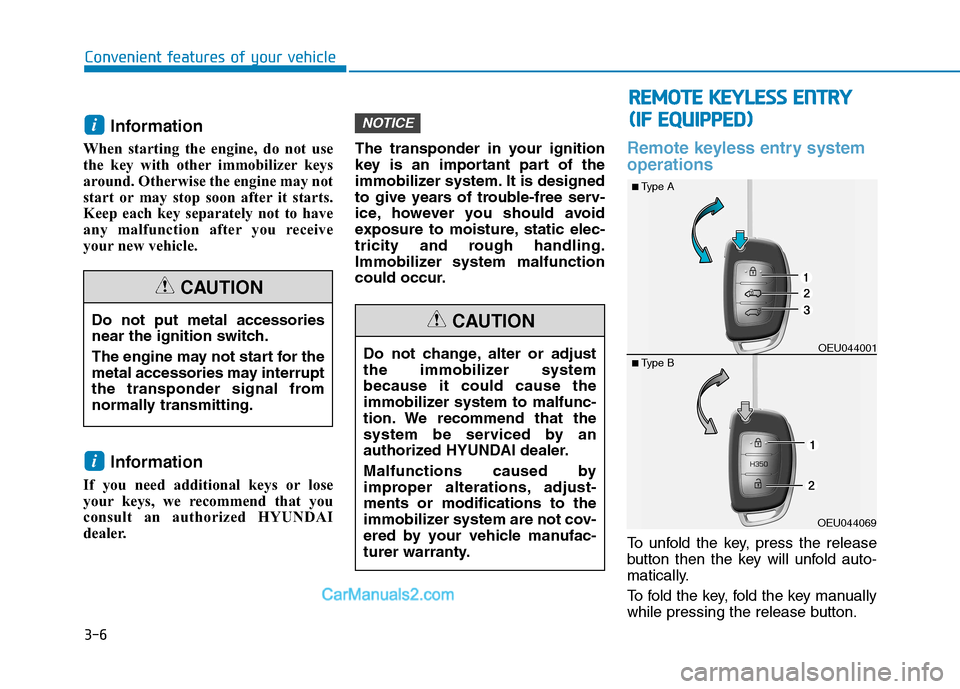
To unfold the key, press the release
button then the key will unfold auto-
matically.
To fold the key, fold the key manually
while pressing the release button.
NOTICE
i
i
Convenient features of your vehicle
Do not put metal accessories
near the ignition switch.
The engine may not start for the
metal accessories may interrupt
the transponder signal from
normally transmitting.
CAUTION
Do not change, alter or adjust
the immobilizer systembecause it could cause the
immobilizer system to malfunc-
tion. We recommend that the
system be serviced by an
authorized HYUNDAI dealer.
Malfunctions caused by
improper alterations, adjust-ments or modifications to the
immobilizer system are not cov-
ered by your vehicle manufac-
turer warranty.
CAUTION
RR
EEMM OOTTEE KK EEYY LLEE SSSS EE NN TTRR YY
(
( IIFF EE QQ UUIIPP PPEEDD ))
OEU044069OEU044001
■
Type A
■ Type B
Page 69 of 473
3-7
Convenient features of your vehicle
Do not fold the key without press-
ing the release button. This may
damage the key.
Lock (1)
All doors (and rear door) are locked if
the lock button is pressed. If all doors
are closed, the hazard warning lights
blink once to indicate that all doors
are locked. However, if any door
remains open, the hazard warning
lights will not blink. Close the door
and try again to lock the doors.
Unlock (2)
Driver door and front passenger door
are unlocked if the unlock button ispressed.
The hazard warning lights will blink
twice to indicate that driver door and
front passenger door are unlocked.
After depressing this button, the
doors will be locked automatically
unless you open any door within 30
seconds.
Rear door and mid sliding doorunlock (3) (if equipped)
The rear door and mid sliding door
are unlocked if the button is pressed
for more than 1 second.
The hazard warning lights will blink twice to indicate that the rear door
and mid sliding door are unlocked.
However, after pressing this button, the rear door and mid sliding door
will lock automatically unless youopen the rear door within 30 sec-
onds.
Also, once the rear door and mid sliding door are opened and then
closed, the rear door will lock auto-
matically.
Transmitter precautions
The transmitter will not work if any of
following occur:
The ignition key is in ignition switch.
You exceed the operating distance limit (about 30 m [90 feet]).
The battery in the transmitter is weak.
Other vehicles or objects may be blocking the signal.
The weather is extremely cold.
The transmitter is close to a radio transmitter such as a radio station
or an airport which can interfere
with normal operation of the trans-
mitter.
When the transmitter does not work
correctly, open and close the door
with the ignition key. If you have a
problem with the transmitter, we rec-
ommend that you contact an author-
ized HYUNDAI dealer.
NOTICE
3
Page 72 of 473
3-10
Convenient features of your vehicle
Armed stage
Park the vehicle and stop the engine.
Arm the system as described below.
1.Remove the ignition key from theignition switch or turn off the
engine.
2.Make sure that all doors (and rear door) and the engine hood areclosed and latched.
3.Lock the doors by depressing the door lock button on the transmitter.After completion of the steps
above, the hazard warning lights
will blink once to indicate that the
system is armed.
If any door, rear door remains
open, the hazard warning lights
won't operate and theft-alarm will
not arm. Close the door and try
again to lock the doors. If any door (and rear door) remains
open, the hazard warning lights
won't operate and theft-alarm will
not arm. Close the door and try
again to lock the doors. If engine hood remains open, the
hazard warning lights won't oper-
ate and theft-alarm will not arm.
Close the engine hood. The hazard
warning lights blink once and theft-
alarm arms.
Do not arm the system until all passengers have left the vehi-
cle. If the system is armed while
a passenger(s) remains in the
vehicle, the alarm may be acti-
vated when the remaining pas-
senger(s) leave the vehicle. If
any door, rear door or enginehood is opened within 30 sec-onds after entering the armed
stage, the system is disarmed to
prevent unnecessary alarm.
Theft-alarm stage
The alarm will be activated if any of
the following occurs while the system
is armed.
A front or rear door is opened with-out using transmitter.
The rear door is opened without using transmitter.
The engine hood is opened.The siren will sound and the hazard
warning lights will blink continuously
for 27 seconds, unless the system is
disarmed. To turn off the system,
unlock the doors with the transmitter.
Page 73 of 473
3-11
Convenient features of your vehicle
3
Disarmed stage
The system will be disarmed when:
Transmitter
- The door unlock button is pressed.
- The engine is started.
- The ignition switch is in the "ON"position. (Armed stage status)
- The ignition switch is in the "ACC" position for 27 seconds or more.
(Theft-alarm stage status)
After the doors are unlocked, the
hazard warning lights will blink twiceto indicate that the system is dis-
armed.
After pressing the unlock button, if
any door (or rear door) is not opened
within 30 seconds, the system will be
rearmed. Information
Burglar alarm system
If the system is not disarmed with the transmitter, insert the key into
the ignition switch and start the
engine. Then the system will be dis-
armed.
If you lose your keys, we recom- mend that you consult an author-
ized HYUNDAI dealer.
Operating door locks from
outside the vehicle
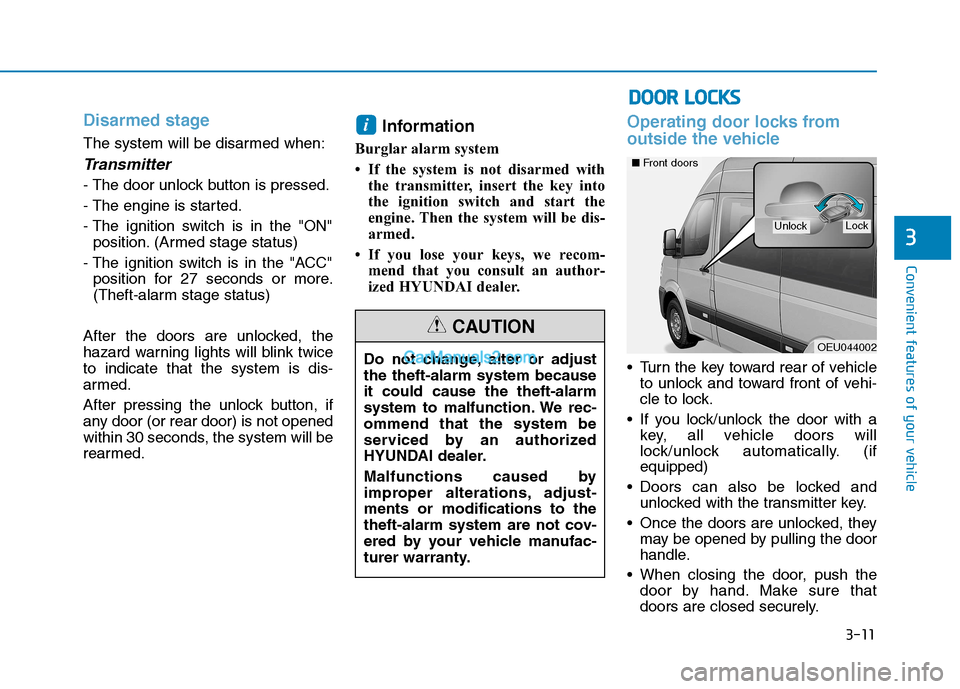
Turn the key toward rear of vehicleto unlock and toward front of vehi-
cle to lock.
If you lock/unlock the door with a key, all vehicle doors will
lock/unlock automatically. (ifequipped)
Doors can also be locked and unlocked with the transmitter key.
Once the doors are unlocked, they may be opened by pulling the door
handle.
When closing the door, push the door by hand. Make sure that
doors are closed securely.
i
Do not change, alter or adjust the theft-alarm system becauseit could cause the theft-alarm
system to malfunction. We rec-ommend that the system be
serviced by an authorized
HYUNDAI dealer.
Malfunctions caused by
improper alterations, adjust-ments or modifications to the
theft-alarm system are not cov-
ered by your vehicle manufac-
turer warranty.
CAUTION
DDOO OORR LL OO CCKK SS
OEU044002
LockUnlock
■Front doors
Page 74 of 473
3-12
Convenient features of your vehicle
In cold and wet climates, doorlock and door mechanisms may
not work properly due to freez-ing conditions.
If the door is locked/unlocked multiple times in rapid succes-
sion with either the vehicle key
or door lock switch, the system
may stop operating temporarily
in order to protect the circuit
and prevent damage to systemcomponents.
Operating door locks from
inside the vehicle
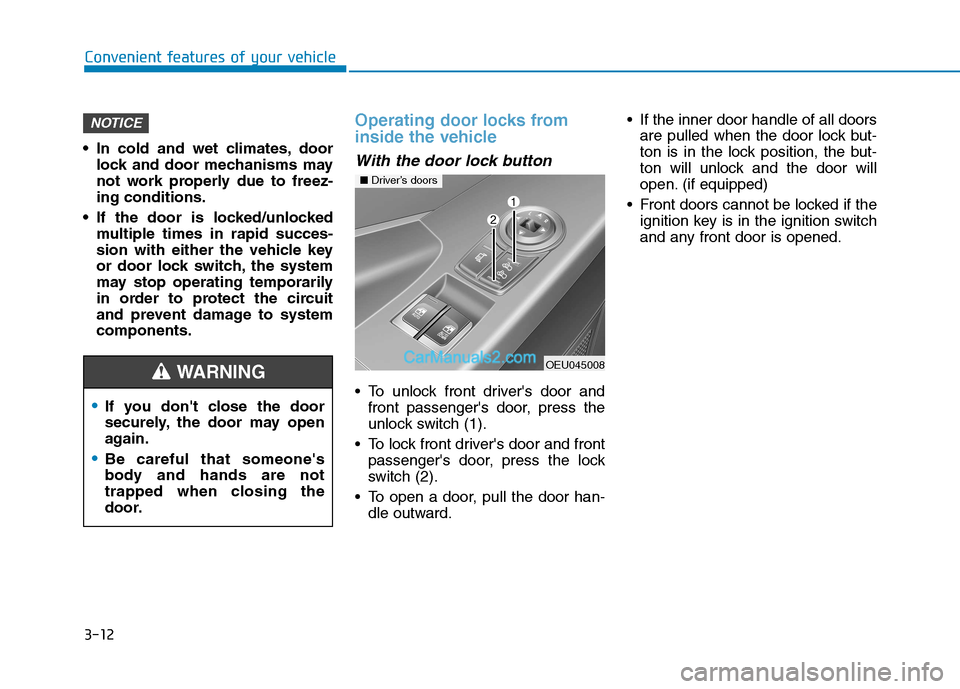
With the door lock button
To unlock front driver's door andfront passenger's door, press the
unlock switch (1).
To lock front driver's door and front passenger's door, press the lock
switch (2).
To open a door, pull the door han- dle outward. If the inner door handle of all doors
are pulled when the door lock but-
ton is in the lock position, the but-
ton will unlock and the door will
open. (if equipped)
Front doors cannot be locked if the ignition key is in the ignition switch
and any front door is opened.
NOTICE
If you don't close the door
securely, the door may open
again.
Be careful that someone's
body and hands are not
trapped when closing the
door.
WARNING OEU045008
■Driver’s doors
Page 75 of 473
3-13
Convenient features of your vehicle
3
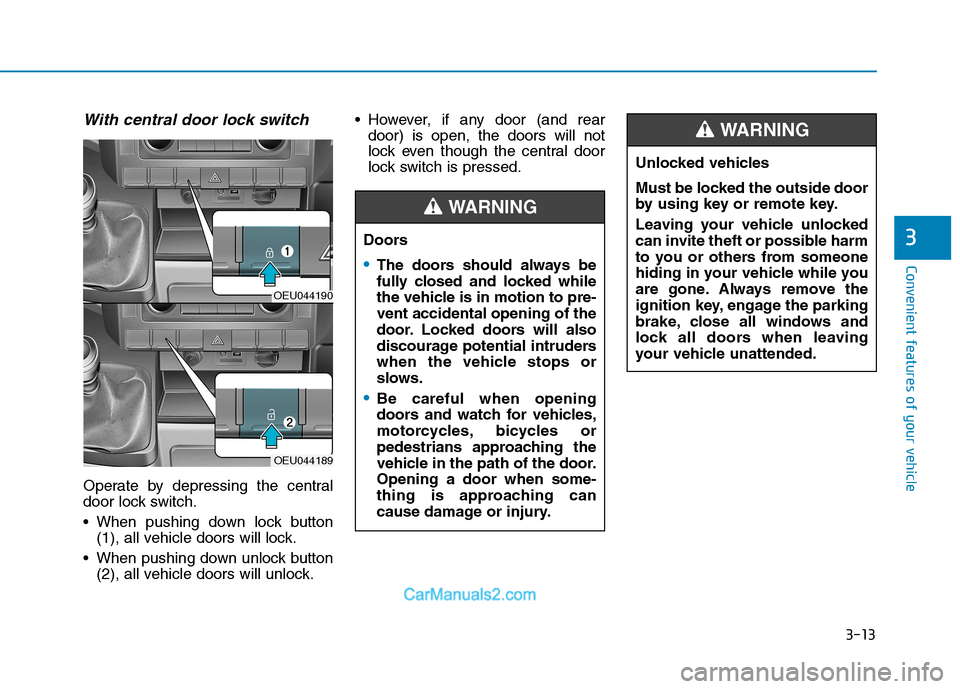
With central door lock switch
Operate by depressing the central
door lock switch.
When pushing down lock button(1), all vehicle doors will lock.
When pushing down unlock button (2), all vehicle doors will unlock. However, if any door (and rear
door) is open, the doors will not
lock even though the central door
lock switch is pressed.
OEU044190
OEU044189
Doors
The doors should always be
fully closed and locked while
the vehicle is in motion to pre-vent accidental opening of the
door. Locked doors will also
discourage potential intruders
when the vehicle stops or
slows.
Be careful when opening
doors and watch for vehicles,
motorcycles, bicycles or
pedestrians approaching the
vehicle in the path of the door.Opening a door when some-
thing is approaching can
cause damage or injury.
WARNING
Unlocked vehicles
Must be locked the outside door
by using key or remote key.
Leaving your vehicle unlocked
can invite theft or possible harm
to you or others from someone
hiding in your vehicle while you
are gone. Always remove the
ignition key, engage the parking
brake, close all windows and
lock all doors when leaving
your vehicle unattended.
WARNING
Page 76 of 473
3-14
Deadlocks (if equipped)
Some vehicles are equipped with a
deadlocking system. Deadlocks pre-
vent opening of a door from either
inside or outside the vehicle once the
deadlocks have been activated pro-
viding an additional measure of vehi-
cle security.
To lock the vehicle using the dead-
lock function, the doors must be
locked using the Remote keyless
entry transmitter. To unlock the vehi-
cle, the transmitter must again beused.
Speed sensing door lock sys- tem (if equipped)
All doors will be automatically locked
after the vehicle speed exceeds 15
km/h. And all doors will be automati-
cally unlocked when you turn the
engine off or when you remove the
ignition key. (if equipped)
Convenient features of your vehicle
Unattended children
An enclosed vehicle can
become extremely hot, causing
death or severe injury to unat-
tended children or animals who
cannot escape the vehicle.
Furthermore, children might
operate features of the vehicle
that could injure them, or theycould encounter other harm,
possibly from someone gaining
entry to the vehicle. Never leave
children or animals unattended
in your vehicle.
WARNING
Do not lock the doors with the
transmitter with anybody left in
the vehicle. The passenger in
the vehicle cannot unlock the
doors with the door lock button.
For example, if the door is
locked with the transmitter, the
passenger in the vehicle cannot
unlock the door without the
transmitter.
WARNING
Page 89 of 473
3-27
Convenient features of your vehicle
3
Power windows
The ignition switch must be in the ON
position for power windows to oper-
ate. Each door has a power window
switch that controls the door's win-
dow. The driver has a power window
lock switch which can block the oper-
ation of front passenger windows.
The power windows can be operated
for approximately 30 seconds after
the ignition key is removed or turned
to the ACC or LOCK position.
However, if the front doors are
opened, the power windows cannot
be operated even within the 30 sec-
onds period.
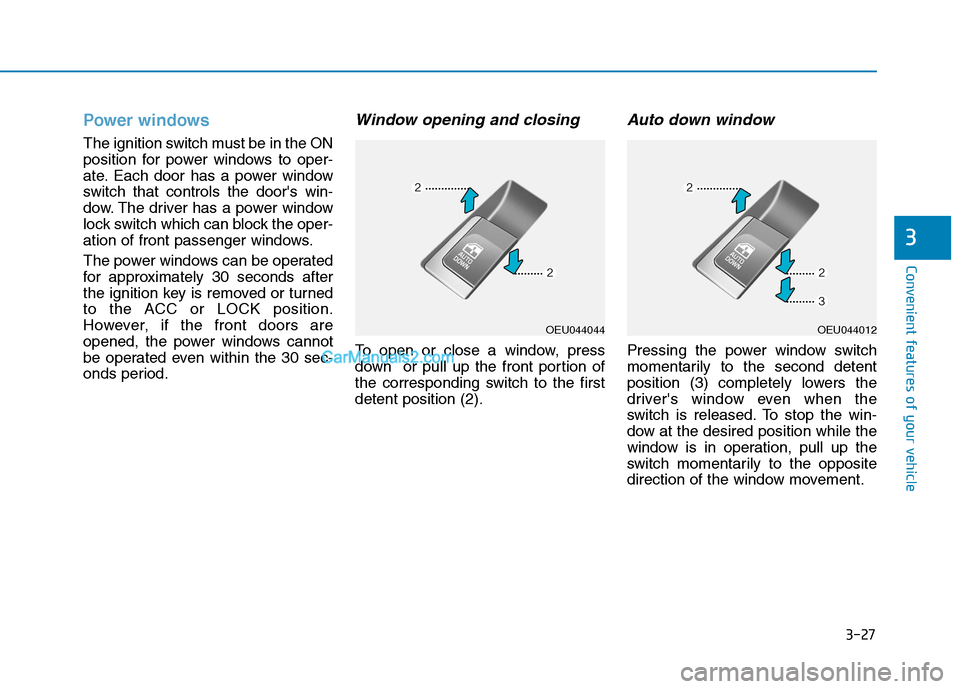
Window opening and closing
To open or close a window, press
down or pull up the front portion of
the corresponding switch to the firstdetent position (2).
Auto down window
Pressing the power window switch
momentarily to the second detent
position (3) completely lowers the
driver's window even when the
switch is released. To stop the win-
dow at the desired position while the
window is in operation, pull up the
switch momentarily to the opposite
direction of the window movement.
OEU044044OEU044012