ignition Hyundai H350 2016 Workshop Manual
[x] Cancel search | Manufacturer: HYUNDAI, Model Year: 2016, Model line: H350, Model: Hyundai H350 2016Pages: 473, PDF Size: 26.4 MB
Page 171 of 473
3-109
Convenient features of your vehicle
3
If you want to defrost and defog
on the front windshield, refer to
“Windshield Defrosting and
Defogging” in this section.
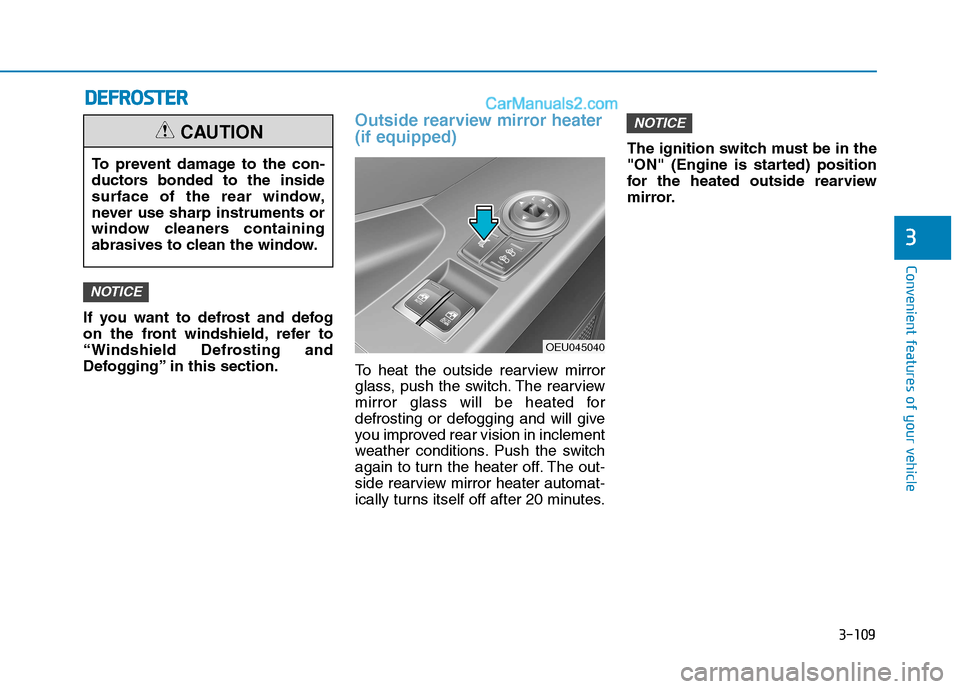
Outside rearview mirror heater (if equipped)
To heat the outside rearview mirror
glass, push the switch. The rearview
mirror glass will be heated for
defrosting or defogging and will give
you improved rear vision in inclement
weather conditions. Push the switch
again to turn the heater off. The out-
side rearview mirror heater automat-
ically turns itself off after 20 minutes.The ignition switch must be in the
"ON" (Engine is started) position
for the heated outside rearview
mirror.
NOTICE
NOTICE
OEU045040
To prevent damage to the con-
ductors bonded to the inside
surface of the rear window,
never use sharp instruments or
window cleaners containing
abrasives to clean the window.
CAUTION
DD
EEFFRR OO SSTT EERR
Page 172 of 473
3-110
Convenient features of your vehicleC
C LLIIMM AATTEE CC OO NNTTRR OO LL SS YY SSTT EEMM (( IIFF EE QQ UUIIPP PPEEDD ))
OEU044165
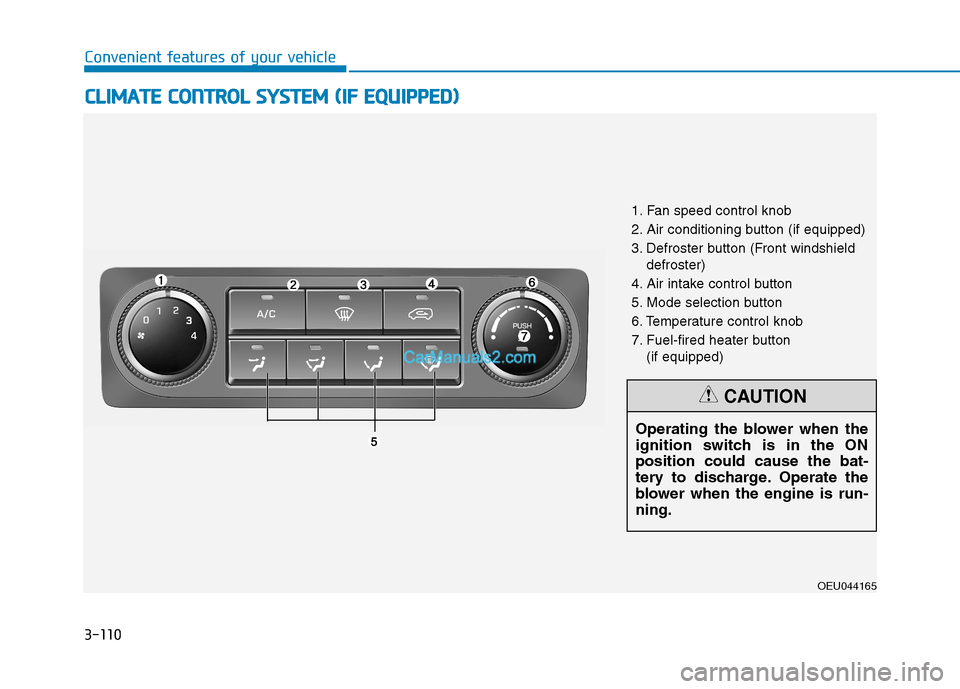
1. Fan speed control knob
2. Air conditioning button (if equipped)
3. Defroster button (Front windshield
defroster)
4. Air intake control button
5. Mode selection button
6. Temperature control knob
7. Fuel-fired heater button (if equipped)
Operating the blower when the
ignition switch is in the ONposition could cause the bat-
tery to discharge. Operate the
blower when the engine is run-ning.
CAUTION
Page 177 of 473
3-115
Convenient features of your vehicle
3
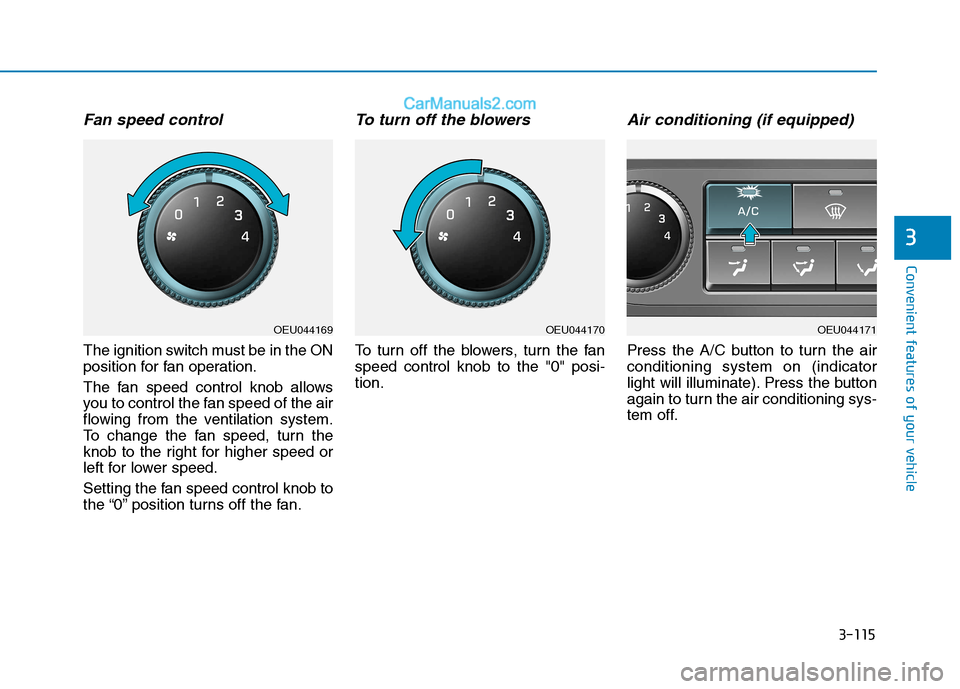
Fan speed control
The ignition switch must be in the ON
position for fan operation.
The fan speed control knob allows
you to control the fan speed of the air
flowing from the ventilation system.
To change the fan speed, turn the
knob to the right for higher speed or
left for lower speed.
Setting the fan speed control knob to
the “0” position turns off the fan.
To turn off the blowers
To turn off the blowers, turn the fanspeed control knob to the "0" posi-tion.
Air conditioning (if equipped)
Press the A/C button to turn the airconditioning system on (indicator
light will illuminate). Press the button
again to turn the air conditioning sys-
tem off.
OEU044169OEU044170OEU044171
Page 181 of 473
3-119
Convenient features of your vehicle
3
Fuel-fired Heater (if equipped)
This fuel-fired heater supplies addi-
tional heat to the interior compart-
ment with a low fuel consumption to
compensate the heat provided by
engine alone. A cleaning process of the fuel-fired
heater will be performed automati-
cally when the heater is not operated
due to increase of coolant tempera-
ture and ignition off.
During cleaning process, supplied
fuel in the heater will be burnt com-
pletely and any smoke will be
expelled. It is a necessary process
for next operation and durability of
the heater and takes about 1~3 min-
utes. The following symptoms will
occur and it is normal.
- A white smoke may come outfrom the fuel-fired heater
exhaust pipe during operation
of the heater. However, when
an excessive black smoke is
discharged, the fuel-firedheater should be inspected.
- A “buk-buk” noise from the heater is a noise to form flame
for combustion.
- When the heater is operated at full load, a “Wooing” noise
occurs.
- When shutting off the engine during heater operation, a
“Wing” noise occurs to per-
form the cleaning process.
When refueling, stop operation of the fuel-fired heater by shut-
ting off the engine.
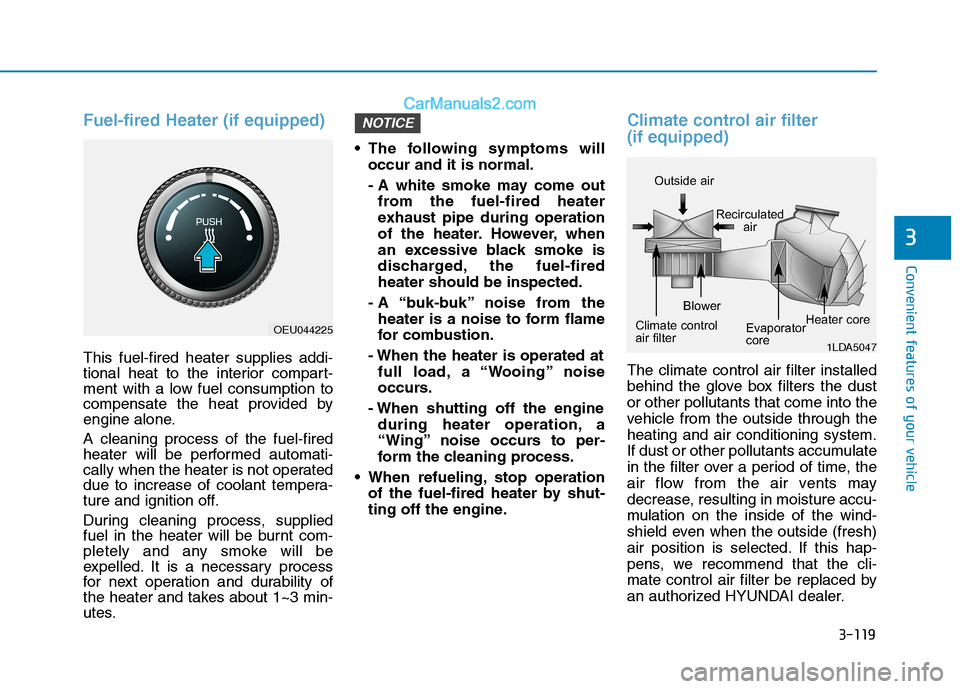
Climate control air filter (if equipped)
The climate control air filter installed
behind the glove box filters the dustor other pollutants that come into the
vehicle from the outside through theheating and air conditioning system.
If dust or other pollutants accumulate
in the filter over a period of time, the
air flow from the air vents may
decrease, resulting in moisture accu-
mulation on the inside of the wind-
shield even when the outside (fresh)
air position is selected. If this hap-
pens, we recommend that the cli-
mate control air filter be replaced by
an authorized HYUNDAI dealer.
NOTICE
1LDA5047
Outside air
Recirculatedair
Climate control
air filter Blower
Evaporator
coreHeater core
OEU044225
Page 188 of 473
3-126
Convenient features of your vehicle
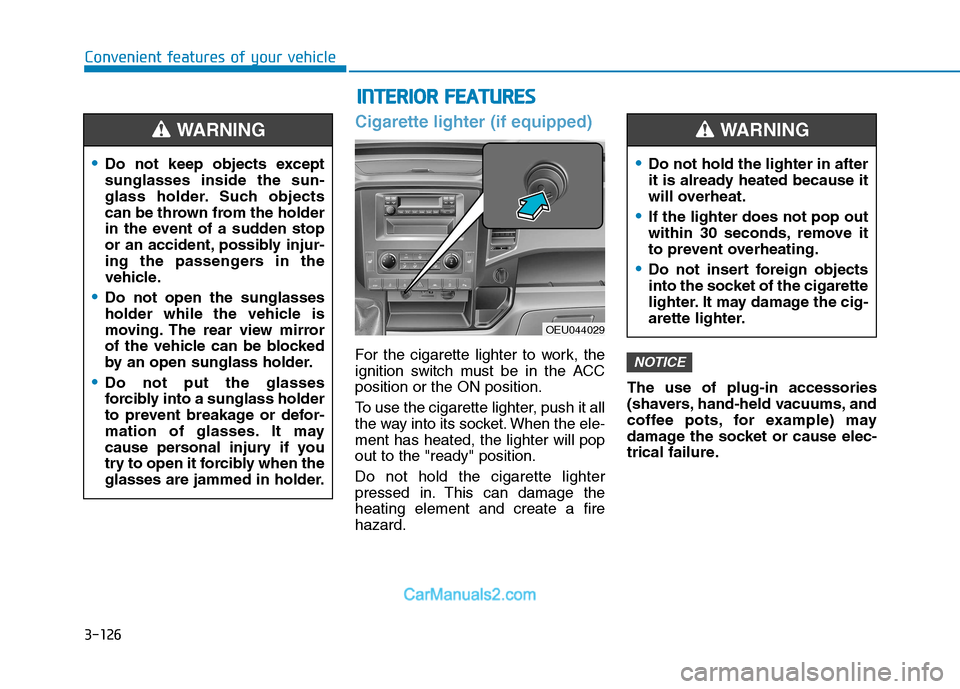
Cigarette lighter (if equipped)
For the cigarette lighter to work, the
ignition switch must be in the ACCposition or the ON position.
To use the cigarette lighter, push it all
the way into its socket. When the ele-ment has heated, the lighter will popout to the "ready" position. Do not hold the cigarette lighter
pressed in. This can damage theheating element and create a firehazard.The use of plug-in accessories
(shavers, hand-held vacuums, and
coffee pots, for example) may
damage the socket or cause elec-
trical failure.NOTICE
Do not keep objects except sunglasses inside the sun-
glass holder. Such objects
can be thrown from the holder
in the event of a sudden stop
or an accident, possibly injur-
ing the passengers in the
vehicle.
Do not open the sunglasses
holder while the vehicle is
moving. The rear view mirror
of the vehicle can be blocked
by an open sunglass holder.
Do not put the glasses
forcibly into a sunglass holder
to prevent breakage or defor-
mation of glasses. It may
cause personal injury if you
try to open it forcibly when the
glasses are jammed in holder.
WARNING
II
NN TTEERR IIOO RR FF EE AA TTUU RREESS
OEU044029
Do not hold the lighter in after
it is already heated because it
will overheat.
If the lighter does not pop out
within 30 seconds, remove it
to prevent overheating.
Do not insert foreign objects
into the socket of the cigarette
lighter. It may damage the cig-
arette lighter.
WARNING
Page 200 of 473
4-8
Multimedia System
(Continued)
Please refrain from use if the
screen is blank or no sound
can be heard as these signs
may indicate product mal-
function. Continued use in
such conditions could lead to
accidents(fires, electric
shock) or product malfunc-tions.
Do not touch the antenna dur- ing thunder or lightening as
such acts may lead to light-
ning induced electric shock.
Do not stop or park in park- ing-restricted areas to operate
the product. Such acts couldlead to traffic accidents.
Use the system with the vehi-
cle ignition turned on.
Prolonged use with the igni-tion turned off could result in
battery discharge.(Continued)
Do not stare at the screen
while driving. Staring at the
screen for prolonged periodsof time could lead to trafficaccidents.
Do not disassemble, assem-
ble, or modify the audio sys-
tem. Such acts could result in
accidents, fire, or electric
shock.
Obey the applicable regula-
tions relevant to the mobile-
phone usage. If not, it is clear-
ly the violation against the
traffic laws.
Heed caution not to spill water
or introduce foreign objects
into the device. Such acts
could lead to smoke, fire, or
product malfunction. (Continued)
WARNING
Page 201 of 473
4-9
Multimedia System
4
Operating the device while driv-ing could lead to accidents due
to a lack of attention to external
surroundings. First park the
vehicle before operating the
device.
Adjust the volume to levels that allow the driver to hear sounds
from outside of the vehicle.
Driving in a state where external
sounds cannot be heard maylead to accidents.
Pay attention to the volume set- ting when turning the device on.
A sudden output of extreme vol-
ume upon turning the device oncould lead to hearing impair-
ment. (Adjust the volume to a
suitable levels before turning off
the device.)
(Continued)(Continued)
Turn on the vehicle ignition
before using this device. Do not
operate the audio system forlong periods of time with the
ignition turned off as such oper-
ations may lead to battery dis-
charge.
Do not subject the device to severe shock or impact. Direct
pressure onto the front side of
the monitor may cause damage
to the LCD or touch screen.
When cleaning the device, make sure to turn off the device and
use a dry and smooth cloth.
Never use tough materials,
chemical cloths, or solvents
(alcohol, benzene, thinners, etc.)
as such materials may damage
the device panel or causecolor/quality deterioration
(Continued)
NOTICE(Continued)
Driving while distracted can
result in a loss of vehicle con-
trol that may lead to an acci-
dent, severe personal injury,
and death. The driver's pri-
mary responsibility is in the
safe and legal operation of a
vehicle, and use of any hand-
held devices, other equip-
ment, or vehicle systems
which take the driver's eyes,
attention and focus away from
the safe operation of a vehicle
or which are not permissible
by law should never be usedduring operation of the vehi-
cle.
Page 238 of 473
4-46
Multimedia System
(Continued)
If Priority is set upon vehicle igni-tion(IGN/ACC ON), the Bluetooth®
Wireless Technology phone will be
automatically connected.
Even if you are outside, the
Bluetooth ®
Wireless Technology
phone will be automatically connect-
ed once you are in the vicinity of the
vehicle.
If you do not want automatic
Bluetooth ®
Wireless Technology con-
nection, turn the Bluetooth®
Wireless
Technology feature off.
The hands-free call volume and qual- ity may differ depending on the
mobile phone type.
Bluetooth ®
Wireless Technology fea-
tures can be used only when the
mobile phone has been paired and
connected with the device. For more
information on pairing and connect-
ing Bluetooth ®
Wireless Technology
enabled mobile phones, refer to the
"Phone Setup" section.
(Continued)(Continued)
When a
Bluetooth®
Wireless
Technology mobile phone is connect-
ed, a ( ) icon will appear at the top
of the screen. If a ( ) icon is not dis-
played, this indicates that a
Bluetooth ®
Wireless Technology
enabled device has not been connect-
ed. You must connect the device
before use. For more information on
Bluetooth ®
Wireless Technology
mobile phones, refer to the "Phone
Setup" section.
Pairing and connecting a Bluetooth®
Wireless Technology enabled mobile
phone will work only when the
Bluetooth ®
Wireless Technology
option within your mobile phone has
been turned on. (Methods of turning
on the Bluetooth®
Wireless
Technology enabled feature may dif-
fer depending on the mobile phone.)
(Continued)(Continued)
In some mobile phones, starting the
ignition while talking through
Bluetooth ®
Wireless Technology
enabled handsfree call will result in
the call becoming disconnected.
(Switch the call back to your mobile
phone when starting the ignition.)
Some features may not be supported in some Bluetooth®
Wireless
Technology mobile phone and
devices.
Bluetooth ®
Wireless Technology
enabled operation may be unstable
depending on the communication
state.
Placing the audio system within an electromagnetic environment may
result in noise interference.
Page 242 of 473
4-50
Multimedia System
BEEP Control
VOLUME Knob clock-wise/counter-clockwise to the
BEEP sound ON/OFF.
LANGUAGE (Only AM210MDEE)
VOLUME Knob clock- wise/counter-clockwise to the select the desired Language
Language setting are as shown
below - English ➟➟
Türkçe7. Button
Press the button to change
to RADIO/USB/AUX/iPod
®modes.
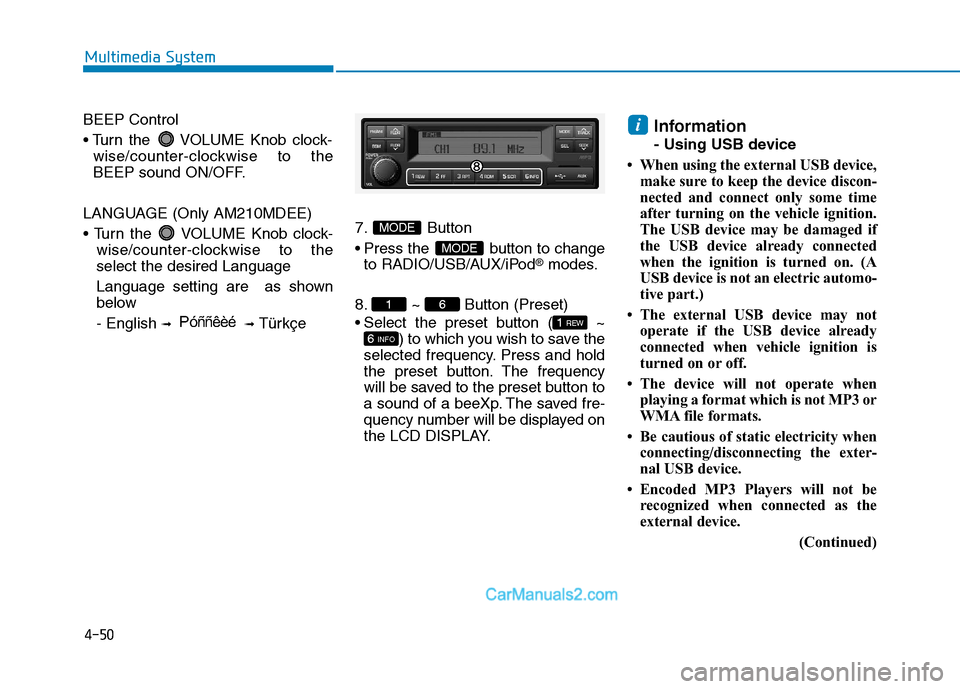
8. ~ Button (Preset)
Select the preset button ( ~ ) to which you wish to save the
selected frequency. Press and hold
the preset button. The frequency
will be saved to the preset button to
a sound of a beeXp. The saved fre-
quency number will be displayed on
the LCD DISPLAY. Information
- Using USB device
When using the external USB device, make sure to keep the device discon-
nected and connect only some time
after turning on the vehicle ignition.
The USB device may be damaged if
the USB device already connected
when the ignition is turned on. (A
USB device is not an electric automo-
tive part.)
The external USB device may not operate if the USB device already
connected when vehicle ignition is
turned on or off.
The device will not operate when playing a format which is not MP3 or
WMA file formats.
Be cautious of static electricity when connecting/disconnecting the exter-
nal USB device.
Encoded MP3 Players will not be recognized when connected as the
external device.
(Continued)
i
6 INFO
1 REW
61
MODE
MODE
P óññêèé
Page 271 of 473
4-79
Multimedia System
4
(Continued)
If Priority is set upon vehicle igni-tion(IGN/ACC ON), the Bluetooth®
Wireless Technology phone will be
automatically connected.
Even if you are outside, the
Bluetooth ®
Wireless Technology
phone will be automatically connect-
ed once you are in the vicinity of the
vehicle.
If you do not want automatic
Bluetooth ®
Wireless Technology con-
nection, turn the Bluetooth®
Wireless
Technology feature off.
The hands-free call volume and qual- ity may differ depending on the
mobile phone type.
Bluetooth ®
Wireless Technology fea-
tures can be used only when the
mobile phone has been paired and
connected with the device. For more
information on pairing and connect-
ing Bluetooth ®
Wireless Technology
enabled mobile phones, refer to the
“Phone Setup” section.
(Continued)(Continued)
When a
Bluetooth®
Wireless
Technology mobile phone is connect-
ed, a ( ) icon will appear at the top
of the screen. If a ( ) icon is not dis-
played, this indicates that a
Bluetooth ®
Wireless Technology
enabled device has not been connect-
ed. You must connect the device
before use. For more information on
Bluetooth ®
Wireless Technology
mobile phones, refer to the “Phone
Setup” section.
Pairing and connecting a Bluetooth®
Wireless Technology enabled mobile
phone will work only when the
Bluetooth ®
Wireless Technology
option within your mobile phone has
been turned on. (Methods of turning
on the Bluetooth®
Wireless
Technology enabled feature may dif-
fer depending on the mobile phone.)
(Continued)(Continued)
In some mobile phones, starting the
ignition while talking through
Bluetooth ®
Wireless Technology
enabled handsfree call will result in
the call becoming disconnected.
(Switch the call back to your mobile
phone when starting the ignition.)
Some features may not be supported in some Bluetooth®
Wireless
Technology mobile phone and
devices.
Bluetooth ®
Wireless Technology
enabled operation may be unstable
depending on the communication
state.
Placing the audio system within an electromagnetic environment may
result in noise interference.