tow HYUNDAI I30 2023 User Guide
[x] Cancel search | Manufacturer: HYUNDAI, Model Year: 2023, Model line: I30, Model: HYUNDAI I30 2023Pages: 533, PDF Size: 59.13 MB
Page 106 of 533
3-23
Convenient features of your vehicle
3
The mirrors stop moving when
they reach the maximum adjust-
ing angles, but the motor contin-
ues to operate whilst the switch
is pressed. Do not press the
switch longer than necessary,
the motor may be damaged.
Do not attempt to adjust the out-
side rearview mirror by hand
otherwise the motor may be
damaged.
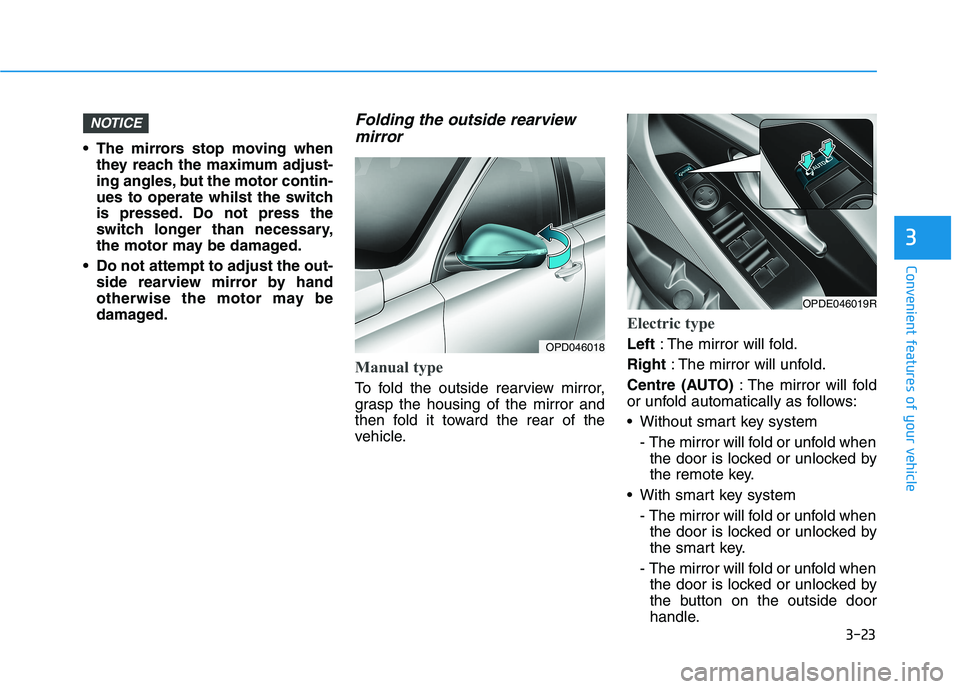
Folding the outside rearview
mirror
Manual type
To fold the outside rearview mirror,
grasp the housing of the mirror and
then fold it toward the rear of the
vehicle.
Electric type
Left: The mirror will fold.
Right: The mirror will unfold.
Centre (AUTO): The mirror will fold
or unfold automatically as follows:
Without smart key system
- The mirror will fold or unfold when
the door is locked or unlocked by
the remote key.
With smart key system
- The mirror will fold or unfold when
the door is locked or unlocked by
the smart key.
- The mirror will fold or unfold when
the door is locked or unlocked by
the button on the outside door
handle.
NOTICE
OPD046018
OPDE046019R
Page 126 of 533

3-43
Convenient features of your vehicle
3
Gauges
Speedometer
The speedometer indicates the
speed of the vehicle and is calibrated
in kilometres per hour (km/h).
Tachometer
The tachometer indicates the
approximate number of engine revo-
lutions per minute (rpm).
Use the tachometer to select the cor-
rect shift points and to prevent lug-
ging and/or over-revving the engine.
Do not operate the engine within
the tachometer's RED ZONE. This
may cause severe engine damage.
Engine coolant temperature
gauge
This gauge indicates the tempera-
ture of the engine coolant when the
ignition switch is in the ON position.
If the gauge pointer moves
beyond the normal range area
toward the "H (HOT)" position, it
indicates overheating that may
damage the engine.
Do not continue driving with an
overheated engine. If your vehicle
overheats, refer to "If the Engine
Overheats" in chapter 6.
NOTICE
NOTICE
OPDE046104/OPDE046105
■Diesel engine ■Petrol engine
OPD046106OPDE046102
Page 165 of 533
3-82
Convenient features of your vehicle
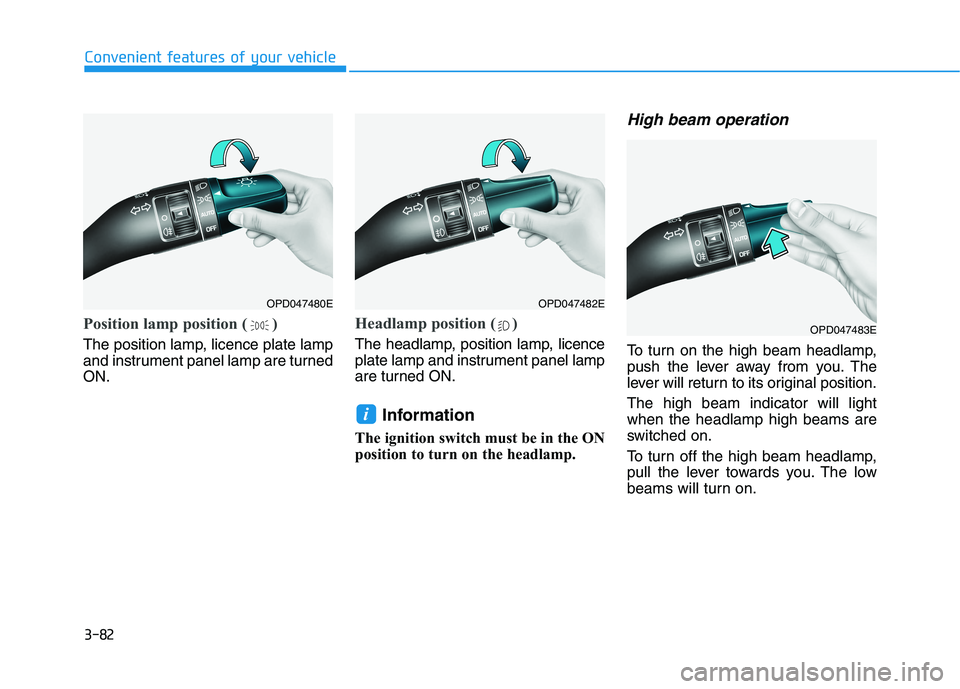
Position lamp position ( )
The position lamp, licence plate lamp
and instrument panel lamp are turned
ON.
Headlamp position ( )
The headlamp, position lamp, licence
plate lamp and instrument panel lamp
are turned ON.
Information
The ignition switch must be in the ON
position to turn on the headlamp.
High beam operation
To turn on the high beam headlamp,
push the lever away from you. The
lever will return to its original position.
The high beam indicator will light
when the headlamp high beams are
switched on.
To turn off the high beam headlamp,
pull the lever towards you. The low
beams will turn on.
i
OPD047480EOPD047482E
OPD047483E
Page 166 of 533
3-83
Convenient features of your vehicle
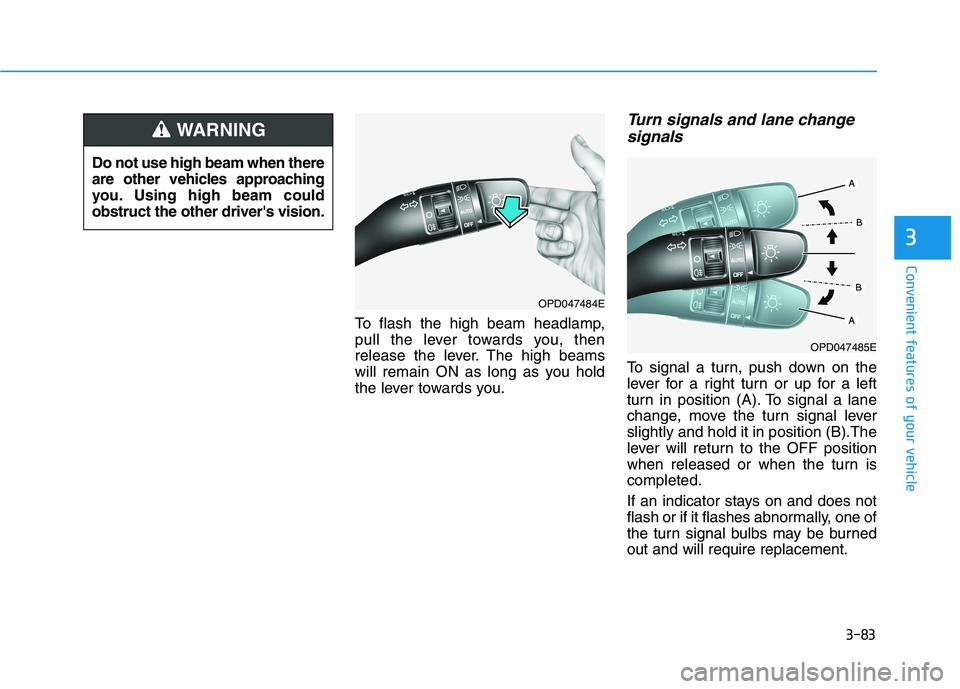
To flash the high beam headlamp,
pull the lever towards you, then
release the lever. The high beams
will remain ON as long as you hold
the lever towards you.
Turn signals and lane change
signals
To signal a turn, push down on the
lever for a right turn or up for a left
turn in position (A). To signal a lane
change, move the turn signal lever
slightly and hold it in position (B).The
lever will return to the OFF position
when released or when the turn is
completed.
If an indicator stays on and does not
flash or if it flashes abnormally, one of
the turn signal bulbs may be burned
out and will require replacement.
3
Do not use high beam when there
are other vehicles approaching
you. Using high beam could
obstruct the other driver's vision.
WARNING
OPD047484E
OPD047485E
Page 177 of 533

3-94
Convenient features of your vehicle
Windscreen washers
In the OFF position, pull the lever
gently toward you to spray washer
fluid on the windscreen and to run the
wipers 1-3 cycles. The spray and
wiper operation will continue until you
release the lever.
If the washer does not work, you may
need to add washer fluid to the wash-
er fluid reservoir.When the outside temperature is
below freezing, ALWAYS warm the
windscreen using the defroster to
prevent the washer fluid from
freezing on the windscreen and
obscuring your vision which
could result in an accident and
serious injury or death.
WARNING
To prevent possible damage
to the washer pump, do not
operate the washer when the
fluid reservoir is empty.
To prevent possible damage
to the wipers or windscreen,
do not operate the wipers
when the windscreen is dry.
To prevent damage to the
wiper arms and other compo-
nents, do not attempt to move
the wipers manually.
To prevent possible damage
to the wipers and washer sys-
tem, use anti-freezing washer
fluids in the winter season or
cold weather.
CAUTION
OTL045280R
Page 190 of 533

3-107
Convenient features of your vehicle
3
Face-Level (B, D, F)
Air flow is directed toward the upper
body and face. Additionally, each
outlet can be controlled to direct the
air discharged from the outlet.
Bi-Level (B, D, C, E, F)
Air flow is directed towards the face
and the floor.
Floor-Level (A, C, D, E, F)
Most of the air flow is directed to the
floor, with a small amount of the air
being directed to the windscreen and
side window defrosters.
Floor/Defrost-Level
(A, C, D, E, F)
Most of the air flow is directed to the
floor and the windscreen with a small
amount directed to the side window
defrosters.
Defrost-Level (A, D)
Most of the air flow is directed to the
windscreenwith a small amount of air
directed to the side window defrosters.MAX A/C-Level (B, D, F)
(if equipped)
To operate the MAX A/C, turn the
temperature control knob to the
extreme left. Air flow is directed
toward the upper body and face.
In this mode, the air conditioning and
the recirculated air position will be
selected automatically.
OPD046308
Page 200 of 533

3-117
Convenient features of your vehicle
3
Mode selectionThe air flow outlet port is converted
as follows:
Face-Level (B, D, F)
Air flow is directed toward the upper
body and face. Additionally, each
outlet can be controlled to direct the
air discharged from the outlet.
Bi-Level (B, D, C, E, F)
Air flow is directed towards the face
and the floor.
(if equipped) (if equipped)
OPDE046307R/OPD047317R
The mode selection button controls the direction of the air flow through the
ventilation system.
Page 212 of 533
3-129
Convenient features of your vehicle
3
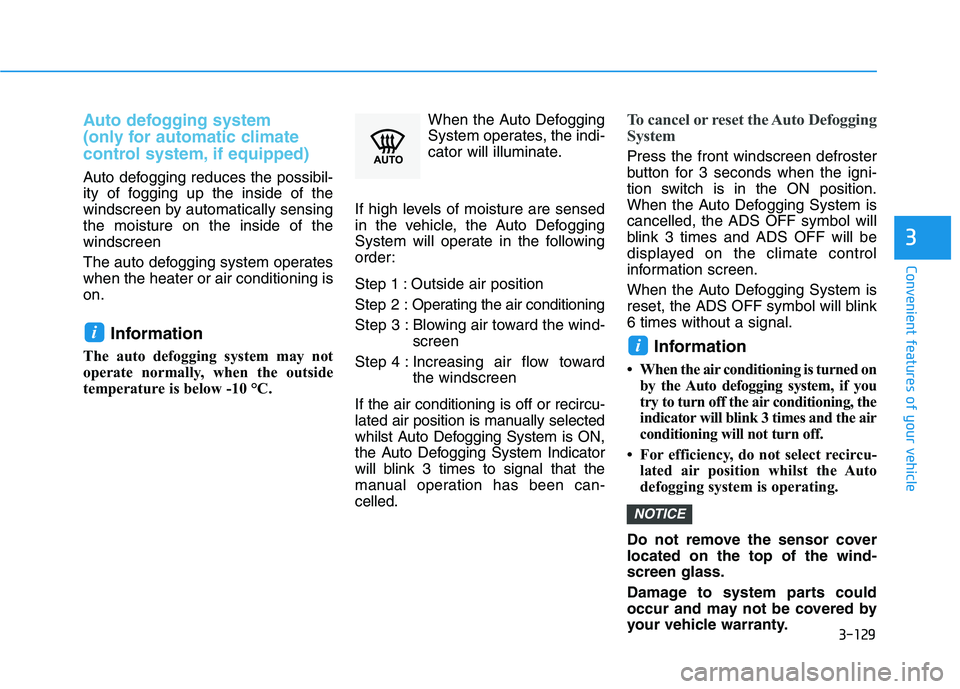
Auto defogging system
(only for automatic climate
control system, if equipped)
Auto defogging reduces the possibil-
ity of fogging up the inside of the
windscreen by automatically sensing
the moisture on the inside of the
windscreen
The auto defogging system operates
when the heater or air conditioning is
on.
Information
The auto defogging system may not
operate normally, when the outside
temperature is below -10 °C.When the Auto Defogging
System operates, the indi-
cator will illuminate.
If high levels of moisture are sensed
in the vehicle, the Auto Defogging
System will operate in the following
order:
Step 1 : Outside air position
Step 2 :Operating the air conditioning
Step 3 : Blowing air toward the wind-
screen
Step 4 : Increasing air flow toward
the windscreen
If the air conditioning is off or recircu-
lated air position is manually selected
whilst Auto Defogging System is ON,
the Auto Defogging System Indicator
will blink 3 times to signal that the
manual operation has been can-
celled.
To cancel or reset the Auto Defogging
System
Press the front windscreen defroster
button for 3 seconds when the igni-
tion switch is in the ON position.
When the Auto Defogging System is
cancelled, the ADS OFF symbol will
blink 3 times and ADS OFF will be
displayed on the climate control
information screen.
When the Auto Defogging System is
reset, the ADS OFF symbol will blink
6 times without a signal.
Information
• When the air conditioning is turned on
by the Auto defogging system, if you
try to turn off the air conditioning, the
indicator will blink 3 times and the air
conditioning will not turn off.
• For efficiency, do not select recircu-
lated air position whilst the Auto
defogging system is operating.
Do not remove the sensor cover
located on the top of the wind-
screen glass.
Damage to system parts could
occur and may not be covered by
your vehicle warranty.
NOTICE
ii
Page 230 of 533
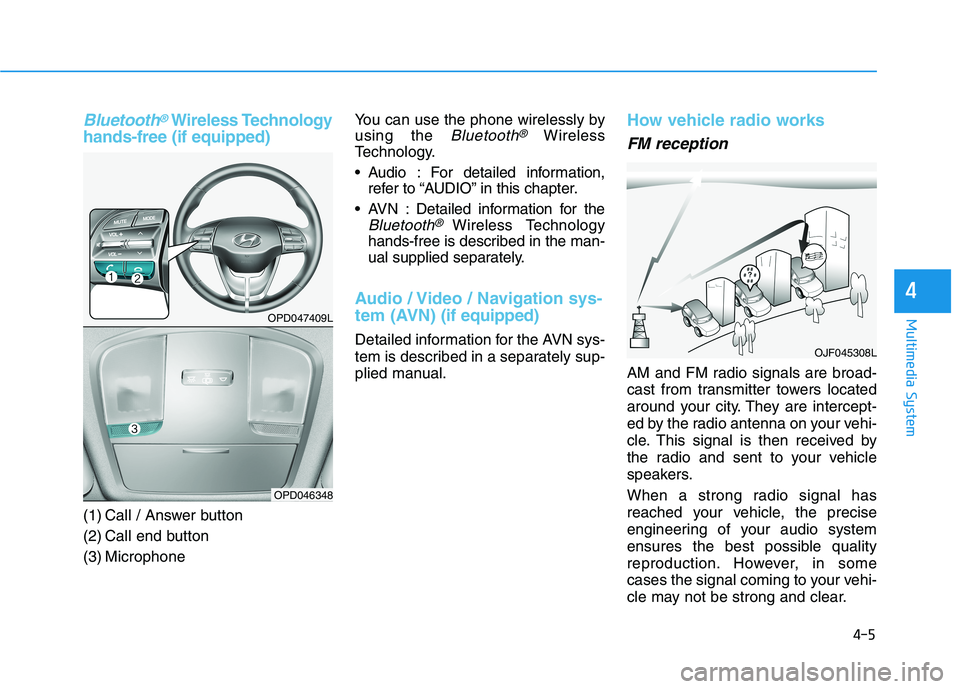
Bluetooth®Wireless Technology
hands-free (if equipped)
(1) Call / Answer button
(2) Call end button
(3) MicrophoneYou can use the phone wirelessly by
using the
Bluetooth®Wireless
Technology.
Audio : For detailed information,
refer to “AUDIO” in this chapter.
AVN : Detailed information for the
Bluetooth® Wireless Technology
hands-free is described in the man-
ual supplied separately.
Audio / Video / Navigation sys-
tem (AVN)(if equipped)
Detailed information for the AVN sys-
tem is described in a separately sup-
plied manual.
How vehicle radio works
FM reception
AM and FM radio signals are broad-
cast from transmitter towers located
around your city. They are intercept-
ed by the radio antenna on your vehi-
cle. This signal is then received by
the radio and sent to your vehicle
speakers.
When a strong radio signal has
reached your vehicle, the precise
engineering of your audio system
ensures the best possible quality
reproduction. However, in some
cases the signal coming to your vehi-
cle may not be strong and clear.
OJF045308L
4-5
Multimedia System
4
OPD047409L
OPD046348
Page 268 of 533
Winter driving .....................................................5-127
Snow or icy conditions ................................................5-127
Winter Precautions .......................................................5-130
Trailer towing .....................................................5-132
Trailer towing equipment ............................................5-133
Driving with a trailer ....................................................5-134
Maintenance when towing a trailer .........................5-138
If you do decide to pull a trailer (For Australia) ..5-138
If you do decide to pull a trailer
(For New Zealand) ........................................................5-140
Vehicle weight ....................................................5-141
Overloading ....................................................................5-141
5