sensor HYUNDAI IONIQ 5 2023 Owner's Manual
[x] Cancel search | Manufacturer: HYUNDAI, Model Year: 2023, Model line: IONIQ 5, Model: HYUNDAI IONIQ 5 2023Pages: 680, PDF Size: 48.22 MB
Page 200 of 680
Convenience Features
5-8
When you set the Two Press Unlock function
1. Make sure you have the smart key in your possession.
2. Touch the touch sensor on the door handle(engraved part) or press the
Door Unlock button (2) on the smart
key. The driver’s door handle will
pop out and the driver’s door will be
unlocked.
3. Touch the touch sensor on the door handle(engraved part) or press the
Door Unlock button (2) on the smart
key within 4 seconds again. All door
handles will pop out and the doors will
be unlocked and the hazard warning
lights will blink twice and the chime will sound.
4. After unlocking the doors, the doors
will automatically re-lock after 30 seconds unless a door is opened. Two Press Unlock Feature
The priority for unlocking the driver door
only, or unlocking all the doors with
one press may be adjusted in the User
Settings menu in the LCD cluster display.
The Two Press Unlock feature, when
enabled, will require the user to press
the door unlock button once for driver
door only and twice for unlocking all the
doors.
Select or Deselect the Two Press Unlock
Feature in the User Settings menu in the
LCD cluster display. The option can be
found under the following menu:
USER SETTINGS → DOOR →TWO PRESS
UNLOCK
The Two Press Unlock Feature can also
be enabled or disabled by pressing
the door lock and unlock buttons
simultaneously on the Key FOB:
Press and hold both the DOOR LOCK
button and the DOOR UNLOCK button
simultaneously until the hazard warning
lights blink.
This will enable or disable the Two Press
Unlock feature. Repeat this procedure to enable/disable the mode again.
Page 201 of 680
05
5-9
Information
• The outside rearview mirror will
unfold if ‘Enable on Door Unlock’ is
selected from the Settings menu in the
infotainment system screen. Select:
- Setup → Vehicle Settings →
Convenience → Welcome Mirror →
Enable on Door Unlock
• The door handle touch sensor will only operate when the smart key is within
0.7~1 m (28~40 in.) from the outside
door handle.
• The doors may lock or unlock if the
touch sensor of the outer door handle is
recognized while washing your car or due to heavy rain.
• To prevent unintentional door lock or unlock:
Press the lock button on the smart
key and immediately press the unlock button along with the lock button
for more than 4 seconds. The hazard
warning lights will blink four times.
At this time, the doors will not lock or
unlock even though the touch sensor is
touched on the outside door handle.
To deactivate the function, press the
door lock or unlock button on the
smart key.
• The doors may not lock or unlock in the following situations.
- If the touch sensor is touched with gloves on
- If the door is suddenly approached Opening the liftgate
To open the liftgate:
1. Make sure you have the smart key in
your possession.
2. Press the liftgate open/close button (3) on the vehicle or press and hold
the Liftgate handle switch on the
smart key for more than one second.
The hazard warning lights will blink
two times and the liftgate will open.
Information
The liftgate open/close button will only operate when the smart key is within 0.7
m (28 in.) from the liftgate.
Page 222 of 680
Convenience Features
5-30
Door locKs
Operating Door Unlocks from
Outside the Vehicle (Manual
type)
Smart key
ONE1051004L
ONE1051010L
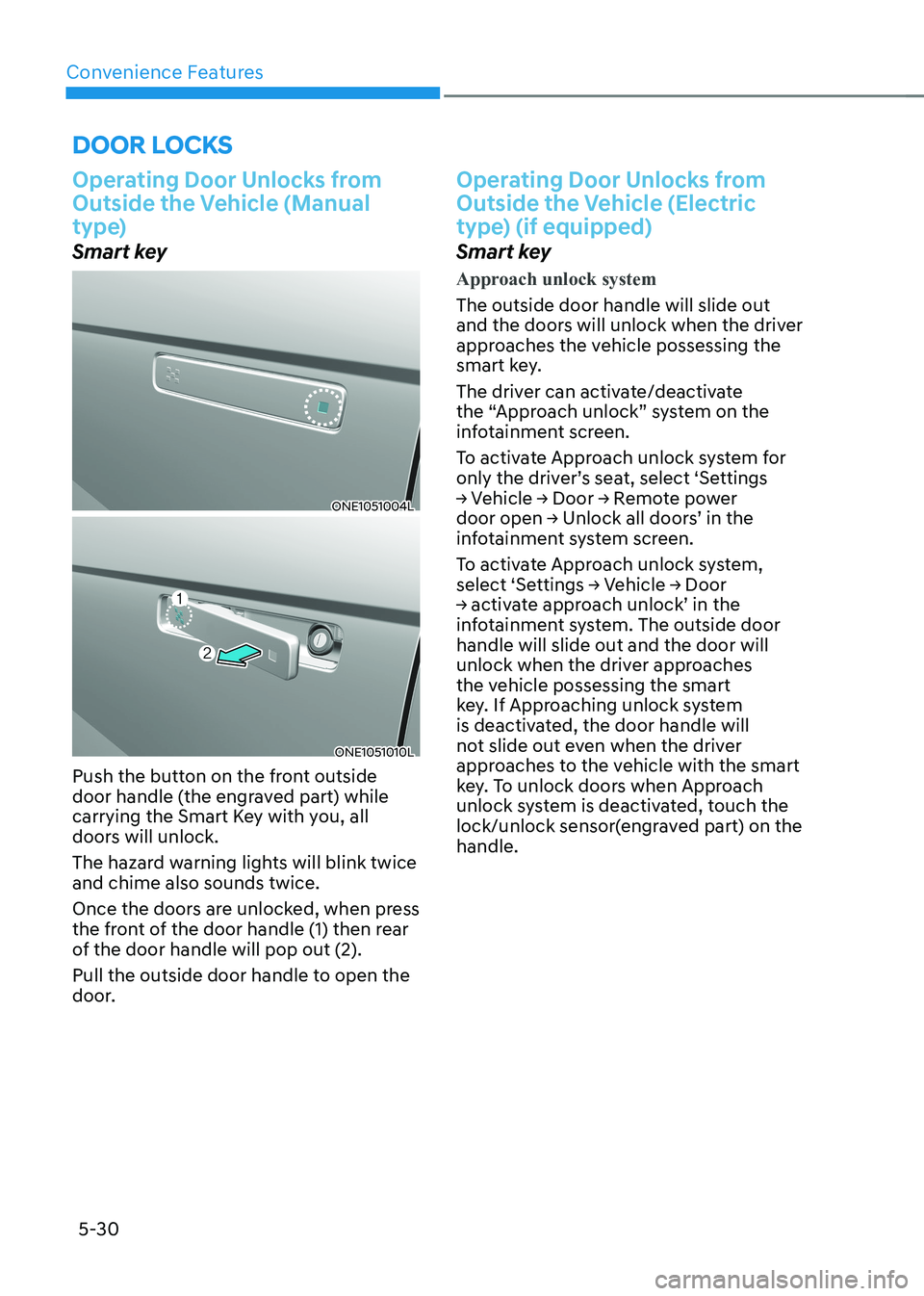
Push the button on the front outside
door handle (the engraved part) while
carrying the Smart Key with you, all
doors will unlock.
The hazard warning lights will blink twice and chime also sounds twice.
Once the doors are unlocked, when press
the front of the door handle (1) then rear
of the door handle will pop out (2).
Pull the outside door handle to open the
door.
Operating Door Unlocks from
Outside the Vehicle (Electric
type) (if equipped)
Smart key
Approach unlock system
The outside door handle will slide out
and the doors will unlock when the driver
approaches the vehicle possessing the
smart key.
The driver can activate/deactivate
the “Approach unlock” system on the
infotainment screen.
To activate Approach unlock system for
only the driver’s seat, select ‘Settings
→ Vehicle → Door → Remote power
door open → Unlock all doors’ in the
infotainment system screen.
To activate Approach unlock system,
select ‘Settings → Vehicle → Door
→ activate approach unlock’ in the
infotainment system. The outside door handle will slide out and the door will
unlock when the driver approaches
the vehicle possessing the smart
key. If Approaching unlock system
is deactivated, the door handle will
not slide out even when the driver
approaches to the vehicle with the smart
key. To unlock doors when Approach
unlock system is deactivated, touch the
lock/unlock sensor(engraved part) on the handle.
Page 224 of 680
Convenience Features
5-32
Operating Door Locks from
Outside the Vehicle (Manual
type)
Smart key
ONE1051004L
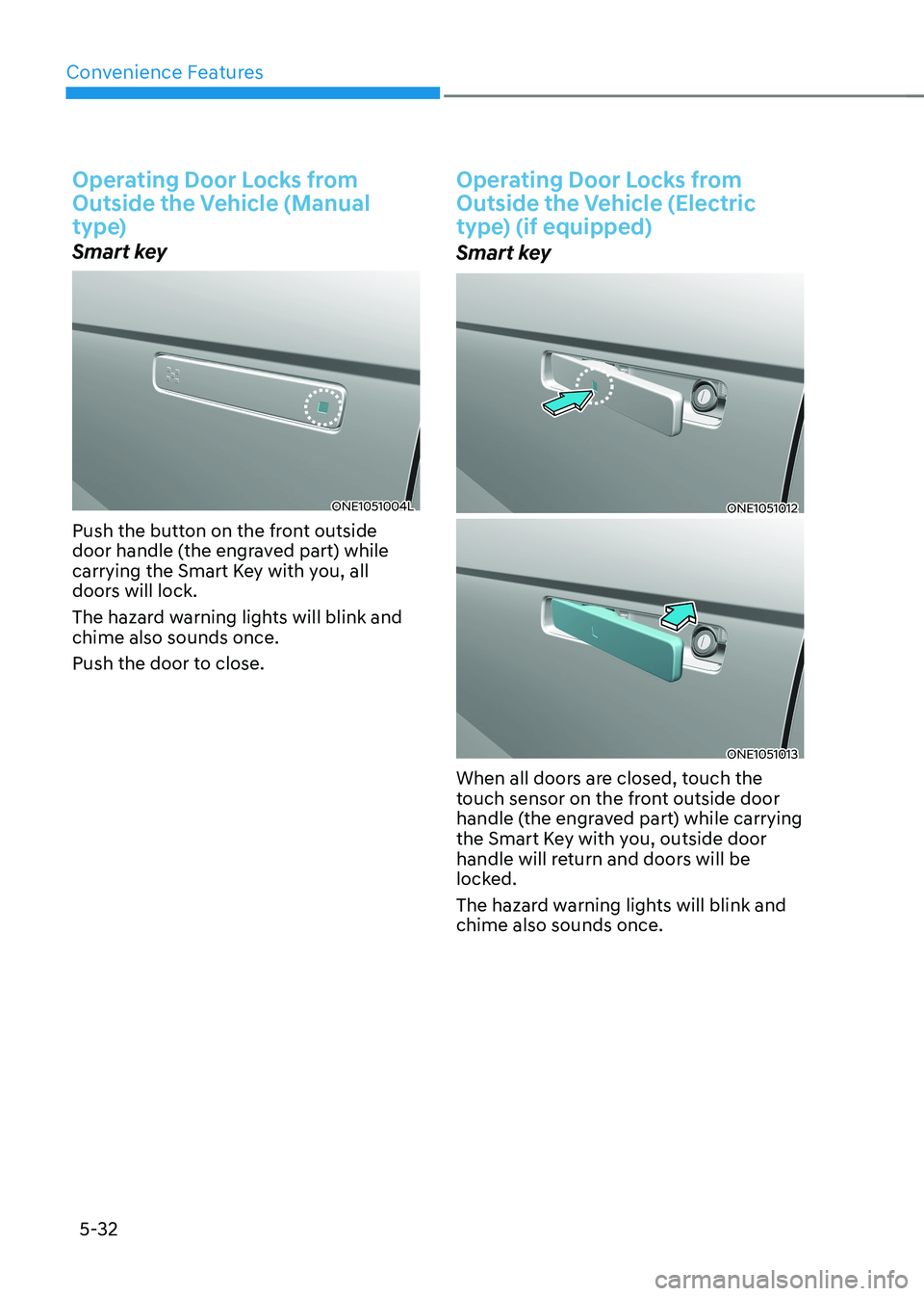
Push the button on the front outside
door handle (the engraved part) while
carrying the Smart Key with you, all
doors will lock.
The hazard warning lights will blink and chime also sounds once.
Push the door to close.
Operating Door Locks from
Outside the Vehicle (Electric
type) (if equipped)
Smart key
ONE1051012
ONE1051013
When all doors are closed, touch the
touch sensor on the front outside door
handle (the engraved part) while carrying
the Smart Key with you, outside door
handle will return and doors will be
locked.
The hazard warning lights will blink and chime also sounds once.
Page 231 of 680
05
5-39
This system helps to protect your vehicle
and valuables. The horn will sound and
the hazard warning lights will blink
continuously if any of the following occur:
- A door is opened without using the smart key.
- The liftgate is opened without using the smart key.
- The vehicle hood is opened.
The alarm continues for 30 seconds, then
the system resets. To turn off the alarm,
unlock the doors with the smart key.
The Theft Alarm System automatically
sets 30 seconds after you lock the
doors and the liftgate. For the system to
activate, you must lock the doors and
the liftgate from outside the vehicle with
the smart key or by touching the touch
sensor or pressing the button on the
outside door handle with the smart key
in your possession.
The hazard warning lights will blink and
the chime will sound once to indicate the
system is armed.
Once the security system is set, opening
any door, the liftgate, or the hood
without using the smart key will cause
the alarm to activate.
The Theft Alarm System will not set if the
hood, the liftgate, or any door is not fully
closed. If the system will not set, check
the hood, the liftgate, or the doors are fully closed.
Do not attempt to alter this system or
add other devices to it.
Information
• Do not lock the doors until all passengers have left the vehicle. If the
remaining passenger leaves the vehicle when the system is armed, the alarm will be activated.
• If the vehicle is not disarmed with the
smart key, open the doors by using the mechanical key and start the vehicle by
directly pressing the Start/Stop button
with the smart key.
• If the system is disarmed by unlocking
the vehicle, but neither a door or the liftgate is opened within 30 seconds, the
doors will relock and the system will
rearm automatically.
ThefT-alarm sysTem
Page 241 of 680
![HYUNDAI IONIQ 5 2023 Owners Manual 05
5-49
Electric Chromic Mirror (ECM) (if equipped)
ONE1051226
[A] : Indicator
Some vehicles come equipped with an
electrochromic mirror that helps control
glare while driving at night or under](/img/35/56168/w960_56168-240.png "HYUNDAI IONIQ 5 2023 Owners Manual 05
5-49
Electric Chromic Mirror (ECM) (if equipped)
ONE1051226
[A] : Indicator
Some vehicles come equipped with an
electrochromic mirror that helps control
glare while driving at night or under")
05
5-49
Electric Chromic Mirror (ECM) (if equipped)
ONE1051226
[A] : Indicator
Some vehicles come equipped with an
electrochromic mirror that helps control
glare while driving at night or under low
light driving conditions.
When the vehicle is running, the glare is
automatically controlled by the sensor
mounted in the rearview mirror. The
sensor detects the light level around the
vehicle, and automatically adjusts to
control the headlamp glare from vehicles
behind you.
Whenever the the gear is shifted to R
(Reverse), the mirror will automatically
go to the brightest setting in order to
improve the driver’s view behind the
vehicle. Electrochromic mirror (ECM) with
HomeLink® system (if equipped)
Your vehicle may be equipped with
a Gentex Automatic-Dimming Mirror
with an Integrated HomeLink® Wireless
Control System.
During nighttime driving, this feature
will automatically detect and reduce
rearview mirror glare. The HomeLink®
Universal Transceiver allows you to
activate your garage door(s), electric
gate, home lighting, etc.
ONE1051261N
(1) HomeLink Channel 1
(2) HomeLink Channel 2
(3) HomeLink Channel 3
(4) Garage Door Opener Status Indicator : Closing or Closed
(5) HomeLink Operation Indicator
(6) Garage Door Opener Status Indicator : Opening or Opened
(7) HomeLink User Interface Indicator
Page 242 of 680
Convenience Features
5-50
Automatic-Dimming Night Vision Safety™ (NVS®
) Mirror (if equipped)
The NVS® Mirror automatically reduces
glare by monitoring light levels in the
front and the rear of the vehicle. Any
object that obstructs either light sensor
will degrade the automatic dimming
control feature.
For more information regarding NVS®
mirrors and other applications, please
refer to the Gentex website:
www.gentex.com
Your mirror will automatically dim
upon detecting glare from the vehicles
traveling behind you.
The mirror defaults to the ON position
each time the vehicle is started.
Integrated HomeLink ®
Wireless Control
System
The HomeLink® Wireless Control System
provides a convenient way to replace
up to three hand held radio-frequency
transmitters used to activate compatible
devices such as gate operators, garage
door openers, entry door locks, security
systems, and home lighting.
NOTICE
HomeLink® operates while the ignition
switch is in the ACC or ON position
for safety reasons. It is to prevent
unintentional security problems from
happening when the vehicle is parked
outside the garage.
WARNING
Before programming HomeLink® to a
garage door opener or gate operator,
make sure people and objects are out
of the way of the device to prevent
potential harm or damage. Do not
use the HomeLink® with any garage
door opener that lacks the safety
stop and reverse features required
by U.S. federal safety standards (this
includes any garage door opener model
manufactured before April 1, 1982).
A garage door that cannot detect an
object - signaling the door to stop and
reverse - does not meet current U.S.
federal safety standards. Using a garage
door opener without these features
increases the risk of serious injury or
death.
For more information, contact
HomeLink® at www.homelink.com, or
call Home-Link customer support at
1-800-355-3515.
It is also recommended that a new
battery be replaced in the handheld
transmitter of the device being trained
to HomeLink® for quicker training and
accurate transmission of the radio
frequency.
Page 252 of 680
Convenience Features
5-60
Adjusting the rearview mirrors
ONE1051028
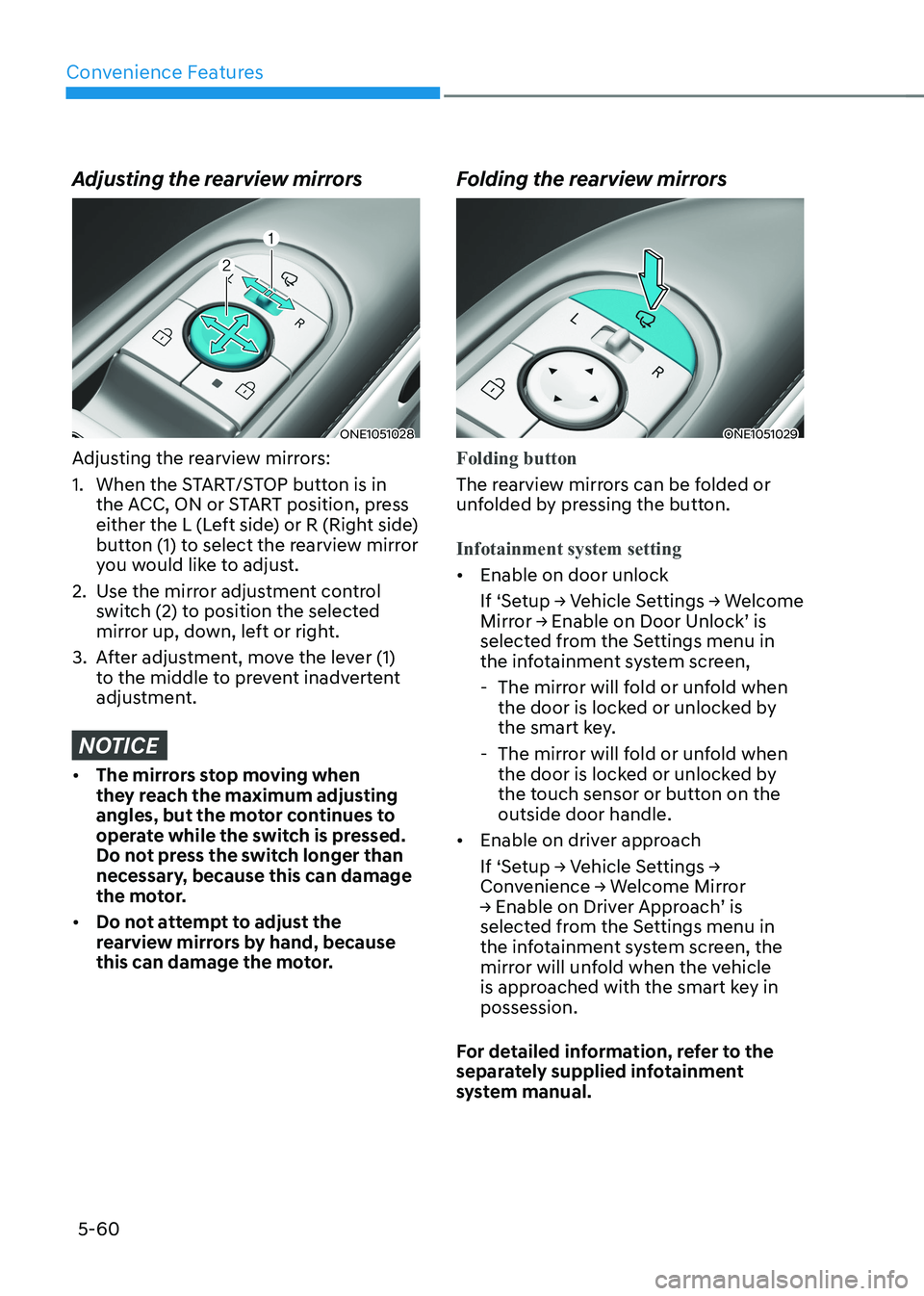
Adjusting the rearview mirrors:
1. When the START/STOP button is in the ACC, ON or START position, press
either the L (Left side) or R (Right side)
button (1) to select the rearview mirror
you would like to adjust.
2. Use the mirror adjustment control switch (2) to position the selected
mirror up, down, left or right.
3. After adjustment, move the lever (1) to the middle to prevent inadvertent
adjustment.
NOTICE
• The mirrors stop moving when
they reach the maximum adjusting
angles, but the motor continues to
operate while the switch is pressed.
Do not press the switch longer than
necessary, because this can damage
the motor.
• Do not attempt to adjust the
rearview mirrors by hand, because
this can damage the motor. Folding the rearview mirrors
ONE1051029
Folding button
The rearview mirrors can be folded or
unfolded by pressing the button.
Infotainment system setting
•
Enable on door unlock
If ‘Setup → Vehicle Settings → Welcome
Mirror → Enable on Door Unlock’ is
selected from the Settings menu in
the infotainment system screen,
- The mirror will fold or unfold when the door is locked or unlocked by
the smart key.
- The mirror will fold or unfold when the door is locked or unlocked by
the touch sensor or button on the outside door handle.
• Enable on driver approach
If ‘Setup → Vehicle Settings →
Convenience → Welcome Mirror
→ Enable on Driver Approach’ is
selected from the Settings menu in
the infotainment system screen, the
mirror will unfold when the vehicle
is approached with the smart key in possession.
For detailed information, refer to the
separately supplied infotainment
system manual.
Page 277 of 680
05
5-85
Exterior Lights
Lighting control
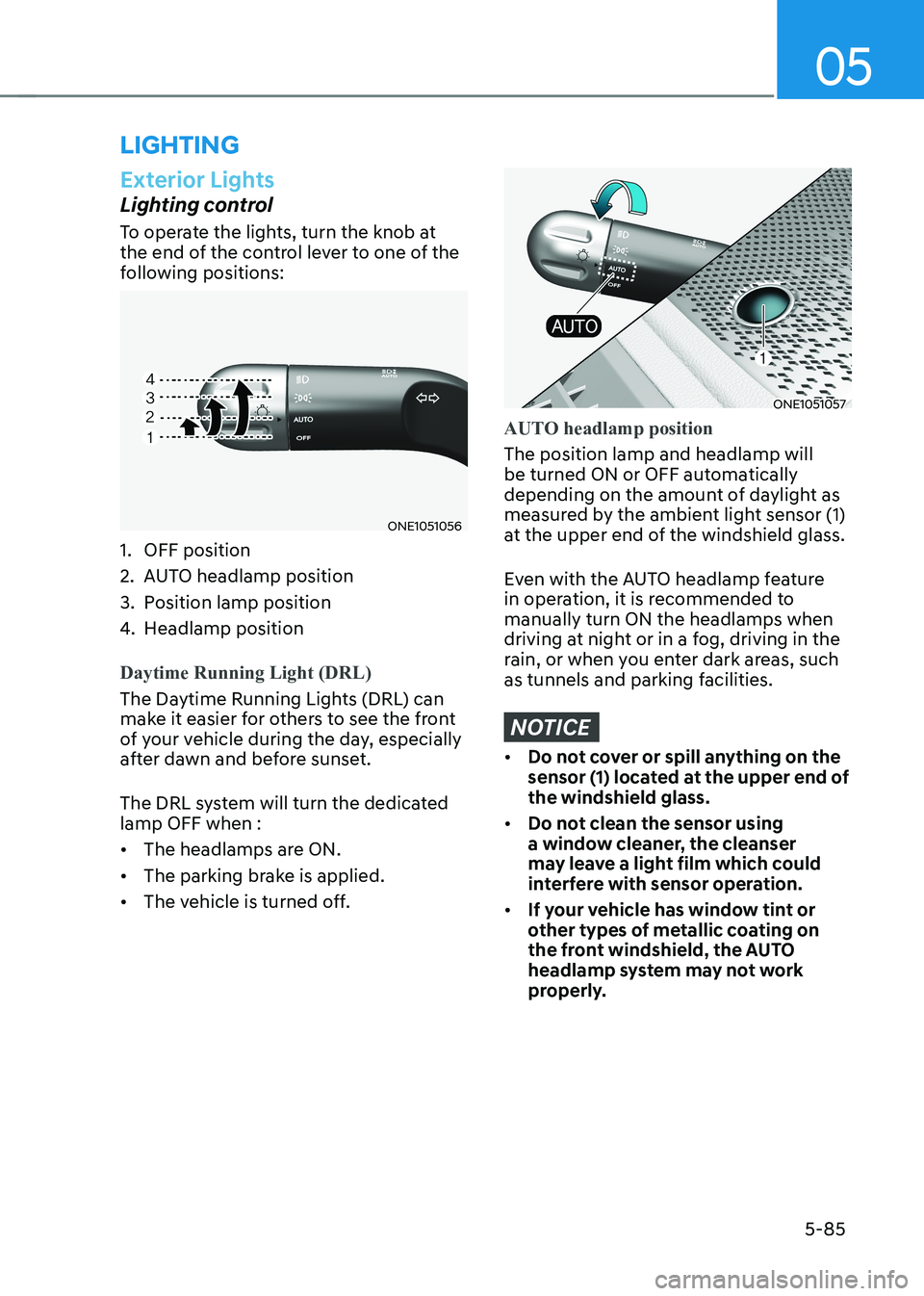
To operate the lights, turn the knob at
the end of the control lever to one of the
following positions:
ONE1051056
1. OFF position
2. AUTO headlamp position
3. Position lamp position
4. Headlamp position
Daytime Running Light (DRL)
The Daytime Running Lights (DRL) can
make it easier for others to see the front
of your vehicle during the day, especially
after dawn and before sunset.
The DRL system will turn the dedicated lamp OFF when : • The headlamps are ON.
• The parking brake is applied.
• The vehicle is turned off.
ONE1051057
AUTO headlamp position
The position lamp and headlamp will
be turned ON or OFF automatically
depending on the amount of daylight as
measured by the ambient light sensor (1)
at the upper end of the windshield glass.
Even with the AUTO headlamp feature
in operation, it is recommended to manually turn ON the headlamps when
driving at night or in a fog, driving in the
rain, or when you enter dark areas, such
as tunnels and parking facilities.
NOTICE
• Do not cover or spill anything on the
sensor (1) located at the upper end of the windshield glass.
• Do not clean the sensor using
a window cleaner, the cleanser
may leave a light film which could
interfere with sensor operation.
• If your vehicle has window tint or
other types of metallic coating on
the front windshield, the AUTO
headlamp system may not work
properly.
lighting
Page 283 of 680
05
5-91
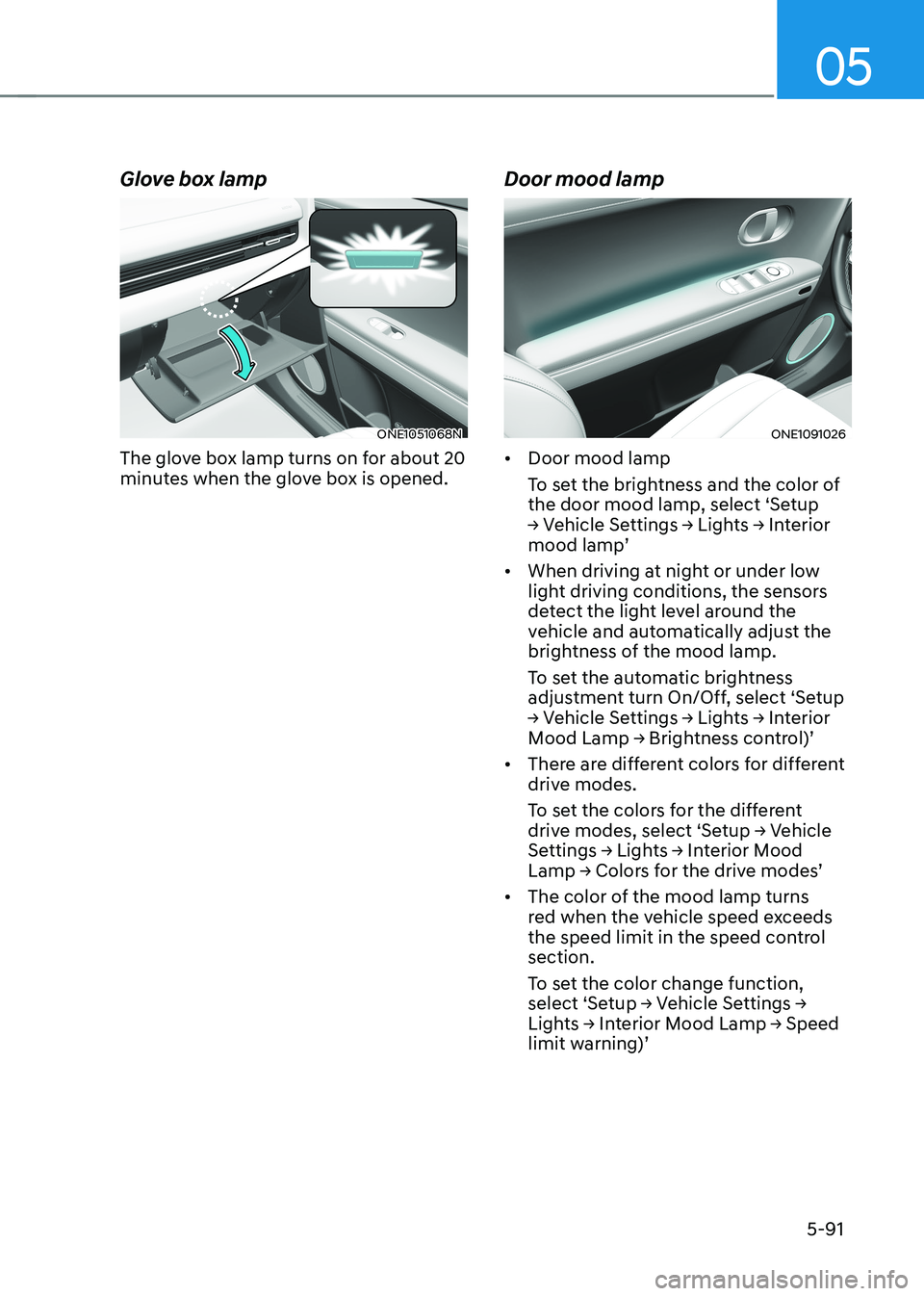
Glove box lamp
ONE1051068N
The glove box lamp turns on for about 20
minutes when the glove box is opened. Door mood lampONE1091026
• Door mood lamp
To set the brightness and the color of
the door mood lamp, select ‘Setup
→ Vehicle Settings → Lights → Interior
mood lamp’
• When driving at night or under low
light driving conditions, the sensors
detect the light level around the
vehicle and automatically adjust the
brightness of the mood lamp.
To set the automatic brightness
adjustment turn On/Off, select ‘Setup
→ Vehicle Settings → Lights → Interior
Mood Lamp → Brightness control)’
• There are different colors for different
drive modes.
To set the colors for the different
drive modes, select ‘Setup → Vehicle
Settings → Lights → Interior Mood
Lamp → Colors for the drive modes’
• The color of the mood lamp turns
red when the vehicle speed exceeds
the speed limit in the speed control section.
To set the color change function,
select ‘Setup → Vehicle Settings →
Lights → Interior Mood Lamp → Speed
limit warning)’