sensor HYUNDAI IONIQ 5 2023 Owner's Guide
[x] Cancel search | Manufacturer: HYUNDAI, Model Year: 2023, Model line: IONIQ 5, Model: HYUNDAI IONIQ 5 2023Pages: 680, PDF Size: 48.22 MB
Page 284 of 680
Convenience Features
5-92
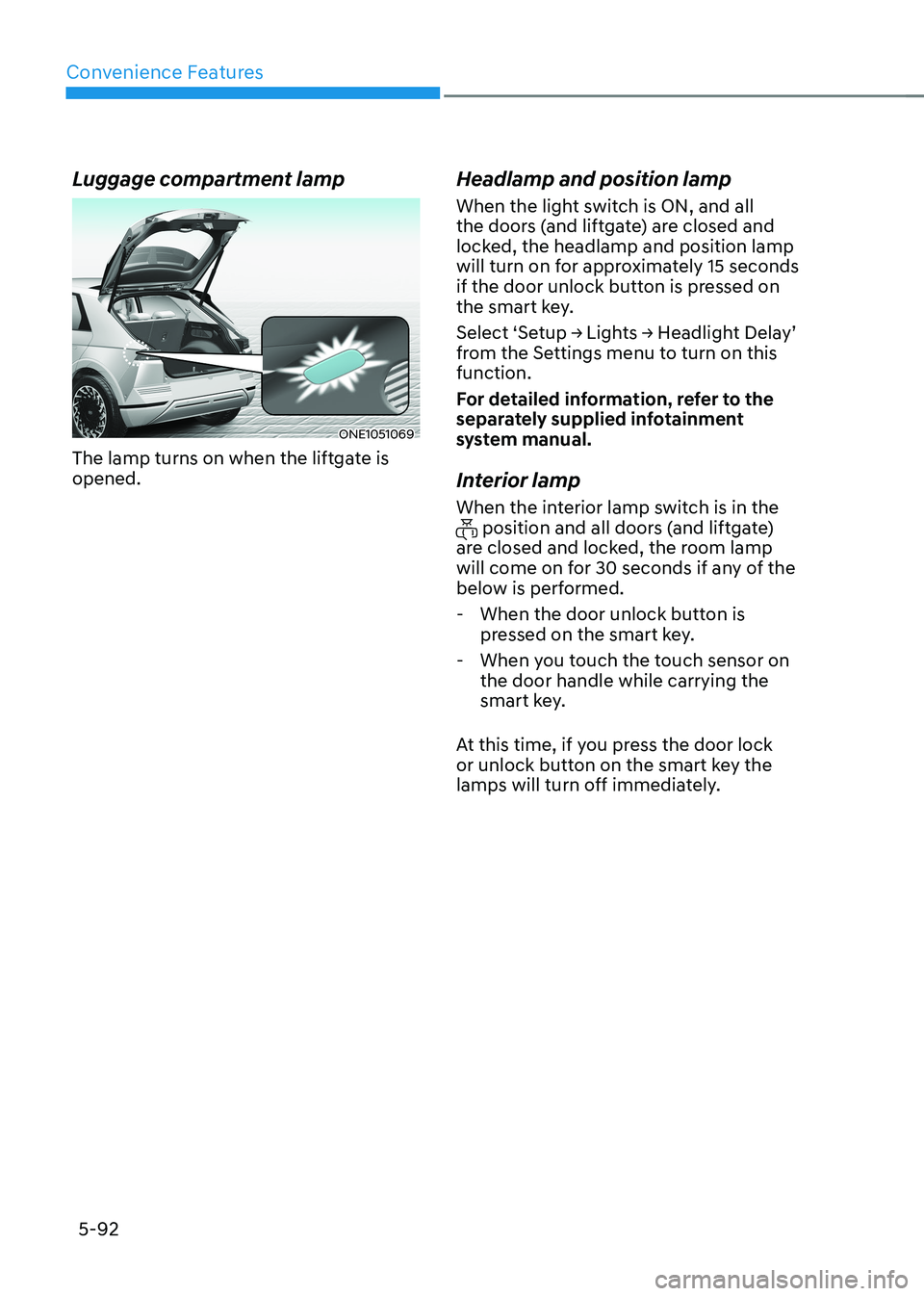
Luggage compartment lamp
ONE1051069
The lamp turns on when the liftgate is opened. Headlamp and position lamp
When the light switch is ON, and all
the doors (and liftgate) are closed and
locked, the headlamp and position lamp
will turn on for approximately 15 seconds
if the door unlock button is pressed on
the smart key.
Select ‘Setup → Lights → Headlight Delay’
from the Settings menu to turn on this function.
For detailed information, refer to the
separately supplied infotainment
system manual.
Interior lamp
When the interior lamp switch is in the
position and all doors (and liftgate)
are closed and locked, the room lamp
will come on for 30 seconds if any of the
below is performed.
- When the door unlock button is pressed on the smart key.
- When you touch the touch sensor on the door handle while carrying the
smart key.
At this time, if you press the door lock
or unlock button on the smart key the
lamps will turn off immediately.
Page 285 of 680
05
5-93
ONE1051064
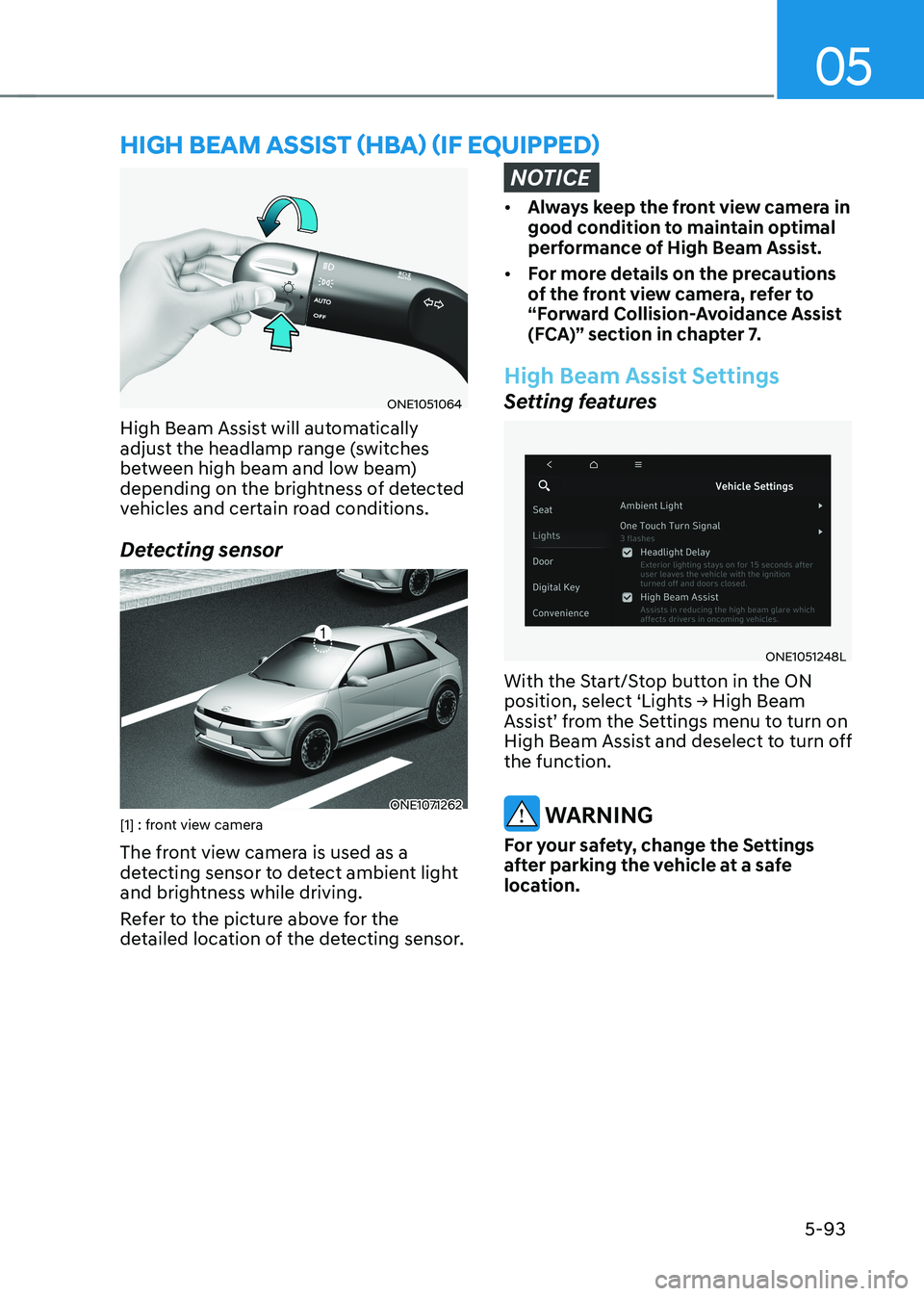
High Beam Assist will automatically
adjust the headlamp range (switches
between high beam and low beam)
depending on the brightness of detected
vehicles and certain road conditions.
Detecting sensor
ONE1071262
[1] : front view camera
The front view camera is used as a
detecting sensor to detect ambient light
and brightness while driving.
Refer to the picture above for the
detailed location of the detecting sensor.
NOTICE
• Always keep the front view camera in
good condition to maintain optimal
performance of High Beam Assist.
• For more details on the precautions
of the front view camera, refer to
“Forward Collision-Avoidance Assist
(FCA)” section in chapter 7.
High Beam Assist Settings
Setting features
ONE1051248L
With the Start/Stop button in the ON
position, select ‘Lights → High Beam
Assist’ from the Settings menu to turn on
High Beam Assist and deselect to turn off the function.
WARNING
For your safety, change the Settings
after parking the vehicle at a safe
location.
hIgh Beam assIsT (hBa) (If eQUIPPed)
Page 288 of 680
Convenience Features
5-96
WIPers and Washers
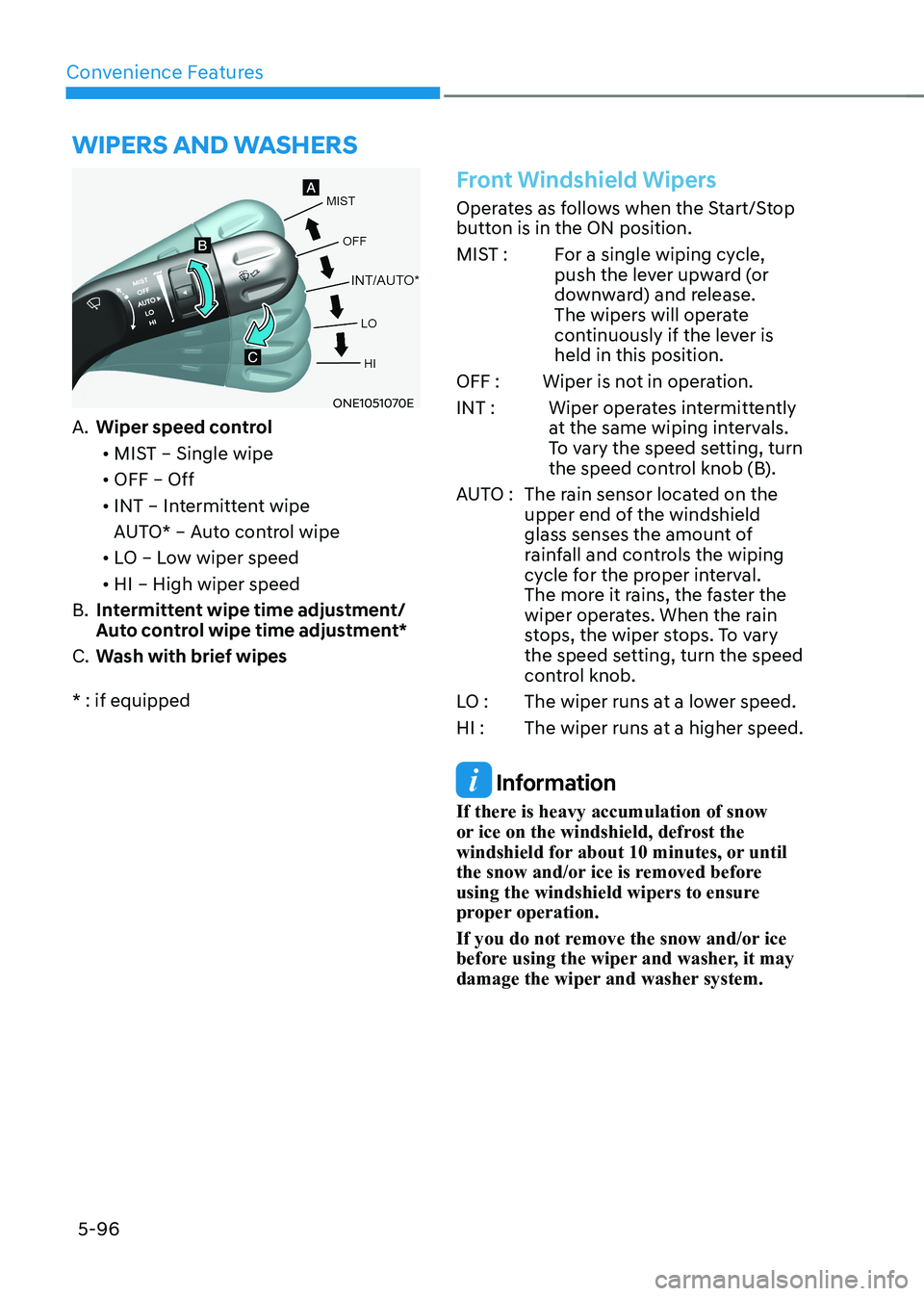
ONE1051070E
A. Wiper speed control
• MIST – Single wipe
• OFF – Off
• INT – Intermittent wipe
AUTO* – Auto control wipe
• LO – Low wiper speed
• HI – High wiper speed
B. Intermittent wipe time adjustment/
Auto control wipe time adjustment*
C. Wash with brief wipes
* : if equipped
Front Windshield Wipers
Operates as follows when the Start/Stop
button is in the ON position.
MIST : For a single wiping cycle, push the lever upward (or
downward) and release.
The wipers will operate
continuously if the lever is held in this position.
OFF : Wiper is not in operation.
INT : Wiper operates intermittently at the same wiping intervals.
To vary the speed setting, turn
the speed control knob (B).
AUTO : The rain sensor located on the upper end of the windshield
glass senses the amount of
rainfall and controls the wiping
cycle for the proper interval.
The more it rains, the faster the
wiper operates. When the rain
stops, the wiper stops. To vary
the speed setting, turn the speed
control knob.
LO : The wiper runs at a lower speed.
HI : The wiper runs at a higher speed.
Information
If there is heavy accumulation of snow
or ice on the windshield, defrost the
windshield for about 10 minutes, or until
the snow and/or ice is removed before
using the windshield wipers to ensure
proper operation.
If you do not remove the snow and/or ice
before using the wiper and washer, it may
damage the wiper and washer system.
Page 289 of 680
05
5-97
AUTO (Automatic) control
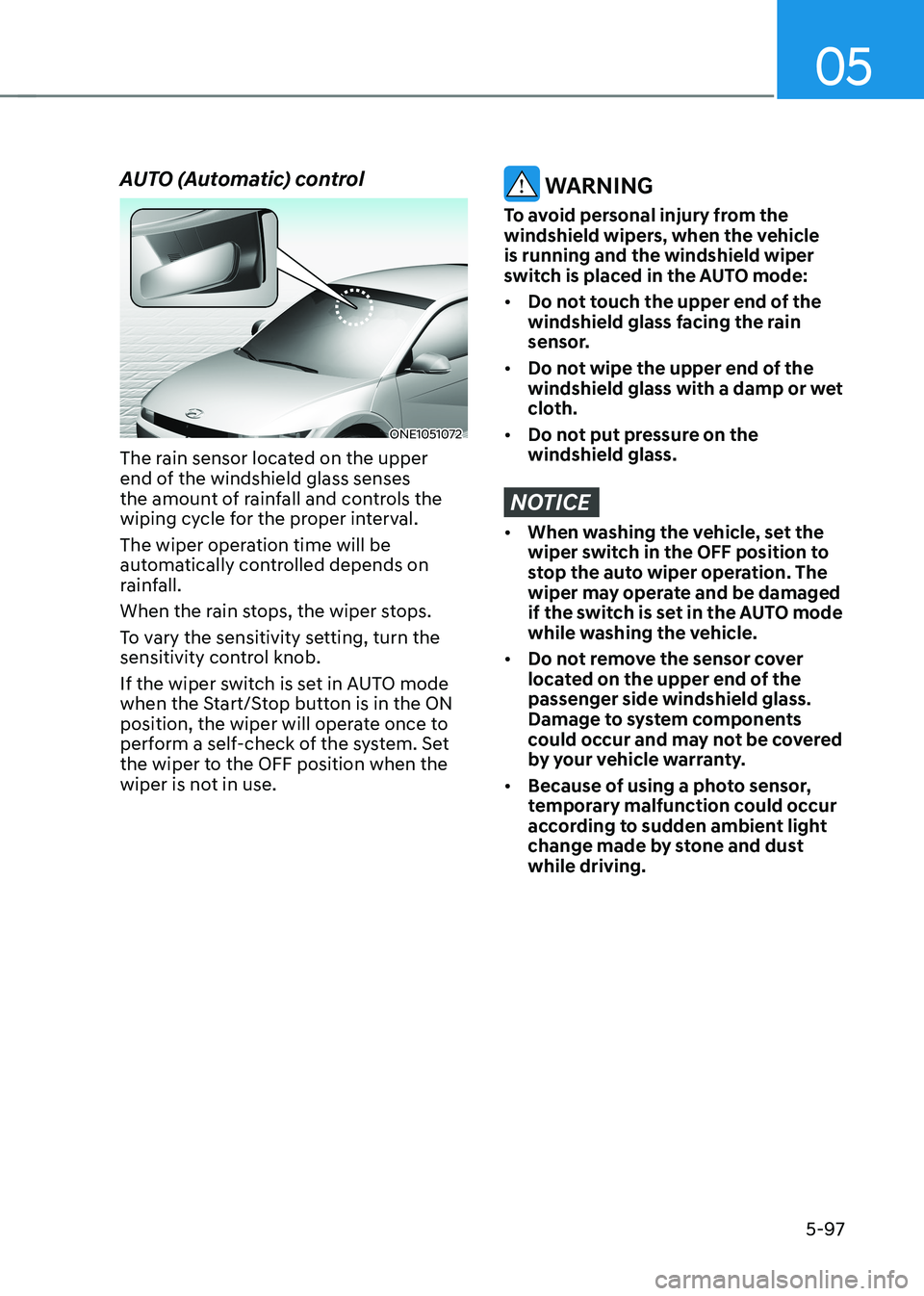
ONE1051072
The rain sensor located on the upper
end of the windshield glass senses
the amount of rainfall and controls the
wiping cycle for the proper interval.
The wiper operation time will be
automatically controlled depends on
rainfall.
When the rain stops, the wiper stops.
To vary the sensitivity setting, turn the
sensitivity control knob.
If the wiper switch is set in AUTO mode
when the Start/Stop button is in the ON
position, the wiper will operate once to
perform a self-check of the system. Set
the wiper to the OFF position when the
wiper is not in use.
WARNING
To avoid personal injury from the
windshield wipers, when the vehicle is running and the windshield wiper
switch is placed in the AUTO mode: • Do not touch the upper end of the
windshield glass facing the rain
sensor.
• Do not wipe the upper end of the
windshield glass with a damp or wet
cloth.
• Do not put pressure on the windshield glass.
NOTICE
• When washing the vehicle, set the
wiper switch in the OFF position to
stop the auto wiper operation. The
wiper may operate and be damaged
if the switch is set in the AUTO mode
while washing the vehicle.
• Do not remove the sensor cover
located on the upper end of the passenger side windshield glass.
Damage to system components
could occur and may not be covered
by your vehicle warranty.
• Because of using a photo sensor,
temporary malfunction could occur
according to sudden ambient light
change made by stone and dust while driving.
Page 293 of 680
05
5-101
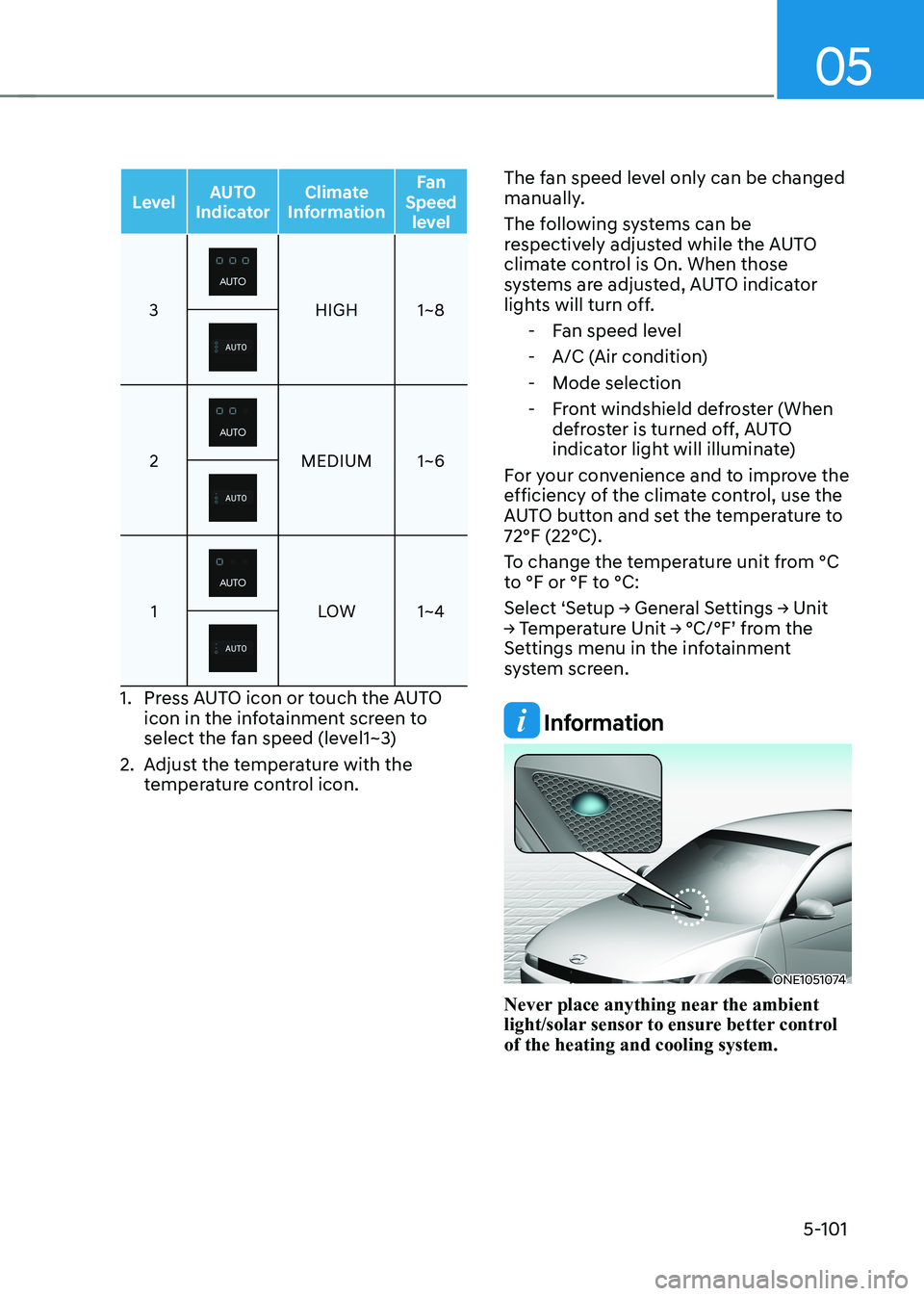
LevelAUTO
Indicator Climate
Information Fan
Speed level
3HIGH 1~8
2MEDIUM 1~6
1LOW 1~4
1. Press AUTO icon or touch the AUTO
icon in the infotainment screen to
select the fan speed (level1~3)
2. Adjust the temperature with the temperature control icon. The fan speed level only can be changed
manually.
The following systems can be
respectively adjusted while the AUTO
climate control is On. When those
systems are adjusted, AUTO indicator
lights will turn off.
- Fan speed level
- A/C (Air condition)
- Mode selection
- Front windshield defroster (When defroster is turned off, AUTO
indicator light will illuminate)
For your convenience and to improve the
efficiency of the climate control, use the
AUTO button and set the temperature to 72°F (22°C).
To change the temperature unit from °C
to °F or °F to °C:
Select ‘Setup → General Settings → Unit
→ Temperature Unit → °C/°F’ from the
Settings menu in the infotainment
system screen.
Information
ONE1051074
Never place anything near the ambient
light/solar sensor to ensure better control of the heating and cooling system.
Page 309 of 680
05
5-117
Turning the Auto Defogging System ON or OFF
Climate control system
Touch the front windshield defroster
icon for 3 seconds when the Start/Stop
button is in the ON position. When the
Auto Defogging System is turned off, the
ADS OFF symbol will blink 3 times and
ADS OFF will be displayed on the climate
control information screen.
When the Auto Defogging System is
turned on, the ADS OFF symbol will blink 6 times without a signal.
Infotainment system
Auto Defogging System can be turned
on and off by selecting ‘Setup →
Vehicle Settings → Climate → Defog/
Defrost Options → Auto Defog’ from the
infotainment system screen.
For detailed information, refer to the
separately supplied infotainment
system manual.
Information
• When the air conditioning is turned
on by Auto Defogging System, if you
try to turn off the air conditioning, the
indicator will blink 3 times and the air conditioning will not be turned off.
• To maintain the effectiveness and
efficiency of the Auto Defogging
System, do not select Recirculation mode while the system is operating.
• When Auto Defogging System is operating, fan speed adjustment,
temperature adjustment, and air intake
control selection are all disabled.
NOTICE
Do not remove the sensor cover located
on the upper end of the windshield glass.
Damage to system parts could occur
and may not be covered by your vehicle
warranty.
Auto Dehumidify (if equipped)
To increase cabin air quality and reduce
windshield misting, recirculation mode
switches off automatically after about
5 minutes, depending on the outside
temperature, and the air intake will
change to fresh mode.
Turning Auto Dehumidify ON or OFF
Climate control system
To turn the Auto Dehumidify feature on
or off, select Face level () mode and
touch the air intake control icon at least
five times within three seconds. When
Auto Dehumidify is turned on, the air
intake control button indicator will blink
6 times. When turned off, the indicator will blink 3 times.
Infotainment system
Auto Dehumidify can be turned on and
off by selecting ‘Setup → Vehicle Settings
→ Climate → Automatic Ventilation →
Auto Dehumidify’ from the infotainment
system screen.
Information
If the battery (12V) is discharged or
disconnected, Auto dehumidify settings
will be reset. Readjust the settings to
turning Auto dehumidify option ON or
OFF.
For detailed information, refer to the separately supplied infotainment system manual.
Page 327 of 680
6
6. Driving Your Vehicle
Before Driving ................................................................................................... 6-3
Before Entering the Vehicle ......................................................................................... 6-3
Before Starting ............................................................................................................. 6-3
Start/Stop Button .............................................................................................. 6-4
Start/Stop Button Positions ......................................................................................... 6-5
Starting the Vehicle ..................................................................................................... 6-6
Turning Off the Vehicle ................................................................................................ 6 -7
Remote Start ................................................................................................................ 6-8
Reduction Gear ................................................................................................. 6-9
Reduction Gear Operation .......................................................................................... 6-9
LCD Display Messages (Cluster) ................................................................................ 6-13
Good Driving Practices .............................................................................................. 6-15
Regenerative Braking System ......................................................................... 6-16
One Pedal Driving........................................................................................................6-17 i-Pedal ......................................................................................................................... 6-18
Smart Recuperation System ........................................................................... 6-19
Smart Recuperation System Setting ......................................................................... 6-19
To Activate Smart Recuperation System .................................................................. 6-19
Ready to Operate ...................................................................................................... 6-20
How to Operate .......................................................................................................... 6-21
Smart Recuperation System Will Be Temporarily Cancelled When: .......................6-21
To Resume Smart Recuperation System .................................................................. 6-21
Vehicle-to-Vehicle Distance Recognition Sensor (Front Radar) .............................6-22
System Malfunction ................................................................................................... 6-23
Limitations of the System .......................................................................................... 6-23
Braking System ............................................................................................... 6-26
Power-Assist Brakes ................................................................................................... 6-26
Disc Brakes Wear Indicator........................................................................................ 6-27
Electronic Parking Brake (EPB) .................................................................................. 6-27
Auto Hold .................................................................................................................... 6-32
Anti-Lock Brake System (ABS) ................................................................................... 6-35
Electronic Stability Control (ESC) ............................................................................. 6-37
Vehicle Stability Management (VSM) ...................................................................... 6-40
Hill-Start Assist Control (HAC) ................................................................................... 6-41
Good Braking Practices ............................................................................................ 6-42
Page 348 of 680
![HYUNDAI IONIQ 5 2023 Owners Guide Driving Your Vehicle
6-22
Vehicle-to-Vehicle Distance
Recognition Sensor (Front
Radar)
ONE1071018
[2] : Front radar For detail location of sensor, refer to the picture
above.
In order for the](/img/35/56168/w960_56168-347.png "HYUNDAI IONIQ 5 2023 Owners Guide Driving Your Vehicle
6-22
Vehicle-to-Vehicle Distance
Recognition Sensor (Front
Radar)
ONE1071018
[2] : Front radar For detail location of sensor, refer to the picture
above.
In order for the")
Driving Your Vehicle
6-22
Vehicle-to-Vehicle Distance
Recognition Sensor (Front
Radar)
ONE1071018
[2] : Front radar For detail location of sensor, refer to the picture
above.
In order for the Smart Recuperation
System to operate properly, always make
sure the radar sensor cover is clean and
free of dirt, snow, and debris. Dirt, snow,
or foreign substances on the lens may
adversely affect the sensing performance
of the sensor. In this case, the system
operation may stop temporarily and not
operate normally.
CAUTION
• Do not apply license plate frame or
foreign objects such as a bumper
sticker or a bumper guard near the
radar sensor. Doing so may adversely
affect the sensing performance of
the radar.
• Always keep the radar sensor and
lens cover clean and free of dirt and debris.
• Use only a soft cloth to wash the
vehicle. Do not spray pressurized
water directly on the sensor or
sensor cover.
• Be careful not to apply unnecessary
force on the radar sensor or sensor
cover. If the sensor is forcibly
moved out of proper alignment,
the Smart Recuperation System
may not operate correctly. In this
case, a warning message may not
be displayed. Have the vehicle
inspected by an authorized HYUNDAI
dealer.
• If the front bumper becomes
damaged in the area around the
radar sensor, the Smart Recuperation
System may not operate properly.
Have the vehicle authorized
HYUNDAI dealer.
• Use only genuine parts or the
equivalent specified for your vehicle
to repair or replace a damaged
sensor or sensor cover. Do not apply
paint to the sensor cover.
Page 349 of 680
06
6-23
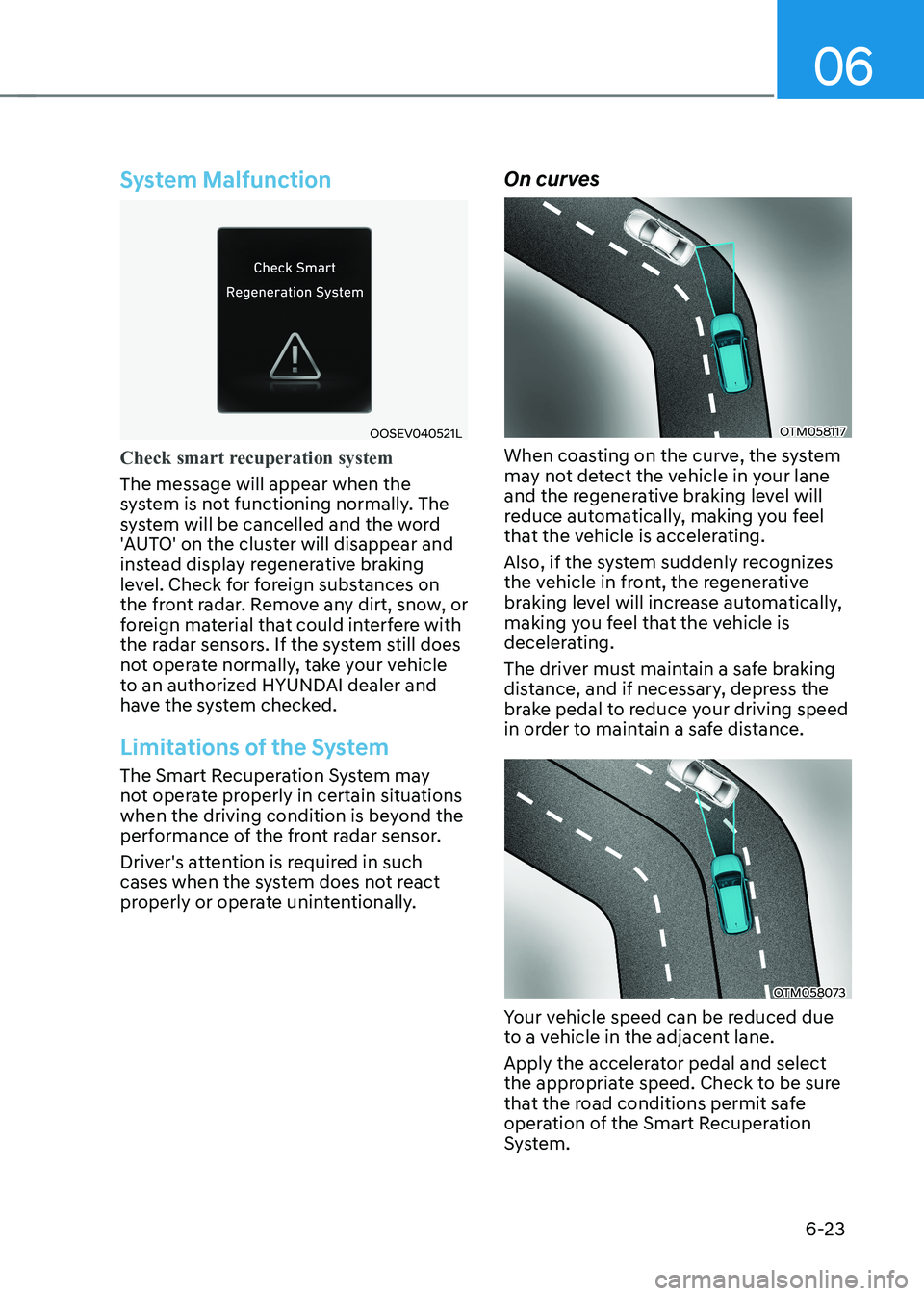
System Malfunction
OOSEV040521L
Check smart recuperation system
The message will appear when the
system is not functioning normally. The
system will be cancelled and the word
'AUTO' on the cluster will disappear and
instead display regenerative braking
level. Check for foreign substances on
the front radar. Remove any dirt, snow, or
foreign material that could interfere with
the radar sensors. If the system still does
not operate normally, take your vehicle
to an authorized HYUNDAI dealer and
have the system checked.
Limitations of the System
The Smart Recuperation System may
not operate properly in certain situations
when the driving condition is beyond the
performance of the front radar sensor.
Driver's attention is required in such
cases when the system does not react
properly or operate unintentionally.On curves
OTM058117
When coasting on the curve, the system
may not detect the vehicle in your lane
and the regenerative braking level will
reduce automatically, making you feel
that the vehicle is accelerating.
Also, if the system suddenly recognizes
the vehicle in front, the regenerative
braking level will increase automatically,
making you feel that the vehicle is
decelerating.
The driver must maintain a safe braking
distance, and if necessary, depress the
brake pedal to reduce your driving speed
in order to maintain a safe distance.
OTM058073
Your vehicle speed can be reduced due
to a vehicle in the adjacent lane.
Apply the accelerator pedal and select
the appropriate speed. Check to be sure
that the road conditions permit safe
operation of the Smart Recuperation
System.
Page 350 of 680
Driving Your Vehicle
6-24
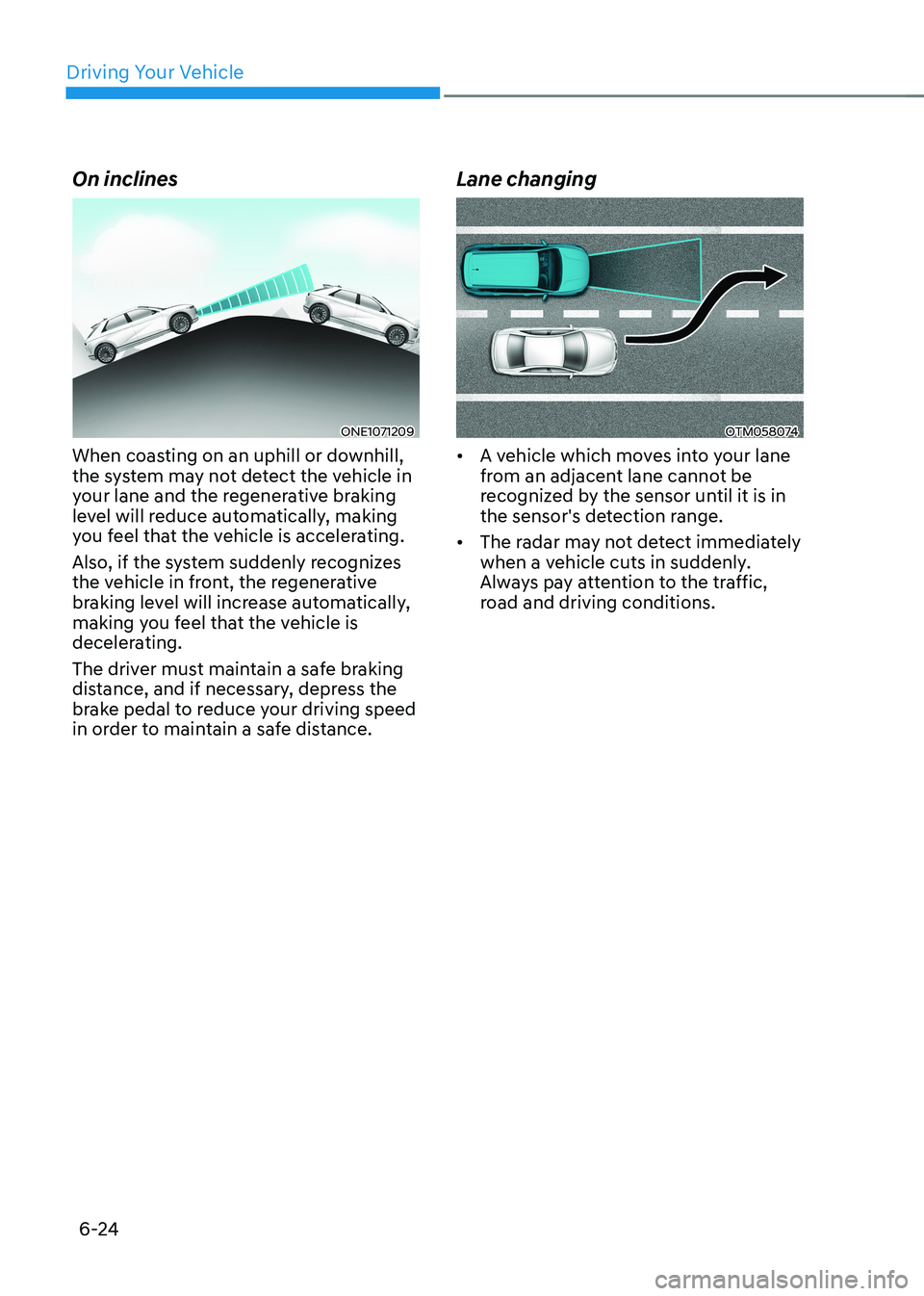
On inclines
ONE1071209
When coasting on an uphill or downhill,
the system may not detect the vehicle in
your lane and the regenerative braking
level will reduce automatically, making
you feel that the vehicle is accelerating.
Also, if the system suddenly recognizes
the vehicle in front, the regenerative
braking level will increase automatically,
making you feel that the vehicle is
decelerating.
The driver must maintain a safe braking
distance, and if necessary, depress the
brake pedal to reduce your driving speed
in order to maintain a safe distance. Lane changingOTM058074
• A vehicle which moves into your lane
from an adjacent lane cannot be
recognized by the sensor until it is in
the sensor's detection range.
• The radar may not detect immediately
when a vehicle cuts in suddenly.
Always pay attention to the traffic,
road and driving conditions.