Pin Hyundai Ioniq Electric 2017 User Guide
[x] Cancel search | Manufacturer: HYUNDAI, Model Year: 2017, Model line: Ioniq Electric, Model: Hyundai Ioniq Electric 2017Pages: 582, PDF Size: 37.73 MB
Page 237 of 582
3-68
Convenient features of your vehicle
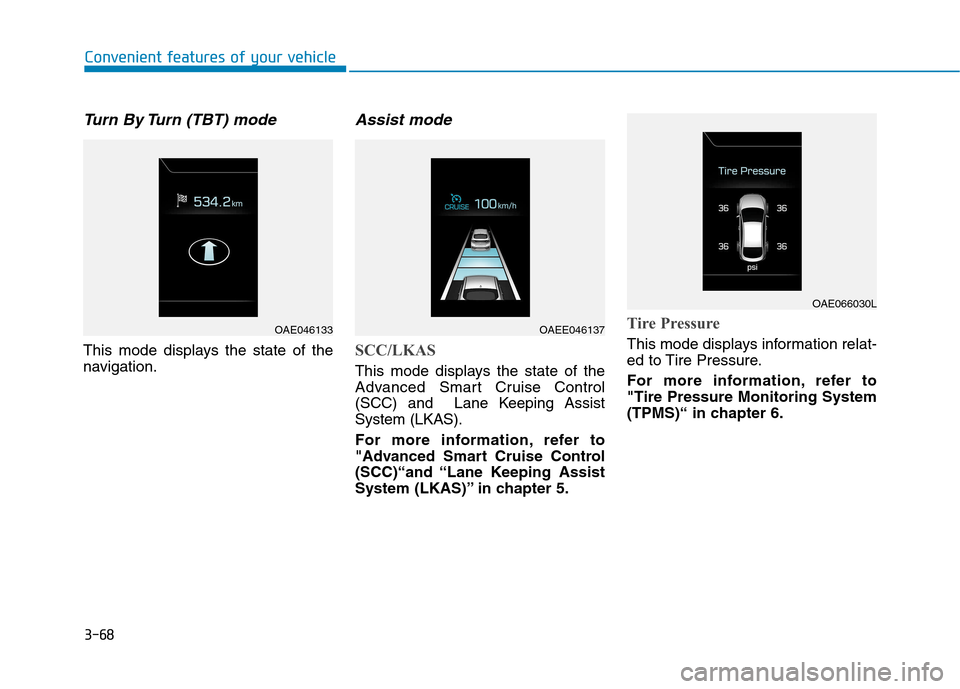
Turn By Turn (TBT) mode
This mode displays the state of the
navigation.
Assist mode
SCC/LKAS
This mode displays the state of the
Advanced Smart Cruise Control
(SCC) and Lane Keeping AssistSystem (LKAS).
For more information, refer to
"Advanced Smart Cruise Control
(SCC)“and “Lane Keeping Assist
System (LKAS)” in chapter 5.
Tire Pressure
This mode displays information relat-
ed to Tire Pressure.
For more information, refer to "Tire Pressure Monitoring System
(TPMS)“ in chapter 6.
OAE046133OAEE046137
OAE066030L
Page 238 of 582
3-69
Convenient features of your vehicle
3
Warning mode
If one of followings occurs, warning
messages will be displayed in the
information mode for several seconds.
- Lower washer fluid ((if equipped)
- Blind Spot Detection (BSD) mal-function (if equipped)
- Autonomous Emergency Braking (AEB) malfunction
- Advanced smart cruise control malfunction
- Tire Pressure Monitoring System (TPMS) malfunction (if equipped)
User settings mode
In this mode, you can change the
setting of the instrument cluster,
doors, lamps, etc.
1. Driving Assist
2. Door
3. Lights
4. Sound
5. Convenience
6. Service Interval
7. Other Features
8. Reset
The information provided differs
according to the items applied to your
vehicle. 1. Driving Assist
- Lane Departure Warning/Standard
LKA/Active LKA
To adjust the sensitivity of the Lane
Keeping Assist System.
For more information, refer to the
"Lane Keeping Assist System" in
chapter 5.
- Slow/Normal/Fast To adjust the sensitivity of the
Smart Cruise Control system.
For more information, refer to the
"Smart Cruise Control" in chapter5.
To activate or deactivate the Autonomous
Emergency Braking (AEB).
For more information, refer to
"Autonomous Emergency Braking
(AEB)" in chapter 5.
Page 256 of 582
3-87
Convenient features of your vehicle
3
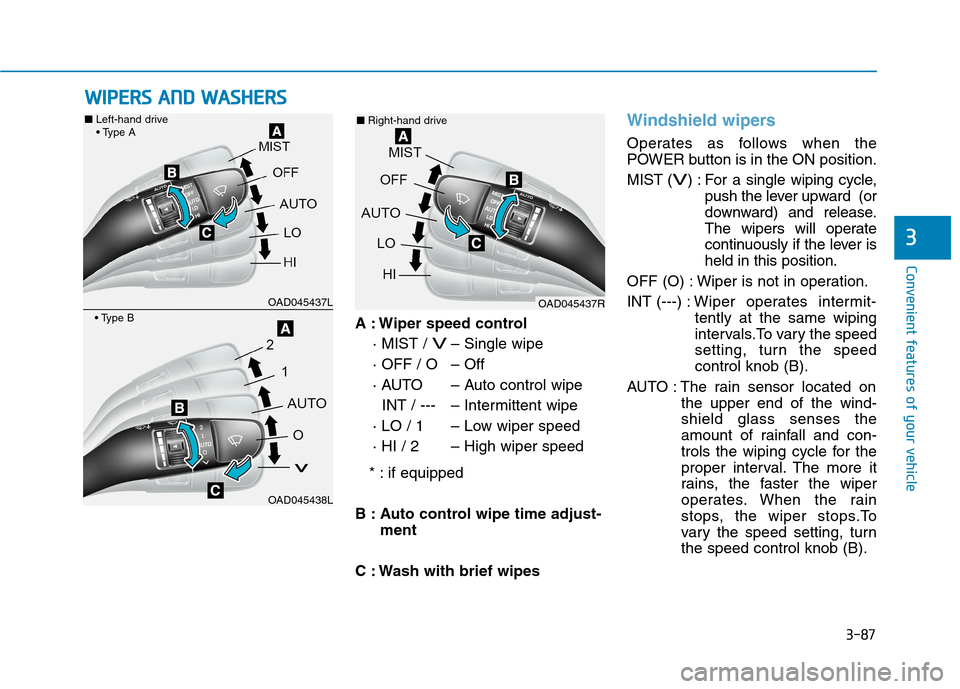
A : Wiper speed control· MIST /
V– Single wipe
· OFF / O – Off
· AUTO – Auto control wipe INT / --- – Intermittent wipe
· LO / 1 – Low wiper speed
· HI / 2 – High wiper speed
* : if equipped
B : Auto control wipe time adjust- ment
C : Wash with brief wipes
Windshield wipers
Operates as follows when the
POWER button is in the ON position. MIST (
V) : For a single wiping cycle, push the lever upward (or
downward) and release.
The wipers will operate
continuously if the lever isheld in this position.
OFF (O) : Wiper is not in operation. INT (---) : Wiper operates intermit-
tently at the same wiping
intervals.To vary the speed
setting, turn the speedcontrol knob (B).
AUTO : The rain sensor located on the upper end of the wind-shield glass senses the
amount of rainfall and con-
trols the wiping cycle for the
proper interval. The more it
rains, the faster the wiper
operates. When the rain
stops, the wiper stops.To
vary the speed setting, turnthe speed control knob (B).
WWIIPP EERR SS AA NN DD WW AASSHH EERR SS
OAD045437L
OAD045438L
■ Left-hand drive
OAD045437R
■
Right-hand drive
Page 257 of 582
3-88
Convenient features of your vehicle
LO (1) : The wiper runs at a lowerspeed.
HI (2) : The wiper runs at a higher
speed.
Information
If there is heavy accumulation of snow
or ice on the windshield, defrost the
windshield for about 10 minutes, or
until the snow and/or ice is removed
before using the windshield wipers to
ensure proper operation.
If you do not remove the snow and/or
ice before using the wiper and washer,
it may damage the wiper and washer
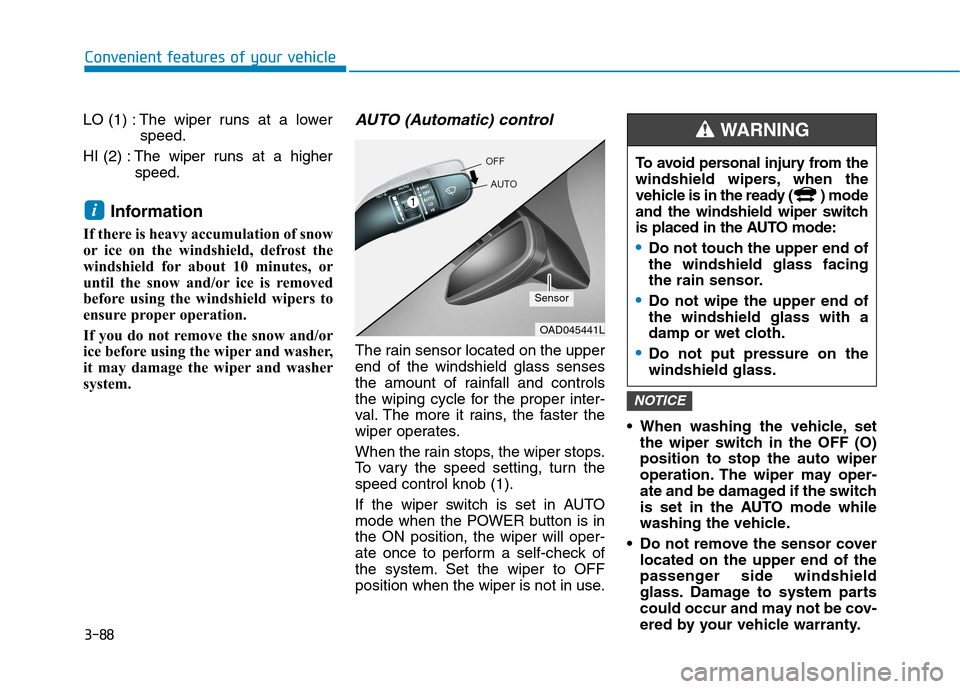
system.AUTO (Automatic) control
The rain sensor located on the upperend of the windshield glass senses
the amount of rainfall and controls
the wiping cycle for the proper inter-
val. The more it rains, the faster the
wiper operates.
When the rain stops, the wiper stops.
To vary the speed setting, turn thespeed control knob (1).
If the wiper switch is set in AUTO
mode when the POWER button is inthe ON position, the wiper will oper-
ate once to perform a self-check of
the system. Set the wiper to OFF
position when the wiper is not in use. When washing the vehicle, set
the wiper switch in the OFF (O)position to stop the auto wiper
operation. The wiper may oper-
ate and be damaged if the switch
is set in the AUTO mode while
washing the vehicle.
Do not remove the sensor cover located on the upper end of the
passenger side windshield
glass. Damage to system parts
could occur and may not be cov-
ered by your vehicle warranty.
NOTICE
i
OAD045441L
Sensor To avoid personal injury from the
windshield wipers, when the
vehicle is in the ready ( ) mode
and the windshield wiper switch
is placed in the AUTO mode:
Do not touch the upper end of the windshield glass facing
the rain sensor.
Do not wipe the upper end of the windshield glass with a
damp or wet cloth.
Do not put pressure on the windshield glass.
WARNING
Page 274 of 582
3-105
Convenient features of your vehicle
3
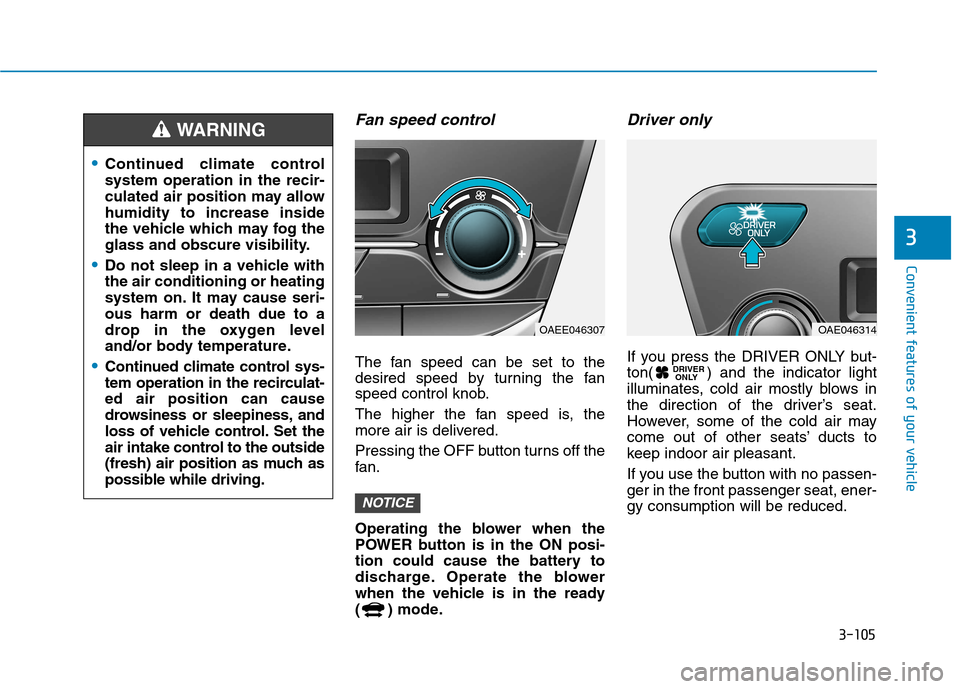
Fan speed control
The fan speed can be set to the
desired speed by turning the fan
speed control knob.
The higher the fan speed is, the
more air is delivered.
Pressing the OFF button turns off the
fan.
Operating the blower when the
POWER button is in the ON posi-
tion could cause the battery to
discharge. Operate the blower
when the vehicle is in the ready
( ) mode.
Driver only
If you press the DRIVER ONLY but-
ton( ) and the indicator light
illuminates, cold air mostly blows in
the direction of the driver’s seat.
However, some of the cold air may
come out of other seats’ ducts to
keep indoor air pleasant.
If you use the button with no passen- ger in the front passenger seat, ener-gy consumption will be reduced.DRIVER
ONLY
NOTICE
Continued climate control system operation in the recir-
culated air position may allowhumidity to increase inside
the vehicle which may fog the
glass and obscure visibility.
Do not sleep in a vehicle with the air conditioning or heating
system on. It may cause seri-ous harm or death due to a
drop in the oxygen level
and/or body temperature.
Continued climate control sys-
tem operation in the recirculat-ed air position can cause
drowsiness or sleepiness, and
loss of vehicle control. Set the
air intake control to the outside
(fresh) air position as much as
possible while driving.
WARNING
OAEE046307OAE046314
Page 278 of 582
3-109
Convenient features of your vehicle
3
The refrigerant system shouldonly be serviced by trained and
certified technicians to insure
proper and safe operation.
The refrigerant system should be serviced in a well-ventilated
place.
The air conditioning evaporator (cooling coil) shall never berepaired or replaced with one
removed from a used or sal-
vaged vehicle and new replace-
ment MAC evaporators shall be
certified (and labeled) as meet-
ing SAE Standard J2842. Information
When opening the windows in humid
weather air conditioning may create
water droplets inside the vehicle.
Since excessive water droplets may
cause damage to electrical equipment,
air conditioning should only be used
with the windows closed.
Air conditioning system operation
tips
If the vehicle has been parked in direct sunlight during hot weather,
open the windows for a short time
to let the hot air inside the vehicle
escape. Use air conditioning to reduce
humidity and moisture inside the
vehicle on rainy or humid days.
During air conditioning system operation, you may occasionally
notice a slight change in the vehiclespeed as the air conditioning com-
pressor cycles. This is a normal
system operation characteristic.
Use the air conditioning system every month only for a few minutes
to ensure maximum system per-
formance.
When using the air conditioning system, you may notice clear water
dripping (or even puddling) on the
ground under the passenger side of
the vehicle. This is a normal system
operation characteristic.
Operating the air conditioning sys- tem in the recirculated air position
provides maximum cooling, howev-
er, continual operation in this mode
may cause the air inside the vehicle
to become stale.
During cooling operation, you may occasionally notice a misty air flowbecause of r apid cooling and
humid air intake. This is a normal
system operation characteristic.
iNOTICE
Page 290 of 582
3-121
Convenient features of your vehicle
3
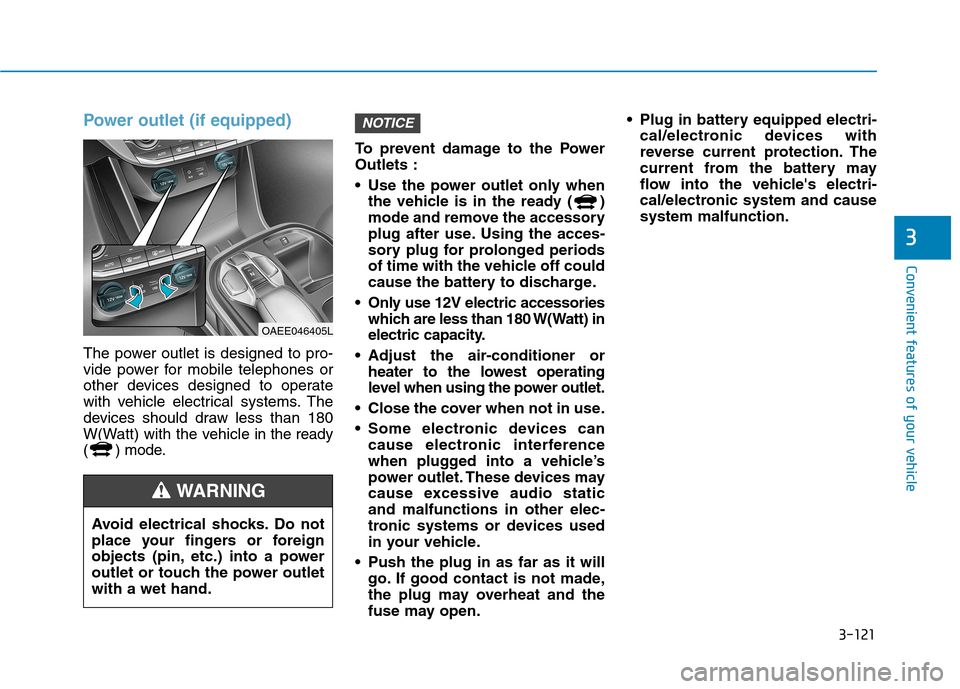
Power outlet (if equipped)
The power outlet is designed to pro-
vide power for mobile telephones or
other devices designed to operate
with vehicle electrical systems. The
devices should draw less than 180
W(Watt) with the vehicle in the ready
( ) mode. To prevent damage to the PowerOutlets :
Use the power outlet only when
the vehicle is in the ready ( )
mode and remove the accessory
plug after use. Using the acces-
sory plug for prolonged periods
of time with the vehicle off could
cause the battery to discharge.
Only use 12V electric accessories which are less than 180 W(Watt) in
electric capacity.
Adjust the air-conditioner or heater to the lowest operating
level when using the power outlet.
Close the cover when not in use.
Some electronic devices can cause electronic interference
when plugged into a vehicle’s
power outlet. These devices may
cause excessive audio staticand malfunctions in other elec-
tronic systems or devices used
in your vehicle.
Push the plug in as far as it will go. If good contact is not made,
the plug may overheat and the
fuse may open. Plug in battery equipped electri-
cal/electronic devices with
reverse current protection. The
current from the battery may
flow into the vehicle's electri-
cal/electronic system and causesystem malfunction.
NOTICE
OAEE046405L
Avoid electrical shocks. Do not
place your fingers or foreign
objects (pin, etc.) into a power
outlet or touch the power outletwith a wet hand.
WARNING
Page 295 of 582
3-126
Convenient features of your vehicle
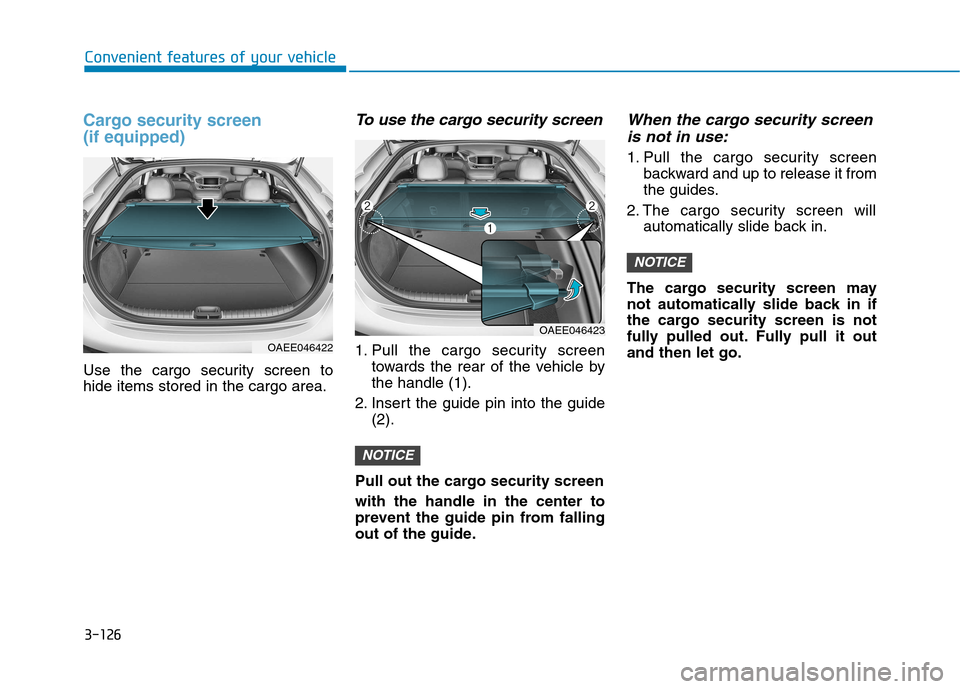
Cargo security screen (if equipped)
Use the cargo security screen to hide items stored in the cargo area.
To use the cargo security screen
1. Pull the cargo security screentowards the rear of the vehicle bythe handle (1).
2. Insert the guide pin into the guide (2).
Pull out the cargo security screen with the handle in the center to
prevent the guide pin from falling
out of the guide.
When the cargo security screen is not in use:
1. Pull the cargo security screen backward and up to release it from
the guides.
2. The cargo security screen will automatically slide back in.
The cargo security screen may
not automatically slide back in if
the cargo security screen is not
fully pulled out. Fully pull it outand then let go.
NOTICE
NOTICE
OAEE046422
OAEE046423
Page 296 of 582
3-127
Convenient features of your vehicle
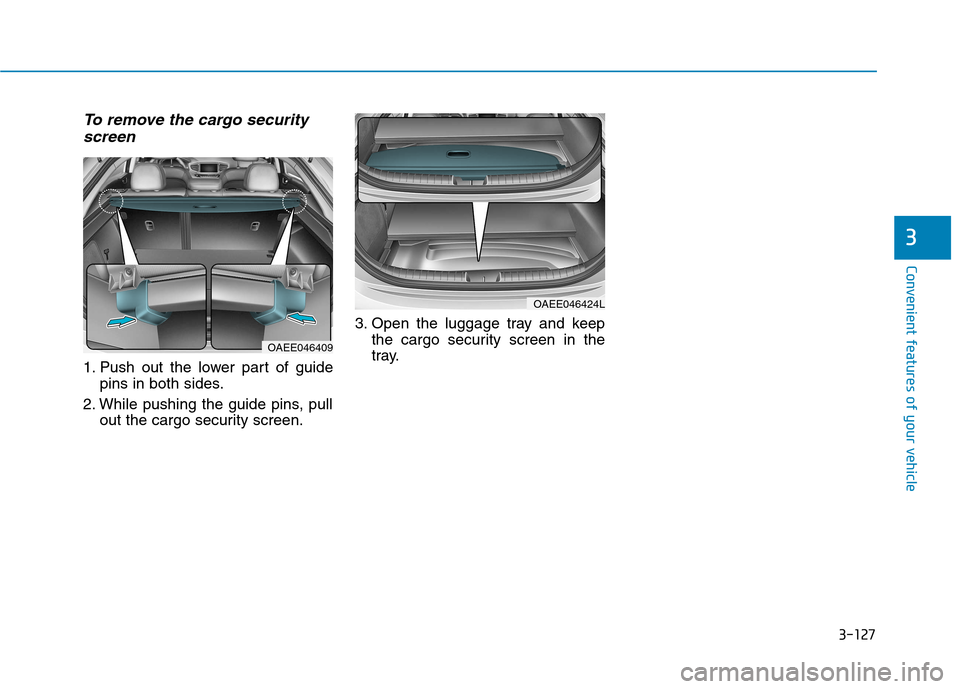
To remove the cargo securityscreen
1. Push out the lower part of guide pins in both sides.
2. While pushing the guide pins, pull out the cargo security screen. 3. Open the luggage tray and keep
the cargo security screen in the
tray.
3
OAEE046409
OAEE046424L
Page 303 of 582
4-7
Multimedia System
4
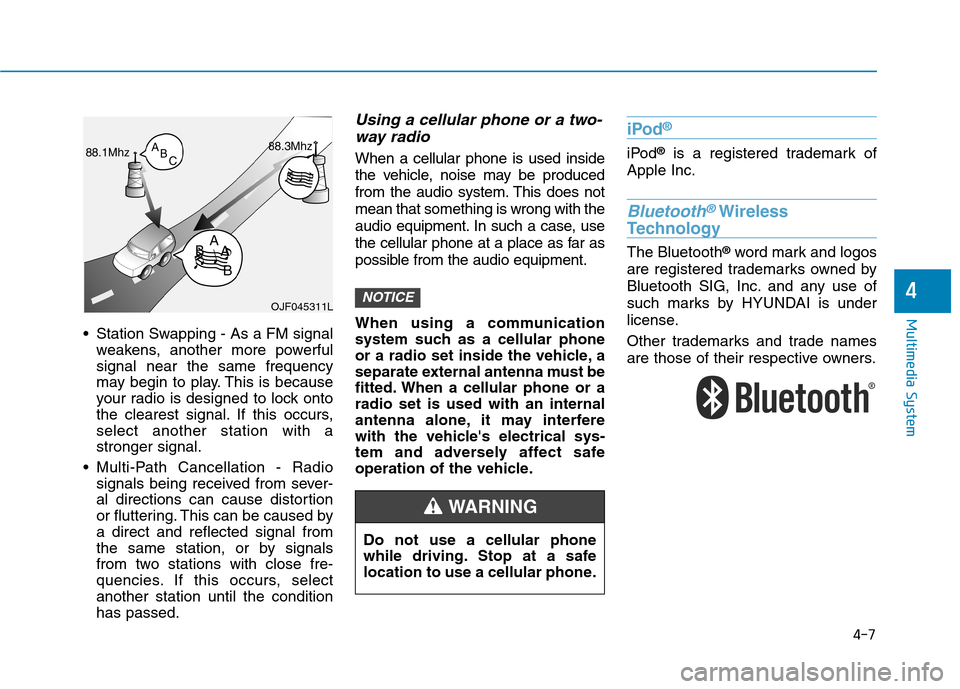
Station Swapping - As a FM signalweakens, another more powerful signal near the same frequency
may begin to play. This is because
your radio is designed to lock onto
the clearest signal. If this occurs,select another station with astronger signal.
Multi-Path Cancellation - Radio signals being received from sever-
al directions can cause distortion
or fluttering. This can be caused bya direct and reflected signal from
the same station, or by signals
from two stations with close fre-
quencies. If this occurs, selectanother station until the conditionhas passed.
Using a cellular phone or a two-
way radio
When a cellular phone is used inside
the vehicle, noise may be produced
from the audio system. This does notmean that something is wrong with the
audio equipment. In such a case, use
the cellular phone at a place as far as
possible from the audio equipment.
When using a communication
system such as a cellular phone
or a radio set inside the vehicle, a
separate external antenna must be
fitted. When a cellular phone or aradio set is used with an internal
antenna alone, it may interfere
with the vehicle's electrical sys-
tem and adversely affect safe
operation of the vehicle.
iPod ®
iPod
®
is a registered trademark of
Apple Inc.
Bluetooth®Wireless
Technology
The Bluetooth ®
word mark and logos
are registered trademarks owned by
Bluetooth SIG, Inc. and any use of
such marks by HYUNDAI is under
license.
Other trademarks and trade names
are those of their respective owners.
NOTICEOJF045311L
Do not use a cellular phone
while driving. Stop at a safe
location to use a cellular phone.
WARNING