Pin Hyundai Ioniq Electric 2017 Owner's Manual
[x] Cancel search | Manufacturer: HYUNDAI, Model Year: 2017, Model line: Ioniq Electric, Model: Hyundai Ioniq Electric 2017Pages: 582, PDF Size: 37.73 MB
Page 73 of 582
H66
DDRRIIVV IINN GG EE LLEE CCTT RR IICC VV EEHH IICC LLEE (( CC OO NNTT..))
Distance to empty that is displayed
on the instrument cluster after
completing a recharge may vary
significantly depending on previ-
ous operating patterns.
When previous driving patterns
include high speed driving, result-
ing in the high voltage battery
using more electricity than usual,the estimated distance to empty is
reduced. When the high voltage
battery uses little electricity in ECO
mode, the estimated distance to
empty increases.
Distance to empty may depend on many factors such as the charge
amount of the high voltage battery,
weather, temperature, durability of
the battery, geographical features,
and driving style.
Natural degradation may occur with the high voltage battery
depending on the number of years
the vehicle is used. This may
reduce the distance to empty.When destination is set
When the destination is set, the dis-
tance to empty may change. The dis-tance to empty is recalculated using
the information of the destination.
However, the distance to empty may
vary significantly based on traffic
conditions, driving habits, and condi-
tion of the vehicle.
Tips for Improving Distance to Empty
If you operate the air conditioner/heater too much, the driving bat-
tery uses too much electricity. This
may reduce the distance to empty.
Therefore, it is recommended that
you set the cabin temperature to
22°C AUTO. This setting that has
been certified by various assess-ment tests to maintain optimal
energy consumption rates while
keeping the temperature fresh.
Turn OFF the heater and air condi-
tioner if you do not need them.
Depress and hold the accelerator pedal to maintain speed and drive
economically.
Gradually depress and release the accelerator pedal when accelerat-
ing or decelerating.
Always maintain specified tire pressures.
Do not use unnecessary electrical components while driving.
Do not load unnecessary items in the vehicle.
Do not mount parts that may increase air resistance.
Page 94 of 582
1-6
Your vehicle at a glance
INTERIOR OVERVIEW (I)
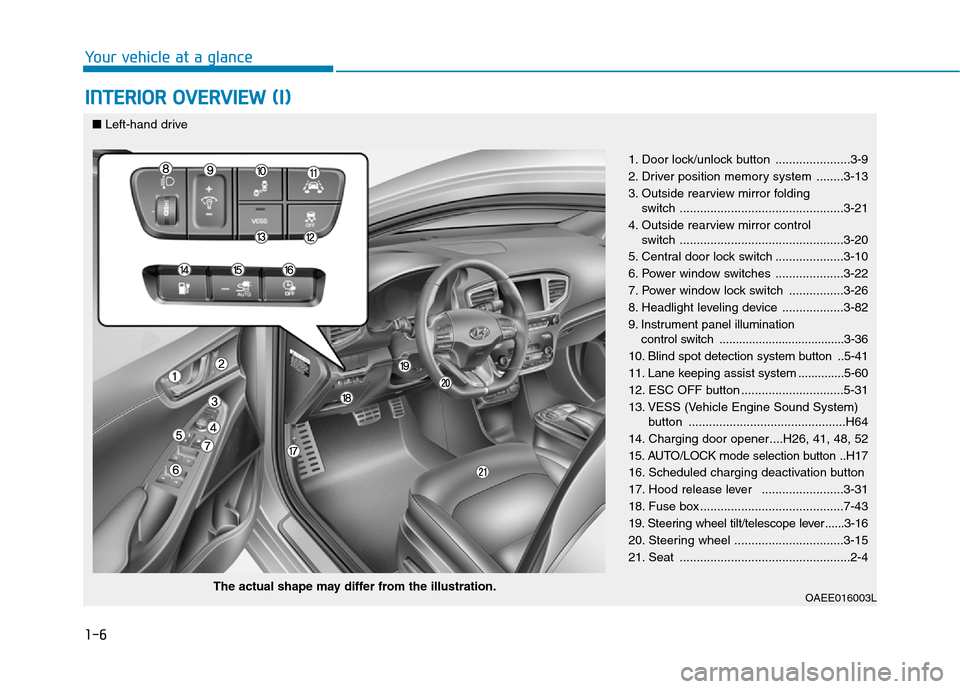
1. Door lock/unlock button ......................3-9
2. Driver position memory system ........3-13
3. Outside rearview mirror folding switch ................................................3-21
4. Outside rearview mirror control switch ................................................3-20
5. Central door lock switch ....................3-10
6. Power window switches ....................3-22
7. Power window lock switch ................3-26
8. Headlight leveling device ..................3-82
9. Instrument panel illumination control switch ......................................3-36
10. Blind spot detection system button ..5-41
11. Lane keeping assist system ..............5-60
12. ESC OFF button ..............................5-31
13. VESS (Vehicle Engine Sound System) button ..............................................H64
14. Charging door opener....H26, 41, 48, 52
15. AUTO/LOCK mode selection button ..H17
16. Scheduled charging deactivation button
17. Hood release lever ........................3-31
18. Fuse box ..........................................7-43
19. Steering wheel tilt/telescope lever ......3-16
20. Steering wheel ................................3-15
21. Seat ..................................................2-4
OAEE016003L
The actual shape may differ from the illustration.
■
Left-hand drive
Page 95 of 582
1-7
Your vehicle at a glance
INTERIOR OVERVIEW (II)
1
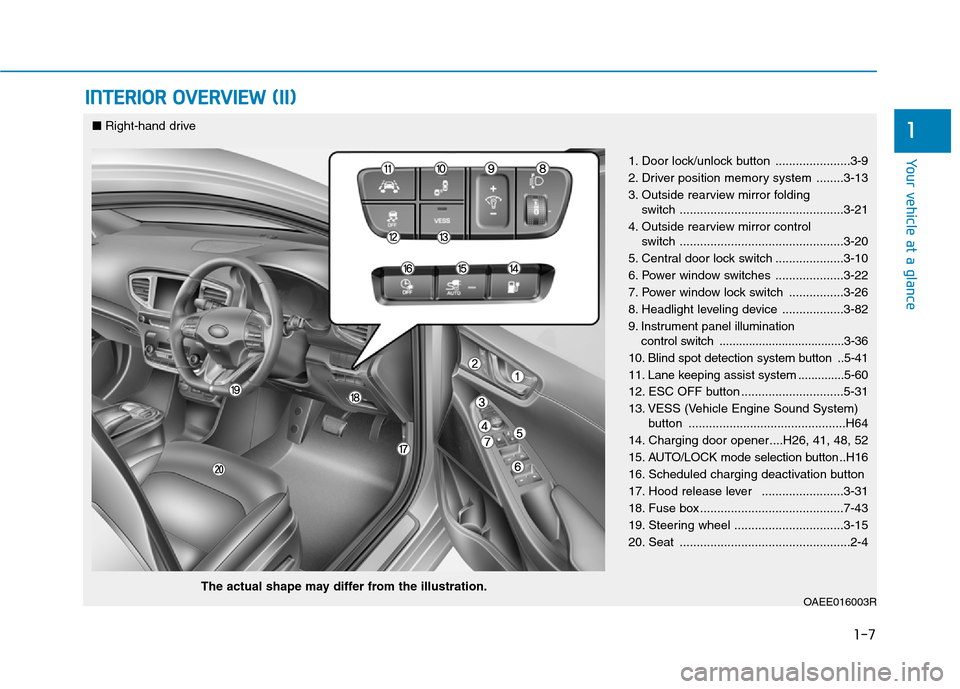
1. Door lock/unlock button ......................3-9
2. Driver position memory system ........3-13
3. Outside rearview mirror folding switch ................................................3-21
4. Outside rearview mirror control switch ................................................3-20
5. Central door lock switch ....................3-10
6. Power window switches ....................3-22
7. Power window lock switch ................3-26
8. Headlight leveling device ..................3-82
9. Instrument panel illumination control switch ......................................3-36
10. Blind spot detection system button ..5-41
11. Lane keeping assist system ..............5-60
12. ESC OFF button ..............................5-31
13. VESS (Vehicle Engine Sound System) button ..............................................H64
14. Charging door opener....H26, 41, 48, 52
15. AUTO/LOCK mode selection button ..H16
16. Scheduled charging deactivation button
17. Hood release lever ........................3-31
18. Fuse box ..........................................7-43
19. Steering wheel ................................3-15
20. Seat ..................................................2-4
OAEE016003R
■ Right-hand drive
The actual shape may differ from the illustration.
Page 114 of 582
2-16
Safety system of your vehicle
Armrest
The armrest is located in the center
of the rear seat. Pull the armrest
down from the seatback to use it.
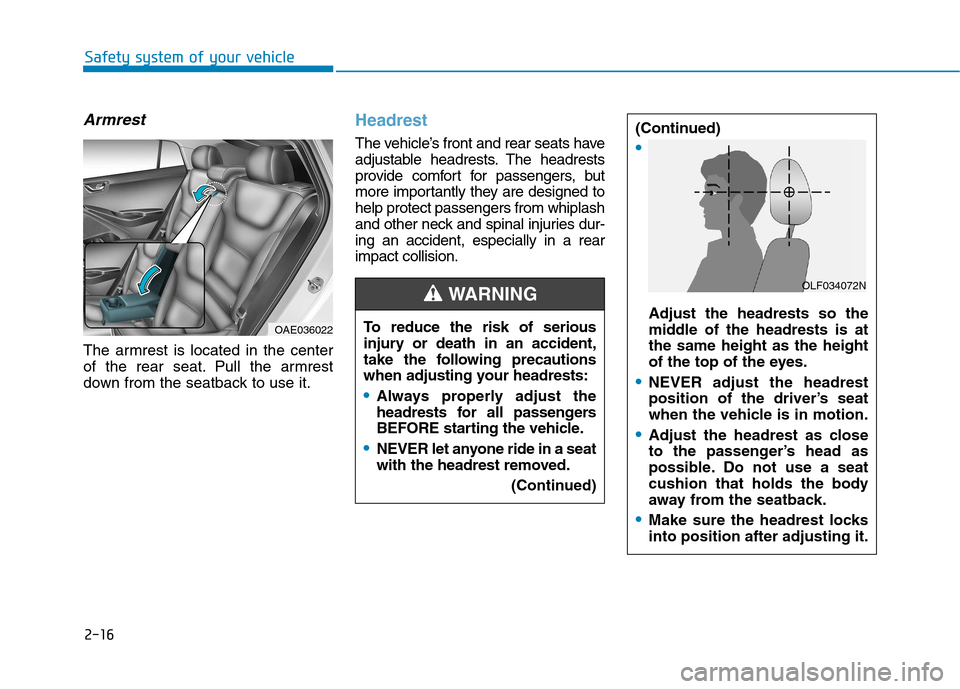
Headrest
The vehicle’s front and rear seats have
adjustable headrests. The headrests
provide comfort for passengers, but
more importantly they are designed tohelp protect passengers from whiplash
and other neck and spinal injuries dur-ing an accident, especially in a rearimpact collision.
OAE036022To reduce the risk of serious
injury or death in an accident,
take the following precautions
when adjusting your headrests:
Always properly adjust the
headrests for all passengers
BEFORE starting the vehicle.
NEVER let anyone ride in a seat
with the headrest removed.
(Continued)
(Continued)
Adjust the headrests so the
middle of the headrests is atthe same height as the height
of the top of the eyes.
NEVER adjust the headrest
position of the driver’s seat
when the vehicle is in motion.
Adjust the headrest as close
to the passenger’s head as
possible. Do not use a seat
cushion that holds the body
away from the seatback.
Make sure the headrest locks into position after adjusting it.
WARNING OLF034072N
Page 119 of 582
2-21
Safety system of your vehicle
2
Seat warmers and air ventila- tion seats
Front seat warmers (if equipped)
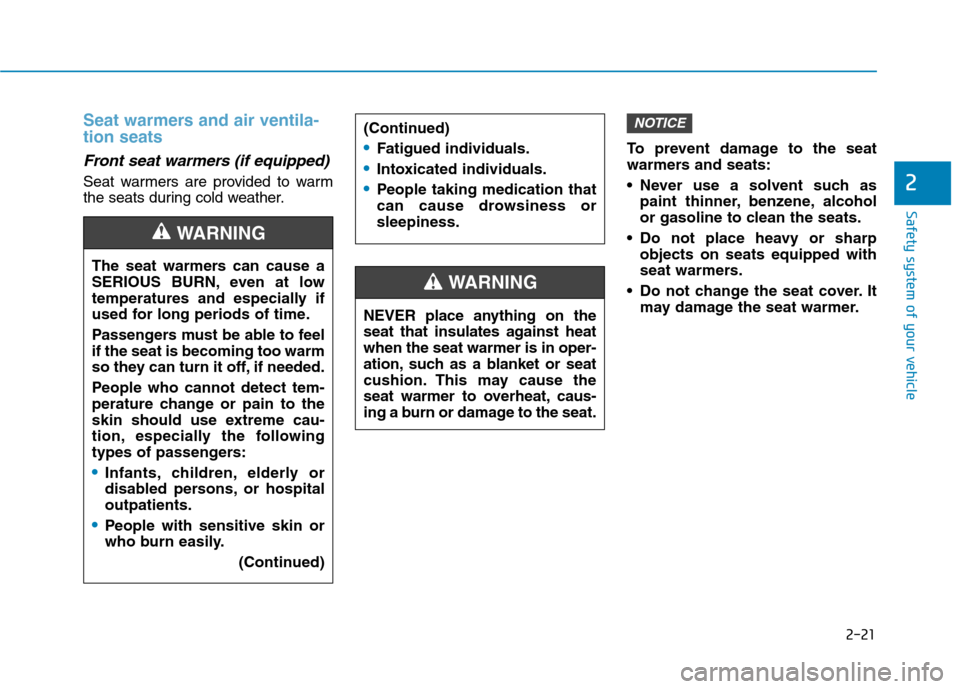
Seat warmers are provided to warm
the seats during cold weather.To prevent damage to the seat
warmers and seats:
Never use a solvent such as
paint thinner, benzene, alcohol
or gasoline to clean the seats.
Do not place heavy or sharp objects on seats equipped with
seat warmers.
Do not change the seat cover. It may damage the seat warmer.
NOTICE(Continued)
Fatigued individuals.
Intoxicated individuals.
People taking medication that
can cause drowsiness orsleepiness.
NEVER place anything on the
seat that insulates against heatwhen the seat warmer is in oper-
ation, such as a blanket or seat
cushion. This may cause the
seat warmer to overheat, caus-
ing a burn or damage to the seat.
WARNING
The seat warmers can cause a
SERIOUS BURN, even at low
temperatures and especially if
used for long periods of time.
Passengers must be able to feel if the seat is becoming too warm
so they can turn it off, if needed.
People who cannot detect tem-
perature change or pain to the
skin should use extreme cau-
tion, especially the following
types of passengers:
Infants, children, elderly or
disabled persons, or hospitaloutpatients.
People with sensitive skin or
who burn easily.
(Continued)
WARNING
Page 136 of 582
2-38
Safety system of your vehicle
Selecting a Child Restraint System (CRS)
When selecting a Child Restraint
System for your child, always:
Make sure the Child RestraintSystem has a label certifying that it
meets applicable Safety Standards
of your country.
A Child Restraint System may only
be installed if it was approved inaccordance with the requirements ofECE-R44 or ECE-R129.
Select a Child Restraint System based on your child’s height and
weight. The required label or the
instructions for use typically pro-
vide this information.
Select a Child Restraint System that fits the vehicle seating positionwhere it will be used.
Read and comply with the warn- ings and instructions for installation
and use provided with the Child
Restraint System.
Child Restraint System types
There are three main types of Child
Restraint Systems: rearward-facing,
forward-facing and booster Child
Restraint Systems.
They are classified according to the
child’s age, height and weight.
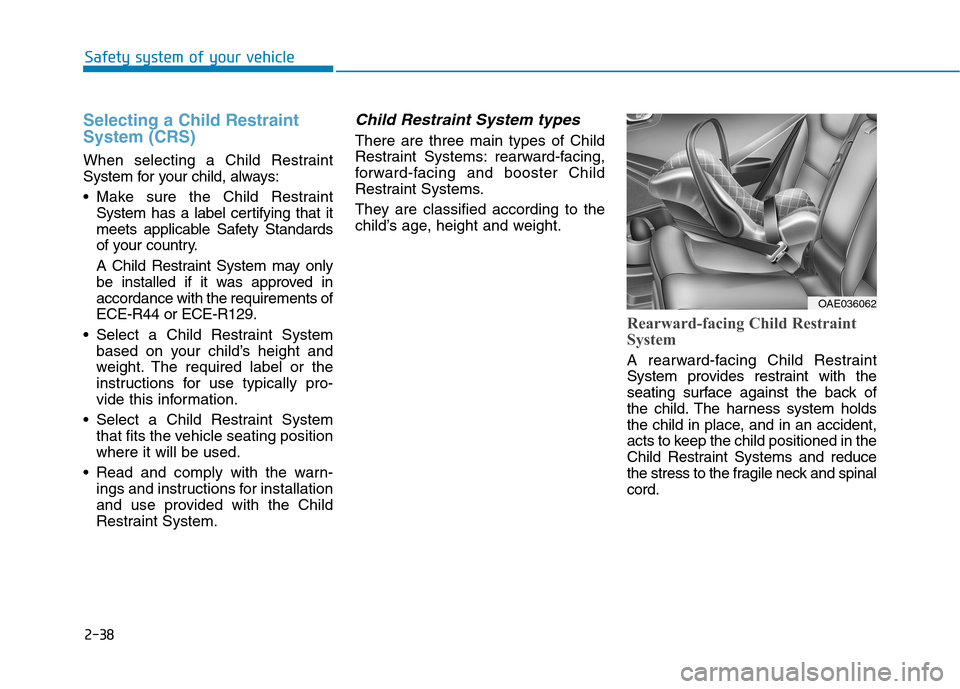
Rearward-facing Child Restraint
System
A rearward-facing Child Restraint
System provides restraint with the
seating surface against the back of
the child. The harness system holds
the child in place, and in an accident,
acts to keep the child positioned in the
Child Restraint Systems and reduce
the stress to the fragile neck and spinalcord.
OAE036062
Page 174 of 582
3-5
Convenient features of your vehicle
Start-up
You can start the vehicle without
inserting the key.For detailed infor-
mation, refer to the POWER button
in chapter 5.
To prevent damaging the smart
key:
• Keep the smart key away from water or any liquid and fire. If the
inside of the smart key getsdamp (due to drinks or moisture),
or is heated, internal circuit may
malfunction, excluding the car
from the warranty.
Avoid dropping or throwing the smart key.
Protect the smart key from extreme temperatures.
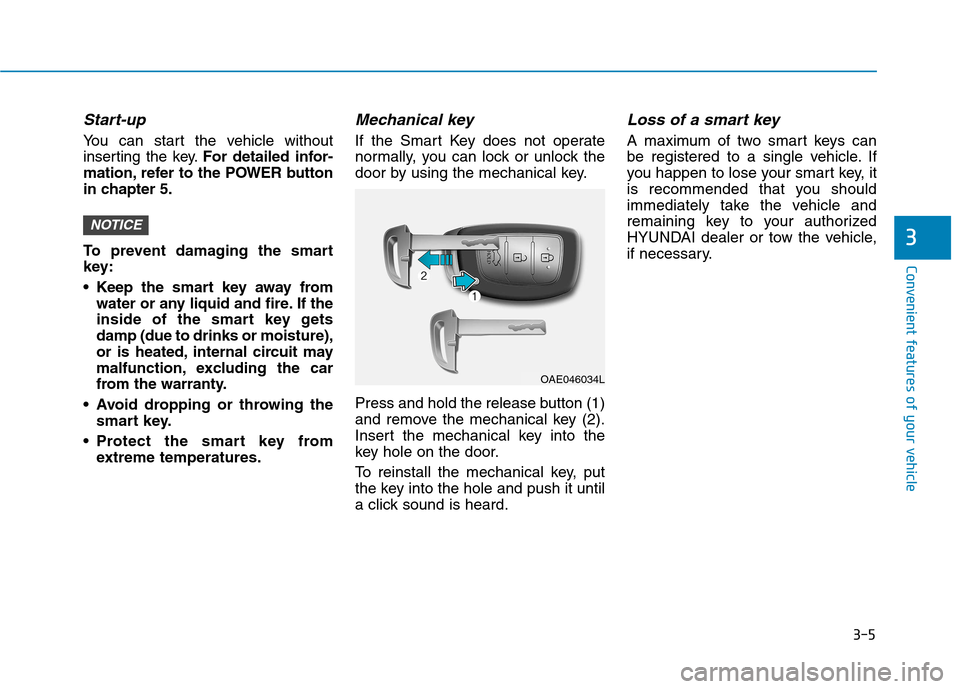
Mechanical key
If the Smart Key does not operate
normally, you can lock or unlock the
door by using the mechanical key.
Press and hold the release button (1)
and remove the mechanical key (2).
Insert the mechanical key into the
key hole on the door.
To reinstall the mechanical key, put
the key into the hole and push it until
a click sound is heard.
Loss of a smart key
A maximum of two smart keys can
be registered to a single vehicle. If
you happen to lose your smart key, it
is recommended that you should
immediately take the vehicle and
remaining key to your authorized
HYUNDAI dealer or tow the vehicle,
if necessary.
NOTICE3
OAE046034L
Page 216 of 582
3-47
Convenient features of your vehicle
3
Low Tire PressureWarning Light
(if equipped)
This warning light illuminates:
When the POWER button is in the ON position.
- It illuminates for approximately 3seconds and then goes off.
When one or more of your tires are significantly underinflated.
For more details, refer to “Tire Pressure Monitoring System
(TPMS)” in chapter 6.
This warning light remains ON
after blinking for approximately 60
seconds, or repeatedly blinks ON
and OFF in 3 second intervals:
When there is a malfunction with the TPMS.
In this case, we recommend that
you have the vehicle inspected by
an authorized HYUNDAI dealer as
soon as possible.
For more details, refer to “Tire Pressure Monitoring System
(TPMS)” in chapter 6.
Electronic Parking Brake (EPB) Warning
Light
This warning light illuminates:
When the POWER button is in the ON position.
- It illuminates for approximately 3seconds and then goes off.
When there is a malfunction with the EPB.
In this case, we recommend that
you have the vehicle inspected by
an authorized HYUNDAI dealer.
Information
The Electronic Parking Brake (EPB)
Warning Light may illuminate when
the Electronic Stability control (ESC)
Indicator Light comes on to indicate
that the ESC is not working properly
(This does not indicate malfunction of
the EPB).
iSafe Stopping
The TPMS cannot alert you to
severe and sudden tire damage
caused by external factors.
If you notice any vehicle insta-
bility, immediately take your
foot off the accelerator pedal,
apply the brake pedal gradual-
ly with light force, and slowly
move to a safe position off the
road.
WARNING
EE PP BB
Page 221 of 582
3-52
Convenient features of your vehicle
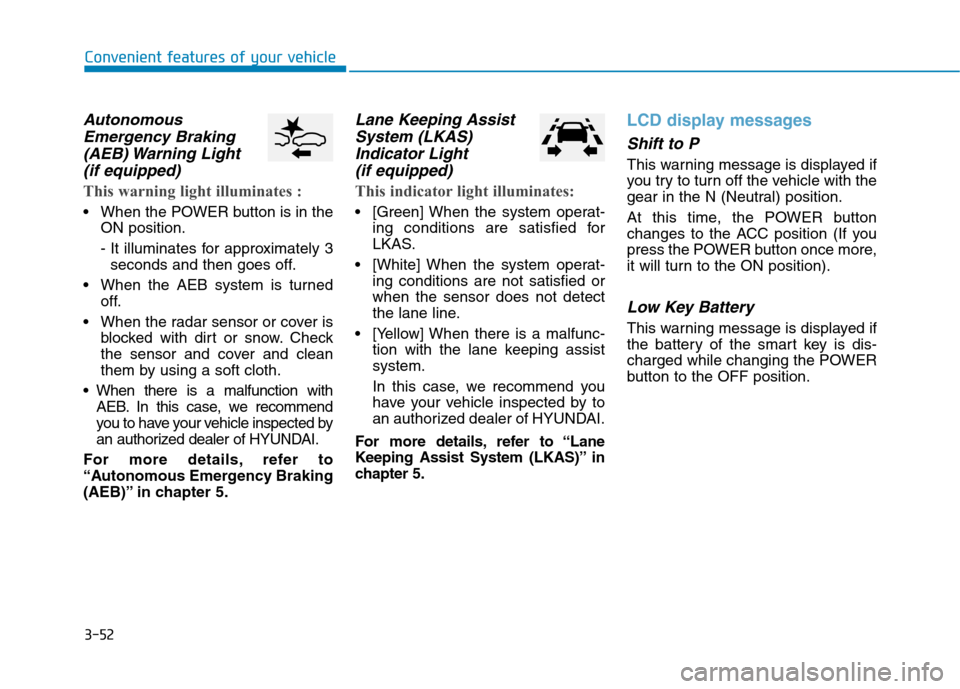
AutonomousEmergency Braking
(AEB) Warning Light (if equipped)
This warning light illuminates :
When the POWER button is in the ON position.
- It illuminates for approximately 3seconds and then goes off.
When the AEB system is turned off.
When the radar sensor or cover is blocked with dirt or snow. Check
the sensor and cover and clean
them by using a soft cloth.
When there is a malfunction with AEB. In this case, we recommend
you to have your vehicle inspected by
an authorized dealer of HYUNDAI.
For more details, refer to
“Autonomous Emergency Braking
(AEB)” in chapter 5.
Lane Keeping Assist System (LKAS)
Indicator Light (if equipped)
This indicator light illuminates:
[Green] When the system operat- ing conditions are satisfied for
LKAS.
[White] When the system operat- ing conditions are not satisfied orwhen the sensor does not detect
the lane line.
[Yellow] When there is a malfunc- tion with the lane keeping assistsystem.
In this case, we recommend you
have your vehicle inspected by to
an authorized dealer of HYUNDAI.
For more details, refer to “Lane
Keeping Assist System (LKAS)” in
chapter 5.
LCD display messages
Shift to P
This warning message is displayed if
you try to turn off the vehicle with the
gear in the N (Neutral) position.
At this time, the POWER button
changes to the ACC position (If you
press the POWER button once more,
it will turn to the ON position).
Low Key Battery
This warning message is displayed if
the battery of the smart key is dis-
charged while changing the POWER
button to the OFF position.
Page 235 of 582
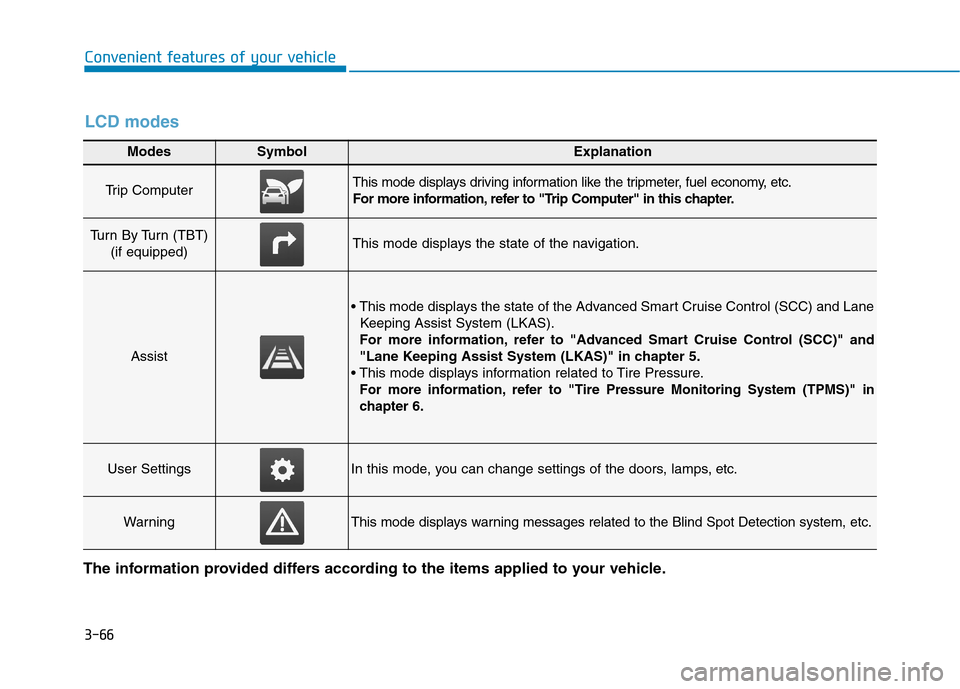
3-66
Convenient features of your vehicle
Modes SymbolExplanation
Trip Computer This mode displays driving information like the tripmeter, fuel economy, etc.
For more information, refer to "Trip Computer" in this chapter.
Turn By Turn (TBT) (if equipped)This mode displays the state of the navigation.
Assist
Keeping Assist System (LKAS).
For more information, refer to "Advanced Smart Cruise Control (SCC)" and
"Lane Keeping Assist System (LKAS)" in chapter 5.
For more information, refer to "Tire Pressure Monitoring System (TPMS)"in
chapter 6.
User SettingsIn this mode, you can change settings of the doors, lamps, etc.
WarningThis mode displays warning messages related to the Blind Spot Detection system, etc.
The information provided differs according to the items applied to your vehicle.
LCD modes