start stop button Hyundai Ioniq Hybrid 2017 Owner's Guide
[x] Cancel search | Manufacturer: HYUNDAI, Model Year: 2017, Model line: Ioniq Hybrid, Model: Hyundai Ioniq Hybrid 2017Pages: 553, PDF Size: 59.51 MB
Page 190 of 553
3-88
Convenient features of your vehicle
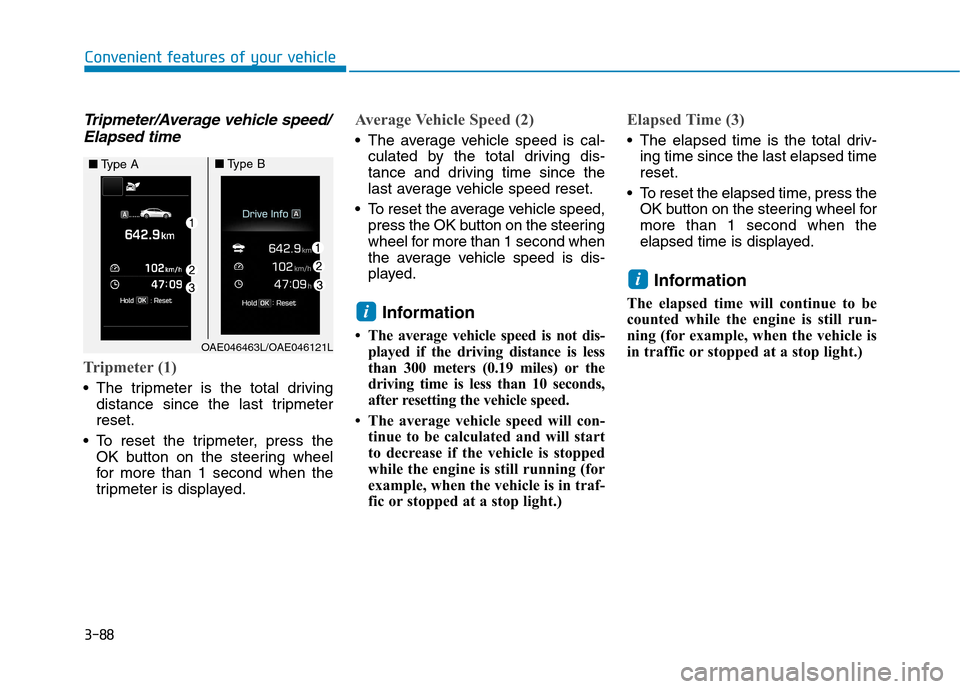
Tripmeter/Average vehicle speed/Elapsed time
Tripmeter (1)
The tripmeter is the total driving distance since the last tripmeter reset.
To reset the tripmeter, press the OK button on the steering wheel
for more than 1 second when the
tripmeter is displayed.
Average Vehicle Speed (2)
The average vehicle speed is cal-culated by the total driving dis-
tance and driving time since the
last average vehicle speed reset.
To reset the average vehicle speed, press the OK button on the steering
wheel for more than 1 second when
the average vehicle speed is dis-
played.
Information
The average vehicle speed is not dis- played if the driving distance is less
than 300 meters (0.19 miles) or the
driving time is less than 10 seconds,
after resetting the vehicle speed.
The average vehicle speed will con- tinue to be calculated and will start
to decrease if the vehicle is stopped
while the engine is still running (for
example, when the vehicle is in traf-
fic or stopped at a stop light.)
Elapsed Time (3)
The elapsed time is the total driv-ing time since the last elapsed time reset.
To reset the elapsed time, press the OK button on the steering wheel formore than 1 second when the
elapsed time is displayed.
Information
The elapsed time will continue to be
counted while the engine is still run-
ning (for example, when the vehicle is
in traffic or stopped at a stop light.)
i
i
OAE046463L/OAE046121L
■ Type A■Type B
Page 213 of 553
3-111
Convenient features of your vehicle
3
DDEEFFRR OO SSTT EERR
To prevent damage to the conduc-
tors bonded to the inside surface
of the rear window, never use sharp
instruments or window cleaners
containing abrasives to clean the
window.
Information
If you want to defrost and defog the
front windshield, refer to “Windshield
Defrosting and Defogging” in this
chapter.
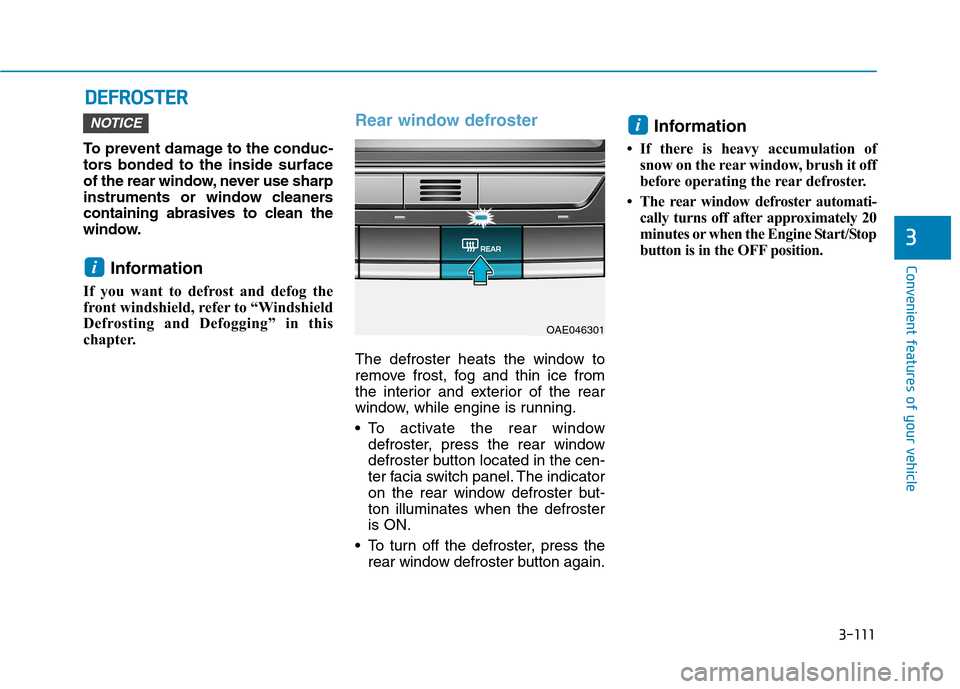
Rear window defroster
The defroster heats the window to
remove frost, fog and thin ice from
the interior and exterior of the rear
window, while engine is running.
To activate the rear window defroster, press the rear window
defroster button located in the cen-
ter facia switch panel. The indicator
on the rear window defroster but-ton illuminates when the defrosteris ON.
To turn off the defroster, press the rear window defroster button again. Information
If there is heavy accumulation of snow on the rear window, brush it off
before operating the rear defroster.
The rear window defroster automati- cally turns off after approximately 20
minutes or when the Engine Start/Stop
button is in the OFF position.
i
i
NOTICE
OAE046301
Page 238 of 553
3-136
Convenient features of your vehicle
The wireless charging process starts
when you put a Qi-enabled cellularphone on the wireless charging unit.
1. Remove other items, including thesmart key, from the wireless charg-
ing unit. If not, the wireless charg-
ing process may be interrupted.
2. The indicator illuminates in orange during the charging process. The
indicator color changes to green,when the charging process iscompleted.
3. You can turn ON or OFF the wire- less charging function in the user
settings mode on the instrument
cluster. (For further information,
refer to the “LCD Modes” in this
chapter.)
Slightly change the cellular phoneposition, when the cellular phone is
not being charged. Make sure that
the indicator illuminates in orange.
The indicator color may not change
to green in accordance with the cel-
lular phone type, even though the
charging process is completed. The
indicator blinks in orange for 10 sec-onds when there is a malfunctionwith the wireless charging system. In this case, temporarily stop the
charging process, and re-attempt to
wirelessly charge your cellular phoneagain.
The system warns you with a mes-
sage on the LCD display when you do
not take out the cellular phone fromthe wireless charging unit with thefront door open and the Engine
Start/Stop button in the OFF position.
The wireless cellular phone
charging system may not sup-
port certain cellular phones,
which are not verified for the Qi
specification ( ).
Locate your cell phone well in the middle of the wireless cellular
phone charging system. Even
when your cell phone locates
slightly to one side, the charging
speed may decrease.
The wireless charging process may temporarily stop, when a
smart key function operates (i.e.
starting the engine, opening the
doors, closing the doors). For certain cell phones, the indi-
cator color may not change to
green, even when the wireless
charging process is properlycompleted.
The wireless charging process may temporarily stop, when tempera-
ture abnormally increases inside
the wireless cellular phone charg-
ing system. The wireless charging
process restarts, when tempera-
ture falls to a proper level.
The wireless charging process may temporarily stop when there
is any metallic item, such as a
coin, between the wireless cellu-
lar phone charging system and a
cellular phone.
NOTICE
Page 263 of 553
![Hyundai Ioniq Hybrid 2017 Owners Guide 4-22
Multimedia System
(6) Pause
Pause or play music.
(7) Playback progress
Press to skip to the desired location.
Playback
Press the [MEDIA]button and
select [Disc MP3].
When a disc is inserted in](/img/35/14930/w960_14930-262.png "Hyundai Ioniq Hybrid 2017 Owners Guide 4-22
Multimedia System
(6) Pause
Pause or play music.
(7) Playback progress
Press to skip to the desired location.
Playback
Press the [MEDIA]button and
select [Disc MP3].
When a disc is inserted in")
4-22
Multimedia System
(6) Pause
Pause or play music.
(7) Playback progress
Press to skip to the desired location.
Playback
Press the [MEDIA]button and
select [Disc MP3].
When a disc is inserted in the audio system, disc playback
begins automatically.
Changing songs
Press the [SEEK/TRACK] button
to play the previous or next song.
Press and hold the [SEEK/TRACK]
button to rewind or fast-forward the
song that is currently playing.
Search songs by turning the TUNE
knob, and press the knob to play.
Selecting songs from a list
Press the [List] to view a list of songs
available to play.
Select and play the desired song.
Repeat play
Press the [Repeat] to enable or dis-
able ‘Repeat all’, ‘Repeat current
song’ or ‘Repeat folder’.
Repeat all: Repeat all songs in the playlist.
Repeat current song: The song that is currently playing is repeated.
Repeat folder: All songs in the current folder are repeated.
Shuffle play
Press the [Shuffle] to enable/disable
‘Shuffle’, ‘Shuffle folder’ play.
Shuffle: Songs are played in arandom order.
Shuffle folder: Songs within the current folder are played in ran-
dom order.
Menu
Press the [Menu] and select the desired function.
Information: Detailed informationon the song that is currently play-
ing is displayed.
Sound Settings: Audio sound set- tings can be changed. Information
- Using the USB Devices
Starting the vehicle while a USB device is connected can damage the
device. Please disconnect USB
devices before starting the vehicle.
Starting the vehicle or stopping the engine while an external USB device
is connected can result in failure of
the external USB device to operate.
Be cautious of static electricity when connecting/disconnecting external
USB devices.
An encrypted MP3 player is not rec- ognized when connected as an exter-
nal device.
External USB devices may not be recognized, depending on the state
of the external USB device.
Only products with byte/sectors for- matted at 4 KB or lower are recog-
nized.
Only USB devices in FAT12/16/32 format are recognized; NTFS and
ExFAT file systems are not recog-
nized.
(Continued)
i
Page 285 of 553
Driving your vehicle
Before driving.........................................................5-4Before entering the vehicle ...........................................5-4
Before starting...................................................................5-4
Ignition switch ........................................................5-5 Key ignition switch ............................................................5-6
Engine Start/Stop button ................................................5-9
Dual clutch transmission .....................................5-15 Dual clutch transmission operation ............................5-15
Parking ...............................................................................5-23
Good driving practices ...................................................5-23
Braking system.....................................................5-25 Power brakes ...................................................................5-25
Disc brakes wear indicator ...........................................5-26
Parking brake ...................................................................5-26
Anti-lock Brake System (ABS) ....................................5-29
Electronic Stability Control (ESC)................................5-31
Vehicle Stability Management (VSM).........................5-34
Hill-Start Assist Control (HAC) ....................................5-36
Emergency Stop Signal (ESS) ......................................5-36
Good braking practices..................................................5-37
Blind Spot Detection system (BSD) ..................5-38 BSD (Blind Spot Detection) /
LCA (Lane Change Assist) .............................................5-39RCTA (Rear Cross Traffic Alert) ..................................5-43
Limitations of the system .............................................5-45 Autonomous Emergency Braking (AEB)...........5-47
System setting and activation......................................5-47
AEB warning message and system control ..............5-49
AEB front radar sensor .................................................5-52
System malfunction ........................................................5-53
Limitations of the system .............................................5-55
Lane Keeping Assist System (LKAS) .................5-59 LKAS operation ................................................................5-60
Warning light and message ..........................................5-64
LKAS function change ...................................................5-65
Limitations of the System .............................................5-66
Speed limit control system .................................5-67 Speed Limit Control Operation.....................................5-67
Cruise control .......................................................5-69 Cruise Control operation ...............................................5-69
Smart Cruise Control system..............................5-75 To Adjust the Sensitivity of
Smart Cruise Control ......................................................5-77To convert to Cruise Control mode ............................5-77
Smart Cruise Control speed ..........................................5-78
Smart Cruise Control Vehicle-to-Vehicle
Distance .............................................................................5-83 Sensor to detect distance to the vehicle ahead .....5-85
Limitations of the system .............................................5-87
5
Page 293 of 553
5-9
Driving your vehicle
5
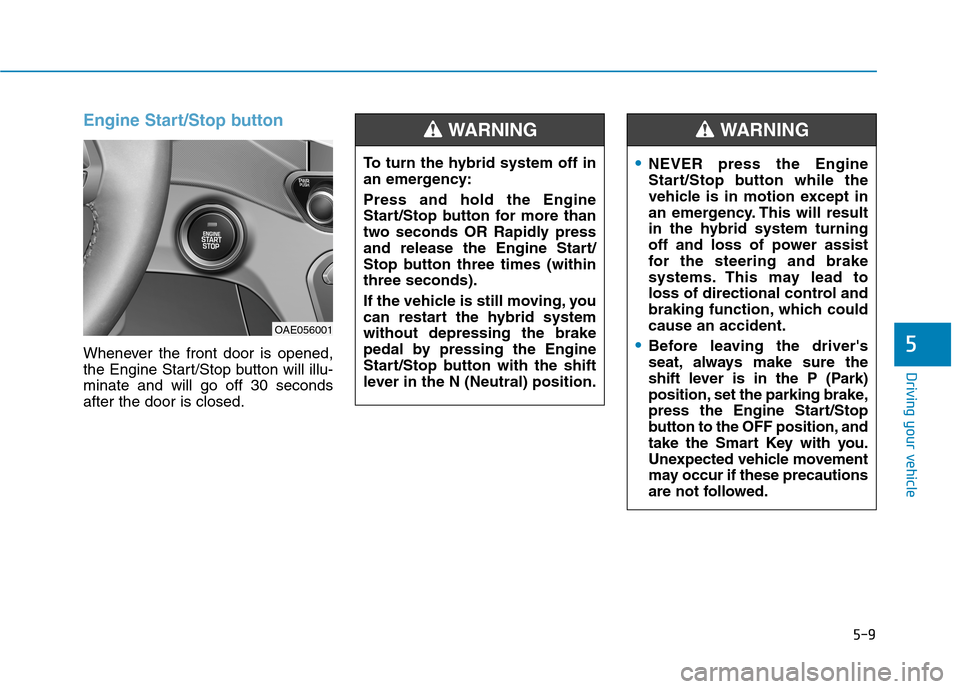
Engine Start/Stop button
Whenever the front door is opened,
the Engine Start/Stop button will illu-minate and will go off 30 secondsafter the door is closed.
OAE056001To turn the hybrid system off in
an emergency: Press and hold the Engine
Start/Stop button for more than
two seconds OR Rapidly press
and release the Engine Start/
Stop button three times (withinthree seconds).
If the vehicle is still moving, you
can restart the hybrid systemwithout depressing the brake
pedal by pressing the Engine
Start/Stop button with the shift
lever in the N (Neutral) position.
WARNING
NEVER press the Engine
Start/Stop button while the
vehicle is in motion except in
an emergency. This will result
in the hybrid system turning
off and loss of power assist
for the steering and brake
systems. This may lead to
loss of directional control and
braking function, which couldcause an accident.
Before leaving the driver's
seat, always make sure the
shift lever is in the P (Park)
position, set the parking brake,
press the Engine Start/Stop
button to the OFF position, and
take the Smart Key with you.
Unexpected vehicle movement
may occur if these precautions
are not followed.
WARNING
Page 294 of 553
5-10
Driving your vehicle
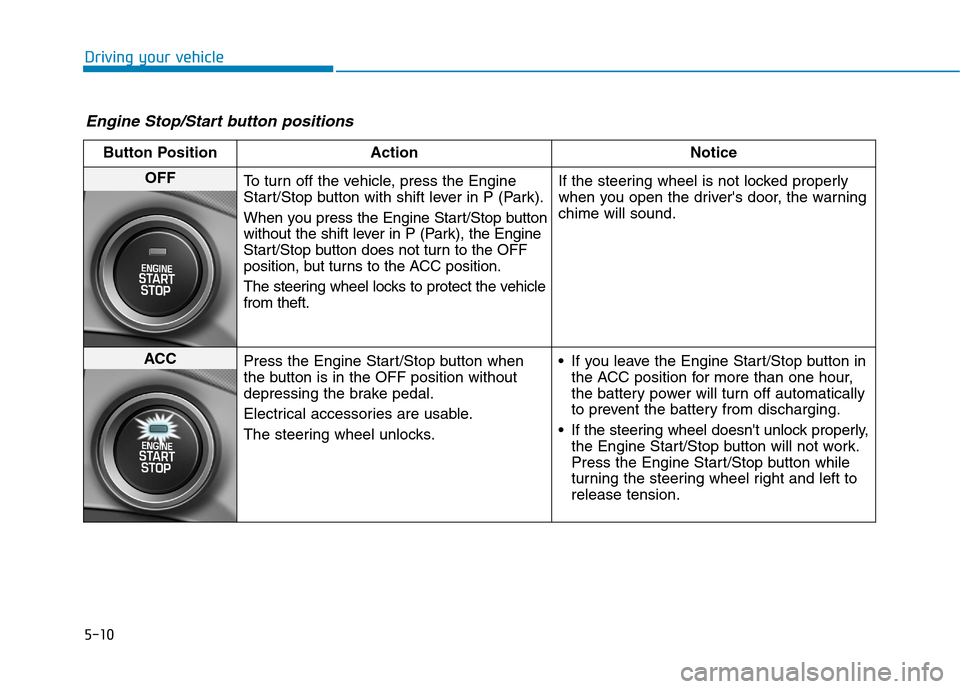
Engine Stop/Start button positions
Button Position ActionNotice
OFF
To turn off the vehicle, press the Engine
Start/Stop button with shift lever in P (Park).
When you press the Engine Start/Stop button
without the shift lever in P (Park), the Engine
Start/Stop button does not turn to the OFF
position, but turns to the ACC position.
The steering wheel locks to protect the vehicle from theft. If the steering wheel is not locked properly
when you open the driver's door, the warningchime will sound.
ACC
Press the Engine Start/Stop button when
the button is in the OFF position without
depressing the brake pedal.
Electrical accessories are usable.
The steering wheel unlocks. If you leave the Engine Start/Stop button in
the ACC position for more than one hour,
the battery power will turn off automatically
to prevent the battery from discharging.
If the steering wheel doesn't unlock properly, the Engine Start/Stop button will not work.
Press the Engine Start/Stop button while
turning the steering wheel right and left torelease tension.
Page 295 of 553
5-11
Driving your vehicle
5
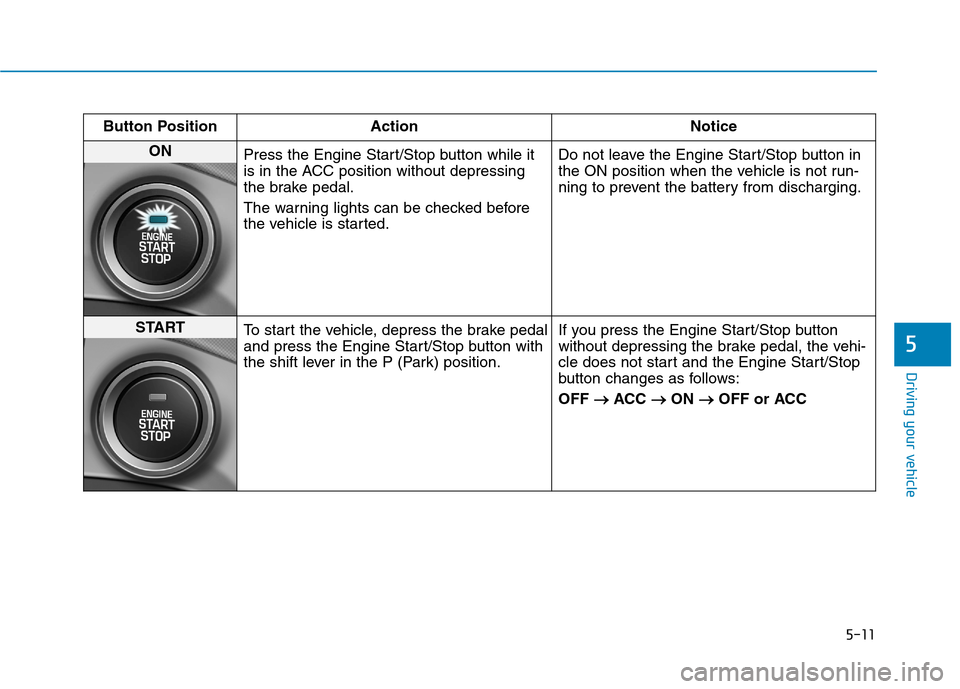
Button Position ActionNotice
ON
Press the Engine Start/Stop button while it
is in the ACC position without depressing
the brake pedal.
The warning lights can be checked before
the vehicle is started. Do not leave the Engine Start/Stop button in
the ON position when the vehicle is not run-
ning to prevent the battery from discharging.
START
To start the vehicle, depress the brake pedal
and press the Engine Start/Stop button with
the shift lever in the P (Park) position. If you press the Engine Start/Stop button
without depressing the brake pedal, the vehi-
cle does not start and the Engine Start/Stop
button changes as follows: OFF
ACC
ON
OFF or ACC
Page 296 of 553
5-12
Driving your vehicle
Starting the hybrid system Information
The vehicle will start by pressing the Engine Start/Stop button, only when
the smart key is in the vehicle.
Even if the smart key is in the vehi- cle, and when it is far away from the
driver, the hybrid system may not
start.
When the Engine Start/Stop button is in the ACC or ON position, any
door is open, the system checks for
the smart key. When the smart key
is not in the vehicle, the " " indi-
cator will blink and the warning
"Key not in vehicle" will come on.
When all doors are closed, the chime
will also sound for about 5 seconds.
Keep the smart key in the vehicle
when in the ACC position or if the
hybrid system is ON. 1. Always carry the smart key with
you.
2. Make sure the parking brake is applied.
3. Make sure the shift lever is in P (Park).
4. Depress the brake pedal.
5. Press the Engine Start/Stop but- ton. If the vehicle starts, the " " indicator will come on.i
Always wear appropriate shoes
when operating your vehicle.
Unsuitable shoes, such as high
heels, ski boots, sandals, flip-
flops, etc., may interfere with
your ability to use the brakeand accelerator pedals.
Do not start the vehicle with the accelerator pedal depressed.
The vehicle can move and lead to an accident.
WARNING
Page 297 of 553
5-13
Driving your vehicle
5
Information
Do not wait for the engine to warm up while the vehicle remains station-
ary.
Start driving at moderate engine
speeds. (Steep accelerating and
decelerating should be avoided.)
Always start the vehicle with your foot on the brake pedal. Do not
depress the accelerator while start-
ing the vehicle. Do not race the
engine while warming it up.
If ambient temperature is low, the " " indicator may remain illumi-
nated longer than the normal amount
of time. To prevent damage to the vehicle:
If the " " indicator turns off
while you are in motion, do not
attempt to move the shift lever
to the P (Park) position.
If traffic and road conditions
permit, you may put the shift
lever in the N (Neutral) position
while the vehicle is still moving
and press the Engine Start/Stop
button in an attempt to restart
the vehicle.
Do not push or tow your vehicle to start the vehicle. To prevent damage to the vehicle:
Do not press the Engine Start/Stop
button for more than 10 seconds
except when the stop lamp fuse is
blown.
When the stop lamp fuse is blown,
you cannot normally start the
hybrid system. Replace the fuse
with a new one. If you are not able
to replace the fuse, you can start
the vehicle by pressing and hold-
ing the Engine Start/Stop button
for 10 seconds with the Engine
Start/Stop button in the ACC posi-tion.
For your safety always depress
the brake pedal before starting the
vehicle.NOTICENOTICEi