light Hyundai Ioniq Hybrid 2017 Quick Reference Guide
[x] Cancel search | Manufacturer: HYUNDAI, Model Year: 2017, Model line: Ioniq Hybrid, Model: Hyundai Ioniq Hybrid 2017Pages: 24, PDF Size: 11.88 MB
Page 2 of 24
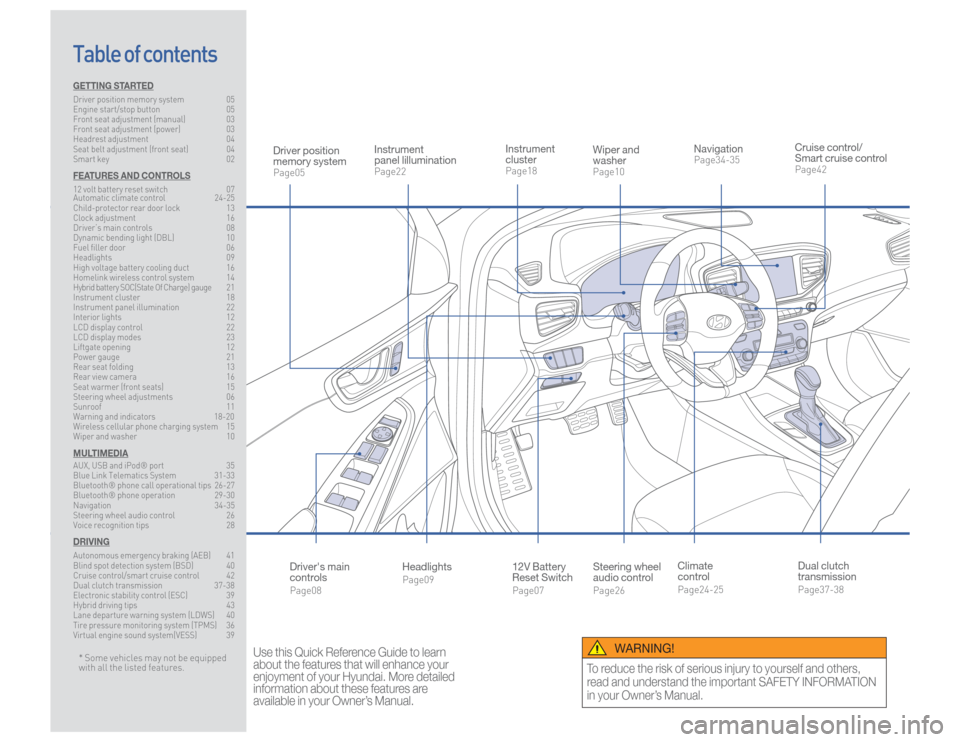
Steering wheel
audio controlPage26
12V Battery
Reset SwitchPage07 Instrument
clusterPage18
NavigationPage34-35
Instrument
panel lillumination Page22
Climate
controlPage24-25
HeadlightsPage09
Table of contents
Cruise control/
Smart cruise controlPage42
Wiper and
washerPage10
Dual clutch
transmissionPage37-38
Driver position
memory systemPage05
WARNING!
To reduce the risk of serious injury to yourself and others,
read and understand the important SAFETY INFORMATION
in your Owner’s Manual.
* Some vehicles may not be equipped
with all the listed features.
Use this Quick Reference Guide to learn
about the features that will enhance your
enjoyment of your Hyundai. More detailed
information about these features are
available in your Owner’s Manual.
Driver's main
controlsPage08
GETTING STARTEDDriver position memory system 05
Engine start/stop button 05
Front seat adjustment (manual) 03
Front seat adjustment (power) 03
Headrest adjustment 04
Seat belt adjustment (front seat) 04
Smart key 02FEATURES AND CONTROLS12 volt battery reset switch 07
Automatic climate control 24-25
Child-protector rear door lock 13
Clock adjustment 16
Driver’s main controls 08
Dynamic bending light (DBL) 10
Fuel filler door 06
Headlights 09
High voltage battery cooling duct 16
Homelink wireless control system 14
Hybrid battery SOC(State Of Charge) gauge 21
Instrument cluster 18
Instrument panel illumination 22
Interior lights 12
LCD display control 22
LCD display modes 23
Liftgate opening 12
Power gauge 21
Rear seat folding 13
Rear view camera 16
Seat warmer (front seats) 15
Steering wheel adjustments 06
Sunroof 11
Warning and indicators 18-20
Wireless cellular phone charging system 15
Wiper and washer 10MULTIMEDIAAUX, USB and iPod® port 35
Blue Link Telematics System 31-33
Bluetooth® phone call operational tips 26-27
Bluetooth® phone operation 29-30
Navigation 34-35
Steering wheel audio control 26
Voice recognition tips 28DRIVINGAutonomous emergency braking (AEB) 41
Blind spot detection system (BSD) 40
Cruise control/smart cruise control 42
Dual clutch transmission 37-38
Electronic stability control (ESC) 39
Hybrid driving tips 43
Lane departure warning system (LDWS) 40
Tire pressure monitoring system (TPMS) 36
Virtual engine sound system(VESS) 39
Page 5 of 24
Quick Reference Guide I 07
06 I Quick Reference Guide
IONIQ HYBRID HYUNDAI
FEATURES AND CONTROLS
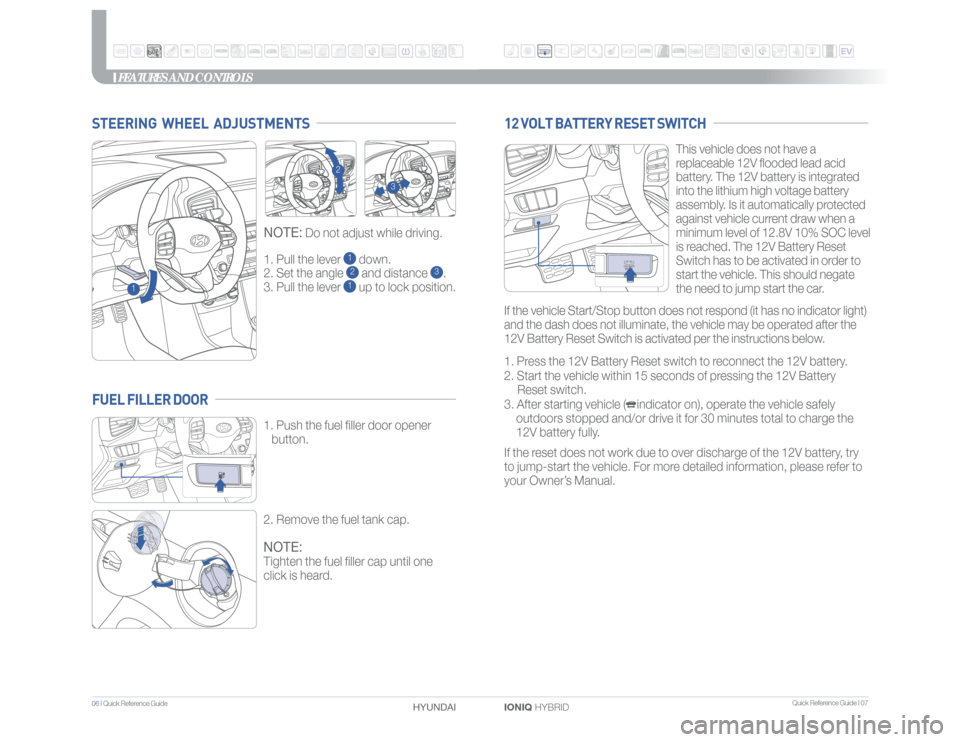
1. Pull the lever
1 down.
2. Set the angle 2 and distance
3.
3. Pull the lever
1 up to lock position.
NOTE:
Do not adjust while driving.
STEERING WHEEL ADJUSTMENTS
1
2
3
This vehicle does not have a
replaceable 12V flooded lead acid
battery. The 12V battery is integrated
into the lithium high voltage battery
assembly. Is it automatically protected
against vehicle current draw when a
minimum level of 12.8V 10% SOC level
is reached. The 12V Battery Reset
Switch has to be activated in order to
start the vehicle. This should negate
the need to jump start the car.
1. Press the 12V Battery Reset switch to reconnect the 12V battery.
2. Start the vehicle within 15 seconds of pressing the 12V Battery
Reset switch.
3. After starting vehicle ( indicator on), operate the vehicle safely
outdoors stopped and/or drive it for 30 minutes total to charge the
12V battery fully.
If the reset does not work due to over discharge of the 12V battery, try
to jump-start the vehicle. For more detailed information, please refer to
your Owner’s Manual.
12 VOLT BATTERY RESET SWITCH
1. Push the fuel filler door opener
button.
2. Remove the fuel tank cap.NOTE:Tighten the fuel filler cap until one
click is heard.
FUEL FILLER DOOR
If the vehicle Start/Stop button does not respond (it has no indicator light)
and the dash does not illuminate, the vehicle may be operated after the
12V Battery Reset Switch is activated per the instructions below.
Page 6 of 24
Quick Reference Guide I 09
08 I Quick Reference Guide
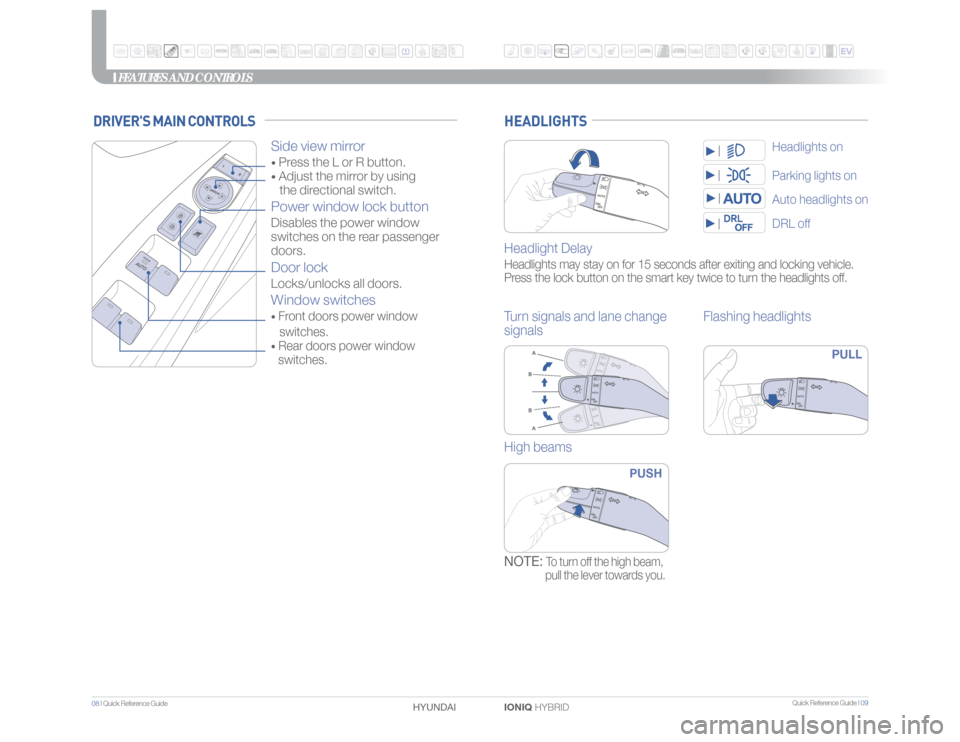
IONIQ HYBRID HYUNDAI HEADLIGHTSHeadlight DelayHeadlights may stay on for 15 seconds after exiting and locking vehicle.
Press the lock button on the smart key twice to turn the headlights off.Turn signals and lane change
signalsFlashing headlights
PULL
High beams
PUSH
NOTE:
To turn off the high beam,
pull the lever towards you.
Parking lights onDRL offAuto headlights onHeadlights on
FEATURES AND CONTROLS
DRIVER'S MAIN CONTROLS
Side view mirror • Press the L or R button. • Adjust the mirror by using
the directional switch.Power window lock buttonDisables the power window
switches on the rear passenger
doors. Door lockLocks/unlocks all doors.Window switches• Front doors power window
switches.• Rear doors power window
switches.
Page 7 of 24
Quick Reference Guide I 11
10 I Quick Reference Guide
IONIQ HYBRID HYUNDAI
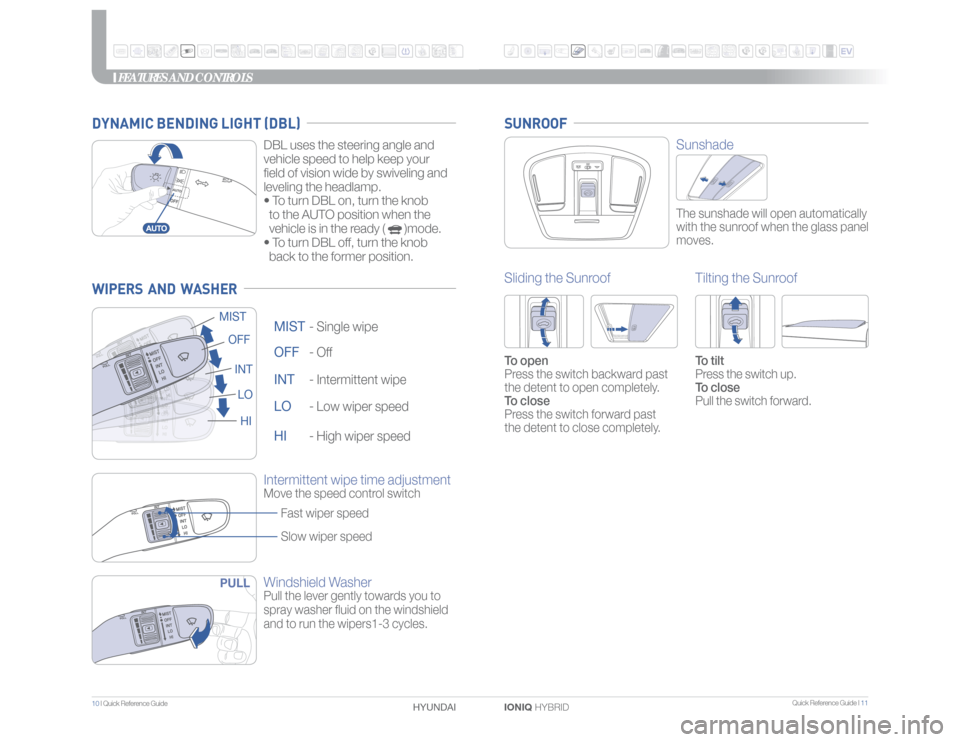
Windshield WasherPull the lever gently towards you to
spray washer fluid on the windshield
and to run the wipers1-3 cycles.OFF -
Off
OFF
MIST -
Single wipe
MIST
INT -
Intermittent wipe
INT
LO -
Low wiper speed
LO
HI -
High wiper speed
HI
Intermittent wipe time adjustmentMove the speed control switch
Fast wiper speed
Slow wiper speed
PULL
FEATURES AND CONTROLS
SunshadeThe sunshade will open automatically
with the sunroof when the glass panel
moves.
Sliding the SunroofTo open
Press the switch backward past
the detent to open completely.
To close
Press the switch forward past
the detent to close completely.
Tilting the SunroofTo tilt
Press the switch up.
To close
Pull the switch forward.
SUNROOF
WIPERS AND WASHER
DBL uses the steering angle and
vehicle speed to help keep your
field of vision wide by swiveling and
leveling the headlamp.
• To turn DBL on, turn the knob
to the AUTO position when the
vehicle is in the ready ( )mode.
• To turn DBL off, turn the knob
back to the former position.
DYNAMIC BENDING LIGHT (DBL)
Page 8 of 24
Quick Reference Guide I 13
12 I Quick Reference Guide
IONIQ HYBRID HYUNDAI
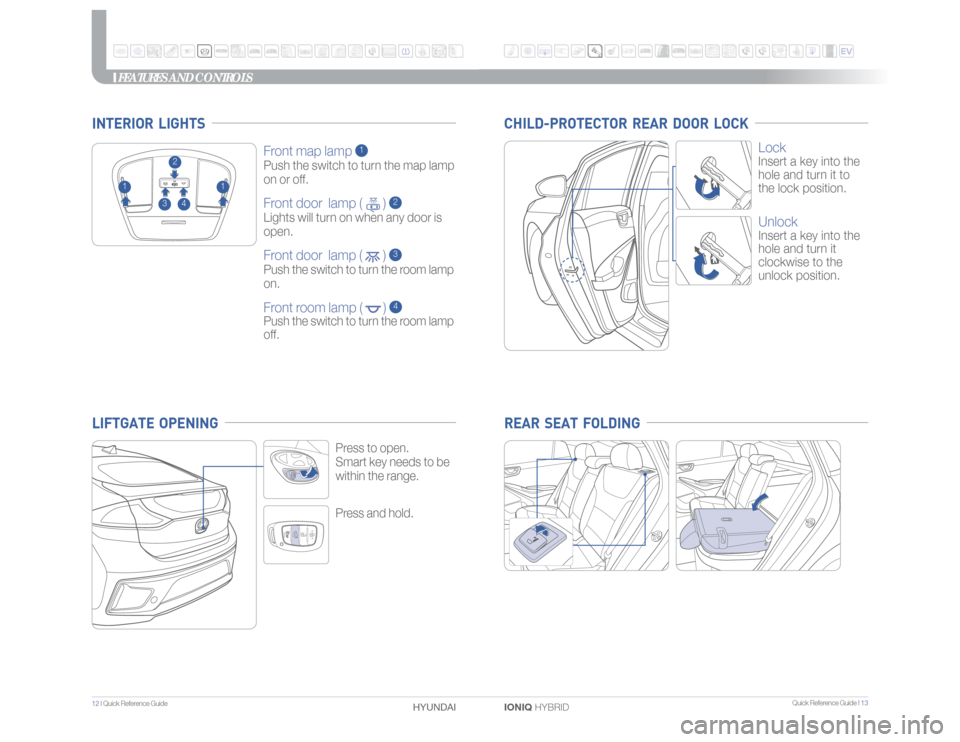
Press and hold.Press to open.
Smart key needs to be
within the range.
Front map lamp
1
Push the switch to turn the map lamp
on or off.Front door lamp ( )
2
Lights will turn on when any door is
open.Front door lamp ( )
3
Push the switch to turn the room lamp
on.Front room lamp ( )
4
Push the switch to turn the room lamp
off.
2
1
1
3
4
INTERIOR LIGHTS
FEATURES AND CONTROLS
Lock Insert a key into the
hole and turn it to
the lock position.UnlockInsert a key into the
hole and turn it
clockwise to the
unlock position.
CHILD-PROTECTOR REAR DOOR LOCK REAR SEAT FOLDING
LIFTGATE OPENING
Page 9 of 24
Quick Reference Guide I 15
14 I Quick Reference Guide
IONIQ HYBRID HYUNDAI
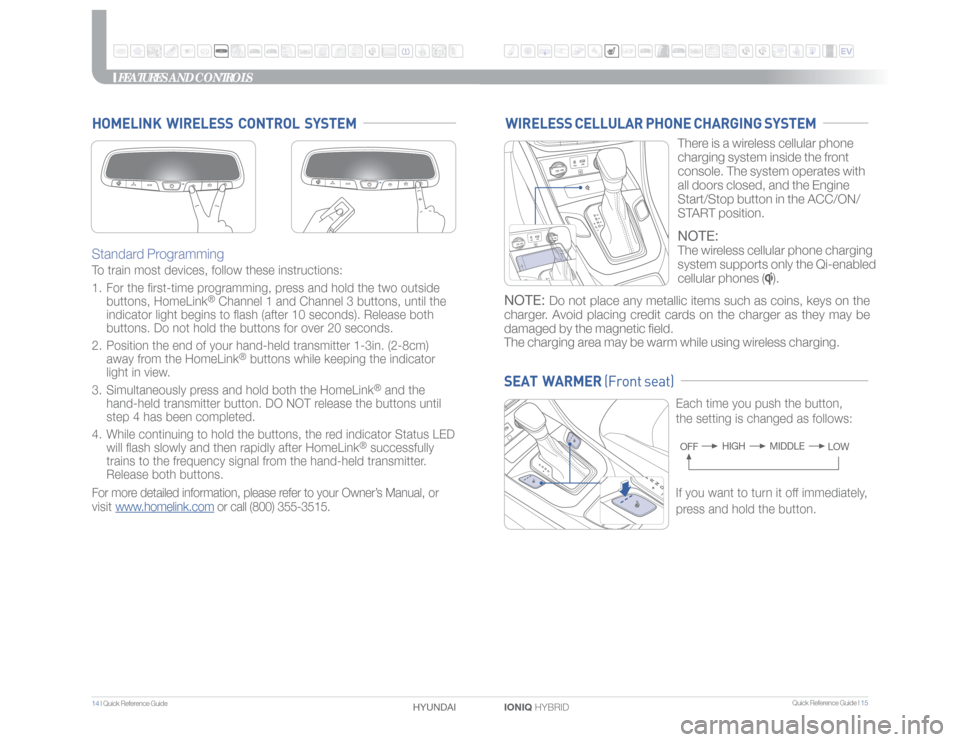
Standard Programming To train most devices, follow these instructions:
1. For the first-time programming, press and hold the two outside
buttons, HomeLink
® Channel 1 and Channel 3 buttons, until the
indicator light begins to flash (after 10 seconds). Release both
buttons. Do not hold the buttons for over 20 seconds.
2. Position the end of your hand-held transmitter 1-3in. (2-8cm)
away from the HomeLink
® buttons while keeping the indicator
light in view.
3. Simultaneously press and hold both the HomeLink
® and the
hand-held transmitter button. DO NOT release the buttons until
step 4 has been completed.
4. While continuing to hold the buttons, the red indicator Status LED
will flash slowly and then rapidly after HomeLink
® successfully
trains to the frequency signal from the hand-held transmitter.
Release both buttons.
For more detailed information, please refer to your Owner’s Manual, or
visit www.homelink.com or call (800) 355-3515.
HOMELINK WIRELESS CONTROL SYSTEM
SEAT WARMER (Front seat)
Each time you push the button,
the setting is changed as follows:OFFMIDDLE HIGH
LOW
FEATURES AND CONTROLS
WIRELESS CELLULAR PHONE CHARGING SYSTEM
There is a wireless cellular phone
charging system inside the front
console. The system operates with
all doors closed, and the Engine
Start/Stop button in the ACC/ON/
START position.NOTE:The wireless cellular phone charging
system supports only the Qi-enabled
cellular phones (
).
NOTE:
Do not place any metallic items such as coins, keys on the
charger. Avoid placing credit cards on the charger as they may be
damaged by the magnetic field.
The charging area may be warm while using wireless charging.
If you want to turn it off immediately,
press and hold the button.
Page 10 of 24
Quick Reference Guide I 17
16 I Quick Reference Guide
IONIQ HYBRID HYUNDAI
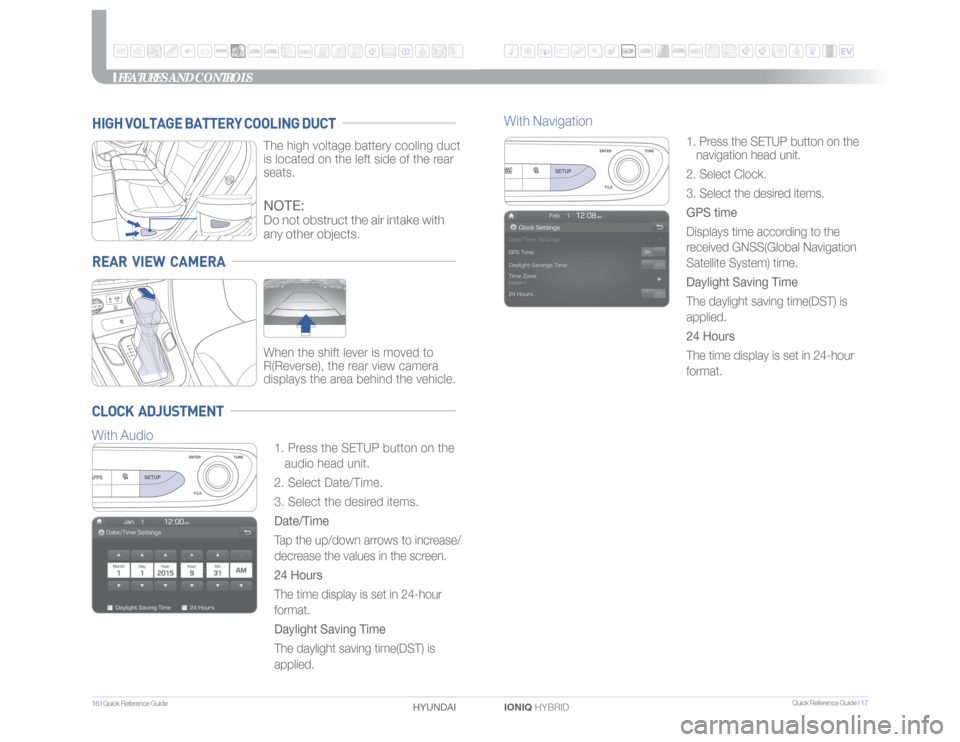
1. Press the SETUP button on the
navigation head unit.
2. Select Clock.
3. Select the desired items.
GPS time
Displays time according to the
received GNSS(Global Navigation
Satellite System) time.
Daylight Saving Time
The daylight saving time(DST) is
applied.
24 Hours
The time display is set in 24-hour
format.
FEATURES AND CONTROLS
With Navigation
REAR VIEW CAMERA
When the shift lever is moved to
R(Reverse), the rear view camera
displays the area behind the vehicle.
HIGH VOLTAGE BATTERY COOLING DUCT
The high voltage battery cooling duct
is located on the left side of the rear
seats.
CLOCK ADJUSTMENT
1. Press the SETUP button on the
audio head unit.
2. Select Date/Time.
3. Select the desired items.
Date/Time
Tap the up/down arrows to increase/
decrease the values in the screen.
24 Hours
The time display is set in 24-hour
format.
Daylight Saving Time
The daylight saving time(DST) is
applied.NOTE:Do not obstruct the air intake with
any other objects.
With Audio
Page 11 of 24
Quick Reference Guide I 19
18 I Quick Reference Guide
IONIQ HYBRID HYUNDAI
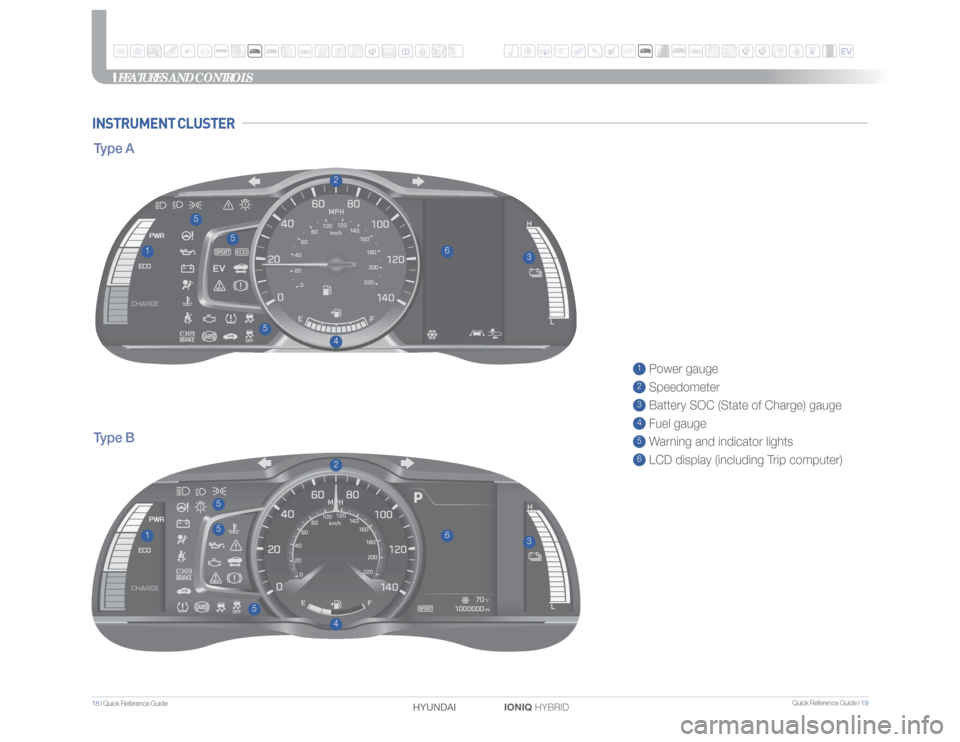
1 Power gauge2 Speedometer3 Battery SOC (State of Charge) gauge4 Fuel gauge5 Warning and indicator lights6 LCD display (including Trip computer)
5
5
55
5
5
44
11
22
33
66
FEATURES AND CONTROLS
INSTRUMENT CLUSTERType BType A
Page 12 of 24
Quick Reference Guide I 21
20 I Quick Reference Guide
IONIQ HYBRID HYUNDAI
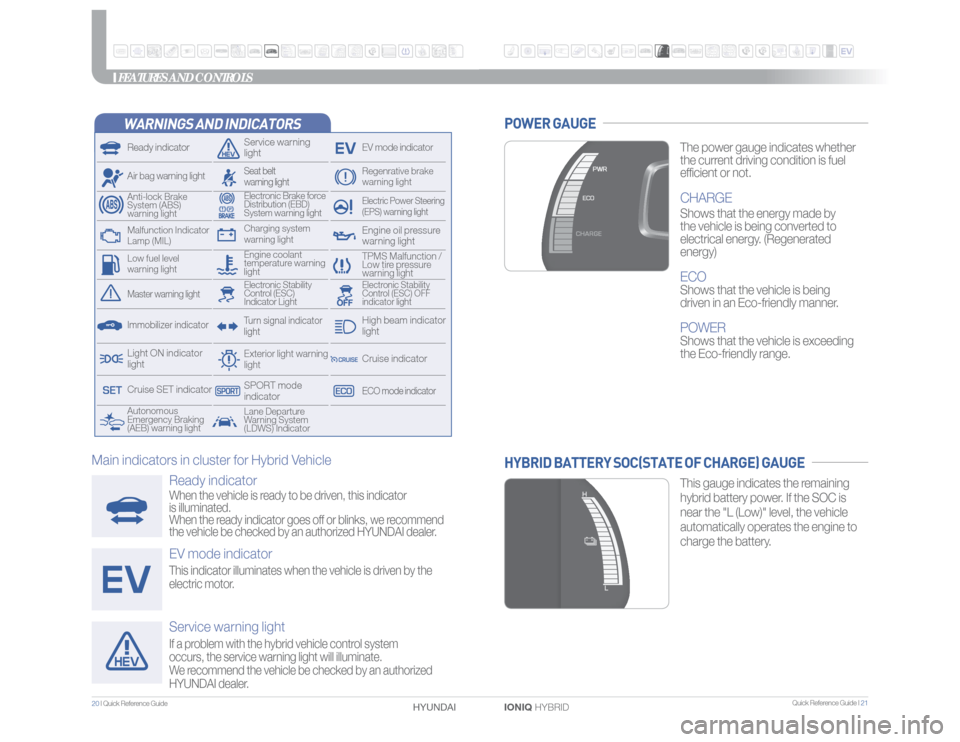
WARNINGS AND INDICATORSReady indicator
Service warning
light
EV mode indicator
Air bag warning light
Electric Power Steering
(EPS) warning light
Electronic Brake force
Distribution (EBD)
System warning light
TPMS Malfunction /
Low tire pressure
warning light
Autonomous
Emergency Braking
(AEB) warning lightLane Departure
Warning System
(LDWS) Indicator
Exterior light warning
lightCharging system
warning light
Engine coolant
temperature warning
light
Anti-lock Brake
System (ABS)
warning light
Regenrative brake
warning light
Seat belt
warning lightTurn signal indicator
light
Immobilizer indicatorMaster warning light
Electronic Stability
Control (ESC) OFF
indicator light
Electronic Stability
Control (ESC)
Indicator Light
Light ON indicator
light
ECO mode indicatorCruise indicatorHigh beam indicator
light
Cruise SET indicator
SPORT mode
indicator
Engine oil pressure
warning light
Malfunction Indicator
Lamp (MIL)Low fuel level
warning lightFEATURES AND CONTROLS
The power gauge indicates whether
the current driving condition is fuel
efficient or not.CHARGEShows that the energy made by
the vehicle is being converted to
electrical energy. (Regenerated
energy)ECOShows that the vehicle is being
driven in an Eco-friendly manner.POWERShows that the vehicle is exceeding
the Eco-friendly range.
POWER GAUGE
This gauge indicates the remaining
hybrid battery power. If the SOC is
near the "L (Low)" level, the vehicle
automatically operates the engine to
charge the battery.
HYBRID BATTERY SOC(STATE OF CHARGE) GAUGE
Ready indicatorWhen the vehicle is ready to be driven, this indicator
is illuminated.
When the ready indicator goes off or blinks, we recommend
the vehicle be checked by an authorized HYUNDAI dealer.EV mode indicatorThis indicator illuminates when the vehicle is driven by the
electric motor.Service warning lightIf a problem with the hybrid vehicle control system
occurs, the service warning light will illuminate.
We recommend the vehicle be checked by an authorized
HYUNDAI dealer.
Main indicators in cluster for Hybrid Vehicle
Page 23 of 24
Quick Reference Guide I 43
42 I Quick Reference Guide
IONIQ HYBRID HYUNDAI
DRIVING
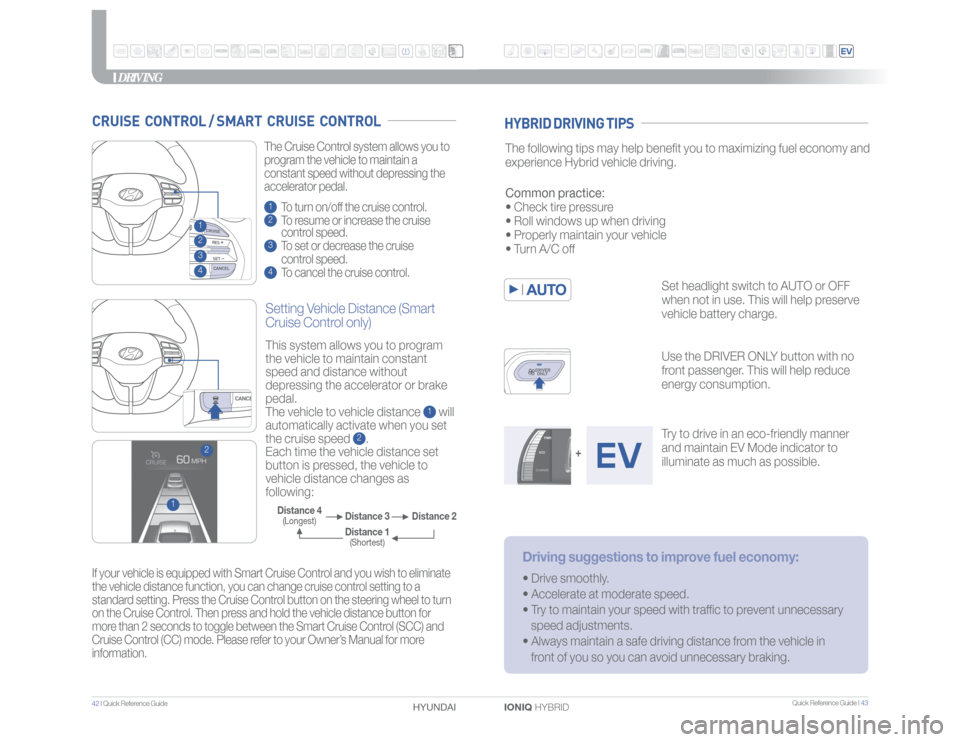
1 To turn on/off the cruise control.2 To resume or increase the cruise
control speed.3 To set or decrease the cruise
control speed.4 To cancel the cruise control. The Cruise Control system allows you to
program the vehicle to maintain a
constant speed without depressing the
accelerator pedal.
If your vehicle is equipped with Smart Cruise Control and you wish to eliminate
the vehicle distance function, you can change cruise control setting to a
standard setting. Press the Cruise Control button on the steering wheel to turn
on the Cruise Control. Then press and hold the vehicle distance button for
more than 2 seconds to toggle between the Smart Cruise Control (SCC) and
Cruise Control (CC) mode. Please refer to your Owner’s Manual for more
information.
CRUISE CONTROL / SMART CRUISE CONTROL
Setting Vehicle Distance (Smart
Cruise Control only)This system allows you to program
the vehicle to maintain constant
speed and distance without
depressing the accelerator or brake
pedal.
The vehicle to vehicle distance
1 will
automatically activate when you set
the cruise speed
2.
Each time the vehicle distance set
button is pressed, the vehicle to
vehicle distance changes as
following:
2
1
Distance 2 Distance 3 Distance 4
(Longest)
Distance 1(Shortest)
2341
The following tips may help benefit you to maximizing fuel economy and
experience Hybrid vehicle driving.
Set headlight switch to AUTO or OFF
when not in use. This will help preserve
vehicle battery charge.
Use the DRIVER ONLY button with no
front passenger. This will help reduce
energy consumption.
Try to drive in an eco-friendly manner
and maintain EV Mode indicator to
illuminate as much as possible. Common practice:
• Check tire pressure
• Roll windows up when driving
• Properly maintain your vehicle
• Turn A/C off
Driving suggestions to improve fuel economy:• Drive smoothly.
• Accelerate at moderate speed.
• Try to maintain your speed with traffic to prevent unnecessary
speed adjustments.
• Always maintain a safe driving distance from the vehicle in
front of you so you can avoid unnecessary braking.
+
HYBRID DRIVING TIPS