lock Hyundai Ioniq Hybrid 2017 Quick Reference Guide
[x] Cancel search | Manufacturer: HYUNDAI, Model Year: 2017, Model line: Ioniq Hybrid, Model: Hyundai Ioniq Hybrid 2017Pages: 24, PDF Size: 11.88 MB
Page 1 of 24
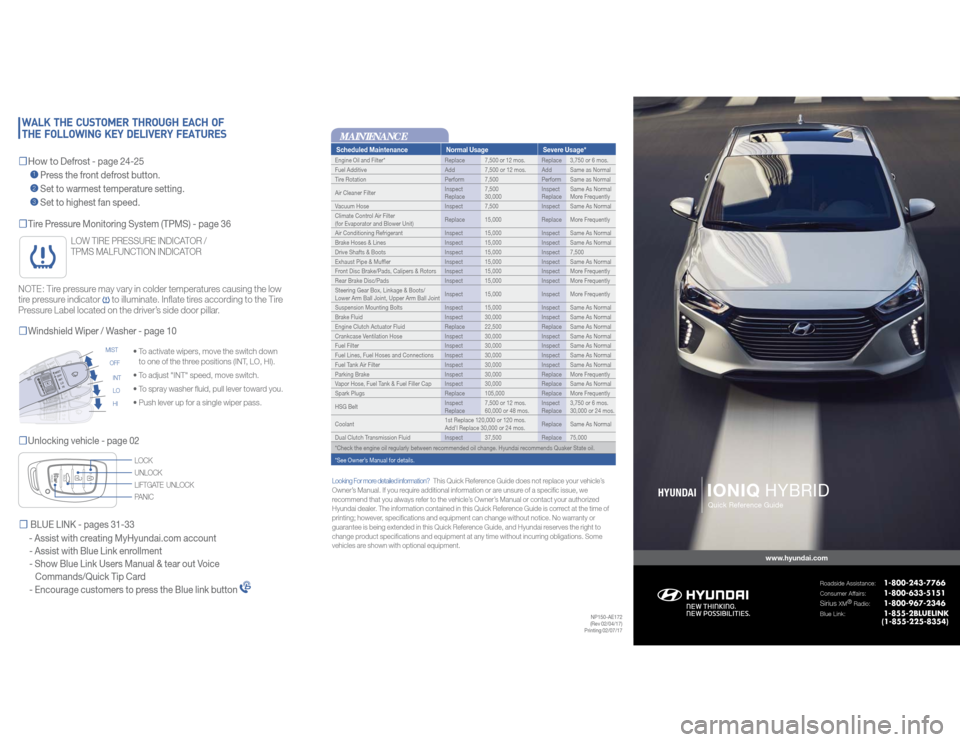
Scheduled Maintenance Normal Usage Severe Usage*Engine Oil and Filter* Replace 7,500 or 12 mos. Replace 3,750 or 6 mos.
Fuel Additive Add 7,500 or 12 mos. Add Same as Normal
Tire Rotation Perform 7,500 Perform Same as Normal
Air Cleaner FilterInspect
Replace7,500
30,000Inspect
ReplaceSame As Normal
More Frequently
Vacuum Hose Inspect 7,500 Inspect Same As Normal
Climate Control Air Filter
(for Evaporator and Blower Unit)Replace 15,000 Replace More Frequently
Air Conditioning Refrigerant Inspect 15,000 Inspect Same As Normal
Brake Hoses & Lines Inspect 15,000 Inspect Same As Normal
Drive Shafts & Boots Inspect 15,000 Inspect 7,500
Exhaust Pipe & Muffler Inspect 15,000 Inspect Same As Normal
Front Disc Brake/Pads, Calipers & Rotors Inspect 15,000 Inspect More Frequently
Rear Brake Disc/Pads Inspect 15,000 Inspect More Frequently
Steering Gear Box, Linkage & Boots/
Lower Arm Ball Joint, Upper Arm Ball JointInspect 15,000 Inspect More Frequently
Suspension Mounting Bolts Inspect 15,000 Inspect Same As Normal
Brake Fluid Inspect 30,000 Inspect Same As Normal
Engine Clutch Actuator Fluid Replace 22,500 Replace Same As Normal
Crankcase Ventilation Hose Inspect 30,000 Inspect Same As Normal
Fuel Filter Inspect 30,000 Inspect Same As Normal
Fuel Lines, Fuel Hoses and Connections Inspect 30,000 Inspect Same As Normal
Fuel Tank Air Filter Inspect 30,000 Inspect Same As Normal
Parking Brake Inspect 30,000 Replace More Frequently
Vapor Hose, Fuel Tank & Fuel Filler Cap Inspect 30,000 Replace Same As Normal
Spark Plugs Replace 105,000 Replace More Frequently
HSG BeltInspect
Replace7,500 or 12 mos.
60,000 or 48 mos.Inspect
Replace3,750 or 6 mos.
30,000 or 24 mos.
Coolant1st Replace 120,000 or 120 mos.
Add’l Replace 30,000 or 24 mos.Replace Same As Normal
Dual Clutch Transmission Fluid Inspect 37,500 Replace 75,000
*Check the engine oil regularly between recommended oil change. Hyundai recommends Quaker State oil.
*See Owner’s Manual for details.
IONIQ
HYBRIDwww.hyundai.com
Roadside Assistance:
1-800-243-7766
Consumer Affairs:
1-800-633-5151
Sirius
XM®
Radio:
1-800-967-2346
Blue Link:
1-855-2BLUELINK
(1-855-225-8354)
HYUNDAI
Quick Reference Guide
☐Tire Pressure Monitoring System (TPMS) - page 36☐Unlocking vehicle - page 02
• To activate wipers, move the switch down
to one of the three positions (INT, LO, HI).
• To adjust "INT" speed, move switch.
• To spray washer fluid, pull lever toward you.
• Push lever up for a single wiper pass.
☐Windshield Wiper / Washer - page 10
INT
LO
HI MIST
OFF
UNLOCK
LIFTGATE UNLOCK LOCK
PANIC
NOTE: Tire pressure may vary in colder temperatures causing the low
tire pressure indicator
to illuminate. Inflate tires according to the Tire
Pressure Label located on the driver’s side door pillar.
LOW TIRE PRESSURE INDICATOR /
TPMS MALFUNCTION INDICATOR
NP150-AE172
(Rev 02/04/17)
Printing 02/07/17
Looking For more detailed information?
This Quick Reference Guide does not replace your vehicle’s
Owner’s Manual. If you require additional information or are unsure of a specific issue, we
recommend that you always refer to the vehicle’s Owner’s Manual or contact your authorized
Hyundai dealer. The information contained in this Quick Reference Guide is correct at the time of
printing; however, specifications and equipment can change without notice. No warranty or
guarantee is being extended in this Quick Reference Guide, and Hyundai reserves the right to
change product specifications and equipment at any time without incurring obligations. Some
vehicles are shown with optional equipment.
MAINTENANCE
☐How to
Defrost - page 24-25
1 Press the front defrost button.
2 Set to warmest temperature setting.
3 Set to highest fan speed.
WALK THE CUSTOMER THROUGH EACH OF
THE FOLLOWING KEY DELIVERY FEATURES☐ BLUE LINK - pages 31-33
- Assist with creating MyHyundai.com account
- Assist with Blue Link enrollment
- Show Blue Link Users Manual & tear out Voice
Commands/Quick Tip Card
- Encourage customers to press the Blue link button
Page 2 of 24
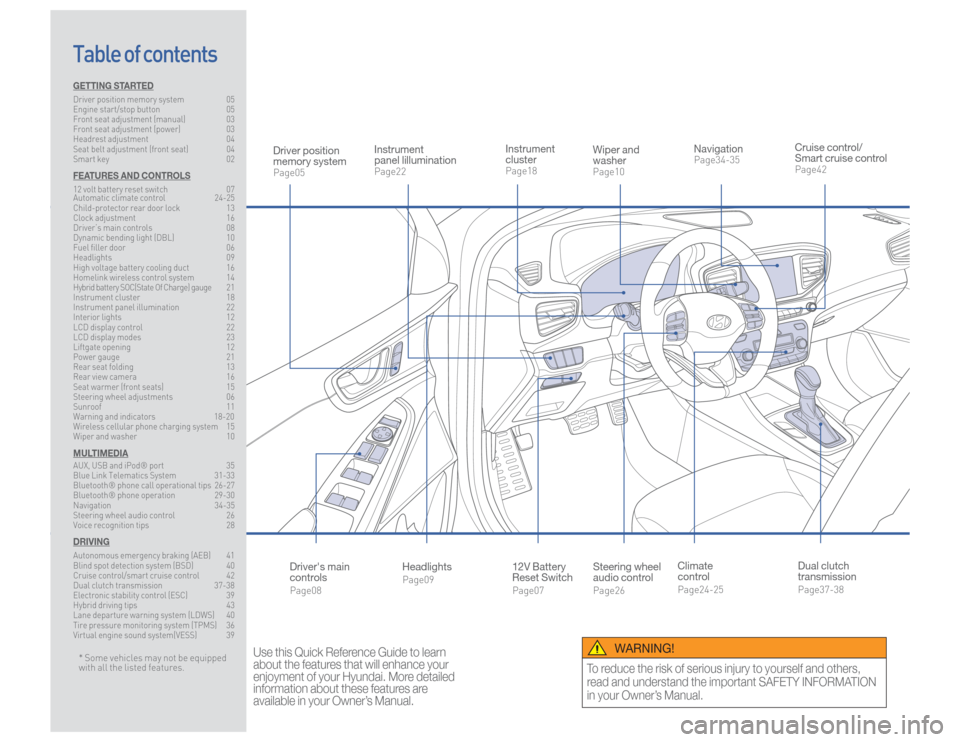
Steering wheel
audio controlPage26
12V Battery
Reset SwitchPage07 Instrument
clusterPage18
NavigationPage34-35
Instrument
panel lillumination Page22
Climate
controlPage24-25
HeadlightsPage09
Table of contents
Cruise control/
Smart cruise controlPage42
Wiper and
washerPage10
Dual clutch
transmissionPage37-38
Driver position
memory systemPage05
WARNING!
To reduce the risk of serious injury to yourself and others,
read and understand the important SAFETY INFORMATION
in your Owner’s Manual.
* Some vehicles may not be equipped
with all the listed features.
Use this Quick Reference Guide to learn
about the features that will enhance your
enjoyment of your Hyundai. More detailed
information about these features are
available in your Owner’s Manual.
Driver's main
controlsPage08
GETTING STARTEDDriver position memory system 05
Engine start/stop button 05
Front seat adjustment (manual) 03
Front seat adjustment (power) 03
Headrest adjustment 04
Seat belt adjustment (front seat) 04
Smart key 02FEATURES AND CONTROLS12 volt battery reset switch 07
Automatic climate control 24-25
Child-protector rear door lock 13
Clock adjustment 16
Driver’s main controls 08
Dynamic bending light (DBL) 10
Fuel filler door 06
Headlights 09
High voltage battery cooling duct 16
Homelink wireless control system 14
Hybrid battery SOC(State Of Charge) gauge 21
Instrument cluster 18
Instrument panel illumination 22
Interior lights 12
LCD display control 22
LCD display modes 23
Liftgate opening 12
Power gauge 21
Rear seat folding 13
Rear view camera 16
Seat warmer (front seats) 15
Steering wheel adjustments 06
Sunroof 11
Warning and indicators 18-20
Wireless cellular phone charging system 15
Wiper and washer 10MULTIMEDIAAUX, USB and iPod® port 35
Blue Link Telematics System 31-33
Bluetooth® phone call operational tips 26-27
Bluetooth® phone operation 29-30
Navigation 34-35
Steering wheel audio control 26
Voice recognition tips 28DRIVINGAutonomous emergency braking (AEB) 41
Blind spot detection system (BSD) 40
Cruise control/smart cruise control 42
Dual clutch transmission 37-38
Electronic stability control (ESC) 39
Hybrid driving tips 43
Lane departure warning system (LDWS) 40
Tire pressure monitoring system (TPMS) 36
Virtual engine sound system(VESS) 39
Page 3 of 24
Quick Reference Guide I 03
02 I Quick Reference Guide
IONIQ HYBRID HYUNDAI
GETTING STARTED
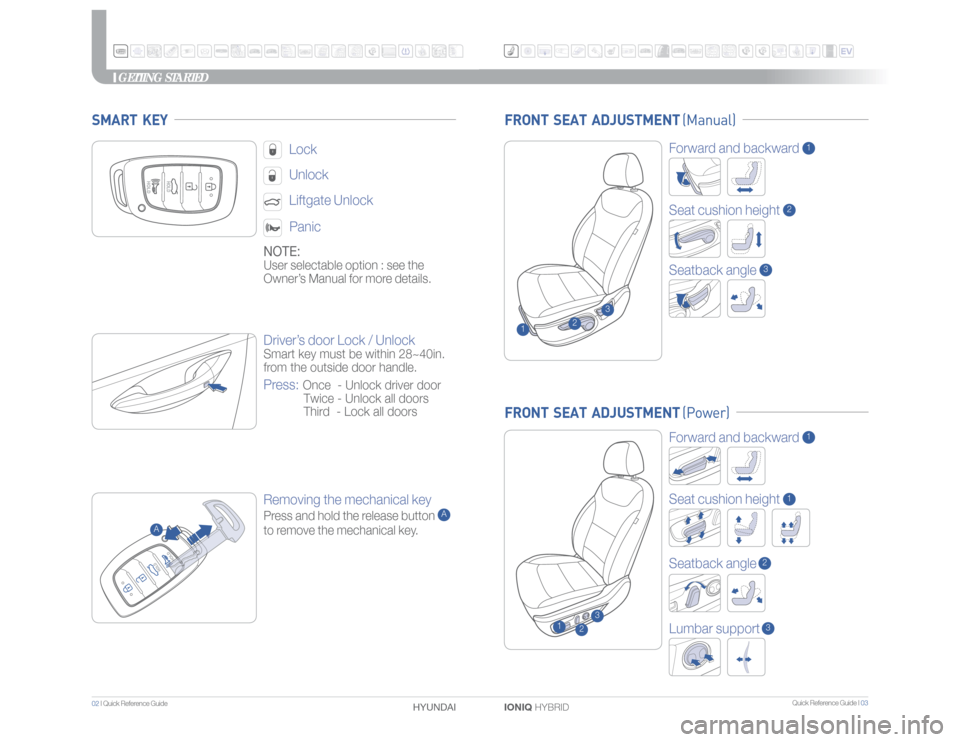
FRONT SEAT ADJUSTMENT (Manual)
Driver’s door Lock / UnlockSmart key must be within 28~40in.
from the outside door handle.Press:
Once - Unlock driver door
Twice - Unlock all doors
Third - Lock all doors
NOTE:User selectable option : see the
Owner’s Manual for more details.
LockUnlockLiftgate Unlock Panic
Removing the mechanical keyPress and hold the release button
A
to remove the mechanical key.
SMART KEY
A
FRONT SEAT ADJUSTMENT (Power)
Forward and backward
1
Seat cushion height
1
Lumbar support
3
1
2
3
2
3
Forward and backward
1
Seat cushion height
2
Seatback angle
3
1
Seatback angle
2
Page 4 of 24
Quick Reference Guide I 05
04 I Quick Reference Guide
IONIQ HYBRID HYUNDAI
GETTING STARTED
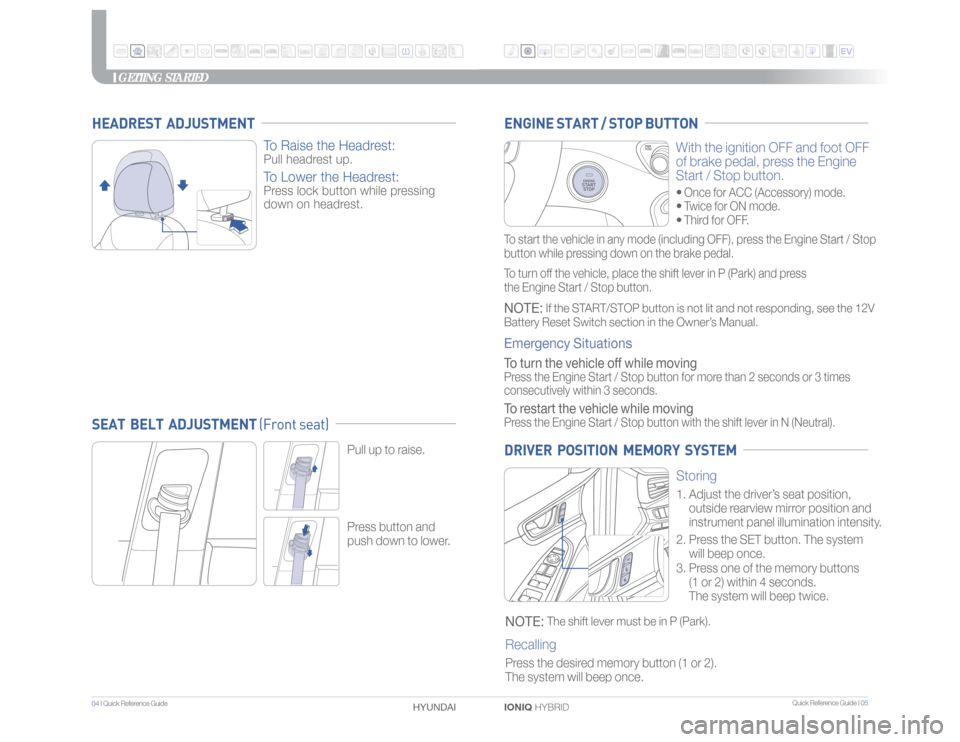
Storing
1. Adjust the driver’s seat position,
outside rearview mirror position and
instrument panel illumination intensity.
2.
Press the SET button. The system
will beep once.
3.
Press one of the memory buttons
(1 or 2) within 4 seconds.
The system will beep twice.
NOTE:
The shift lever must be in P (Park).
Recalling
Press the desired memory button (1 or 2).
The system will beep once.
Pull up to raise.Press button and
push down to lower.
With the ignition OFF and foot OFF
of brake pedal, press the Engine
Start / Stop button.• Once for ACC (Accessory) mode.• Twice for ON mode.• Third for OFF.
ENGINE START / STOP BUTTON DRIVER POSITION MEMORY SYSTEM
SEAT BELT ADJUSTMENT (Front seat) HEADREST ADJUSTMENT
To Raise the Headrest:
Pull headrest up.
To Lower the Headrest:
Press lock button while pressing
down on headrest.
To start the vehicle in any mode (including OFF), press the Engine Start / Stop
button while pressing down on the brake pedal.
To turn off the vehicle, place the shift lever in P (Park) and press
the Engine Start / Stop button.NOTE:
If the START/STOP button is not lit and not responding, see the 12V
Battery Reset Switch section in the Owner’s Manual.
Emergency Situations To turn the vehicle off while moving Press the Engine Start / Stop button for more than 2 seconds or 3 times
consecutively within 3 seconds.To restart the vehicle while movingPress the Engine Start / Stop button with the shift lever in N (Neutral).
Page 5 of 24
Quick Reference Guide I 07
06 I Quick Reference Guide
IONIQ HYBRID HYUNDAI
FEATURES AND CONTROLS
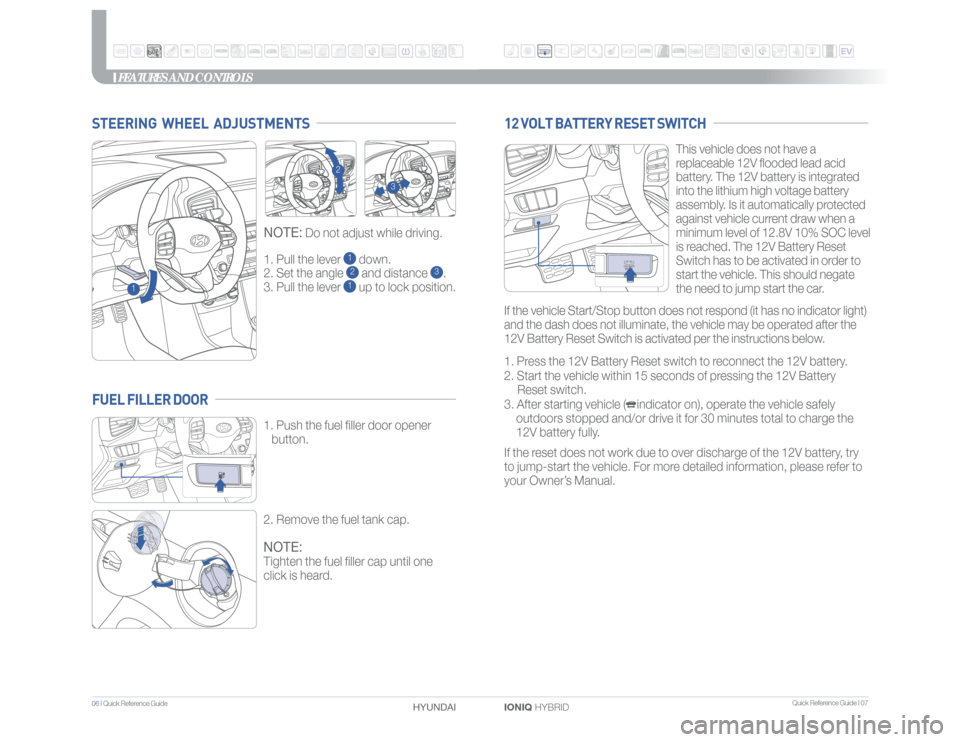
1. Pull the lever
1 down.
2. Set the angle 2 and distance
3.
3. Pull the lever
1 up to lock position.
NOTE:
Do not adjust while driving.
STEERING WHEEL ADJUSTMENTS
1
2
3
This vehicle does not have a
replaceable 12V flooded lead acid
battery. The 12V battery is integrated
into the lithium high voltage battery
assembly. Is it automatically protected
against vehicle current draw when a
minimum level of 12.8V 10% SOC level
is reached. The 12V Battery Reset
Switch has to be activated in order to
start the vehicle. This should negate
the need to jump start the car.
1. Press the 12V Battery Reset switch to reconnect the 12V battery.
2. Start the vehicle within 15 seconds of pressing the 12V Battery
Reset switch.
3. After starting vehicle ( indicator on), operate the vehicle safely
outdoors stopped and/or drive it for 30 minutes total to charge the
12V battery fully.
If the reset does not work due to over discharge of the 12V battery, try
to jump-start the vehicle. For more detailed information, please refer to
your Owner’s Manual.
12 VOLT BATTERY RESET SWITCH
1. Push the fuel filler door opener
button.
2. Remove the fuel tank cap.NOTE:Tighten the fuel filler cap until one
click is heard.
FUEL FILLER DOOR
If the vehicle Start/Stop button does not respond (it has no indicator light)
and the dash does not illuminate, the vehicle may be operated after the
12V Battery Reset Switch is activated per the instructions below.
Page 6 of 24
Quick Reference Guide I 09
08 I Quick Reference Guide
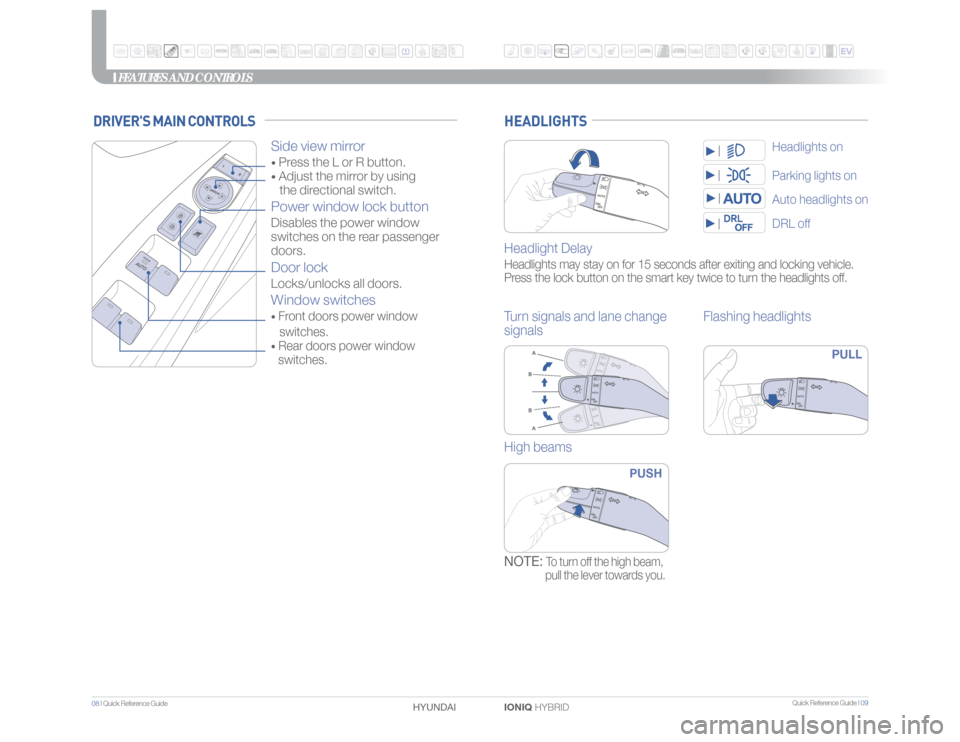
IONIQ HYBRID HYUNDAI HEADLIGHTSHeadlight DelayHeadlights may stay on for 15 seconds after exiting and locking vehicle.
Press the lock button on the smart key twice to turn the headlights off.Turn signals and lane change
signalsFlashing headlights
PULL
High beams
PUSH
NOTE:
To turn off the high beam,
pull the lever towards you.
Parking lights onDRL offAuto headlights onHeadlights on
FEATURES AND CONTROLS
DRIVER'S MAIN CONTROLS
Side view mirror • Press the L or R button. • Adjust the mirror by using
the directional switch.Power window lock buttonDisables the power window
switches on the rear passenger
doors. Door lockLocks/unlocks all doors.Window switches• Front doors power window
switches.• Rear doors power window
switches.
Page 8 of 24
Quick Reference Guide I 13
12 I Quick Reference Guide
IONIQ HYBRID HYUNDAI
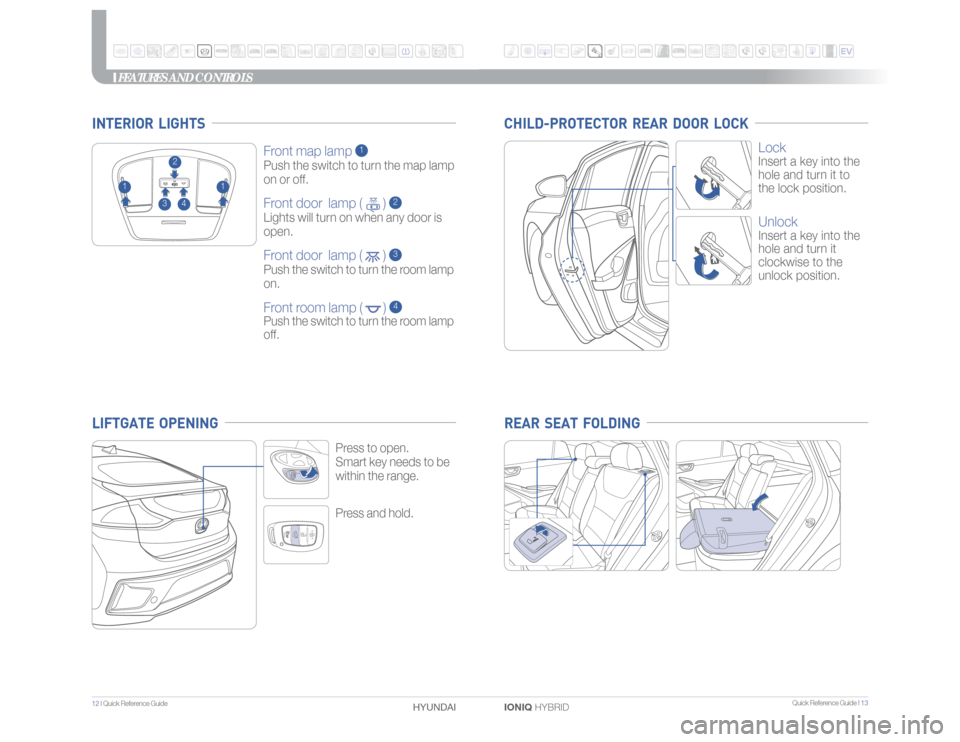
Press and hold.Press to open.
Smart key needs to be
within the range.
Front map lamp
1
Push the switch to turn the map lamp
on or off.Front door lamp ( )
2
Lights will turn on when any door is
open.Front door lamp ( )
3
Push the switch to turn the room lamp
on.Front room lamp ( )
4
Push the switch to turn the room lamp
off.
2
1
1
3
4
INTERIOR LIGHTS
FEATURES AND CONTROLS
Lock Insert a key into the
hole and turn it to
the lock position.UnlockInsert a key into the
hole and turn it
clockwise to the
unlock position.
CHILD-PROTECTOR REAR DOOR LOCK REAR SEAT FOLDING
LIFTGATE OPENING
Page 10 of 24
Quick Reference Guide I 17
16 I Quick Reference Guide
IONIQ HYBRID HYUNDAI
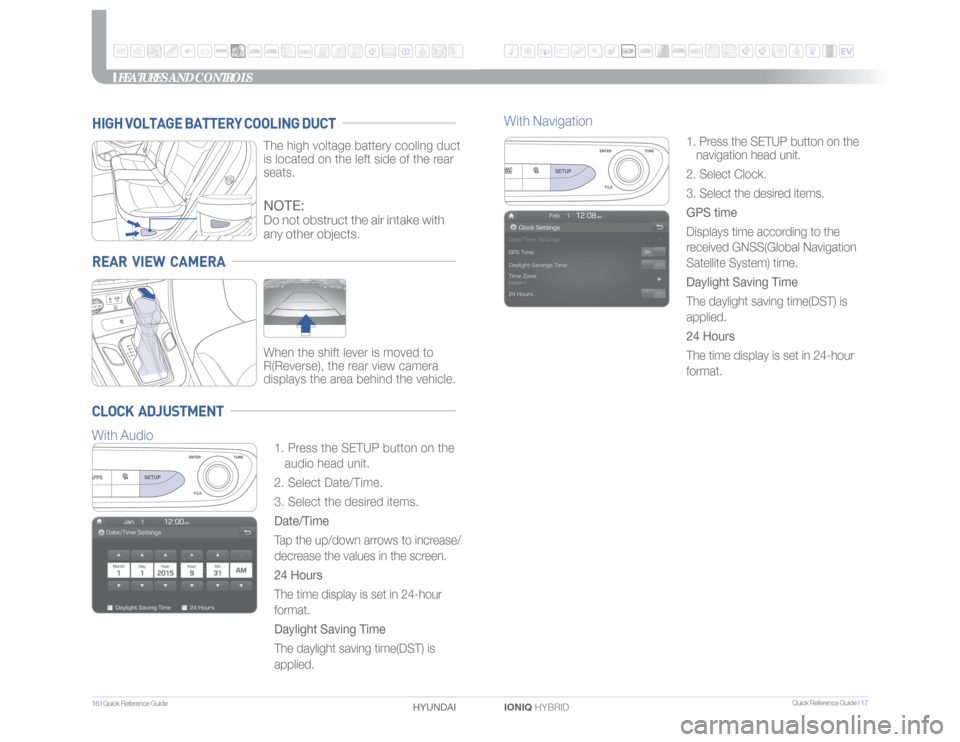
1. Press the SETUP button on the
navigation head unit.
2. Select Clock.
3. Select the desired items.
GPS time
Displays time according to the
received GNSS(Global Navigation
Satellite System) time.
Daylight Saving Time
The daylight saving time(DST) is
applied.
24 Hours
The time display is set in 24-hour
format.
FEATURES AND CONTROLS
With Navigation
REAR VIEW CAMERA
When the shift lever is moved to
R(Reverse), the rear view camera
displays the area behind the vehicle.
HIGH VOLTAGE BATTERY COOLING DUCT
The high voltage battery cooling duct
is located on the left side of the rear
seats.
CLOCK ADJUSTMENT
1. Press the SETUP button on the
audio head unit.
2. Select Date/Time.
3. Select the desired items.
Date/Time
Tap the up/down arrows to increase/
decrease the values in the screen.
24 Hours
The time display is set in 24-hour
format.
Daylight Saving Time
The daylight saving time(DST) is
applied.NOTE:Do not obstruct the air intake with
any other objects.
With Audio
Page 12 of 24
Quick Reference Guide I 21
20 I Quick Reference Guide
IONIQ HYBRID HYUNDAI
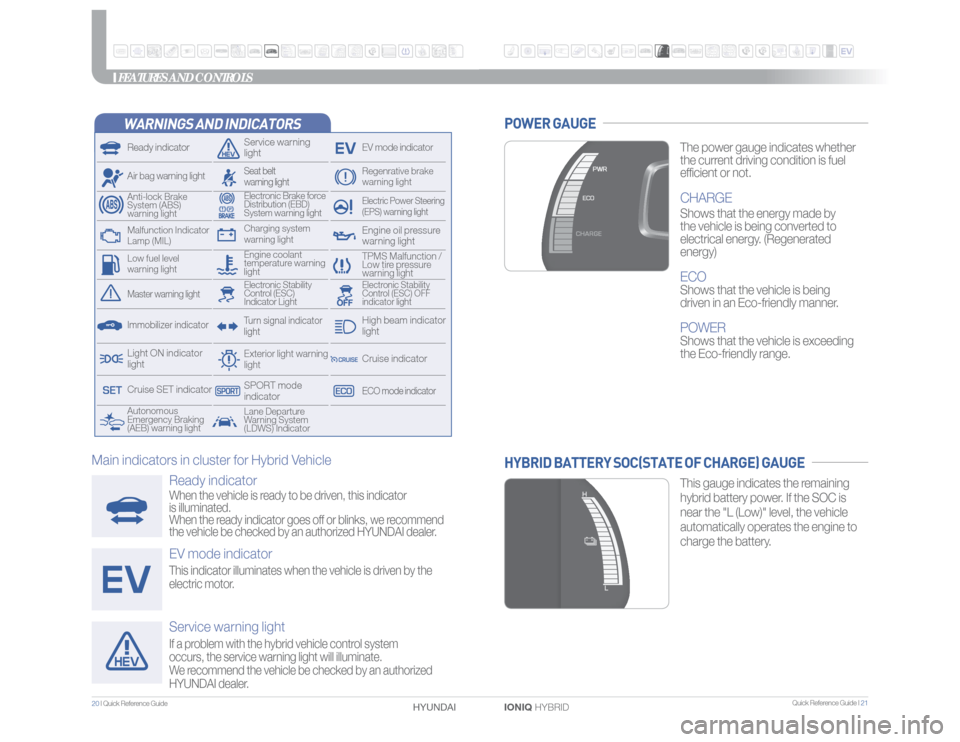
WARNINGS AND INDICATORSReady indicator
Service warning
light
EV mode indicator
Air bag warning light
Electric Power Steering
(EPS) warning light
Electronic Brake force
Distribution (EBD)
System warning light
TPMS Malfunction /
Low tire pressure
warning light
Autonomous
Emergency Braking
(AEB) warning lightLane Departure
Warning System
(LDWS) Indicator
Exterior light warning
lightCharging system
warning light
Engine coolant
temperature warning
light
Anti-lock Brake
System (ABS)
warning light
Regenrative brake
warning light
Seat belt
warning lightTurn signal indicator
light
Immobilizer indicatorMaster warning light
Electronic Stability
Control (ESC) OFF
indicator light
Electronic Stability
Control (ESC)
Indicator Light
Light ON indicator
light
ECO mode indicatorCruise indicatorHigh beam indicator
light
Cruise SET indicator
SPORT mode
indicator
Engine oil pressure
warning light
Malfunction Indicator
Lamp (MIL)Low fuel level
warning lightFEATURES AND CONTROLS
The power gauge indicates whether
the current driving condition is fuel
efficient or not.CHARGEShows that the energy made by
the vehicle is being converted to
electrical energy. (Regenerated
energy)ECOShows that the vehicle is being
driven in an Eco-friendly manner.POWERShows that the vehicle is exceeding
the Eco-friendly range.
POWER GAUGE
This gauge indicates the remaining
hybrid battery power. If the SOC is
near the "L (Low)" level, the vehicle
automatically operates the engine to
charge the battery.
HYBRID BATTERY SOC(STATE OF CHARGE) GAUGE
Ready indicatorWhen the vehicle is ready to be driven, this indicator
is illuminated.
When the ready indicator goes off or blinks, we recommend
the vehicle be checked by an authorized HYUNDAI dealer.EV mode indicatorThis indicator illuminates when the vehicle is driven by the
electric motor.Service warning lightIf a problem with the hybrid vehicle control system
occurs, the service warning light will illuminate.
We recommend the vehicle be checked by an authorized
HYUNDAI dealer.
Main indicators in cluster for Hybrid Vehicle
Page 18 of 24
Quick Reference Guide I 33
32 I Quick Reference Guide
IONIQ HYBRID HYUNDAI
MULTIMEDIA
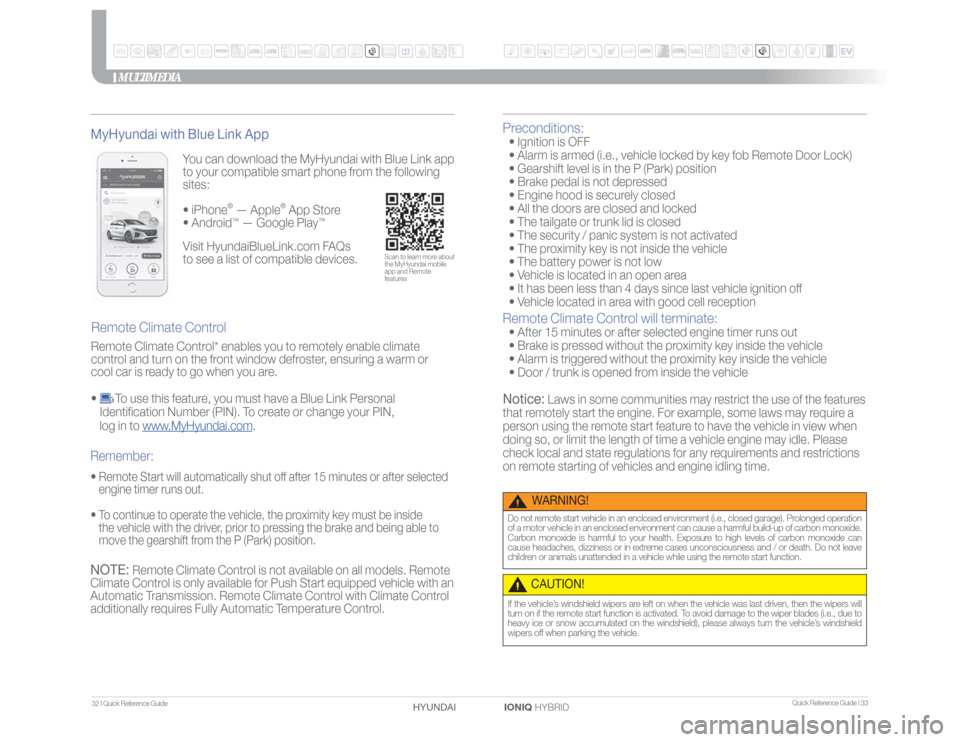
You can download the MyHyundai with Blue Link app
to your compatible smart phone from the following
sites: • iPhone
® — Apple
® App Store
• Android
™ — Google Play
™
Remote Climate Control MyHyundai with Blue Link App• Remote Start will automatically shut off after 15 minutes or after selected
engine timer runs out.
• To continue to operate the vehicle, the proximity key must be inside
the vehicle with the driver, prior to pressing the brake and being able to
move the gearshift from the P (Park) position.Remember:
Scan to learn more about
the MyHyundai mobile
app and Remote
features
Visit HyundaiBlueLink.com FAQs
to see a list of compatible devices.
NOTE:
Remote Climate Control is not available on all models. Remote
Climate Control is only available for Push Start equipped vehicle with an
Automatic Transmission. Remote Climate Control with Climate Control
additionally requires Fully Automatic Temperature Control.
Preconditions: • Ignition is OFF
• Alarm is armed (i.e., vehicle locked by key fob Remote Door Lock)
• Gearshift level is in the P (Park) position
• Brake pedal is not depressed
• Engine hood is securely closed
• All the doors are closed and locked
• The tailgate or trunk lid is closed
• The security / panic system is not activated
• The proximity key is not inside the vehicle
• The battery power is not low
• Vehicle is located in an open area
• It has been less than 4 days since last vehicle ignition off
• Vehicle located in area with good cell receptionRemote Climate Control will terminate: • After 15 minutes or after selected engine timer runs out
• Brake is pressed without the proximity key inside the vehicle
• Alarm is triggered without the proximity key inside the vehicle
• Door / trunk is opened from inside the vehicleNotice:
Laws in some communities may restrict the use of the features
that remotely start the engine. For example, some laws may require a
person using the remote start feature to have the vehicle in view when
doing so, or limit the length of time a vehicle engine may idle. Please
check local and state regulations for any requirements and restrictions
on remote starting of vehicles and engine idling time.
WARNING!
Do not remote start vehicle in an enclosed environment (i.e., closed garage). Prolonged operation
of a motor vehicle in an enclosed environment can cause a harmful build-up of carbon monoxide.
Carbon monoxide is harmful to your health. Exposure to high levels of carbon monoxide can
cause headaches, dizziness or in extreme cases unconsciousness and / or death. Do not leave
children or animals unattended in a vehicle while using the remote start function.
CAUTION!If the vehicle’s windshield wipers are left on when the vehicle was last driven, then the wipers will
turn on if the remote start function is activated. To avoid damage to the wiper blades (i.e., due to
heavy ice or snow accumulated on the windshield), please always turn the vehicle’s windshield
wipers off when parking the vehicle.
Remote Climate Control* enables you to remotely enable climate
control and turn on the front window defroster, ensuring a warm or
cool car is ready to go when you are.
•
To use this feature, you must have a Blue Link Personal
Identification Number (PIN). To create or change your PIN,
log in to www.MyHyundai.com.