display HYUNDAI IX35 2014 Workshop Manual
[x] Cancel search | Manufacturer: HYUNDAI, Model Year: 2014, Model line: IX35, Model: HYUNDAI IX35 2014Pages: 1534, PDF Size: 39.76 MB
Page 619 of 1534
Adjusting the driver and passenger side temperature equally
1. Press the DUAL button again to deac-tivate DUAL mode. The passenger
side temperature will be set to the
same temperature as the driver side.
2. Operate the driver side temperature control button. The driver and passen-
ger side temperature will be adjusted
equally.
Temperature conversion (if equipped)
You can switch the temperature mode
between Centigrade to Fahrenheit as fol-
lows:
While pressing the OFF button, press the
AUTO button for 3 seconds or more.
The display will change from Centigrade
to Fahrenheit, or from Fahrenheit to
Centigrade.
If the battery has been discharged or dis-
connected, the temperature mode dis-
play will reset to Centigrade.
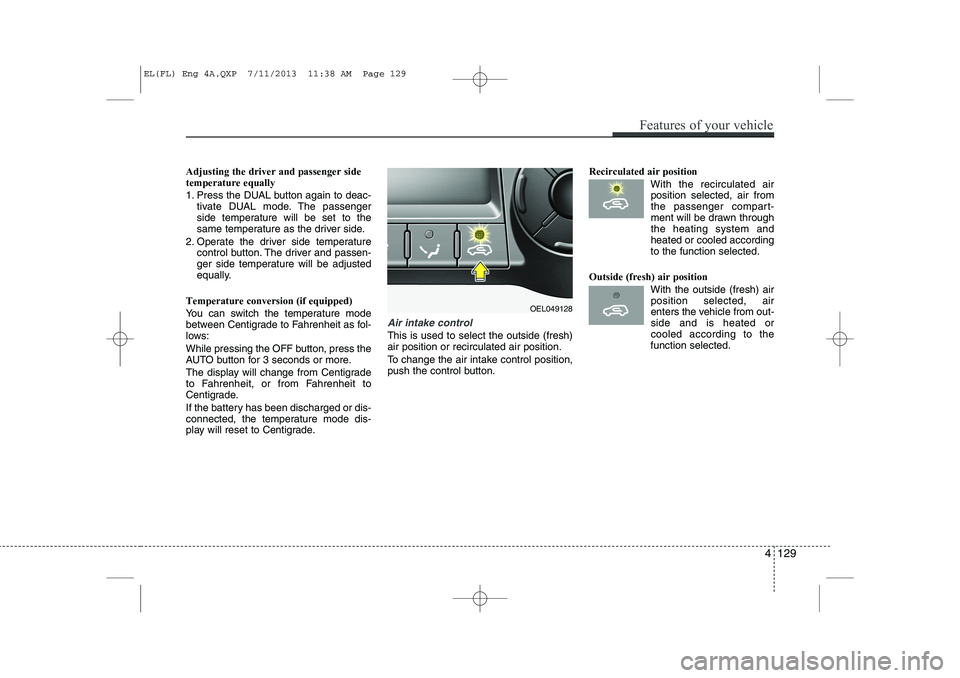
Air intake control
This is used to select the outside (fresh) air position or recirculated air position.
To change the air intake control position,
push the control button. Recirculated air position
With the recirculated airposition selected, air from
the passenger compart-
ment will be drawn throughthe heating system andheated or cooled according
to the function selected.
Outside (fresh) air position With the outside (fresh) airposition selected, air
enters the vehicle from out-side and is heated orcooled according to the
function selected.
OEL049128
Features of your vehicle
129
4
EL(FL) Eng 4A.QXP 7/11/2013 11:38 AM Page 129
Page 631 of 1534
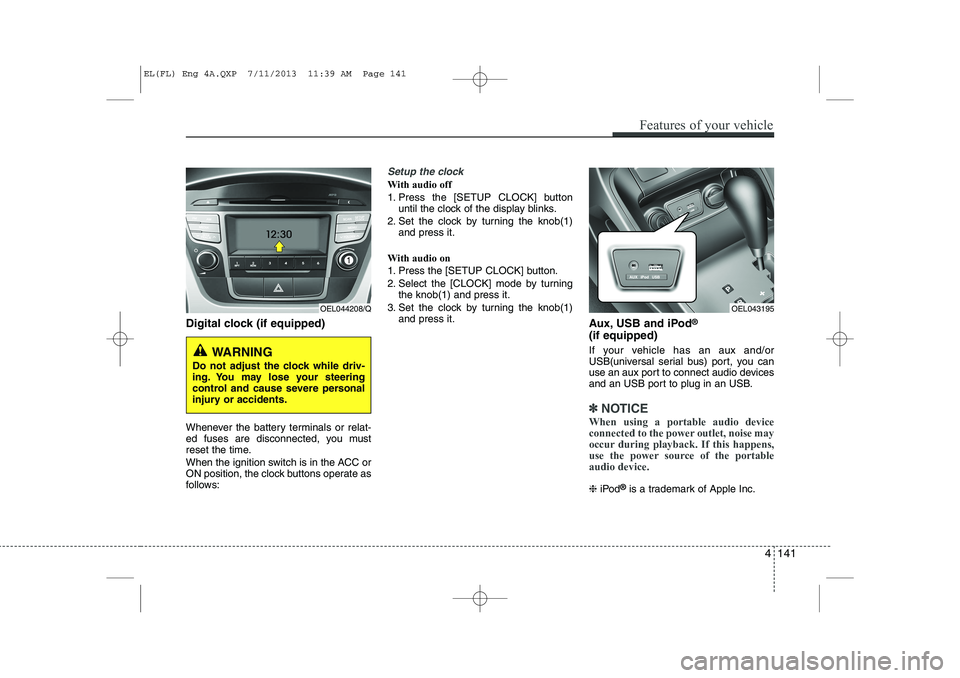
Digital clock (if equipped)
Whenever the battery terminals or relat-
ed fuses are disconnected, you must
reset the time.
When the ignition switch is in the ACC or
ON position, the clock buttons operate as
follows:
Setup the clock
With audio off
1. Press the [SETUP CLOCK] buttonuntil the clock of the display blinks.
2. Set the clock by turning the knob(1) and press it.
With audio on
1. Press the [SETUP CLOCK] button.
2. Select the [CLOCK] mode by turning the knob(1) and press it.
3. Set the clock by turning the knob(1) and press it. Aux, USB and iPod®
(if equipped)
If your vehicle has an aux and/or
USB(universal serial bus) port, you can
use an aux port to connect audio devices
and an USB port to plug in an USB.
✽✽ NOTICE
When using a portable audio device
connected to the power outlet, noise may
occur during playback. If this happens,
use the power source of the portableaudio device.
❈ iPod ®
is a trademark of Apple Inc.
Features of your vehicle
141
4
OEL044208/Q
WARNING
Do not adjust the clock while driv-
ing. You may lose your steering
control and cause severe personal
injury or accidents.
OEL043195
EL(FL) Eng 4A.QXP 7/11/2013 11:39 AM Page 141
Page 640 of 1534
Features of your vehicle
150
4
Caring for disc
If the temperature inside the car is too
high, open the car windows to ventilate
before using the system.
It is illegal to copy and use MP3/WMA files without permission. Use CDs that
are created only by lawful means.
Do not apply volatile agents, such as benzene and thinner, normal cleaners
and magnetic sprays made for ana-
logue disc onto CDs.
To prevent the disc surface from get- ting damaged, hold CDs by the edges
or the center hole only.
Clean the disc surface with a piece of soft cloth before playback (wipe it fromthe center to the outside edge).
Do not damage the disc surface or attach pieces of sticky tape or paper.
Make certain only CDs are inserted into the CD player (Do not insert morethan one CD at a time).
Keep CDs in their cases after use to protect them from scratches or dirt.
Depending on the type of CD-R/CD- RW CDs, certain CDs may not operate
normally according to manufacturingcompanies or making and recording
methods. In such circumstances, con-
tinued use may cause malfunctions to
your audio system.✽✽ NOTICE - Playing an
Incompatible Copy
Protected Audio CD
Some copy protected CDs, which do not comply with international audio CDstandards (Red Book), may not play on
your car audio. Please note that inabili-
ties to properly play a copy protectedCD may indicate that the CD is defec-
tive, not the CD player. ✽✽
NOTICE
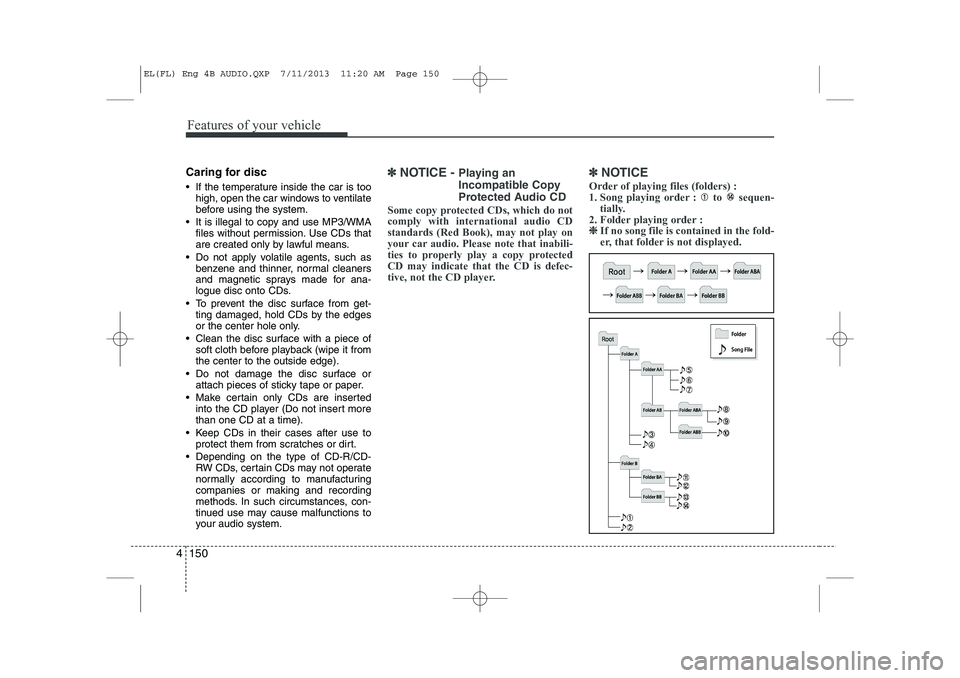
Order of playing files (folders) :
1. Song playing order : to sequen- tially.
2. Folder playing order : ❈
❈ If no song file is contained in the fold-
er, that folder is not displayed.
EL(FL) Eng 4B AUDIO.QXP 7/11/2013 11:20 AM Page 150
Page 647 of 1534
4 157
Features of your vehicle
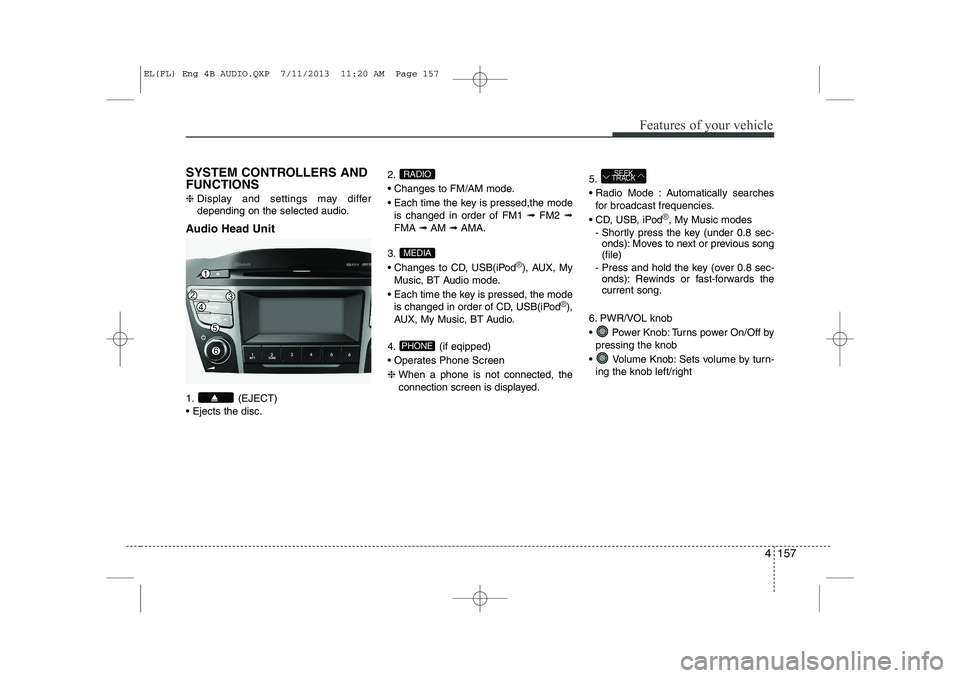
SYSTEM CONTROLLERS AND FUNCTIONS ❈Display and settings may differ
depending on the selected audio.
Audio Head Unit
1. (EJECT) Ejects the disc. 2.
Changes to FM/AM mode.
Each time the key is pressed,the mode
is changed in order of FM1 ➟FM2 ➟
FMA ➟AM ➟AMA.
3.
Changes to CD, USB(iPod
®), AUX, My
Music, BT Audio mode.
Each time the key is pressed, the mode is changed in order of CD, USB(iPod
®),
AUX, My Music, BT Audio.
4. (if eqipped)
Operates Phone Screen❈ When a phone is not connected, the
connection screen is displayed. 5.
Radio Mode : Automatically searches
for broadcast frequencies.
CD, USB, iPod
®, My Music modes
- Shortly press the key (under 0.8 sec- onds): Moves to next or previous song (file)
- Press and hold the key (over 0.8 sec- onds): Rewinds or fast-forwards thecurrent song.
6. PWR/VOL knob
Power Knob: Turns power On/Off by pressing the knob
Volume Knob: Sets volume by turn- ing the knob left/right
SEEK
TRACK
PHONE
MEDIA
RADIO
EL(FL) Eng 4B AUDIO.QXP 7/11/2013 11:20 AM Page 157
Page 648 of 1534
Features of your vehicle
158
4
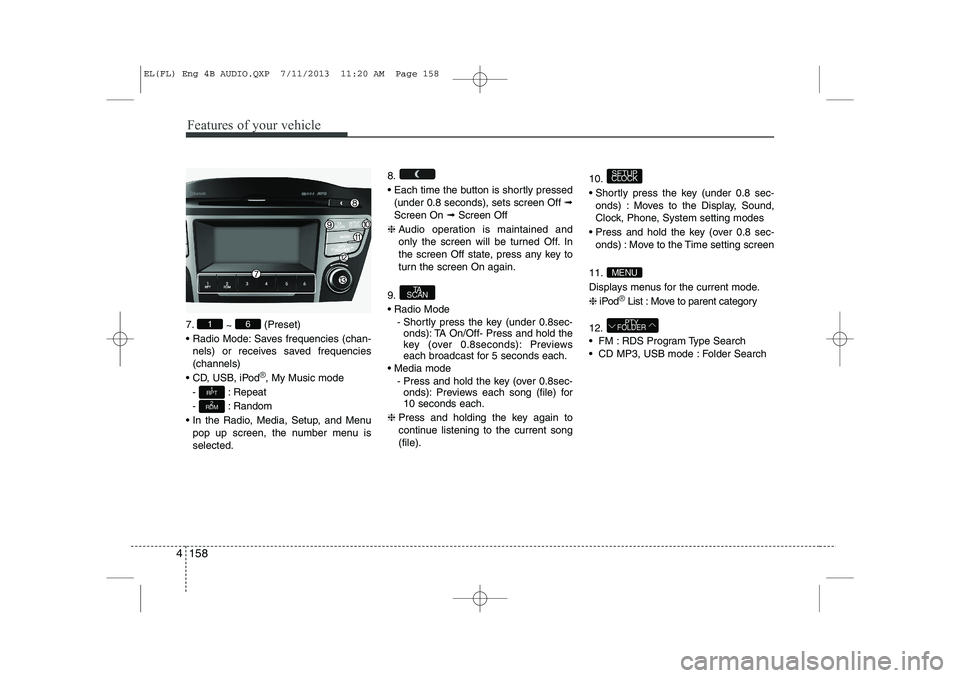
7.
~ (Preset)
Radio Mode: Saves frequencies (chan- nels) or receives saved frequencies (channels)
CD, USB, iPod
®, My Music mode
- : Repeat
- : Random
In the Radio, Media, Setup, and Menu pop up screen, the number menu is selected. 8.
Each time the button is shortly pressed
(under 0.8 seconds), sets screen Off ➟
Screen On ➟Screen Off
❈ Audio operation is maintained and
only the screen will be turned Off. In
the screen Off state, press any key to
turn the screen On again.
9. Radio Mode - Shortly press the key (under 0.8sec-onds): TA On/Off- Press and hold the
key (over 0.8seconds): Previews
each broadcast for 5 seconds each.
Media mode - Press and hold the key (over 0.8sec-onds): Previews each song (file) for10 seconds each.
❈ Press and holding the key again to
continue listening to the current song(file). 10.
Shortly press the key (under 0.8 sec-
onds) : Moves to the Display, Sound,
Clock, Phone, System setting modes
Press and hold the key (over 0.8 sec- onds) : Move to the Time setting screen
11.
Displays menus for the current mode.❈ iPod
®List : Move to parent category
12.
FM : RDS Program Type Search
CD MP3, USB mode : Folder Search
PTY
FOLDER
MENU
SETUP
CLOCK
TA
SCAN
2
RDM
1
RPT
61
EL(FL) Eng 4B AUDIO.QXP 7/11/2013 11:20 AM Page 158
Page 649 of 1534
4 159
Features of your vehicle
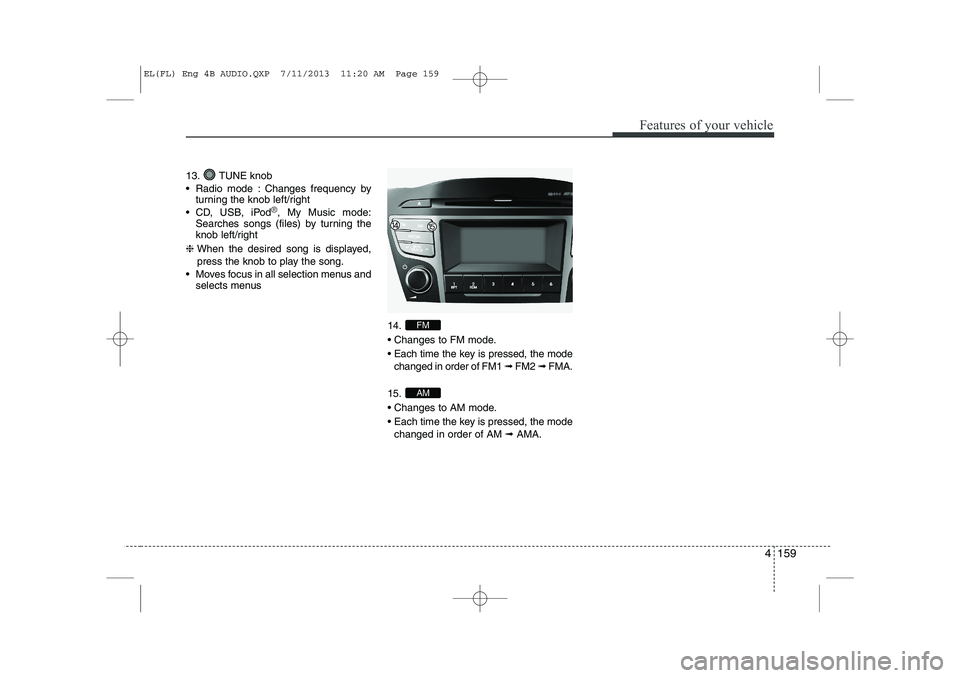
13. TUNE knob
Radio mode : Changes frequency byturning the knob left/right
CD, USB, iPod
®, My Music mode:
Searches songs (files) by turning the
knob left/right
❈ When the desired song is displayed,
press the knob to play the song.
Moves focus in all selection menus and selects menus
14.
Changes to FM mode.
Each time the key is pressed, the modechanged in order of FM1 ➟ FM2 ➟ FMA.
15.
Changes to AM mode.
Each time the key is pressed, the mode changed in order of AM ➟AMA.
AM
FM
EL(FL) Eng 4B AUDIO.QXP 7/11/2013 11:20 AM Page 159
Page 650 of 1534
![HYUNDAI IX35 2014 Workshop Manual Features of your vehicle
160
4
SETUP
- AC100ELEE, AC110ELEE
Display Settings
Press the key Select [Display]
through TUNE knob or key
Select menu through TUNE knob Mode Pop up
[Mode Pop up]](/img/35/56237/w960_56237-649.png "HYUNDAI IX35 2014 Workshop Manual Features of your vehicle
160
4
SETUP
- AC100ELEE, AC110ELEE
Display Settings
Press the key Select [Display]
through TUNE knob or key
Select menu through TUNE knob Mode Pop up
[Mode Pop up]")
Features of your vehicle
160
4
SETUP
- AC100ELEE, AC110ELEE
Display Settings
Press the key Select [Display]
through TUNE knob or key
Select menu through TUNE knob Mode Pop up
[Mode Pop up] Changes . selec- tion mode
During On state, press the or
key to display the mode
change pop up screen.
When the pop up screen is displayed, use the TUNE knob or keys
~ to select the desired mode.
Scroll text
[Scroll text] Set /
: Maintains scroll
: Scrolls only one (1) time.
Song Info
When playing an MP3 file, select the
desired display info from ‘Folder/File’ or
‘Album/Artist/Song’. Sound Settings
Press the key Select [Sound]
through TUNE knob or key
Select menu through TUNE knob
2
RDM
SETUP
CLOCK
Off
On
OffOn
6
1
MEDIA
RADIO
On
1
RPT
SETUP
CLOCK
EL(FL) Eng 4B AUDIO.QXP 7/11/2013 11:20 AM Page 160
Page 653 of 1534
![HYUNDAI IX35 2014 Workshop Manual 4 163
Features of your vehicle
Time Format This function is used to set the 12/24
hour time format of the audio system.
Select [Time Format] Set 12Hr / 24Hr
through TUNE knob
Clock Display when Po](/img/35/56237/w960_56237-652.png "HYUNDAI IX35 2014 Workshop Manual 4 163
Features of your vehicle
Time Format This function is used to set the 12/24
hour time format of the audio system.
Select [Time Format] Set 12Hr / 24Hr
through TUNE knob
Clock Display when Po")
4 163
Features of your vehicle
Time Format This function is used to set the 12/24
hour time format of the audio system.
Select [Time Format] Set 12Hr / 24Hr
through TUNE knob
Clock Display when Power is OFF
Select [Clock Disp.(Pwr Off) Set /through TUNE knob
: Displays time/date on screen
: Turn off. Automatic RDS Time This option is used to automatically set
the time by synchronizing with RDS.
Select [Automatic RDS Time] Set
/ through TUNE
knob
: Turn on Automatic Time
: Turn off.
Off
On
Off
On
Off
On
Off
On
EL(FL) Eng 4B AUDIO.QXP 7/11/2013 11:20 AM Page 163
Page 654 of 1534
![HYUNDAI IX35 2014 Workshop Manual Features of your vehicle
164
4
Phone Setup (if eqipped)
Press the key Select [Phone] Pair Phone
Select [Pair Phone] Set through TUNE knob ➀
Search for device names as displayed
on your mobil](/img/35/56237/w960_56237-653.png "HYUNDAI IX35 2014 Workshop Manual Features of your vehicle
164
4
Phone Setup (if eqipped)
Press the key Select [Phone] Pair Phone
Select [Pair Phone] Set through TUNE knob ➀
Search for device names as displayed
on your mobil")
Features of your vehicle
164
4
Phone Setup (if eqipped)
Press the key Select [Phone] Pair Phone
Select [Pair Phone] Set through TUNE knob ➀
Search for device names as displayed
on your mobile phone and connect.
➁ Input the passkey displayed on the
screen. (Passkey : 0000)
❈ The device name and passkey will be
displayed on the screen for up to 3
minutes. If pairing is not completed
within the 3 minutes, the mobile phone
pairing process will automatically becanceled. ➂
Pairing completion is displayed.
❈ In some mobile phones, pairing will
automatically be followed by connec-tion.
❈ It is possible to pair up to five
Bluetooth®Wireless Technology
enabled mobile phones.
SETUP
CLOCKCAUTION
To pair a Bluetooth®Wireless
Technology enabled mobile phone, authentication and connection processes are first required. As aresult, you cannot pair your mobile
phone while driving the vehicle.First park your vehicle before use.
EL(FL) Eng 4B AUDIO.QXP 7/11/2013 11:20 AM Page 164
Page 655 of 1534
![HYUNDAI IX35 2014 Workshop Manual 4 165
Features of your vehicle
Phone List The names of up to 5 paired phones will
be displayed.
A [ ] is displayed in front of the currently
connected phone. Select the desired name to setup the
s](/img/35/56237/w960_56237-654.png "HYUNDAI IX35 2014 Workshop Manual 4 165
Features of your vehicle
Phone List The names of up to 5 paired phones will
be displayed.
A [ ] is displayed in front of the currently
connected phone. Select the desired name to setup the
s")
4 165
Features of your vehicle
Phone List The names of up to 5 paired phones will
be displayed.
A [ ] is displayed in front of the currently
connected phone. Select the desired name to setup the
selected phone.
Connecting a phone
Select [Phone List] Select mobile phone
through TUNE knob Select [ConnectPhone] ➀ Select a mobile phone that is not cur- rently connected.
➁ Connect the selected mobile phone.
➂ Connection completion is displayed.
❈ If a phone is already connected, dis-connect the currently connected
phone and select a new phone to con-nect.
Disconnecting a connected phone
Select [Phone List] Select mobile phone through TUNE knob Select
[Disconnect Phone] ➀ Select the currently connected mobile
phone.
➁ Disconnect the selected mobile
phone.
➂ Disconnection completion is dis-
played.
EL(FL) Eng 4B AUDIO.QXP 7/11/2013 11:20 AM Page 165