Button Hyundai Kona EV 2019 Owner's Manual
[x] Cancel search | Manufacturer: HYUNDAI, Model Year: 2019, Model line: Kona EV, Model: Hyundai Kona EV 2019Pages: 540, PDF Size: 21.84 MB
Page 481 of 540
H18
Charging Connector
AUTO / LOCK Mode
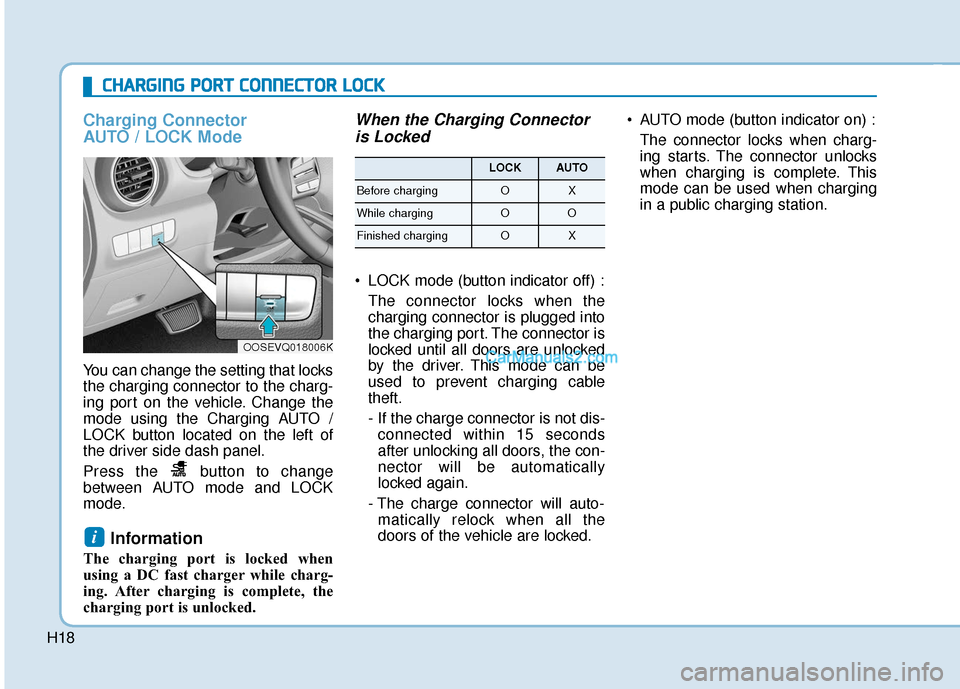
You can change the setting that locks
the charging connector to the charg-
ing port on the vehicle. Change the
mode using the Charging AUTO /
LOCK button located on the left of
the driver side dash panel.
Press the button to change
between AUTO mode and LOCK
mode.
Information
The charging port is locked when
using a DC fast charger while charg-
ing. After charging is complete, the
charging port is unlocked.
When the Charging Connectoris Locked
LOCK mode (button indicator off) :
The connector locks when the
charging connector is plugged into
the charging port. The connector is
locked until all doors are unlocked
by the driver. This mode can be
used to prevent charging cable
theft.
- If the charge connector is not dis-connected within 15 seconds
after unlocking all doors, the con-
nector will be automatically
locked again.
- The charge connector will auto- matically relock when all the
doors of the vehicle are locked. AUTO mode (button indicator on) :
The connector locks when charg-
ing starts. The connector unlocks
when charging is complete. This
mode can be used when charging
in a public charging station.
i
C
CH
H A
AR
RG
G I
IN
N G
G
P
P O
O R
RT
T
C
C O
O N
NN
NE
EC
CT
T O
O R
R
L
L O
O C
CK
K
OOSEVQ018006K
LOCKAUTO
Before chargingOX
While chargingOO
Finished chargingOX
Page 482 of 540
H19
Scheduled Charging
You can set-up a charging sched-ule for your vehicle using the Audio
or Navigation screen or BlueLink
application.
Refer to the Multimedia manual or
the BlueLink manual for detailed
information about setting sched-
uled charging.
Scheduled charging can only be done when using a Level 2 AC
charging station or the Level 1 AC
charger with the Hyundai-supplied
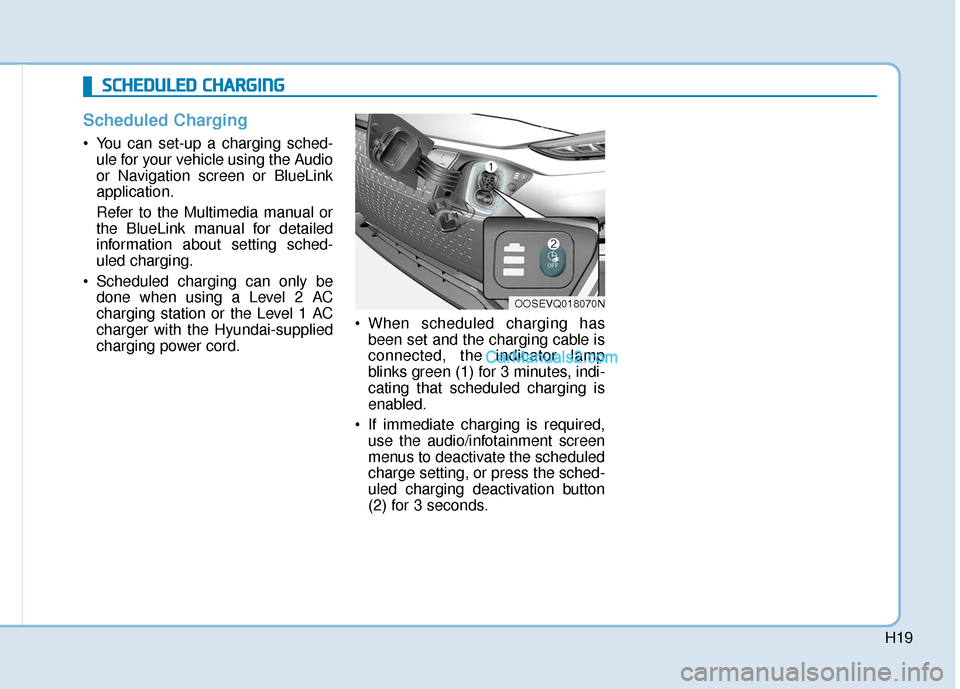
charging power cord. When scheduled charging has
been set and the charging cable is
connected, the indicator lamp
blinks green (1) for 3 minutes, indi-
cating that scheduled charging is
enabled.
If immediate charging is required, use the audio/infotainment screen
menus to deactivate the scheduled
charge setting, or press the sched-
uled charging deactivation button
(2) for 3 seconds.
OOSEVQ018070N
S
SC
C H
H E
ED
D U
U L
LE
E D
D
C
C H
H A
AR
RG
G I
IN
N G
G
Page 485 of 540
H22
Level 2 AC Charging (240V)
Actual charger image and charg-
ing method may vary in accor-
dance with the charging station
manufacturer.
How to Connect AC Charger
1. Depress the brake pedal andapply the electronic parking brake.
2. Shift to P (Park) and turn OFF the vehicle using the POWER button.
Information
If charging is initiated without the
gear in P (Park), charging will start
only after the gear is automatically
shifted to P (Park).
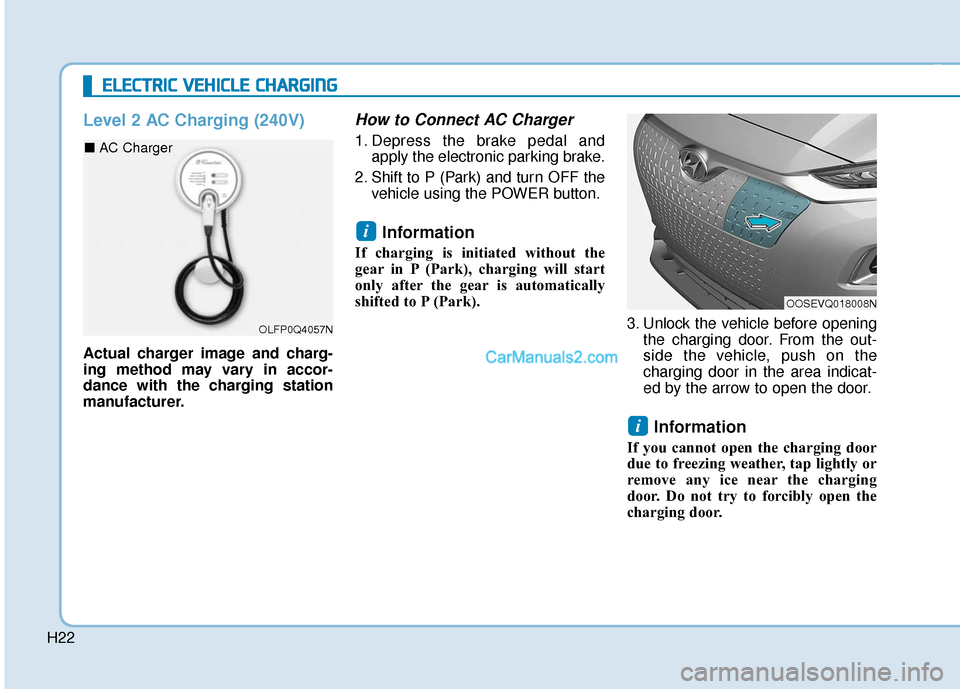
3. Unlock the vehicle before openingthe charging door. From the out-
side the vehicle, push on the
charging door in the area indicat-
ed by the arrow to open the door.
Information
If you cannot open the charging door
due to freezing weather, tap lightly or
remove any ice near the charging
door. Do not try to forcibly open the
charging door.
i
i
E EL
LE
E C
CT
T R
R I
IC
C
V
V E
EH
H I
IC
C L
LE
E
C
C H
H A
AR
RG
G I
IN
N G
G
OLFP0Q4057N
■ AC Charger
OOSEVQ018008N
Page 489 of 540
H26
How to Disconnect AC Charger
1. Confirm that charging hasstopped on the EV charging sta-
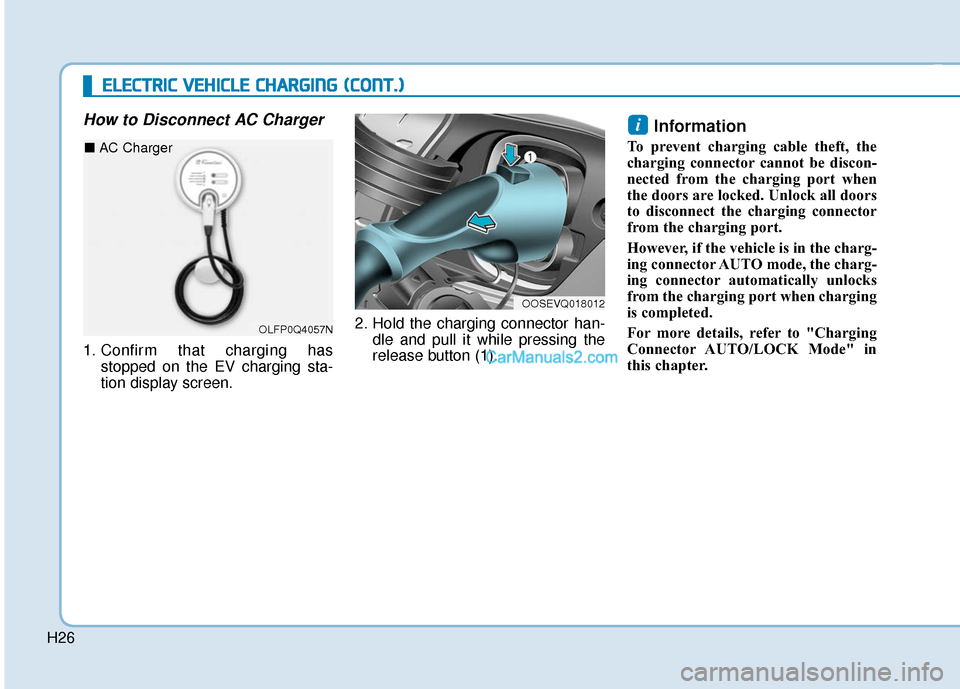
tion display screen. 2. Hold the charging connector han-
dle and pull it while pressing the
release button (1).
Information
To prevent charging cable theft, the
charging connector cannot be discon-
nected from the charging port when
the doors are locked. Unlock all doors
to disconnect the charging connector
from the charging port.
However, if the vehicle is in the charg-
ing connector AUTO mode, the charg-
ing connector automatically unlocks
from the charging port when charging
is completed.
For more details, refer to "Charging
Connector AUTO/LOCK Mode" in
this chapter.
i
OOSEVQ018012
E
EL
LE
E C
CT
T R
R I
IC
C
V
V E
EH
H I
IC
C L
LE
E
C
C H
H A
AR
RG
G I
IN
N G
G
(
( C
C O
O N
NT
T.
.)
)
OLFP0Q4057N
■ AC Charger
Page 491 of 540
H28
DC Fast Charging
DC fast charging (also known as
Level 3 charging) provides high
power DC current directly to the EV
battery. DC charging stations are
capable of charging the EV battery to
80% in less than 75 minutes under
normal conditions.
While DC charging is very fast com-
pared to AC charging, prolonged and
continuous use of DC fast charging
may reduce the long term life of the
EV battery. Usage of a DC fast
charger should be minimized when
possible in order to help prolong the
life of the EV battery.Actual charger image and charg-
ing method may vary in accor-
dance with the charging station
manufacturer.
Information
If you use a DC charger when the
vehicle is already fully charged, some
DC chargers will send out an error
message. When the vehicle is fully
charged, do not charge the vehicle.
How to Connect DC Charger
1. Depress the brake pedal and
apply the electronic parking brake.
2. Shift to P (Park) and turn OFF the vehicle using the POWER button.
Information
If charging is initiated without the
gear in P (Park), charging will start
only after the gear is automatically
shifted to P (Park). 3. Unlock the vehicle before opening
the charging door. From the out-
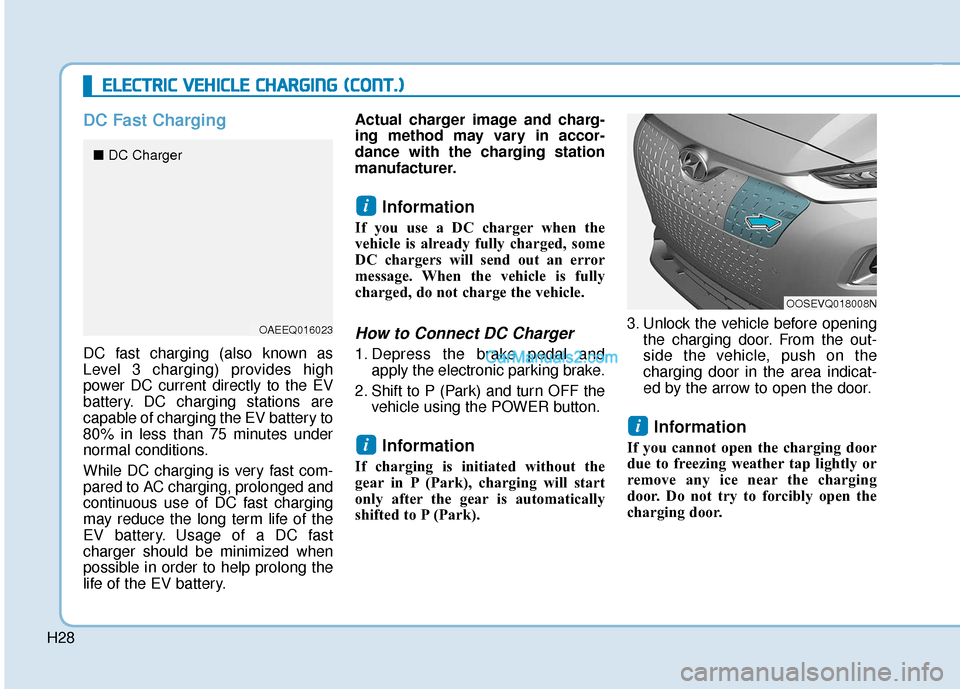
side the vehicle, push on the
charging door in the area indicat-
ed by the arrow to open the door.
Information
If you cannot open the charging door
due to freezing weather tap lightly or
remove any ice near the charging
door. Do not try to forcibly open the
charging door.
i
i
i
E EL
LE
E C
CT
T R
R I
IC
C
V
V E
EH
H I
IC
C L
LE
E
C
C H
H A
AR
RG
G I
IN
N G
G
(
( C
C O
O N
NT
T.
.)
)
OOSEVQ018008N
OAEEQ016023
■ DC Charger
Page 496 of 540
H33
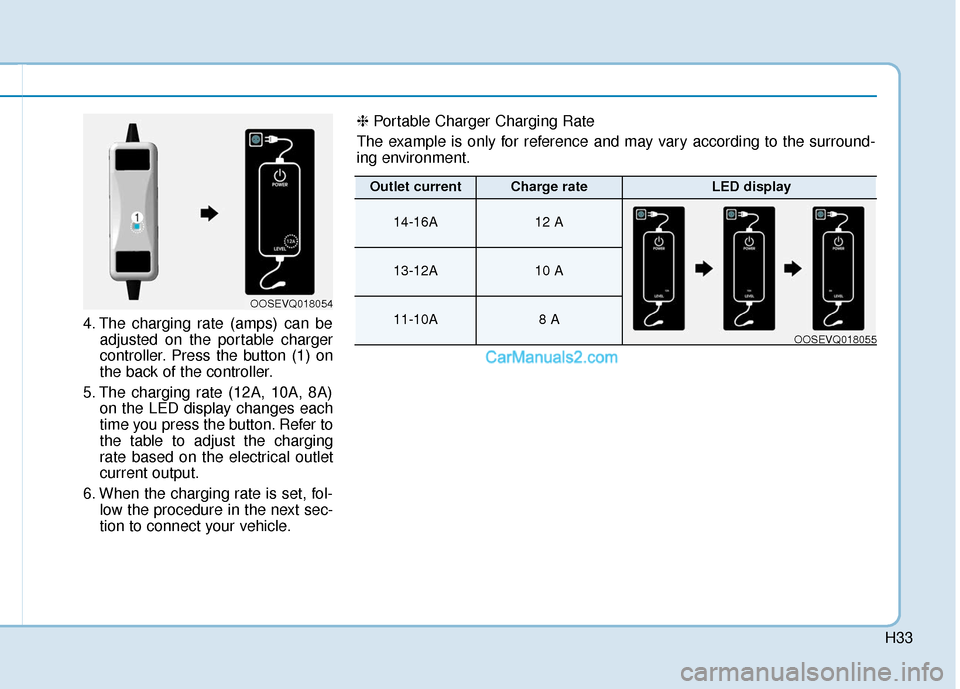
4. The charging rate (amps) can beadjusted on the portable charger
controller. Press the button (1) on
the back of the controller.
5. The charging rate (12A, 10A, 8A) on the LED display changes each
time you press the button. Refer to
the table to adjust the charging
rate based on the electrical outlet
current output.
6. When the charging rate is set, fol- low the procedure in the next sec-
tion to connect your vehicle.
OOSEVQ018054
❈ Portable Charger Charging Rate
The example is only for reference and may vary according to the surround-
ing environment.
Outlet currentCharge rateLED display
14-16A12 A
13-12A10 A
11-10A8 A
OOSEVQ018055
Page 497 of 540
H34
Connecting the Portable Charger
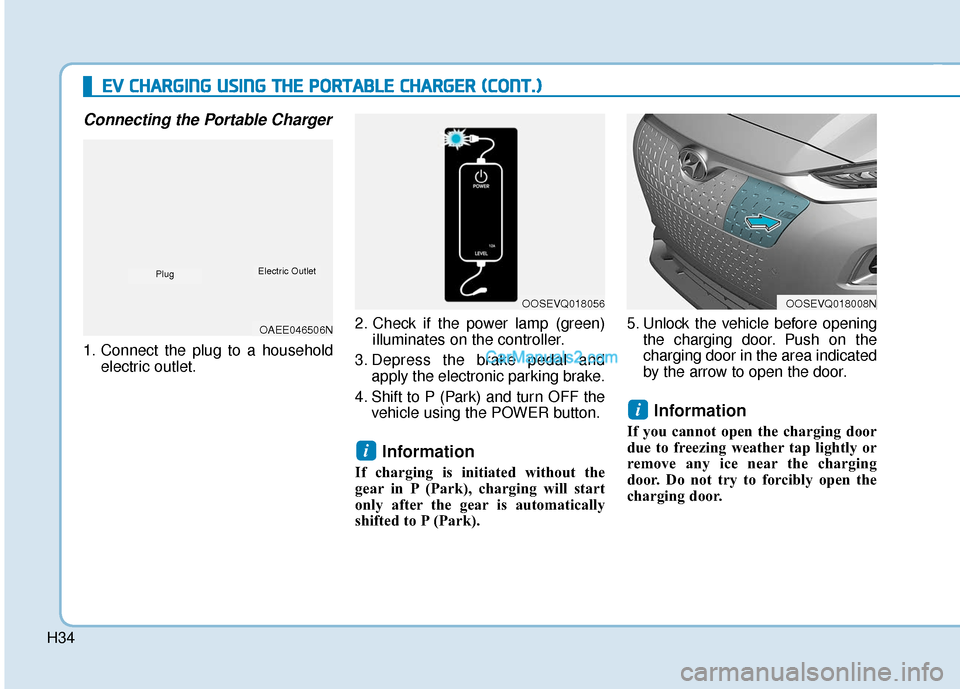
1. Connect the plug to a householdelectric outlet. 2. Check if the power lamp (green)
illuminates on the controller.
3. Depress the brake pedal and apply the electronic parking brake.
4. Shift to P (Park) and turn OFF the vehicle using the POWER button.
Information
If charging is initiated without the
gear in P (Park), charging will start
only after the gear is automatically
shifted to P (Park). 5. Unlock the vehicle before opening
the charging door. Push on the
charging door in the area indicated
by the arrow to open the door.
Information
If you cannot open the charging door
due to freezing weather tap lightly or
remove any ice near the charging
door. Do not try to forcibly open the
charging door.
i
i
E
EV
V
C
C H
H A
AR
RG
G I
IN
N G
G
U
U S
SI
IN
N G
G
T
T H
H E
E
P
P O
O R
RT
TA
A B
BL
LE
E
C
C H
H A
AR
RG
G E
ER
R
(
( C
C O
O N
NT
T.
.)
)
OOSEVQ018056OOSEVQ018008N
OAEE046506N
PlugElectric Outlet
Page 501 of 540
H38
E
EV
V
C
C H
H A
AR
RG
G I
IN
N G
G
U
U S
SI
IN
N G
G
T
T H
H E
E
P
P O
O R
RT
TA
A B
BL
LE
E
C
C H
H A
AR
RG
G E
ER
R
(
( C
C O
O N
NT
T.
.)
)
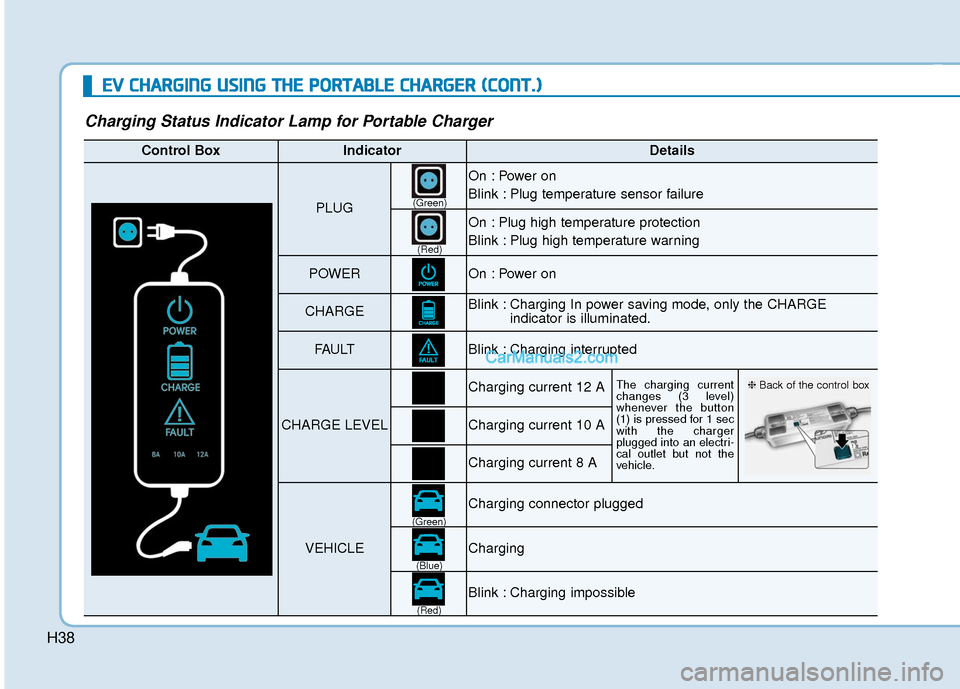
Charging Status Indicator Lamp for Portable Charger
Control BoxIndicatorDetails
PLUG
On : Power on
Blink : Plug temperature sensor failure
On : Plug high temperature protection
Blink : Plug high temperature warning
POWEROn : Power on
CHARGEBlink : Charging In power saving mode, only the CHARGE
indicator is illuminated.
FAU LTBlink : Charging interrupted
CHARGE LEVEL
Charging current 12 AThe charging current
changes (3 level)
whenever the button
(1) is pressed for 1 sec
with the charger
plugged into an electri-
cal outlet but not the
vehicle.
Charging current 10 A
Charging current 8 A
VEHICLE
Charging connector plugged
Charging
Blink : Charging impossible
(Green)
(Green) (Blue)
(Red)(Red)
❈
Back of the control box
Page 504 of 540
H41
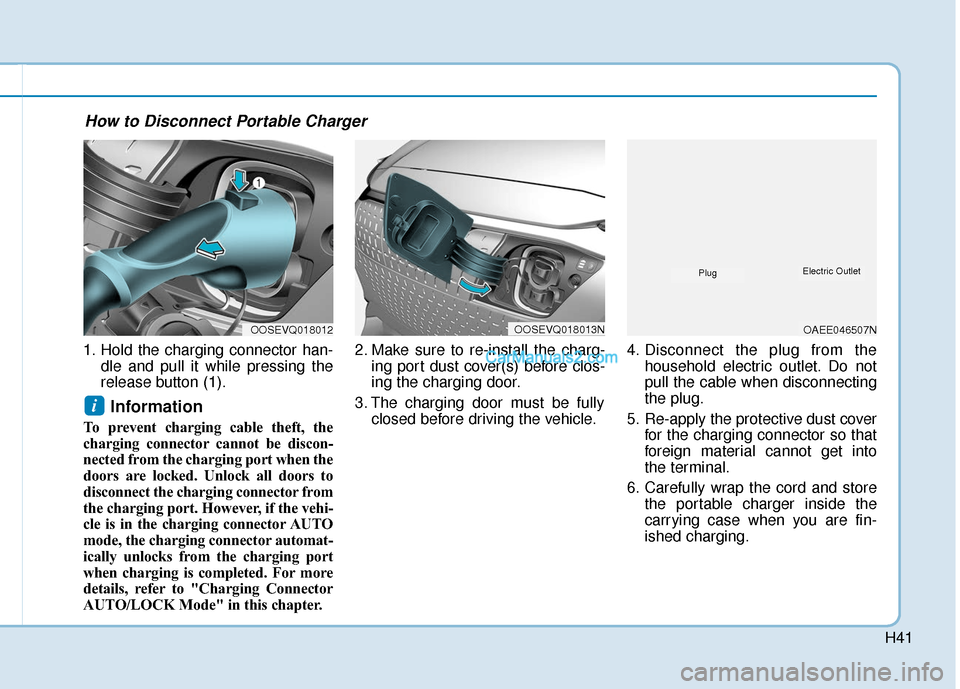
1. Hold the charging connector han-dle and pull it while pressing the
release button (1).
Information
To prevent charging cable theft, the
charging connector cannot be discon-
nected from the charging port when the
doors are locked. Unlock all doors to
disconnect the charging connector from
the charging port. However, if the vehi-
cle is in the charging connector AUTO
mode, the charging connector automat-
ically unlocks from the charging port
when charging is completed. For more
details, refer to "Charging Connector
AUTO/LOCK Mode" in this chapter. 2. Make sure to re-install the charg-
ing port dust cover(s) before clos-
ing the charging door.
3. The charging door must be fully closed before driving the vehicle. 4. Disconnect the plug from the
household electric outlet. Do not
pull the cable when disconnecting
the plug.
5. Re-apply the protective dust cover for the charging connector so that
foreign material cannot get into
the terminal.
6. Carefully wrap the cord and store the portable charger inside the
carrying case when you are fin-
ished charging.
i
OOSEVQ018012OOSEVQ018013NOAEE046507N
PlugElectric Outlet
How to Disconnect Portable Charger
Page 507 of 540
H44
How to Start the Vehicle
1. Holding the smart key, sit in thedriver's seat.
2. Fasten the seat belt before start- ing the vehicle.
3. Make sure to engage the parking brake.
4. Turn OFF all electrical devices.
5. Make sure to depress and hold the brake pedal.
6. While depressing the brake pedal, shift to P (Park).
7. Depress and hold the brake pedal while pressing the POWER but-
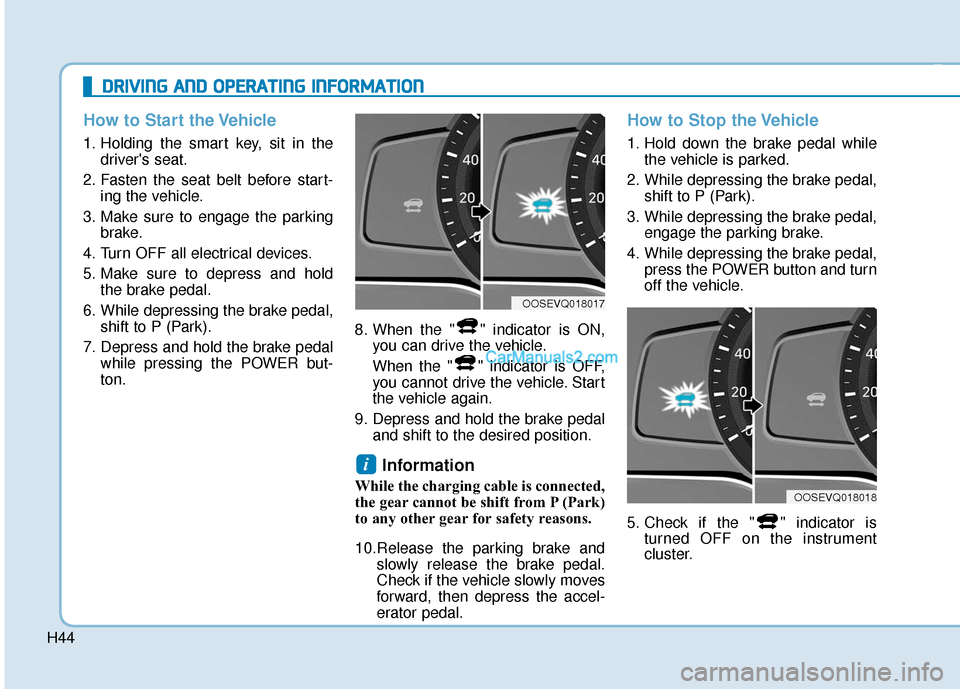
ton. 8. When the " " indicator is ON,
you can drive the vehicle.
When the " " indicator is OFF,
you cannot drive the vehicle. Start
the vehicle again.
9. Depress and hold the brake pedal and shift to the desired position.
Information
While the charging cable is connected,
the gear cannot be shift from P (Park)
to any other gear for safety reasons.
10.Release the parking brake and slowly release the brake pedal.
Check if the vehicle slowly moves
forward, then depress the accel-
erator pedal.
How to Stop the Vehicle
1. Hold down the brake pedal whilethe vehicle is parked.
2. While depressing the brake pedal, shift to P (Park).
3. While depressing the brake pedal, engage the parking brake.
4. While depressing the brake pedal, press the POWER button and turn
off the vehicle.
5. Check if the " " indicator is turned OFF on the instrument
cluster.
i
D
DR
RI
IV
V I
IN
N G
G
A
A N
N D
D
O
O P
PE
ER
R A
A T
TI
IN
N G
G
I
IN
N F
FO
O R
RM
M A
AT
TI
IO
O N
N
OOSEVQ018018
OOSEVQ018017