AUX Hyundai Kona EV 2019 User Guide
[x] Cancel search | Manufacturer: HYUNDAI, Model Year: 2019, Model line: Kona EV, Model: Hyundai Kona EV 2019Pages: 540, PDF Size: 21.84 MB
Page 359 of 540
6-3
What to do in an emergency
If you Have a Flat Tire While
Driving
If a tire goes flat while you are driving:
Take your foot off the acceleratorpedal and let the vehicle slow down
while driving straight ahead. Do not
apply the brakes immediately to
slow down the vehicle, but use the
paddle shifter (left side lever) to
increase regenerative braking con-
trol. Do not attempt to pull off the
road suddenly as this may cause
loss of vehicle control. When the
vehicle has slowed to such a speed
that it is safe to do so, brake care-
fully and pull off the road. Drive off
the road as far as possible and park
on firm, level ground. If you are on
a divided highway, do not park in
the median area between the two
traffic lanes.
When the vehicle is stopped, press the hazard warning flasher button,
shift to P(Park), apply the parking
brake, and place the POWER but-
ton in the OFF position. Have all passengers get out of the
vehicle. Be sure they all get out on
the side of the vehicle that is away
from traffic.
Follow the instructions provided later in this chapter.
Confirm the EV Battery SOC
Level
Confirm that the vehicle is in P
(Park). The vehicle can only be
started when the gear is in P
(Park).
Confirm the State of Charge (SOC) percentage level on the charge
gauge or in the head unit display.
Inspect the 12V auxiliary battery connections in the EV motor com-
partment to make sure they are
clean and tight.
Turn on the headlamps. If the headlamps are not illuminating
properly, the 12V auxiliary battery
voltage may be low.
Do not push or pull the vehicle to
start it. This could cause damage to
your vehicle. See instructions for
"Jump Starting" provided in this
chapter.
6
I I F
F
T
T H
H E
E
V
V E
EH
H I
IC
C L
LE
E
W
W I
IL
L L
L
N
N O
O T
T
S
S T
T A
A R
RT
T
Page 381 of 540
7
Maintenance
7
Maintenance
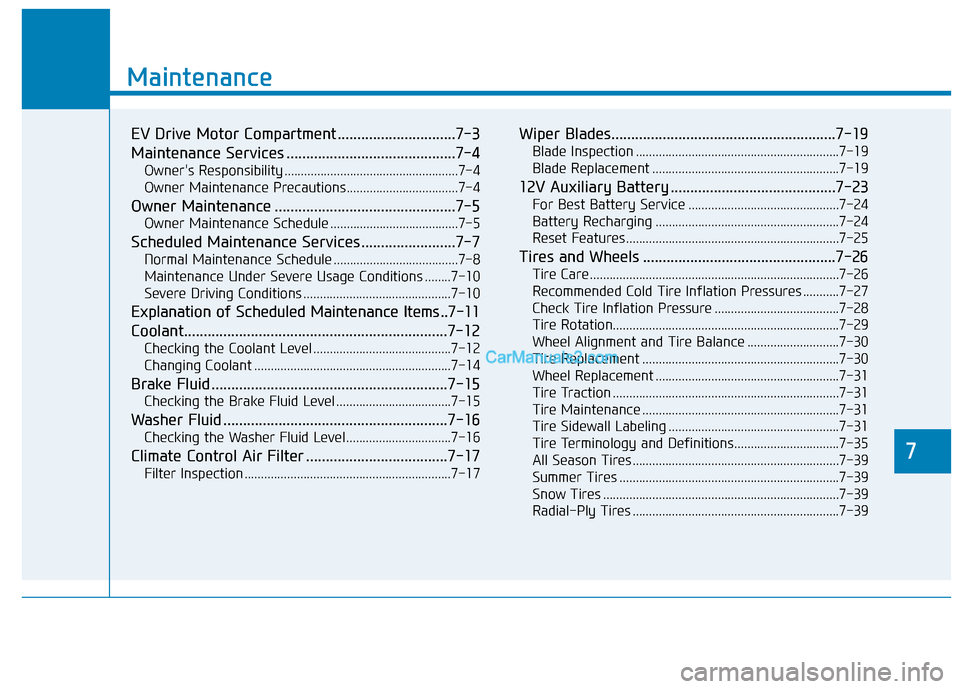
EV Drive Motor Compartment ..............................7-3
Maintenance Services ...........................................7-4
Owner's Responsibility .....................................................7-4
Owner Maintenance Precautions..................................7-4
Owner Maintenance ..............................................7-5
Owner Maintenance Schedule .......................................7-5
Scheduled Maintenance Services........................7-7
Normal Maintenance Schedule ......................................7-8
Maintenance Under Severe Usage Conditions ........7-10
Severe Driving Conditions .............................................7-10
Explanation of Scheduled Maintenance Items ..7-11
Coolant.................................................................\
..7-12
Checking the Coolant Level ..........................................7-12
Changing Coolant ............................................................7-14
Brake Fluid ............................................................7-15
Checking the Brake Fluid Level ...................................7-15
Washer Fluid .........................................................7-16
Checking the Washer Fluid Level................................7-16
Climate Control Air Filter ....................................7-17
Filter Inspection ...............................................................7-17
Wiper Blades.........................................................7-19
Blade Inspection ..............................................................7-19
Blade Replacement .........................................................7-19
12V Auxiliary Battery ..........................................7-23
For Best Battery Service ..............................................7-24
Battery Recharging ........................................................7-24
Reset Features.................................................................7-25
Tires and Wheels .................................................7-26
Tire Care ........................................................................\
....7-26
Recommended Cold Tire Inflation Pressures ...........7-27
Check Tire Inflation Pressure ......................................7-28
Tire Rotation...................................................................\
..7-29
Wheel Alignment and Tire Balance ............................7-30
Tire Replacement ............................................................7-30
Wheel Replacement ........................................................7-31
Tire Traction .....................................................................7-3\
1
Tire Maintenance ............................................................7-31
Tire Sidewall Labeling ....................................................7-31
Tire Terminology and Definitions................................7-35
All Season Tires ...............................................................7-39
Summer Tires ...................................................................7-39
Snow Tires ........................................................................\
7-39
Radial-Ply Tires ...............................................................7-39
7
Page 383 of 540
7-3
7
Maintenance
E
EV
V
D
D R
RI
IV
V E
E
M
M O
OT
TO
O R
R
C
C O
O M
M P
PA
A R
RT
TM
M E
EN
N T
T
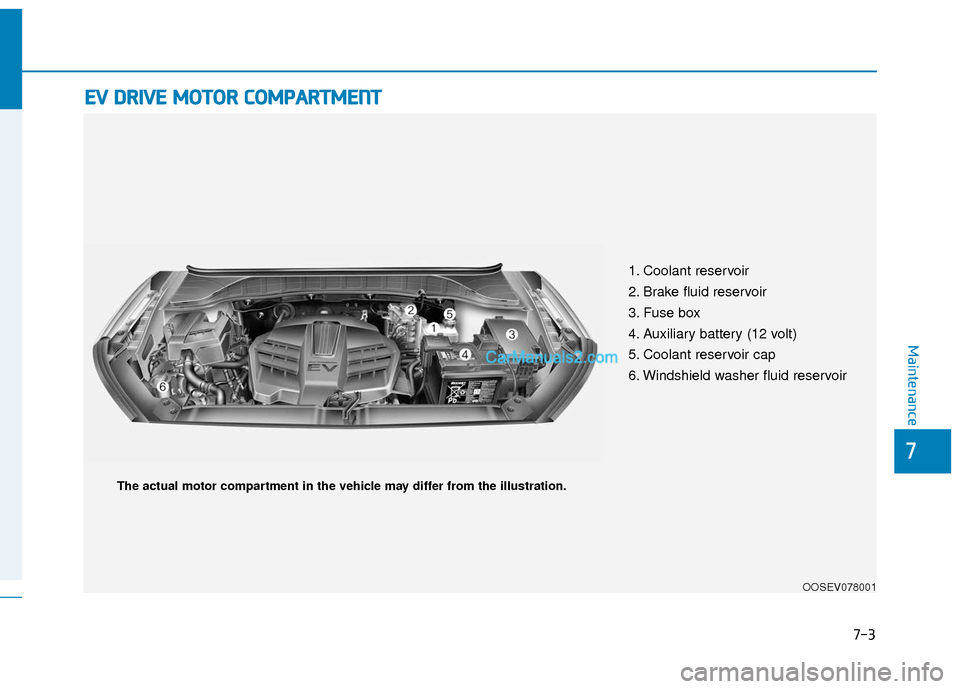
1. Coolant reservoir
2. Brake fluid reservoir
3. Fuse box
4. Auxiliary battery (12 volt)
5. Coolant reservoir cap
6. Windshield washer fluid reservoir
OOSEV078001
The actual motor compartment in the vehicle may differ from the illustration.
Page 388 of 540
7-8
Maintenance
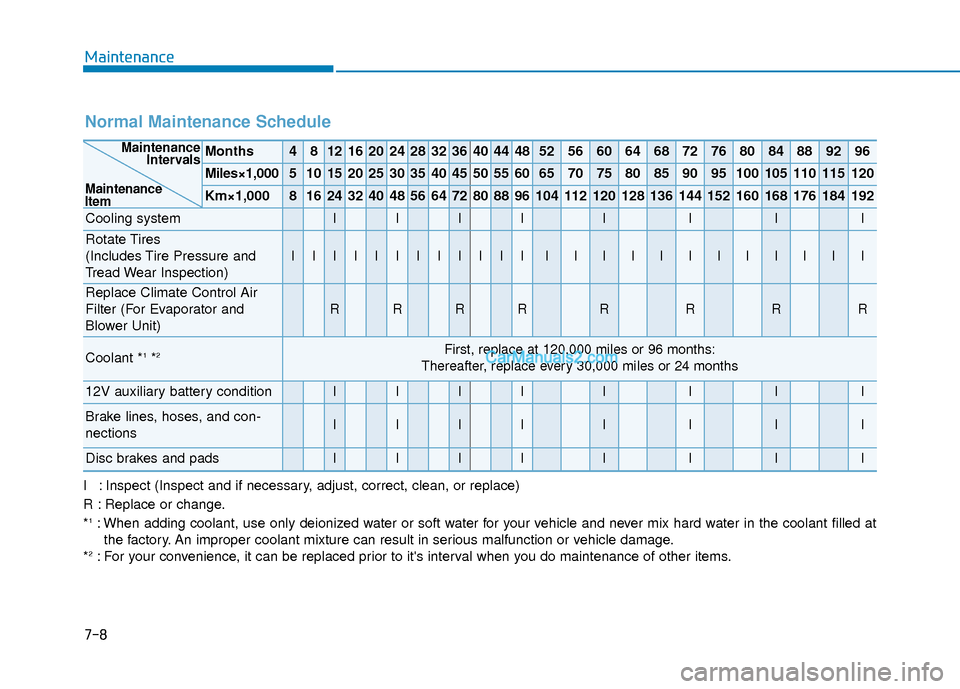
Normal Maintenance Schedule
Months4812162024283236404448525660646872768084889296
Miles×1,0005101520253035404550556065707580859095100105110115120
Km×1,00081624324048566472808896104112120128136144152160168176184192
Cooling systemIIIIIIII
Rotate Tires
(Includes Tire Pressure and
Tread Wear Inspection)
IIIIIIIIIIIIIIIIIIIIIIII
Replace Climate Control Air
Filter (For Evaporator and
Blower Unit)
RRRRRRRR
Coolant *1*2First, replace at 120,000 miles or 96 months:
Thereafter, replace every 30,000 miles or 24 months
12V auxiliary battery conditionIIIIIIII
Brake lines, hoses, and con-
nectionsIIIIIIII
Disc brakes and padsIIIIIIII
Maintenance Intervals
Maintenance
Item
I : Inspect (Inspect and if necessary, adjust, correct, clean, or replace)
R : Replace or change.
*
1: When adding coolant, use only deionized water or soft water for your vehicle and never mix hard water in the coolant filled at the factory. An improper coolant mixture can result in serious malfunction or vehicle damage.
*
2: For your convenience, it can be replaced prior to it's interval when you do maintenance of other items.
Page 465 of 540
How to Disconnect Portable Charger .........................H41
Charging Connector Manual Release ..........................H42
Precautions When Using the Portable Charger ........H42
EV Charging Troubleshooting
- Steps to Consider ...............................................H43
How to Start the Vehicle ......................................H44
How to Stop the Vehicle.......................................H44
Virtual Engine Sound System ..............................H45
Distance to Empty .................................................H45
When destination is not set ...........................................H46
Navigation - When a Destination is Set .....................H46
Tips for Improving Range When Using the
Climate Control System ........................................H46
Tips for Improving Range While Driving ............H47
Power/Charge Gauge............................................H47
State of Charge (SOC) Gauge for
High Voltage Battery ...........................................H47
Warning and Indicator Lights .............................H48
Ready Indicator ................................................................H48
Service Warning Light .....................................................H48
Power Down Warning Light ...........................................H49
Charging Indicator Light..................................................H49
High Voltage Battery Level Warning Light .................H49
Regenerative Brake Warning Light ..............................H49
LCD Display Messages ..........................................H50
Shift to P to charge .........................................................H50
Remaining Time .................................................................H50
Unplug vehicle to start ....................................................H50
Charging Door Open ........................................................H51Charging Stopped. Check the AC/DC charger ...........H51
Charging Stopped. Check the cable connection .......H52
Check regenerative brakes/
Stop vehicle and check regenerative brakes ............H52 Low Battery........................................................................\
H52
Charge immediately. Power limited ..............................H53
Low outside temperature may limit power output.
Charge EV battery/Low EV battery temperature.
Power limited .....................................................................H53\
EV Battery Overheated! Stop vehicle..........................H54
Power limited .....................................................................H54\
Stop vehicle and check power supply .........................H55
Check Virtual Engine Sound System............................H55
Check electric vehicle system .......................................H55
Energy Flow ..........................................................H56
Vehicle Stop........................................................................\
H56
EV Propulsion ....................................................................H56
Regeneration ......................................................................H5\
6
Aux. Battery Saver+ .............................................H57
Mode ........................................................................\
............H57
System Setting...................................................................H58
LCD Message .....................................................................H58\
Utility Mode ............................................................H59
System Setting and Activation ......................................H59
System Deactivation .........................................................H59
If an Accident Occurs ...........................................H60
Additional Precautions..........................................H62
Service Interlock Connector ................................H62
Service Plug ...........................................................H62
Page 466 of 540
H3
Electric Vehicles (EVs)
Battery electric vehicles (BEVs or
EVs) are driven using a battery and
an electric motor. While general vehi-
cles use an internal combustion
engine and gasoline as fuel, electric
vehicles use electrical energy that is
charged inside the high voltage bat-
tery. As a result, electric vehicles are
eco-friendly in that they do not
require fuel and do not emit exhaust
gases.
Characteristics of Electric
Vehicles (EVs)
1. EVs are using the electrical ener-gy that is charged inside the high
voltage battery. In terms of air pol-
lution and greenhouse gas emis-
sions, EVs are cleaner than con-
ventional vehicles.
2. A 150 kW electric drive motor mated to a reduction gearbox
comprises the vehicle drivetrain.
This electric-only powertrain sig-
nificantly reduces engine room
noise and vibration while driving.
3. When decelerating or driving downhill, regenerative braking is
utilized to charge the high voltage
battery. This helps to minimize
energy loss and increases vehicle
range.
4. When the state of charge (SOC) of the battery is low, the EV battery
can be recharged through several
different charging methods. Refer
to “Charging Information" later in
this section.
Information
What does regenerative braking do?
Regenerative braking uses the electric
motor when decelerating or braking
which converts vehicle motion (kinetic
energy) to electrical energy to charge
the high voltage battery.
Battery Information
The vehicle is composed of a highvoltage battery that drives the
motor and air-conditioner, and an
auxiliary battery (12 V) that drives
the lamps, wipers, and audio sys-
tem.
The auxiliary battery is automati- cally charged when the vehicle is in
the ready ( ) mode or the high
voltage battery is being charged.
i
E
EL
LE
E C
CT
T R
R I
IC
C
V
V E
EH
H I
IC
C L
LE
E
Page 479 of 540
H16
E
EL
LE
E C
CT
T R
R I
IC
C
V
V E
EH
H I
IC
C L
LE
E
C
C H
H A
AR
RG
G I
IN
N G
G
I
IN
N D
DI
IC
C A
A T
TO
O R
R
L
L A
A M
M P
P
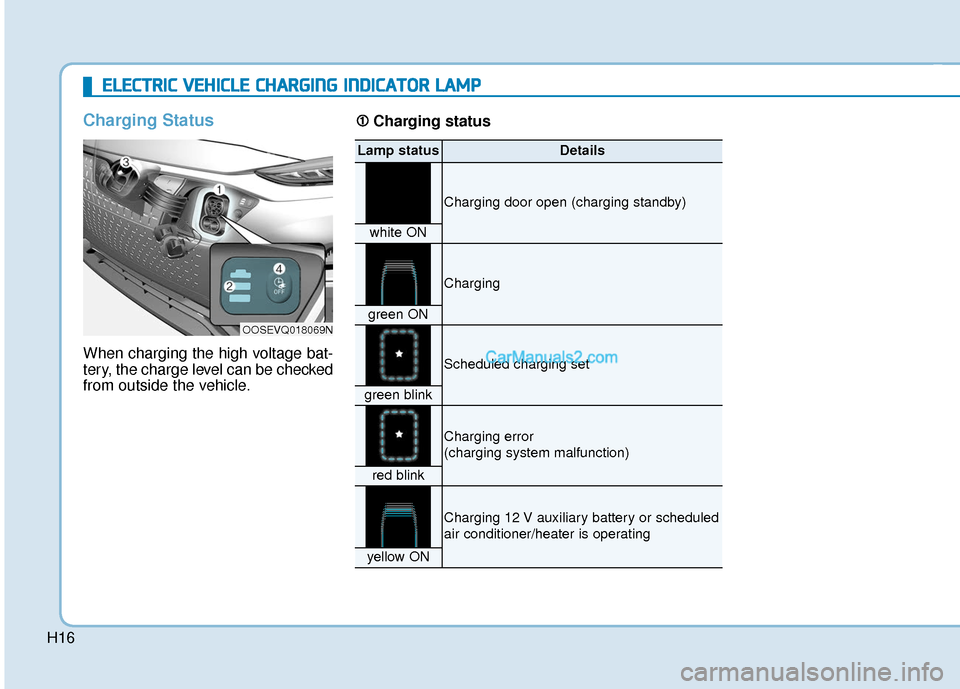
Charging Status
When charging the high voltage bat-
tery, the charge level can be checked
from outside the vehicle.
OOSEVQ018069N
Lamp statusDetails
Charging door open (charging standby)
white ON
Charging
green ON
Scheduled charging set
green blink
Charging error
(charging system malfunction)
red blink
Charging 12 V auxiliary battery or scheduled
air conditioner/heater is operating
yellow ON
➀ ➀
Charging status
Page 480 of 540
H17
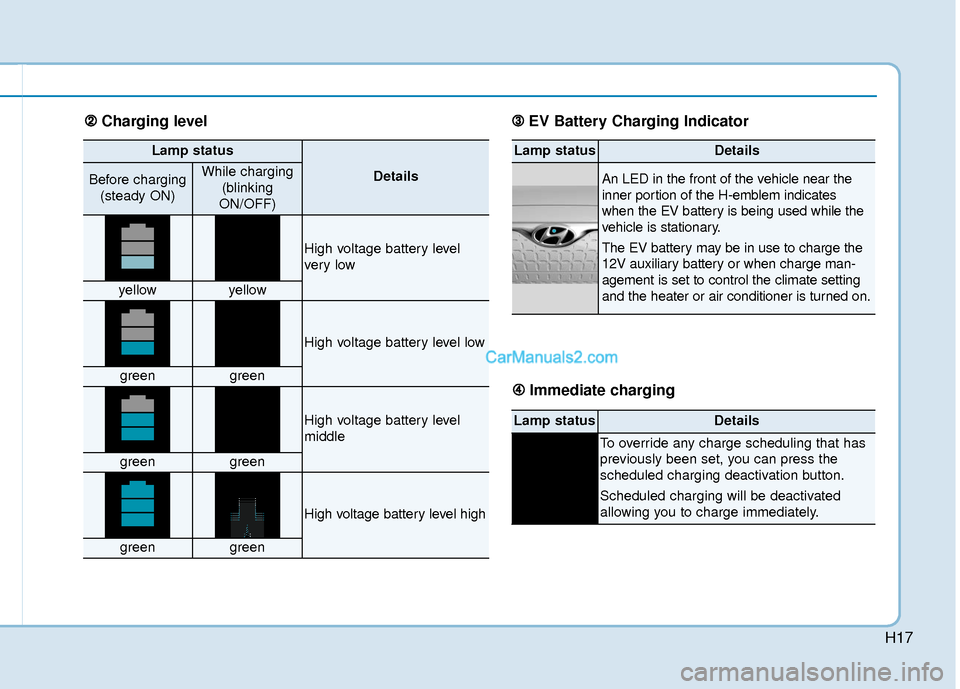
Lamp status
DetailsBefore charging(steady ON)While charging (blinking
ON/OFF)
High voltage battery level
ver y low
yellowyellow
High voltage battery level low
greengreen
High voltage battery level
middle
greengreen
High voltage battery level high
greengreen
Lamp statusDetails
An LED in the front of the vehicle near the
inner portion of the H-emblem indicates
when the EV battery is being used while the
vehicle is stationary.
The EV battery may be in use to charge the
12V auxiliary battery or when charge man-
agement is set to control the climate setting
and the heater or air conditioner is turned on.
Lamp statusDetails
To override any charge scheduling that has
previously been set, you can press the
scheduled charging deactivation button.
Scheduled charging will be deactivated
allowing you to charge immediately.
➁ ➁ Charging level ➂
➂
EV Battery Charging Indicator
➃
➃ Immediate charging
Page 520 of 540
H57
Aux. Battery Saver+
The Aux. Battery Saver+ is a function
that monitors the charging status of
the 12 V auxiliary battery.
If the auxiliary battery level is low, the
main high voltage battery charges
the auxiliary battery.
Information
The Aux. Battery Saver+ function will
be ON when the vehicle is delivered. If
the function is not needed, you may
turn it off in the Users Settings mode
on the cluster. For more information,
refer to the following page.
Mode
Cycle Mode :
When the POWER button is in the
OFF position with all doors, hood
and liftgate closed, the Aux. Battery
Saver+ activates according to the
auxiliary battery status.
Automatic Mode :
When the POWER button is in the
ON position with the charging con-
nector plugged in, the function acti-
vates according to the auxiliary bat-
tery status to prevent overdischarge
of the auxiliary battery.Information
• The Aux. Battery Saver+ activatesfor a maximum of 20 minutes. If the
Aux Battery Saver+ function acti-
vates for more than 10 times consec-
utively in automatic mode, the func-
tion will be disabled. (Note: There
may be a problem with the 12V aux-
iliary battery.)
If the vehicle is driven normally and
12V battery is able to charge nor-
mally, the Aux. Battery Saver+
function will be enabled again.
• The Aux. Battery Saver+ function cannot prevent battery discharge if
the auxiliary battery is damaged,
worn out, used as a power supply or
unauthorized electronic devices are
used.
• If the Aux. Battery Saver+ function was activated, a message will be dis-
played on the instrument cluster
and the high voltage battery level
may have decreased.
i
i
Page 521 of 540
H58
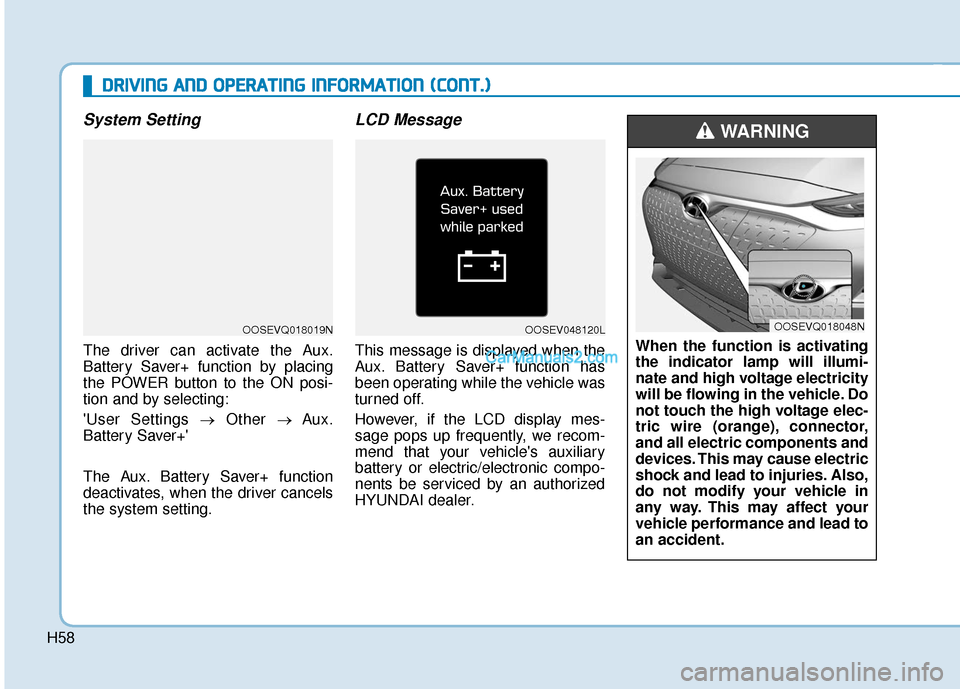
System Setting
The driver can activate the Aux.
Battery Saver+ function by placing
the POWER button to the ON posi-
tion and by selecting:
'User Settings →Other → Aux.
Battery Saver+'
The Aux. Battery Saver+ function
deactivates, when the driver cancels
the system setting.
LCD Message
This message is displayed when the
Aux. Battery Saver+ function has
been operating while the vehicle was
turned off.
However, if the LCD display mes-
sage pops up frequently, we recom-
mend that your vehicle's auxiliary
battery or electric/electronic compo-
nents be serviced by an authorized
HYUNDAI dealer.
D D R
RI
IV
V I
IN
N G
G
A
A N
N D
D
O
O P
PE
ER
R A
A T
TI
IN
N G
G
I
IN
N F
FO
O R
RM
M A
AT
TI
IO
O N
N
(
( C
C O
O N
NT
T.
.)
)
OOSEVQ018019NOOSEV048120L
When the function is activating
the indicator lamp will illumi-
nate and high voltage electricity
will be flowing in the vehicle. Do
not touch the high voltage elec-
tric wire (orange), connector,
and all electric components and
devices. This may cause electric
shock and lead to injuries. Also,
do not modify your vehicle in
any way. This may affect your
vehicle performance and lead to
an accident.
WARNING
OOSEVQ018048N