Audio Hyundai Kona EV 2019 User Guide
[x] Cancel search | Manufacturer: HYUNDAI, Model Year: 2019, Model line: Kona EV, Model: Hyundai Kona EV 2019Pages: 540, PDF Size: 21.84 MB
Page 232 of 540
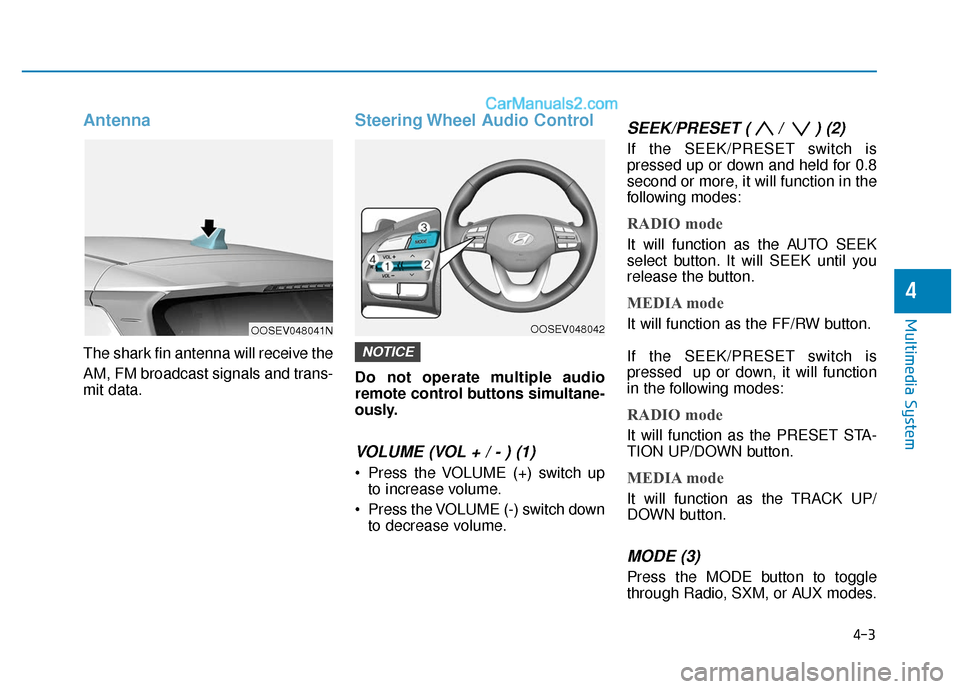
Antenna
The shark fin antenna will receive the
AM, FM broadcast signals and trans-
mit data.
Steering Wheel Audio Control
Do not operate multiple audio
remote control buttons simultane-
ously.
VOLUME (VOL + / - ) (1)
Press the VOLUME (+) switch upto increase volume.
Press the VOLUME (-) switch down to decrease volume.
SEEK/PRESET ( / ) (2)
If the SEEK/PRESET switch is
pressed up or down and held for 0.8
second or more, it will function in the
following modes:
RADIO mode
It will function as the AUTO SEEK
select button. It will SEEK until you
release the button.
MEDIA mode
It will function as the FF/RW button.
If the SEEK/PRESET switch is
pressed up or down, it will function
in the following modes:
RADIO mode
It will function as the PRESET STA-
TION UP/DOWN button.
MEDIA mode
It will function as the TRACK UP/
DOWN button.
MODE (3)
Press the MODE button to toggle
through Radio, SXM, or AUX modes.
NOTICE
4-3
Multimedia System
4
OOSEV048041NOOSEV048042
Page 233 of 540
4-4
Multimedia System
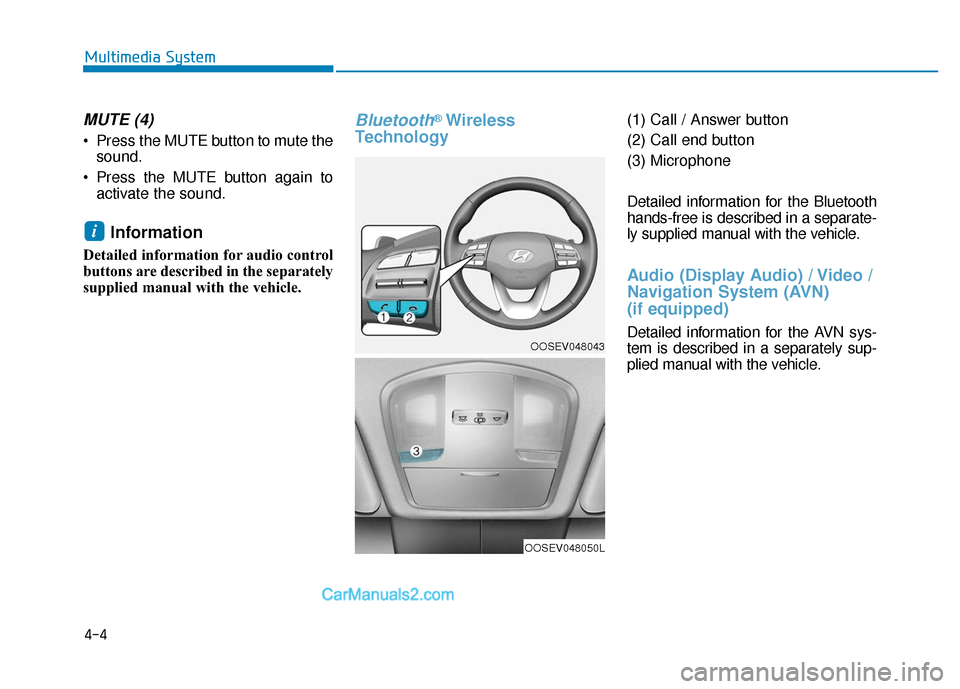
MUTE (4)
Press the MUTE button to mute thesound.
Press the MUTE button again to activate the sound.
Information
Detailed information for audio control
buttons are described in the separately
supplied manual with the vehicle.
Bluetooth®Wireless
Technology(1) Call / Answer button
(2) Call end button
(3) Microphone
Detailed information for the Bluetooth
hands-free is described in a separate-
ly supplied manual with the vehicle.
Audio (Display Audio) / Video /
Navigation System (AVN)
(if equipped)
Detailed information for the AVN sys-
tem is described in a separately sup-
plied manual with the vehicle.
i
OOSEV048043
OOSEV048050L
Page 281 of 540
5-48
Driving your vehicle
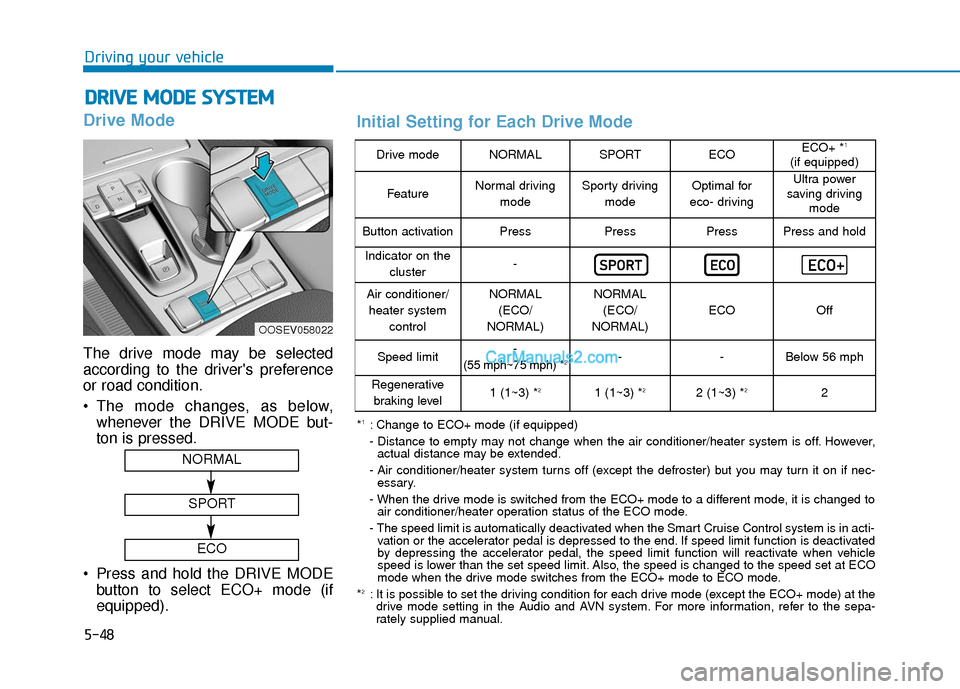
Drive Mode
The drive mode may be selected
according to the driver's preference
or road condition.
The mode changes, as below,whenever the DRIVE MODE but-
ton is pressed.
Press and hold the DRIVE MODE button to select ECO+ mode (if
equipped).
D DR
RI
IV
V E
E
M
M O
OD
DE
E
S
S Y
Y S
ST
T E
EM
M
OOSEV058022
NORMAL
SPORT
ECO
Drive modeNORMALSPORTECOECO+ *1
(if equipped)
FeatureNormal driving
modeSporty drivingmodeOptimal for
eco- drivingUltra power
saving driving mode
Button activationPressPressPressPress and hold
Indicator on the
cluster-
Air conditioner/heater system controlNORMAL(ECO/
NORMAL)NORMAL (ECO/
NORMAL)
ECOOff
Speed limit-
(55 mph~75 mph) *2--Below 56 mph
Regenerative braking level1 (1~3) *21 (1~3) *22 (1~3) *22
*1: Change to ECO+ mode (if equipped)
- Distance to empty may not change when the air conditioner/heater system is off. However, actual distance may be extended.
- Air conditioner/heater system turns off (except the defroster) but you may turn it on if nec- essary.
- When the drive mode is switched from the ECO+ mode to a different mode, it is changed to air conditioner/heater operation status of the ECO mode.
- The speed limit is automatically deactivated when the Smart Cruise Control system is in acti- vation or the accelerator pedal is depressed to the end. If speed limit function is deactivated
by depressing the accelerator pedal, the speed limit function will reactivate when vehicle
speed is lower than the set speed limit. Also, the speed is changed to the speed set at ECO
mode when the drive mode switches from the ECO+ mode to ECO mode.
*
2: It is possible to set the driving condition for each drive mode (except the ECO+ mode) at the drive mode setting in the Audio and AVN system. For more information, refer to the sepa-
rately supplied manual.
Initial Setting for Each Drive Mode
Page 287 of 540
5-54
Driving your vehicle
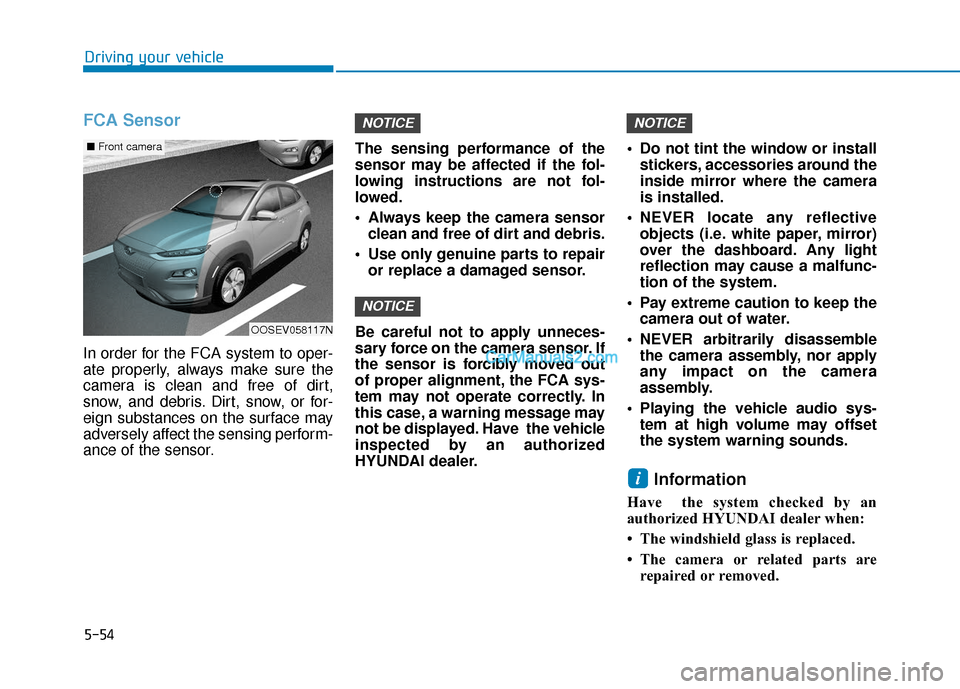
FCA Sensor
In order for the FCA system to oper-
ate properly, always make sure the
camera is clean and free of dirt,
snow, and debris. Dirt, snow, or for-
eign substances on the surface may
adversely affect the sensing perform-
ance of the sensor.The sensing performance of the
sensor may be affected if the fol-
lowing instructions are not fol-
lowed.
Always keep the camera sensor
clean and free of dirt and debris.
Use only genuine parts to repair or replace a damaged sensor.
Be careful not to apply unneces-
sary force on the camera sensor. If
the sensor is forcibly moved out
of proper alignment, the FCA sys-
tem may not operate correctly. In
this case, a warning message may
not be displayed. Have the vehicle
inspected by an authorized
HYUNDAI dealer. Do not tint the window or install
stickers, accessories around the
inside mirror where the camera
is installed.
NEVER locate any reflective objects (i.e. white paper, mirror)
over the dashboard. Any light
reflection may cause a malfunc-
tion of the system.
Pay extreme caution to keep the camera out of water.
NEVER arbitrarily disassemble the camera assembly, nor apply
any impact on the camera
assembly.
Playing the vehicle audio sys- tem at high volume may offset
the system warning sounds.
Information
Have the system checked by an
authorized HYUNDAI dealer when:
• The windshield glass is replaced.
• The camera or related parts arerepaired or removed.
i
NOTICE
NOTICE
NOTICE
OOSEV058117N
■ Front camera
Page 309 of 540
5-76
Driving your vehicle
LKA Operation
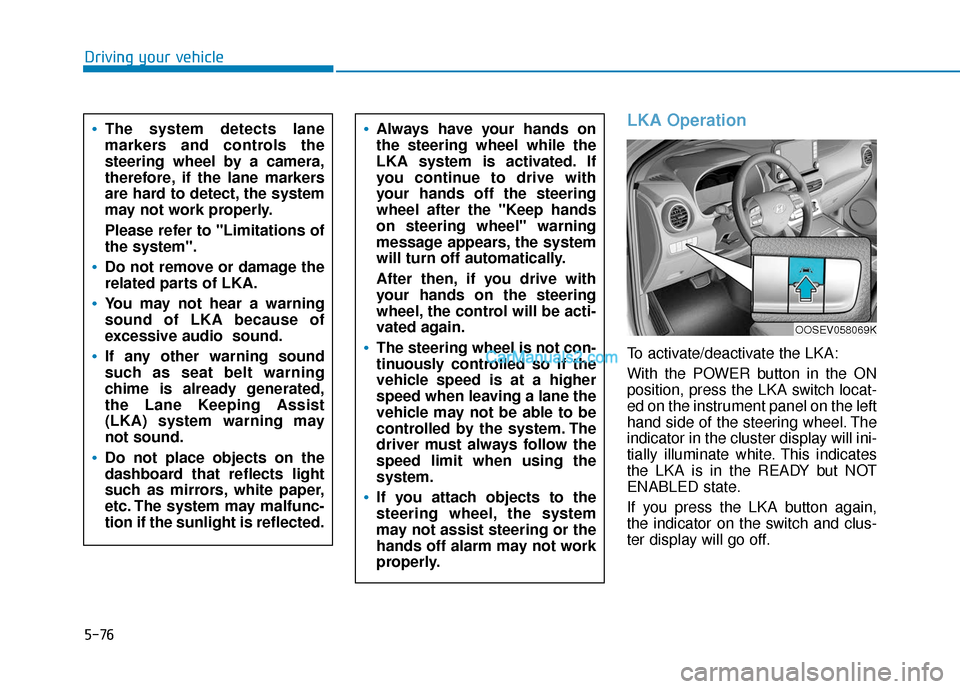
To activate/deactivate the LKA:
With the POWER button in the ON
position, press the LKA switch locat-
ed on the instrument panel on the left
hand side of the steering wheel. The
indicator in the cluster display will ini-
tially illuminate white. This indicates
the LKA is in the READY but NOT
ENABLED state.
If you press the LKA button again,
the indicator on the switch and clus-
ter display will go off.
Always have your hands on
the steering wheel while the
LKA system is activated. If
you continue to drive with
your hands off the steering
wheel after the "Keep hands
on steering wheel" warning
message appears, the system
will turn off automatically.
After then, if you drive with
your hands on the steering
wheel, the control will be acti-
vated again.
The steering wheel is not con-
tinuously controlled so if the
vehicle speed is at a higher
speed when leaving a lane the
vehicle may not be able to be
controlled by the system. The
driver must always follow the
speed limit when using the
system.
If you attach objects to the
steering wheel, the system
may not assist steering or the
hands off alarm may not work
properly.
The system detects lane
markers and controls the
steering wheel by a camera,
therefore, if the lane markers
are hard to detect, the system
may not work properly.
Please refer to "Limitations of
the system".
Do not remove or damage the
related parts of LKA.
You may not hear a warning
sound of LKA because of
excessive audio sound.
If any other warning sound
such as seat belt warning
chime is already generated,
the Lane Keeping Assist
(LKA) system warning may
not sound.
Do not place objects on the
dashboard that reflects light
such as mirrors, white paper,
etc. The system may malfunc-
tion if the sunlight is reflected.
OOSEV058069K
Page 320 of 540
5-87
Driving your vehicle
5
The vehicle drives through a
windy area.
The vehicle is controlled by
the following driving assist
systems:
- Lane Keeping Assist (LKA)system
- Forward Collision-avoidance Assist (FCA) system
- Smart Cruise Control (SCC) system
Playing the vehicle audio sys-
tem at high volume may offset
the Driver Attention Warning
(DAW) system warning sounds.
CAUTION
Page 333 of 540
5-100
Driving your vehicle
Even if the warning message
does not appear and warning
chime does not sound, always
pay attention to the driving
conditions to prevent danger-
ous situations from occur-
ring.
Playing the vehicle audio sys-
tem at high volume may offset
the system warning sounds.
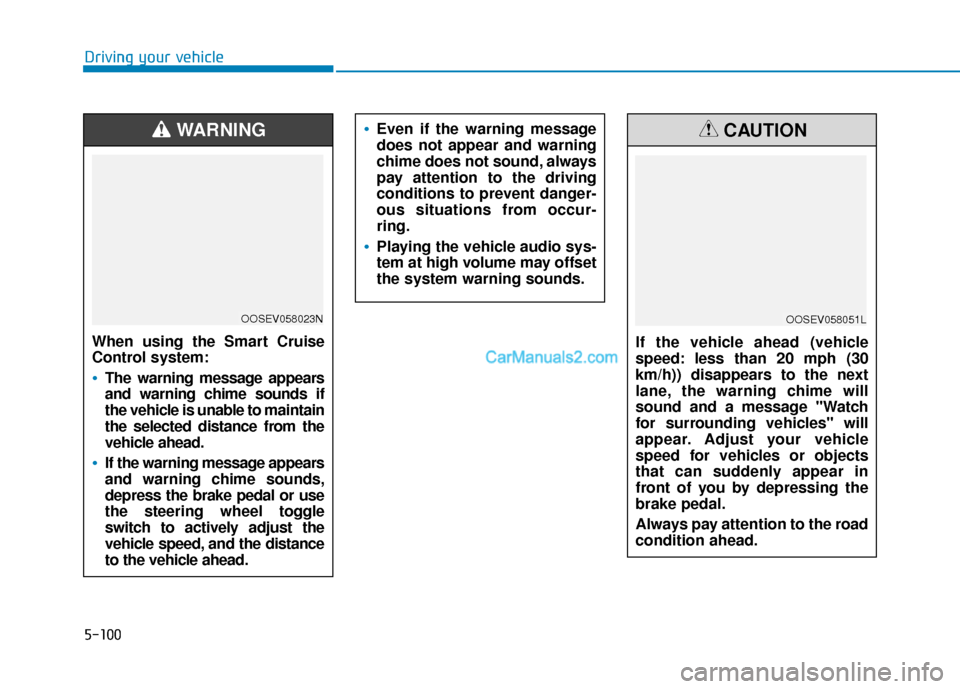
When using the Smart Cruise
Control system:
The warning message appears
and warning chime sounds if
the vehicle is unable to maintain
the selected distance from the
vehicle ahead.
If the warning message appears
and warning chime sounds,
depress the brake pedal or use
the steering wheel toggle
switch to actively adjust the
vehicle speed, and the distance
to the vehicle ahead.
WARNING
OOSEV058023N
If the vehicle ahead (vehicle
speed: less than 20 mph (30
km/h)) disappears to the next
lane, the warning chime will
sound and a message "Watch
for surrounding vehicles" will
appear. Adjust your vehicle
speed for vehicles or objects
that can suddenly appear in
front of you by depressing the
brake pedal.
Always pay attention to the road
condition ahead.
CAUTION
OOSEV058051L
Page 405 of 540
7-25
7
Maintenance
By jump starting
After a jump start from a good bat-
tery, drive the vehicle for 20-30 min-
utes before it is shutoff. The vehicle
may not restart if you shut it off
before the battery had a chance to
adequately recharge. See "Jump
Starting" in chapter 6 for more infor-
mation on jump starting procedures.
Information
An inappropriately disposedbattery can be harmful to
the environment and human
health. Dispose of the bat-
tery according to your local
law(s) or regulation.
Reset Features
Some items need to be reset after
the battery has been discharged or
the battery has been disconnected.
Power Windows
Trip Computer
Climate Control System
Clock
Audio System
Sunroof
i
Watch the battery during
charging, and stop or reduce
the charging rate if the battery
cells begin boiling violently.
The negative battery cable
must be removed first and
installed last when the battery
is disconnected. Disconnect
the battery charger in the fol-
lowing order:
(1) Turn off the battery charg-
er main switch.
(2) Unhook the negative
clamp from the negative
battery terminal.
(3) Unhook the positive clamp from the positive battery
terminal.
Always use a genuine
HYUNDAI approved battery
when you replace the battery.
Page 423 of 540
7-43
7
Maintenance
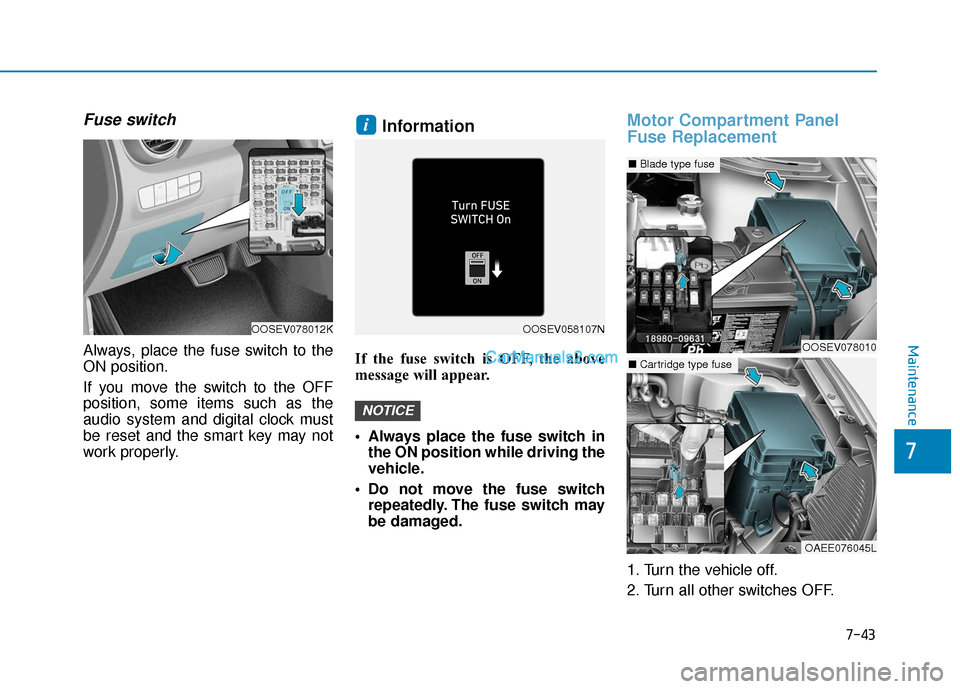
Fuse switch
Always, place the fuse switch to the
ON position.
If you move the switch to the OFF
position, some items such as the
audio system and digital clock must
be reset and the smart key may not
work properly.
Information
If the fuse switch is OFF, the above
message will appear.
Always place the fuse switch inthe ON position while driving the
vehicle.
Do not move the fuse switch repeatedly. The fuse switch may
be damaged.
Motor Compartment Panel
Fuse Replacement
1. Turn the vehicle off.
2. Turn all other switches OFF.
NOTICE
i
OOSEV078012KOOSEV058107N
OOSEV078010
■ Blade type fuse
OAEE076045L
■Cartridge type fuse
Page 426 of 540
7-46
Maintenance
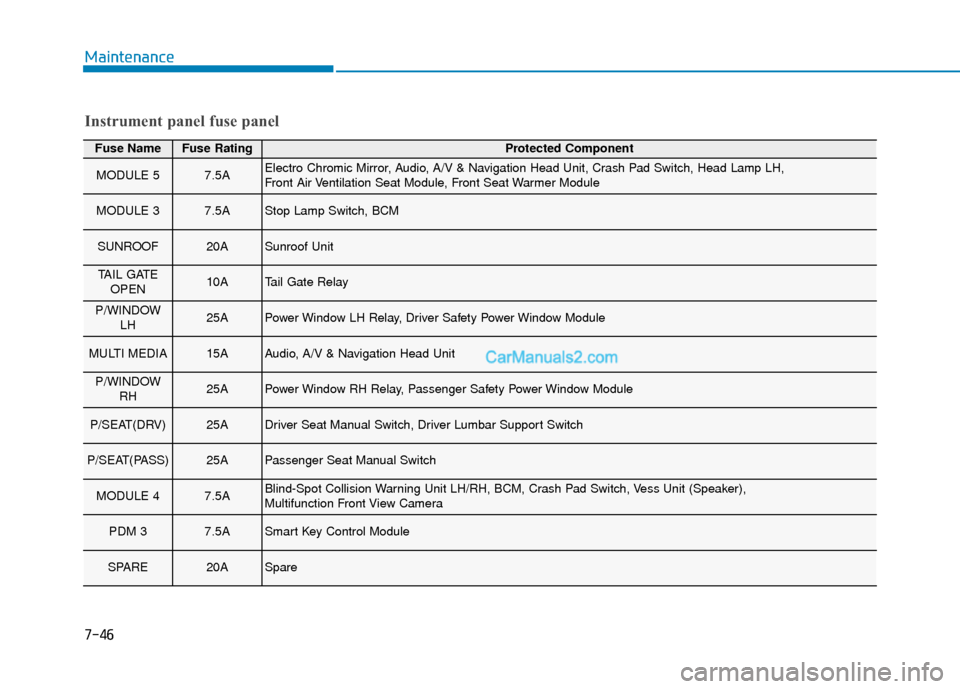
Fuse NameFuse RatingProtected Component
MODULE 57.5AElectro Chromic Mirror, Audio, A/V & Navigation Head Unit, Crash Pad Switch, Head Lamp LH,
Front Air Ventilation Seat Module, Front Seat Warmer Module
MODULE 37.5AStop Lamp Switch, BCM
SUNROOF20ASunroof Unit
TAIL GATEOPEN10ATail Gate Relay
P/WINDOW LH25APower Window LH Relay, Driver Safety Power Window Module
MULTI MEDIA15AAudio, A/V & Navigation Head Unit
P/WINDOWRH25APower Window RH Relay, Passenger Safety Power Window Module
P/SEAT(DRV)25ADriver Seat Manual Switch, Driver Lumbar Support Switch
P/SEAT(PASS)25APassenger Seat Manual Switch
MODULE 47.5ABlind-Spot Collision Warning Unit LH/RH, BCM, Crash Pad Switch, Vess Unit (Speaker),
Multifunction Front View Camera
PDM 37.5ASmart Key Control Module
SPARE20ASpare
Instrument panel fuse panel