temp sensor Hyundai Kona EV 2019 User Guide
[x] Cancel search | Manufacturer: HYUNDAI, Model Year: 2019, Model line: Kona EV, Model: Hyundai Kona EV 2019Pages: 540, PDF Size: 21.84 MB
Page 335 of 540
5-102
Driving your vehicle
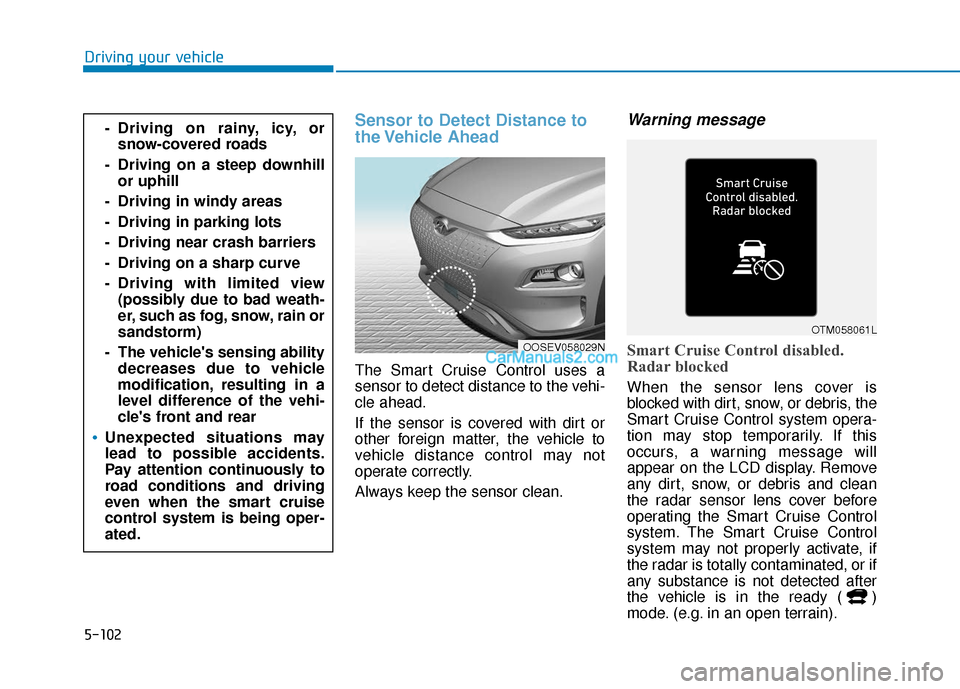
Sensor to Detect Distance to
the Vehicle Ahead
The Smart Cruise Control uses a
sensor to detect distance to the vehi-
cle ahead.
If the sensor is covered with dirt or
other foreign matter, the vehicle to
vehicle distance control may not
operate correctly.
Always keep the sensor clean.
Warning message
Smart Cruise Control disabled.
Radar blocked
When the sensor lens cover is
blocked with dirt, snow, or debris, the
Smart Cruise Control system opera-
tion may stop temporarily. If this
occurs, a warning message will
appear on the LCD display. Remove
any dirt, snow, or debris and clean
the radar sensor lens cover before
operating the Smart Cruise Control
system. The Smart Cruise Control
system may not properly activate, if
the radar is totally contaminated, or if
any substance is not detected after
the vehicle is in the ready ( )
mode. (e.g. in an open terrain).
- Driving on rainy, icy, orsnow-covered roads
- Driving on a steep downhill or uphill
- Driving in windy areas
- Driving in parking lots
- Driving near crash barriers
- Driving on a sharp curve
- Driving with limited view (possibly due to bad weath-
er, such as fog, snow, rain or
sandstorm)
- The vehicle's sensing ability decreases due to vehicle
modification, resulting in a
level difference of the vehi-
cle's front and rear
Unexpected situations may
lead to possible accidents.
Pay attention continuously to
road conditions and driving
even when the smart cruise
control system is being oper-
ated.
OOSEV058029N
OTM058061L
Page 336 of 540
5-103
Driving your vehicle
5
Information
For the SCC operation is temporarily
stopped if the radar is blocked, but
you wish to use conventional cruise
control mode (speed only control func-
tion), you must convert to the cruise
control mode (refer to "To convert to
Cruise Control mode" in the following
page).
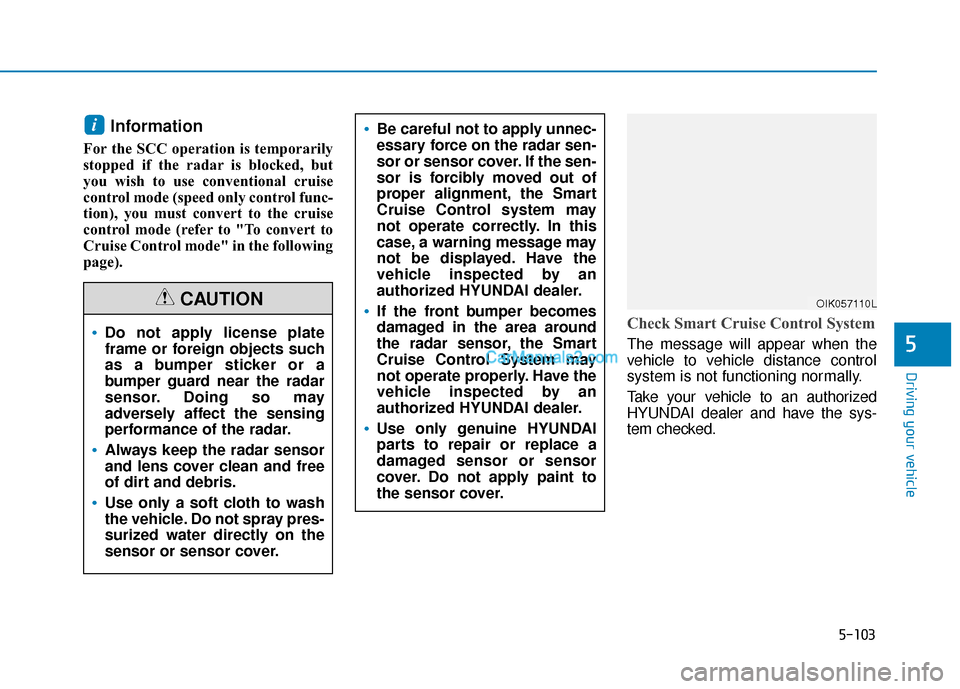
Check Smart Cruise Control System
The message will appear when the
vehicle to vehicle distance control
system is not functioning normally.
Take your vehicle to an authorized
HYUNDAI dealer and have the sys-
tem checked.
i
Do not apply license plate
frame or foreign objects such
as a bumper sticker or a
bumper guard near the radar
sensor. Doing so may
adversely affect the sensing
performance of the radar.
Always keep the radar sensor
and lens cover clean and free
of dirt and debris.
Use only a soft cloth to wash
the vehicle. Do not spray pres-
surized water directly on the
sensor or sensor cover.
CAUTIONOIK057110L
Be careful not to apply unnec-
essary force on the radar sen-
sor or sensor cover. If the sen-
sor is forcibly moved out of
proper alignment, the Smart
Cruise Control system may
not operate correctly. In this
case, a warning message may
not be displayed. Have the
vehicle inspected by an
authorized HYUNDAI dealer.
If the front bumper becomes
damaged in the area around
the radar sensor, the Smart
Cruise Control System may
not operate properly. Have the
vehicle inspected by an
authorized HYUNDAI dealer.
Use only genuine HYUNDAI
parts to repair or replace a
damaged sensor or sensor
cover. Do not apply paint to
the sensor cover.
Page 501 of 540
H38
E
EV
V
C
C H
H A
AR
RG
G I
IN
N G
G
U
U S
SI
IN
N G
G
T
T H
H E
E
P
P O
O R
RT
TA
A B
BL
LE
E
C
C H
H A
AR
RG
G E
ER
R
(
( C
C O
O N
NT
T.
.)
)
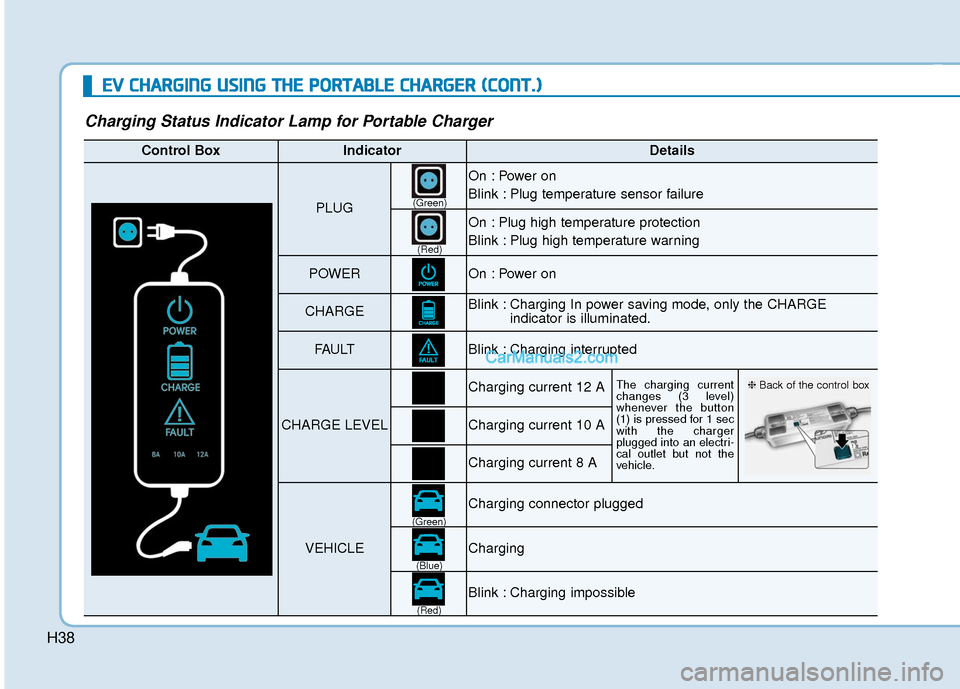
Charging Status Indicator Lamp for Portable Charger
Control BoxIndicatorDetails
PLUG
On : Power on
Blink : Plug temperature sensor failure
On : Plug high temperature protection
Blink : Plug high temperature warning
POWEROn : Power on
CHARGEBlink : Charging In power saving mode, only the CHARGE
indicator is illuminated.
FAU LTBlink : Charging interrupted
CHARGE LEVEL
Charging current 12 AThe charging current
changes (3 level)
whenever the button
(1) is pressed for 1 sec
with the charger
plugged into an electri-
cal outlet but not the
vehicle.
Charging current 10 A
Charging current 8 A
VEHICLE
Charging connector plugged
Charging
Blink : Charging impossible
(Green)
(Green) (Blue)
(Red)(Red)
❈
Back of the control box
Page 502 of 540
H39
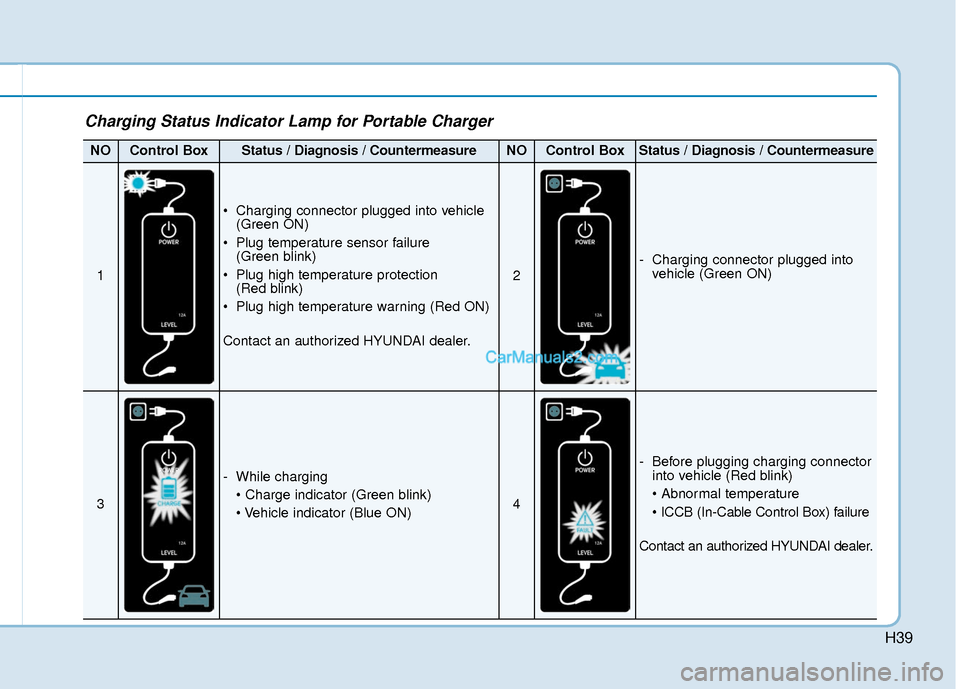
Charging Status Indicator Lamp for Portable Charger
NOControl BoxStatus / Diagnosis / CountermeasureNOControl BoxStatus / Diagnosis / Countermeasure
1
Charging connector plugged into vehicle(Green ON)
Plug temperature sensor failure (Green blink)
Plug high temperature protection (Red blink)
Plug high temperature warning (Red ON)
Contact an authorized HYUNDAI dealer.
2
- Charging connector plugged into vehicle (Green ON)
3
- While charging
4
- Before plugging charging connectorinto vehicle (Red blink)
Contact an authorized HYUNDAI dealer.
Page 503 of 540
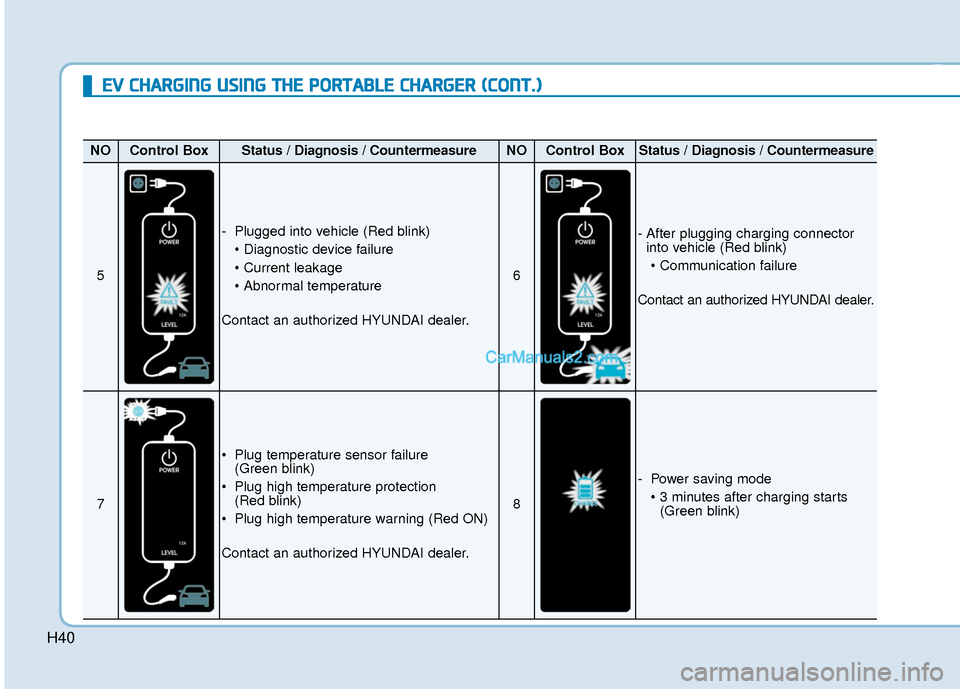
H40
E
EV
V
C
C H
H A
AR
RG
G I
IN
N G
G
U
U S
SI
IN
N G
G
T
T H
H E
E
P
P O
O R
RT
TA
A B
BL
LE
E
C
C H
H A
AR
RG
G E
ER
R
(
( C
C O
O N
NT
T.
.)
)
NOControl BoxStatus / Diagnosis / CountermeasureNOControl BoxStatus / Diagnosis / Countermeasure
5
- Plugged into vehicle (Red blink)
Contact an authorized HYUNDAI dealer.
6
- After plugging charging connector into vehicle (Red blink)
Contact an authorized HYUNDAI dealer.
7
Plug temperature sensor failure (Green blink)
Plug high temperature protection (Red blink)
Plug high temperature warning (Red ON)
Contact an authorized HYUNDAI dealer.
8
- Power saving mode (Green blink)
Page 528 of 540

I-2
Air bag warning labels ....................................................2-71
Air bags ........................................................................\
...2-47Additional safety precautions .....................................2-69
Air bag collision sensors ............................................2-64
Air bag inflation conditions .......................................2-65
Air bag non-inflation conditions ................................2-66
Air bag warning labels ...............................................2-69
Curtain air bags ..........................................................2-51
Driver's air bag ...........................................................2-49
How does the air bags system operate? .....................2-52
Occupant Classification System (OCS) .....................2-57
Passenger's front air bag.............................................2-49
Side air bags ...............................................................2-50
SRS Care ....................................................................2-68\
SRS components and functions..................................2-52
SRS warning light ......................................................2-53
What to expect after an air bag inflates .....................2-56
Why didn't my air bag go off in a collision ...............2-63
Air conditioning system specification ..............................8-5
Air ventilated seats .........................................................2-22
Airconditioning system .................................................3-117
Alarm system ..................................................................3-15
Antenna ........................................................................\
.....4-3
Anti-lock Brake System (ABS) ......................................5-40 Appearance care..............................................................7-65
Exterior care ...............................................................7-65
Interior care ................................................................7-70
Armrest ........................................................................\
...2-15
Audio / Video / Navigation system ..................................4-4
Auto defogging system .................................................3-131
Auto hold ........................................................................\
5-36
Auto light position ..........................................................3-97
Automatic climate control system ................................3-117 Air conditioning .......................................................3-125
Air intake control .....................................................3-123
Automatic heating and air conditioning ...................3-118
Climate control information screen selection button .3-125
Driver only ...............................................................3-124
Fan speed control .....................................................3-124
Fresh mode ...............................................................3-123
HEAT button.............................................................3-125
Manual heating and air conditioning........................3-119
Mode selection .........................................................3-120
OFF mode.................................................................3-126
Recirculation mode ..................................................3-123
System maintenance .................................................3-128
Temperature control .................................................3-122
Automatic ventilation ...................................................3-134
Auxiliary battery (12 volt) Battery recharging ......................................................7-23
Aux, USB and iPod ..........................................................4-2
Index
A